Overview

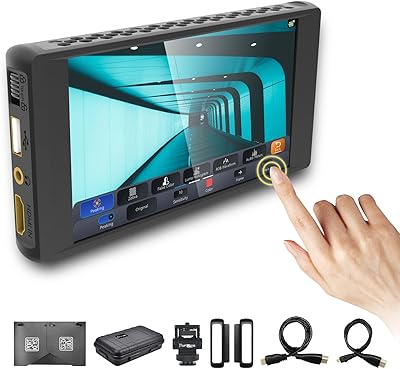
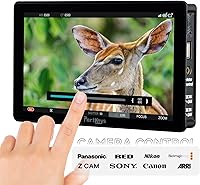
The Portkeys BM7 II DS 7″ Camera Monitor occupies a distinct space in the field monitor market: it is not just a screen, it is a camera control hub built into a 7-inch panel. Portkeys has built its reputation specifically around monitors that let operators adjust camera settings directly from the display, and the BM7 II DS is the clearest expression of that focus. Running the brand's own CINENORM OS, it brings wired and wireless control together with dual SDI inputs and HDMI connectivity — a setup that appeals to solo shooters and small crews who want to manage their camera without a dedicated assistant on set.
Features & Benefits

At 2200 nits, the BM7 II DS is genuinely usable in direct sunlight — that is a meaningful threshold separating monitors you can actually read outdoors from ones that require a shade. The 85% P3-DCI color coverage and 1000:1 contrast ratio make it credible for on-set LUT preview work, particularly when feeding a graded signal through the SDI loop-out. Wired camera control spans Sony, Canon, and Panasonic bodies, while wireless control reaches up to 50 meters under ideal, line-of-sight conditions — useful for gimbal work, but interference-heavy environments will test those limits. The split-screen mode and Freeze Frame overlay round out a genuinely deep feature set.

Best For

This camera control monitor makes the most sense for solo video operators — specifically those running Sony FX-series or Canon Cinema bodies who want to tweak autofocus, exposure, or ISO without reaching back to the camera. Documentary and event shooters will appreciate the brightness when working under unpredictable outdoor light. Small crews juggling multiple camera brands can use the wireless multi-monitor system to coordinate up to four units from a single source. DITs and on-set colorists will find the SDI loop-out with applied LUT particularly practical. Gimbal operators who need to adjust camera parameters remotely, without disturbing a balanced rig, are also a natural fit.

User Feedback

With 105 ratings averaging 4.1 out of 5, this Portkeys monitor earns genuine respect — but that score also signals real-world friction worth understanding. Outdoor brightness and broad camera compatibility draw consistent praise, and users report the touchscreen responding well during fast-paced shoots. The criticism centers mostly on the CINENORM OS itself: the menu structure takes time to internalize, and operators who pick it up mid-production without prior experience often find it disorienting at first. A few buyers have flagged concerns about cable durability and wireless consistency in RF-congested environments. At this price tier, most buyers are experienced enough to distinguish teething issues from genuine flaws — and the feedback suggests both exist here.

Pros

  • 2200 nits of brightness makes this camera control monitor genuinely readable in direct outdoor sunlight without a shade.
  • Wired and wireless camera control across Sony, Canon, and Panasonic bodies reduces the need for a dedicated camera assistant.
  • Dual 3G SDI inputs plus HDMI gives flexible signal routing for both run-and-gun and studio configurations.
  • SDI loop-out with an applied 3D LUT lets you feed a graded image to a director monitor while keeping a clean recording signal.
  • Collaborative multi-monitor control across up to four Portkeys units is a rare feature at this price tier.
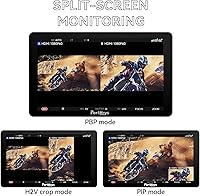
  • The split-screen mode with independent LUT loading per side is a practical shot-matching tool on set.
  • At 460 grams, the BM7 II DS is light enough for gimbal use without significantly disrupting rig balance.
  • The Freeze Frame overlay tool provides a genuinely useful continuity reference without requiring a separate device.
  • 85% P3-DCI color coverage makes on-set LUT preview work credible for colorists needing a portable reference panel.

Cons

  • The CINENORM OS menu structure has a steep learning curve that catches new users off guard mid-production.
  • Wireless control reliability drops noticeably in RF-congested environments like event venues and broadcast sets.
  • The glossy screen surface introduces reflections that can skew color perception and shadow detail in mixed lighting.
  • Proprietary control cable connectors show wear over extended use, raising long-term durability concerns for heavy users.
  • No 4K signal input is a real gap as cinema cameras increasingly output native 4K HDR feeds.
  • The collaborative multi-monitor control only works within the Portkeys ecosystem, limiting flexibility for mixed-brand monitor setups.
  • Initial configuration is time-consuming, and the included documentation does not always address firmware-specific setup steps clearly.
  • The 50-meter wireless range is a theoretical ceiling — practical indoor performance is often considerably shorter.
  • Buyers who skip the camera control features entirely will find it difficult to justify the cost over simpler display-only alternatives.

Ratings

The Portkeys BM7 II DS 7″ Camera Monitor earns a nuanced scorecard built from AI analysis of verified buyer reviews worldwide — filtering out incentivized feedback and spam to surface what working videographers actually experience. Across categories ranging from outdoor visibility to software usability, the scores reflect a monitor that genuinely excels in its core mission while carrying a few rough edges worth knowing before you buy.
Outdoor Brightness & Visibility
91%
At 2200 nits, this camera control monitor holds up in direct afternoon sunlight in a way that cheaper 1000-nit panels simply do not. Shooters covering outdoor events and run-and-gun documentary work consistently report being able to read focus and exposure without cupping a hand over the screen.
A small number of users in extreme high-altitude or desert shooting environments note that even at maximum brightness, glare on the glossy screen surface can wash out fine shadow detail. A matte screen option would address this for a meaningful subset of buyers.
Camera Control Integration
88%
The ability to adjust ISO, aperture, shutter, and autofocus parameters directly from the touchscreen is the defining reason most buyers choose the BM7 II DS over a comparable display-only monitor. Solo operators shooting Sony FX-series or Canon Cinema bodies find it genuinely reduces their need for a camera assistant on smaller productions.
Compatibility breadth is impressive on paper, but a handful of reviewers report that certain less-common camera models require firmware updates before control functions activate reliably. Buyers should verify their specific body is fully supported before assuming plug-and-play behavior.
Wireless Control Reliability
72%
28%
Under clean, line-of-sight conditions — think open studio floors or outdoor fields — the wireless camera control performs consistently and with low latency. The collaborative multi-monitor feature, allowing up to four units to be controlled from one, is particularly useful for multi-camera event setups.
In RF-congested environments like conference venues, wedding halls, or crowded broadcast sets, several verified buyers report dropped connections and sluggish response. The 50-meter range figure is best treated as a theoretical ceiling rather than a practical daily expectation.
Color Accuracy & LUT Support
84%
The 85% P3-DCI coverage and 1000:1 contrast ratio make on-set LUT preview work credible for DITs and colorists who need a reference point, not a calibrated master. The SDI loop-out with an applied 3D LUT baked in is a feature that saves meaningful time in multi-monitor or switcher setups.
Critical colorists and those accustomed to dedicated reference monitors will note this is not a replacement for a calibrated display. The panel's glossy surface also introduces reflections that can subtly skew color perception in mixed-light environments.
Software & Menu Usability (CINENORM OS)
63%
37%
Once learned, the CINENORM OS interface gives experienced users fast access to a deep feature set — waveforms, false color, LUT management, and camera control all accessible without diving through endless sub-menus. Operators who invest time in setup sessions before a shoot generally report a smooth workflow on the day.
The learning curve is the most consistently cited frustration across reviews. New users picking up the BM7 II DS for the first time mid-production often find the menu logic unintuitive, and the documentation does not fully bridge the gap. This is a real consideration for rental use or crews with rotating operators.
Build Quality & Durability
69%
31%
The chassis feels solid enough for regular on-set handling, and at 460 grams it balances portability with a sense of structural substance. Most buyers report no issues across months of continuous production use in studio and controlled location environments.
A recurring concern among verified buyers involves the durability of the proprietary control cables over time, with some reporting connector wear after extended use. The overall chassis, while acceptable, does not feel as ruggedized as some competing monitors at a similar price point.
Touchscreen Responsiveness
81%
19%
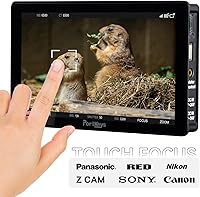
The dynamic touchscreen draws clear praise for its responsiveness during fast-paced shoots, with touch focus control in particular cited as accurate and quick to register. Operators switching from button-based monitors tend to adapt quickly and appreciate the tactile feedback reduction on set.
A minority of users note that the touch layer can become less responsive when the screen is slightly wet or when gloves are worn in cold environments. These are edge cases, but they matter for outdoor shooters in variable weather conditions.
Split-Screen Monitoring
77%
23%
The split-screen mode with independent LUT loading per panel half is a genuinely useful tool for shot-matching and A/B comparisons on set. The ability to flip and mirror each side independently adds flexibility that competitors at this tier rarely offer.
Some users find the split-screen setup process fiddly, particularly when switching between different source configurations mid-shoot. It works well once configured, but it is not a feature you want to be learning for the first time under time pressure.
Freeze Frame & Continuity Tools
74%
26%
The Freeze Frame function with semi-transparent overlay is a practical continuity tool that script supervisors and solo shooters alike find genuinely useful for matching eyelines, props, and lighting between takes without relying on memory or printed stills.
The overlay is limited to 16:9 JPEG files, which adds a small but real preparation step. Users who want to pull a frame quickly on the fly without pre-prepared reference images find the workflow slightly less immediate than they would like.
Signal Connectivity & Routing
86%
Dual 3G SDI inputs alongside HDMI gives the BM7 II DS genuine flexibility as a signal router on multi-source setups. The SDI loop-out with LUT applied is especially useful for feeding a director or client monitor with a graded image while keeping a clean signal for recording.
There is no 4K signal input, which is a notable gap as more cinema cameras output 4K HDR signals natively. For shooters who rely on full-resolution 4K monitoring, this is a meaningful constraint to weigh against the camera control benefits.
Portability & Weight Balance
79%
21%
At 460 grams, the BM7 II DS is manageable on a camera rig or articulating arm without tipping the balance toward front-heavy. Gimbal operators in particular report that it does not substantially disrupt their center-of-gravity setup when mounted above the camera.
For shooters coming from smaller 5-inch monitors, the jump to 7 inches does require a rethink of their rig configuration. It is not a monitor you can casually clip to a hot shoe bracket and forget about — it needs proper mounting hardware to perform comfortably.
Value for Money
71%
29%
For buyers who will genuinely use both the monitoring and camera control functions, the BM7 II DS consolidates two pieces of kit into one, which justifies the premium for solo operators and budget-conscious small productions. The feature depth at this tier is hard to match with a display-only monitor.
For buyers who primarily need a bright reference monitor and have no interest in camera control, the price feels harder to defend against simpler alternatives. You are paying for the control ecosystem, and if that does not fit your workflow, the value equation shifts noticeably.
Setup & Initial Configuration
61%
39%
Once a user has configured their preferred camera profile and LUT presets, recalling them on subsequent shoots is straightforward. Experienced Portkeys users transitioning from earlier models report a relatively short reorientation period before feeling at home.
Out-of-the-box setup is more involved than most competing monitors. New buyers frequently report spending a non-trivial amount of time on initial configuration before the camera control features activate correctly, and the included documentation does not always cover firmware-specific nuances.
Multi-Monitor Collaborative Control
76%
24%
The ability to designate one BM7 II DS as a primary controller for up to three additional Portkeys monitors is a standout capability for multi-camera productions. Directors and focus pullers working across Sony and Canon cameras simultaneously cite this as a feature that would otherwise require dedicated hardware costing considerably more.
This feature only works across Portkeys monitors with the appropriate wireless control function, meaning it requires investment in multiple units from the same ecosystem. Mixed-monitor setups with other brands cannot participate, which limits its appeal for crews with existing monitor investments.

Suitable for:

The Portkeys BM7 II DS 7″ Camera Monitor is built for working videographers who want to consolidate their monitor and camera control into a single, capable unit — and who are willing to invest time learning the system to get there. Solo operators running Sony FX-series or Canon Cinema bodies will feel the most immediate benefit, since the ability to adjust exposure, autofocus, and ISO directly from the touchscreen removes the need for a dedicated camera assistant on smaller shoots. Documentary and event videographers who work in unpredictable outdoor light will appreciate a 2200-nit panel that holds up without a shade in most daylight conditions. Small crews juggling multiple camera brands can use the wireless multi-monitor control system to coordinate up to four units from a single source, which is a meaningful operational advantage on multi-camera setups. Gimbal operators and drone pilots who need to tweak camera parameters without disturbing a balanced rig will also find the wireless control range practical, provided they are working in relatively open, interference-free environments. DITs and on-set colorists who need a portable panel capable of previewing and outputting 3D LUT-graded signals over SDI will find a credible tool here at a competitive price point for this feature combination.
Not suitable for:

The Portkeys BM7 II DS 7″ Camera Monitor is a harder sell for anyone who primarily needs a clean, bright reference display and has no real intention of using camera control functions — at this price, simpler alternatives offer comparable image quality without the added software complexity. Buyers who need to hand the monitor to rotating crew members or rental clients should think carefully, as the CINENORM OS has a documented learning curve that can slow down less experienced operators mid-production. The glossy screen surface and absence of a 4K signal input are both meaningful limitations for shooters working with modern cinema cameras outputting native 4K HDR feeds. Those who shoot regularly in RF-congested environments — crowded venues, broadcast events, urban interiors — may find the wireless control less dependable than the spec sheet suggests, with connection consistency being a recurring real-world complaint. Buyers expecting the rugged, weatherproofed chassis of a broadcast-grade monitor will likely find the build quality adequate but unremarkable. If your existing rig is already built around display-only monitors from other brands, integrating the BM7 II DS as a multi-monitor control hub requires committing to the Portkeys ecosystem, since the collaborative control feature only works with other compatible Portkeys units.

Specifications

  • Screen Size: The panel measures 7 inches diagonally, offering a practical balance between on-set visibility and rig portability.
  • Brightness: Peak brightness reaches 2200 nits, providing sufficient luminance for use in direct outdoor sunlight without a monitor hood in most conditions.
  • Resolution: The display outputs at 1920×1080 full HD, delivering sharp image detail for focus checking and exposure monitoring on set.
  • Color Standard: The panel covers 85% of the P3-DCI color space, making it a credible tool for on-set LUT preview and rough color reference work.
  • Contrast Ratio: A 1000:1 contrast ratio allows the monitor to render meaningful separation between shadow and highlight detail under controlled lighting conditions.
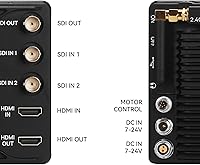
  • Signal Input: Two 3G SDI inputs and one HDMI input allow the monitor to accept signals from a wide range of cameras and external video sources simultaneously.
  • Signal Output: One 3G SDI output and one HDMI output are provided, with the SDI output capable of passing a signal with an applied 3D LUT baked in.
  • Camera Control: Both wired and wireless camera control are supported, enabling direct adjustment of camera parameters including ISO, aperture, shutter, and autofocus from the touchscreen.
  • Wireless Range: Wireless camera control operates at a rated range of up to 50 meters under clear, line-of-sight conditions.
  • Multi-Monitor Control: One BM7 II DS unit can simultaneously control up to three additional compatible Portkeys monitors, enabling coordinated multi-camera parameter management from a single display.
  • Operating System: The monitor runs Portkeys' proprietary CINENORM OS, which manages camera control, LUT loading, monitoring tools, and display configuration through a unified touchscreen interface.
  • Touchscreen: A dynamic capacitive touchscreen supports direct touch focus control and full menu navigation without requiring physical buttons for most operations.
  • Dimensions: The unit measures 179×107×31mm, keeping the footprint compact enough for standard 15mm rod or articulating arm mounting on most professional camera rigs.
  • Weight: At 460 grams, the monitor is light enough for balanced gimbal use while still providing a solid, substantial feel in the hand.
  • Input Voltage: The monitor accepts an input voltage range of 7 to 24V, making it compatible with standard V-mount and Gold Mount battery systems as well as on-camera battery plates.
  • Power Draw: Maximum power consumption is rated at 15W, which is moderate for a 7-inch monitor at this brightness level and should not strain most standard battery setups.
  • Aspect Ratio: The native aspect ratio is 16:9, matching the standard output format of most cinema and mirrorless cameras used in professional video production.
  • 3D LUT Support: The monitor supports loading and applying custom 3D LUT files, including outputting a LUT-applied signal through the SDI loop-out for director or client monitoring.
  • Freeze Frame: A built-in Freeze Frame function captures any live frame and overlays it semi-transparently against the current video feed for continuity comparison, requiring a 16:9 1080p JPEG source file.

Related Reviews
Portkeys HD7T 7″ Field Monitor
77%
91%
Outdoor Brightness
88%
Value for Money
89%
Monitoring Tool Set
67%
Touchscreen Responsiveness
72%
Panel Resolution & Clarity
More
Portkeys PT5 II 5″ Field Monitor
79%
88%
Image Clarity
84%
Build Quality & Portability
57%
Outdoor Visibility
91%
Monitoring Tools & Scopes
86%
3D LUT Support
More
ZEROXCLUB B3C 3-Camera Wireless Backup Camera System
76%
84%
Video Signal Reliability
83%
Image Quality
76%
Night Vision Performance
71%
Installation Experience
88%
Weather & Build Durability
More
LILLIPUT A7S 7″ Camera Field Monitor
84%
88%
Display Quality
91%
Portability & Weight
86%
Brightness in Outdoor Conditions
80%
Customizability of Buttons
83%
Durability & Build Quality
More
NEEWER F700 7″ Field Monitor
78%
91%
Outdoor Visibility
86%
Touch Screen Responsiveness
54%
Fan Noise
88%
3D LUT Support
89%
Battery & Power Versatility
More
Camecho Vehicle Backup Camera 7″ Monitor
85%
88%
Ease of Installation
85%
Image Quality
83%
Build Quality
90%
Night Vision Performance
87%
Display Clarity
More
Hikity 7″ Backup Camera with Monitor Kit
86%
89%
Image Clarity
73%
Night Vision Performance
94%
Installation Ease
90%
Build Quality
91%
Weather Resistance
More
Portkeys PT6 5.2″ Field Monitor
78%
91%
Value for Money
67%
Screen Brightness & Outdoor Visibility
63%
Build Quality & Durability
84%
Touchscreen Responsiveness
89%
Monitoring Tools (Waveform, False Color, LUT)
More
NEEWER F100 7-inch Field Monitor
78%
83%
Image Quality
66%
Outdoor Visibility
71%
Build Quality
68%
Ball Head & Mounting
78%
Battery Life
More
Feelworld FW759 7″ Field Monitor
72%
83%
Image Clarity
58%
Brightness & Outdoor Usability
81%
Focus Peaking Performance
89%
Portability & Form Factor
54%
Build Quality & Durability
More

FAQ

Yes, the BM7 II DS supports wireless camera control for Sony FX-series bodies without a tethering cable. That said, wireless performance depends heavily on your environment — in open spaces it works reliably, but in crowded venues with a lot of radio frequency interference, you may experience occasional lag or dropped inputs. Having the wired control cable as a backup is always a smart call for critical shoots.

For the majority of outdoor shooting situations — overcast days, open shade, or even moderately bright sunlight — 2200 nits is genuinely workable without a hood. In direct midday sun at peak summer brightness, especially at high altitude or in desert environments, a hood still helps. But compared to the 1000-nit monitors that dominated this price range previously, the difference in outdoor usability is real and meaningful.

Expect a learning curve — this is one of the most commonly mentioned friction points among new users. The menu logic is not immediately obvious, and the documentation that ships with the unit does not always walk you through every firmware-specific step. Most users report feeling comfortable after a few dedicated setup sessions at home before taking it on a real shoot. Watching Portkeys tutorial videos on YouTube before your first use is genuinely worth the time.

The BM7 II DS can display signals from different sources through its SDI and HDMI inputs, but the camera control function works with one connected camera body at a time. The multi-monitor wireless control feature lets you coordinate up to four Portkeys monitors simultaneously, which is useful for multi-camera setups — but each monitor is still controlling its own connected camera body independently.

The monitor accepts 7 to 24V DC input, which covers most standard professional battery systems including V-mount and Gold Mount plates via a D-tap or compatible adapter. It draws a maximum of 15W, so even moderately sized V-mount batteries will run it for several hours. Check that your battery plate outputs within the voltage range before connecting.

Yes, and it is actually a popular choice for gimbal operators specifically because of the wireless camera control capability — you can adjust ISO, aperture, or autofocus settings without physically reaching back to the camera and disrupting your balance. At 460 grams it adds noticeable but manageable weight to the rig. A proper cage mount or articulating arm keeps the setup stable.

Yes, the monitor supports custom 3D LUT loading, and you can apply a LUT to the display independently of the output signal — or use the SDI loop-out to send a LUT-baked signal to a second monitor or switcher. The split-screen mode lets you load LUTs per screen half independently, which is useful for quick A/B comparisons on set.

This is a fair concern based on buyer feedback — the proprietary control cables have received some criticism for connector wear over extended use. For occasional or studio use they hold up well, but shooters who are constantly plugging and unplugging on location should handle the connectors carefully and consider keeping a spare cable on hand. It is not a widespread failure, but it is consistent enough in reviews to be worth noting.

No — the BM7 II DS accepts 3G SDI and HDMI signals up to 1080p. If your camera outputs a native 4K signal, the monitor will typically downscale it to display at 1080p, which is workable for monitoring purposes but not ideal if you need to evaluate fine 4K detail like pixel-level sharpness or fine grain. For pure 4K reference work, this is a meaningful limitation to factor into your decision.

Not reliably. The 50-meter wireless range specification assumes a clean line-of-sight environment. Through walls, or in venues packed with other wireless devices and RF interference — like weddings, conferences, or broadcast events — several users report noticeably reduced range and occasional connection instability. For those environments, wired control is the more dependable option.

Where to Buy