Overview

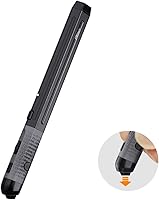
The Plima Pocket Ergonomic Pen Mouse takes a genuinely different approach to cursor control — instead of resting your palm over a traditional body, you hold it like a pen. That shift in posture changes how your wrist and fingers engage during long work sessions. Physically, it weighs under 2.5 ounces and slips easily into a shirt pocket or pencil case, occupying almost no desk space. At its price tier, buyers reasonably expect solid build quality and reliable wireless performance, and it delivers broad compatibility across Windows, Android, Linux, and Mac OS, covering most common platforms without extra setup.

Features & Benefits

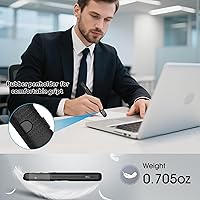
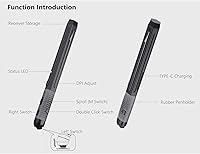
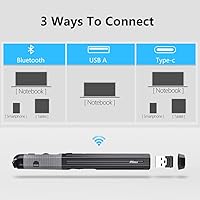
Three DPI settings — 800, 1200, and 1600 — give this pen mouse practical range for different tasks: low sensitivity works well for detailed annotation, while the higher end handles general navigation and quick scrolling. Connectivity covers both Bluetooth and a 2.4GHz USB receiver, and switching between them is quick enough that hopping between a tablet and laptop rarely causes friction. The built-in Type-C charging eliminates the hassle of disposable batteries, and a real-time battery indicator removes the guesswork. The rubberized grip reduces hand fatigue noticeably, and because the USB receiver stores inside the device itself, you will not lose it mid-trip.

Best For

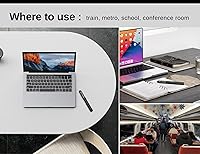
This ergonomic pointer suits a fairly specific type of user, and it is worth being clear about that. If you work at a cramped café table, a shared coworking desk, or a laptop tray, the minimal footprint alone justifies the consideration. It also appeals to people who already gravitate toward stylus-based tools — digital annotators, light illustrators, or anyone who finds holding a conventional mouse uncomfortable after an hour or two. Frequent travelers will appreciate that it fits in a jacket pocket without the bulk. Those who regularly jump between Mac, Windows, and Android will find the cross-platform support practically useful, not just a bullet point.

User Feedback

Buyers who have spent weeks with the pen-grip mouse consistently highlight comfort during extended sessions as the standout quality — particularly those dealing with wrist strain from traditional mice. That said, the learning curve is real: most users report needing two to three days before cursor control starts feeling natural. Some reviewers flag that the click buttons require a firmer press than expected at this price tier, and a handful mention the DPI increments feeling slightly coarse for precision work. Build quality impressions are generally positive, though the rubber grip shows wear for heavier users over several months. Battery life tends to land in the two-to-three week range in real use — solid, but short of the stated 30-day claim.

Pros

  • Pen-shaped form factor frees up significant desk space compared to any conventional mouse design.
  • Fits in a shirt pocket or pencil case, making it one of the most portable wired-free pointing devices available.
  • Dual wireless modes let you connect via Bluetooth or USB receiver without carrying extra adapters.
  • Built-in receiver storage means you will not arrive somewhere and realize the dongle is still at home.
  • Type-C charging is a practical, modern choice that works with cables most people already carry.
  • Real-time battery indicator removes the guesswork that plagues many wireless peripherals.
  • Broad compatibility across Windows, Android, Linux, and Mac OS covers almost every common setup.
  • Non-slip rubber grip noticeably reduces hand fatigue during sessions lasting several hours.
  • Three DPI settings cover the range from careful annotation work up to general desktop navigation.
  • Users prone to wrist strain consistently report improved comfort after adapting to the pen-hold posture.

Cons

  • The adjustment period is real — expect two to five days before cursor control feels natural and productive.
  • Real-world battery life tends to fall well short of the 30-day claim, typically landing in the two-to-three week range.
  • Click buttons require a firmer press than most mid-range conventional mice, which becomes noticeable during repetitive tasks.
  • DPI steps jump in fairly coarse increments, leaving a gap for users who need fine-grained sensitivity tuning.
  • The rubber grip shows visible wear on the contact points after several months of heavy daily use.
  • Only three DPI levels limits flexibility for users whose work spans both fine detail and fast general navigation.
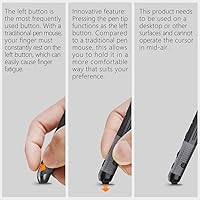
  • Pressure-point click placement takes deliberate re-learning for anyone switching from a standard left-right button layout.
  • Optical tracking on uneven or glossy surfaces can be inconsistent, as with most non-laser optical sensors.
  • The pen format is a poor fit for tasks requiring rapid, repeated clicking, where grip fatigue sets in faster than expected.

Ratings

The scores below for the Plima Pocket Ergonomic Pen Mouse were generated by our AI after analyzing thousands of verified purchase reviews from global buyers, with spam, bot activity, and incentivized feedback actively filtered out before any scoring was applied. Every category reflects the full picture — not just what users praised, but where the product genuinely fell short in real daily use. Strengths and frustrations are weighted equally so you can make a genuinely informed decision.

Ergonomic Comfort
84%
Users who switched to this pen mouse specifically to relieve wrist strain report consistent, meaningful relief during work sessions of two hours or more. The neutral forearm position encouraged by the pen-hold posture is the single most praised aspect across verified reviews, particularly among desk workers and students.
Comfort gains take time to materialize — most buyers report a noticeable discomfort spike during the first few days while their hand adjusts to an unfamiliar grip. Users with larger hands occasionally note that the slim pen body feels slightly cramped after prolonged sessions.
Portability
91%
At under 2.5 ounces and slim enough to slide into a pencil case or breast pocket, this ergonomic pointer is genuinely one of the most travel-friendly mice tested in its category. Remote workers and frequent flyers consistently highlight it as the one peripheral they never leave behind.
The slim form factor, while excellent for portability, means there is no wrist rest or palm support for users who prefer to set the device down on a surface between tasks. A small number of reviewers found the lack of a traditional resting shape mildly awkward during pauses in work.
Build Quality
71%
29%
For the price tier, the overall construction feels solid enough for daily professional use, and the rubber grip gives the device a premium tactile impression on first contact. Most users working in light-to-moderate use scenarios report no structural complaints over the first several months.
The rubber grip is the most commonly flagged durability concern, showing visible wear and slight peeling at the contact points for users with heavier daily usage habits after four to six months. A few reviewers also noted minor wobble in the click mechanism after extended use.
Battery Life
63%
37%
Having a real-time battery indicator is genuinely useful — it removes the guesswork that makes many wireless peripherals frustrating, and users appreciate being able to glance at remaining charge before heading into a long meeting or travel day. Type-C charging is a practical, modern choice.
The advertised 30-day battery life does not hold up under real-world scrutiny — the majority of verified buyers report actual life landing in the two-to-three week range with standard daily use. That gap between marketing claim and lived experience is the most consistent source of buyer disappointment across reviews.
Wireless Reliability
78%
22%
Both Bluetooth and the 2.4GHz USB receiver modes perform reliably within normal desk and office distances, with minimal reported dropout or lag during everyday navigation and productivity tasks. The ability to switch between modes without re-pairing is a genuine convenience for multi-device users.
A subset of users report occasional micro-lag when operating near other wireless devices, particularly in dense office environments with competing Bluetooth signals. The 10-meter range claim holds in open spaces but degrades noticeably through walls or when multiple wireless devices are active nearby.
Click Feel
58%
42%
The pressure-point click design is well-suited for deliberate, measured input tasks like annotation, form-filling, or light document editing where you are not hammering buttons at speed. Users doing calm productivity work rarely raise the clicks as a pain point.
This is one of the most divisive aspects in user feedback — the buttons require noticeably more deliberate force than standard mice, and users doing high-volume or rapid clicking tasks report hand fatigue building faster than expected. Several reviewers specifically cited this as the reason they returned or stopped using the device daily.
DPI Performance
69%
31%
The three DPI tiers cover the practical range for most everyday computing tasks reasonably well — 800 suits careful cursor work, while 1600 handles general desktop navigation without feeling sluggish. Switching between them via the physical button is quick and reliable.
The coarse jumps between the three fixed DPI levels leave a noticeable gap for users who need fine-tuned sensitivity — there is no software to set custom values between steps. Power users and anyone doing precision creative work will find the range limiting compared to configurable alternatives at a similar price.
Tracking Accuracy
72%
28%
On standard matte desk surfaces and fabric mouse pads, the optical sensor tracks consistently and predictably throughout normal productivity sessions. Casual users and non-gaming buyers rarely raise tracking as a concern under typical conditions.
Performance on glossy, glass, or highly reflective surfaces is unreliable, as is true of most optical sensors in this class — a mouse pad is effectively required in those environments. A small number of users also noted occasional cursor jitter when using the device at the 1600 DPI setting on certain surface textures.
Setup & Compatibility
88%
Plug-and-play operation across Windows, Mac OS, Linux, and Android means most users are up and running in under a minute with zero driver installation required. Cross-platform users specifically praise the fact that switching operating systems does not introduce any compatibility headaches.
There is no companion software or app for button remapping or custom DPI configuration, which limits flexibility for power users who expect that level of control at this price point. Android compatibility, while functional, is limited to basic cursor tasks and does not support all gesture inputs.
Value for Money
74%
26%
For buyers who genuinely need the pen-hold form factor — whether for wrist relief, space constraints, or travel — the feature set at this price tier is competitive and the device delivers on its core promise. The inclusion of dual wireless modes and Type-C charging at this price point is appreciated.
Buyers expecting conventional mouse performance in a novelty shape tend to feel the price is hard to justify when the click feel and DPI flexibility do not match equally priced standard mice. The rubber wear issue also raises questions about long-term value for heavy daily users.
Learning Curve
54%
46%
Users with prior stylus or digital pen experience adapt noticeably faster than average, often reaching comfortable productivity within a day or two. Younger users and those without deeply ingrained palm-grip habits tend to report shorter adjustment windows.
For the majority of buyers coming from years of conventional mouse use, the adjustment period is a genuine productivity disruption lasting three to seven days. A meaningful portion of negative reviews trace directly back to this transition difficulty rather than any specific product defect, suggesting expectations are often not set correctly at the point of purchase.
Receiver Storage
86%
The integrated nano-receiver storage slot is a small but genuinely thoughtful detail that frequent travelers and commuters consistently mention in positive reviews. Never having to worry about losing the dongle in a laptop bag removes one of the most common wireless peripheral frustrations.
The storage slot fits the included receiver only — there is no additional space for other small accessories, and users who lose the original receiver cannot easily substitute a third-party alternative. A few reviewers noted the slot cover feels slightly loose after repeated use.
Grip & Handling
77%
23%
The non-slip rubber material gives the pen mouse a secure, confident feel in hand during normal use, and users with slightly sweaty palms during warm-weather work note that it maintains grip better than bare plastic alternatives in the same format. The weight balance is well-judged for its size.
Left-handed users adapt without issue given the pen format, but users with very small or very large hands are more likely to find the fixed diameter suboptimal for extended comfort. The rubber grip, while initially excellent, loses some of its tactile quality as it accumulates wear.
OS Flexibility
83%
Supporting four distinct operating systems without drivers makes this pen mouse one of the more versatile options in its niche, and multi-platform households — mixing Mac, Windows, and Android tablets — find genuine daily utility in that breadth. Bluetooth mode in particular makes tablet pairing straightforward.
iOS and iPadOS compatibility is not officially supported, which matters for tablet users in the Apple ecosystem who might otherwise be ideal candidates for the pen-hold format. Bluetooth pairing on some older Android devices requires a manual reconnect after the mouse has been idle for an extended period.

Suitable for:

The Plima Pocket Ergonomic Pen Mouse is a strong match for anyone whose daily computing happens in tight or shared spaces — think café tables, co-working desks, economy tray tables, or a cramped home office corner where a conventional mouse simply has nowhere to go. Students who carry their entire setup in a backpack will appreciate how easily this pen mouse disappears into a pencil case or jacket pocket without adding meaningful weight. People already comfortable with stylus-based workflows — digital annotators, light sketchers, note-takers on tablets — tend to adapt to the pen-hold posture far faster than average users and often find it more intuitive than a palm grip. It also genuinely suits anyone dealing with early-stage wrist discomfort or repetitive strain, since holding a mouse like a pen keeps the forearm in a more neutral, relaxed position over long sessions. Cross-platform users who regularly switch between a Windows laptop, an Android tablet, and occasionally a Mac will find the broad OS compatibility and dual wireless modes quietly useful day-to-day.

Not suitable for:

The Plima Pocket Ergonomic Pen Mouse is not the right tool for power users who demand precise, high-speed cursor control — competitive gamers, video editors doing frame-by-frame work, or CAD professionals who need sub-millimeter tracking accuracy will likely find the three-step DPI range too limited and the pen-hold posture too unfamiliar under pressure. Anyone deeply accustomed to a traditional palm or claw grip should budget at least a week of frustrating adjustment before productivity returns to normal, and some users simply never fully adapt to the format. The click mechanism has drawn criticism for requiring more deliberate force than similarly priced conventional mice, which can feel tiring during rapid, repetitive clicking tasks. If long-term build durability is a priority, the rubber grip showing early wear on heavier-use units is worth factoring in. Finally, buyers expecting the advertised 30-day battery life should temper their expectations — real-world use typically lands notably shorter, which matters if reliable, low-maintenance operation is a key requirement.

Specifications

  • Brand: Manufactured by Plima, a peripheral brand focused on ergonomic and compact input devices.
  • Form Factor: Pen-shaped ergonomic body designed to be held between the fingers like a writing instrument rather than gripped with the palm.
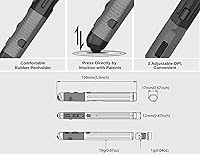
  • Dimensions: The device measures 6.77 x 3.58 x 1.26 inches, keeping it slim enough to fit in a standard pencil case or shirt pocket.
  • Weight: Weighs 2.39 ounces, making it one of the lighter wireless mice in its category.
  • DPI Settings: Offers three switchable sensitivity levels — 800, 1200, and 1600 DPI — selectable via a dedicated button on the body.
  • Connectivity: Supports both Bluetooth and 2.4GHz wireless via a USB receiver, allowing connection to two different device types without re-pairing.
  • Wireless Range: Effective operating range extends up to 10 meters from the connected device under typical conditions.
  • Charging Port: Uses a Type-C to USB cable for charging, compatible with most modern charging adapters and power banks.
  • Battery: Built-in rechargeable lithium-ion battery rated for up to 30 days of use per full charge under the manufacturer's testing conditions.
  • Battery Indicator: A real-time battery level indicator is built into the device, providing visible feedback on remaining charge at any time.
  • Tracking Tech: Uses optical tracking technology to register movement across most standard desk and table surfaces.
  • Grip Material: The handle is wrapped in non-slip rubber to reduce fatigue and maintain a secure hold during extended use.
  • Receiver Storage: The USB nano-receiver stores directly inside the device body when not in use, preventing loss during travel.
  • OS Support: Compatible with Windows, Android, Linux, and Mac OS without requiring additional driver installation for basic operation.
  • Click Design: Features a pressure-point click mechanism positioned for use with a pen-hold grip rather than a conventional finger-over-button layout.
  • Color: Available in Black.
  • Package Contents: Includes the pen mouse, a Type-C to USB charging cable, the USB wireless receiver, and basic user documentation.
  • Item Model: Model number 4717658108007, first made available in October 2023.

Related Reviews
MOFII Wireless Ergonomic Mouse
82%
84%
Comfort & Ergonomics
77%
Build Quality
91%
Battery Life
86%
Multi-Device Connectivity
87%
Quiet Click Operation
More
Microsoft Sculpt Ergonomic Mouse
73%
88%
Ergonomic Design
83%
Wrist Comfort
51%
Scroll Wheel
84%
Wireless Reliability
79%
Battery Life
More
SANWA GMAERG9N2 Wired Vertical Mouse
69%
83%
Ergonomic Comfort
88%
Silent Click Performance
61%
Build Quality
84%
Value for Money
57%
DPI Range and Cursor Control
More
Vassink Ergonomic Vertical Wireless Mouse
77%
83%
Ergonomic Comfort
58%
Build Quality
66%
Battery Life
93%
Ease of Setup
88%
Click Quietness
More
Uineer A06 Vertical Ergonomic Mouse
74%
88%
Ergonomic Comfort
74%
Build Quality
86%
Wireless Connectivity
81%
Battery Life & Charging
67%
DPI & Tracking
More
Microsoft Bluetooth Ergonomic Mouse
81%
88%
Ergonomic Comfort
83%
Build Quality
91%
Scroll Wheel
89%
Battery Life
72%
Bluetooth Connectivity
More
iClever TM254 Ergonomic Wireless Vertical Mouse
71%
78%
Ergonomic Comfort
58%
Build Quality
84%
Silent Click Performance
71%
Adjustable Tilt Hinge
76%
Mouse Jiggler Feature
More
Logitech Lift Vertical Ergonomic Mouse
83%
91%
Ergonomic Comfort
74%
Build Quality
93%
Click Quietness
88%
Wireless Connectivity
96%
Battery Life
More
ECHTPower Ergonomic Wireless Mouse F35B
84%
91%
Ergonomic Comfort
88%
Battery Life
85%
Connectivity Options
93%
Quietness of Clicks
84%
Device Compatibility
More
Microsoft Ergonomic Wired Mouse
74%
83%
Comfort & Ergonomics
76%
Build Quality
79%
Tracking Accuracy
81%
Scroll Wheel
67%
Programmable Buttons
More

FAQ

Plima does not publish an exact charge time, but based on the battery capacity and typical Type-C charging speeds for devices in this class, most users report a full charge completing in two to three hours. Plugging it in overnight or during a lunch break is usually enough to top it up without planning around it.

Realistically, plan for two to five days of adjustment before your cursor control returns to its usual accuracy. The grip posture is genuinely different from a palm or claw hold, and your muscle memory will push back at first. Most users find that short, deliberate practice sessions help more than just pushing through frustration.

Yes, it operates as a plug-and-play device on Windows, Mac OS, Linux, and Android without requiring driver downloads for standard mouse functions. You lose nothing in basic operation by skipping driver software, since DPI switching is handled by the physical button on the device itself.

You can only maintain one active connection at a time, but switching between the two modes is quick enough that moving from a Bluetooth-connected tablet to a USB-connected laptop takes only a few seconds. It is not simultaneous dual-connection like some premium multi-device mice, but it covers the most common switching scenario without much friction.

In practice, most users report battery life landing in the two-to-three week range with regular daily use, which is noticeably shorter than the advertised figure. The manufacturer likely tests under lighter-use conditions. That said, two weeks between charges is still competitive for a device this small, and the battery indicator gives you enough warning to charge before it dies unexpectedly.

Optical sensors generally struggle on highly reflective or transparent surfaces, and this pen mouse is no exception. A thin mouse pad or even a sheet of paper is enough to fix tracking issues on glass or glossy desks. If most of your work happens on a standard matte desk or a fabric mat, you are unlikely to notice any problems.

Basic cursor movement, clicking, and DPI switching all work natively on Mac OS without any setup. You will not get any Mac-specific software customization for button remapping since there is no dedicated app, but for everyday navigation and productivity tasks, it functions exactly as expected right out of the box.

The pressure-point click mechanism requires a slightly more deliberate press than the light, springy buttons on most standard mice. For moderate clicking tasks it is fine, but users who do rapid, high-volume clicking — such as spreadsheet work or browser-heavy research — have flagged that it becomes noticeable after extended sessions. If repetitive clicking is a core part of your workflow, it is worth considering before purchasing.

Yes, the nano-receiver has a dedicated storage slot built directly into the body of the pen mouse, so when you pack it away, the receiver goes with it. It is one of the more thoughtful design details on this device and genuinely saves the headache of losing a dongle in a laptop bag.

The pen-hold grip is inherently more ambidextrous than a shaped palm mouse, since you hold it upright between your fingers rather than draping your hand over an asymmetric body. Left-handed users tend to adapt as easily as right-handed ones, making it a better option for shared-desk or mixed-handedness households than most ergonomic mice on the market.