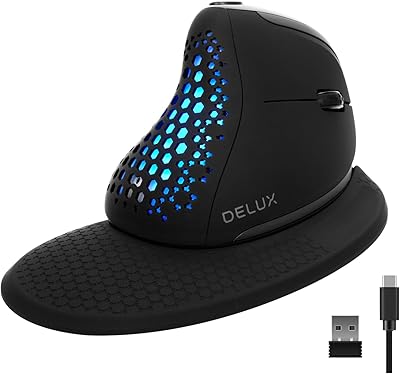
Lekvey XC-05 Vertical Wireless Mouse







Overview
The Lekvey XC-05 Vertical Wireless Mouse is a budget-conscious pick for anyone starting to feel early wrist strain from long days at a desk. Unlike flat mice that keep your forearm twisted palm-down, the vertical grip rotates your hand into a more natural handshake posture, taking real pressure off the wrist over time. The green-purple colorway is refreshingly different from the sea of black and gray peripherals crowding most desks. Setup is as simple as it gets: plug the nano USB receiver into any available port and you are working within seconds. Just keep expectations grounded — this is a comfort-focused value buy, not a professional-grade peripheral.
Features & Benefits
The vertical grip keeps your forearm in a neutral position rather than twisted flat, reducing cumulative strain during long sessions at a screen. DPI switching between 800, 1200, and 1600 lets you adapt on the fly — lower for precision work, higher for general browsing. The built-in battery lasts roughly 150 hours on one charge, so you are recharging about once a month rather than stocking AA batteries. Primary buttons use a quiet click mechanism that won't draw stares in silent offices or libraries, and dedicated side buttons handle browser navigation without touching the keyboard. One honest caveat: after 20 minutes idle, this wireless vertical mouse enters sleep mode with a noticeable 3-second wake lag — minor, but worth knowing upfront.
Best For
This vertical mouse suits right-handed users with medium to large hands — the body runs noticeably larger than a standard mouse, and smaller hands will find the reach genuinely awkward. It is a solid option for desk workers and students who want to ease wrist fatigue during long browsing or document sessions without a significant spend. Travelers will appreciate the wireless setup and long battery life that removes the need to carry spare batteries on the road. Mac users, pay close attention before purchasing: the Lekvey ergonomic mouse connects through a USB-A nano receiver, and newer MacBooks with only USB-C ports will require a separate adapter that is not included.
User Feedback
Sitting at a 4.3-star average, this wireless vertical mouse earns generally positive marks. Most buyers mention adapting to the grip quickly after coming from a flat mouse, and the colorway gets surprisingly frequent compliments. Battery life draws consistent praise across reviews. The recurring complaint, however, centers on the sleep mode delay — that 3-second pause feels genuinely disruptive during quick task-switching, and multiple reviewers flag it specifically. Users with smaller hands confirm the sizing warning is real. On build quality, feedback splits: the plastic construction feels adequate rather than solid, and the scroll wheel earns lukewarm responses. Compared to pricier vertical mice, most buyers acknowledge a difference in feel but consider the overall value reasonable.
Pros
- The vertical grip noticeably reduces forearm twist during long desk sessions, making daily work more comfortable over time.
- Built-in rechargeable battery lasts weeks on a single charge — no drawer full of AA batteries required.
- Plug-and-play USB receiver works instantly on Windows and Linux with zero driver setup.
- Low-noise primary clicks are genuinely quiet enough for libraries, shared offices, and late-night use.
- Three DPI levels cover the range from careful document work to quick wide-screen navigation.
- At under 100 grams, this wireless vertical mouse is easy to carry in any laptop bag without adding bulk.
- The green-purple colorway is a rare personality option in a peripheral category dominated by plain black and gray.
- Side navigation buttons are well-placed for browser-heavy workdays, reducing unnecessary keyboard reach.
- Broad OS compatibility means it works across older Windows versions, Linux, and Mac without extra software.
- Strong value for the price tier — rechargeable, six buttons, quiet clicks, and ergonomic design in one package.
Cons
- The 3-second wake delay after sleep mode interrupts workflow and is a consistent real-world frustration for active users.
- Scroll wheel feels loose and imprecise — noticeably below the standard of similarly priced flat mice.
- No Bluetooth connectivity means one USB port is always occupied, with no multi-device switching option.
- The nano receiver has no onboard storage slot on the mouse body, making it easy to lose during travel.
- Newer MacBook owners need a USB-C adapter that is not included — an easy pre-purchase detail to miss.
- Small-handed users will find the body too large for a comfortable grip, despite the ergonomic intent.
- The plastic construction feels thin rather than durable, and long-term resilience is a reasonable concern.
- Only side buttons on the right side limits usefulness for any left-handed workaround attempts.
- No visual DPI indicator makes it hard to know which sensitivity level is currently active without testing.
- Users familiar with premium vertical mice will immediately notice the difference in build precision and tracking quality.
Ratings
The scores below for the Lekvey XC-05 Vertical Wireless Mouse were generated by our AI system after analyzing thousands of verified purchase reviews from global buyers, with spam, bot submissions, and incentivized feedback actively filtered out. The results reflect a genuine cross-section of real-world experiences — both what users consistently praised and what genuinely frustrated them. Nothing has been smoothed over to flatter the product.
Ergonomic Comfort
Build Quality
Battery Life
Sleep Mode & Wake Responsiveness
Wireless Connectivity
DPI Performance
Click Noise Level
Size & Hand Fit
Navigation Buttons
Design & Aesthetics
Setup & Ease of Use
Value for Money
Mac Compatibility
Scroll Wheel Feel
Portability
Suitable for:
The Lekvey XC-05 Vertical Wireless Mouse is a practical choice for right-handed desk workers, students, and remote employees who spend the bulk of their day clicking through documents, browsing, or managing emails and want to reduce wrist fatigue without committing to a high-end peripheral budget. If you have been noticing early signs of wrist strain from long sessions at a flat mouse, the vertical grip can genuinely help shift your arm posture into a less stressful position — though it works best as a preventative comfort upgrade rather than a treatment. Office workers in shared or quiet environments will appreciate the low-noise primary buttons, and frequent travelers will find the rechargeable battery and lightweight body easy to toss in a bag without worrying about spare batteries. It also suits anyone who simply wants a distinctive-looking mouse — the green-purple colorway is genuinely uncommon and will stand out on any desk setup. Medium to large hands are the sweet spot for fit, and the plug-and-play USB receiver makes it accessible to users who dislike fiddling with software or drivers.
Not suitable for:
Left-handed users should stop here — the Lekvey XC-05 Vertical Wireless Mouse is built exclusively for right-handed grips, and the asymmetric shape offers no ambidextrous option. Anyone with small hands will likely find the proportions uncomfortable rather than ergonomic, as the wider and taller body requires a stretch that negates much of the comfort benefit the design is meant to deliver. Power users, graphic designers, or anyone who needs a fast, precise mouse with a high DPI ceiling will outgrow this vertical mouse quickly — the top sensitivity setting is modest, and the scroll wheel feel is a step behind what productivity-focused users expect. Mac users on newer MacBook models should know upfront that the USB-A nano receiver means you will need a separate USB-C adapter, which adds an inconvenience and a cost that is easy to miss until the box is already open. And if you are the type who returns to your screen frequently for short bursts throughout the day, the 3-second wake delay after sleep mode will wear on you faster than you might expect.
Specifications
- Model Number: The model designation for this mouse is XC-05, manufactured by Lekvey.
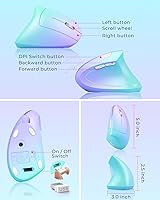
- Dimensions: The mouse body measures 5.0 x 3.0 x 2.5 inches, making it larger than a standard flat mouse.
- Weight: The unit weighs 3.36 ounces (95g), keeping it light enough for travel without feeling flimsy in hand.
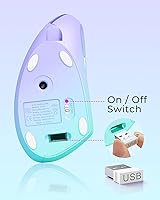
- Connectivity: Connects via a 2.4GHz USB nano receiver using plug-and-play technology — no drivers or software installation required.
- Bluetooth: This mouse does not support Bluetooth; a USB-A nano receiver is the only connection method available.
- DPI Levels: Three switchable sensitivity levels are available: 800, 1200, and 1600 DPI, selectable via a dedicated button on the mouse body.
- Button Count: The mouse features 6 buttons in total: left click, right click, scroll wheel click, DPI switch, Page Back, and Page Forward.
- Click Type: Primary left and right buttons use a low-noise quiet-click mechanism designed to minimize audible sound during use.
- Battery Type: The mouse includes a built-in rechargeable lithium battery — no replaceable cells are required.
- Battery Life: On a full charge, the mouse delivers up to approximately 150 hours of active use under normal conditions.
- Charge Time: A full recharge takes approximately 3 hours via the included charging cable.
- Sleep Mode: The mouse automatically enters a power-saving sleep state after 20 minutes of inactivity, with a roughly 3-second delay to wake upon button press.
- Hand Orientation: Designed exclusively for right-handed users; the asymmetric vertical body shape does not accommodate left-handed use.
- Tracking Technology: Uses optical tracking technology for cursor movement detection across standard desk surfaces.
- OS Compatibility: Compatible with Windows 2000, XP, Vista, 7, 8, and 10, as well as Linux and Mac OS X operating systems.
- Mac Note: MacBook models with only USB-C ports require a USB-A to USB-C adapter to use the nano receiver, which is not included in the box.
- Color Variant: This variant features a green and purple two-tone colorway across the mouse shell.
- Hand Size Fit: The manufacturer advises that this mouse is not suitable for small hands due to its larger-than-average body dimensions.
Related Reviews

Logitech MX Vertical

UGREEN Vertical Wireless Ergonomic Mouse

Woddlffy RAAVEE Ergonomic Vertical Wireless Mouse

Acer OMR241 Ergonomic Vertical Mouse
DeLUX M618mini Wireless Vertical Ergonomic Mouse

seenda Ergonomic Vertical Wireless Mouse

Cherry MW4500 Wireless Vertical Ergonomic Mouse
SHARE SUNSHINE Ergonomic Vertical Wireless Mouse
Perixx PERIMICE-713RX Wireless Rechargeable Vertical Mouse