PHILIPS SPT6348 Wireless Keyboard and Mouse Combo

Overview
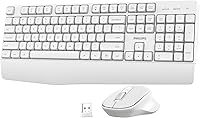
The PHILIPS SPT6348 Wireless Keyboard and Mouse Combo is a straightforward, no-frills wireless desk setup built for everyday users who want cable-free convenience without spending much. Plug the USB dongle in and you are up and running — no drivers, no software installation, no fuss. The two headline design promises are ergonomic comfort and quiet operation, which are reasonable goals at this price level. It works across Windows, Mac, Android, and iOS, making it flexible enough for mixed-device households. Just know going in: this is a value-tier set, not a mechanical keyboard enthusiast's dream or a precision gamer's tool.
Features & Benefits
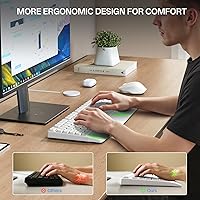
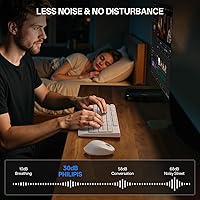
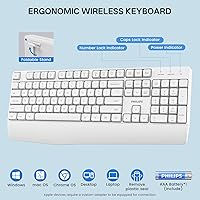
The 2.4GHz wireless connection holds steady up to 15 meters — plenty for most home setups, with no dropped signals mid-sentence or during video calls. Both devices enter sleep mode when idle, so battery life stretches considerably without you thinking about it. The keys are noticeably soft and muted, and the mouse clicks share that same quiet character, making this ergonomic desk set easy to use in shared offices or late-night sessions. A wrist-rest area along the keyboard's lower edge offers real support during long typing stretches, easing tension that builds up over hours. Multimedia keys handle volume and playback directly. Batteries are included, so setup to first keystroke takes under a minute.
Best For
This wireless combo fits a specific buyer profile, and knowing that upfront saves disappointment. If you work from home and want a quiet, clutter-free desk without overspending, it covers the basics well. Students in dorms or library study rooms will appreciate how little noise it generates during long note-taking sessions. It also suits people who mix work and entertainment throughout the day — the media shortcuts make switching contexts quick. Anyone stepping away from a wired setup for the first time will find the plug-and-play approach refreshingly simple. And because it runs on both Mac and Windows, it handles multi-OS households without any reconfiguration.
User Feedback
Across 110-plus ratings averaging 4.4 stars, buyers tend to land in the same place: pleasantly surprised given what they paid. The most consistent praise covers setup speed and how genuinely quiet the keys and clicks feel in daily use. That said, the mouse draws fair criticism — users with larger hands find it on the small side, and the battery compartment door feels less solid than the rest of the build. A handful of reviewers note that waking the devices from sleep takes a beat or two. Nobody is calling this a Logitech rival, but most buyers at this tier consider it a reliable daily driver that delivers exactly what it promises.
Pros
- Plug-and-play USB dongle setup works instantly — no software, no Bluetooth pairing, no frustration.
- Quiet key switches and silent mouse clicks make this ergonomic desk set genuinely office-friendly.
- Auto sleep mode on both devices meaningfully extends battery life between changes.
- Batteries are included in the box, so the set is ready to use right out of the packaging.
- Cross-platform support covers Windows, Mac, Android, and iOS without any reconfiguration.
- The wrist-rest area along the keyboard base provides real support during extended typing sessions.
- A 15-meter wireless range gives plenty of flexibility for living room or open-office setups.
- Multimedia shortcut keys handle volume and playback without interrupting your workflow.
- At this price tier, the 4.4-star average across 110-plus buyers reflects strong value-for-money satisfaction.
Cons
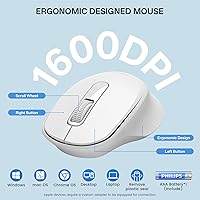
- The mouse body runs small and may cause discomfort for users with medium or large hands during long sessions.
- The battery compartment door on the mouse feels noticeably less solid than the rest of the build.
- Waking either device from sleep mode introduces a short but noticeable lag before it responds.
- No software or app support means there is zero ability to remap keys or adjust mouse sensitivity.
- The plastic construction throughout feels lightweight, which may translate to reduced long-term durability.
- Only a single USB dongle is included, which could be limiting for users with minimal available ports.
- Key travel and actuation feedback will disappoint anyone accustomed to mechanical or premium membrane keyboards.
- The white color, while clean-looking, may show dirt and grime more visibly over months of daily use.
Ratings
The scores below were generated by AI after analyzing verified buyer reviews for the PHILIPS SPT6348 Wireless Keyboard and Mouse Combo from multiple global sources, with spam, bot activity, and incentivized feedback actively filtered out. Both the strengths and the genuine frustrations real users experienced are reflected transparently in each category score. This ergonomic desk set earns high marks in several everyday usability areas, while a few persistent pain points keep it from scoring across the board.
Ease of Setup
Typing Comfort
Noise Level
Wireless Reliability
Mouse Ergonomics
Build Quality
Battery Life
Cross-Platform Compatibility
Value for Money
Multimedia Shortcut Keys
Aesthetic Design
Cursor Precision
Packaging and Unboxing
Suitable for:
The PHILIPS SPT6348 Wireless Keyboard and Mouse Combo is a strong fit for home office workers who want a quiet, low-maintenance desk setup that just works without a learning curve or installation headaches. If you spend several hours a day typing emails, drafting documents, or jumping between browser tabs, the soft key switches and wrist-support layout offer a noticeable reduction in finger and wrist tension over time. Students working in shared spaces — dorms, libraries, coffee shops — will especially appreciate how little noise this ergonomic desk set produces compared to standard membrane combos. It also suits light multitaskers who blend productivity and entertainment throughout the day, since the built-in media shortcut keys make pausing a video or adjusting volume quick and natural. Anyone who uses both Mac and Windows machines regularly will find the cross-platform compatibility a genuine convenience, and first-time wireless adopters will appreciate that setup involves nothing more than plugging in a single USB dongle.
Not suitable for:
The PHILIPS SPT6348 Wireless Keyboard and Mouse Combo is not the right tool for power users, enthusiasts, or anyone who depends on precision and tactile feedback to get work done. Writers or coders who prefer the crisp, defined actuation of mechanical switches will likely find the soft keystrokes underwhelming and imprecise over long sessions. The included mouse runs small, and if you have larger hands or rely on an ergonomic grip for extended pointing work, you will probably feel the strain this wireless combo was designed to prevent. Gamers should look elsewhere entirely — there is no polling rate advantage, no programmable buttons, and no software customization on offer here. Creative professionals who need pixel-accurate cursor control for design or video editing work will also hit the ceiling of what this set can deliver. If durability or premium build quality matters to you, the plastic construction — particularly around the mouse battery door — may feel flimsy compared to mid-range or premium alternatives.
Specifications
- Model Number: This combo carries the official model designation SPT6348 from Philips.
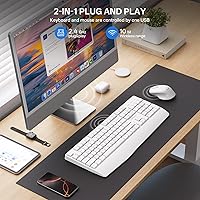
- Connectivity: Both devices connect via a single 2.4GHz USB nano dongle that requires no driver installation.
- Wireless Range: The 2.4GHz connection maintains a stable signal up to 15 meters from the USB receiver.
- Keyboard Type: Full-size ergonomic keyboard with a built-in wrist-rest area along the lower edge.
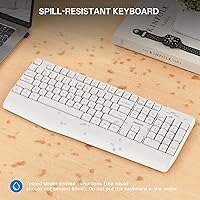
- Key Switches: Low-noise, sound-reduction membrane switches designed to minimize keystroke sound during typing.
- Mouse Design: Compact wireless mouse with quiet-click buttons engineered to reduce audible click noise.
- Power Source: Both the keyboard and mouse are powered by AA batteries, which are included in the box.
- Auto Sleep Mode: Both devices automatically enter a power-saving sleep state after a period of inactivity to extend battery life.
- Compatible OS: Works with Windows 7 and later, Mac OS, Android, and iOS without additional software.
- Multimedia Keys: Dedicated shortcut keys on the keyboard provide direct control of volume, play, pause, and media functions.
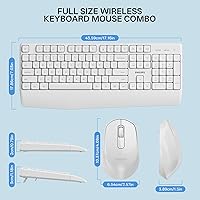
- Dimensions: The keyboard measures 17.72 x 7.09 x 2.76 inches, suitable for standard desktop and home office setups.
- Combo Weight: The full keyboard and mouse set together weigh approximately 2.05 pounds.
- Color: Available in white with a clean, minimal finish suited to modern home office environments.
- Receiver Type: A single USB nano dongle connects both the keyboard and mouse simultaneously to the host device.
- BSR Ranking: Ranked #242 in the Computer Keyboard and Mouse Combos category on Amazon at time of review.
- Average Rating: Holds a 4.4-out-of-5-star average based on over 110 verified buyer ratings.
- Manufacturer: Designed and sold under the Philips brand, manufactured as model SPT6348.
- Date Available: This product first became available for purchase in June 2025.
Related Reviews

Arteck HW192 Wireless Keyboard and Mouse Combo
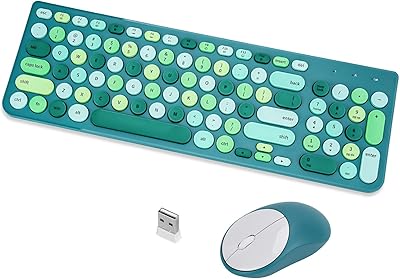
GUKJOB iK6630 Wireless Keyboard and Mouse Combo

Atelus Wireless Keyboard and Mouse Combo
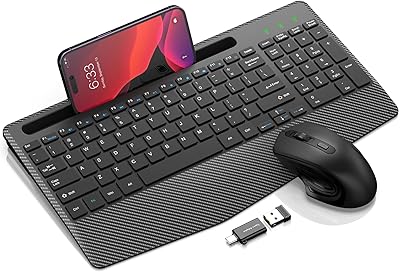
Hayyiesh KG659-01 Wireless Keyboard and Mouse Combo

HP 18H24AA Wireless Keyboard and Mouse Combo

QUASIO Wireless Keyboard and Mouse Combo

GEEZER Wireless Keyboard and Mouse Combo
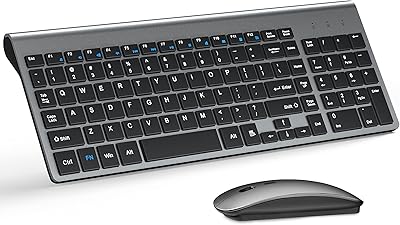
TopMate Wireless Keyboard and Mouse Combo

cimetech Wireless Keyboard and Mouse Combo
