Overview

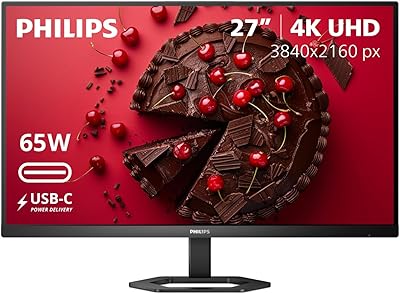
The Philips 27E2N1510 27″ QHD Monitor sits in a competitive spot — a 27-inch IPS panel with 2560x1440 resolution at a price that undercuts many comparable options without stripping out the features that actually matter. Philips built the E2 series for everyday practicality: home office setups, students, and light creative work rather than enthusiast use cases. At this price tier, QHD IPS panels are not always a given, which makes the value proposition genuinely interesting. One honest caveat worth raising upfront is the glossy screen surface — something buyers in bright rooms should factor in before committing, since it can introduce unwanted reflections during daylight hours.

Features & Benefits

The IPS panel is the centerpiece here. Colors stay accurate and consistent across wide viewing angles — a real advantage over TN alternatives where color shifts noticeably when you move off-axis. The 100Hz refresh rate paired with 1ms MPRT makes motion visibly smoother compared to a standard 60Hz display, even if it falls well short of dedicated high-refresh gaming monitors. Adaptive-Sync handles screen tearing without locking you into a specific GPU brand. For long sessions, LowBlue Mode and Flicker-Free technology do reduce noticeable fatigue over time. EasyRead mode softens the display tone for reading-heavy tasks, and both HDMI 2.0 and DisplayPort 1.4 inputs cover virtually any device you might connect.

Best For

This Philips QHD display makes the most sense for home office users and students who spend long hours at a screen and want noticeably sharper text than 1080p without a steep price jump. Casual gamers will appreciate the smoother motion at 100Hz and tear-free output, though anyone serious about competitive play should look at purpose-built options. It also suits content consumers — streaming, hobbyist photo editing — where color fidelity matters more than raw speed. The VESA mount support is a quiet bonus for anyone running a monitor arm, and it works well in tighter desk spaces where placement flexibility counts.

User Feedback

Across just over 100 ratings, the 27E2N1510 holds a 4.2-star average — a solid result that reflects genuine satisfaction rather than inflated enthusiasm. Buyers frequently highlight image sharpness and color quality, especially those upgrading from older 1080p panels, and the value-to-quality ratio comes up consistently in positive reviews. On the other side, users in bright or sun-facing rooms flag the glossy panel as a real drawback, with reflections appearing often enough to be a legitimate concern. A few reviewers also note that the stand offers limited height adjustment, which matters if you prefer a more ergonomic setup. Overall, this mid-range monitor reads as a dependable daily driver rather than an exciting outlier.

Pros

  • Sharp 2560x1440 IPS panel delivers a noticeable clarity upgrade over standard 1080p displays.
  • Accurate colors and wide viewing angles make this Philips QHD display reliable for everyday creative tasks.
  • 100Hz refresh rate provides visibly smoother motion compared to typical 60Hz office monitors.
  • Adaptive-Sync eliminates screen tearing without requiring a specific GPU brand or ecosystem.
  • LowBlue Mode and Flicker-Free technology reduce eye fatigue during long work or study sessions.
  • EasyRead Mode softens the display tone, making extended document reading noticeably more comfortable.
  • Both HDMI 2.0 and DisplayPort 1.4 inputs ensure broad compatibility with modern desktops and laptops.
  • VESA mount support adds meaningful placement flexibility for monitor arm users and compact desk setups.
  • Competitive price point for a 27-inch QHD IPS panel makes the value proposition hard to ignore.
  • Holds a 4.2-star average across over 100 real buyer ratings, reflecting consistent everyday satisfaction.

Cons

  • Glossy panel surface causes persistent reflections in bright or sunlit rooms, limiting placement flexibility.
  • The stand lacks height and pivot adjustment, making ergonomic positioning difficult without extra accessories.
  • 100Hz refresh rate falls short for competitive gamers who rely on 144Hz or faster panels.
  • No HDR support limits appeal for users who want richer contrast in media consumption or creative work.
  • Color gamut coverage is not specified for professional use, making it unsuitable for serious color-critical work.
  • Glossy coating can attract fingerprints and smudges more readily than matte-finish alternatives.
  • Limited ergonomic out-of-the-box experience may require additional spending on a monitor arm or riser.
  • With just over 100 ratings, the long-term reliability picture is still somewhat limited compared to more established models.

Ratings

The scores below for the Philips 27E2N1510 27″ QHD Monitor were generated by AI after analyzing verified buyer reviews from multiple global markets, with spam, bot-submitted, and incentivized feedback actively filtered out. Each category reflects the honest distribution of real user experiences — strengths and frustrations weighted equally — so you get a transparent picture of where this Philips QHD display genuinely delivers and where it falls short.

Image Clarity
91%
Users upgrading from 1080p panels consistently describe the jump to 2560x1440 on a 27-inch screen as immediately striking — text is sharper, fine UI details are crisper, and spreadsheets or design files become noticeably easier to read for extended periods. The IPS panel handles this resolution without the softness or color inconsistency that cheaper panel types introduce.
A small number of users note that the glossy surface can slightly diminish perceived sharpness in brightly lit rooms, where reflections compete with on-screen content. This is a placement issue rather than a panel defect, but it is worth flagging for buyers who cannot control their ambient lighting.
Color Accuracy
84%
For a monitor at this price point, color reproduction is genuinely strong — reviewers doing hobbyist photo editing and graphic design work find the IPS panel handles natural tones and gradients without the obvious color shifting seen on TN displays. Wide viewing angles mean colors stay consistent whether you are sitting directly in front or slightly off to the side.
Professional colorists or anyone working to industry color standards will find the panel lacks factory calibration and wide-gamut coverage. The out-of-box color profile is good for everyday use but not precise enough for print-accurate or broadcast-standard creative work.
Refresh Rate & Smoothness
79%
21%
Moving from a 60Hz display to 100Hz is a tangible improvement that everyday users and casual gamers both notice — scrolling, window animations, and light gaming all feel more fluid. Paired with Adaptive-Sync, the experience stays tear-free without needing specific GPU compatibility, which buyers consistently appreciate.
For anyone familiar with 144Hz or faster gaming monitors, 100Hz feels like a compromise rather than a feature. Competitive gamers in the review base are clear that this mid-range monitor is not a substitute for a purpose-built gaming display, and the 1ms MPRT spec does not fully close that gap in fast-paced scenarios.
Eye Comfort
88%
LowBlue Mode and Flicker-Free technology receive consistent praise from users who spend six or more hours daily in front of the screen — remote workers and students in particular report noticeably less end-of-day eye fatigue compared to their previous displays. EasyRead Mode adds a useful paper-like warmth specifically for reading-heavy tasks.
LowBlue Mode shifts the white point toward warmer tones, which some users find off-putting during color-sensitive work or media consumption. It requires manual toggling rather than automatic scheduling, which a few buyers flag as a minor but avoidable inconvenience.
Build Quality
71%
29%
The overall chassis feels solid enough for a stationary desk setup — the bezel is slim, the back panel has a clean finish, and the monitor does not wobble under typical desk conditions. Most buyers describe it as feeling appropriately constructed for a budget-tier product.
The stand draws recurring criticism for its limited adjustability and relatively lightweight feel. Height, pivot, and swivel adjustments are absent, which means users who need proper ergonomic positioning will likely need to factor in the cost of a monitor arm from the start.
Stand & Ergonomics
58%
42%
The included stand keeps the monitor stable on a flat desk surface and handles the display weight without flexing. For users who plan to use a VESA arm anyway, the stand is a non-issue since the monitor supports third-party mounting out of the box.
Tilt is the only adjustment available, and the fixed height is a real pain point for taller users or anyone with a non-standard chair-to-desk ratio. Several reviewers explicitly mention purchasing a separate riser or arm to compensate, which adds to the effective cost of ownership.
Connectivity
83%
Having both HDMI 2.0 and DisplayPort 1.4 means most buyers can connect two devices simultaneously and switch between them without unplugging anything — a practical setup for users running a desktop and a laptop side by side. Both ports support the full 2560x1440 at 100Hz without any signal limitations.
There is no USB-C input, no USB hub, and no audio passthrough, which feels like a missed opportunity at this price point given how many modern laptops rely on USB-C as their primary output. Buyers coming from an all-in-one or MacBook ecosystem will need an adapter from day one.
Glare & Screen Surface
54%
46%
In dim or controlled lighting environments, the glossy panel surface works in the monitor's favor — colors appear slightly more vivid and contrast feels punchy compared to equivalent matte panels. Users in basement offices or rooms with blackout curtains rarely raise glare as a concern.
In typical home environments with overhead lighting or natural windows, reflections on the glossy surface are a recurring and consistent complaint. Multiple reviewers describe repositioning their desk or monitor specifically to manage this issue, and a few say they would have chosen a matte alternative had they known in advance.
Value for Money
93%
This is where the 27E2N1510 earns its strongest reviews — buyers repeatedly describe it as punching above its weight for the asking price, particularly those who compared it against similarly priced competitors and found the IPS panel and QHD resolution combination difficult to match. For first-time QHD buyers, the perceived value is especially strong.
A handful of reviewers note that stretching the budget slightly opens up options with better stands, USB-C inputs, or matte panels, which reframes the value equation depending on your priorities. The price is compelling, but it is not without trade-offs that more demanding users will feel over time.
Setup & Out-of-Box Experience
86%
Assembly is consistently described as quick and tool-free — the stand attaches without complications, and the on-screen menu is straightforward enough that most users configure their preferred settings within the first session. The monitor is recognized immediately by Windows and macOS without driver installation.
The on-screen display menu uses physical buttons on the back edge of the panel, which some users find awkward to navigate by feel without looking. A joystick control would be a more intuitive solution at this price tier, and its absence is a minor but notable usability gap.
Gaming Performance
67%
33%
Casual gaming at 100Hz with Adaptive-Sync enabled is a genuinely enjoyable experience on this Philips QHD display — titles like strategy games, RPGs, and slower-paced action games look sharp and run smoothly without tearing. The QHD resolution adds meaningful visual detail compared to 1080p gaming on the same screen size.
Fast-paced competitive titles expose the ceiling of 100Hz quickly, and the panel response time, while adequate, does not fully eliminate ghosting at the highest motion speeds. Buyers specifically shopping for a gaming monitor should treat this as a casual option rather than a competitive one.
Multimedia & Streaming
82%
18%
Streaming video and consuming media on a 27-inch QHD IPS panel is a genuinely pleasant experience — colors are rich, the image is sharp, and the screen size hits a comfortable sweet spot for viewing distances typical of a home desk setup. The glossy panel actually benefits content playback in controlled lighting by boosting perceived contrast.
The absence of HDR support means high-dynamic-range content from streaming platforms like Netflix or Disney Plus does not render with expanded brightness or contrast headroom. For dedicated home theater or media-room use, this is a real limitation that HDR-capable alternatives in the same segment address.
OSD & Controls
63%
37%
The on-screen display covers all the core adjustment options — brightness, contrast, color temperature, input switching, and the various eye comfort modes — without unnecessary complexity. Users who configure it once and leave it rarely return to the menu, which keeps friction low for everyday use.
Physical button placement on the rear of the panel makes OSD navigation by feel unreliable, and the button labels are not always intuitive on first use. Several reviewers mention needing a few sessions to get comfortable with the control layout, which is a friction point that better-designed monitors in this category have already solved.

Suitable for:

The Philips 27E2N1510 27″ QHD Monitor is a strong fit for remote workers and students who spend the bulk of their day in front of a screen and want a meaningful visual upgrade without a significant financial commitment. The jump from 1080p to 2560x1440 on a 27-inch IPS panel is immediately noticeable — text is sharper, spreadsheets and documents feel less cramped, and color accuracy holds up well enough for hobbyist photo editing or casual design work. Anyone who values eye comfort during long sessions will appreciate the combination of Flicker-Free technology and LowBlue Mode, which genuinely takes the edge off extended use. Casual gamers looking for smoother motion at 100Hz with Adaptive-Sync tear-free output will also find this Philips QHD display performs better than its price might suggest. VESA mount compatibility is a quiet but practical plus for anyone running a monitor arm or working within a compact desk setup where standard stand height does not cut it.

Not suitable for:

The Philips 27E2N1510 27″ QHD Monitor has real limitations that certain buyers should weigh carefully before purchasing. Competitive or enthusiast gamers who rely on high refresh rates — 144Hz and above — or need ultra-fast panel response times will find this mid-range monitor underwhelming; the 100Hz ceiling and 1ms MPRT rating is solid for casual use but not built for fast-paced competitive play. The glossy panel surface is a genuine dealbreaker for anyone working in a bright room with large windows or overhead lighting directly in their line of sight, as reflections can be persistent and distracting. Professional creatives who depend on factory-calibrated color accuracy, wide color gamut coverage, or HDR support for serious production work should look elsewhere, since the 27E2N1510 does not address those needs. The stand also offers limited ergonomic adjustment, so users who require height or pivot flexibility will likely need to budget for a separate arm or riser to get a comfortable long-term setup.

Specifications

  • Screen Size: The display measures 27 inches diagonally, providing ample workspace for multitasking and document-heavy workflows.
  • Resolution: Native resolution is 2560x1440 (QHD), delivering noticeably sharper detail than a standard 1080p panel at this screen size.
  • Panel Type: Uses an IPS (In-Plane Switching) panel, which provides consistent color accuracy and wide viewing angles compared to TN alternatives.
  • Refresh Rate: Supports a 100Hz refresh rate, producing smoother motion than the 60Hz panels common at this price tier.
  • Response Time: Rated at 1ms MPRT (Moving Picture Response Time), reducing motion blur during fast-moving content playback.
  • Adaptive-Sync: Adaptive-Sync is supported, dynamically matching the display refresh rate to GPU output to eliminate screen tearing and stuttering.
  • Screen Surface: The panel features a glossy screen surface, which enhances color vibrancy but can produce reflections in brightly lit environments.
  • Aspect Ratio: Standard 16:9 widescreen aspect ratio, compatible with virtually all modern operating systems, applications, and media formats.
  • Connectivity: Equipped with one HDMI 2.0 port and one DisplayPort 1.4 input, covering the connectivity needs of most modern desktops and laptops.
  • VESA Mount: Includes VESA mount compatibility, allowing the monitor to be attached to third-party monitor arms or wall-mounting brackets.
  • Eye Comfort: LowBlue Mode and Flicker-Free technology are built in to reduce eye strain during extended viewing sessions.
  • EasyRead Mode: EasyRead Mode adjusts the display tone to simulate a paper-like reading experience, easing fatigue during long document or web reading sessions.
  • Dimensions: The monitor measures 8.3 x 24.13 x 18.3 inches (D x W x H) with the stand attached.
  • Weight: Total weight with stand is 12.62 pounds, making it manageable for solo desk setup or repositioning.
  • Color: Available in a matte black finish that suits most neutral desk environments without drawing attention.
  • Series: Part of the Philips E2 lineup, which targets everyday productivity and home office users rather than enthusiast or professional segments.

Related Reviews
LXZ LX270ZA 27″ QHD Monitor
87%
94%
Display Quality
91%
Color Accuracy
90%
Refresh Rate Performance
88%
Adaptive Sync & Gaming
85%
Build Quality
More
BenQ GW2790QT 27″ QHD Monitor
87%
94%
Display Quality
90%
Ergonomics & Adjustability
91%
Connectivity (USB-C)
93%
Color Accuracy
72%
Audio Performance
More
KOORUI 27E3Q 27-inch QHD Gaming Monitor
76%
88%
Value for Money
83%
Image Quality
76%
Refresh Rate Performance
91%
Stand & Ergonomics
47%
HDR Performance
More
KTC H27T13 27-inch QHD IPS Monitor
75%
88%
Image Clarity & Sharpness
83%
Color Accuracy & Vibrancy
91%
Value for Money
79%
Eye Comfort & Anti-Blue Light
74%
Refresh Rate & Smoothness
More
Dell S2725DS 27-inch QHD Monitor
81%
91%
Image Clarity & Resolution
88%
Eye Comfort & Low Fatigue
89%
Ergonomics & Stand Flexibility
79%
Refresh Rate & Motion Smoothness
74%
Contrast & Black Levels
More
BenQ PD2706QN 27-inch QHD Monitor
81%
91%
Color Accuracy
88%
USB-C Connectivity
86%
Panel & Display Quality
84%
Nano Matte Surface
89%
Mac Integration & ICCsync
More
memzuoix 27-inch QHD 165Hz Gaming Monitor
70%
88%
Image Clarity
84%
Refresh Rate Performance
91%
Value for Money
82%
Adaptive Sync (FreeSync/G-Sync)
77%
Color Accuracy
More
MSI Optix MAG274QRF 27-inch QHD Gaming Monitor
77%
91%
Motion Performance
88%
Image Clarity
89%
Refresh Rate Value
78%
Color Out of Box
41%
HDR Implementation
More
ViewSonic VG2748A-2K 27-inch QHD Monitor
78%
88%
Image Clarity
91%
Ergonomic Stand
74%
Smart Wellness Features
86%
Eye Comfort
83%
Connectivity
More
FYHXele 27-inch 300Hz QHD Gaming Monitor
79%
91%
Refresh Rate Performance
88%
Image Sharpness
74%
Color Accuracy
51%
HDR Quality
86%
Response Time & Motion Clarity
More

FAQ

Yes, because it uses Adaptive-Sync rather than a proprietary standard like G-Sync or FreeSync Premium, it is broadly compatible with both AMD and Nvidia GPUs. Just make sure to enable it through your GPU control panel for the best tear-free experience.

The stand offers tilt adjustment but does not support height, swivel, or pivot changes out of the box. If you need a more ergonomic setup, a VESA-compatible monitor arm is a straightforward fix since the display does support VESA mounting.

Honestly, it can be a real issue. The glossy panel enhances color richness in controlled lighting, but in a bright room or facing a window, reflections become noticeable and distracting. If your workspace gets a lot of natural light, a matte-panel monitor might serve you better.

The Philips 27E2N1510 27″ QHD Monitor does not include a USB-C port, so direct USB-C connection is not possible. You would need a USB-C to HDMI or USB-C to DisplayPort adapter, which most modern MacBooks and laptops support without issues.

For general productivity work, the difference is subtle but real — scrolling and window animations feel noticeably smoother. For casual gaming it is a genuine upgrade over 60Hz, though it is not a replacement for dedicated high-refresh gaming monitors running at 144Hz or above.

It does shift the display toward warmer tones, which some people find a little yellow at first. Most users adjust quickly, and it does help reduce eye fatigue during long sessions. You can also toggle it off when doing color-sensitive work.

Always run it at its native 2560x1440 for the sharpest result. Running it at a lower resolution like 1080p on a QHD panel tends to look soft and somewhat blurry, so there is no real benefit to downscaling unless a specific application requires it.

It performs well for streaming and media consumption. The IPS panel delivers solid color reproduction, and 27 inches at QHD resolution gives you a sharp, detailed image for video content. The glossy screen can actually work in your favor here if your room is dim or well-controlled.

The monitor has two inputs — one HDMI 2.0 and one DisplayPort 1.4 — so you can connect two devices simultaneously and switch between them using the on-screen menu. There is no built-in USB hub or KVM functionality.

Philips typically includes at least one cable in the box — commonly an HDMI or DisplayPort cable — though the exact included accessories can vary by regional packaging. It is worth checking your specific listing or package contents before assuming you have everything you need for day one setup.