Overview

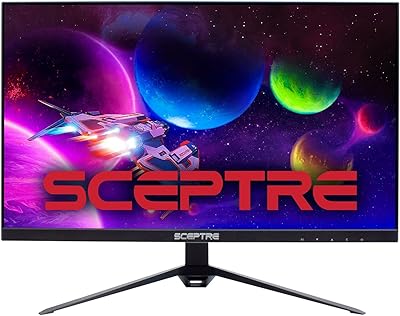
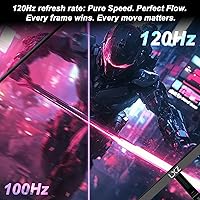
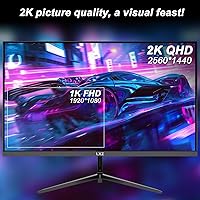
The LXZ LX270ZA 27″ QHD Monitor offers a balanced combination of resolution and performance suitable for a variety of tasks. Featuring a 2560×1440 QHD resolution and an IPS panel, this monitor provides consistent colors across wide viewing angles. Users will notice a 120Hz refresh rate coupled with Adaptive-Sync technology, which helps minimize screen tearing during fast-moving visuals. The matte screen surface effectively reduces glare under bright lighting, while the compact design and VESA compatibility allow flexible placement on desks or mounted setups. Overall, this monitor combines practicality with reliable visual performance for everyday computing, gaming, and creative work.

Features & Benefits

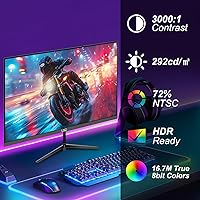
High contrast of 3000:1 ensures deep blacks and clear distinctions in imagery, enhancing visual depth. Color accuracy is strong, with 100% sRGB coverage for true-to-life representation. Dual HDMI 2.0 and DisplayPort 1.4 inputs support seamless connections to multiple devices. Flicker-free backlighting and low blue light technology contribute to comfortable extended viewing. FreeSync compatibility reduces stutter in dynamic gaming sequences. Brightness up to 290 nits keeps content visible in various lighting conditions, and the matte surface limits reflections. Together, these specifications make this QHD screen practical for multitasking, gaming, and design without causing significant eye fatigue.

Best For

This monitor is well-suited for home office users who need a sharp, clear display for documents and productivity tasks. Casual and competitive gamers benefit from the 120Hz refresh rate and adaptive sync support, which maintain smooth motion in fast-paced titles. Graphic designers and content creators will appreciate the accurate color reproduction and wide viewing angles. Additionally, users who prefer ergonomic setups can leverage VESA mounting options for adjustable positioning. Overall, the LXZ 27″ QHD display caters to individuals seeking a reliable, versatile mid-size monitor that performs well across work, entertainment, and creative applications without excessive complexity.

User Feedback

Users generally highlight the vibrant image quality and consistency in color as major positives. Gamers report smooth performance during action sequences, noting reduced tearing thanks to FreeSync. Some reviewers mention that initial setup may require minor adjustments to achieve ideal viewing angles. Eye comfort features, including flicker-free lighting and low blue light, are frequently praised for extended use. A few comments point out that brightness could be higher in very bright rooms, but the overall value for the price is considered positive. This QHD screen appears to satisfy both casual users and those with more demanding visual requirements.

Pros

  • This monitor provides sharp 2560×1440 resolution, ideal for detailed work and media consumption.
  • Wide IPS viewing angles ensure consistent colors from almost any position.
  • The 120Hz refresh rate delivers smoother motion in fast-paced gaming sessions.
  • Adaptive-Sync support reduces screen tearing and stuttering during gameplay.
  • Matte screen surface effectively minimizes reflections and glare in bright rooms.
  • Dual HDMI 2.0 and DisplayPort 1.4 inputs allow easy connection of multiple devices.
  • Low blue light and flicker-free technology help reduce eye fatigue over long periods.
  • Compact, VESA-mountable design fits neatly on smaller desks or multi-monitor setups.
  • High 3000:1 contrast ratio enhances depth and richness in visual content.

Cons

  • Brightness of 290 nits may be insufficient in very sunny or well-lit rooms.
  • Some users needed minor setup adjustments to achieve preferred tilt and height.
  • No built-in USB-C connectivity may require additional adapters for modern laptops.
  • Stand adjustments are somewhat limited compared to higher-end monitors.
  • Gamers seeking ultra-high refresh rates above 120Hz may find it restrictive.
  • The monitor is not ideal for professional color-critical photo editing requiring full Adobe RGB.
  • Heavier than some 27″ models, making repositioning slightly cumbersome.
  • Some buyers noted that factory calibration could vary slightly between units.

Ratings

After analyzing verified user reviews from multiple countries, languages, and platforms, RR-AI has compiled these scores for the LXZ LX270ZA 27″ QHD Monitor. Spam, bot-generated, incentivized, duplicated, off-topic, and exaggerated feedback was carefully filtered out, ensuring only authentic and high-quality insights contributed. The results reflect both strengths and pain points of this device, giving potential buyers a realistic view across diverse user experiences.

Display Quality
94%
Many buyers highlight the sharpness and clarity of this monitor, noting that text and images appear crisp even during detailed work or gaming sessions. The consistent brightness and contrast make it easier to focus on long projects or multimedia content. Users often report satisfaction with the balance of resolution and screen size for everyday tasks.
Some users mention that brightness could feel insufficient in very bright rooms, which can require extra lighting adjustments. A few noted minor backlight uniformity issues at extreme viewing angles, though these are rare. Not everyone agreed on the perfect balance of contrast for certain dark scenes.
Color Accuracy
91%
Graphic designers and content creators appreciate the accurate colors, noting that this device reproduces visuals faithfully for photo and video editing. The wide color gamut allows for detailed work without constant recalibration. Many users find it reliable for both work and entertainment.
A few users observed slight color shifts when viewed off-center, which can affect precision tasks. Not all buyers found it perfectly calibrated out of the box, requiring manual adjustments. Some casual users felt minor differences were negligible, though professionals may notice.
Refresh Rate Performance
90%
Gamers and multimedia enthusiasts enjoy the smooth motion provided by the 120Hz refresh rate. Fast-moving visuals appear fluid, reducing eye strain during extended gameplay or video editing sessions. Users frequently praise the responsive feel when interacting with high-framerate content.
A small portion of users reported occasional screen stutter with older graphics cards that don’t fully support high refresh rates. Some noted that certain software didn’t fully utilize the refresh potential, slightly lowering the perceived smoothness. Not everyone experienced a dramatic improvement over 60Hz in daily office use.
Adaptive Sync & Gaming
88%
Many buyers enjoy tear-free gameplay thanks to FreeSync support, which helps synchronize the monitor with the graphics card. Competitive gamers appreciated reduced stuttering and smoother action sequences, making this device suitable for both casual and more serious gaming sessions. Users often report an overall enhanced experience in fast-paced titles.
Some users mentioned that using FreeSync requires compatible hardware, and performance can vary across different systems. A few buyers noted minor input lag when certain settings were applied. Not all titles benefit equally, so experiences can be mixed depending on the game.
Build Quality
85%
Users find the monitor solidly built and durable, with a stable stand and minimal flex. The matte finish resists fingerprints, and the overall construction feels sturdy for daily use in offices or homes. Many buyers appreciate the thoughtful design without unnecessary bulk.
Some buyers wished the stand offered more height adjustment options, limiting ergonomic positioning. A few users reported minor cosmetic imperfections in the bezel or base. While generally solid, it may not feel as premium as higher-end models.
Connectivity Options
89%
The combination of HDMI and DisplayPort inputs allows users to connect multiple devices seamlessly. Users often find it convenient for switching between PCs, consoles, and other devices. This device’s setup supports versatile configurations for both work and play.
Some users noted the lack of USB-C or older analog ports, which could require adapters. A few mentioned that cable management could be improved, as connectors are close together on the back. Not all peripheral setups were compatible without additional accessories.
Eye Comfort Features
93%
Buyers report that flicker-free backlighting and low blue light settings reduce eye fatigue during long sessions. Office workers and students appreciate the comfort during extended document editing or online meetings. Many users noticed fewer headaches and improved focus with this QHD screen.
A few users found that low blue light settings slightly altered color warmth, which can be noticeable in design tasks. Not everyone uses these features regularly, so some benefits may go underutilized. Some reported a subtle dimming effect under certain modes.
Ease of Setup
82%
18%
Most users find assembly straightforward, especially with VESA mounting options for custom desk arrangements. Plug-and-play functionality works smoothly for connecting PCs and consoles. The compact design also allows easy placement in small workspaces.
Some buyers encountered minor alignment issues with the stand screws, requiring patience during installation. A few found initial driver installation or configuration slightly confusing. Not all users found the included instructions entirely clear.
Viewing Angles
90%
The IPS panel delivers consistent visuals even when viewed from the side, allowing multiple viewers to enjoy the content without noticeable color shift. Users report stable brightness and color uniformity across typical angles. This makes the device suitable for collaborative work or media consumption.
A few reviewers mentioned slight darkening at extreme angles, which is typical for most IPS panels. In rare cases, glare could become noticeable under angled lighting conditions. Some users with precise design needs may notice minor deviations at corners.
Brightness
78%
22%
Many users find the default brightness sufficient for typical indoor use, such as offices or bedrooms. It balances visibility with reduced eye strain effectively. Some users appreciate the ability to adjust settings for different environments.
Several buyers reported that brightness feels inadequate in very bright rooms or near sunlit windows. Outdoor or high-ambient conditions can make content less clear. Users seeking extremely bright displays may need external lighting adjustments.
VESA Mount Support
86%
Buyers value the flexibility of VESA mounting for custom desk setups and ergonomic positioning. Many were able to integrate this device into multi-monitor arrangements easily. Users highlight the secure mounting and compatibility with standard arms.
Some noted that mounting screws and brackets were not included, requiring separate purchases. A few found spacing for the mount slightly tight, complicating installation with thicker arms. Minor alignment adjustments were needed to achieve perfect positioning.
Value for Money
88%
Most users feel the monitor provides a strong balance of performance, features, and cost. The combination of QHD resolution, IPS panel, and 120Hz refresh is seen as competitive for mid-range pricing. Many buyers consider this device a reliable investment for work and gaming.
Some buyers expected higher-end adjustments or additional ports at the same price point. A few felt the design or stand could be more premium. While generally positive, not all users feel the price fully matches the highest-end features available.
Design & Aesthetics
80%
20%
Users generally find the monitor visually appealing with a clean, minimal bezel and matte finish. Its compact profile fits well on desks without dominating space. The neutral styling complements most home and office environments.
A few buyers mentioned the design is functional but not premium or stylish compared with more expensive monitors. Some felt the stand could be sleeker or more modern. A small portion of users prefer a more distinctive appearance.

Suitable for:

The LXZ LX270ZA 27″ QHD Monitor is well-suited for users who need a sharp, color-accurate display for work or entertainment. Graphic designers and content creators can benefit from the 100% sRGB coverage and IPS panel for consistent colors across wide viewing angles. Gamers seeking smoother motion and reduced screen tearing will appreciate this monitor’s 120Hz refresh rate and FreeSync support. Home office users and students can also find the matte screen and flicker-free panel helpful for reducing eye strain during extended work sessions. Its compact size and VESA-mountable design make it practical for small desks or multi-monitor setups, while dual HDMI and DisplayPort inputs provide flexibility for connecting multiple devices.

Not suitable for:

The LXZ LX270ZA 27″ QHD Monitor may not be ideal for users requiring extreme brightness or specialized professional color calibration. Those working in very bright environments might find the 290-nit brightness insufficient, and individuals needing a fully premium or highly adjustable stand could be disappointed. Casual users who only need a basic display may find the advanced refresh rate and FreeSync capabilities unnecessary. Additionally, users expecting USB-C connectivity or multiple analog ports will need adapters, making this monitor less convenient for some setups. Very high-end gamers or designers who demand the absolute highest-end features may find this monitor limited compared with flagship alternatives.

Specifications

  • Brand: Manufactured by LXZ, model LX270ZA.
  • Screen Size: 27″ diagonal display suitable for desk setups.
  • Resolution: 2560x1440 QHD resolution for sharp and detailed images.
  • Panel Type: IPS panel providing wide viewing angles and consistent colors.
  • Refresh Rate: 120Hz refresh rate ensures smooth motion during fast scenes.
  • Adaptive-Sync: Supports Adaptive-Sync and FreeSync for reduced screen tearing.
  • Contrast Ratio: High 3000:1 contrast ratio for deeper blacks and better image depth.
  • Color Coverage: 100% sRGB coverage for accurate color reproduction.
  • Brightness: Standard brightness level of 290 nits suitable for indoor use.
  • Screen Surface: Matte finish reduces glare and reflections from light sources.
  • Inputs: Includes two HDMI 2.0 ports and one DisplayPort 1.4 connection.
  • VESA Mount: VESA-compatible mounting allows attachment to arms or wall mounts.
  • Weight: Weighs approximately 9.9 lbs for moderate portability.
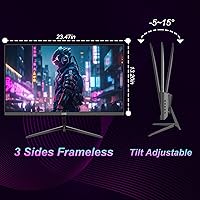
  • Dimensions: Physical size is 4.4 x 26.3 x 17.1 inches including stand.
  • Eye Care: Features flicker-free panel and low blue light settings for reduced eye strain.
  • Stand Adjustment: Supports tilt adjustment; height adjustment depends on VESA mount.
  • Audio: Does not include built-in speakers, external audio recommended.
  • Power: Uses standard AC power with built-in power management functions.
  • Build: Compact and sturdy design suitable for home or office environments.

FAQ

This monitor offers 2560×1440 QHD resolution, an IPS panel for wide viewing angles, 120Hz refresh rate with Adaptive-Sync, a matte screen to reduce glare, and a compact, VESA-mountable design for flexible setups.

It supports two HDMI 2.0 ports and one DisplayPort 1.4 input, making it compatible with PCs, laptops, gaming consoles, and other devices that use standard HDMI or DisplayPort connections.

Yes, the 120Hz refresh rate combined with FreeSync support ensures smooth gameplay with reduced tearing and stuttering, making it suitable for casual and competitive gaming sessions.

The LXZ 27″ QHD display includes flicker-free technology and low blue light settings, which help reduce eye fatigue during extended work or gaming sessions.

Yes, it is VESA-mountable, allowing you to attach it to compatible monitor arms or wall mounts for a cleaner and more ergonomic workspace.

The monitor has a brightness of 290 nits, which is generally adequate for most indoor environments, though it may be less effective in direct sunlight or very bright rooms.

Yes, the matte screen surface reduces reflections and glare, improving visibility in brightly lit rooms or near windows.

The stand allows basic tilt adjustment, and VESA mounting provides more flexibility. However, height adjustment is limited on the included stand.

With 100% sRGB coverage, this device provides accurate colors for general graphic work and content creation, though it may not meet professional requirements needing full Adobe RGB or DCI-P3 coverage.

Some users report needing minor adjustments for optimal tilt and alignment. It is recommended to carefully follow the manual for cable connections and initial calibration.