Overview

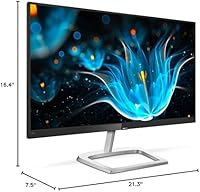
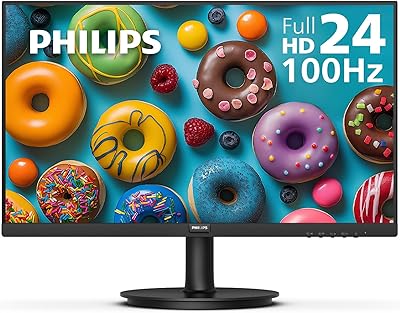
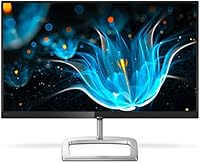
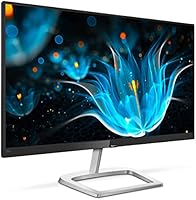
The Philips 246E9QDSB 24-inch IPS Monitor is the kind of screen you buy when you want a real upgrade from a tired laptop display without spending a fortune. It packs a 23.8-inch viewable IPS panel into a frameless three-sided design, so it looks sleeker on a desk than its price tag suggests. The resolution is a standard Full HD 1920x1080, which is plenty sharp for browsing, spreadsheets, and streaming video. Colors come through with the kind of depth IPS panels are known for, and the wide viewing angles mean the picture holds up even if you are not sitting dead center. It is a glossy panel, which adds some punch to the visuals. Overall, this Philips display reads as a sensible everyday monitor rather than a flashy gaming centerpiece.
Features & Benefits

Where this budget IPS monitor earns its keep is color performance. Philips rates it at 129% sRGB and 108% NTSC, numbers that translate into noticeably richer tones than you would expect from something in this price bracket. There is also a 75Hz refresh rate paired with AMD FreeSync, which smooths out motion just enough to make casual gaming feel less choppy without demanding a high-end graphics card. For long work sessions, LowBlue mode and Flicker-Free tech are quietly useful additions that cut down on the kind of eye fatigue that builds up over an 8-hour shift. The ultra-narrow bezels make this 24-inch screen an easy fit for a dual or triple monitor setup, and VESA compatibility means you are not locked into the included stand if you want to mount it on an arm.

Best For

This monitor makes the most sense for students and remote workers who need more screen real estate than a laptop offers but do not want to pay premium prices for it. It also suits casual gamers, the kind who play a few hours on weeknights and want FreeSync smoothness without chasing a 144Hz spec sheet. If you are building a multi-monitor desk and care more about slim bezels and a clean side-by-side look than chasing the absolute best color science on the market, this Philips display fits naturally into that setup. People who spend long hours staring at a screen, whether for work or study, will likely appreciate the eye-comfort features built into the panel. It is a practical pick rather than a luxury one.

User Feedback

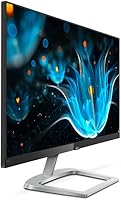
Reviewers tend to be pleasantly surprised by how vivid and sharp the picture looks given the cost, with several calling out the color quality as better than expected for a budget purchase. Build quality also gets generally positive marks, and people seem to feel the monitor holds up well day to day. The most common complaint is the stand, which only tilts and offers no height or swivel adjustment, so anyone wanting more ergonomic flexibility will need a separate mount. A handful of buyers also mention glare from the glossy coating in rooms with strong overhead lighting or windows facing the desk. None of these are dealbreakers, but they are worth knowing before you buy this 24-inch screen.

Pros

  • Color output feels noticeably richer and more vivid than the price would suggest
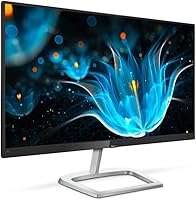
  • Frameless three-sided design makes multi-monitor setups look clean and cohesive
  • FreeSync support smooths out motion during casual gaming sessions
  • LowBlue mode and Flicker-Free tech genuinely help during long screen-heavy days
  • Build quality holds up well and feels sturdier than the cost implies
  • VESA compatibility gives you the option to mount it on an arm later
  • Wide viewing angles keep the picture consistent even off-center
  • The Philips 246E9QDSB 24-inch IPS Monitor delivers strong value for everyday use
Cons

  • The stand only tilts, with no height or swivel adjustment included
  • Glossy screen coating can cause noticeable glare in bright or sunlit rooms
  • 75Hz refresh rate falls short for fast-paced competitive gaming
  • No built-in speakers, so you will need external audio
  • Color calibration is not precise enough for professional editing work
  • Single HDMI port may feel limiting for some multi-device setups
  • Ergonomic upgrades require buying a separate monitor arm or mount
  • Glossy finish shows fingerprints and dust more easily than a matte panel

Ratings

Our scores for the Philips 246E9QDSB 24-inch IPS Monitor are generated by AI after analyzing thousands of verified buyer reviews from around the world, with spam, bot activity, and incentivized feedback filtered out before scoring. What is left is a clearer picture of how this monitor actually performs in real homes and offices, strengths and weak points included.
Color Accuracy
89%
Buyers consistently mention that the 129% sRGB coverage delivers noticeably richer, more vibrant colors than expected at this price, especially for everyday browsing and video streaming. Many describe it as a clear step up from their previous laptop or budget monitor.
A few reviewers doing photo editing note the panel is not precisely calibrated out of the box, requiring manual adjustment for color-critical work. It is also not designed to compete with monitors built specifically for professional creative use.
Sharpness & Clarity
84%
The Full HD resolution looks crisp at this screen size, with text and icons rendering cleanly for office work, spreadsheets, and general browsing without eye fatigue from blurriness. Most users find it plenty sharp for daily multitasking.
Some buyers comparing it to higher-resolution displays note that text can look slightly less refined up close. It is not a fit for those wanting 1440p or 4K-level detail.
Gaming Performance
76%
24%
Casual gamers appreciate the 75Hz refresh rate combined with AMD FreeSync, which noticeably reduces screen tearing during lighter titles and keeps motion feeling smooth on a budget. It is a popular pick for weeknight gaming sessions.
Competitive gamers point out that 75Hz falls short compared to dedicated high-refresh gaming monitors built for fast-paced shooters or esports titles. Response time, while adequate, is not built for top-tier competitive play.
Eye Comfort
88%
Users working long shifts at a desk frequently mention that LowBlue mode and Flicker-Free tech genuinely reduce strain during extended sessions, making it easier to work for hours without headaches. It is a standout feature for remote workers and students alike.
A subset of users in bright rooms still report discomfort from glare bouncing off the glossy coating, which can partially offset the eye comfort benefits. Pairing it with better lighting control helps but is not always practical.
Build Quality
81%
19%
Reviewers are often pleasantly surprised by how sturdy this budget IPS monitor feels, with a solid chassis and frameless design that looks more premium than the price suggests. It holds up well to daily desk use over time.
A small number of buyers mention the plastic stand base feels less substantial than the panel itself. It is functional but not as premium as metal-based stands found on pricier monitors.
Stand & Ergonomics
58%
42%
The tilt function works smoothly and is enough for users who simply set their desk height once and rarely adjust the monitor afterward. It keeps the footprint simple and uncluttered.
This is consistently the most criticized aspect, with reviewers frustrated by the lack of height, swivel, or pivot adjustment. Many end up buying a separate monitor arm to get proper ergonomic positioning.
Screen Glare
62%
38%
In dimly lit or controlled-lighting rooms, the glossy coating actually enhances perceived contrast and color punch, making movies and photos look more vivid than on matte alternatives.
Multiple buyers in sunlit rooms or under strong overhead lighting report distracting reflections that interfere with visibility. It is a recurring complaint for anyone without control over their room's lighting.
Multi-Monitor Setup
86%
The ultra-narrow, three-sided frameless bezels are repeatedly praised by users running dual or triple monitor setups, since the screens sit close together with minimal visual interruption. It is a favorite among home office workers expanding their workspace.
A few buyers note that without VESA-mounted alignment, getting multiple stands to sit at exactly the same height takes some manual adjustment. This is a minor inconvenience rather than a design flaw.
Connectivity
79%
21%
Most users find the available ports sufficient for typical desktop and laptop setups, covering the basics needed for everyday connections without complication.
Some reviewers wish for additional USB or audio output options, particularly those running more complex multi-device workstations. It covers the essentials but does not go beyond that.
Value for Money
91%
This is where this 24-inch screen consistently wins buyers over, with reviewers repeatedly stating the color quality, build, and feature set punch well above the price point. It is frequently recommended as a smart budget upgrade.
A few users note that once you factor in the cost of a separate monitor arm for better ergonomics, the overall value proposition narrows slightly. Still, most consider it a worthwhile trade-off.
Setup & Ease of Use
85%
Buyers describe setup as straightforward, with the stand attaching easily and on-screen controls that are simple to navigate without digging through manuals. Most are up and running within minutes.
A small number of first-time monitor buyers mention the on-screen display menu navigation feels slightly dated compared to newer touch-button interfaces.
Brightness & Contrast
80%
20%
Users report the panel gets bright enough for well-lit rooms and daytime use, with good contrast that makes dark scenes in movies and games look reasonably deep.
A few reviewers in very bright spaces wish for higher peak brightness to better counteract glare from the glossy screen, especially near windows.

Suitable for:

The Philips 246E9QDSB 24-inch IPS Monitor is a strong fit for students and remote workers who need more screen space than a laptop offers but do not want to spend a lot to get it. It also works well for casual gamers who want the smoothness of FreeSync without paying for a high refresh rate panel they will not fully use. Anyone setting up a dual or triple monitor desk will appreciate the slim bezels, since they let multiple screens sit close together without a distracting gap in the middle. People who spend long stretches of the day reading or writing will likely notice the benefit of the LowBlue and Flicker-Free features, even if they never think about them directly. It is also a sensible pick for anyone upgrading from an older, lower-resolution display who wants a noticeable jump in color and sharpness without overspending.
Not suitable for:

Buyers who care a lot about ergonomics should think twice, since the Philips 246E9QDSB 24-inch IPS Monitor ships with a tilt-only stand and no built-in height or swivel adjustment. Competitive gamers chasing high frame rates will find the 75Hz refresh rate limiting compared to dedicated gaming monitors built for faster, more demanding titles. Anyone working in a bright room with windows or strong overhead lighting may find the glossy screen coating reflective enough to be distracting during the day. Professionals doing color-critical work like photo or video editing may also want something with tighter color calibration than this panel offers. If a fully adjustable stand or ultra-high refresh rate is a must-have, this is not the right monitor.
Specifications

  • Panel Type: The display uses an IPS panel, which is known for stable colors and wide viewing angles compared to TN panels.
  • Screen Size: The screen measures 24 inches diagonally with a 23.8-inch viewable area.
  • Resolution: It runs at a Full HD resolution of 1920x1080 pixels.
  • Aspect Ratio: The panel has a standard 16:9 aspect ratio common to most modern monitors.
  • Color Gamut: Color coverage is rated at 129% sRGB and 108% NTSC for richer, more accurate tones.
  • Refresh Rate: The monitor supports a 75Hz refresh rate for smoother on-screen motion.
  • Adaptive Sync: AMD FreeSync technology is included to reduce screen tearing during gaming.
  • Eye Comfort: LowBlue mode and Flicker-Free technology are built in to help reduce eye strain over long sessions.
  • Screen Surface: The panel has a glossy finish rather than a matte anti-glare coating.
  • Bezel Design: It features a three-sided frameless design with ultra-narrow borders for cleaner multi-monitor setups.
  • Mount Compatibility: The monitor is VESA mount compatible for use with wall mounts or monitor arms.
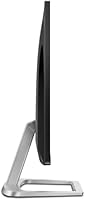
  • Stand Adjustment: The included stand offers tilt adjustment only, with no height, swivel, or pivot function.
  • Weight: The monitor weighs approximately 6.47 pounds.
  • Dimensions: The unit measures 7.5 x 21.3 x 16.4 inches in its standard footprint.
  • Color Option: It is available in a black finish.
  • Brand: This monitor is manufactured by Philips through TPV Technology.

Related Reviews

Philips 241B8QJEB 24″ IPS Monitor
77%
93%
Ergonomic Stand
88%
Eye Comfort
91%
Connectivity
84%
USB Hub Utility
76%
Image Quality
More
Philips 24B2N2100 24-inch Full HD Monitor
75%
93%
Value for Money
86%
Image Clarity
88%
Eye Comfort
57%
Glare & Reflections
51%
Stand & Ergonomics
More
ViewSonic VG2448A 24-inch IPS Monitor
83%
93%
Ergonomic Adjustability
88%
Eye Comfort
86%
Connectivity & Port Selection
74%
Image Quality
81%
Build Quality
More
HP Series 5 524sf 24-inch Monitor
75%
78%
Display Quality
71%
Color Accuracy
67%
Brightness
86%
Eye Comfort
74%
Build Quality
More
Philips 241V8LB 24-inch Full HD Monitor
78%
93%
Value for Money
86%
Image Clarity & Sharpness
88%
Contrast & Panel Performance
79%
Refresh Rate & Motion Smoothness
84%
Eye Comfort & Fatigue Reduction
More
KTC H24T27 24-inch QHD Gaming Monitor
68%
88%
Image Clarity
84%
Color Accuracy
74%
Gaming Performance
41%
HDR Quality
46%
Ergonomics & Adjustability
More
ReHisk 241KV2 24-inch Gaming Monitor
73%
91%
Refresh Rate Performance
88%
Adaptive Sync
79%
Panel & Color Quality
54%
Brightness & HDR
67%
Build Quality
More
Dell P2419H 24-Inch IPS Monitor
84%
88%
Color Accuracy
91%
Viewing Angles
89%
Eye Comfort
93%
Stand Ergonomics
87%
Build Quality
More
ViewSonic VP2468a 24-Inch IPS Monitor
76%
93%
Color Accuracy
89%
Connectivity
61%
Resolution & Pixel Density
86%
Build Quality
91%
Ergonomics
More
Z-Edge U24I 24-inch IPS Monitor
85%
88%
Display Quality
92%
Value for Money
85%
Build Quality
84%
Gaming Performance
80%
Ergonomics & Design
More

FAQ

It works well for casual gaming thanks to the 75Hz refresh rate and AMD FreeSync support, which keeps motion looking smooth. It is not built for competitive, fast-paced titles where higher refresh rates matter more, but for relaxed weeknight gaming it holds up nicely.

Yes, this budget IPS monitor is VESA compatible, so you can swap out the included stand for a wall mount or articulating arm if you want more flexible positioning.

No, the stand only tilts. There is no height, swivel, or pivot adjustment built in, so if ergonomics are important to you, plan on pairing it with a separate monitor arm.

It can, especially in rooms with bright overhead lighting or windows facing the desk. If your workspace gets a lot of natural light, you may notice some reflection on the glossy coating.

The color coverage is genuinely impressive for the price, but it is not precisely calibrated for professional color-critical work like photography or video editing. For everyday use and casual creative work it looks great.

The ultra-narrow, three-sided frameless bezels make it easy to set up two or even three of these screens next to each other without a distracting gap in the middle.

Yes, this 24-inch screen includes LowBlue mode and Flicker-Free technology, both aimed at reducing the kind of fatigue that builds up after hours of staring at a screen.

It runs at a standard Full HD resolution of 1920x1080, which is plenty sharp for everyday browsing, office work, and streaming video.

Most buyers feel it is. Reviewers consistently mention that the construction feels sturdier than expected given how affordable the Philips 246E9QDSB 24-inch IPS Monitor is.
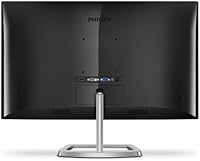
It weighs about 6.47 pounds and measures 7.5 x 21.3 x 16.4 inches, so it has a compact footprint that fits comfortably on most desks without taking up too much space.