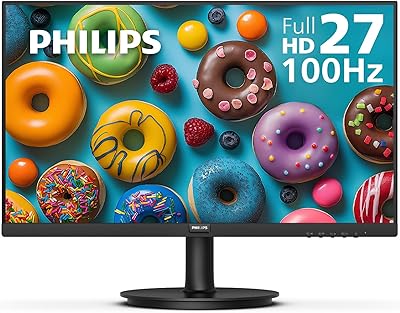
Philips 241V8LB 24-inch Full HD Monitor




Overview
The Philips 241V8LB 24-inch Full HD Monitor sits in a comfortable spot for buyers who want a dependable, brand-name screen without stretching their budget. Philips opted for a VA panel rather than IPS, and that choice matters — VA technology delivers noticeably richer contrast, which makes everyday content like spreadsheets, web pages, and streaming video look more grounded and less washed out. The frameless three-sided design keeps the desk looking clean and works especially well for side-by-side setups. One genuine talking point is the 4-year advance replacement warranty, which is rare at this price point. The glossy screen finish, however, is worth knowing about upfront — it can pick up reflections in brighter rooms.
Features & Benefits
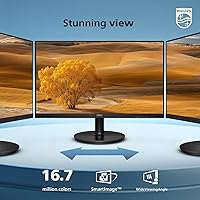
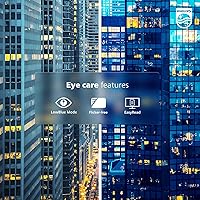
The 100Hz refresh rate is the kind of upgrade that sounds small on paper but feels immediately noticeable — scrolling through long documents looks sharper, and casual gaming sits comfortably above what a standard 60Hz panel can offer. The VA panel contrast is the real visual story here; darker backgrounds stay genuinely dark, which improves readability in dimmer environments. Viewing from the side is also much less of an issue than with some budget screens, as the wide viewing angle holds color consistency well. Eye Care mode and EasyRead help during marathon work sessions, and VESA mount support means you can swap the included stand for a fully adjustable arm whenever you want.
Best For
If you work from home and spend hours staring at documents, emails, and video calls, this Philips monitor handles that daily routine reliably and without noticeable eye fatigue. Students get a lot of usable screen space at a price that leaves room in the budget for other things. Building a dual-monitor setup? The thin bezel edges make the gap between two screens minimal enough that it barely registers. Casual gamers who want something smoother than a basic display but are not ready to invest in a dedicated gaming screen will find the refresh rate hits a satisfying middle ground. Upgraders from older or smaller displays will notice the difference right away.
User Feedback
The 241V8LB holds a strong rating across thousands of reviews, and recurring themes are consistent: buyers appreciate the image clarity straight out of the box, the easy setup, and the genuine peace of mind that comes with the warranty — that last point comes up more than you might expect. On the critical side, the glossy panel is a real concern for anyone with windows behind their desk, since reflections can become distracting. The stand offers no height adjustment, which frustrates taller users. A few creative professionals note that color reproduction, while pleasing to the eye, is not calibrated for serious design work. At this screen size, most buyers find 1080p resolution perfectly adequate for daily use.
Pros
- The VA panel produces noticeably deeper contrast than most IPS alternatives at a comparable price, making everyday content look richer.
- A four-year advance replacement warranty is genuinely rare at this price tier and adds real long-term ownership confidence.
- The three-sided frameless design looks clean on a desk and works especially well in dual-monitor configurations.
- EasyRead and Eye Care modes make a tangible difference during long workdays — reduced fatigue accumulates meaningfully over a full week.
- The 100Hz refresh rate delivers smoother scrolling and a more responsive feel compared to standard 60Hz office displays.
- VESA mount support gives you a straightforward path to a full ergonomic arm setup whenever the included stand feels limiting.
- Setup is fast and tool-free — most buyers are up and running within minutes of opening the box.
- Full HD resolution looks sharp and well-defined at this screen size for typical office and home use.
- The wide viewing angle keeps colors consistent even when colleagues or family members are watching from an angle.
- Build quality feels solid and durable relative to what competing no-name brands offer at the same price.
Cons
- The glossy screen coating causes persistent glare in naturally lit rooms — a real daily irritant for many buyers.
- The stand only tilts; there is no height adjustment, swivel, or pivot without purchasing a separate VESA arm.
- Only one HDMI port is available, making multi-source setups unnecessarily awkward and cable-dependent.
- Color accuracy is not suitable for design or photography work — factory calibration prioritizes visual appeal over precision.
- The on-screen menu navigation via rear-mounted buttons is clunky and takes patience to get used to.
- Minor panel variation between units means two side-by-side displays may need manual calibration to match properly.
- The bottom bezel chin is noticeably thicker than the other three sides, which breaks the frameless illusion up close.
- Fast-moving scenes can reveal mild ghosting — not a dealbreaker for office use, but noticeable during action content.
- There is no USB hub, DisplayPort, or USB-C — connectivity options are sparse even by budget monitor standards.
- Some buyers have reported friction when initiating warranty claims, which slightly undercuts the otherwise strong after-sales promise.
Ratings
The Philips 241V8LB 24-inch Full HD Monitor has earned a strong reputation across thousands of verified purchases globally, and our AI-driven scoring reflects that — drawing exclusively from authenticated buyer reviews while filtering out incentivized, bot-generated, and low-credibility submissions. The scores below capture what real users consistently love about this 24-inch display and where it genuinely falls short, so you get a transparent picture before committing.
Value for Money
Image Clarity & Sharpness
Contrast & Panel Performance
Refresh Rate & Motion Smoothness
Eye Comfort & Fatigue Reduction
Glare & Screen Coating
Stand & Ergonomics
Build Quality & Materials
Connectivity & Port Selection
Color Accuracy
Bezel & Desk Aesthetics
Setup & Out-of-Box Experience
Warranty & After-Sales Confidence
Multi-Monitor Compatibility
Suitable for:
The Philips 241V8LB 24-inch Full HD Monitor is a strong match for home office workers who spend the bulk of their day in documents, spreadsheets, and video calls — the VA panel and Eye Care features hold up well across long sessions without the eye fatigue that cheaper screens tend to cause. Students on a tight budget will find this 24-inch display covers everything from lecture notes to late-night streaming without any meaningful compromise for day-to-day use. If you are building a dual-monitor workstation, the nearly borderless edges on three sides make side-by-side arrangements look genuinely clean, which is harder to achieve with conventionally bezeled screens at this price. Casual gamers who want a noticeable smoothness upgrade over a basic display — without crossing into dedicated gaming monitor territory — will find the 100Hz refresh rate hits a practical sweet spot. The four-year advance replacement warranty also makes this a particularly sensible pick for anyone who wants long-term ownership confidence rather than gambling on a no-name brand with unclear support.
Not suitable for:
The Philips 241V8LB 24-inch Full HD Monitor is not the right call for anyone who works in a brightly lit room with natural light coming in from the side or behind — the glossy screen coating reflects ambient light persistently, and no amount of brightness adjustment fully resolves it. Graphic designers, photographers, and video editors who need accurate, consistent color reproduction should look elsewhere; this panel is tuned for pleasing everyday visuals, not color-critical professional work. Competitive gamers will also find this display limiting — the panel was not engineered for fast response times, and motion clarity during high-speed gameplay does not match what a purpose-built gaming monitor delivers even at comparable refresh rates. Users who need ergonomic flexibility from their stand — whether due to desk height, posture requirements, or accessibility needs — will be frustrated by the tilt-only base, which offers no height or swivel adjustment without buying a separate arm. Anyone hoping to connect multiple source devices simultaneously will also hit a wall quickly, as the single HDMI port and legacy VGA connection leave no room for a multi-input workflow.
Specifications
- Screen Size: The active display area measures 23.8 inches diagonally, which Philips markets as a 24-inch class panel.
- Resolution: Native resolution is 1920x1080 Full HD, delivering a pixel density well-suited to standard office work and general media consumption at this screen size.
- Panel Type: Uses a VA (Vertical Alignment) panel, which offers stronger contrast ratios and deeper blacks compared to IPS panels in the same price range.
- Refresh Rate: Supports a maximum refresh rate of 100Hz, providing noticeably smoother motion than standard 60Hz displays for both scrolling and casual gaming.
- Aspect Ratio: 16:9 widescreen aspect ratio, the standard format for productivity software, streaming video, and most modern content.
- Viewing Angle: Rated at 178 degrees both horizontally and vertically, meaning colors and brightness remain consistent when viewed from almost any angle.
- Color Depth: Capable of rendering 16.7 million colors, covering standard sRGB content with natural, lifelike gradients for everyday use.
- Screen Surface: Glossy anti-glare coating enhances color vibrancy in controlled lighting but can produce visible reflections in bright or naturally lit environments.
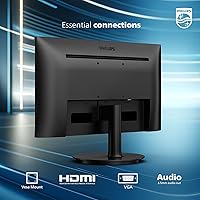
- Connectivity: Equipped with one HDMI port and one VGA port, covering the most common connection types for desktop and laptop users.
- VESA Mount: Compatible with standard 100x100mm VESA mounting patterns, allowing the included stand to be replaced with a third-party monitor arm.
- Bezel Design: Frameless on three sides (top, left, right), with a slightly thicker chin at the bottom, making it well-suited for side-by-side multi-monitor arrangements.
- Eye Care: Includes Philips EasyRead mode and Eye Care technology designed to reduce flicker and blue light exposure during extended screen sessions.
- Dimensions: Assembled with stand, the monitor measures approximately 21.25 inches wide, 16.38 inches tall, and 7.96 inches deep.
- Weight: The fully assembled unit weighs approximately 6.39 pounds, making it easy to reposition or transport between workspaces.
- Stand Adjustment: The included stand supports tilt adjustment only; height, swivel, and pivot adjustments are not available without a third-party VESA arm.
- Power Input: Operates on 12 volts DC via an external power adapter included in the box.
- Warranty: Covered by Philips 4-Year Advance Replacement Warranty, meaning a replacement unit is dispatched before the defective one is returned.
- Release Date: This model was first made available for purchase in August 2023.
Related Reviews
Dell SE2425HM 24-inch IPS Monitor
Dell D2421H 24-inch Full HD IPS Monitor
Philips 221V8LB3 22-Inch Full HD Monitor
Dell S2421HS 24-Inch FHD IPS Monitor
ViewSonic VA2447-MHU 24 Inch Full HD Monitor
Acer K243Y 24-inch Full HD IPS Monitor
KTC H24V13 24-Inch FHD Gaming Monitor
ViewSonic VA2409M 24-inch IPS Monitor
LG 24MP60G-B 24-inch IPS Monitor