

Overview

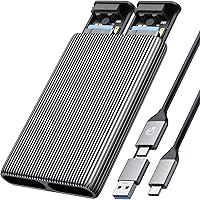
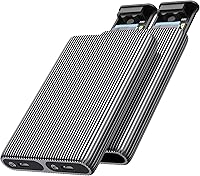
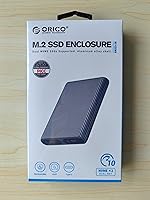
The ORICO Dual M.2 NVMe SSD Enclosure is a dual-bay storage accessory from a Chinese brand with a long track record in drives and enclosures. It connects two NVMe SSDs to a host simultaneously over USB 3.2 Gen2, pulling real-world speeds close to 1000 MB/s. The all-aluminum body with fin-style heat sinks handles heat during sustained transfers better than the plastic alternatives common at this price tier. One thing to flag upfront: this two-slot NVMe dock only works with NVMe-based M.2 drives. SATA M.2, PCIe AHCI, and mSATA are all incompatible, which catches a surprising number of buyers off guard.

Features & Benefits

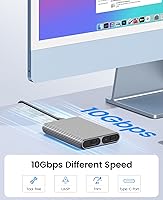
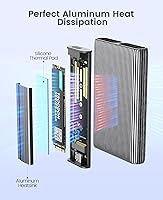
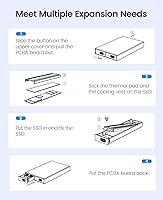
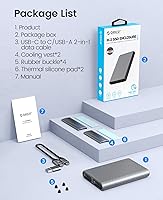
The interface is USB 3.2 Gen2 over Type-C, which translates to roughly 1000 MB/s in practice when paired with a fast NVMe drive. The included 2-in-1 cable covers both USB-C to C and USB-C to A right out of the box. Each bay operates as a completely independent volume — no RAID, no pooling, just two separate drives your OS sees individually. Tool-free installation is genuinely simple: slide the drive in, seat it with the rubber plug, done. Two silicone thermal pads alongside the aluminum heat sinks add real contact area, and during extended file transfers that extra cooling actually shows up in sustained throughput. No external power brick needed either.

Best For

The ORICO dual NVMe caddy earns its place for a fairly specific type of user. Video editors and content creators who juggle multiple project drives will appreciate plugging in two SSDs at once without a separate hub. It is also a practical pick for migrating data between drives, since both volumes appear independently and you can move files directly. Smaller form factors like 2230 drives — common in recent laptops and the Steam Deck — are supported, which broadens the appeal. Smart TV or console users with USB-C OTG get high-speed external storage without the speed penalties of slower enclosures or mechanical drives.

User Feedback

The consensus among buyers is largely positive, with build quality and heat management mentioned most often. People switching from plastic single-bay enclosures tend to notice the difference right away. The frustrations are worth knowing, though. Only one cable ships in the box — with two bays available, that feels like an oversight for anyone expecting to run both drives simultaneously. A few users have also hit compatibility walls after installing M.2 SATA drives, which this enclosure simply will not recognize. Read speeds track closely with advertised numbers; write speeds vary more by drive brand. A handful of users report intermittent disconnects on older USB 3.0 hosts.

Pros

  • Both NVMe drives mount as fully independent volumes — no RAID complexity, just clean plug-and-play access.
  • Aluminum alloy build with fin-style heat sinks outperforms plastic enclosures during sustained high-speed transfers.
  • Tool-free rubber plug installation means drives are ready to use in under two minutes, no screwdriver needed.
  • USB 3.2 Gen2 interface delivers real-world read speeds close to 1000 MB/s with a capable NVMe drive.
  • Bus-powered over a single USB-C connection — no power brick, no extra cables cluttering your bag.
  • The included 2-in-1 cable covers both USB-C to USB-C and USB-C to USB-A hosts right out of the box.
  • Supports all four common M.2 form factors, including compact 2230 drives from recent laptops and handheld devices.
  • Compatible with Windows, macOS, and Linux with no driver installation required.
  • Compact and light enough to carry daily without adding noticeable bulk to a laptop bag.
  • Works with OTG-capable Android devices, smart TVs, and consoles, not just traditional computers.

Cons

  • Only one cable is included for a two-bay enclosure — a second cable requires a separate purchase.
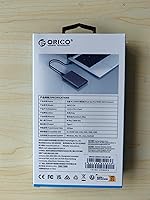
  • SATA-based M.2 drives are completely unsupported, and this limitation is not clearly communicated in the packaging.
  • Write speeds vary noticeably depending on drive brand and host controller, often lagging behind advertised figures.
  • Rubber retention plugs wear out with repeated drive swaps and are difficult to replace or source separately.
  • Occasional disconnects reported on older USB 3.0 ports make it unreliable on legacy host setups.
  • No included case or pouch means the exposed fin design can snag or scratch items in a packed bag.
  • Bus power can be inconsistent on low-output USB-C ports, occasionally causing one bay to fail to mount.
  • The enclosure gets warm to the touch during very long continuous write sessions despite the passive cooling design.

Ratings

The ORICO Dual M.2 NVMe SSD Enclosure has been scored by our AI system after analyzing verified global buyer reviews, with spam, bot-submitted, and incentivized feedback actively filtered out. The ratings below reflect where this two-slot NVMe dock genuinely delivers and where real users have run into friction. Both strengths and recurring pain points are represented transparently across every category.

Build Quality
88%
The aluminum alloy chassis feels noticeably more substantial than the plastic enclosures common at this price tier. Users frequently mention that it does not flex or creak, and the fin-style exterior gives it a purposeful, tool-grade look that holds up well after repeated handling.
A few buyers note that the rubber retention plugs feel less refined than the rest of the unit — they can be fiddly to seat correctly and show wear over time with frequent drive swaps.
Thermal Management
84%
During sustained transfers of large video files, the aluminum body and included silicone thermal pads do meaningful work keeping drive temperatures in check. Users switching from plastic single-bay units report noticeably cooler operation under the same workloads.
The passive cooling has its limits under very long continuous writes — some users pushing large sequential workloads report the enclosure getting quite warm to the touch, though throttling complaints are relatively rare.
Transfer Speed
82%
18%
Read speeds consistently track close to the advertised 1000 MB/s ceiling when paired with a fast Gen3 or Gen4 NVMe drive and a capable USB 3.2 Gen2 host port. For large file migrations or video editing workflows, this is a meaningful step above USB 3.0 enclosures.
Write speeds show more variability and depend heavily on the specific drive brand and the host system. Some users report write performance falling noticeably short of read speeds, particularly on mid-range NVMe drives.
Drive Compatibility
71%
29%
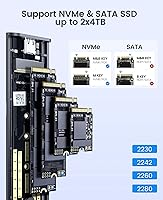
Support for all four common M.2 form factors — 2230, 2242, 2260, and 2280 — is a genuine practical advantage, especially for users with compact 2230 drives from recent laptops or handheld gaming devices.
The NVMe-only limitation is the single biggest source of negative reviews. A meaningful share of buyers assumed any M.2 drive would work, only to find their SATA-based M.2 or PCIe AHCI drive completely unrecognized. This is a spec issue, not a defect, but the frustration is real and recurring.
Ease of Installation
91%
The tool-free rubber plug system genuinely lives up to its billing. Most users report getting both drives seated and recognized within a couple of minutes, with no driver installation required on Windows, macOS, or Linux.
The rubber plugs, while convenient, do not always hold drives as securely as a traditional screw, which gives some users pause when the enclosure is used in portable or travel contexts where it might get jostled.
Cable & Connectivity
67%
33%
The included 2-in-1 cable handles both USB-C to USB-C and USB-C to USB-A connections, which covers most modern laptops and desktops without needing a separate adapter.
Only one cable ships in the box. For a dual-bay enclosure where the clear use case often involves connecting to two separate machines or setups, this feels like a corner cut. Several users flagged having to source a second cable independently.
Port & Host Compatibility
73%
27%
Works reliably across Windows, macOS, and Linux without any driver setup. OTG-capable Android devices, smart TVs, and consoles with USB-C ports are also supported, giving the enclosure more versatility than its spec sheet implies.
A recurring complaint involves intermittent disconnects when plugging into older USB 3.0 Type-A ports via the included adapter end. The issue appears tied to host controller quality rather than the enclosure itself, but it is frequent enough to be worth noting.
Portability
86%
At just under 3.6 ounces and roughly the footprint of a large smartphone, this dual-bay enclosure slips into a laptop bag without adding noticeable bulk. It is one of the more compact dual-NVMe options available at this price level.
The exposed fin design, while functional for cooling, means the enclosure has no included pouch or case. In a bag with other gear, the fins can snag or scratch surrounding items, which a few traveling users have pointed out.
Value for Money
78%
22%
Relative to other dual-bay NVMe enclosures, the combination of aluminum construction, passive cooling hardware, and USB 3.2 Gen2 speeds at this price point is competitive. Buyers coming from single-bay plastic enclosures tend to feel the upgrade is well justified.
If you only need one drive at a time, there are single-bay options at significantly lower cost with similar speeds. The value case depends almost entirely on whether you actually need two simultaneous NVMe connections.
Thermal Pad Quality
74%
26%
ORICO includes two silicone thermal pads in the box — one per drive — which make proper contact with the aluminum shell and contribute to the cooler operating temps users report compared to padless designs.
The pads are adequate but not premium. A couple of enthusiast users noted they replaced them with higher-conductivity aftermarket pads to squeeze out better sustained performance, suggesting the stock pads are functional but not exceptional.
Bus Power Reliability
79%
21%
Running without an external power brick is a real convenience for portable use. Most users find both bays power up reliably from a single USB-C port on a modern laptop or powered hub, with no instability during normal transfers.
On some lower-power USB-C ports — particularly on older ultrabooks or unpowered hubs — users have reported one bay failing to mount consistently. Using a powered hub resolves this, but it does reduce the convenience of the bus-powered design.
Setup & Out-of-Box Experience
83%
No driver CD, no software, no configuration — plug it in and both drives appear as independent volumes within seconds. For less technical users, this zero-friction setup is one of the most appreciated aspects of the product.
The packaging documentation is minimal, and the NVMe-only restriction is not prominently communicated in the box. A short compatibility checklist in the packaging would prevent a significant share of the negative reviews this product receives.
Durability Over Time
76%
24%
The aluminum shell resists the kind of scuffing and cracking that plagues plastic enclosures after a few months of regular use. Users who have owned this for over a year generally report no structural degradation.
The rubber retention plugs are the weak point for long-term durability. With frequent drive swaps, they stretch and lose grip, and replacement plugs are not easy to source separately.

Suitable for:

The ORICO Dual M.2 NVMe SSD Enclosure is a strong pick for anyone who regularly works with two NVMe drives at once and needs a portable, bus-powered solution that does not require a power outlet. Video editors and content creators who move large project files between drives will get the most out of it — having both volumes accessible simultaneously via a single USB-C connection cuts out a lot of the back-and-forth that comes with single-bay enclosures. It is equally well-suited for users in the middle of a laptop SSD upgrade, since you can run the old and new drives side by side and transfer everything directly without going through cloud storage or a third machine. Developers and IT professionals who maintain separate drives for different environments will also find the independent bay behavior clean and predictable. Even console and smart TV users with USB-C OTG support can benefit, getting near-USB-3.2 speeds without investing in a bulkier desktop solution.

Not suitable for:

If your M.2 drive is SATA-based rather than NVMe, the ORICO Dual M.2 NVMe SSD Enclosure will not recognize it — full stop — and this catches more buyers off guard than it should. Users who only ever need one drive accessible at a time will find better value in a simpler, less expensive single-bay enclosure that costs meaningfully less. Anyone relying on older USB 3.0 ports as their primary connection should be aware that intermittent disconnect issues have been reported in that setup, and the experience is less reliable than on modern USB-C hosts. If you need RAID functionality, mirroring, or a combined storage pool, this two-slot NVMe dock does not offer that — each bay operates as a fully separate, independent volume with no bridging. Finally, buyers who want a bundled travel pouch or a second cable included in the box may find the out-of-box accessories underwhelming for the price.

Specifications

  • Interface: Connects to host devices via USB 3.2 Gen2, delivering up to 10 Gbps bandwidth over a USB Type-C port.
  • Max Transfer Speed: Real-world sequential read speeds reach approximately 1000 MB/s when paired with a fast NVMe drive and a capable host controller.
  • Drive Protocol: Compatible exclusively with NVMe-based M.2 drives; M.2 SATA, PCIe AHCI, mSATA, and non-M.2 form factor drives are not supported.
  • Drive Key Support: Accepts M-Key and B+M Key M.2 NVMe drives; B-Key-only SATA drives will not be recognized.
  • Form Factors: Supports M.2 drive sizes 2230, 2242, 2260, and 2280 across both bays independently.
  • Max Capacity: Each bay supports drives up to 4TB, for a combined maximum of 8TB across both slots.
  • Bay Behavior: The two drive bays operate as fully independent volumes; there is no RAID, spanning, or pooling functionality.
  • Material: Enclosure body is constructed from aluminum alloy with an external fin-style pattern to aid passive heat dissipation.
  • Thermal Solution: Includes two aluminum heat sinks and two silicone thermal pads, one set per drive bay, to manage heat during sustained transfers.
  • Power Source: Bus-powered via the host USB-C port; no external power adapter or wall outlet is required.
  • Included Cable: Ships with one 2-in-1 cable supporting both USB-C to USB-C and USB-C to USB-A connections.
  • Installation: Tool-free design uses rubber plugs to retain drives in their bays; no screwdriver or mounting hardware is needed.
  • Driver Requirement: No driver installation is required; the enclosure is plug-and-play on Windows, macOS, and Linux out of the box.
  • OS Compatibility: Officially supports Windows, macOS, and Linux; also works with OTG-capable Android devices, smart TVs, and select gaming consoles.
  • Connector Type: Uses a USB Type-C port on the enclosure side for both data transfer and bus power delivery.
  • Dimensions: The enclosure measures 4.41 x 2.95 x 0.67 inches, making it compact enough to carry in a laptop bag or shirt pocket.
  • Weight: Weighs approximately 3.52 oz (roughly 100g), which is light for an all-aluminum dual-bay enclosure.
  • Acceleration Protocols: Supports both UASP and TRIM acceleration protocols to improve transfer efficiency and help maintain long-term drive performance.
  • Hot Swap Support: Supports hot replacement, meaning drives can be swapped without powering down or restarting the host device.
  • Manufacturer: Designed and produced by Shenzhen ORICO Technologies Co., Ltd., a brand specializing in storage accessories and PC peripherals.

Related Reviews

WAVLINK Dual-Bay NVMe M.2 SSD Cloner

75%
83%
Offline Cloning Reliability
78%
Transfer Speed
71%
Compatibility Range
76%
Build Quality
86%
Ease of Setup
More
ORICO TCM2 M.2 NVMe SSD Enclosure
78%
83%
Transfer Speed
61%
Thermal Management
74%
Build Quality
91%
Ease of Installation
86%
Cable Bundle Quality
More
dockteck DH0002 M.2 NVMe/SATA SSD Enclosure

84%
88%
Transfer Speed (NVMe)
76%
SATA Drive Performance
83%
Build Quality
93%
Ease of Setup
79%
Thermal Management
More
ineo C2605-NVMe M.2 NVMe SSD Enclosure

77%
88%
Write Protection Reliability
79%
Transfer Speed Performance
82%
Thermal Management
61%
Fan Noise Level
76%
Build Quality & Materials
More
Cable Matters USB4 40Gbps M.2 NVMe Enclosure

80%
88%
Data Transfer Performance
83%
Build Quality & Materials
79%
Thermal Management & Cooling
91%
Portability & Form Factor
74%
Compatibility Range
More
IO CREST SY-ENC50127 USB 3.2 Type-C Dual Bay HDD + M.2 NVMe External Enclosure

83%
88%
Performance
93%
Ease of Setup
91%
Build Quality
87%
Data Transfer Speed
90%
Cooling/Heat Management
More
Plugable M.2 NVMe SSD Enclosure

87%
94%
Ease of Setup
92%
Data Transfer Speed
88%
Build Quality
90%
Port Compatibility
87%
Cooling & Thermal Management
More
GRAUGEAR 40Gbps M.2 NVMe SSD Enclosure
85%
93%
Speed & Performance
88%
Cooling Efficiency
91%
Ease of Installation
85%
Build Quality
75%
Compatibility with Older USB Interfaces
More
elecacc M.2 NVMe SSD Enclosure Adapter
87%
92%
Ease of Use
89%
Cloning Functionality
90%
Transfer Speed
86%
Compatibility with SSD Sizes
88%
Portability
More
ORICO IG740PRO 4TB M.2 NVMe SSD
79%
91%
Sequential Read Performance
88%
Endurance & Longevity
84%
Thermal Management
79%
Value for Money
74%
PS5 Compatibility
More

FAQ

No, it will not. This two-slot NVMe dock only supports NVMe-based M.2 drives. If your drive uses the SATA protocol — even if it physically fits the M.2 slot — the enclosure simply will not recognize it. Check your drive's spec sheet before buying; look for NVMe or PCIe in the protocol description.

No, they appear as two completely separate drives on your computer. There is no RAID, no spanning, and no merging of the two bays. Each drive mounts and unmounts independently, just as if you had plugged in two separate USB drives.

Yes, the two bays are fully independent and each supports 2230, 2242, 2260, and 2280 form factors. You could have a 2280 drive in one slot and a 2242 in the other without any issues.

No external power adapter is needed. The ORICO Dual M.2 NVMe SSD Enclosure draws all the power it needs directly from the host device through the USB-C cable. That said, on older laptops or unpowered USB hubs with limited output, one bay occasionally struggles to mount — using a powered hub solves that.

For most setups, yes, but it depends on your workflow. The included 2-in-1 cable lets you connect to either a USB-C or USB-A port on a single host. If you were hoping to run each drive connected to a different machine simultaneously, you will need to source a second cable yourself.

It gets warm — noticeably so during sustained sequential writes of large files — but that is expected behavior for a passively cooled aluminum enclosure working hard. The thermal pads and fin design do their job under typical workloads. It is only during very prolonged, back-to-back transfers that the shell gets hot enough to feel uncomfortable to hold.

It works on consoles and smart TVs that support USB storage via USB-C or USB-A with an OTG-capable port, but compatibility depends on how the console handles external drives. NVMe drives in this enclosure have worked for many users on PS4 and Xbox, though PS5 extended storage via USB has its own requirements that are worth checking against Sony's official guidance.

Genuinely tool-free. You slide the M.2 drive into the slot, press the rubber plug into the retention point to hold it in place, and connect the USB cable. No screwdriver, no screws, no thermal paste application required — the silicone pads are pre-included. The whole process takes two to three minutes.

It will still work, but your speeds will be capped by the older port's bandwidth — typically around 400 to 500 MB/s rather than the full 1000 MB/s possible with USB 3.2 Gen2. A small number of users have also reported occasional disconnects specifically on USB 3.0 Type-A ports, which appears to be a host controller compatibility issue rather than a fault with the enclosure itself.

Yes, hot swapping is supported. You can safely eject a drive through your operating system and physically remove it while the enclosure stays connected, then insert a new drive and have it mount without restarting. Just make sure to eject properly through the OS before pulling a drive to avoid data loss.

Where to Buy