
Overview

The Ocypus Iota A40 CPU Air Cooler is one of those budget builds that actually makes you look twice — not because of inflated claims, but because of a genuine surprise: a matrix dot-panel display sitting on top of a single-tower cooler at this price point. Ocypus is a newer name in a space long owned by brands like Noctua, be quiet!, and DeepCool, so there's natural skepticism to address. What they offer is broad socket compatibility across current AMD and Intel platforms, a rated TDP ceiling of 220W, and a distinctive visual identity. Just be clear-eyed going in — this is a compact single-tower, and it performs accordingly.

Features & Benefits

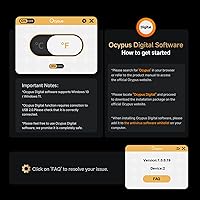
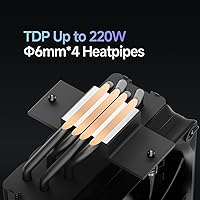
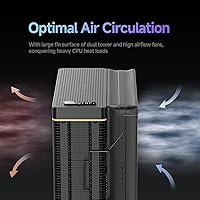
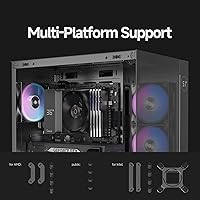
The standout feature is clearly the top-mounted dot-matrix display, which pulls data like CPU temperature and usage through the Ocypus app — skip the app and the panel stays dark, so that's worth knowing upfront. Underneath the visual layer, four copper heat pipes run through an aluminum fin stack built with folded edges and interlocked fin clips, a construction approach aimed at reducing turbulence and improving structural rigidity simultaneously. The 120mm PWM fan runs between 500 and 2,000 RPM, moving 77 CFM of air while staying at or below 29 decibels — roughly the level of a quiet library. The all-metal mounting kit covers AM4, AM5, LGA1700, LGA1851, and older Intel sockets, and at 125mm wide, RAM clearance is rarely an issue.

Best For

This Ocypus air cooler hits a sweet spot for builders upgrading from a stock cooler on a Ryzen 5, Ryzen 7, or mainstream Intel Core CPU. The 220W TDP rating looks strong on paper, but in real-world sustained workloads — think extended video rendering or multi-threaded compilation — a more realistic ceiling is around 150 to 180W before temperatures start climbing. It's a natural fit for mid-range gaming rigs and light creative workstations where peak loads are occasional rather than constant. The compact tower dimensions also make it a smart pick for mATX builds where a larger dual-tower would either block RAM slots or refuse to fit altogether. If you like app-driven customization, the display adds a genuine personal touch.

User Feedback

Among verified buyers, the Iota A40 holds a 4.4-star average, and the praise follows a consistent pattern: installation is straightforward, the hardware quality feels solid relative to the asking price, and the display draws genuine reactions — people either love the novelty or consider it a nice bonus. Criticism tends to cluster around the companion app, which some users find temperamental on first setup, and a few note the display can be difficult to read in a brightly lit room. Thermal performance is generally well-regarded for mainstream chips, though buyers running high-core-count processors under sustained load report that temperatures don't stay as low as the rated ceiling might suggest. Fan noise at idle is barely noticeable; under heavy load it stays unobtrusive for most.

Pros

  • The dot-matrix top display is a genuinely distinctive feature at this price tier, giving builds a personalized visual identity.
  • Installation is straightforward thanks to all-metal hardware and solid mounting support across both AMD and Intel platforms.
  • The 120mm FDB fan stays impressively quiet at idle, barely registering above ambient background noise in a typical room.
  • Compact tower dimensions rarely conflict with tall RAM kits or side-panel clearance in standard ATX and mATX cases.
  • Four copper heat pipes deliver a meaningful temperature improvement over stock coolers on mainstream Ryzen and Intel CPUs.
  • Broad socket coverage across AM4, AM5, LGA1700, and LGA1851 keeps the cooler relevant through common platform upgrades.
  • Verified buyers consistently describe the build quality as solid relative to what you would expect at this price point.
  • PWM fan control ramps speed only when the CPU demands it, keeping the system quiet during light everyday tasks.

Cons

  • The companion app is required to activate the display; skip it and the top panel contributes nothing to the build.
  • App stability has been inconsistent for some users, with first-setup friction reported across certain system configurations.
  • The display panel can be genuinely difficult to read under bright room lighting, limiting its practical visual payoff.
  • Sustained cooling on high-core-count processors falls noticeably short of the advertised TDP ceiling under real workloads.
  • Ocypus lacks the long-established support history of category veterans, which may concern buyers prioritizing warranty reliability.
  • Fan noise climbs perceptibly under heavy CPU load, which could bother users in quiet work or home recording environments.
  • Long-term viability of the display feature depends entirely on Ocypus continuing to maintain and update their companion app.

Ratings

Our scores for the Ocypus Iota A40 CPU Air Cooler were generated by AI after analyzing thousands of verified buyer reviews from global markets, with spam, incentivized, and bot-flagged submissions actively filtered out before any category was scored. Each rating transparently reflects both the genuine strengths and the recurring frustrations that real builders have reported across multiple platforms. The result is an honest, balanced picture of where this cooler earns its reputation and where it still has room to grow.

Thermal Performance
74%
26%
For mainstream Ryzen 5, Ryzen 7, and Core i5 or i7 chips running gaming sessions or mixed productivity workloads, the Iota A40 keeps temperatures in a range that feels like a genuine upgrade over stock cooling. Buyers moving from boxed coolers consistently report double-digit temperature drops during gaming, which is a tangible win for everyday desktop use.
The advertised 220W TDP ceiling overpromises for anyone running a Ryzen 9 or Core i9 under sustained all-core loads — temperatures climb quickly and never fully stabilize the way they would under a larger dual-tower. For content creators doing extended video encodes or large 3D renders, this single-tower's thermal ceiling becomes apparent within the first few minutes.
Noise Level
81%
19%
At idle and during light tasks like browsing or document editing, the FDB fan is nearly inaudible — the kind of quiet you genuinely appreciate working late at night in a small room. Most buyers specifically call out how unobtrusive the cooler is during everyday use, and their experience closely matches the rated 29 dB(A) ceiling under normal conditions.
Under heavy CPU load when the fan climbs toward 2,000 RPM, noise steps up noticeably — not disruptive, but present enough that users in open-desk home office setups or those with a microphone nearby will register it. A handful of buyers also note the fan's noise profile at high speeds has a slightly higher pitch than some rivals running at equivalent loads.
Value for Money
88%
For what the Iota A40 delivers — four heat pipes, a quiet FDB fan, all-metal mounting hardware, broad socket support, and a functional dot-matrix display — buyers consistently describe it as overdelivering on visible value. Compared to bare-bones budget coolers that offer none of the display novelty or metal hardware quality, it stands out as a notably complete package at this tier.
The value equation shifts depending on whether you actually use the display feature — buyers who never install the companion app pay for a visual element they never activate, reducing the differentiation versus simpler and sometimes cheaper competitors. For users who only care about raw cooling efficiency per dollar spent, a no-frills rival could argue a stronger pure-thermal case.
Installation Ease
91%
Installation is consistently the most praised aspect in buyer reviews — the all-metal hardware kit covers AMD and Intel platforms with minimal fuss, and the mounting pressure feels reassuringly firm without requiring excessive force or special tools. First-time builders in particular frequently highlight how the process was faster and less stressful than they had anticipated from online guides.
A small number of users report that the instruction manual lacks enough detail for certain socket configurations, requiring a quick search online to clarify mounting orientation before proceeding. Backplate installation on some Intel boards can also feel slightly awkward without a second pair of hands to hold components in position during the initial fastening steps.
Display Feature
83%
The top-mounted dot-matrix display genuinely sets this cooler apart from everything else competing at the same price — buyers who activate it through the app describe it as a conversation starter in glass-panel cases, and the circular glyph format gives builds a distinctive identity that typically costs considerably more to achieve with other coolers or add-on accessories.
The display's total dependency on the Ocypus app means it contributes nothing out of the box, which surprises buyers who assume it activates automatically on first boot. Under bright room lighting the panel brightness struggles to stand out, making the display a feature that performs best in dim or semi-controlled lighting rather than a well-lit living room or office.
Software Experience
62%
38%
When the Ocypus app installs and pairs correctly, buyers describe the configuration process as intuitive enough for most users — setting what the display reads takes only a few minutes, and the app does not noticeably consume system resources or interfere with gaming performance once configured and running in the background.
App stability is the most consistently cited frustration in critical reviews — some users encounter pairing failures, display dropouts after sleep or restart, or setup errors that require a full reinstall to resolve. For a feature that sits at the center of this cooler's identity, the software experience feels noticeably undercooked relative to the quality of the hardware it controls.
Fan Performance
77%
23%
The 120mm FDB fan moves a respectable 77 CFM and adapts smoothly to shifting CPU demands through PWM control — during typical gaming sessions it ramps up and down without jarring transitions that break immersion. The bearing choice also inspires confidence for long-term daily operation without the whine or wobble that cheaper sleeve-bearing fans develop over time.
At peak RPM, the fan's static pressure of 4.65 mmH2O is adequate but not exceptional, meaning restrictive case airflow environments may see slightly higher temperatures than open-air test conditions suggest. Compared to fans bundled with some competing coolers in the same tier, the overall airflow-to-noise ratio at high loads is competent rather than genuinely impressive.
Build Quality
78%
22%
The all-metal mounting bracket and aluminum fin construction feel meaningfully more substantial than most buyers expect at this price point, and several users note the cooler has a premium density to it when handled before installation. The folded fin edges and interlocked clip construction add structural durability that helps it hold up well against typical handling during builds.
Some buyers feel the fin stack density and base plate surface finish fall slightly short compared to coolers from more established brands at similar price points, with minor rough edges on the fin array occasionally noted during installation. It is solid for what it costs, but it does not carry the same refinement as hardware from manufacturers with decades of production experience.
Socket Compatibility
86%
Covering AMD AM4, AM5, and Intel LGA115X through LGA1851 in a single hardware kit makes this cooler a practical choice for builders who anticipate a platform upgrade within the next year or two without wanting to replace their thermal solution. Buyers planning AM5 builds specifically appreciate not having to source separate mounting adapters or aftermarket brackets.
High-end desktop enthusiast sockets like AMD TRX50 and Intel LGA2066 are unsupported, which rules the cooler out for workstation-class builds from the start. The hardware kit also does not hint at any forward compatibility beyond the current listed generation, so buyers on emerging or niche platforms should verify support carefully rather than assuming coverage.
RAM Clearance
84%
At 125mm wide, this single-tower cooler sidesteps the RAM clearance headaches that wider dual-tower designs routinely cause — most standard-height DDR4 and DDR5 kits seat without any conflict, and buyers in compact mATX builds specifically mention the slim profile as a primary reason they chose it over bulkier alternatives.
Buyers running particularly tall aftermarket RAM heatspreaders that extend significantly above the DIMM slot may still encounter tight clearance on the slot nearest the cooler. It is a minor consideration for most mainstream memory kits, but worth measuring carefully in advance for anyone running high-profile or oversized memory with large decorative fins.
Aesthetic Design
85%
The matrix-perforated top panel and the clean tower silhouette give the Iota A40 a distinctive look that stands apart from the utilitarian appearance of most budget coolers — buyers who post their builds online frequently note it photographs well and adds visual cohesion to mid-range glass-panel cases without relying on RGB lighting.
The design identity leans heavily on the dot-matrix display as its visual centrepiece, which means builds without a side window or cases where the cooler top is not visible lose most of the aesthetic payoff. Without the app active and the display lit, the overall look is noticeably plain for a cooler that leads with visual distinction as a core selling point.
Mounting Hardware
87%
The all-metal mounting kit inspires genuine confidence during installation — buyers note the bracket construction does not flex or feel fragile the way plastic mounting clips on cheaper coolers often do under repeated tightening. The unified kit covering both AMD and Intel platforms without swapping out major components simplifies the process considerably for multi-platform builders.
A small number of users report that the mounting screws require firm torque to seat fully, and without any torque guidance in the documentation, a few first-time builders over-tightened and worried about motherboard flex during the process. A simple reference marking or torque note in the instructions would eliminate this anxiety for less experienced builders entirely.
Long-term Reliability
69%
31%
The FDB fan bearing is a sound choice for longevity — fluid dynamic bearings are known for maintaining stable operation over multi-year daily use, and buyers who have run the cooler for several months report no noticeable degradation in noise floor or thermal performance. The all-metal physical construction also points toward good durability under normal operating conditions.
Ocypus is a relatively new entrant in a market where brands like Noctua and be quiet! have decade-long reliability records, so long-term failure rate data, warranty response times, and replacement part availability remain thin. The display feature's ongoing usability also depends entirely on Ocypus continuing to support and maintain their companion app, which is an open and unproven question for a newer brand.

Suitable for:

The Ocypus Iota A40 CPU Air Cooler is a practical pick for mid-range builders who want a meaningful step up from a stock cooler without spending heavily on thermal hardware. It fits especially well on mainstream Ryzen 5 or Ryzen 7 chips and Intel Core i5 or i7 processors running typical gaming or productivity workloads, where sustained heat output rarely pushes past 150 to 180W in practice. Builders working in mATX or compact ATX cases will appreciate the tower's modest footprint, which avoids the RAM clearance conflicts that larger dual-tower coolers routinely cause. If you enjoy personalizing a rig down to the small details, the app-controlled dot-matrix display adds a layer of visual identity that very few coolers at this tier offer. It is also a sensible option for anyone upgrading a pre-built desktop on a compatible socket, since the all-metal mounting hardware and broad platform support make installation approachable even for first-time builders.

Not suitable for:

The Ocypus Iota A40 CPU Air Cooler is not the right tool for high-core-count workhorses like a Ryzen 9 or Core i9 running sustained multi-threaded loads — the 220W TDP ceiling is a rated figure, and real-world performance on those chips tends to fall short of that headroom under prolonged stress. Enthusiast builders who need serious thermal overhead for overclocking or extended rendering sessions should look at larger dual-tower designs from more established brands. Anyone who prefers a completely software-free setup will find the digital display frustrating, since it requires installing the Ocypus companion app to function at all — skip the app and the panel adds nothing. The cooler is also a poor fit for ultra-compact ITX builds where case airflow is already restricted and every millimeter of clearance matters. Finally, if long-term brand support and proven warranty service are important factors in your buying decision, Ocypus is still building that track record and does not yet carry the same confidence as names like Noctua or be quiet!

Specifications

  • Cooling Type: Single-tower air cooler that transfers heat from the CPU through direct-contact copper heat pipes into an aluminum fin stack.
  • TDP Rating: Rated to handle up to 220W of CPU thermal design power under manufacturer test conditions.
  • Heat Pipes: Four direct-contact copper heat pipes draw heat from the CPU heat spreader directly into the base of the fin array.
  • Fan Size: Ships with a single 120mm PWM fan as the sole active cooling component.
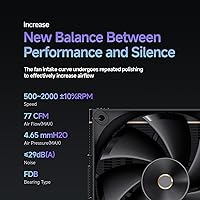
  • Fan Speed: Fan speed adjusts between 500 and 2,000 RPM with a tolerance of ±10%, modulated by the motherboard PWM signal.
  • Airflow: The 120mm fan moves up to 77 CFM of air through the fin stack at maximum rotational speed.
  • Static Pressure: Maximum static pressure is rated at 4.65 mmH2O, providing sufficient push through the densely packed fin array.
  • Noise Level: Operational noise is rated at or below 29 dB(A), roughly comparable to the ambient sound level of a quiet library.
  • Fan Bearing: The fan uses a Fluid Dynamic Bearing (FDB) for long-term operational stability, low friction, and reduced noise over the product lifespan.
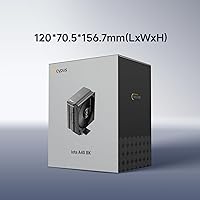
  • Dimensions: The radiator measures 125 x 70.5 x 156.7mm (approximately 4.92″ x 2.78″ x 6.17″) with the fan mounted.
  • Weight: Total cooler weight is 650g (approximately 22.9 oz), placing minimal stress on the motherboard PCB during normal use.
  • Materials: Fin stack is constructed from aluminum, the heat pipes are copper, and all mounting bracket components are metal.
  • Power Connector: Connects to the motherboard via a standard 4-pin PWM header, compatible with all modern desktop motherboards.
  • Input Voltage: Fan operates at 12V DC, the standard voltage rail for desktop PWM fans across all major motherboard manufacturers.
  • Fan Wattage: Maximum fan power draw is 2.4W, making its contribution to overall system power consumption negligible.
  • Socket Support: Compatible with AMD AM4 and AM5, and Intel LGA115X, LGA1200, LGA1700, and LGA1851 sockets out of the box.
  • Display: A matrix circular dot-panel sits on the cooler top and requires the Ocypus companion app to activate and configure.
  • Mounting Hardware: All mounting components are metal construction and a single hardware kit covers both AMD and Intel supported platforms.

Related Reviews
Ocypus Iota A62 CPU Air Cooler
77%
78%
Thermal Performance
74%
Noise Level
86%
Display & Aesthetics
58%
Software & App Reliability
88%
Ease of Installation
More
Ocypus Iota L36 360mm AIO CPU Cooler
81%
83%
Thermal Performance
91%
Digital Temperature Display
87%
Noise Level
78%
Build Quality
81%
ARGB Lighting
More
Cooler Master Hyper 212 Black CPU Cooler
79%
83%
Thermal Performance
79%
Noise Level
93%
Value for Money
76%
Installation Experience
81%
Build Quality
More
Cooler Master Hyper 212 Halo CPU Air Cooler
84%
88%
Cooling Performance
91%
Noise Level
85%
Ease of Installation
89%
Build Quality
80%
RGB Aesthetics
More
Cooler Master i70C Low-Profile CPU Cooler
78%
72%
Thermal Performance
88%
Noise Level
93%
Form Factor & Fit
86%
Installation Ease
78%
ARGB Lighting
More
Cooler Master MasterAir MA824 Stealth CPU Cooler
81%
88%
Thermal Performance
91%
Noise Level
93%
RAM Clearance
72%
Installation Experience
89%
Build Quality & Materials
More
Cooler Master i71C RGB Low-Profile CPU Cooler
79%
67%
Thermal Performance
83%
Noise Level
74%
Build Quality
86%
Installation Ease
81%
RGB Lighting Quality
More
Cooler Master Hyper 622 Halo Dual Tower CPU Cooler
82%
83%
Thermal Performance
88%
Noise Level
89%
Ease of Installation
67%
RAM Clearance
86%
Build Quality
More
Thermalright PS120SE CPU Air Cooler
80%
89%
Thermal Performance
86%
Noise Level
93%
Value for Money
74%
Build Quality
81%
Ease of Installation
More
Vetroo V5 CPU Air Cooler
82%
73%
Thermal Performance
84%
Noise Level
91%
Value for Money
71%
Build Quality
88%
ARGB Lighting Quality
More

FAQ

The Iota A40 covers the most widely used current and recent sockets: AMD AM4 and AM5, and Intel LGA115X, LGA1200, LGA1700, and LGA1851. If your board uses any of those, you are good to go. High-end desktop platforms like AMD TR4 or Intel LGA2066 are not supported, so double-check your motherboard specs if you are running a workstation-class chip.

The cooler works completely without the app — it will cool your CPU normally the moment it is installed and the fan header is connected. The Ocypus app is only needed if you want to activate and customize the top-panel dot-matrix display. Without it, the panel stays dark or shows a static default state, which does not affect thermal performance in any way.

In a dimmer room or a case with good interior contrast, the dot-matrix display is genuinely eye-catching and draws attention. In a bright, well-lit space, the panel can wash out and become harder to read clearly. The display faces upward from the top of the tower, so the angle and ambient light in your room will have a noticeable effect on how well it shows up day-to-day.

At 125mm wide, this single-tower cooler has a slim enough profile that it clears standard-height RAM without issue in most ATX and mATX builds. If you are running particularly tall RAM kits with large decorative heatspreaders, it is worth checking the gap between your DIMM slots and the edge of the cooler tower before buying. Most mainstream DDR4 and DDR5 kits at standard heights will not have a problem.

For the majority of Ryzen 7 and Core i7 setups running games, everyday creative work, or mixed productivity tasks, the Ocypus Iota A40 CPU Air Cooler handles the load well and offers a genuine improvement over stock cooling. The limitation shows up under sustained all-core workloads — extended video encoding, large 3D renders, or anything that keeps every thread fully loaded for long stretches. In those scenarios temperatures will climb more than they would with a larger cooler, so it is worth being realistic about your workload before committing.

At idle and during light tasks, the fan is quiet enough that most people will not notice it over normal PC background noise. Under heavy CPU load, when the fan climbs toward its upper speed range, there is a noticeable increase in noise — audible but not intrusive for most home or office environments. The 29 dB(A) spec represents near-maximum output under controlled lab conditions, so expect real-world gaming noise to land somewhere between that and near-silent depending on the workload.

Thermal paste inclusion is not explicitly confirmed in the listed product specifications for this cooler. As a general rule when installing any aftermarket cooler, it is wise to have a small tube of quality thermal compound on hand regardless, since some units ship with paste pre-applied on the base plate while others do not, and stock application quality can vary.

Installation is one of the Iota A40's practical strengths — the all-metal mounting kit works across both AMD and Intel platforms without requiring separate hardware sets for each, and the process follows the standard backplate-and-standoff approach that any beginner build guide will walk you through. First-time builders who watch a single installation walkthrough video should have no trouble getting it seated correctly and securely.

Through the Ocypus app, the dot-matrix panel can be configured to show information like CPU temperature or usage load. It uses a circular glyph-style format rather than a sharp numeric screen, so it reads as a stylized visual indicator rather than a precise data display. If you need a crisp, high-contrast numerical readout, a cooler with a traditional LCD screen would serve that goal more directly.

On raw thermal performance for mainstream chips, the two land in a similar range — the Hyper 212 has a longer track record and a much deeper pool of third-party reviews to draw confidence from. Where this Ocypus air cooler differentiates itself is the dot-matrix display, which adds visual personality the Hyper 212 simply does not offer at any configuration. If pure thermal output and zero software dependency are your priorities, the Hyper 212 remains a tough target; if you want a more distinctive build with some visual customization at a comparable price, the Iota A40 makes a reasonable case for itself.