
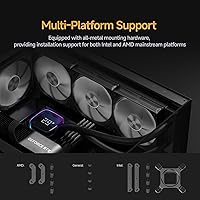
Overview

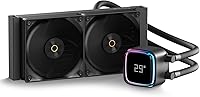
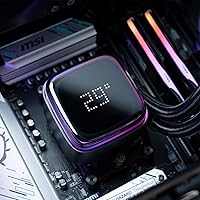
The Ocypus Iota L24 240mm AIO Cooler sits squarely in the mid-range bracket, built around a 240mm aluminum radiator meant to handle everyday desktop CPU loads without much fuss. What sets this liquid CPU cooler apart visually is its floating-style digital display, a small panel that sits above the pump block and reads out real-time temperatures rather than leaving you guessing. It works across both AMD and Intel LGA platforms, so socket compatibility isn't a concern for most current builds. Styling leans into the ARGB trend, with lighting that's clearly meant to be a centerpiece rather than an afterthought. It's not chasing extreme overclocking crowds; it's aimed at builders who want decent cooling and a bit of visual flair in one package.

Features & Benefits

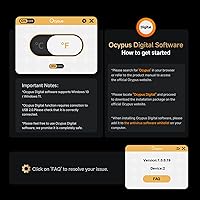
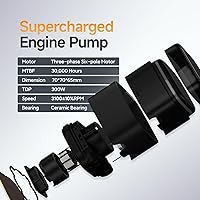
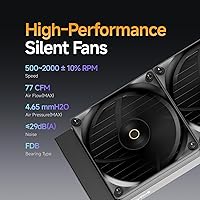
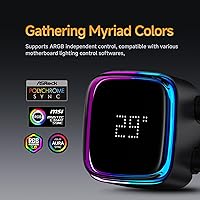
Most of the appeal of this AIO cooler comes down to a handful of practical touches. The digital readout can toggle between Celsius and Fahrenheit, though that switch happens through Ocypus software rather than on the unit itself, which is worth knowing upfront. Inside, a compact 70x65mm pump keeps coolant moving steadily, and the included pair of 120mm PWM fans can ramp up to 2000 RPM when things heat up, while staying around 29dB during lighter, everyday use. The ARGB lighting can run independently or sync with your motherboard's own software, giving some flexibility depending on your setup. All-metal mounting hardware rounds things out, and it's designed to keep installation reasonably painless on both AMD and Intel boards.

Best For

This 240mm cooling kit makes the most sense for a specific kind of buyer rather than everyone shopping for a cooler. If you like glancing at a live temperature number without opening monitoring software, the built-in display is genuinely useful. It also suits anyone putting together an ARGB-themed build who doesn't want to spend premium money just for lighting. People moving away from a stock cooler will likely notice a real improvement in thermal headroom, especially under sustained loads. And for mixed-use systems, where fan speeds might spike occasionally during gaming or rendering, this cooler responds reasonably well without needing constant manual tuning or fiddling.

User Feedback

Owners tend to highlight the same two things first: the display and the lighting. Both come across as the standout features in casual use, giving the build a bit of personality beyond plain metal and tubing. On the cooling side, feedback generally lands in solid-but-not-spectacular territory, fine for mainstream CPUs but not something pushed toward heavy overclocking. The most common gripe is fan noise once RPMs climb under load, which some find more noticeable than expected. Installation gets fairly consistent praise for being straightforward with the included hardware. The software used for switching temperature units, though, draws mixed reactions, with a few buyers finding it less intuitive than they'd hoped.

Pros

  • Real-time temperature display removes the need for separate monitoring software
  • All-metal mounting hardware makes installation straightforward for first-time builders
  • ARGB lighting can sync independently or follow your motherboard's existing effects
  • Fans stay fairly quiet around 29dB during idle and light everyday use
  • Compact pump design supports steady, consistent liquid circulation over time
  • Solid thermal improvement over stock coolers for mainstream CPU workloads
  • Compatible with both AMD and Intel LGA platforms without extra adapters
  • Fans can ramp up to 2000 RPM when workloads genuinely demand it

Cons

  • Switching between Celsius and Fahrenheit requires installing separate Ocypus software
  • Fan noise becomes noticeably more apparent once RPMs climb under heavier loads
  • Cooling performance is adequate for mainstream use but not built for serious overclocking
  • Display software is reported to have a mixed, sometimes clunky user experience
  • 240mm radiator size may limit headroom on more demanding, high-wattage CPUs
  • Lighting and display features add cost compared to simpler coolers without them
  • No mention of included fan or radiator splitter cables for easier cable management

Ratings

These scores for the Ocypus Iota L24 240mm AIO Cooler are generated by AI after analyzing verified user reviews from buyers worldwide, with spam, bots, and incentivized feedback actively filtered out. The goal is a transparent picture that reflects both what people genuinely like about this cooler and where it tends to fall short in daily use.

Cooling Performance
81%
19%
Most buyers running mainstream CPUs in gaming or multitasking setups report noticeably lower temperatures compared to their old stock cooler, especially during long sessions. The 240mm radiator seems to keep pace with typical daily workloads without much complaint.
A smaller portion of users pushing heavier overclocks or higher-TDP chips note the radiator size starts showing its limits. It's clearly tuned for mainstream use rather than chasing the lowest possible temperatures.
Noise Level
68%
32%
At idle or during light browsing and office tasks, owners describe the fans as genuinely unobtrusive, sitting comfortably in the background of a quiet room setup. The 29dB rating tracks with real-world impressions during low loads.
Once fans ramp toward their 2000 RPM ceiling under gaming or rendering loads, noise becomes the single most repeated complaint across reviews. For anyone in a quiet home office, this spike is hard to ignore.
Digital Display Feature
88%
The floating-style temperature display is consistently called out as a standout feature, letting users glance at CPU temps without tabbing into monitoring software during gaming sessions. It adds a genuinely functional touch beyond pure aesthetics.
A subset of buyers wish the display worked without needing a software install at all, especially for quick temperature checks right after first boot. It's a small inconvenience but noted often enough to matter.
ARGB Lighting Quality
85%
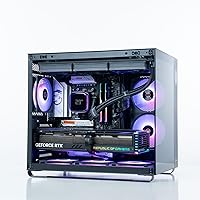
Builders assembling RGB-themed rigs consistently praise how the lighting looks once integrated into a case with a tempered glass panel. The ability to sync independently or through motherboard software gives flexibility many didn't expect at this price.
A few users mention the lighting effects feel slightly less vivid than premium competitors, particularly in well-lit rooms during the day. It's a minor cosmetic nitpick rather than a functional issue.
Software Experience
58%
42%
Users who take time to set up the Ocypus software appreciate the ability to switch between Celsius and Fahrenheit and adjust lighting profiles to match their build's theme. Once configured, most leave it alone and forget it exists.
Initial setup and unit-switching draws mixed reactions, with several buyers describing the interface as clunky or unintuitive compared to more polished competitor apps. This seems to be the software's most consistent weak point.
Installation Ease
84%
First-time AIO builders frequently mention the all-metal mounting hardware made the process less intimidating than expected, with clear bracket compatibility across AMD and Intel boards. Many finished installation without needing outside tutorials.
A handful of reviewers note the included instructions could be clearer on bracket orientation, leading to a bit of trial and error. It's a small friction point rather than a dealbreaker for most.
Build Quality
83%
The combination of aluminum, copper, and rubber components feels solid to most owners, with tubing and fittings showing no early signs of wear after regular use. The pump housing in particular gets praised for feeling sturdy.
A small number of users express mild concern over long-term durability given the price point, though no widespread failure pattern shows up in current feedback. It's more of a watch-and-see category than an active complaint.
Fan Quality
75%
25%
The FDB bearing fans hold up well during extended gaming sessions, with several users noting smooth, consistent airflow without obvious wobble or rattle over months of use. Performance scales predictably as RPM increases.
As covered elsewhere, the tradeoff for that higher airflow ceiling is noise creeping up noticeably at peak speeds. Some buyers also wish the fans had a slightly wider quiet-operation range before hitting that threshold.
Socket Compatibility
90%
Builders running both current AMD and Intel LGA platforms report smooth compatibility without needing to hunt for separate adapters. This flexibility makes it a safer pick for upgraders unsure of future platform changes.
There's little negative feedback here, though a few users on older or niche socket variants suggest double-checking compatibility lists before buying, since not every legacy socket gets explicit mention.
Value for Money
76%
24%
Buyers comparing this 240mm cooling kit against pricier competitors with similar displays feel they're getting solid functionality without overpaying purely for a name brand. The combination of display and lighting at this tier feels reasonable.
Those who only wanted straightforward cooling performance sometimes feel they're paying extra for features they barely use, like the display software. It's a better value for buyers who actually want the extras.
Aesthetic Design
86%
The floating display design paired with ARGB lighting consistently earns compliments for looking more premium than its price suggests, especially in builds with a glass side panel. It photographs and looks well in person according to most reviewers.
A few buyers feel the black-only color option limits matching with lighter-themed builds, wishing for additional finish choices. It's a stylistic limitation rather than a quality concern.

Suitable for:

The Ocypus Iota L24 240mm AIO Cooler makes the most sense for builders who want a visible, real-time temperature readout without having to open monitoring software every time they check their system. It's a strong fit for anyone assembling an ARGB-themed gaming PC on a mid-range budget, since the lighting can stand on its own or sync with existing motherboard effects. People upgrading from a stock cooler will likely appreciate the extra thermal headroom for mainstream desktop CPUs under typical gaming or productivity loads. It also suits first-time AIO buyers, since the all-metal mounting hardware and straightforward installation process help avoid common setup headaches. Anyone running mixed workloads that occasionally spike fan speeds will benefit from the added airflow when it's actually needed, while staying reasonably quiet the rest of the time.

Not suitable for:

This liquid CPU cooler isn't the right pick for enthusiasts chasing extreme overclocking results, since cooling performance is described as solid rather than exceptional for mainstream chips. Buyers who are highly sensitive to fan noise should think twice, as RPMs climbing under load have been flagged as the most common minor complaint. Anyone hoping to switch temperature display units on the fly, without installing extra software, may find that requirement more of a hassle than expected. Those who already use comprehensive third-party monitoring tools may not see much added value in the built-in display. The Ocypus Iota L24 240mm AIO Cooler also isn't ideal for buyers prioritizing silent operation above all else, since fan noise becomes more noticeable at higher speeds.

Specifications

  • Radiator Size: The aluminum radiator measures 240mm and uses a dual-fan layout for heat dissipation.
  • Pump Dimensions: The liquid cooling pump measures 70 x 70 x 65mm and sits directly on the CPU block.
  • Fan Count: Two 120mm PWM fans are included for radiator airflow.
  • Fan Speed: Fans operate in a range of roughly 500 to 2000 RPM with PWM control.
  • Noise Level: Fan noise is rated at approximately 29 decibels under typical operation.
  • Display: A digital display on the pump housing shows real-time CPU or GPU temperature readings.
  • Temperature Units: Display units can be switched between Celsius and Fahrenheit using Ocypus software.
  • Lighting: ARGB lighting is built into the pump and can run independently or sync with compatible motherboard software.
  • Socket Compatibility: The cooler supports mainstream AMD and Intel LGA desktop CPU sockets.
  • Mounting Hardware: All-metal mounting brackets are included for installation on supported platforms.
  • Power Connector: The unit uses a 3-pin power connector running on 12V DC.
  • Materials: Construction includes aluminum, copper, and rubber components throughout the radiator, pump, and tubing.
  • Product Weight: The complete cooler assembly weighs approximately 4.01 pounds.
  • Cooling Method: The system combines liquid cooling circulation with active air cooling from the radiator fans.
  • Brand: The product is manufactured by Ocypus under the Iota L24 model line.

Related Reviews
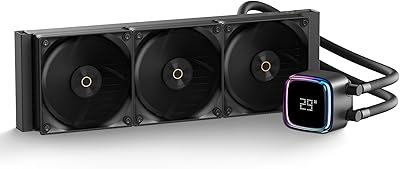
Ocypus Iota L36 360mm AIO CPU Cooler
81%
83%
Thermal Performance
91%
Digital Temperature Display
87%
Noise Level
78%
Build Quality
81%
ARGB Lighting
More
greenDracaena Osprey 240mm AIO CPU Cooler
75%
74%
Thermal Performance
81%
Noise Level
78%
Build Quality
83%
Installation Experience
86%
Value for Money
More
Ocypus Iota A40 CPU Air Cooler
80%
74%
Thermal Performance
81%
Noise Level
88%
Value for Money
91%
Installation Ease
83%
Display Feature
More
Ocypus Iota A62 CPU Air Cooler
77%
78%
Thermal Performance
74%
Noise Level
86%
Display & Aesthetics
58%
Software & App Reliability
88%
Ease of Installation
More
SAMA LD 240 AIO Liquid CPU Cooler
77%
88%
Value for Money
74%
Thermal Performance
83%
LCD Display Quality
71%
Noise Level
76%
Build Quality
More
be quiet! Silent Loop 3 240mm Cooler
83%
93%
Acoustic Performance
81%
Thermal Performance
78%
Pump Quality
91%
Fan Quality
88%
Refillability & Longevity
More
NZXT Kraken X53 RGB 240mm AIO Liquid Cooler
79%
78%
Thermal Performance
74%
Noise Level
88%
Build Quality
91%
Aesthetics & RGB
83%
Installation Experience
More
Cooler Master MasterLiquid 360L Core 360mm
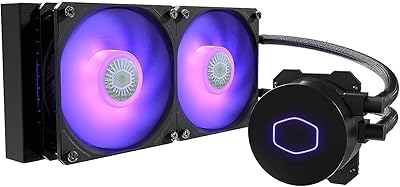
82%
88%
Thermal Performance
74%
Pump Quality & Reliability
91%
Installation Experience
83%
Noise Level
86%
Value for Money
More
Cooler Master MasterLiquid ML240L V2 AIO Cooler
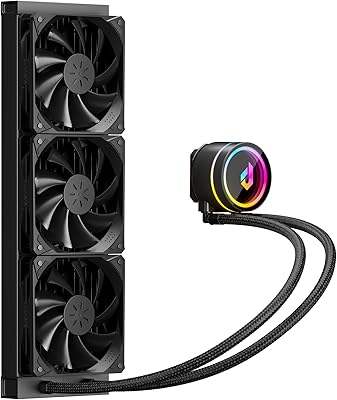
77%
78%
Thermal Performance
91%
Installation Experience
63%
Pump Noise & Vibration
82%
Fan Performance
88%
ARGB Lighting
More
AUSDOM S360 360mm AIO Liquid CPU Cooler
78%
83%
Thermal Performance
81%
Noise Level
76%
Build Quality
88%
Installation Experience
79%
RGB & Lighting Quality
More

FAQ

Most mid-tower cases support a 240mm radiator, but it's worth checking your specific case's front or top mounting space before buying. As long as there's room for a 240mm rad and two 120mm fans, you should be fine.

The display itself shows temperature readings without any software running. However, if you want to switch between Celsius and Fahrenheit, you'll need to install the Ocypus software first.

Yes, this liquid CPU cooler supports mainstream AMD platforms along with Intel LGA sockets. The included all-metal mounting hardware covers both, so you shouldn't need separate brackets.

Under load, fan speeds can climb toward their 2000 RPM max, and that's when noise becomes more noticeable. At idle or light use, though, things stay fairly quiet around the 29dB range.

Yes, the lighting can either run on its own independent controls or sync through compatible motherboard ARGB software. It really depends on what ecosystem you're already using for the rest of your build's lighting.

Most buyers report a fairly straightforward installation thanks to the included all-metal mounting hardware. It still helps to watch an install video first, since AIO coolers have a few more steps than air coolers, but it's manageable for a first attempt.

Yes, the display is designed to show either CPU or GPU temperatures, depending on how you configure it through the software. You'll just need to set which source you want monitored.

Compared to a stock or basic air cooler, this 240mm cooling kit generally offers better thermal headroom for sustained gaming or mixed workloads. It's not built for extreme overclocking, but it should comfortably handle mainstream CPUs running hotter games or multitasking.

It comes with all-metal mounting brackets designed to work across both AMD and Intel platforms. You won't need to source separate hardware unless your motherboard has an unusual mounting layout.

It works fine for that purpose, though you're also paying for the display and ARGB lighting whether you use them or not. If you genuinely don't care about either feature, a simpler cooler might give you similar thermal performance for less money.