Overview

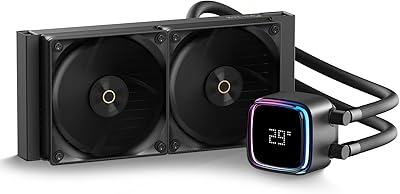
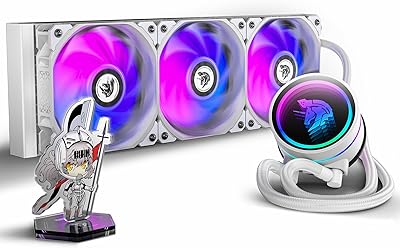
The Ocypus Iota L36 360mm AIO CPU Cooler arrives as a genuinely interesting option from a brand still carving out its name in a crowded market. What distinguishes it immediately is the floating digital display on the pump head — a live temperature readout that actually tells you something useful while your build is running. It covers modern Intel sockets up to LGA1851 and AMD through AM5, so compatibility is not a concern for most current platforms. With a 300W TDP rating, it handles demanding mid-range workloads comfortably, though pushing extreme overclocks on flagship chips is a separate conversation. For the price tier, the value here is hard to argue with.
Features & Benefits

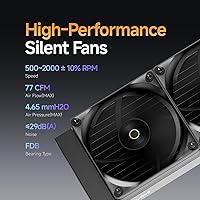
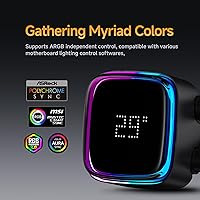
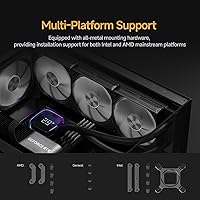
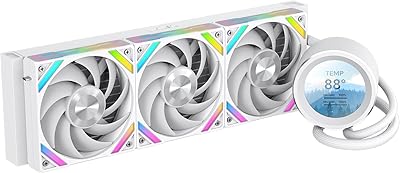
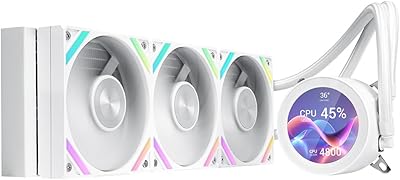
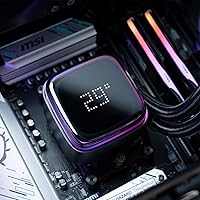
The pump head is where the Iota L36 makes its clearest statement. That digital temperature display sits beneath a high-transparency cover, giving it a layered, almost suspended look that reads well in a windowed build. It shows CPU or GPU temps in real time, and you can toggle between Celsius and Fahrenheit through the Ocypus software. The three 120mm fans use fluid dynamic bearings, spinning from 500 to 2000 RPM while staying below 29dB under normal loads. The aluminum radiator is light enough that it won't stress your chassis mounts, and all-metal hardware for both Intel and AMD platforms ships in the box. The ARGB pump lighting is independently controlled and plays nicely with most major motherboard ecosystems.

Best For

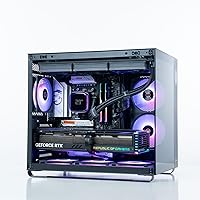
This 360mm AIO is a natural fit for builders putting together a mid-range gaming or content creation rig — think Ryzen 7 or Intel Core i7-class processors running heavy workloads without extreme overclocking. The windowed case crowd will appreciate the display and lighting combination without paying flagship cooler prices. It is also a solid pick for first-time AIO adopters; the all-inclusive hardware kit means no scrambling for socket-specific adapters, and the display provides a direct read on thermals without digging into monitoring software. If you are upgrading from a bulky air cooler and want noticeably quieter operation, this liquid cooler handles that transition without a steep learning curve.

User Feedback

Buyers consistently point to the display clarity as a standout feature — seeing live temps without launching software proves more practical than many expect. Installation feedback runs mostly positive across AM4, AM5, and LGA1700, though a handful of users note the Ocypus companion app could use some polish, particularly around ARGB preset management. On noise, most agree this liquid cooler runs impressively quiet at idle and stays tolerable even at full fan speed. The recurring tension in reviews involves brand trust: buyers coming from Corsair or NZXT territory are often pleasantly surprised by the build quality, while a smaller group stays cautious about long-term reliability from a less-established name. Overall, the rating reflects a cooler that tends to over-deliver for its bracket.

Pros

  • Live CPU temperature display on the pump head is genuinely useful, not just decorative.
  • Covers AM4, AM5, LGA1700, and LGA1851 out of the box with no extra bracket kit needed.
  • Three FDB fans keep noise impressively low during everyday gaming and browsing sessions.
  • ARGB lighting syncs cleanly with Asus Aura, MSI Mystic Light, and Gigabyte RGB Fusion.
  • Lightweight aluminum radiator puts minimal stress on case mounting points.
  • The Iota L36 delivers mid-range thermal performance that consistently surprises buyers at its price tier.
  • PWM fan control through the motherboard BIOS works reliably without touching any software.
  • The floating display aesthetic looks polished in windowed builds without requiring a premium cooler budget.
  • All-metal mounting hardware feels solid and inspires more confidence than plastic bracket kits.

Cons

  • The Ocypus companion app feels like an early release — sparse presets and occasional detection bugs frustrate users.
  • Aluminum radiator construction is less thermally efficient than copper alternatives under extreme sustained loads.
  • No zero-RPM fan stop mode, so this 360mm AIO is never fully silent even at idle.
  • Display brightness has no independent adjustment, which can feel intrusive in dark room setups.
  • Long-term pump reliability data is limited given how recently Ocypus entered the market.
  • Fan speed customization outside the BIOS requires the app, which currently lacks depth.
  • The large pump head creates cable routing challenges in smaller mATX and ITX cases.
  • Instruction manual relies almost entirely on diagrams, leaving first-time builders dependent on video guides.

Ratings

The scores below reflect an AI-driven analysis of verified global buyer reviews for the Ocypus Iota L36 360mm AIO CPU Cooler, with automated filtering applied to remove incentivized, duplicate, and bot-generated submissions. The resulting ratings capture what real builders consistently praise and where they push back, giving you an honest picture of both the strengths and the friction points before you buy.

Thermal Performance
83%
For mid-range builds running Ryzen 7 or Core i7 processors under sustained gaming or rendering loads, this 360mm AIO keeps temperatures in a genuinely comfortable range. Buyers upgrading from 240mm coolers or high-end air towers frequently note meaningful idle and load temp reductions.
Users pairing it with high-TDP flagships like the Ryzen 9 or Core i9 report that thermals become less impressive under prolonged all-core stress tests. The 300W TDP ceiling is real, and expecting it to compete with premium copper-core AIOs at that thermal ceiling leads to disappointment.
Digital Temperature Display
91%
The floating display concept genuinely lands in practice — the readout is crisp, visible through a windowed panel from across a desk, and switching between Celsius and Fahrenheit is straightforward. Builders report that having live temps visible without opening monitoring software becomes a habit they didn't know they wanted.
The display tops out at 199 degrees Fahrenheit, which is fine for CPU temps but feels like an odd ceiling. A small number of users also noted that the display brightness cannot be adjusted independently, making it slightly intrusive in darker room setups.
Noise Level
87%
At idle and moderate loads, this liquid cooler is genuinely unobtrusive — most users describe it as barely registering over ambient room noise. The fluid dynamic bearing fans contribute to a smoother, lower-pitched sound profile that holds up well during extended gaming sessions.
At full fan speed under heavy sustained load, the noise climbs noticeably and the sub-29dB spec feels optimistic. A handful of reviewers with open or poorly dampened cases found the fans audible enough to distract during quiet content consumption.
Build Quality
78%
22%
The all-metal mounting hardware is a genuine positive — nothing feels cheap or plasticky in the bracket kit, and the pump head has a solid, well-assembled feel that holds up against more expensive competitors visually. The aluminum radiator is light but does not feel flimsy.
Some buyers noted that the tubing, while functional, feels slightly less premium compared to established brands at a similar price point. Given that Ocypus is still building its reputation, a few users admitted they are withholding full confidence until they have more long-term data on pump longevity.
ARGB Lighting
81%
19%
The pump head ARGB lighting is vivid and the color cycling looks genuinely polished inside a windowed build. Compatibility with Asus Aura Sync, MSI Mystic Light, and Gigabyte RGB Fusion means most builders can sync it without extra effort.
Independent control outside motherboard software depends on the Ocypus app, which users describe as functional but sparse. Preset variety is limited compared to what Corsair iCUE or NZXT CAM offer, and the app interface feels like an early-version release.
Software & App Experience
63%
37%
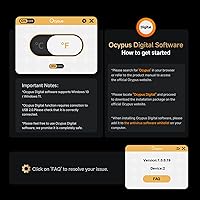
The Ocypus Digital software covers the essentials — temperature display unit switching and basic ARGB control — and for users who just want it set and forgotten, it gets the job done without drama. Installation is straightforward on Windows 11.
This is the Iota L36's clearest weak point in user feedback. Bugs, occasional failure to detect the cooler after sleep cycles, and a lack of fan curve customization within the app are recurring complaints. Users who want deep software control will feel the gap compared to category leaders.
Installation Experience
82%
18%
The box includes all-metal hardware for both Intel and AMD platforms, which means most builders do not need to source additional brackets. The mounting process follows the same general logic as other AIOs, and the included thermal paste is applied with no drama.
A few AM5 users reported that the standoff hardware required slightly more alignment patience than expected, and the instruction manual leans heavily on diagrams over written guidance. Nothing dealbreaking, but first-time builders may want to reference a video walkthrough alongside the included sheet.
Platform Compatibility
89%
Support for LGA1851 alongside the usual LGA1700, LGA1200, AM4, and AM5 sockets means the Iota L36 is relevant for current-gen builds without requiring a separate compatibility check for most mainstream chips. Buyers appreciate not having to source additional mounting kits.
Older Intel sockets like LGA2066 for HEDT platforms are not supported, which is understandable but worth noting for anyone running an older high-core-count workstation setup.
Radiator & Fan Quality
77%
23%
The three 120mm FDB fans move a respectable amount of air at peak speeds, and the aluminum radiator stays cool to the touch under most gaming workloads. The lightweight construction is a practical advantage for builds with thin radiator mounting points.
Aluminum transfers heat less efficiently than copper at equivalent thickness, which is a known tradeoff. Users doing CPU-intensive workstation tasks noticed this gap more than gamers did, and the radiator fins feel slightly more delicate during handling compared to thicker copper alternatives.
Value for Money
88%
For the price bracket, the combination of a live temperature display, ARGB lighting, broad socket support, and solid mid-range cooling performance is difficult to match. Buyers consistently note that the feature set punches above what the price tag suggests.
The value calculus shifts slightly if you factor in the software limitations and the uncertainty around long-term reliability from a newer brand. Buyers who prioritize ecosystem longevity and warranty confidence may prefer spending more for an established name.
Aesthetics & Visual Design
86%
The floating display effect under the transparent pump cover photographs beautifully and draws consistent compliments in build showcase posts. The overall pump head design feels distinctive without being polarizing, fitting into both understated and RGB-heavy builds.
The pump head is notably larger than average at 70x70x65mm, and in tighter ITX or mATX cases it can feel visually dominant. Users with smaller form factor builds occasionally found it harder to route cables cleanly around the pump block.
Fan Speed & Airflow Control
71%
29%
PWM control through the motherboard works reliably, and the 500 to 2000 RPM range gives a reasonable spread between silent and performance modes. Builders using quality fan curve profiles in BIOS report good results without touching any additional software.
Without a dedicated fan control interface in the Ocypus app, users relying on the software for custom curves are left out. The fans also lack a zero-RPM stop mode, which some premium AIO fans offer for completely silent idle behavior.
Pump Reliability
72%
28%
In the short-to-medium term, users report no unusual pump noise, no gurgling, and consistent thermal output over the first several months of use. The pump housing feels robustly built and the circulation design appears to function as intended under normal workloads.
Because Ocypus lacks the multi-year track record that brands like Corsair or be quiet! have accumulated, long-term pump durability remains an open question. Buyers who have owned the unit for over a year are still a relatively small pool, making it hard to assess failure rates with confidence.

Suitable for:

The Ocypus Iota L36 360mm AIO CPU Cooler is a strong match for PC builders assembling mid-range gaming or content creation rigs around processors like the Ryzen 7 7700X, Core i7-13700, or similar chips that run hard but don't push extreme all-core overclocking boundaries. If you're building in a case with a tempered glass panel and want a pump head that earns its visual place without requiring a separate display upgrade, this liquid cooler delivers that combination at a price most mid-range budgets can absorb. First-time AIO buyers will appreciate that the all-metal mounting hardware covers both Intel and AMD platforms out of the box, removing the guesswork around compatibility. Anyone upgrading from a tower air cooler who wants quieter operation and a live thermal readout they can actually see from their desk will find the Iota L36 a practical and satisfying step up. It also suits builders who care about ARGB synchronization with their existing motherboard ecosystem without investing in a premium-tier cooler to get there.
Not suitable for:

The Ocypus Iota L36 360mm AIO CPU Cooler is not the right tool for builders running flagship high-TDP processors — think Core i9 or Ryzen 9 chips under sustained all-core workloads or aggressive manual overclocks — where a copper-core radiator or a more established performance-focused AIO will hold temperatures more reliably. Users who depend heavily on companion software for fan curve customization, lighting profiles, or deep system integration will find the Ocypus app notably underpowered compared to what Corsair iCUE, NZXT CAM, or similar platforms offer. This liquid cooler is also not ideal for buyers who prioritize long-term brand reliability backed by years of documented track record; Ocypus is still a newer name, and if a five-year warranty from a well-established manufacturer is a non-negotiable for you, this cooler cannot yet compete on that front. Small form factor builders should also be aware that the pump head's footprint is on the larger side, which can create clearance and cable management challenges in tighter ITX cases.
Specifications

  • Radiator Size: The radiator measures 360mm in length, designed to fit standard triple-120mm fan mounting positions in ATX and larger cases.
  • Radiator Material: The radiator is constructed from aluminum, offering a lightweight alternative to copper with adequate heat dissipation for mid-range thermal loads.
  • Radiator Dimensions: Physical radiator dimensions are 397 x 120 x 27mm (approximately 15.63 x 4.72 x 1.06 inches), consistent with standard 360mm radiator slot sizing.
  • Fan Configuration: Three 120mm PWM fans are included, each using fluid dynamic bearings for reduced friction, lower noise, and improved longevity over sleeve-bearing designs.
  • Fan Speed Range: Fans operate between 500 and 2000 RPM with a tolerance of plus or minus 10%, controlled via PWM signal from the motherboard header.
  • Noise Output: Maximum rated noise level is 29dB(A), measured at full fan speed, making it one of the quieter options in the 360mm AIO category under normal operating conditions.
  • Airflow & Pressure: Each fan delivers a maximum airflow of 77 CFM and a maximum static pressure of 4.65mmH2O, balancing throughput and radiator fin penetration effectively.
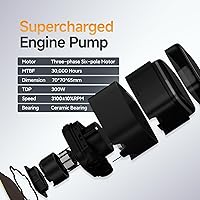
  • Pump Head Size: The pump housing measures 70 x 70 x 65mm, which is notably larger than average and should be considered when planning clearance in compact builds.
  • TDP Rating: The cooler is rated to handle up to 300W TDP, making it appropriate for mainstream high-performance CPUs without extreme manual overclocking applied.
  • Temperature Display: A real-time digital readout on the pump head shows CPU or GPU temperature, with support for Celsius and Fahrenheit toggling through the Ocypus Digital software.
  • Lighting: The pump head features ARGB lighting with independent control, compatible with Asus Aura Sync, MSI Mystic Light, Gigabyte RGB Fusion, and similar motherboard ecosystems.
  • Intel Compatibility: Supported Intel sockets include LGA115x, LGA1200, LGA1700, and LGA1851, covering mainstream platforms from 10th-generation through the latest Arrow Lake series.
  • AMD Compatibility: Supported AMD sockets include AM4 and AM5, covering Ryzen 3000 through Ryzen 9000 series processors without requiring additional adapter hardware.
  • Mounting Hardware: All mounting brackets and fasteners are all-metal construction, with hardware for both Intel and AMD platforms included in the box at no additional cost.
  • Power Connector: The unit uses a 3-pin power connector operating at 12V DC, drawing 3.6 watts under normal operation.
  • Total Weight: The complete cooler assembly weighs approximately 4.78 lbs (around 2,245g), which is within typical range for 360mm AIO units with aluminum radiators.
  • Tubing Material: Flexible rubber tubing connects the pump head to the radiator, with a braided or sleeved outer finish standard for this product class.
  • Manufacturer: The Iota L36 is manufactured by Ocypus, a brand that entered the PC cooling market in 2024 and is positioned in the mid-range value segment.

Related Reviews

Ocypus Iota L24 AIO Cooler
87%
91%
Cooling Performance
94%
Noise Level
89%
RGB Lighting Customization
88%
Ease of Installation
93%
Compatibility with Intel and AMD Platforms
More
Ocypus Iota A62 CPU Air Cooler
77%
78%
Thermal Performance
74%
Noise Level
86%
Display & Aesthetics
58%
Software & App Reliability
88%
Ease of Installation
More
upHere P360K 360mm AIO Liquid CPU Cooler
77%
78%
Thermal Performance
67%
Noise Level
71%
Build Quality
88%
Installation Experience
86%
Compatibility
More
Ocypus Iota A40 CPU Air Cooler
85%
88%
Performance
94%
Noise Level
85%
Ease of Installation
90%
Compatibility
86%
Cooling Efficiency
More
SAMA Q70 360mm AIO Liquid CPU Cooler
80%
83%
Cooling Performance
88%
LCD Display Quality
61%
Display Software & Setup
79%
Fan Noise Level
72%
Pump Noise & Reliability
More
SAMA Q60 360mm AIO Liquid CPU Cooler
85%
91%
Cooling Performance
88%
Noise Level
80%
Ease of Installation
85%
Aesthetic & Customizability
92%
Compatibility
More
GAMDIAS Aura GLV2 360mm AIO Liquid CPU Cooler
87%
91%
Cooling Performance
88%
Noise Level
90%
ARGB Lighting Customization
85%
Ease of Installation
93%
Compatibility with Intel & AMD
More
NZXT Kraken Z73 360mm AIO RGB CPU Liquid Cooler
84%
92%
Cooling Performance
87%
Noise Level
72%
Installation Ease
80%
Software Control (CAM V4)
90%
Aesthetic Customization (LCD Display)
More
AsiaHorse WK-A360 ARGB AIO CPU Liquid Cooler 360mm
87%
94%
Cooling Performance
88%
Noise Levels (Under Load)
75%
RGB Aesthetics
90%
Installation Ease
92%
Build Quality
More
Lian Li Galahad II Lite 360mm Cooler
82%
83%
Thermal Performance
91%
Build Quality
74%
Noise Level
79%
Installation Experience
88%
Cable Management
More

FAQ

Yes, the Ocypus Iota L36 360mm AIO CPU Cooler officially supports LGA1851, and the included hardware kit covers it without needing a separate adapter. If you are building around an Intel Core Ultra 200 series chip, you are covered straight out of the box.

Most users find it very readable through a tempered glass panel from a typical seated position. The display sits behind a transparent cover that gives it a layered, slightly elevated look, and the digits are crisp enough to read without squinting. It is not a tiny readout — it is designed to be seen, not just noticed.

Yes, and honestly this is the better option for most people. The fans use standard PWM control, so you can set custom fan curves directly in your motherboard BIOS — Asus, MSI, Gigabyte, and ASRock all handle this natively. The Ocypus app is mainly needed if you want to control the display settings or ARGB lighting profiles.

It is optional for cooling functionality — the fans and pump will run fine without it. You only need the software if you want to switch the display between Celsius and Fahrenheit or customize the ARGB lighting beyond what your motherboard software already offers. That said, the app has received mixed reviews for stability, so many users simply skip it.

It depends on your specific case. The radiator itself is a standard 360mm size (397 x 120 x 27mm), which fits in any mid-tower that supports triple-120mm top or front mounting. Where you need to pay attention is the pump head — at 70 x 70 x 65mm, it is larger than average and can occasionally conflict with tall RAM heatspreaders or nearby VRM heatsinks on some boards.

For most gaming and productivity workloads on mid-range CPUs, this 360mm AIO trades blows with top-tier air coolers and often wins on noise-adjusted performance. Where a high-end air cooler can edge it out is pure sustained all-core loads on very high-TDP chips, where the aluminum radiator's thermal capacity has limits. For anything below 250W sustained, the comparison is genuinely close.

You can still control it through the Ocypus software even without a motherboard ARGB header, so the lighting is not locked out entirely. However, if your board does not have a 5V ARGB header, you will not get synchronized effects with other components. A basic static color or default cycle is still accessible through the software.

The Iota L36 ships with thermal paste pre-applied to the base plate, so you can mount it directly without additional preparation. The included compound is adequate for normal use. If you want to squeeze out every last degree and are comfortable with the process, replacing it with a higher-end paste like Thermal Grizzly Kryonaut is always an option — but it is not necessary for most builds.

That depends on your workload. For gaming and mixed use where the 7950X does not sustain full all-core boost for extended periods, the Iota L36 will keep things in check. If you are running prolonged multi-threaded workloads like 3D rendering or video encoding at full tilt, the 7950X can push well past 200W sustained, and an aluminum 360mm AIO starts to show its limits there. For that chip under heavy professional loads, a premium copper-core AIO or custom loop is a more reliable pairing.

At moderate gaming loads where the CPU is not pegged, most users describe it as very quiet — easy to forget it is even running. During extended stress scenarios that push fans toward their upper range, the noise becomes noticeable but stays within a tolerable hum rather than an aggressive whine. For open-back headphone users in a quiet room, the fans at peak speed are detectable; for everyone else, it is a non-issue.