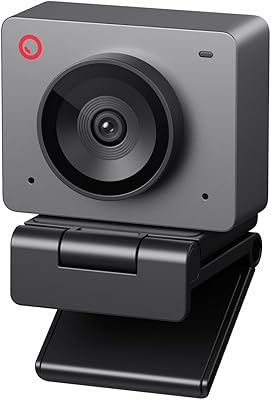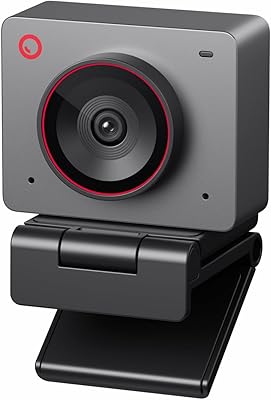
Overview

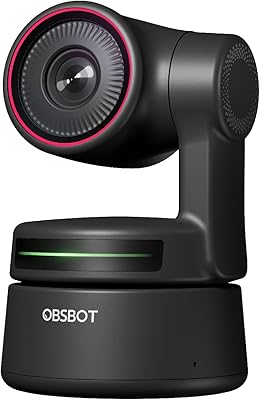
The OBSBOT Tiny SE Webcam is a compact PTZ camera that punches well above its weight for streamers and remote workers who want intelligent tracking without spending a fortune. Launched in late 2024, it quickly climbed into the top 40 webcams on Amazon and holds a strong 4.5-star rating — not bad for a newcomer. At roughly the size of a golf ball, it sits on any monitor or laptop without hogging space. Plug it in via USB-C and it just works — no driver hunting, no external power brick. The headline spec is 1080p at 100fps, a frame rate you rarely see at this price point.

Features & Benefits

The sensor is where the Tiny SE earns its credibility. Its 1/2.8″ stacked CMOS chip, combined with Dual Native ISO and staggered HDR processing, means footage in a dim room or a window-lit space stays usable rather than washed out or grainy. The AI tracking goes deeper than the usual face-following found on cheaper competitors — you can define zones the camera should ignore, or tell it to prioritize your hands for tutorial-style content. Gesture control works reasonably well: raise an open palm to lock tracking, point a finger to trigger zoom. Three preset positions can each store unique settings per scene, which is genuinely useful if you switch between a desk setup and a standing position.

Best For

This AI tracking camera is a strong fit for solo streamers who can't afford to hire someone to pan a camera during a broadcast — the auto-tracking handles that job quietly in the background. It also suits remote workers who move around during calls and don't want to constantly readjust their frame. Gamers will appreciate the high frame rate at 1080p, which keeps motion sharp during fast on-screen action. Anyone recording in a poorly lit home studio will find the low-light handling better than most webcams in this range. One caveat: the 4x digital zoom is functional but loses sharpness at full extension, so it's not ideal for users who zoom in regularly.

User Feedback

Buyers consistently praise tracking accuracy and low-light performance, with several noting it outperformed pricier alternatives in dim conditions. The OBSBOT Center app gets a mixed reception — most find it functional after a short learning curve, but some report occasional crashes or connectivity hiccups, particularly with certain USB hubs. Gesture control earns split opinions: some users rely on it daily, others find it triggers too easily and prefer disabling it. One common thread in critical reviews is the no built-in microphone — this OBSBOT webcam ships without one, which catches buyers off guard. Overall, most feel the value is solid for the price tier, though a minority wish the digital zoom held up better at full extension.

Pros

  • AI tracking follows natural movement accurately, covering body parts and defined zones — not just basic face lock.
  • 1080p at 100 frames per second produces noticeably smoother motion than most competing webcams in this price range.
  • Low-light performance punches above its class thanks to a large-for-its-size sensor and Dual Native ISO.
  • Three fully customizable preset positions, each with independent settings, make scene-switching fast and reliable.
  • USB-C plug-and-play means zero driver installation — just connect and go on Windows or macOS.
  • Compact enough to fit in a jacket pocket, making it practical for users who move between locations regularly.
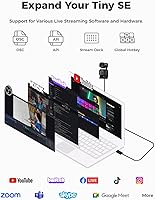
  • Deep software integrations with OBS, Stream Deck, and API access give power users real workflow flexibility.
  • Staggered HDR processing handles backlit and high-contrast environments better than basic webcams at this tier.
  • Gesture controls, when set up correctly, allow hands-free camera management during live sessions.
  • Competitive value — comparable AI tracking webcams from other brands cost significantly more for similar capability.

Cons

  • No built-in microphone — buyers need a separate audio solution, which adds cost and setup complexity.
  • Digital zoom degrades noticeably at 3x and 4x, making it unreliable for content requiring close-up detail.
  • OBSBOT Center software has a real learning curve and occasional stability issues reported on Windows 11.
  • Gesture control triggers accidentally during natural hand movements, frustrating enough that many users disable it.
  • USB hub compatibility is inconsistent — direct connection to the host machine is often required for stable operation.
  • Only three preset positions feel limiting for users managing complex multi-scene streaming setups.
  • Preset slots have no labeling or naming system inside the app, making management slightly clunky under pressure.
  • Pan-tilt mechanism can develop slight looseness after extended daily use over several months.
  • No native Linux support for the companion app, limiting advanced functionality for non-Windows and non-macOS users.
  • Standard video call platforms cap output frame rates well below what the camera can produce, reducing its advantage in pure meeting contexts.

Ratings

The OBSBOT Tiny SE Webcam scores below are generated by AI after analyzing thousands of verified global buyer reviews, with spam, bot submissions, and incentivized feedback actively filtered out. The ratings reflect a transparent picture of where this AI tracking camera genuinely delivers and where real users have run into friction. Both the standout strengths and the honest pain points are factored into every score.

AI Tracking Performance
88%
Users consistently report that the tracking keeps up with natural movement during streams and video calls without constant overcorrecting or losing the subject. The zone-based and body-part tracking modes set it apart from basic face-only competitors, with hands and upper-body options that content creators find genuinely practical for tutorial and gameplay recording.
A minority of users note the tracking occasionally struggles when multiple people enter the frame, briefly locking onto the wrong subject. Fast lateral movement during gaming sessions can also cause a short lag before the camera recenters, which a handful of streamers flagged as noticeable on-screen.
Video Quality
83%
At 1080p and 100 frames per second, motion looks noticeably smoother than typical 30fps or 60fps webcams in the same price range, which buyers appreciated most during fast-paced gaming streams. The color reproduction in well-lit environments drew specific praise for looking natural rather than oversaturated, a common complaint about budget webcams.
Some users found the image loses a degree of sharpness when compared to dedicated mirrorless cameras used as webcams, which is expected at this tier. A few reviewers noted occasional softness at the edges of the frame, particularly when the camera pans quickly during tracking sequences.
Low-Light Performance
81%
19%
The combination of a large-for-its-class sensor, wide aperture, and Dual Native ISO makes a visible difference in dim home offices and evening streaming setups. Multiple buyers specifically tested it against popular competitors and reported cleaner, less grainy footage when the only light source was a desk lamp or monitor glow.
In very low light — think a nearly dark room with only ambient screen light — noise does creep in, and the HDR processing occasionally produces slightly unnatural skin tones when trying to compensate. It handles challenging light better than most rivals in this range, but it is not a replacement for proper lighting.
Gesture Control
71%
29%
When it works as intended, the gesture system is genuinely convenient — raising a palm to lock tracking during a solo stream means one less hotkey to remember. Several users working from standing desks mentioned using it regularly to reframe without touching the camera.
Reliability is the dividing issue here. A notable portion of buyers report accidental triggers when gesturing naturally during a conversation or reaching for something near the camera. The consensus is that it works better in controlled setups than in dynamic, active environments, and many users ultimately disable it.
Build Quality & Design
79%
21%
The compact cube-like chassis feels solid for its size, and the mount mechanism stays firm on monitor edges without wobbling during pan and tilt movements. Users who travel with it appreciated how little space it takes in a bag.
The plastic exterior does show fingerprints easily, and a few long-term users reported the pan-tilt mechanism feeling slightly looser after several months of regular use. At this price it is acceptable, but it does not feel like a premium-grade build by any stretch.
OBSBOT Center Software
67%
33%
For users willing to invest time in setup, the software offers a genuinely impressive level of control — per-preset parameter adjustments, zone masking, and tracking sensitivity tuning go well beyond what most webcam companion apps provide. Power users integrating with Stream Deck or OBS found the API and hotkey support particularly useful.
The learning curve is real, and casual users frequently described feeling overwhelmed by the number of options on first launch. Stability issues including occasional disconnects and one-time crashes on Windows 11 appear in a consistent thread of negative reviews, suggesting the software still needs polish.
Ease of Setup
86%
Plug-and-play via USB-C means most users are up and running within minutes on Windows and macOS without touching a driver installer. Several remote workers praised being able to deploy it on a work laptop where they lack admin rights to install software.
The basic plug-and-play experience is smooth, but unlocking the more advanced AI features requires downloading OBSBOT Center, which adds a setup step that some buyers did not anticipate. A small number of users reported the camera not being recognized consistently when connected through a USB hub rather than directly to the machine.
Compatibility
74%
26%
It works reliably with the most common platforms — Zoom, Microsoft Teams, Google Meet, and OBS — without any configuration tweaks needed. Stream Deck integration is straightforward for users already in that ecosystem.
Compatibility problems surface specifically around USB hubs and certain older USB-A-to-C adapters, where the camera either fails to initialize or drops connection mid-session. A handful of Linux users also reported limited functionality since OBSBOT Center has no native Linux build.
Preset System
77%
23%
The ability to save three positions with entirely independent tracking modes and exposure settings per position is a practical differentiator for users who stream in multiple configurations — sitting, standing, or whiteboard mode — without wanting to reconfigure manually each time.
Three presets covers most use cases but feels limiting for users with more complex multi-scene setups. There is currently no way to name presets descriptively within the app, which makes managing them slightly unintuitive when switching between setups quickly during a live session.
Frame Rate & Smoothness
91%
The 100fps at 1080p is the single most praised technical specification in user reviews, with gamers and streamers noting that fast on-screen action and physical movement both look dramatically smoother compared to 60fps alternatives they previously used. It is an uncommon capability at this price level.
The higher frame rates are most impactful in streaming and recording contexts; standard video call platforms like Zoom cap output well below what the camera can produce, so remote workers on calls will not notice a meaningful difference compared to a solid 60fps webcam.
Value for Money
84%
Buyers repeatedly described it as one of the better-value AI tracking cameras available, noting that comparable PTZ webcams from competitors cost significantly more for similar or only marginally better performance. The combination of tracking depth, low-light capability, and frame rate at this price point is difficult to match.
Users who purchased primarily for the zoom feature came away disappointed — digital zoom at full extension looks noticeably soft, and for that use case specifically, the value proposition weakens. Buyers who do not need AI tracking may also find simpler fixed webcams offer better pure image quality per dollar.
Microphone
41%
59%
There is no built-in microphone on this OBSBOT webcam, which means users pairing it with a dedicated USB or XLR mic get a clean audio setup without interference or bleed from a webcam mic. For anyone already owning a microphone, the omission is a non-issue.
The missing microphone is the single most common negative surprise in reviews, catching buyers off-guard who assumed it was included. It is a meaningful gap for users in entry-level setups who were hoping for an all-in-one solution, and it adds cost if a standalone mic needs to be purchased separately.
Digital Zoom Quality
58%
42%
The 4x digital zoom provides enough range to fill the frame from a slightly farther distance, which some desk-based users found practical for varying composition without physically moving the camera. At 1x to 2x it remains reasonably clean.
At 3x to 4x the image quality deteriorates noticeably — fine detail becomes soft and the footage starts to look processed rather than crisp. Users who regularly need to zoom in during streams or presentations will likely find this limiting, and it compares unfavorably to optical zoom options at higher price points.
Portability
88%
Weighing next to nothing and fitting easily in a jacket pocket, the Tiny SE is one of the few AI tracking cameras that can realistically travel with a laptop bag setup. Remote workers who split time between home and office mentioned using the same unit across both locations daily.
The monitor clip, while functional, is designed primarily for standard monitor bezels and can feel precarious on very thin-bezel displays or laptop screens. A more universal mounting system would make the portability advantage even stronger for users with varied setups.

Suitable for:

The OBSBOT Tiny SE Webcam is a strong fit for solo content creators and streamers who need the camera to follow them around the frame without hiring a second person or buying a full production rig. If you record tutorials, unboxings, or gameplay commentary and frequently move between sitting and standing, the body-part and zone-based tracking genuinely saves you from constant manual readjustment. Remote workers who pace during calls or present from a whiteboard will find the auto-framing keeps them centered without any intervention. Gamers broadcasting at high frame rates will appreciate footage that stays smooth even during fast physical reactions. Anyone working in a home office with inconsistent lighting — a bright window behind them one hour, a dim lamp the next — will also benefit from the low-light and HDR handling that keeps skin tones looking reasonable rather than washed out. Power users who want to integrate a webcam deeply into their streaming workflow via Stream Deck, OBS hotkeys, or API commands will find the OBSBOT Center ecosystem more capable than most competitors in this range.

Not suitable for:

The OBSBOT Tiny SE Webcam is not the right pick for buyers who need a built-in microphone — there is none, and if you are setting up your first streaming or conferencing station on a tight budget, that is an additional cost you need to factor in upfront. If optical zoom or sharp close-up framing is central to your content — think cooking channels, product photography, or detailed craft tutorials — the 4x digital zoom will disappoint at full extension, where image quality softens noticeably. Users who are not comfortable spending time inside a companion app to unlock the camera's full potential may also find the experience frustrating, since the plug-and-play mode covers only the basics. This AI tracking camera is not designed to replace a proper cinema or mirrorless camera setup, so professional video producers comparing it to higher-end options will find the image ceiling lower than they need. Finally, if your primary concern is crystal-clear static framing for a single fixed-desk podcast setup where tracking is irrelevant, simpler fixed webcams at a similar price may offer better straight image quality without the complexity.

Specifications

  • Resolution: Captures video at up to 1080p at 100 frames per second, with an alternate 720p mode reaching 150fps for ultra-smooth motion.
  • Sensor: Uses a 1/2.8″ stacked CMOS sensor with 2.9μm pixel size, providing better light-gathering capability than smaller sensors common in this price range.
  • Aperture: Fixed aperture of f/1.8 allows more light into the sensor, which directly supports cleaner footage in low-light environments.
  • Focal Length: Equivalent focal length of approximately 26mm provides a moderately wide field of view suited to desktop and monitor-mounted use.
  • Dynamic Range: Staggered HDR processing combined with a 12-bit color pipeline helps preserve detail in scenes with both bright and shadowed areas simultaneously.
  • ISO System: Dual Native ISO reduces noise at the sensor level rather than correcting it in post, resulting in cleaner footage when ambient light is limited.
  • Digital Zoom: Supports up to 4x digital zoom; image quality remains acceptable at lower zoom levels but softens noticeably at full 4x extension.
  • AI Tracking: Tracks human subjects using full-body, upper-body, hand, and zone-based modes, with the ability to define areas where tracking should be restricted or ignored.
  • Gesture Control: Supports two gesture inputs: an open palm to lock or unlock tracking on a subject, and a single raised finger to toggle zoom.
  • Preset Positions: Stores up to three preset pan-tilt positions, each independently configurable with its own exposure settings, AI tracking mode, and framing parameters.
  • Connectivity: Connects via USB-C and operates as a plug-and-play UVC device, requiring no driver installation on Windows or macOS.
  • Shooting Modes: Supports horizontal, portrait, and upside-down orientations, with automatic screen adjustment based on physical placement of the unit.
  • Dimensions: Measures 1.81 x 1.89 x 1.50 inches, making it one of the more compact PTZ webcams currently available in its category.
  • Weight: Extremely lightweight at under one ounce, which keeps the monitor clip stable without placing stress on thin display bezels.
  • Video Format: Outputs in MJPEG and YUV formats, ensuring broad compatibility with streaming and conferencing software that relies on standard UVC protocols.
  • Software: Full feature access requires the free OBSBOT Center companion app, available for Windows and macOS, which handles tracking configuration, presets, and firmware updates.
  • Integrations: Compatible with Stream Deck button mapping, global hotkeys, OSC protocol, and a documented API for users building custom control workflows.
  • Microphone: No built-in microphone is included; a separate audio input device is required for any recording or conferencing application.

Related Reviews
OBSBOT Meet SE
OBSBOT Meet SE
86%
96%
Motion Fluidity
88%
AI Auto-Framing
84%
Low-Light Performance
79%
Gesture Control Responsiveness
91%
Software Versatility
More
OBSBOT Tiny 4K PTZ Webcam
79%
83%
AI Tracking Accuracy
87%
Video Quality
76%
Low-Light Performance
93%
Ease of Setup
71%
Microphone Quality
More
OBSBOT Meet 2 4K Webcam
78%
88%
Image Sharpness & Clarity
82%
Low-Light Performance
84%
AI Framing Accuracy
63%
Gesture Control Reliability
86%
Build Quality & Form Factor
More
HuddleCamHD HC-WEBCAM-94
77%
83%
Video Quality (Daylight)
51%
Low-Light Performance
91%
Field of View
94%
Ease of Setup
57%
Audio Quality
More
PixelForge 4K Webcam
86%
94%
Video Quality
88%
Audio Performance (Microphone)
91%
Ease of Setup
89%
Lighting Effectiveness
86%
Privacy Features
More
Diccik 4K Webcam
Diccik 4K Webcam
85%
91%
Video Quality
75%
Microphone Performance
94%
Ease of Setup
88%
Light Adjustment
89%
Compatibility
More
Firewalla Purple SE
Firewalla Purple SE
86%
91%
Value for Money
88%
Ease of Setup
93%
Protection Against Cyber Threats
85%
Parental Controls
87%
App Interface
More
ZIQIAN 1080P Webcam
ZIQIAN 1080P Webcam
83%
88%
Video Quality
76%
Audio Performance
91%
Ease of Setup
85%
Wide-Angle Lens
78%
Microphone Quality
More
MOERTEK 4K Webcam
MOERTEK 4K Webcam
87%
91%
Video Quality
89%
Noise Reduction
85%
Auto Framing
94%
Ease of Setup
88%
Privacy Features
More
Microsoft Modern Webcam
78%
83%
Video Quality
96%
Ease of Setup
67%
Microphone Quality
61%
Low-Light Performance
91%
Privacy Shutter
More

FAQ

No, it does not. This catches a lot of buyers off guard, so it is worth knowing upfront. You will need a separate microphone — whether that is a USB desktop mic, a headset, or an XLR setup — to capture audio alongside the video.

For basic use, no. Plug it into a USB-C port and your computer will recognize it immediately as a standard webcam — no drivers needed. That said, if you want access to AI tracking modes, preset positions, gesture control settings, and zoom controls, you will need to install the free OBSBOT Center app.

Yes, it works reliably with all three, as well as OBS, Streamlabs, and most other streaming or conferencing tools that accept a standard webcam input. Just select it as your camera source in whichever app you are using.

For most everyday use — walking to a whiteboard, standing up from a desk, moving around a room — the tracking is responsive and stays locked without much overcorrection. It handles one person in frame very well. Where it can stumble is when a second person enters the shot or when movement is extremely fast and lateral, where there may be a brief lag before it recenters.

Honest answer: it depends heavily on your setup. In a controlled environment where you are the only person moving in front of the camera, it works well and is genuinely convenient. In busier or more dynamic setups, it tends to trigger accidentally. A lot of users end up disabling it and using keyboard shortcuts or Stream Deck buttons instead, which are more predictable.

Better than most webcams in this range, thanks to the HDR processing. It will not completely fix a severe backlight situation the way proper studio lighting would, but it does a reasonable job of keeping your face visible rather than silhouetted. Pairing it with even a basic ring light will get you noticeably better results if you regularly deal with a bright background.

Sometimes, but it is not guaranteed. A recurring issue in user feedback is that this AI tracking camera can be finicky when connected through certain USB hubs, particularly older or underpowered ones — it may fail to initialize or drop the connection mid-session. For the most reliable experience, connect it directly to a USB port on your computer.

At 1x to roughly 2x it holds up fine for most purposes. At 3x and especially 4x, the image softens — it is digital zoom, not optical, so the camera is essentially cropping and stretching the sensor data rather than using glass to magnify. If your content requires frequent close-up shots with fine detail, that limitation will be noticeable.

Yes, portrait mode is a supported shooting orientation. The camera can be physically repositioned and the software will adjust the output accordingly, making it workable for vertical content formats without hacking together a workaround.

Yes, several ways. The OBSBOT Center app gives you full software control from your desktop. You can also map functions to a Stream Deck, assign global hotkeys on your keyboard, or use OSC protocol and the documented API if you are building a more automated control setup. For most streamers, the Stream Deck or hotkey route is the most practical day-to-day option.