OBSBOT Meet 2 4K Webcam
Overview
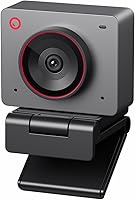
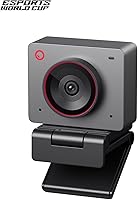
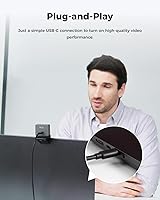
The OBSBOT Meet 2 4K Webcam is one of the more surprising entries in the mid-range webcam space — not because of what the spec sheet says, but because of how much has been packed into something roughly the size of a large earbud. Plug it into a USB-C port and it works immediately, no driver installation required. For users who want more control, the companion OBSBOT Center software unlocks deeper customization. It also comes in several color options, a small but appreciated touch for desk setup enthusiasts. OBSBOT's role as the official webcam partner for the 2025 Esports World Cup adds a layer of real-world credibility that carries some weight.
Features & Benefits
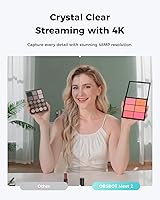
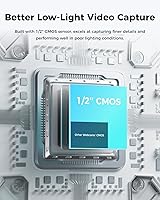
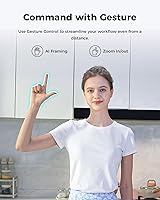
At the core of the Meet 2 sits a 1/2″ CMOS sensor with an f/1.8 aperture — noticeably larger than what most webcams at this price point use, and that extra sensor area genuinely helps in dim or mixed lighting. The camera records at 4K with up to 60 frames per second and HDR support, keeping motion crisp and colors balanced even under tricky light sources. AI framing adapts automatically for solo use or group calls, recomposing the shot as people enter or leave the frame. Gesture control — a wave to toggle framing, a pointed finger to zoom — works hands-free once you get the hang of it. Beauty mode and fine-tuning options round things out through the companion app.
Best For
This compact webcam suits remote and hybrid workers who move between locations and need something portable without sacrificing video quality — it slips into any bag without a second thought. Streamers and content creators who want intelligent auto-framing but aren't ready to invest in a full PTZ rig will find it punches above its weight. Gamers who care about a clean, minimal desk setup will appreciate how little space it occupies. It also handles variable home-office lighting better than many competitors in this range. Frequent travelers wanting reliable 4K video on the road without carrying extra gear have a genuinely practical option here.
User Feedback
Buyers consistently highlight image sharpness and how quickly the AI framing responds as two of the standout positives, with many noting a clear step up from older or budget webcams. Gesture control receives more divided opinions — users who stick with it tend to appreciate the convenience, but missed gesture recognition in low-contrast or cluttered backgrounds is a recurring complaint. The built-in microphones are adequate for casual calls but fall short of what a dedicated external mic delivers, so audio-focused users should plan accordingly. A handful of macOS users have reported occasional software inconsistencies, while Windows users seem to have a more stable experience overall. Most buyers agree the value proposition holds up well for what you get in this price tier.
Pros
- AI framing adjusts automatically for solo users and small groups, removing the need to manually reposition the camera.
- The sensor size and aperture deliver visibly better low-light footage than most webcams competing at this price point.
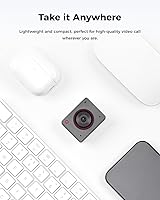
- Weighing barely 40 grams, the Meet 2 is genuinely pocketable — smaller than most earbuds cases.
- 4K at 60 frames per second keeps fast movement sharp and smooth, useful for both streaming and active presentations.
- Plug-and-play USB-C setup means zero installation time — it works the moment you plug it in.
- HDR processing handles backlit environments and window glare better than fixed-exposure alternatives.
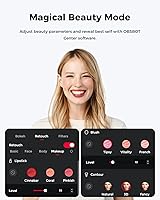
- Beauty mode is subtle enough at lower settings to be useful without looking artificially processed.
- Multiple color options let users match the webcam to their existing desk setup aesthetic.
- OBSBOT Center software unlocks deeper manual controls for users who want fine-grained adjustments beyond defaults.
- Ranked among the top webcams on Amazon, this AI webcam has a track record of consistent user satisfaction.
Cons
- Built-in microphones struggle noticeably in rooms with echo, background noise, or open-plan office environments.
- Gesture control misfires frequently in cluttered or low-contrast backgrounds, making it unreliable for everyday use.
- macOS users report software instability including disconnections and settings that reset unexpectedly between sessions.
- The plastic clip mount loses tension over time on thin laptop lids, causing the camera to shift slightly.
- Advanced AI features can behave unpredictably when routed through third-party virtual camera drivers in OBS.
- At maximum digital zoom, image quality degrades enough to be noticeable on larger displays.
- No official Linux support limits options for users outside Windows and macOS ecosystems.
- White balance can drift toward warm tones under artificial bulb lighting without manual correction through the app.
- Users with older USB ports or certain docking stations may experience frame drops or automatic resolution downscaling.
- The overall package feels slightly audio-light for buyers expecting a true all-in-one streaming solution at this price.
Ratings
The OBSBOT Meet 2 4K Webcam has been put through its paces by buyers across home offices, streaming setups, and travel bags worldwide — and our AI has analyzed thousands of verified purchase reviews, actively filtering out incentivized ratings and bot patterns to surface what real users actually experience. Scores reflect the full picture, covering where this compact AI webcam genuinely impresses and where it falls short of expectations.
Image Sharpness & Clarity
Low-Light Performance
AI Framing Accuracy
Gesture Control Reliability
Build Quality & Form Factor
Microphone Quality
4K & 60 FPS Performance
Software & App Experience
Plug-and-Play Setup
Value for Money
Portability
HDR & Color Accuracy
Compatibility Across Platforms
Beauty Mode & Image Processing
Suitable for:
The OBSBOT Meet 2 4K Webcam is a strong match for remote workers and hybrid employees who regularly shift between home, the office, and third spaces like cafes — its pocket-friendly size means it travels without friction, and the image quality is noticeably better than what most laptop screens can deliver on their own. Streamers and content creators who want hands-free framing without spending several hundred dollars more on a motorized PTZ camera will find the AI framing a practical middle ground that handles most solo and small-group scenarios well. Gamers who want clean, high-resolution video on stream without cluttering their desk with bulky hardware will appreciate how little physical presence this compact webcam demands. It also suits professionals who present frequently on video calls and want their footage to look sharp and well-composed without spending time manually adjusting camera angles or fiddling with settings. Anyone working under inconsistent natural light — near windows that shift throughout the day, for instance — will benefit from the HDR processing and the larger-than-average sensor that keeps the image balanced without constant manual correction.
Not suitable for:
The OBSBOT Meet 2 4K Webcam is not the right tool for buyers who treat audio as equally important as video — the built-in microphones are adequate for casual calls but will disappoint podcasters, voiceover artists, or anyone broadcasting to an audience that expects broadcast-quality sound. Users on macOS who rely heavily on the companion software for custom configurations may find the experience inconsistent, with settings occasionally not persisting and software stability lagging behind what Windows users get. This AI webcam also falls short for buyers who need robust gesture control in cluttered or dimly lit environments, since recognition in those conditions is unreliable enough to erode the feature's usefulness. Professional videographers or studios expecting cinema-grade dynamic range and color science should look elsewhere — the imaging is impressive for the category, but it is still a webcam, not a mirrorless camera. Finally, Linux users or anyone working through complex virtual camera routing in OBS may run into compatibility limitations that the hardware alone cannot resolve.
Specifications
- Sensor: The camera uses a 1/2″ CMOS sensor, which is larger than the sensors found in most webcams at this price tier and contributes to improved light capture in dim conditions.
- Aperture: The lens has a maximum aperture of f/1.8, allowing more light to reach the sensor and helping maintain image clarity in low-light environments.
- Resolution: Video output reaches 4K UHD, delivering sharp, detailed footage suitable for high-resolution displays and recorded content.
- Frame Rate: The camera supports up to 60 frames per second at 4K resolution, keeping motion smooth during fast-paced gaming streams or active presentations.
- HDR Support: HDR processing is built in, helping balance exposure between bright and dark areas of the frame automatically.
- AI Framing: AI framing operates in both solo and group modes, dynamically adjusting the composition as subjects enter or leave the shot.
- Gesture Control: Version 2.0 gesture control recognizes an open-hand gesture to toggle AI framing and an extended index finger gesture to control zoom level hands-free.
- Microphones: Two built-in microphones are integrated into the body, providing basic stereo audio capture without requiring an external mic for casual use.
- Connectivity: The webcam connects via a single USB-C cable and is recognized as a plug-and-play device on both Windows and macOS without driver installation.
- Weight: The unit weighs 40.5 grams, making it one of the lightest 4K webcams available and genuinely portable for travel and hybrid work.
- Dimensions: The camera body measures approximately 0.43 x 0.2 x 0.41 inches, giving it a footprint comparable to a large earbud or small USB drive.
- Video Format: Recorded video is saved in MP4 format, which is broadly compatible with editing software, streaming platforms, and media players.
- Audio Formats: The camera supports AAC, MP3, and PCM audio formats for flexible compatibility across recording and communication applications.
- Companion Software: The optional OBSBOT Center app provides advanced controls including exposure tuning, beauty mode intensity, field-of-view adjustments, and AI framing preferences.
- Beauty Mode: A built-in beauty mode softens the image with adjustable intensity, operable through the companion app without any third-party software.
- Color Options: The webcam is available in multiple color variants, allowing buyers to match the device to their existing desk or studio aesthetic.
- Power Source: The device draws power entirely through the USB-C connection and does not require a separate power adapter or battery.
- Platform Support: Core plug-and-play functionality is supported on Windows and macOS; Linux is not officially supported by the manufacturer.
Related Reviews
OBSBOT Tiny 4K PTZ Webcam
OBSBOT Meet SE
Insta360 Link 2
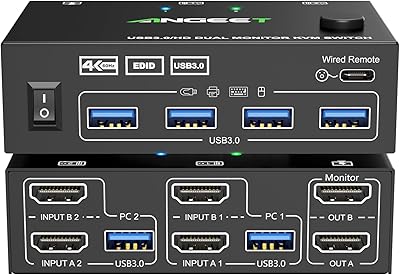
ANGEET HDMI KVM Switch 2 Monitors 2 Computers 4K@60Hz
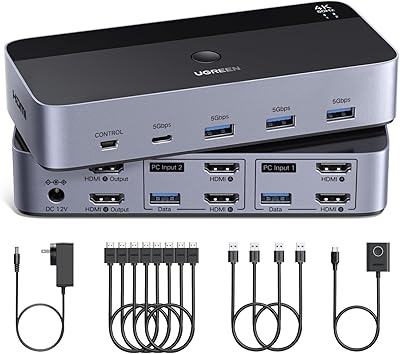
UGREEN AK500 Dual Monitor KVM Switch
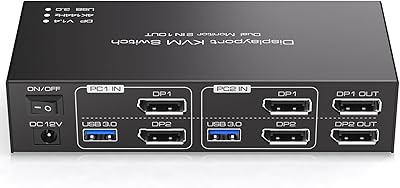
TJCXELE 4K@144Hz Dual-Monitor DisplayPort KVM Switch

PEATOP 4K-C80CCMD Webcam

PixelForge 4K Webcam

MOERTEK MT 4K Webcam
