
Overview

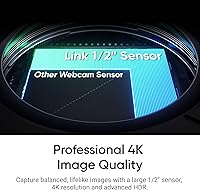
The Insta360 Link 2 arrived in late 2024 as one of the few webcams built around a 1/2″ CMOS sensor — hardware you typically find in dedicated cameras, not desktop peripherals. That sensor alone sets it apart from the crowded field of fixed-lens competitors. What really distinguishes this PTZ webcam, though, is its motorized pan-and-tilt mechanism: the camera physically moves to keep you in frame, rather than relying on a digital crop. It currently ranks among the top webcams on Amazon, and the price reflects that ambition. This is prosumer territory — buyers who want broadcast-quality results from a desk setup will find it worthwhile.

Features & Benefits

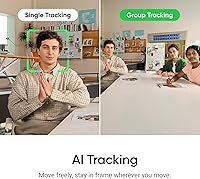
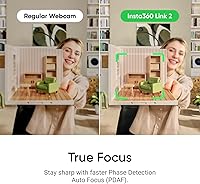
The 4K HDR image quality is where most buyers notice the difference immediately — skin tones stay accurate under mixed lighting conditions that would wash out cheaper sensors. The PDAF autofocus locks on quickly without the hunting stutter common in budget webcams. Then there is the AI subject tracking, which physically rotates the camera to follow you as you move — no cropping, no quality loss. The built-in noise-canceling mic handles open offices and busy home environments better than most standalone mics at the same price. Gesture control and smartphone remote access round things out, and the DeskView, Whiteboard, and 4K Portrait modes make this tracking camera genuinely versatile.

Best For

This PTZ webcam makes the most sense for people who have outgrown basic webcams and want a tangible step up in daily video quality. Remote professionals on back-to-back Zoom or Teams calls will appreciate how consistently sharp and well-lit they look without adjusting anything. Streamers and creators — especially those who move around while presenting or teaching — will find the physical tracking far more satisfying than a static frame. Educators who regularly reference a whiteboard or desk surface get genuine utility from those dedicated modes. It is less suited to someone who just needs a reliable camera for occasional calls; the setup and software learning curve require some patience and a real use case to justify the investment.

User Feedback

Owners of this tracking camera consistently praise low-light performance and tracking accuracy, with many noting the quality jump over the original Link feels significant rather than incremental. Home office workers and podcasters particularly mention how much cleaner their audio is without any extra microphone setup. That said, a recurring theme in critical reviews is the reliance on the Link Controller software — if it misbehaves, the camera loses some of its smarter features. A handful of users also report that gesture recognition can be inconsistent, occasionally triggering unintentionally. USB-only connectivity is another limitation some buyers flag. On balance, most long-term owners consider the investment justified, but it rewards users who take time to configure it properly.

Pros

  • Physical pan-and-tilt tracking keeps you in frame without any digital quality loss or cropping.
  • The 1/2″ sensor produces genuinely accurate, well-exposed video even in poorly lit home offices.
  • PDAF locks focus quickly and cleanly, eliminating the hunting stutter common in cheaper webcams.
  • Built-in noise cancellation handles keyboard noise and ambient hum well enough to replace a basic USB mic.
  • DeskView, Whiteboard, and Portrait modes address real creator workflows rather than acting as gimmicks.
  • Works reliably across Zoom, Teams, Google Meet, OBS, and Twitch without any custom drivers.
  • Smartphone remote control is a practical convenience for solo creators without a production assistant.
  • The Link 2 represents a meaningful hardware upgrade over its predecessor, not just a software refresh.
  • Compact and sturdy build sits firmly on monitor bezels without wobble during tracking movement.
  • HDR processing holds color accuracy across mixed lighting conditions that would challenge most webcams.

Cons

  • Link Controller software has caused recognition failures for some users after Mac or Windows updates.
  • Gesture control misfires in dim lighting or when hands are naturally animated during conversation.
  • USB-only connectivity limits cable-free desk setups and restricts mounting placement options.
  • The whirring motor sound during tracking can occasionally be picked up by nearby sensitive microphones.
  • Getting full value requires a real time investment in app configuration — out-of-the-box setup is only partial.
  • Tracking can briefly lose the subject when background contrast is low or a pet crosses the frame.
  • High-end podcast or voiceover work still benefits from a dedicated external microphone despite the solid built-in mic.
  • Sustained 4K output can strain older machines, leading to dropped frames in demanding recording scenarios.
  • Mode switching requires app interaction rather than a physical button, slowing down live multi-mode workflows.
  • Buyers who rarely use tracking or specialized modes will struggle to justify the price against capable mid-range alternatives.

Ratings

Our scores for the Insta360 Link 2 are generated by AI after analyzing thousands of verified buyer reviews worldwide, with spam, bot activity, and incentivized feedback actively filtered out. The result is an honest, data-driven picture of where this PTZ webcam genuinely excels and where real users have run into frustration. Both strengths and recurring pain points are reflected transparently in every category below.

Image Quality
93%
Users consistently describe the 4K HDR output as the clearest they have seen from a webcam, with accurate skin tones that hold up whether they are sitting near a window or under artificial office lighting. Several podcast hosts and remote managers note that colleagues frequently ask what camera they switched to.
A small number of buyers report occasional overexposure in high-contrast scenes, such as when a bright window sits directly behind them. Some also note that 4K output requires a reasonably powerful machine to avoid dropped frames during intensive streaming sessions.
AI Subject Tracking
88%
The physical pan-and-tilt tracking is the feature buyers mention most enthusiastically — teachers pacing in front of a board and streamers who stand while gaming both describe it as transformative compared to a static wide-angle crop. Response speed is consistently rated as fast and natural-looking.
Tracking can occasionally latch onto background movement, like a pet crossing the room, before reacquiring the primary subject. A handful of users also note that in very low-contrast environments — a person wearing dark clothes against a dark wall — the system can momentarily lose lock.
Low-Light Performance
89%
The 1/2″ sensor gives the Link 2 a meaningful advantage in dim rooms, and buyers in home offices with poor overhead lighting note far less noise and grain than they experienced with previous webcams. Evening streaming sessions and late-night calls are frequently cited as use cases where the difference is immediately visible.
While low-light performance is strong for a webcam, it does not fully match a dedicated mirrorless camera in very dark rooms. Some users note that below a certain ambient threshold, the AI noise reduction introduces a slight smoothing effect that softens fine facial detail.
Autofocus
86%
Phase Detection AutoFocus draws specific praise from users who previously dealt with lens-hunting on older webcams. Buyers on video calls describe a camera that locks quickly when they lean forward or step back, without the distracting refocus pulse that cheaper models exhibit.
A few users report that PDAF occasionally struggles when the background has a similarly toned pattern to the subject. It is rare, but in certain office setups — particularly those with busy bookshelves directly behind the user — brief focus hesitation has been flagged.
Microphone Quality
81%
19%
Remote workers in open-plan offices and shared home spaces appreciate that the AI noise cancellation genuinely reduces keyboard clatter, HVAC hum, and ambient conversation without making the speaker sound hollow or over-processed. Several buyers dropped a separate USB microphone after switching to this tracking camera.
In acoustically challenging environments — bare concrete rooms or spaces with significant echo — the noise cancellation can introduce an unnatural tonal quality to the voice. Power users who record high-quality podcast audio still recommend a dedicated microphone rather than relying solely on the built-in solution.
Software & App Experience
63%
37%
The Link Controller app unlocks the most useful features — gesture triggers, mode switching, and remote smartphone control — and users who invest time learning it generally report a capable, well-organized interface. Over-the-air firmware updates have also addressed some early bugs reported at launch.
Software dependency is the single most common frustration. Multiple buyers describe scenarios where the app failed to recognize the camera after a system update, temporarily disabling tracking and gesture features. On Mac specifically, permissions conflicts with video conferencing apps have been reported more than once, requiring a full reinstall to resolve.
Gesture Control
67%
33%
When it works reliably, gesture control is a genuine convenience — solo streamers and presenters appreciate being able to trigger zoom or tracking without reaching for a keyboard shortcut. Users in well-lit environments with clean backgrounds report high recognition accuracy.
Gesture reliability drops noticeably in dim lighting or when the user is farther from the camera than usual. Accidental triggers during natural hand movements while talking are a recurring complaint, and several buyers have simply turned the feature off in favor of manual app controls.
Build Quality & Design
84%
The compact graphite black housing feels sturdy for its size, and the magnetic mounting system is frequently praised for how securely it attaches to a monitor lip without marring the surface. At just over a pound, it sits firmly without any wobble during pan-and-tilt movement.
A few users note that the plastic housing picks up fingerprints easily, and the motor mechanism produces a faint whirring sound during tracking that can occasionally be picked up by sensitive microphones nearby. The footprint, while compact, can feel awkward on ultra-thin monitor bezels.
Setup & Ease of Use
71%
29%
Plug-and-play USB connectivity means the camera is recognized immediately by Windows and Mac without any driver installation, which buyers appreciate for a quick first impression. The physical controls and indicator lights are intuitive enough for basic use right out of the box.
Unlocking the full feature set requires downloading the Link Controller app, configuring permissions, and in some cases troubleshooting conflicts with Zoom or Teams. New users who expect a truly effortless setup sometimes feel the learning investment is steeper than the marketing implies.
Compatibility
82%
18%
Buyers report consistent performance across Zoom, Microsoft Teams, Google Meet, Twitch, and OBS, with the camera recognized as a standard UVC device. This broad compatibility is regularly cited as a reason to choose it over proprietary ecosystem webcams that lock you into specific software.
The camera is USB-only, which rules out wireless or Bluetooth setups that some creators prefer for cable-managed desk builds. A small number of users also note that older machines with limited USB bandwidth can experience intermittent frame drops at full 4K output.
AI Modes Versatility
78%
22%
DeskView, Whiteboard, and 4K Portrait modes each address a distinct real-world scenario — product reviewers, teachers, and vertical-format content creators specifically call these out as features they use regularly rather than novelties they tried once. Portrait mode in particular has earned praise from TikTok and Instagram creators.
Switching between modes still requires interaction with the app rather than a dedicated physical button, which slows down multi-mode workflows. A few educators note that Whiteboard mode works best with high-contrast markers and a well-lit board; pale chalk or low-contrast writing can reduce detection accuracy.
Value for Money
74%
26%
Buyers who use this PTZ webcam daily for professional calls, streaming, or content creation consistently conclude that the image quality, tracking hardware, and microphone performance together justify the investment, particularly when compared to piecing together a separate webcam, tracking device, and microphone.
For anyone who primarily uses a webcam for occasional video calls, the cost is difficult to rationalize against strong mid-range alternatives. A recurring sentiment in mixed reviews is that you need to actually use most of its advanced features regularly to feel the price is fair.
Tracking Speed & Smoothness
83%
The motorized tracking movement is described by most users as fluid rather than mechanical — it does not snap or jerk between positions, which makes the footage look intentional on stream rather than automated. Speed adjustments via the app let power users fine-tune responsiveness to their preference.
At maximum tracking speed, a few users note that fast lateral movement — like quickly crossing the room — can result in a brief moment where the subject exits the frame before the camera catches up. Slower, deliberate movement is tracked far more smoothly than sudden dashes.
Upgrade Value Over Previous Gen
79%
21%
Users who owned the original Insta360 Link consistently describe the sensor upgrade, improved PDAF, and faster tracking as meaningful rather than cosmetic improvements. The addition of gesture control and the expanded mode set make the Link 2 feel like a genuinely evolved product for those who pushed the limits of the first version.
Buyers who use the camera primarily for static wide-angle calls and never relied on tracking may find the generational leap less compelling. A handful of original Link owners note that they would have appreciated a broader field-of-view option without needing to switch modes.

Suitable for:

The Insta360 Link 2 is built for people who spend serious time on camera and want their setup to reflect that. Remote professionals who run back-to-back video meetings will notice an immediate and meaningful difference in how polished and consistent their image looks, regardless of whether their home office lighting is ideal. Streamers and content creators who move around — standing up to demonstrate something, stepping to a whiteboard, or gesturing while talking — will find the physical tracking far more useful than any static wide-angle compromise. Educators who teach online and regularly reference a physical board or desk surface get genuine, practical utility from the dedicated modes rather than just a spec to brag about. Anyone upgrading from an entry-level webcam who is ready to invest properly in their video presence will find this tracking camera delivers a step change that is hard to replicate by any other single device purchase.

Not suitable for:

If you join a video call once a week and mostly sit still, the Insta360 Link 2 is a difficult spend to justify — much of what you are paying for simply will not get used. The camera depends on its companion software to unlock its most compelling features, which means buyers who dislike managing apps, dealing with permission conflicts, or troubleshooting after OS updates will find ownership more frustrating than rewarding. USB-only connectivity is a real constraint for creators who have invested in cable-managed or wireless desk setups, and the lack of a native wireless option limits placement flexibility. Users on older or lower-powered machines should also be cautious, since sustained 4K output during intensive streaming or recording sessions demands processing headroom that budget hardware may not reliably provide. If your priority is the simplest possible plug-and-play experience with zero configuration, there are more straightforward options at a lower price point that will serve occasional use just as well.

Specifications

  • Sensor: The camera uses a 1/2″ CMOS sensor, significantly larger than the 1/4″ sensors found in most consumer webcams, which directly improves low-light performance and dynamic range.
  • Resolution: Video output reaches up to 4K UHD, with HDR processing applied to balance exposure across high-contrast lighting conditions.
  • Autofocus: Phase Detection AutoFocus (PDAF) provides fast, accurate subject lock-on without the refocus hunting commonly observed in contrast-detection systems.
  • Pan & Tilt: A motorized PTZ mechanism physically rotates and tilts the camera body to follow subject movement, covering a wide range of motion without any digital cropping.
  • AI Tracking: On-device AI subject tracking identifies and follows a person around the room in real time, maintaining consistent framing during movement.
  • Microphone: The integrated microphone uses AI-based noise-canceling algorithms to filter ambient sounds such as keyboard clicks, HVAC noise, and background conversation.
  • Gesture Control: The camera recognizes specific hand gestures to trigger functions including AI tracking activation, zoom adjustment, and Whiteboard Mode without touching any device.
  • Remote Control: A companion smartphone app enables full remote camera control, including mode switching, zoom, and tracking toggle, from a mobile device.
  • Video Formats: Supported video output formats include MJPEG and H.264, ensuring broad compatibility with streaming software and video conferencing platforms.
  • Connectivity: The camera connects via a single USB cable and is recognized as a standard UVC device on both Windows and macOS without additional drivers.
  • Special Modes: Three specialized shooting modes are available: DeskView for overhead desk capture, Whiteboard for presentation surfaces, and 4K Portrait for vertical-format content.
  • Compatibility: The camera is confirmed compatible with Zoom, Microsoft Teams, Google Meet, Twitch, OBS Studio, and most other major video conferencing and streaming platforms.
  • OS Support: Full functionality is supported on both PC (Windows) and Mac (macOS), with the Link Controller companion app available for both operating systems.
  • Aperture: The lens has a maximum aperture of f/2.2, which contributes to its ability to maintain a bright, clean image in lower ambient lighting conditions.
  • Dimensions: The camera body measures 2.06 x 2.72 x 1.62 inches, making it compact enough to mount on most monitor bezels without obstructing the screen.
  • Weight: The unit weighs 1.08 pounds including its magnetic mount base, which is sufficient to keep it stable during motorized pan-and-tilt movement.
  • Color: The camera is available in Graphite Black, a matte dark finish that suits most desk and studio environments.
  • Model Number: The official model identifier is CINSABNB, which can be referenced when checking firmware updates or contacting manufacturer support.

Related Reviews
Fujifilm Instax Mini Link 2 Smartphone Printer
84%
91%
Print Quality
94%
Portability
89%
Ease of Use
85%
Connectivity
92%
Customization Options
More
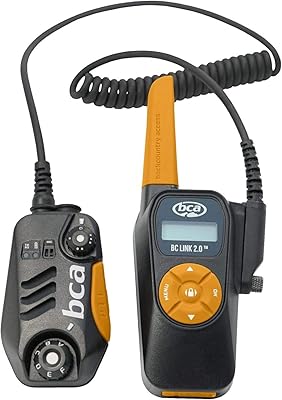
Backcountry Access BC Link 2.0 Radio
86%
89%
Range & Signal Strength
92%
Waterproof Performance
84%
Ease of Use
91%
Battery Life
88%
Build Quality & Durability
More
TP-Link TX201 2.5G PCIe Network Card
84%
93%
Installation Ease
88%
Transfer Speed Performance
79%
Driver & Software Support
96%
Value for Money
82%
Build & Hardware Quality
More
Denon HEOS Link Wireless Pre-Amplifier Series 2
87%
90%
Audio Quality
87%
Ease of Setup
91%
Alexa Integration
89%
Multi-Room Audio Sync
85%
Connectivity Options
More
TP-Link Deco S4 Mesh WiFi System (2-Pack)
87%
91%
Wi-Fi Coverage
88%
Performance Stability
94%
Ease of Setup
90%
Parental Controls
85%
Device Support
More
TP-Link CPE210 2.4GHz N300 Outdoor Wireless Bridge
84%
88%
Performance
92%
Value for Money
91%
Ease of Installation
86%
Build Quality
83%
Weather Resistance
More
TP-Link Deco BE95 WiFi 7 Mesh System (2-Pack)
87%
92%
WiFi Coverage
89%
Ease of Setup
91%
Performance (Speed)
88%
Reliability
87%
Security Features (HomeShield)
More
D-Link DMS-107 7-Port 2.5GB Unmanaged Gaming Switch
86%
88%
Performance
90%
Build Quality
93%
Ease of Setup
85%
Gaming Performance
95%
Fanless Design Noise
More
dockteck DH0002 M.2 NVMe/SATA SSD Enclosure
84%
88%
Transfer Speed (NVMe)
76%
SATA Drive Performance
83%
Build Quality
93%
Ease of Setup
79%
Thermal Management
More
TP-Link TL-SG108-M2 8-Port 2.5G Multi-Gigabit Network Switch
89%
93%
Ease of Setup
89%
Network Performance
91%
Build Quality
96%
Noise Level (Fanless Design)
87%
Compatibility with Cat5e Cables
More

FAQ

Basic plug-and-play use works without software — the camera is recognized immediately as a webcam on both Windows and Mac. However, AI tracking, gesture control, and the specialized modes all require the Link Controller app to be installed and running. Think of the app as the brain behind the smarter features; without it, you have a very good 4K camera but not a tracking one.

Yes, it works with both platforms as a standard UVC camera device, so no special configuration is needed for basic video calls. If you want tracking to stay active during a Teams or Zoom session, you run the Link Controller app alongside your meeting software, and they operate independently without conflict in most setups.

For normal movement — walking a few steps, turning to a whiteboard, or standing up from your desk — the tracking is impressively smooth and responsive. It handles deliberate, moderate movement well. Very fast lateral movement, like quickly crossing the full width of the room, can occasionally cause a brief lag before the camera catches up, but this is rarely an issue in typical use.

This is one of the more honest trade-offs with the Link 2. In well-lit conditions with a clean background, false triggers are uncommon. In dimmer rooms or when you tend to gesture naturally while speaking, unintended activations can happen. Many users who find this annoying simply disable gesture control in the app and rely on the smartphone remote or keyboard shortcuts instead.

For video calls, streaming commentary, and casual content, the noise-canceling mic performs well above average and genuinely handles background noise better than most standalone budget microphones. For serious podcast recording where audio quality is the primary deliverable, a dedicated condenser or dynamic microphone will still produce cleaner, more natural results. It is an excellent secondary mic but a capable primary one for most non-audio-focused creators.

Yes, it is recognized by OBS as a standard video capture device. You select it as your video source in OBS settings, and it will output at your chosen resolution and frame rate. The Link Controller app runs alongside OBS without conflict, meaning tracking and mode features remain active while you stream.

If the app closes or crashes, the camera continues to output video as a standard webcam — your stream or call will not drop. However, tracking stops and the camera holds its last position until the app is restarted. It is worth keeping the app stable by ensuring it is up to date before any important session.

This tracking camera is specifically designed for PC and Mac use via USB. It is not intended for direct TV connection and does not have HDMI output. For use with a capture card, it can work as a UVC source in setups where the capture card supports USB webcam input, but advanced features like tracking and gesture control would still require the companion app running on a connected computer.

The motor produces a faint, low-frequency whirring sound during movement. In most recording environments with any ambient noise at all, it is completely inaudible on the recording. In a very quiet, acoustically treated room with a sensitive nearby microphone, there is a chance the motor sound could be faintly detected, though this is an edge case that the vast majority of users never encounter.

Software-based tracking solutions zoom into a digital crop of the frame to simulate following movement, which reduces effective resolution and image quality the more you move. This PTZ webcam physically moves the full lens, so you keep the complete 4K sensor output at all times regardless of how far you move. For anyone who values image quality while moving, that hardware difference is meaningful and noticeable on stream or in recordings.