Overview

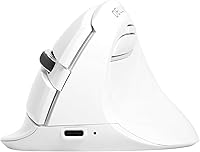
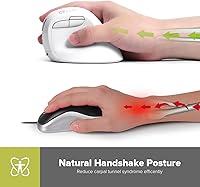
The DeLUX M618mini Wireless Vertical Ergonomic Mouse enters a category that most people discover only after their wrist starts complaining. Vertical mice work by rotating the hand into a natural handshake position, which reduces the forearm twisting that flat mice demand all day long. This compact vertical mouse sits in the mid-range price tier, making it accessible without feeling cheap. What sets it apart from most vertical options is its small-hand-focused sizing — a genuine rarity in this space — combined with dual wireless connectivity via BT 5.2 and a 2.4G USB receiver. Think of it as a capable daily office driver, not a precision gaming tool.
Features & Benefits

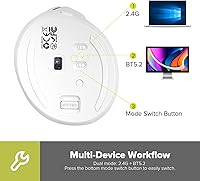
The vertical handshake grip is the core selling point here — when your palm faces inward rather than downward, the muscles and tendons in your forearm get a real break. It won't cure RSI, but it can meaningfully reduce daily strain if you spend long hours at a desk. The M618mini switches between Bluetooth 5.2 and a 2.4G dongle with a dedicated button, so jumping between a laptop and a tablet takes seconds. Five DPI levels top out at 4000, covering everything from detailed spreadsheet work to casual browsing. The front-mounted USB-C port means you can charge while working, and the silent clicks keep things quiet in shared spaces.

Best For

This ergonomic wireless mouse is a natural fit for small-handed users who have tried standard vertical mice and found them oversized and awkward. Office workers and students noticing early wrist fatigue will likely appreciate the posture shift, as will remote workers who bounce between multiple devices throughout the day. If you work in a quiet setting — a library, a shared office, or after everyone has gone to bed — the silent switches are genuinely useful. One important caveat worth stating clearly: Mac users lose access to the forward and back buttons, which is a real limitation if browser navigation shortcuts matter to your workflow.

User Feedback

Buyers who make the switch to the M618mini tend to report a noticeable comfort difference within the first week, particularly around wrist and forearm tension. That said, there is a consistent learning curve — the first few days can feel disorienting, and some users report accidentally hitting the wrong button before the grip becomes second nature. On build quality, most buyers consider it solid for the price, though a few note the scroll wheel feels imprecise at times. Battery life generally tracks close to the two-week claim under moderate daily use. Overall sentiment leans positive, with most criticism pointing at macOS button limitations rather than the hardware itself.

Pros

  • The upright handshake grip noticeably reduces forearm tension during long work sessions.
  • Dual wireless modes let you switch between two devices without swapping dongles or re-pairing.
  • Compact sizing is a rare and welcome feature in the vertical mouse category, fitting small hands well.
  • Silent click switches are genuinely quiet — a practical win in shared or late-night workspaces.
  • USB-C charging on the front means you can top up the battery without interrupting your workflow.
  • Five DPI levels cover a wide range, from careful detail work to quick desktop navigation.
  • Battery life in real-world use tracks close to the two-week claim under moderate daily conditions.
  • Build quality feels solid relative to the mid-range price, with no obvious flex or rattle.
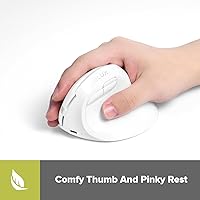
  • The thumb concave and extended pinky ledge add meaningful grip stability during mouse movement.

Cons

  • Forward and back thumb buttons are completely non-functional on macOS, a significant limitation for Apple users.
  • The scroll wheel lacks the precision and satisfying resistance found on competing mice at a similar price.
  • New users should expect two to five days of awkward adjustment before the vertical grip feels natural.
  • The 500mAh battery, while adequate, cannot be swapped out if it degrades over time.
  • Button placement takes getting used to, and accidental mis-clicks are common during the early learning period.
  • The M618mini is sized for small hands, meaning medium or large-handed users may feel cramped quickly.
  • No software or companion app means DPI settings and button behavior cannot be customized beyond the hardware defaults.
  • The 4000 DPI ceiling and optical sensor are adequate for office use but lag behind dedicated productivity or gaming mice.

Ratings

The scores below for the DeLUX M618mini Wireless Vertical Ergonomic Mouse were generated by our AI review engine after analyzing thousands of verified global buyer reviews, with spam, bot-submitted, and incentivized feedback actively filtered out. Each category reflects the honest distribution of real user sentiment — strengths are credited where earned, and recurring frustrations are not softened or buried. The result is a transparent snapshot of what actual owners think after weeks of daily use.
Ergonomic Comfort
83%
Users who made the switch from a flat mouse consistently report reduced tension in the forearm and wrist after the first week of regular use. Office workers logging six or more hours daily found the handshake grip particularly beneficial during back-to-back meetings and document-heavy workdays.
The comfort payoff is not instant — most buyers describe an awkward adjustment period of three to five days before the grip starts feeling natural. A small number of users with medium-to-large hands reported that the compact sizing limited the full ergonomic benefit the vertical angle is supposed to deliver.
Fit for Small Hands
88%
The M618mini genuinely fills a gap in the vertical mouse market — small-handed users who had previously found ergonomic mice oversized and clumsy praised the sizing as an almost immediate improvement in control and stability. The thumb concave and the extended pinky ledge add practical grip security that larger-bodied mice cannot replicate for this hand size.
Users with medium or large hands found the fit uncomfortably snug within an hour, and some reported that their ring finger had nowhere comfortable to rest. The compact body is a deliberate design choice, but it does draw a clear line between who this mouse is built for and who it is not.
Wireless Connectivity
86%
Hybrid workers found real value in being able to toggle between a Bluetooth-connected laptop and a 2.4G dongle desktop without re-pairing — the switch is fast and reliable in typical office environments. Bluetooth 5.2 offers a stable, low-latency connection that most users described as indistinguishable from the wired alternatives they previously used.
A handful of users on older Bluetooth hardware reported occasional micro-stutters when operating in BT mode at distances over 8 feet. The 2.4G nano receiver, while solid, has no onboard storage slot in the mouse body, making it easy to misplace during travel.
Battery Life
79%
21%
Under moderate daily office use — roughly four to six hours of active mousing — most buyers confirmed the battery lasted between 10 and 14 days before needing a charge, which aligns closely with the manufacturer's claim. The front-mounted USB-C port is a well-placed practical detail, allowing charge-while-use without awkward cable angles.
Power users clocking eight or more hours daily found the battery dropping closer to seven or eight days, which still requires charging mid-week. The 500mAh cell is non-removable, so long-term battery degradation over a year or two of use is a legitimate concern with no user-replaceable workaround.
Silent Click Performance
81%
19%
Buyers working in libraries, open-plan offices, and late-night home setups consistently highlighted the silent switches as one of the most practically useful features. The tactile feedback is noticeably present despite the reduced noise — clicks do not feel mushy or imprecise, which was a concern for users coming from louder mechanical switches.
In a completely silent room, a faint thud is still audible on each click, which may matter in very quiet recording or study environments. A few users noted that the right-click button felt slightly less firm than the left after a few months of heavy use, suggesting minor long-term consistency concerns.
Scroll Wheel Quality
58%
42%
For casual web browsing and document scrolling, the wheel performs adequately — step increments are defined enough that normal page navigation does not feel unpredictable. Users doing light daily office tasks rarely flagged the scroll wheel as a major issue.
This is one of the most commonly cited weaknesses in real buyer feedback. The scroll wheel lacks the precision and satisfying resistance found on competing mice at a similar price, with some users describing it as loose or inconsistent under fast scrolling. Users working in spreadsheets or design tools found the imprecision genuinely frustrating during detailed work.
Build Quality
73%
27%
For a mid-range peripheral, the outer shell feels solid in hand — there is no obvious flex when gripping firmly, and the matte finish resists fingerprints better than glossy alternatives. Most buyers rated the build as appropriate and above what they expected at this price tier.
The plastic construction does not inspire the same confidence as higher-end ergonomic mice, and a small portion of users reported minor creaking from the body after several months of heavy daily use. The overall construction quality is honest for the price, but buyers expecting a premium tactile experience will likely be underwhelmed.
DPI & Sensitivity Range
76%
24%
Five selectable DPI levels from 800 to 4000 cover the practical needs of most office and general productivity users, and the dedicated DPI button makes switching mid-task quick without navigating any software menu. Users doing mixed work — detailed spreadsheet edits at lower DPI, then quick desktop navigation at higher — found the range genuinely useful.
The 4000 DPI ceiling is adequate for office work but falls short for anyone coming from a higher-end productivity or creative workflow mouse. There is no companion software, which means DPI levels cannot be fine-tuned beyond the five hardware presets — a limitation that more particular users found restrictive.
macOS Compatibility
41%
59%
Basic functions — left click, right click, scroll, and DPI switching — work without issues on macOS, and Bluetooth pairing is straightforward on modern Apple hardware. For Mac users who only need a comfortable pointing device with no extra button requirements, the core experience is functional.
The forward and back thumb buttons are completely non-functional on macOS, which is a significant daily limitation for anyone relying on browser navigation shortcuts. This is not a fixable software issue — it is a hardware and driver compatibility gap that DeLUX has not resolved, making this ergonomic wireless mouse a poor value for Mac-primary users.
Setup & Ease of Use
89%
The plug-and-play experience on Windows is as frictionless as it gets — insert the nano receiver and the mouse is recognized within seconds, no driver download required. Bluetooth pairing is equally straightforward and works reliably across Windows laptops, tablets, and Android devices.
New vertical mouse users may find the mode-switch button placement confusing at first, and a few buyers accidentally toggled between BT and 2.4G without realizing it, mistaking the connection drop for a malfunction. The lack of any included quick-start guide beyond a small leaflet left some less tech-savvy users briefly uncertain.
Value for Money
78%
22%
For small-handed Windows users looking to try ergonomic mousing without a large financial commitment, the M618mini delivers a compelling combination of dual wireless connectivity, rechargeable battery, and silent switches at a price most buyers considered fair. Buyers who experienced genuine wrist relief rated the value particularly highly.
Mac users and those with larger hands get a noticeably worse deal — core features are either non-functional or physically uncomfortable, which erodes the value proposition significantly for those groups. Buyers comparing against similarly priced competitors with software support and better scroll wheels may feel the trade-offs tip toward frustrating.
Portability & Travel-Friendliness
74%
26%
At 4.2 ounces and under 4.5 inches long, the compact vertical mouse slips into a laptop bag without taking up meaningful space, which remote workers and frequent travelers appreciated. The wireless-first design removes the need to carry a cable for daily use.
The nano USB receiver has no dedicated storage slot in the mouse body, which is a real inconvenience for travelers who switch bags frequently — losing the dongle means losing 2.4G functionality entirely. The vertical form factor also makes it slightly harder to pack flat compared to a standard low-profile mouse.
Thumb Button Usability
63%
37%
On Windows, the forward and back thumb buttons work out of the box and are positioned close enough to reach naturally without shifting grip. Users who rely on browser navigation found these buttons a genuine time-saver during research-heavy workdays.
Button placement takes adjustment — new users commonly report accidentally pressing one or both thumb buttons while repositioning their grip during the first week. As noted throughout, these buttons are entirely non-functional on macOS, which removes a significant portion of the mouse's feature set for Apple users.
Surface Compatibility
71%
29%
The optical sensor tracks reliably on cloth mousepads, fabric desk mats, and most solid-color hard desks, covering the surfaces most office and home users are likely to have. No driver configuration or surface calibration is needed — it just works in typical setups.
Glossy desks and glass surfaces cause noticeable tracking failures, which is a common limitation of optical sensors at this price tier but worth flagging for users with modern minimalist desk setups. A few users also noted minor jitter when using the mouse on uneven or textured fabric surfaces.

Suitable for:

The DeLUX M618mini Wireless Vertical Ergonomic Mouse is a strong match for anyone with smaller hands who has written off vertical mice as too bulky or awkward to grip comfortably. Office workers and students who spend four or more hours daily at a computer — and are starting to feel it in their wrists — will find the upright hand position a genuine relief compared to a standard flat mouse. Hybrid workers juggling a laptop and a desktop will appreciate being able to switch between Bluetooth and the 2.4G dongle without re-pairing from scratch. The silent click mechanism makes it a considerate choice in shared spaces like open-plan offices, libraries, or late-night home setups where noise matters. If you are a Windows user looking for an accessible entry point into ergonomic mousing without spending a lot, this compact vertical mouse hits a practical sweet spot.
Not suitable for:

The DeLUX M618mini Wireless Vertical Ergonomic Mouse is not the right tool for Mac-first users who rely heavily on browser navigation, because the forward and back thumb buttons simply do not function on macOS — and that is a daily frustration, not a minor quirk. Gamers or creative professionals who need high-precision tracking, customizable buttons, or polling rates tuned for fast movement should look elsewhere; this is an office peripheral, not a performance one. People with large or extra-large hands are also likely to find the compact sizing restrictive, with fingers feeling cramped over extended sessions. Those expecting scroll wheel precision comparable to premium productivity mice may be disappointed, as user feedback points to the scroll wheel as one of the weaker components. If you are unwilling to endure a short but real adjustment period — most people need at least a few days to adapt to the vertical grip angle — the transition could feel more frustrating than it is worth.
Specifications

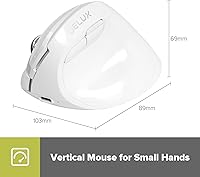
  • Dimensions: The mouse measures 4.29 x 3.5 x 2.72 inches, making it one of the more compact vertical mice available on the market.
  • Weight: At 4.2 ounces, the M618mini is light enough for extended daily use without causing additional arm fatigue.
  • Connectivity: It supports dual wireless modes — Bluetooth 5.2 and a 2.4G USB receiver — allowing connection to two different devices with a simple toggle.
  • DPI Range: Five selectable sensitivity levels are available: 800, 1200, 1600, 2400, and 4000 DPI, switchable via a dedicated button on the body.
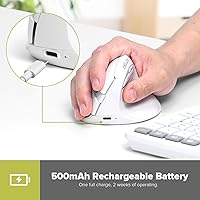
  • Battery: A built-in 500mAh Li-ion rechargeable battery powers the mouse, rated for up to two weeks of active use on a single full charge.
  • Standby Life: When not in active use, the mouse can remain in standby mode for up to six months before requiring a recharge.
  • Charge Port: Charging is handled through a front-mounted USB-C port, allowing the mouse to be used normally while plugged in.
  • Charge Time: A full recharge from empty takes approximately two hours under standard USB charging conditions.
  • Button Count: The mouse features six buttons in total, including left click, right click, scroll wheel click, DPI toggle, and forward and back thumb buttons.
  • Click Type: All primary click switches are silent optical type, designed to reduce audible noise without losing the tactile response of a standard click.
  • Grip Style: The body is oriented vertically so the hand rests in a natural handshake position, reducing forearm pronation during use.
  • Sensor: The mouse uses an optical movement detection sensor suited for standard office surfaces, including most desk pads and solid-color mousepads.
  • OS Support: Full functionality is available on Windows 7, 8, and 10; macOS is supported but the forward and back thumb buttons do not function on Apple systems.
  • Form Factor: The compact body is specifically shaped for small to medium hands, with a thumb concave and an extended lower edge for the pinky finger.
  • Receiver: The 2.4G wireless mode uses a nano USB-A receiver that can be stored in a standard laptop port when not in active use.
  • Material: The outer shell uses a skin-friendly matte plastic finish described by the manufacturer as comfortable for extended palm contact.

Related Reviews

DeLUX Seeker M618XSD Wireless Ergonomic Vertical Mouse
85%
88%
Ergonomics & Comfort
93%
Connectivity Options
85%
Customizability (DPI & RGB)
91%
Display & Functionality
82%
Battery Life
More
seenda Ergonomic Vertical Wireless Mouse
86%
90%
Wrist Comfort & Ergonomics
87%
Battery Life & Charging
91%
Quiet Click Performance
85%
Compatibility & Connectivity
88%
Build Quality & Durability
More
Woddlffy RAAVEE Ergonomic Vertical Wireless Mouse
75%
81%
Ergonomic Comfort
54%
Build Quality
83%
Wireless Connectivity
57%
DPI Range
63%
Button Functionality
More
UGREEN Vertical Wireless Ergonomic Mouse
84%
88%
Ergonomic Comfort
84%
Connectivity Performance
80%
Ease of Use
91%
Design and Build Quality
82%
Battery Life
More
Lekvey XC-05 Vertical Wireless Mouse
75%
83%
Ergonomic Comfort
66%
Build Quality
88%
Battery Life
54%
Sleep Mode & Wake Responsiveness
81%
Wireless Connectivity
More
Acer OMR241 Ergonomic Vertical Mouse
74%
83%
Ergonomic Comfort
67%
Build Quality
88%
Battery Life
61%
DPI and Precision
43%
Mac Compatibility
More
Cherry MW4500 Wireless Vertical Ergonomic Mouse
83%
89%
Ergonomics & Comfort
74%
Battery Life
81%
DPI Performance
77%
Ease of Use
85%
Build Quality
More
SHARE SUNSHINE Ergonomic Vertical Wireless Mouse
74%
83%
Ergonomic Comfort
79%
Adjustable Tilt Angle
71%
Build Quality
74%
Palm Rest Comfort
88%
Wireless Connectivity
More
DeLUX M618XSU Wired Ergonomic Vertical Mouse
72%
83%
Ergonomic Comfort
76%
Build Quality
79%
Horizontal Thumb Wheel
88%
Silent Click Performance
91%
Windows Compatibility
More
MEETION DirectorC Split Ergonomic Keyboard Mouse Combo
72%
83%
Ergonomic Comfort
71%
Typing Experience
77%
Mouse Performance
66%
Wrist Rest Quality
62%
Build Quality
More

FAQ

It is a genuine design choice, not a marketing claim. At 4.29 x 2.72 inches, the M618mini is noticeably smaller than most vertical mice, which tend to be built for average to large hands. If your hand length is roughly 6.5 inches or under, this mouse is likely to fit well. Larger hands may find the grip cramped over a long session.

There is a dedicated mode-switch button on the mouse that toggles between BT 5.2 and 2.4G with a single press. The transition is quick — typically under two seconds — and you do not need to re-pair each time you switch, as long as both devices have been set up at least once.

Unfortunately, no. The thumb buttons for browser navigation forward and back are not functional on macOS due to driver compatibility limitations. The left click, right click, scroll wheel, and DPI button all work fine on Mac, but if those navigation buttons are part of your daily workflow, this ergonomic wireless mouse is not the best pick for an Apple setup.

Most users report real-world battery life landing somewhere between 10 and 14 days under moderate daily use — which tracks reasonably close to the two-week claim. If you leave the mouse idle for extended periods, it enters a low-power standby mode that can stretch that figure considerably. Charging via the front USB-C port takes around two hours.

The ergonomic case is legitimate but comes with nuance. Holding your hand in a vertical handshake position reduces forearm pronation — the inward rotation your arm does when using a flat mouse — which can meaningfully ease tension in the wrist and forearm over time. That said, it is not a treatment for carpal tunnel syndrome or RSI, and results vary by individual. Think of it as a supportive habit change, not a cure.

Yes, and it is worth expecting it rather than being surprised by it. Most people need two to five days before the grip starts to feel natural, and accidental button mis-clicks are common during that early phase. Stick with it past the first week before making a final judgment — the adjustment period is real, but it does pass.

Yes. The USB-C charging port is positioned on the front of the mouse, and the cable does not interfere with normal hand placement. You can plug it in and continue working without any significant disruption, which is a practical advantage if you forget to charge it overnight.

The silent switches make a noticeable difference compared to standard mechanical click mice. In a quiet room, you can still faintly hear a soft thud, but it is nowhere near disruptive in a library or shared office setting. The tactile feedback is still present, so it does not feel mushy or unresponsive despite being quieter.

Yes, the DeLUX M618mini Wireless Vertical Ergonomic Mouse is plug-and-play on Windows. The USB receiver is recognized immediately on Windows 7, 8, and 10 without any driver download. Bluetooth pairing on both Windows and Mac is straightforward as well. The trade-off is that there is no companion software, so button remapping or DPI customization beyond the five hardware presets is not possible.

The optical sensor performs reliably on most standard surfaces — cloth mousepads, desk pads, and solid-color desks all work well. It can struggle on highly reflective surfaces like glass or certain glossy desks, which is common for optical sensors at this price point. A basic fabric mousepad is the safest choice if you are unsure about your work surface.

Where to Buy