

Overview

The HP 920 Ergonomic Vertical Mouse enters a crowded but genuinely useful category — one that rewards people who spend long hours at a desk and are starting to feel it in their wrists or forearms. Vertical mice aren't a gimmick; for many users, the upright grip position does meaningfully reduce strain over time. What makes the HP 920 stand out at its price point is the detachable wrist rest, a detail most competitors skip entirely. Multi-device support is strong, though ChromeOS users should know compatibility is limited. And unlike many wireless mice, this one runs on a rechargeable USB-C battery — no hunting for AA cells.

Features & Benefits

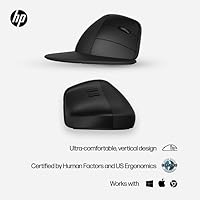
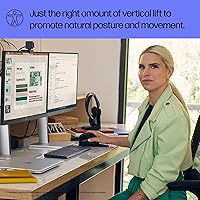
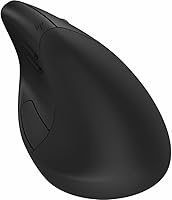
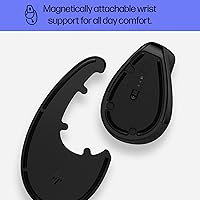
The vertical handshake grip is the foundation of what this ergonomic wireless mouse offers — your hand rests at roughly a 60-degree angle, which prevents your forearm from pronating flat the way a conventional mouse demands. That shift in position is genuinely noticeable after a long day of clicking. The detachable wrist rest attaches securely and adds comfort during use, though users with larger hands may find the fit slightly snug. Switching between up to three paired devices takes a single button press — no re-pairing needed. The adjustable 4000 DPI sensor also tracks reliably across most surfaces, including textured and glossy ones.

Best For

This vertical mouse is well-suited to office workers who spend most of the day at a computer and are starting to notice discomfort in the wrist or elbow. It also works particularly well for multi-device professionals — think someone juggling a work laptop, a personal desktop, and a shared tablet across a single workday. Windows and macOS users will get the full experience, including button customization via the HP Accessory Center app; ChromeOS users should check compatibility carefully before buying, as support is limited. If you prefer sustainable tech choices and dislike dealing with disposable batteries, this ergonomic wireless mouse checks both boxes without much compromise.

User Feedback

With a 4.4-star rating from over 2,100 buyers, the HP 920 has earned genuine credibility in a short time. Recurring praise centers on comfort after switching from a traditional flat mouse, with many users reporting reduced wrist and forearm fatigue within the first few weeks. Build quality and straightforward device pairing also come up frequently as positives. On the critical side, some Mac users have reported inconsistent behavior with the HP Accessory Center software, making button customization less reliable on that platform. A handful of buyers with larger hands mention the wrist rest feels undersized, and a few note the scroll wheel lacks tactile precision. Overall, the satisfaction rate is notably high.

Pros

  • The vertical grip angle meaningfully reduces forearm pronation strain during long desk sessions.
  • Switching between up to three paired devices requires just a single button press — no re-pairing needed.
  • USB-C recharging is convenient and the battery holds up well over weeks of typical office use.
  • The detachable wrist rest adds genuine comfort and is easy to remove when not needed.
  • The multi-surface sensor tracks reliably on textured and less-than-ideal desk surfaces.
  • Build quality feels solid and durable, not hollow or plasticky despite the lightweight design.
  • Bluetooth 5.3 connection is stable and pairs quickly with Windows and macOS machines.
  • Using post-consumer recycled materials is a meaningful sustainability commitment, not just a marketing note.
  • With over 2,100 ratings and a 4.4-star average, real-world buyer satisfaction is well above average for this category.
  • DPI can be adjusted up to 4000, giving enough range for both detail-focused and large-monitor workflows.

Cons

  • HP Accessory Center software has known reliability issues on macOS, limiting button customization for Mac users.
  • ChromeOS compatibility is partial at best — full functionality is not guaranteed on Chromebooks.
  • Users with larger hands may find the wrist rest too narrow and the grip geometry uncomfortable over time.
  • The scroll wheel lacks tactile precision, which can be frustrating for users who rely on fine scroll control.
  • This ergonomic wireless mouse is right-hand only — left-handed users have no option here.
  • Actual battery life will vary depending on DPI settings and usage intensity; heavy users may see less than the rated 16 weeks.
  • The HP Accessory Center app must be installed to unlock programmable buttons, adding a software dependency some users prefer to avoid.
  • No option for wired use as a fallback when the battery runs low mid-session.
  • Only available in black, which limits choice for users who prefer color-matched desk setups.
  • The dongle occupies a USB-A port permanently if you want the most stable wireless connection, which is a constraint on machines with limited ports.

Ratings

Our AI-generated scores for the HP 920 Ergonomic Vertical Mouse are derived from deep analysis of thousands of verified global buyer reviews, with spam, bot activity, and incentivized feedback actively filtered out before scoring. Every category reflects both the genuine strengths buyers repeatedly praised and the real friction points that surfaced across long-term use — nothing is glossed over. The result is a transparent, balanced picture to help you decide whether this ergonomic wireless mouse is actually the right fit for your setup.

Ergonomic Comfort
88%
The vertical grip angle is the core reason most people buy this mouse, and for the majority it delivers. Users who switched from a standard flat mouse consistently report reduced forearm and wrist tension after a few weeks of adjustment — particularly those logging six or more hours at a desk daily.
The ergonomic benefit is not universal. Users with larger hands note the grip geometry feels slightly narrow, and a small number of buyers found the transition period uncomfortable enough that they returned to their old mouse. Ergonomic fit is personal, and this one is not sized for every hand.
Build Quality
83%
For a mouse built substantially from recycled plastics, the construction feels more solid than expected at this price tier. Buttons click with satisfying firmness, the shell does not flex under pressure, and the overall finish has a premium tactile quality that holds up well after months of daily use.
A minority of users reported that the wrist rest attachment point feels slightly loose after extended use, raising questions about long-term durability. The matte surface also tends to collect oils and smudges visibly over time, requiring more frequent wiping than smoother alternatives.
Multi-Device Switching
91%
Switching between three paired devices with a single button press is consistently cited as one of the HP 920's strongest real-world advantages. Users who alternate between a work laptop and a personal desktop throughout the day find this feature alone justifies the purchase, with reconnection happening in under two seconds.
The switching experience is notably weaker on ChromeOS, where some device-pairing features do not function as expected. A handful of Bluetooth users also reported occasional lag when switching on macOS, though this was not a widespread complaint and may be software-related rather than hardware.
Battery Life
86%
The USB-C rechargeable battery genuinely impresses the majority of users — most report charging the mouse only once every two to three months under typical office workloads. Compared to mice that drain a pair of AA batteries in three to four weeks, this represents a real quality-of-life improvement for desk workers.
Heavy users running at high DPI settings report that real-world battery life falls noticeably short of the 16-week rating — some seeing closer to eight to ten weeks. There is also no wired fallback mode, so a dead battery mid-meeting means a hard stop until it charges.
Software & Customization
62%
38%
When the HP Accessory Center app works as intended on Windows, it gives users genuine control over button assignments, scroll wheel speed, and DPI steps — a level of configurability that productivity-focused users appreciate and actually use daily to streamline repetitive tasks.
The software experience on macOS is a recurring sore point across user reviews, with reports of buttons not saving their configurations, the app failing to recognize the mouse, or crashing unexpectedly. This is a meaningful limitation for Apple users who bought the mouse expecting full programmability.
Wireless Connectivity
89%
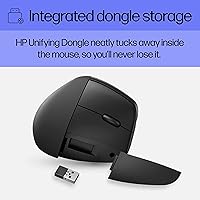
Bluetooth 5.3 delivers a stable, drop-free connection in typical home and office environments, and the HP Unifying Dongle provides an even tighter link for users who prefer plug-and-forget reliability. The vast majority of buyers report zero connectivity issues across the first several months of use.
A small segment of users noted occasional Bluetooth disconnects when the mouse was idle for longer periods, requiring a click to wake — which some found mildly disruptive in video call scenarios. The dongle also permanently occupies a USB-A port, which is a constraint worth considering on slim laptops.
Sensor Accuracy
81%
19%
The multi-surface blue optical sensor tracks consistently on most real-world surfaces users actually work on — fabric pads, wood desks, and even light-colored marble countertops. DPI adjustability up to 4000 gives enough range to satisfy both precision-focused users and those who prefer a faster cursor sweep across large monitors.
A few users reported minor inconsistencies on very dark or highly reflective glossy surfaces, where optical sensors generally struggle. The sensor also does not match the precision of higher-end laser alternatives, which is worth noting for users who do detailed graphic or CAD work.
Wrist Rest Design
71%
29%
The detachable wrist rest is a differentiating feature at this tier, and for users with average-sized hands it adds genuine comfort by supporting the wrist through long typing-adjacent mouse sessions. The magnetic or clip-on attachment is secure enough that it does not shift during active use.
Users with larger hands consistently flag that the wrist rest is too narrow to fully support their palm, reducing its practical value. The attachment mechanism, while functional, shows minor loosening over weeks of repeated attaching and detaching — a durability question that has not yet been tested over multiple years.
Ease of Setup
93%
Out of the box, the HP 920 pairs quickly via Bluetooth or the included dongle, and basic use requires zero software installation. Windows users in particular report being up and running in under three minutes — a refreshingly low-friction unboxing experience compared to mice that require driver installation before they will function.
The setup experience degrades slightly when users attempt to configure programmable buttons, since this requires tracking down and installing the HP Accessory Center app separately. For less tech-savvy buyers, the absence of an in-box software guide or QR code to the download page creates a minor barrier.
Scroll Wheel Feel
58%
42%
The scroll wheel functions reliably and responds consistently during general web browsing and document navigation. For light to moderate scroll usage — reading articles, navigating spreadsheets, or scrolling through email — most users find it perfectly adequate and never feel the need to raise it as an issue.
Users who rely on precise scroll control for tasks like code navigation, InDesign layouts, or detailed spreadsheet work frequently call out the scroll wheel as a weak point. The tactile feedback is described as mushy or imprecise compared to competitors at a similar price point, and this is one of the most consistent criticisms in the review pool.
Portability
76%
24%
At 4.5 oz and with a removable wrist rest, this ergonomic wireless mouse is lighter than it looks in photos. Bluetooth connectivity means it can travel without the dongle when needed, and the compact vertical footprint takes up less bag space than many traditional ergonomic mice with sculpted palm rests.
The vertical form factor, while great at a desk, makes the mouse slightly awkward to store in a laptop bag compared to a slim, low-profile travel mouse. Without a carrying pouch included in the box, the wrist rest can separate in transit and scratch other items — a minor but recurring complaint from frequent travelers.
Value for Money
79%
21%
For buyers who use all the headline features — multi-device switching, rechargeable battery, and the wrist rest — the HP 920 justifies its mid-to-premium positioning fairly well. The combination of those three features in a single mouse is not easy to replicate at a lower price point without making significant trade-offs.
Users who primarily care about a great sensor and reliable button customization have noted that competing brands offer better-executing software and more refined scroll wheels at a comparable price. If the ergonomic angle is not your primary concern, the value case is harder to make.
Sustainability
84%
The use of up to 65% post-consumer recycled plastics is a genuinely substantive commitment that eco-conscious buyers have called out as a meaningful differentiator. The material choice does not come at the cost of perceived quality — the mouse does not feel cheap or brittle despite its recycled composition.
HP does not include detailed documentation about the recyclability of the device at end-of-life, which leaves some environmentally motivated buyers with unanswered questions. The packaging, while improved, still includes some non-recyclable elements that undercut the overall sustainability narrative slightly.

Suitable for:

The HP 920 Ergonomic Vertical Mouse is a strong match for desk-bound professionals who spend five or more hours a day at a computer and are starting to feel the toll in their wrists, forearms, or shoulders. The upright grip position genuinely reduces the strain that comes from keeping your forearm flat on a desk all day, and the benefit compounds over weeks of consistent use — this is not just a first-day comfort impression. People who regularly switch between multiple devices will also find real value here: toggling between a work laptop, personal desktop, or tablet takes a single button press rather than any tedious re-pairing process. The USB-C rechargeable battery is a practical bonus for anyone who dislikes keeping spare AA batteries on hand. Eco-conscious buyers who factor in materials and recyclability as part of a purchase decision will appreciate that the build incorporates a high proportion of post-consumer recycled plastics without feeling cheap or flimsy.

Not suitable for:

The HP 920 Ergonomic Vertical Mouse is not the right choice for everyone, and a few specific buyer profiles should look elsewhere before committing. ChromeOS users in particular should approach with caution — compatibility is limited, and button customization through the HP Accessory Center software may not work as expected on that platform. Mac users should also be aware that the companion software has a track record of inconsistency on macOS, which means the programmable button feature may deliver a frustrating experience rather than a productive one. People with larger hands may find the wrist rest undersized and the overall grip geometry less comfortable than expected — ergonomic mice are not one-size-fits-all, and hand size genuinely matters here. Anyone who relies heavily on precise scroll wheel control for design work, spreadsheet navigation, or coding will likely want a mouse with a more refined scroll mechanism. Finally, buyers seeking a left-handed ergonomic option will need to look at other models entirely, as this vertical mouse is designed exclusively for right-hand use.

Specifications

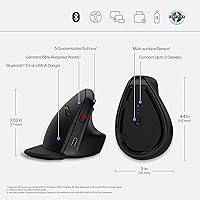
  • Dimensions: The mouse measures 3.94 x 6.7 x 3.3 inches (L x W x H), giving it a compact vertical footprint suitable for most standard desks.
  • Weight: At 4.5 oz, the HP 920 is lightweight enough for extended use without causing arm fatigue from lifting and repositioning.
  • Connectivity: Connects via Bluetooth 5.3 or the included HP Unifying USB dongle, supporting up to three simultaneously paired devices.
  • DPI Range: The optical sensor is adjustable up to 4000 DPI, allowing users to tune cursor speed for anything from spreadsheet precision to large multi-monitor setups.
  • Sensor Type: Uses a blue optical, multi-surface sensor capable of tracking reliably on textured, glossy, and marble-like surfaces without a dedicated mouse pad.
  • Buttons: Features 6 physical buttons in total, with 5 of them programmable through the HP Accessory Center software on supported operating systems.
  • Battery Type: Powered by a built-in rechargeable lithium-ion battery — no replaceable cells required.
  • Battery Life: Rated for up to 16 weeks per charge under typical usage conditions; heavier use at higher DPI settings will reduce this figure.
  • Charging Port: Charges via USB-C, making it compatible with most modern charging cables and adapters already in common use.
  • OS Support: Fully supported on Windows 10, Windows 11, and macOS 10.13 or later; ChromeOS compatibility is limited and not all features are available on that platform.
  • Design Style: Vertical ergonomic form factor with a handshake-style grip angle designed to reduce forearm pronation during extended desk sessions.
  • Wrist Rest: Includes a detachable wrist rest that clips onto the base of the mouse and can be removed when not needed or during travel.
  • Material: The shell is constructed with up to 65% post-consumer recycled and recyclable plastics, reducing environmental impact without compromising structural durability.
  • Color: Available exclusively in black; no other color variants are currently offered for this model.
  • Hand Orientation: Designed for right-hand use only; no left-handed version of this mouse exists in the HP 920 lineup.
  • Software: Button customization and DPI configuration require the HP Accessory Center app, which must be downloaded separately and has known limitations on macOS.
  • Wireless Standard: Bluetooth 5.3 provides a stable, low-latency wireless connection with improved range and energy efficiency compared to older Bluetooth standards.
  • Market Rank: Holds a Best Sellers Rank of #101 in the Computer Mice category on Amazon, reflecting strong and consistent consumer demand since its 2023 launch.

Related Reviews
seenda Ergonomic Vertical Wireless Mouse
86%
90%
Wrist Comfort & Ergonomics
87%
Battery Life & Charging
91%
Quiet Click Performance
85%
Compatibility & Connectivity
88%
Build Quality & Durability
More
Contour Unimouse Ergonomic Vertical Mouse

85%
89%
Ergonomic Comfort
87%
Customizability
82%
Ease of Use
93%
Battery Life
85%
Build Quality
More
Logitech Lift Vertical Ergonomic Mouse
83%
91%
Ergonomic Comfort
74%
Build Quality
93%
Click Quietness
88%
Wireless Connectivity
96%
Battery Life
More
UGREEN Vertical Wireless Ergonomic Mouse
84%
88%
Ergonomic Comfort
84%
Connectivity Performance
80%
Ease of Use
91%
Design and Build Quality
82%
Battery Life
More
Lekvey XC-05 Vertical Wireless Mouse
75%
83%
Ergonomic Comfort
66%
Build Quality
88%
Battery Life
54%
Sleep Mode & Wake Responsiveness
81%
Wireless Connectivity
More
Woddlffy RAAVEE Ergonomic Vertical Wireless Mouse
75%
81%
Ergonomic Comfort
54%
Build Quality
83%
Wireless Connectivity
57%
DPI Range
63%
Button Functionality
More
Acer OMR241 Ergonomic Vertical Mouse

74%
83%
Ergonomic Comfort
67%
Build Quality
88%
Battery Life
61%
DPI and Precision
43%
Mac Compatibility
More
Philips SPK Vertical Ergonomic Wireless Mouse
77%
83%
Ergonomic Comfort
91%
Silent Click Performance
78%
Hand Size Fit
62%
DPI Range & Cursor Control
79%
Wireless Reliability
More
SHARE SUNSHINE Ergonomic Vertical Wireless Mouse
74%
83%
Ergonomic Comfort
79%
Adjustable Tilt Angle
71%
Build Quality
74%
Palm Rest Comfort
88%
Wireless Connectivity
More
Cherry MW4500 Wireless Vertical Ergonomic Mouse
76%
83%
Ergonomic Comfort
71%
Build Quality
58%
Scroll Wheel
89%
Battery Life
84%
Wireless Reliability
More

FAQ

Basic mouse functionality — moving the cursor, clicking, and scrolling — works immediately without installing anything. However, if you want to remap the programmable buttons or fine-tune DPI settings, you will need to download the HP Accessory Center app. Mac users in particular should be aware that the app has had some reliability issues on macOS, so button customization may not work as smoothly on Apple machines.

You pair the mouse to up to three devices — any combination of USB dongle and Bluetooth connections — and then use a dedicated switch button on the mouse body to cycle between them. There is no need to re-pair each time; it just jumps to the next remembered device. In day-to-day use, this is quick and reliable for Windows and macOS machines, though the experience on ChromeOS is more limited.

The wrist rest attaches at the base of the mouse and adds a padded extension for your wrist to rest on. It clips on securely enough that it does not wobble during use. When removed, the mouse is more compact and easier to pack, though the underside where it attaches is not particularly refined. Users with larger hands have noted that the rest feels on the smaller side, so fit is not guaranteed for everyone.

Partially. The HP 920 Ergonomic Vertical Mouse will connect to a Chromebook via Bluetooth or the USB dongle, and basic navigation will work. However, ChromeOS support is explicitly listed as limited, meaning features like programmable buttons and the HP Accessory Center software are unlikely to function fully. If you primarily use a Chromebook, this is not the ideal choice.

HP rates the battery at up to 16 weeks, but that figure assumes moderate daily use at lower DPI settings. Heavy users who run the DPI high all day can expect noticeably fewer weeks between charges. Charging is done via a USB-C cable, which is the same connector used by most modern phones and laptops. There is no option to use the mouse while it charges, so planning a short charging window every few months is the practical approach.

The vertical grip can genuinely help reduce forearm strain for many people, because it eliminates the unnatural flat-palm position that standard mice force on you. That said, ergonomic mice are not a medical cure, and results vary by individual. If you are dealing with significant or ongoing pain, it is worth consulting a physiotherapist alongside any equipment changes. For mild discomfort or as a preventive measure, switching to a vertical mouse like this one is a reasonable and commonly recommended step.

Yes, completely. You can pair it to your devices purely over Bluetooth 5.3 and leave the dongle in the box. The dongle is there for computers that lack Bluetooth or for situations where a more stable, lower-latency connection is preferred. Using Bluetooth also frees up a USB-A port on your machine, which is worth considering if you are working from a laptop with limited ports.

The multi-surface optical sensor performs well on most common materials, including fabric desk pads, wood, and even textured surfaces like marble or light-colored laminates. You should not need a specific mouse pad to get consistent tracking. Very dark glossy surfaces can occasionally cause drift or inconsistency with optical sensors in general, so if your desk is dark glass, a thin mouse pad is worth keeping handy.

No. The vertical grip shape is contoured specifically for right-hand use, and there is no left-handed version available in the HP 920 lineup. Left-handed users looking for a vertical ergonomic mouse will need to search for models explicitly designed for that purpose from other manufacturers.

The overall pattern across more than 2,100 ratings is quite positive — most buyers who switched from a conventional flat mouse report a noticeable improvement in wrist and forearm comfort that holds up over weeks, not just the first day. The most common complaints tend to be about software behavior on Mac and the wrist rest sizing for larger hands, rather than the core ergonomic design itself. It is a well-regarded product in its category, and the high satisfaction rate reflects that.