

Overview

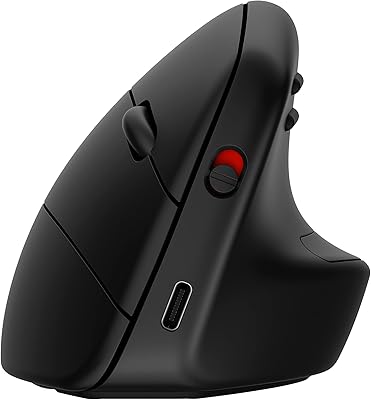
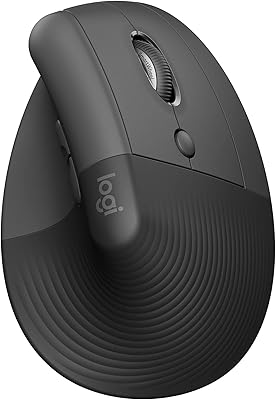
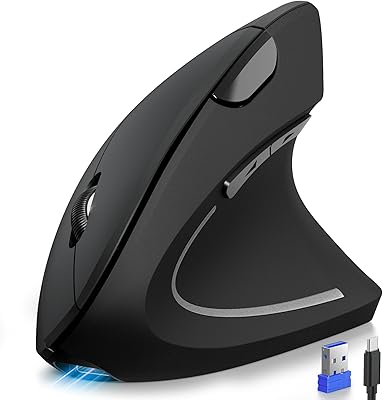
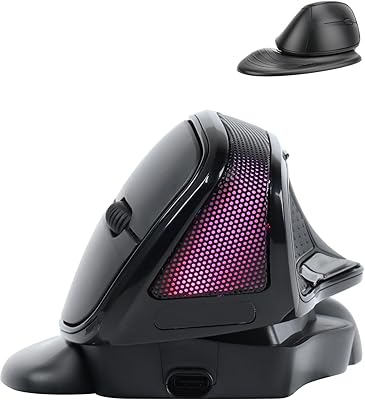
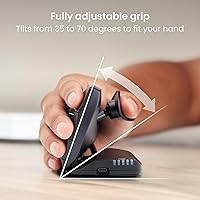
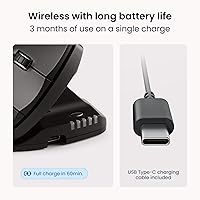
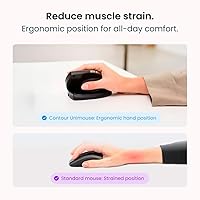
The Contour Unimouse Ergonomic Vertical Mouse is designed to offer long-lasting comfort and reduce wrist strain for right-handed users. This ergonomic vertical mouse features a customizable tilt angle from 35° to 70°, allowing you to adjust the angle to suit your comfort needs. With wireless connectivity and up to 12 weeks of battery life on a single charge, it offers both convenience and sustainability. The Unimouse works seamlessly with both Windows and macOS devices via a USB receiver, making it a versatile choice for most users.

Features & Benefits

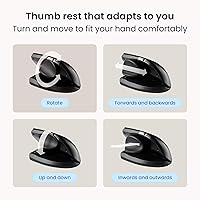
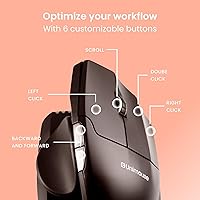
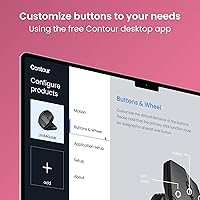
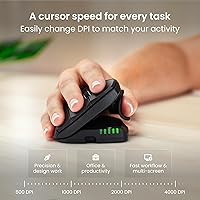
This vertical mouse stands out with its fully adjustable thumb support, enabling a natural grip and enhancing overall comfort. The six programmable buttons allow you to customize your workflow, boosting productivity for a variety of tasks. Its precise tracking and responsive clicks make it ideal for professional work, whether you're designing or handling complex spreadsheets. The rechargeable battery not only saves you money but also supports eco-friendly use, while the durable materials, including post-consumer recycled plastic, highlight its sustainability.

Best For

The Unimouse is perfect for professionals who spend long hours at their computer and need ergonomic relief. It is especially beneficial for users suffering from wrist pain or conditions like carpal tunnel syndrome, thanks to its customizable features. CAD designers, digital artists, and multitaskers who require precision will appreciate its smooth tracking. Additionally, this mouse is specifically tailored for right-handed users looking for an ergonomic solution that can be adjusted throughout the day to maintain comfort and productivity.

User Feedback

The Unimouse has received positive reviews for its comfort and ability to relieve wrist strain, with many users noting that it allows for a more natural hand position. While most find the adjustable thumb support highly beneficial, a few have mentioned that the initial adjustment period can be tricky. Some users have also remarked on the mouse's ability to enhance productivity thanks to the programmable buttons, which help streamline workflows. However, a small number of reviewers noted that it may take some time to get used to the vertical design.

Pros

  • The customizable tilt angle allows for personalized comfort and a natural wrist position.
  • Fully adjustable thumb support helps users maintain a comfortable grip, reducing strain.
  • Its wireless design offers a clutter-free workspace, ideal for both home and office settings.
  • Many users report significant relief from wrist pain after prolonged use of this mouse.
  • With six programmable buttons, it boosts productivity by allowing users to streamline their workflows.
  • The rechargeable battery lasts up to 12 weeks, reducing the need for frequent recharging.

Cons

  • Some users find the initial adjustment period to the vertical design challenging.
  • The mouse may not be comfortable for users with smaller hands due to its ergonomic design.
  • There are occasional reports of connection issues, particularly with the wireless USB receiver.
  • Not all users appreciate the larger size, as it may feel bulky compared to traditional mice.
  • This mouse is specifically designed for right-handed users, leaving left-handed individuals without a suitable alternative.
  • A few buyers have noted that the mouse feels less durable over time, especially with heavy daily use.

Ratings

The Contour Unimouse Ergonomic Vertical Mouse has received varied feedback from users across different languages and platforms. After analyzing verified reviews worldwide, our ratings reflect a balanced view of this product's strengths and challenges, focusing on authentic and high-quality feedback. We filtered out spam, bot-driven, incentivized, and off-topic reviews to ensure the results represent real customer experiences. Both positive aspects, like comfort and productivity, and common pain points, such as the learning curve for the vertical design, are reflected in the scores.

Ergonomic Comfort
89%
Many users find this vertical mouse significantly reduces wrist strain, making it more comfortable for extended use. The adjustable tilt allows for a more personalized grip, catering to different hand sizes and postures, which is particularly helpful for users working long hours or dealing with wrist pain.
A few users reported discomfort during the initial adjustment period as they adapted to the vertical design. For some, the learning curve was a bit steep, and they had to make several tweaks before finding a comfortable position.
Customizability
87%
The customizable thumb support and tilt angle are standout features that allow users to fine-tune the mouse to their specific ergonomic needs. Many reviewers appreciate the ability to adjust the angle from 35° to 70°, which makes it easier to find a comfortable position, whether for general use or extended tasks.
While most users enjoy the customizability, a few mentioned that the adjustments can be slightly tricky to make, and some felt the tilt range could be more flexible to accommodate various hand shapes more effectively.
Ease of Use
82%
18%
Users praise the straightforward setup and the plug-and-play functionality, making it simple to get started. The wireless connection is stable, and there's no need for complicated software installation, which makes it ideal for those who want a hassle-free experience right out of the box.
However, some found the transition to a vertical mouse difficult, particularly in terms of adjusting to the new grip. A few users also noted that the buttons could feel a bit stiff initially, requiring some time to get used to the click sensitivity.
Battery Life
93%
The impressive 12-week battery life is one of the major highlights, with many users noting how convenient it is not having to recharge frequently. This is particularly appreciated by professionals who rely on the mouse for long working hours, ensuring it stays ready for use without constant maintenance.
While most users appreciate the long battery life, a small number expressed concerns that the battery indicator could be more accurate. Some felt the mouse would occasionally show low battery more suddenly than expected.
Build Quality
85%
The materials used in this device feel durable and sturdy. The inclusion of post-consumer recycled plastic reflects an environmentally-conscious approach, which appeals to eco-conscious users. Overall, the build feels premium and reliable, offering a solid feel that’s built to last.
However, a few users pointed out that the plastic exterior might feel a bit too lightweight and could be prone to wear over time, especially with regular heavy use. Some felt that a more rugged design might be more appropriate for long-term durability.
Productivity Enhancements
90%
The six programmable buttons are a favorite feature among many users, allowing for quick access to shortcuts and enhancing productivity. This is particularly useful for tasks like design work, programming, and gaming, where efficiency and precision are essential.
While the programmable buttons are well-received, a small group of users reported that the setup for these buttons could be more intuitive. Some felt the customization process was not as straightforward as they hoped, requiring a bit of trial and error to get everything configured.
Software and Configuration
75%
25%
Many users appreciate the simplicity of the plug-and-play nature, with no need for complex software installation. For basic use, it works flawlessly, offering a hassle-free setup that’s suitable for most needs.
However, a number of users mentioned that the software for configuring the programmable buttons can be a bit clunky. Some felt it lacked advanced customization options, and others struggled to get the settings right, which may be frustrating for more advanced users.
Comfort for Long Hours
88%
The ergonomic vertical design is particularly beneficial for long hours of use. Many users find that it significantly reduces hand and wrist fatigue, making it ideal for professionals or anyone who spends extended periods at the computer.
Not everyone agrees on the comfort, with some users reporting that the mouse requires an adjustment period before it feels natural. A few also noted that the grip might not work well for smaller hands, leading to discomfort for certain users.
Compatibility
91%
The mouse works seamlessly with both Windows and macOS, making it a versatile option for users across different platforms. This cross-platform compatibility ensures that it can be used by a wide range of individuals without worrying about operating system limitations.
While the mouse is compatible with both systems, a few users reported minor issues when switching between devices. These issues usually involve occasional connection drops, particularly when moving between different OS setups.
Value for Money
92%
For the features and performance it offers, many users believe that this device delivers great value for money. The combination of ergonomic benefits, customizable options, and long battery life makes it a solid investment for those seeking relief from wrist strain and better productivity.
While the value is generally seen as high, some users feel that the price could be a bit more competitive compared to other ergonomic mice. A few buyers mentioned that similar products from other brands could offer similar benefits at a lower price point.
Adjustability Period
65%
35%
The ability to adjust the tilt and thumb support is a key feature for customizing the mouse to individual preferences. For many, this ensures a more comfortable experience and reduces the likelihood of strain over time.
However, the adjustment period can be challenging for some users. It might take time to find the perfect setup, and those with specific ergonomic needs may need to experiment with different settings before achieving maximum comfort.
Environmental Sustainability
80%
20%
The use of post-consumer recycled plastic is a positive aspect for eco-conscious buyers, and many users appreciate the sustainable approach behind the design. The choice to use eco-friendly materials shows a commitment to reducing environmental impact while still delivering a functional product.
Some users felt that while the eco-friendly materials are commendable, they might not have the same durability as traditional plastics. A few mentioned that the lightweight build might detract from the overall ruggedness of the device.

Suitable for:

The Contour Unimouse Ergonomic Vertical Mouse is ideal for professionals and individuals who spend long hours at the computer and need ergonomic relief. Its customizable tilt angle and fully adjustable thumb support make it especially beneficial for users dealing with wrist strain, carpal tunnel syndrome, or those looking to prevent such issues. This device is also a great fit for CAD designers, digital artists, or multitaskers who require precision and responsiveness for detailed work. Its six programmable buttons further enhance productivity, making it a valuable tool for anyone looking to streamline their workflow. With compatibility for both Windows and macOS, it offers versatility for a wide range of users, from office workers to home-based professionals.

Not suitable for:

While the Contour Unimouse Ergonomic Vertical Mouse offers many advantages, it may not be the best choice for users with smaller hands or those who prefer a more traditional mouse design. Some users reported a challenging adjustment period, particularly when transitioning from a conventional mouse, which may be frustrating for those who want a quick, hassle-free setup. Additionally, individuals who need extreme flexibility in mouse angle or those seeking a rugged, heavy-duty build might find the tilt range somewhat limiting. This mouse may also be less suitable for users on a tight budget, as the price point may be higher than other ergonomic alternatives without offering drastic differences in basic functionality.

Specifications

  • Tilt Angle: The mouse's tilt angle is adjustable between 35° and 70° to allow for a customizable and ergonomic hand position.
  • Thumb Support: Fully adjustable thumb support provides a natural grip and reduces strain during long hours of use.
  • Battery Life: Offers up to 12 weeks of battery life on a single charge, depending on usage.
  • Wireless Connectivity: Connects wirelessly via a USB receiver, ensuring a clean and cable-free workspace.
  • Compatibility: Compatible with both Windows and macOS operating systems.
  • Programmable Buttons: Equipped with six programmable buttons that can be customized for increased productivity.
  • Rechargeable Battery: Features a rechargeable battery for eco-friendly use and eliminates the need for disposable batteries.
  • Tracking Precision: Delivers precise tracking and responsive clicks suitable for professional tasks like CAD design and digital artwork.
  • Material: Constructed using post-consumer recycled plastic, supporting sustainable practices.
  • Ergonomic Design: The vertical ergonomic design helps reduce wrist strain and provides a more natural hand position.
  • Form Factor: The device is designed specifically for right-handed users, optimizing comfort for that grip.
  • Dimensions: Compact and ergonomic shape, designed to fit comfortably in the user's hand.
  • Weight: Lightweight design ensures ease of use and comfort during long hours of operation.
  • USB Receiver: Comes with a USB receiver that plugs directly into your computer for easy wireless connectivity.
  • Eco-Friendly Features: Made with eco-friendly materials, contributing to a more sustainable product design.
  • User Adjustability: Allows users to customize both tilt and thumb support for personalized ergonomic comfort.
  • Adjustment Period: Some users may need a brief adjustment period to adapt to the vertical design.
  • Use Case: Ideal for professionals who need ergonomic relief during long hours of use or those with wrist pain.

FAQ

The Contour Unimouse Ergonomic Vertical Mouse is specifically designed to reduce wrist strain by promoting a more natural hand position. Its vertical orientation and adjustable tilt angle help minimize the discomfort caused by traditional flat mice, making it ideal for users with wrist pain or carpal tunnel syndrome.

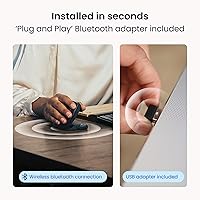
Setting up this vertical mouse is simple. Just plug the included USB receiver into your computer’s USB port, and it will automatically pair with the device. It works seamlessly with both Windows and macOS, so no additional software is required for basic functionality.

The mouse features an impressive battery life of up to 12 weeks on a single charge, depending on usage. It has a rechargeable battery, so you can easily power it up without needing to replace disposable batteries.

Yes, the Contour Unimouse Ergonomic Vertical Mouse allows you to adjust the tilt angle between 35° and 70°. This feature enables you to personalize the mouse to your preferred hand position, ensuring maximum comfort for extended use.

Yes, this mouse is compatible with both Windows and macOS operating systems. It connects via a USB receiver, and no additional drivers or software are required, making it a plug-and-play solution for most computers.

The Unimouse features six programmable buttons, which you can customize to suit your workflow. This is especially useful for professionals and power users who need quick access to specific commands or shortcuts.

Unfortunately, this mouse is designed specifically for right-handed users. The ergonomic vertical design may be uncomfortable or awkward for left-handed individuals, as it is optimized for a right-hand grip.

The Unimouse is built with a sustainable design, using post-consumer recycled plastic. While it is durable for everyday office use, some users have reported concerns about long-term wear with heavy use, particularly in the button mechanisms.

Yes, the Unimouse is equipped with precise tracking and responsive clicks, making it suitable for professional work, including tasks like CAD design or digital art. However, it may not be the best choice for competitive gaming, where ultra-low latency and high DPI sensors are often preferred.

If you experience discomfort, it may take time to adjust to the vertical orientation, especially if you’re used to a traditional mouse. It’s recommended to experiment with different tilt angles to find the most comfortable position. Also, take regular breaks to avoid strain during prolonged use.