Overview

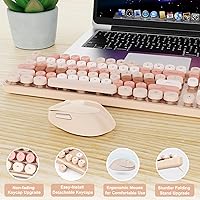
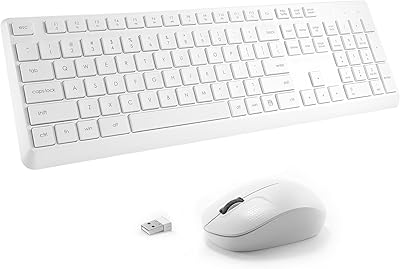
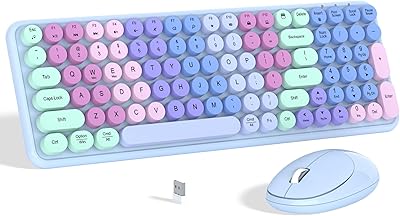
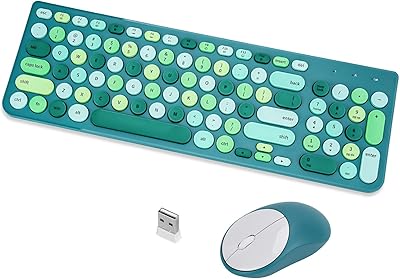
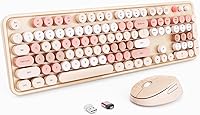
The Nowlike S100 Wireless Keyboard and Mouse Combo arrived in mid-2024 with a clear identity: a retro-styled milk tea set aimed at anyone who wants their desk to look as considered as it functions. It climbed into the top 100 of its category fairly quickly, which reflects real demand for aesthetics-forward peripherals at an accessible price. This is a full-size layout with a numeric keypad — not a trimmed-down compromise — and setup requires nothing more than plugging in the included USB receiver. Mac users should know upfront: this combo is built primarily for Windows.
Features & Benefits

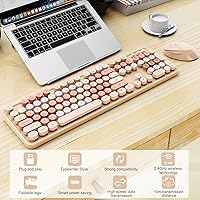
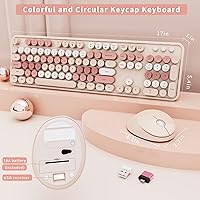
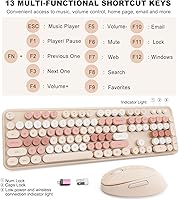
The round keycaps are the obvious talking point — they give this typewriter-style wireless duo its distinctive look — but they also carry fade-resistant legends, which matters after a year of daily use. The 2.4GHz connection holds steady at distances that cover most home or office rooms without issue. One detail worth flagging about the Type-C adapter: it connects to the USB receiver stored under the mouse, not directly into your laptop port — a step that catches some buyers off guard. There are 13 dedicated hotkeys for media and shortcuts, though Mac users will find several of these non-functional, so Windows is clearly the intended environment.

Best For

This retro keyboard combo fits a specific buyer well. Students furnishing a dorm on a tight budget will appreciate that it looks far more intentional than its price implies, and the numeric keypad means spreadsheets and data entry are handled properly. Remote workers who care about how their workspace reads on video calls will find it appealing too. That said, heavy typists or anyone needing precise mouse tracking for creative work should look elsewhere. The S100 set excels at light-to-moderate daily use and works especially well as a gift for someone who values a personality-driven, cohesive desk aesthetic.

User Feedback

Buyers consistently highlight the visual appeal of this typewriter-style wireless duo — it photographs well on styled desks and tends to draw compliments in shared office spaces. The wireless connection earns solid marks for staying consistent across typical room distances. On the downside, users with larger hands occasionally find the mouse a touch compact, and some note that key travel feels shallower than the retro styling suggests. Battery longevity holds up in light use, but heavier users may replace batteries more often than expected. Mouse clicks can feel a bit stiff initially. Overall, satisfaction is high when buyers approach it as a style-first peripheral rather than a performance tool.

Pros

  • The retro milk tea colorway stands out immediately — it looks far more considered than most peripherals in this price range.
  • Full-size layout with a numeric keypad means no compromises for data entry or spreadsheet work.
  • Plug-and-play setup on Windows takes under a minute with zero driver installation required.
  • Fade-resistant keycap legends stay readable after months of regular daily use.
  • The 2.4GHz wireless connection holds steady across typical home and office room distances without noticeable dropouts.
  • Pre-installed AA batteries mean the S100 set is usable straight out of the box.
  • Auto-sleep power-saving mode helps extend battery life meaningfully during idle periods.
  • A free receiver replacement policy removes one of the more common long-term ownership anxieties for wireless peripherals.
  • The Type-C adapter broadens compatibility with modern laptops that lack a standard USB-A port.
  • At its price point, the overall package — keyboard, mouse, adapter, and receiver — represents genuine value for light to moderate daily use.

Cons

  • Key travel is shallow and the bottom-out feel will disappoint anyone coming from a mechanical or high-quality membrane keyboard.
  • Mouse buttons feel stiff out of the box and require deliberate force that some users find tiring during click-heavy sessions.
  • No backlighting at all, which is a real limitation for anyone working in dim environments or at night.
  • The mouse is on the small side — users with larger hands report discomfort and cramping during longer sessions.
  • Mac hotkey support is very limited, making this a frustrating daily driver for macOS users who rely on shortcut keys.
  • Battery drain on the mouse is faster than expected under continuous use, requiring more frequent replacements than the keyboard.
  • The plastic surface shows fingerprints readily, which works against the clean aesthetic that most buyers purchased it for.
  • The Type-C connection method — adapter into receiver stored under the mouse — is unintuitive and catches some buyers off guard.
  • No RGB or lighting options of any kind, so buyers hoping for even subtle illumination will be disappointed.
  • The full-size footprint is not travel-friendly; packing it regularly for commuting or co-working spaces is inconvenient.

Ratings

The Nowlike S100 Wireless Keyboard and Mouse Combo has been scored by our AI system after processing verified buyer reviews from multiple global markets, with spam, bot-generated, and incentivized responses actively filtered out. The result is an honest snapshot of real-world satisfaction — covering everything from daily typing comfort to long-term durability — with both genuine strengths and recurring frustrations reflected transparently in every category score.
Aesthetic Design
93%
The milk tea colorway and round retro keycaps consistently earn praise from buyers who care deeply about desk presentation. Many users specifically mention it as the reason they chose this set over cheaper black alternatives, and it photographs exceptionally well in workspace setups.
The styling is niche — buyers who prefer a clean, minimal, or dark aesthetic will likely find it too decorative. A small number of users noted the brown tones look slightly different on screen compared to in person.
Value for Money
88%
For a wireless combo that includes a full-size keyboard, a numeric keypad, and a mouse with an ergonomic shape, the price-to-feature ratio is hard to argue with at this tier. Most buyers feel they received more than they expected visually and functionally for what they paid.
A few users who upgraded from a budget membrane keyboard felt the typing experience was not dramatically different, which tempered the sense of value slightly. Those expecting premium tactile feedback may feel the price point still reflects certain compromises.
Typing Feel
67%
33%
The keycaps register inputs reliably and the layout is spacious enough for comfortable extended sessions for average-sized hands. Light typists and students writing notes or emails find the tactile response perfectly adequate for everyday tasks.
Key travel is noticeably shallow, which is a recurring criticism from users who type heavily or come from mechanical keyboard backgrounds. The bottom-out feel is soft rather than satisfying, and some describe it as mushy under sustained use.
Mouse Comfort & Precision
71%
29%
The ergonomic curve suits right-handed users during standard office tasks — browsing, document editing, and data entry — without creating significant wrist tension over a few hours. Several buyers with mild wrist sensitivity reported it held up well for light daily use.
Users with larger hands frequently flag the mouse as too compact, with fingers feeling cramped on extended use. Tracking precision is adequate for office work but noticeably limited for anything requiring fine cursor control, such as photo editing or illustration.
Wireless Stability
84%
The 2.4GHz connection performs consistently across typical home and office distances, with most users reporting no dropouts or lag during normal use. The reported 33-foot range holds up well in open-plan setups and standard-sized rooms.
A small portion of users noticed occasional micro-interruptions when the receiver was placed behind a desktop tower or obstructed by other USB devices. Moving the receiver to a front USB port or using the included extension resolved most reported issues.
Setup & Compatibility
81%
19%
Plug-and-play functionality means the set works within seconds on Windows machines — no software downloads, no driver conflicts, and no configuration screens to navigate. Pre-installed batteries mean buyers can use it straight from the box.
The Type-C adapter setup is slightly confusing since it connects to the receiver stored under the mouse rather than plugging directly into a laptop port. Mac users also encounter limited hotkey functionality, which is not prominently disclosed at the point of purchase.
Battery Life
72%
28%
Under light daily use — a few hours of typing and occasional mouse movement — both the keyboard and mouse hold charge well, with the auto-sleep function meaningfully reducing drain during idle periods. Casual users report going weeks without a battery change.
Power users or those who forget to trigger sleep mode manually find battery consumption higher than expected. Some buyers noted the mouse in particular drains faster than the keyboard under continuous use, requiring more frequent AA replacements.
Build Quality & Durability
74%
26%
The overall construction feels more solid than the price range typically delivers, with a chassis that does not flex noticeably under firm typing pressure. The fade-resistant keycap printing holds up well over several months of regular use based on user reports.
The plastic finish shows fingerprints and smudges more readily than darker keyboards, requiring frequent wiping to maintain its aesthetic appeal. A minority of buyers reported slight key wobble on edge keys after several months of daily use.
Keycap Legibility
86%
The fade-resistant legends are a genuine practical benefit — after months of regular use, users note that the printed characters remain clear and sharp, which is not always the case with budget membrane sets in this price bracket.
The retro font styling on some keys can slow down unfamiliar users briefly since the character shapes are more stylized than standard typefaces. Under low ambient light, the lack of backlighting makes the keycaps harder to read.
Backlighting
31%
69%
There is essentially nothing to criticize about a feature that does not exist — buyers who are aware of this before purchasing simply adjust their workspace lighting accordingly without any issue.
The complete absence of backlighting is a real limitation for users who work in dim environments or late at night. It is one of the most commonly mentioned disappointments in reviews, particularly from students and night-shift workers who expected at least basic LED support at this price.
Mouse Click Feedback
63%
37%
For casual document navigation and web browsing, the clicks are responsive enough that most light users do not raise concerns. The buttons actuate reliably without requiring excessive force once broken in after initial use.
Out of the box, the primary mouse buttons feel notably stiff and require deliberate force compared to most competitors in this price range. Some users found this fatiguing during click-heavy tasks, and a portion reported the resistance did not soften meaningfully with use.
Portability & Weight
77%
23%
At 2.2 pounds for the full package, the set is light enough to pack and move between workspaces with minimal effort. Students who carry it between a dorm room and a common study area find the weight unremarkable.
The keyboard footprint is full-size, which limits portability for anyone looking to travel with it regularly. It is not a compact or tenkeyless option, so bag space is a genuine consideration for commuters.
Mac Compatibility
38%
62%
Core input functions — standard typing, cursor movement, and basic clicks — work without issue on macOS, so the hardware itself is not broken for Mac users who only need fundamental functionality.
A significant portion of the 13 hotkeys are non-functional on Mac, including media controls and shortcut keys that many users rely on daily. This limitation is frustrating for buyers who discovered it post-purchase, and it substantially reduces the set's utility outside of a Windows environment.
Packaging & Unboxing
79%
21%
The box presentation is clean and organized, which adds to the gifting appeal of this retro keyboard combo. Everything arrives well-secured, and buyers report no damage or missing components on arrival in the vast majority of cases.
Packaging is functional but not especially premium — there is no form-fitted tray or notable unboxing experience beyond adequate protection. For buyers giving it as a gift, additional wrapping is likely needed to match the visual appeal of the product itself.

Suitable for:

The Nowlike S100 Wireless Keyboard and Mouse Combo is a strong fit for students setting up a first desk space who want something that looks intentional without stretching a tight budget. It works equally well for remote workers who spend their days on documents, spreadsheets, and email — tasks where a full-size layout with a dedicated numeric keypad genuinely helps productivity. If your desk aesthetic leans toward soft, warm, or vintage-inspired tones, this retro keyboard combo will slot in naturally and photograph well on any styled workspace. It also makes an unusually good gift for someone who would appreciate a personality-driven peripheral that looks more expensive than it is. Anyone who runs Windows, needs plug-and-play simplicity, and does not require high-precision mouse tracking will find the S100 set covers the basics reliably and attractively.
Not suitable for:

The Nowlike S100 Wireless Keyboard and Mouse Combo has real limitations that make it a poor match for certain buyers, and it is worth being direct about them. Mac users will lose access to a significant portion of the 13 hotkeys, which quietly undermines daily workflow for anyone relying on media controls or system shortcuts. Heavy typists who have grown accustomed to mechanical keyboards will likely find the shallow key travel unsatisfying — the typing feel is functional but not particularly rewarding under sustained, fast input. Designers, illustrators, or anyone doing precision cursor work should look elsewhere, as the mouse tracking is adequate for office tasks but not fine enough for creative applications. Users who work in dim lighting will also face a real practical gap since this typewriter-style wireless duo has no backlighting whatsoever, which is a meaningful omission for late-night or low-light environments. Finally, buyers with large hands should be aware that the mouse runs on the compact side and may cause fatigue during longer sessions.
Specifications

  • Brand & Model: Manufactured by Nowlike under the model designation S100.
  • Color: Available in a milk tea brown colorway with warm, neutral-toned keycaps and matching mouse body.
  • Wireless Technology: Uses a 2.4GHz radio frequency connection via a compact USB receiver for stable, low-latency input.
  • Wireless Range: Operates reliably at distances up to 33 feet between the receiver and peripherals under typical indoor conditions.
  • Keyboard Layout: Full-size layout including a dedicated numeric keypad on the right side, function row, and standard alphanumeric block.
  • Hotkeys: Includes 13 dedicated shortcut keys for media playback, volume, and system functions, with limited support on macOS.
  • Keycap Style: Round retro typewriter-style keycaps with fade-resistant printed legends designed to remain legible after extended daily use.
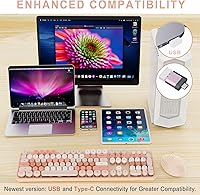
  • Connectivity: Compatible with USB-A ports natively; a Type-C adapter is included for use with USB-C-only laptops and devices.
  • Mouse Design: Ergonomically shaped right-handed mouse intended to reduce wrist strain during standard office and home use sessions.
  • Power Source: Both the keyboard and mouse are powered by AA batteries, which come pre-installed and ready for immediate use.
  • Power Management: Auto-sleep mode activates after a period of inactivity to conserve battery life on both devices.
  • Setup Requirements: Fully plug-and-play on Windows; no driver download or software installation is required to begin using the set.
  • OS Compatibility: Optimized for Windows PCs; core typing and mouse functions work on macOS, but several hotkeys are non-functional.
  • Package Dimensions: The retail package measures 17.52 x 10.24 x 1.85 inches, accommodating both devices in a single flat box.
  • Item Weight: The complete packaged unit weighs 2.2 pounds including both the keyboard and mouse.
  • Receiver Policy: Nowlike offers a free replacement for lost or damaged USB receivers, providing added long-term ownership assurance.
  • Battery Requirement: Requires 2 AA batteries total across both devices; exact per-device split follows standard wireless peripheral configuration.
  • First Available: This product was first listed for sale in August 2024.

Related Reviews

Arteck HW192 Wireless Keyboard and Mouse Combo

78%
78%
Build Quality
72%
Typing Experience
63%
Mouse Comfort & Ergonomics
81%
Battery Life
69%
Wireless Connectivity
More
seenda Wireless Keyboard and Mouse Combo
88%
89%
Typing Comfort
87%
Ergonomics
82%
Wireless Connectivity
94%
Setup & Installation
88%
Key Spacing & Accuracy
More
Harburfine Wireless Keyboard and Mouse Combo
85%
88%
Ergonomics & Comfort
93%
Quietness & Noise Level
85%
Wireless Connectivity & Range
84%
Battery Life & Power Management
90%
Setup & Installation
More
ULSOU Wireless Keyboard and Mouse Combo
85%
88%
Ergonomics and Comfort
92%
Battery Life
84%
Typing Experience
87%
Wireless Connectivity
80%
Mouse Performance
More
MOFII Wireless Keyboard and Mouse Combo
84%
94%
Ease of Setup
85%
Ergonomics and Comfort
90%
Wireless Connectivity
88%
Design and Aesthetics
83%
Battery Life
More
Cimetech Wireless Keyboard and Mouse Combo
88%
91%
Value for Money
88%
Ease of Use
83%
Connectivity
94%
Portability
85%
Ergonomics
More
KNOWSQT Wireless Keyboard and Mouse Combo
87%
89%
Wireless Performance
83%
Build Quality
86%
Ergonomics & Comfort
91%
Design & Aesthetics
76%
Battery Life
More
FOPETT Wireless Keyboard and Mouse Combo
85%
91%
Typing Experience
87%
Battery Life
94%
Design & Aesthetics
88%
Ergonomics
85%
Build Quality
More
Kootop Wireless Keyboard Mouse Combo
87%
89%
Ergonomics and Comfort
91%
Typing Experience
85%
Wireless Connectivity
87%
Design and Aesthetics
83%
Battery Life
More
Trueque Wireless Keyboard and Mouse Combo
78%
83%
Value for Money
81%
Typing Comfort & Ergonomics
78%
Backlight Quality
74%
Mouse Performance
88%
Noise Level
More

FAQ

It works right away on Windows — just plug the USB receiver into any available port and both the keyboard and mouse will connect automatically. There are no drivers to download and no software to configure. You can be typing within about 30 seconds of opening the box.

Yes, but you need to use the included Type-C adapter correctly. The adapter connects to the USB receiver that is stored in the compartment underneath the mouse — you attach them together first, then plug that combined unit into your USB-C port. It is a slightly unintuitive step, so keep the instructions handy the first time.

Basic typing and mouse movement work fine on macOS, so you can use it as a straightforward input device. However, a significant number of the 13 hotkeys — including media controls and some shortcut keys — are not recognized by macOS and will simply not respond. If you rely on those shortcuts daily, this set will feel incomplete on a Mac.

Both devices run on standard AA batteries, and they come pre-installed so you can use the set immediately after unboxing. Battery life under light daily use is reasonable, though the mouse tends to drain slightly faster than the keyboard under continuous use.

Yes, particularly on the mouse buttons. A small amount of stiffness on first use is typical for this type of peripheral and usually softens after a few days of regular clicking. The keyboard keys themselves are generally consistent from the start, though the travel depth is shallow by design.

Most users find the connection very stable for everyday home and office distances. If you do experience occasional interruptions, the most common fix is moving the USB receiver to a front-facing port or using a short USB extension cable to keep it away from interference behind a desktop tower.

The stated range is up to 33 feet, which covers most standard room configurations comfortably. In practice, you are unlikely to sit more than 10 to 15 feet from your desk, so range is rarely a limiting factor for typical use.

The keycaps use fade-resistant legends, and based on user reports over several months of regular use, the characters remain clear and legible. This is a notable practical advantage over cheaper sets where printing begins flaking within a few weeks of heavy use.

Honestly, this is one area worth thinking about before buying. The mouse is on the compact side, and users with larger hands have reported that their fingers feel cramped, especially during longer sessions. If your hands are medium to small, you will likely be fine, but larger-handed buyers may want to check dimensions against a mouse they already find comfortable.

Both devices share the same single USB receiver, so they work as a paired set through that one dongle. You cannot split them across two separate computers using the included hardware. If you only want one of the two devices, you would need to leave the receiver connected and simply not use the other peripheral.