

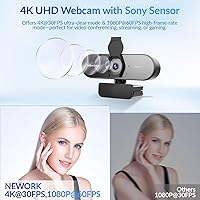

Overview

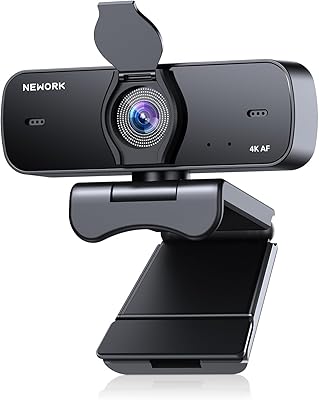
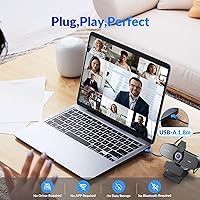
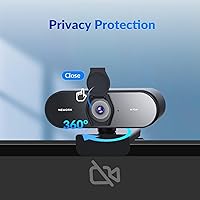
The NEWORK EasyCam 502 4K Webcam is a high-performance webcam designed for a variety of uses, including video conferencing, live streaming, and online teaching. This 4K webcam offers a plug-and-play USB-A connection, meaning it requires no drivers and is compatible with most devices. The camera also features a built-in privacy cover, which is perfect for users who prioritize security. Whether you’re a remote worker, content creator, or educator, this webcam ensures clear, high-quality video and audio for all your needs.

Features & Benefits

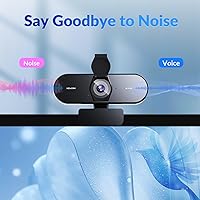
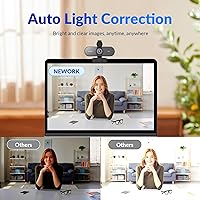
The 4K resolution at 30FPS and the 1080P at 60FPS mode deliver smooth, lag-free video, making this camera suitable for both casual video calls and professional streaming. With dual autofocus (PDAF and CDAF), it offers precise focusing in various lighting conditions, ensuring sharp images even in challenging environments. The webcam’s noise-cancelling microphones capture clear audio from up to three meters away, while the 79° field of view is ideal for small to medium groups. Additionally, auto light correction optimizes video quality regardless of lighting.

Best For

This webcam is best suited for remote workers who need a reliable camera for video conferencing, as well as streamers and content creators looking for high-quality, smooth video. It’s also an excellent choice for online instructors who want clear video and audio for virtual classrooms. The webcam’s easy setup and security features, such as the privacy cover, make it appealing to anyone who values both convenience and privacy in their tech tools.

User Feedback

Users generally praise the sharp 4K video quality and the quick autofocus, which ensures clear and crisp images. The plug-and-play setup is another common highlight, as it eliminates the hassle of installing drivers. However, some users have mentioned that the webcam’s 79° field of view may not be wide enough for larger groups. While the noise-cancelling microphones are often appreciated for their clarity, a few users have expressed a desire for even better audio performance in noisier environments.

Pros

  • 4K video quality provides sharp, clear visuals for professional video calls and streaming.
  • Easy setup with plug & play functionality, making it ideal for users who need a hassle-free experience.
  • Built-in privacy cover ensures peace of mind for users concerned about security.
  • Dual noise-cancelling microphones effectively capture clear audio, even from a distance of up to 3 meters.
  • Wide 79° field of view accommodates small to medium groups, making it suitable for team video calls.
  • Auto light correction improves video quality in varying lighting conditions, ensuring consistent results.

Cons

  • Field of view may feel too narrow for larger groups, making it less ideal for big team meetings.
  • Some users report the autofocus can struggle in low light, despite the camera's high resolution.
  • Lack of advanced software or manual settings for fine-tuning may limit control for tech-savvy users.
  • Build quality could be more robust for users who need a webcam for heavy travel or frequent adjustments.
  • A few users mentioned occasional compatibility issues with certain Linux systems, despite broad compatibility claims.
  • Video quality may not be noticeably better on smaller screens, making the 4K resolution redundant for some users.

Ratings

After analyzing verified user feedback from multiple platforms and countries, we've compiled a comprehensive review of the NEWORK EasyCam 502 4K Webcam. Authentic reviews from diverse sources highlight its performance, features, and usability, with both strengths and minor pain points reflected in the ratings. Our scoring methodology filters out any spam, bot-generated, or incentivized content to ensure that only quality feedback informs the results.

Video Quality
94%
Many users are highly satisfied with the 4K video quality, noting that it delivers crisp, clear visuals during video calls and streams. The sharpness and clarity make it ideal for professional use, ensuring that every detail is captured with precision. Users often highlight the vibrant color reproduction and the overall lifelike feel of the video feed.
A few users mentioned that the video quality can suffer in low-light environments, despite the auto light correction feature. Some have found that the 4K resolution is not always as noticeable on smaller screens, leading to mixed opinions about its overall value for everyday video calls.
Autofocus Performance
90%
The dual autofocus system with PDAF and CDAF ensures that subjects stay in focus even during movement, which is appreciated by streamers and conference participants. Users note that the autofocus is fast and reliable, adapting well to varying lighting conditions. This feature makes the webcam particularly useful for dynamic environments like live streams and video conferences.
However, some users have pointed out that the autofocus can occasionally struggle when there is rapid movement or sudden changes in lighting. In certain cases, it takes a moment to adjust, which can be distracting during fast-paced activities like gaming or streaming.
Ease of Setup
92%
Several reviewers praised the plug-and-play functionality, which makes the webcam incredibly easy to set up without the need for additional drivers or software. The USB-A connection is straightforward, and users report that the webcam works instantly with Windows, Mac, and Linux systems. This hassle-free setup is especially beneficial for those who need a quick and reliable solution for video calls or streaming.
While most users find the setup seamless, a small number of reviewers noted occasional compatibility issues with older systems or specific configurations. Some reported needing to update their operating system for optimal performance, which could be a hassle for less tech-savvy individuals.
Microphone Quality
88%
The dual noise-cancelling microphones received positive feedback for their ability to capture clear audio even in noisy environments. Users appreciated the 3-meter pickup range, which allows for clear communication during video conferences or live streaming sessions. The mics effectively filter out background noise, making them suitable for professional settings.
However, a few users have noted that the microphones may not perform as well in very loud environments or with multiple people speaking at once. Some reviewers mentioned that the sound can become slightly muffled when the user is not positioned directly in front of the webcam.
Build Quality
85%
The webcam’s build is generally solid, with users appreciating its compact design and adjustable tripod mount. The materials feel durable, and the lightweight structure makes it easy to transport and set up in different environments. The privacy cover also adds a nice touch for added security when the camera is not in use.
On the downside, a few users noted that the webcam feels somewhat flimsy in terms of plastic quality, especially the adjustable mount. While it’s functional, some buyers expressed concerns about the longevity of the mount, particularly if it’s frequently adjusted.
Privacy Features
91%
Users who value security appreciate the built-in lens cover that allows them to physically block the camera when not in use. This feature provides peace of mind for those concerned about privacy during video calls or while the webcam is idle. It’s especially important for professionals who are cautious about potential security breaches.
A small group of users mentioned that the lens cover feels a bit stiff and could be easier to slide. Some felt that the mechanism could be more intuitive or smoother for quick access when they need to cover the camera in a hurry.
Field of View
78%
22%
The 79° field of view is well-suited for video calls and streaming sessions involving one or two people. Many users find it wide enough for their personal or professional setups, allowing them to be seen clearly without any need to adjust the camera frequently.
However, a few users pointed out that the 79° field of view may not be ideal for larger groups or situations where more people need to fit into the frame. This limitation is especially noticeable for those using the webcam for virtual meetings or classrooms with multiple participants.
Light Correction
86%
The auto light correction feature is particularly beneficial for users who operate in varying lighting conditions. Many reviewers noted that it works well to brighten up their video feed in dimly lit rooms, which enhances the overall video quality. This is especially valuable for those who do not always have optimal lighting setups for video calls or streaming.
That said, some users mentioned that the light correction can occasionally overcompensate, causing the image to appear too bright or washed out. This may be a minor issue for those who need more precise control over their video quality.
Connectivity
93%
With its USB-A plug-and-play connectivity, this webcam offers great convenience and is compatible with most modern PCs, Macs, and Linux systems. Users have consistently appreciated the ease of connection, eliminating the need for additional software or complex setup steps.
A few users did report issues with older devices that did not support USB-A connections. Some mentioned having to purchase additional adapters to use the webcam with their existing setups, which adds to the overall cost.
Software/Software Experience
80%
20%
Many users find the software experience straightforward and easy to navigate. There’s no need to install extra drivers, and the webcam works out of the box on various operating systems. The lack of complicated setup steps is a big plus for users looking for a simple and quick solution for video conferencing.
On the flip side, a handful of users noted that the lack of dedicated software features or customization options might limit some advanced users who want to fine-tune settings like brightness or exposure manually. This could be a dealbreaker for those who need more control over their video output.
Long-Term Durability
81%
19%
In general, users report that the webcam performs reliably over time, with no major issues regarding functionality. The build quality, while not perfect, is sufficient for regular use, and it continues to perform well even after several months of use.
Some users are concerned about the long-term durability of the adjustable tripod mount, which may wear down with frequent adjustments. A few buyers mentioned that the webcam feels somewhat fragile, especially when frequently moved between different locations.
Price to Performance Ratio
90%
The price for this device is often praised as a strong selling point, offering excellent value for the performance it delivers. Buyers feel they get great video quality, reliable autofocus, and strong audio performance without paying a premium for high-end features. It’s considered a solid investment for users looking for a well-rounded webcam.
On the downside, some buyers feel that the 4K resolution is overkill for casual users who don’t require ultra-high-definition video. These users believe the webcam could be priced lower without compromising performance, making it slightly less appealing to those on a tighter budget.

Suitable for:

The NEWORK EasyCam 502 4K Webcam is ideal for remote workers, professionals, and content creators who need high-quality video and clear audio for video calls, streaming, or online teaching. With its plug-and-play functionality, it’s a great choice for those who need a hassle-free setup across different platforms like Windows, Mac, or Linux. Educators hosting virtual classes will benefit from the webcam’s sharp 4K resolution and noise-cancelling microphones, while streamers can rely on its autofocus and smooth video quality for professional broadcasts. Privacy-conscious users will also appreciate the built-in lens cover for added security, ensuring peace of mind when the camera is not in use.

Not suitable for:

This webcam may not be the best choice for users who need to fit large groups into the frame. With a 79° field of view, it is better suited for individual or small group use. Additionally, those working in very low-light environments may find the auto light correction insufficient to fully improve video quality in dark settings. Casual users who do not need 4K resolution might find this webcam overkill for their needs, especially since the higher resolution may not provide significant benefits on smaller screens. Furthermore, those looking for more advanced customization options might be disappointed by the lack of dedicated software for manual adjustments.

Specifications

  • Resolution: Supports 4K video resolution at 30FPS and 1080P at 60FPS for smooth, high-quality video.
  • Autofocus: Features dual autofocus using PDAF and CDAF for sharp focus in a variety of lighting conditions.
  • Microphones: Equipped with dual noise-cancelling microphones that provide clear audio with a 3-meter pickup range.
  • Field of View: Has a 79° wide-angle field of view, suitable for small to medium-sized groups.
  • Light Correction: Automatic light correction enhances video quality in different lighting environments.
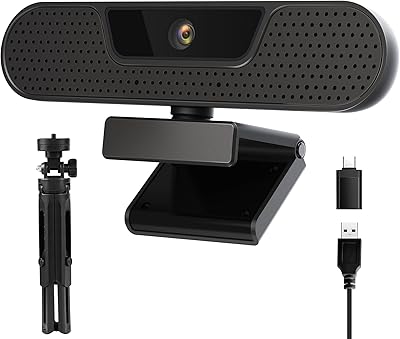
  • Connectivity: Connects via USB-A with plug-and-play functionality, requiring no additional drivers or software.
  • Compatibility: Compatible with Windows, Mac, and Linux operating systems.
  • Privacy Cover: Includes a built-in privacy cover to block the lens when not in use, ensuring privacy.
  • Mounting: Comes with an adjustable tripod mount for flexible positioning and stability.
  • Build Material: Constructed with durable plastic materials designed for everyday use and portability.
  • Dimensions: Measures approximately 3.5 inches by 2.5 inches, compact enough for most setups.
  • Weight: Lightweight design, weighing approximately 0.5 pounds for easy transport and setup.
  • Focus Range: The autofocus system works efficiently from close range up to several feet, ensuring clarity at different distances.
  • Microphone Sensitivity: The microphone is sensitive enough to capture clear voice audio in environments with moderate background noise.
  • Warranty: Comes with a standard warranty, covering manufacturer defects and ensuring customer satisfaction.
  • Usage Scenario: Ideal for remote work, video conferencing, streaming, and online teaching.
  • Operating Temperature: Works within standard operating temperatures of 32°F to 104°F (0°C to 40°C).
  • Color: Available in a sleek black finish, providing a professional appearance for all settings.

FAQ

Setting up this webcam is simple—just plug it into a USB-A port on your PC, Mac, or laptop. It is a plug-and-play device, meaning no drivers are needed, and it should work immediately after connecting.

Yes, this webcam is fully compatible with both Windows and Mac systems, and it even works on Linux. The USB-A connection ensures wide compatibility across platforms without the need for additional software.

Absolutely! This device is ideal for video calls, streaming, and online teaching. The sharp 4K video quality and noise-cancelling microphones ensure your content is clear and professional, even in challenging environments.

The webcam has a 79° field of view, which is suitable for small to medium groups. It's great for personal use, one-on-one video calls, or small team meetings, but may not capture larger groups as well.

This webcam uses dual autofocus technology, combining PDAF (Phase Detection Autofocus) and CDAF (Contrast Detection Autofocus) to provide sharp focus even in different lighting conditions. It helps maintain clear visuals during video calls or streaming sessions.

Yes, this webcam has automatic light correction that helps maintain good video quality even in dimly lit environments. It adjusts the brightness and contrast to ensure you look clear on camera, even in less than ideal lighting.

Yes, the NEWORK EasyCam 502 comes with a built-in privacy cover. This feature allows you to easily cover the lens when not in use, ensuring added privacy and peace of mind.

The webcam features dual noise-cancelling microphones with a 3-meter pickup range. These mics effectively reduce background noise, ensuring clear and crisp audio for your calls or streams, even in moderately noisy environments.

While the 79° field of view is sufficient for small to medium groups, it may not be ideal for large team calls or big groups. For larger groups, the camera may not fit everyone into the frame comfortably.

No, this webcam is plug-and-play, meaning no drivers or additional software are required. Simply plug it into your computer’s USB-A port, and it will work immediately on Windows, Mac, or Linux systems.