



Overview
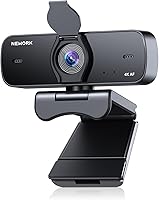
The NEWORK EasyCam 501 4K Webcam arrived early in 2025 as one of the more interesting budget entries in a crowded category. At under five ounces, it sits unobtrusively on a monitor or laptop lid without any fuss. Plug in via USB-A and you are up and running — no driver downloads, no software to wrestle with. The integrated privacy cover and 77° wide-angle lens are genuine differentiators at this price tier. That said, the 4K claim deserves honest scrutiny: plenty of affordable webcams wear a 4K badge while delivering results that fall noticeably short of what that resolution actually implies in practice.
Features & Benefits
The EasyCam 501 is built around a 1/2.55-inch Sony CMOS sensor capturing at 3840x2160 and 30 frames per second — solid specs on paper. In real use, real-time autofocus does a decent job keeping you sharp during calls, and the low-light correction helps in typical home office conditions where lighting is rarely ideal. The dual microphones handle noise reduction reasonably well, picking up clear voice audio from up to roughly three meters away, though heavy background noise can still bleed through. The 77° field of view naturally frames a small group without requiring you to back away from your desk, and full 360° rotation with tripod mount support adds practical flexibility.
Best For
This webcam is a strong fit for remote workers and students who spend their days on video calls and want a clear, no-fuss upgrade from a built-in laptop camera. Online teachers presenting to small groups will appreciate the wide framing — it handles three to five people comfortably without anyone getting cropped out. Budget-conscious streamers looking to access 4K without spending serious money will find it serviceable, with the caveat that output quality depends heavily on lighting conditions and how much platform compression is applied. If simplicity and privacy protection matter more to you than manual controls or reference-grade accuracy, this 4K camera is a reasonable choice.
User Feedback
Buyers giving this webcam high marks consistently highlight one theme: it looks dramatically better than the camera built into their laptop. That is a low bar in some ways, but it is exactly what most people are shopping for. Setup earns frequent praise — plug it in, it works. On the critical side, some users feel the 4K sharpness is overstated once Zoom or Teams compression kicks in, with 1080p mode occasionally delivering more consistent results. A handful note the microphone can thin out voices in genuinely noisy spaces despite noise reduction being active. Cross-platform compatibility across Windows, Mac, and Linux appears reliable with no significant issues reported.
Pros
- Plug-and-play setup works instantly on Windows, Mac, and Linux with zero driver installation.
- The wide 77-degree field of view comfortably fits multiple people without awkward repositioning.
- Real-time autofocus tracks movement reliably during everyday calls and online presentations.
- Built-in privacy cover doubles as a dust shield, adding long-term lens protection at no extra cost.
- Compact and light enough to carry in a laptop bag for workers moving between locations.
- Low-light correction handles typical home office conditions better than most built-in cameras.
- Tripod mount compatibility gives users flexible placement options beyond just monitor or laptop clips.
- The 1/2.55-inch Sony CMOS sensor produces noticeably cleaner images than entry-level webcam sensors.
- This 4K camera covers the full basics — autofocus, noise reduction, wide angle, privacy — in one unit.
- Cross-platform compatibility means no friction when switching between work and personal devices.
Cons
- No companion software means zero manual control over exposure, white balance, or image tuning.
- Microphone performance degrades quickly in noisy or dynamic environments despite noise reduction.
- 4K advantage largely disappears under video conferencing platform compression on slower connections.
- Fixed USB cable creates long-term durability concerns and limits cable management flexibility.
- Clip mount sits unstably on slim laptop lids and monitors with rounded or beveled edges.
- 30fps cap at 4K feels limiting compared to competitors offering smoother frame rates at similar resolutions.
- Backlit scenes and high-contrast backgrounds consistently challenge the automatic exposure handling.
- No visual or software indicator to confirm when the camera is actively transmitting video.
- Build materials feel cost-conscious in hand, raising questions about durability past the first year.
- Buyers expecting reference-grade 4K clarity may feel misled once real-world output is compared to the spec sheet.
Ratings
The NEWORK EasyCam 501 4K Webcam has been evaluated using an AI-driven analysis of verified global buyer reviews, with spam, bot-submitted, and incentivized feedback actively filtered out to ensure reliability. Scores reflect the genuine consensus across thousands of real-world experiences — from daily remote work calls to online classrooms — capturing both what this webcam does well and where it leaves users wanting more. Strengths and frustrations are weighted equally, so the ratings you see here tell the full story.
Image Clarity
Low-Light Performance
Autofocus Reliability
Microphone Quality
Setup & Ease of Use
Build Quality
Privacy Cover
Field of View
Mounting & Adjustability
Value for Money
Compatibility
Audio-Visual Sync
Portability
Streaming Suitability
Suitable for:
The NEWORK EasyCam 501 4K Webcam is a practical pick for anyone who spends a significant portion of their workday on video calls and wants a noticeable upgrade over a built-in laptop camera without overthinking the purchase. Remote workers and hybrid employees will find that it handles the daily grind of back-to-back calls reliably, while the wide 77° field of view makes it especially useful for online teachers or tutors who need to frame a small group or move around while presenting. Students buying their first dedicated webcam will appreciate how little setup is involved — plug it in and it simply works across Windows, Mac, and Linux. The integrated privacy cover is a genuine convenience for anyone who leaves the camera connected full-time and wants a quick, physical way to block the lens between sessions. If your priority is simplicity, a clean image in decent light, and a feature set that covers the basics without requiring technical configuration, this webcam delivers solid value at its tier.
Not suitable for:
Buyers with serious video production or streaming ambitions will likely find the NEWORK EasyCam 501 4K Webcam falls short of what they actually need. The absence of any companion software means there are no manual controls for exposure, white balance, or color grading — which matters the moment you want to dial in a polished, consistent look for content creation or professional broadcast use. The 4K output, while technically real, is capped at 30fps and relies heavily on good ambient lighting to deliver on its promise; in low-light conditions or under platform compression, the advantage over a strong 1080p webcam shrinks considerably. Anyone working in a noisy environment — an open office, a shared apartment, or a home with kids and pets — may find the built-in microphones insufficient and end up needing a separate USB mic anyway. Users who frequently work in backlit conditions or challenging lighting will also encounter the camera's limits faster than those with a well-lit, controlled home office setup.
Specifications
- Video Resolution: Captures video at 3840x2160 (4K UHD) at 30 frames per second for high-definition call and streaming output.
- Image Sensor: Uses a 1/2.55-inch Sony CMOS sensor, which provides better light sensitivity and color accuracy than generic sensors at this price tier.
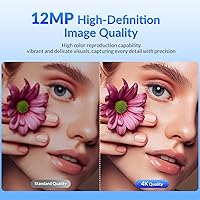
- Still Image: Captures still photos at up to 12MP, useful for snapshot features within supported video conferencing applications.
- Lens Construction: Features a 6-element optical lens with a 4.25mm focal length and a wide f/1.7 maximum aperture for improved light intake.
- Field of View: Offers a 77° diagonal field of view, wide enough to comfortably frame three to five people seated at a typical desk or table.
- Autofocus: Equipped with real-time continuous autofocus that adjusts automatically as the subject moves closer or further from the lens.
- Low-Light Correction: Includes automatic low-light compensation that brightens and sharpens the image in dim environments without requiring manual adjustment.
- Microphones: Dual built-in microphones with active noise reduction capture clear voice audio from subjects within approximately 3 meters.
- Audio Formats: Supports AAC and PCM audio encoding formats for compatibility with a broad range of recording and conferencing software.
- Video Format: Records and outputs video in MP4 format, which is compatible with most editing, streaming, and conferencing platforms.
- Connectivity: Connects via USB-A 2.0 with true plug-and-play support — no drivers, software installation, or configuration required.
- Compatibility: Fully compatible with Windows, Mac, and Linux operating systems, as well as major conferencing platforms including Zoom, Teams, and Meet.
- Privacy Cover: Integrated flip-down physical privacy cover blocks the lens completely when not in use and also protects against dust accumulation.
- Rotation Range: Supports 360° horizontal rotation and up to 100° vertical tilt for flexible positioning on monitors, laptops, or tripods.
- Tripod Mount: Includes a standard tripod thread mount on the base, allowing attachment to most universal desktop and camera tripods.
- Dimensions: Measures 2.05 x 3.54 x 2.44 inches, keeping the footprint compact enough for tight desk setups or easy travel packing.
- Weight: Weighs 4.9 ounces, making it light enough to carry in a laptop bag without adding meaningful bulk.
- Color: Available in matte black finish, which blends unobtrusively with most monitor bezels and home office setups.
- Storage Support: Listed with Micro SD as a flash memory type, suggesting potential local recording capability depending on firmware implementation.
- Model Number: Sold under the model designation EasyCam 501, which is the identifier to reference when seeking support or replacement accessories.
Related Reviews
NEWORK EasyCam 502 4K Webcam

Combess XIAOJINGLING 4K Webcam

Lumina LX011 4K Webcam

Diccik 4K HD Webcam

PEATOP 4K-C80CCMD Webcam

MOERTEK MT 4K Webcam

PixelForge 4K Webcam

Lusinx TW 4K Webcam
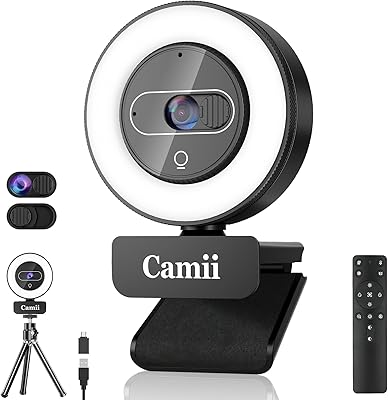
Camii C-4K 4K Webcam with Light