




Overview
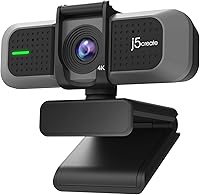
The j5create JVU430 4K Webcam enters a crowded budget segment with specs that look impressive on paper — 4K resolution, a wide-angle lens, and dual USB-A and USB-C connectivity that works with both older and newer machines. That last point is genuinely practical if you switch between a desktop with legacy ports and a newer laptop. It holds a #652 Best Sellers Rank in Webcams, and its 3.7-out-of-5 rating from 54 reviewers signals moderate satisfaction rather than strong enthusiasm. The honest takeaway: this j5create webcam competes well at its price point, but whether it actually lives up to its 4K label in real daily use is the real question.
Features & Benefits
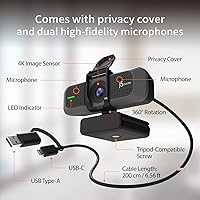
The 8MP CMOS sensor shoots at 4K at 30fps or bumps up to 60fps if you drop to 1080p — useful if you prioritize smoother motion for streaming over raw pixel count. The 94° wide-angle field of view is wide enough to show a whiteboard or a shared workspace, though some edge distortion is expected at that angle. The F/2.0 aperture helps in lower-light rooms, though it won't save you in near-darkness. The built-in stereo microphones handle quiet environments adequately, but a dedicated mic will serve you better in noisy spaces. The 6.56-foot cable and swivel mount give you real flexibility in how and where you position it.
Best For
The JVU430 is a solid pick for remote workers who spend their days on Zoom, Teams, or Skype and want a noticeable upgrade from a built-in laptop camera without spending heavily. Online teachers and tutors will particularly appreciate the wide field of view — it's genuinely useful when you need to show a book, a drawing, or a physical object on screen. Budget-conscious streamers can get workable 4K footage without committing to a high-end camera. The USB-A and USB-C cable setup also makes it a good fit for anyone who regularly switches between machines with different ports. And if you prefer a physical privacy cover over a software toggle, that built-in slider is a real perk.
User Feedback
Keep in mind that the JVU430 has only 54 ratings at the time of writing, so the overall 3.7-out-of-5 score should be treated as a starting signal rather than a definitive verdict. On the positive side, buyers frequently praise its plug-and-play setup — no drivers needed on most systems. Image sharpness in good natural light draws consistent appreciation. On the flip side, autofocus can be inconsistent, and the microphones struggle noticeably in louder environments. A handful of users have noted driver compatibility issues on certain setups. Some buyers also question whether the 4K label reflects genuine quality or a stretch of the term at this price tier.
Pros
- Plug-and-play USB setup works on most Windows and Mac systems without driver installation.
- The 94° wide-angle lens captures significantly more of your space than typical webcams at this price.
- Supports both USB-A and USB-C, making it easy to switch between older desktops and newer laptops.
- The built-in sliding privacy cover physically blocks the lens — a genuinely useful security feature.
- Dropping to 1080p unlocks 60fps, producing smoother, more fluid video for streaming or motion-heavy content.
- The 6.56-foot cable is longer than most competitors, giving you real desk positioning flexibility.
- Works out of the box with Zoom, Teams, Skype, and OBS without any extra setup or configuration.
- The 360-degree swivel mount makes angle adjustments quick and easy across different desk or room setups.
- Dual stereo microphones handle quiet, one-on-one video calls adequately without needing a separate microphone.
Cons
- Autofocus can be inconsistent, occasionally losing focus during movement or when lighting conditions shift.
- The built-in microphones struggle noticeably in noisy or reverberant spaces, making a dedicated mic near-essential.
- 4K recording is capped at 30fps, which can appear less fluid during fast motion compared to higher-end options.
- A handful of users have encountered driver compatibility issues on specific system setups, requiring extra troubleshooting.
- The wide field of view introduces edge distortion that may be distracting for close-up or professional-grade recording.
- Low-light image quality falls short of what premium webcams deliver, despite the F/2.0 aperture specification.
- With only 54 reviews on record, there is limited long-term data on reliability or consistent software support.
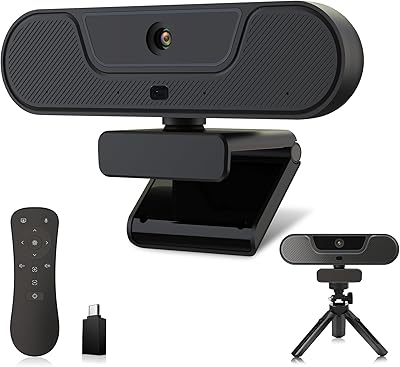
- No speakerphone or remote control functionality, which reduces its appeal for more feature-rich conferencing needs.
Ratings
The j5create JVU430 4K Webcam scores below were generated by our AI system after analyzing verified global buyer reviews, with spam, bot activity, and incentivized submissions actively filtered out to ensure every rating reflects real user experience. With only 54 ratings currently in the pool, the dataset is on the smaller side — scores are calibrated accordingly and treated as early-stage signals rather than fully settled verdicts. Both the genuine strengths and the honest pain points are represented across every category without softening.
Image Quality
Low-Light Performance
Autofocus
Audio Quality
Value for Money
Frame Rate
Ease of Setup
Build Quality
Privacy & Security
Connectivity
Mount & Cable Design
Software Compatibility
Wide-Angle Performance
Suitable for:
The j5create JVU430 4K Webcam is a well-matched option for remote professionals who are still relying on a built-in laptop camera and want a real upgrade without a significant financial commitment. If your day is built around Zoom, Teams, or Skype calls and you work in a reasonably well-lit space, the wide 94° field of view and F/2.0 aperture will deliver a noticeably cleaner image than what most integrated cameras produce. Online teachers and tutors stand to gain particularly here — the broad viewing angle is genuinely practical when you need to show a whiteboard, a book, or a physical demonstration to students on screen. The dual USB-A and USB-C cable design is a thoughtful touch for anyone who switches regularly between an older desktop and a newer device, removing the need for adapters. Budget-minded streamers or casual content creators curious about 4K output will find it a low-risk entry point. Finally, if a physical privacy cover is something you actively look for — and many privacy-conscious buyers do — the built-in slider here is a legitimate reason to choose this over similarly priced alternatives that skip it entirely.
Not suitable for:
The j5create JVU430 4K Webcam is a harder sell for anyone whose work demands consistently reliable, high-quality video in varied conditions. Professional streamers, video producers, or anyone broadcasting to a public audience will run into its ceiling quickly — autofocus inconsistencies and limited low-light performance become real problems when your output quality is visible to hundreds of viewers. If your recording environment is anything less than quiet, the built-in microphones will disappoint; background noise bleeds through noticeably, and a dedicated USB microphone becomes a near-essential add-on rather than an optional upgrade. Users who specifically need 4K at 60fps should also look elsewhere, as that combination is not available on this camera — 4K is limited to 30fps. With only 54 ratings at the time of writing, there is not yet enough long-term feedback to confidently assess durability or sustained software support. Buyers who rely on a strong review record before committing may prefer to wait or consider more established webcam brands with larger user communities behind them.
Specifications
- Resolution: Captures video at 4K Ultra HD resolution (3840 x 2160 pixels) at a maximum of 30 frames per second.
- 1080p Mode: When set to Full HD (1920 x 1080), the frame rate can be increased to up to 60fps for smoother motion.
- Image Sensor: Uses an 8-megapixel CMOS image sensor to capture fine detail and adapt to varying lighting conditions.
- Aperture: The F/2.0 aperture allows more light into the sensor, improving image clarity in lower-light environments.
- Field of View: The 94° wide-angle lens covers a broad area of the scene, suitable for shared workspaces or displaying physical materials on screen.
- Microphone: Features two built-in stereo microphones designed for voice capture during video calls and recordings.
- Cable Length: The attached USB cable measures 6.56 ft (200 cm), providing more reach than many competing webcams in this category.
- Connectivity: Includes both a USB-A connector and a USB-C connector, allowing connection to a wide range of devices without adapters.
- Privacy Cover: Equipped with a built-in sliding lens cover that physically blocks the camera when not in use.
- Mount Type: The camera head rotates 360 degrees on its mount, allowing flexible positioning on a monitor or flat surface.
- Dimensions: Physical dimensions measure 4.17 x 2.5 x 2.54 inches (length x width x height).
- Weight: The unit weighs 8.4 oz, making it light enough to reposition or move between setups without effort.
- Platforms: Officially compatible with Zoom, Skype, Microsoft Teams, and OBS Studio without requiring additional software.
- OS Support: Connects as a standard USB plug-and-play device, requiring no driver installation on most operating systems.
- Video Format: Recorded video output is encoded in MPEG format.
- Audio Format: Supports AAC, MP3, and PCM audio formats for recorded audio output.
- Model Number: The official model designation for this camera is JVU430.
- Brand: Manufactured and sold under the j5create brand, a peripheral accessories maker focused on USB connectivity products.
Related Reviews

PixelForge 4K Webcam

PEATOP 4K-C80CCMD Webcam

Diccik 4K HD Webcam

Lumina LX011 4K Webcam

Combess XIAOJINGLING 4K Webcam

MOERTEK MT 4K Webcam

Lusinx TW 4K Webcam
Opal Tadpole 4K Webcam
VIZOLINK V20 4K PTZ Webcam