
Overview

The NETGEAR GS608 8-Port Gigabit Ethernet Switch has been around long enough that its continued presence on bestseller lists says something real — this isn't a product coasting on a brand name. It's the kind of hardware you buy when you simply need more wired ports and have zero interest in logging into an admin panel to make that happen. Plug it in, connect your devices, done. At its mid-range price point, buyers aren't expecting enterprise-grade metal construction or advanced traffic controls. What they expect is reliability, and that's exactly the promise this gigabit switch has consistently delivered across nearly two decades on the market.

Features & Benefits

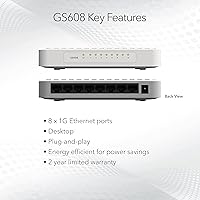
Eight full gigabit ports means you can run a NAS, a couple of gaming rigs, a smart TV, and a desktop workstation without any of them fighting over bandwidth. The fanless, silent operation is a genuine practical advantage — tuck it behind a TV cabinet or on a bedroom shelf and you'll forget it's even running. It also supports IEEE 802.3az, which quietly trims power consumption during low-traffic periods without you doing a thing. Mounting options are flexible: flat on a desk or screwed to a wall. There's no software to install, no account to create, and no ongoing maintenance required. The 2-year warranty rounds things out as a reasonable safety net at this price.

Best For

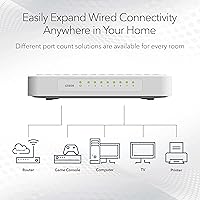
This 8-port switch is a natural fit for anyone whose router ran out of ethernet ports and who isn't interested in learning networking concepts just to solve the problem. Home users with a mix of wired devices — a desktop, a NAS, a game console, maybe a network printer — will find it handles the load without any fuss. It also works well in small home offices or shared apartments where wall mounting keeps cables tidy and the unit discreet. That said, if you need VLANs, port mirroring, or traffic prioritization, this isn't the right tool — unmanaged switches simply don't offer those controls, and the GS608 is no exception.

User Feedback

Across hundreds of reviews, the pattern is clear: buyers appreciate how little there is to think about after unboxing. Zero-configuration setup comes up repeatedly, particularly from users who aren't networking-savvy and just needed things to work. Silent operation earns consistent praise from people running units in home theaters and bedrooms. Where opinions diverge is on build quality — a handful of buyers find the lightweight plastic chassis feels less solid than metal-bodied competitors at a comparable price. A smaller number note that port indicator LEDs can be tricky to read from certain angles. Long-term reliability reports are largely positive, though, and multi-year ownership without incident is a recurring theme.

Pros

  • Plug-and-play setup requires zero configuration — connect cables and the network works immediately.
  • All eight ports run at full gigabit speed, handling heavy simultaneous workloads without bottlenecks.
  • Completely fanless design means absolute silence, even in bedrooms or noise-sensitive home offices.
  • IEEE 802.3az energy efficiency trims idle power draw automatically, no user action needed.
  • Wall-mount support is built in, making cable management and discreet placement straightforward.
  • Netgear's 2-year limited warranty provides meaningful protection for a mid-range networking device.
  • The GS608 has a proven multi-year track record — many buyers report years of daily use without a single failure.
  • Compact footprint fits easily on a desk or inside a media cabinet without dominating the space.
  • Works with any router or modem out of the box — no brand lock-in or compatibility headaches.

Cons

  • The plastic enclosure feels noticeably hollow and lightweight compared to metal-chassis rivals at a similar price.
  • No management interface means zero visibility into port traffic, link speeds, or network activity.
  • Port indicator LEDs are hard to read from below-desk angles or in bright ambient lighting.
  • Wall-mount screws and anchors are not included, adding a small but avoidable extra step for installers.
  • The chassis can run warm when enclosed in tight cabinets with other equipment during sustained heavy use.
  • No SFP uplink port limits flexibility for users connecting to fiber or planning network expansion.
  • Customer support quality from Netgear is inconsistent, with some warranty claim experiences notably slower than expected.
  • No QoS or traffic prioritization means latency-sensitive applications compete equally with background transfers.

Ratings

The scores below were generated by AI after analyzing verified buyer reviews worldwide for the NETGEAR GS608 8-Port Gigabit Ethernet Switch, with automated filtering applied to remove incentivized, bot-generated, and outlier submissions. The result is an honest composite that captures what real users consistently praise as well as the friction points that show up across multiple independent accounts. Both sides of the experience are reflected without sugarcoating.

Ease of Setup
97%
Buyers describe the setup experience in almost uniformly glowing terms — pull it out of the box, plug in the cables, and it works. No browser-based configuration portal, no firmware wizard, no account creation. For non-technical users, this alone is the single biggest reason they choose this switch over alternatives.
A handful of users wished there was at least a basic web interface for monitoring port activity or traffic, so the complete absence of any management layer does frustrate the small minority who outgrow purely unmanaged hardware without realizing it upfront.
Network Performance
91%
Full gigabit throughput across all eight ports holds up reliably under simultaneous workloads — multiple users report running 4K streams, large NAS transfers, and active gaming sessions concurrently without any noticeable bottleneck or packet loss during normal household use.
A small number of users in heavy prosumer or small-business environments note that the lack of Quality of Service controls means latency-sensitive traffic cannot be prioritized, which occasionally surfaces during peak simultaneous usage in more demanding setups.
Silent Operation
94%
The fanless design draws consistent, enthusiastic feedback from users who place the unit in living rooms, home offices, and bedrooms. Several reviewers specifically mention switching from a fan-cooled switch and describing the silence as a noticeable quality-of-life improvement in noise-sensitive rooms.
A few users running the switch in enclosed cabinets or stacking it with other equipment report that the chassis does get warm under sustained load — not alarmingly so, but enough that thermal management in tight spaces warrants some consideration.
Build Quality
67%
33%
The compact plastic enclosure is tidy and inoffensive in appearance, and most home users find it perfectly adequate sitting on a desk or mounted to a wall. The unit is light enough to wall-mount securely without heavy-duty hardware.
This is the most common source of buyer dissatisfaction. Compared to metal-chassis switches at a similar or slightly higher price, the GS608 feels noticeably lightweight — almost hollow. Users upgrading from older Netgear or TP-Link metal units in particular tend to flag this as a step down in perceived durability.
Value for Money
83%
For straightforward home network expansion, the price-to-performance ratio holds up well. Buyers consistently feel they are getting reliable gigabit switching without paying for managed features they would never use, and the 2-year warranty reinforces confidence in the investment.
As competition in the unmanaged gigabit switch segment has intensified, some buyers note that comparable port counts with metal enclosures are available from rival brands at nearly the same price point, which makes the GS608 feel slightly less compelling on value alone.
Port Count & Layout
78%
22%
Eight ports covers the needs of most home setups comfortably — router, NAS, desktop, smart TV, game console, and a spare port or two for guests or future devices. The RJ45 layout is clean and evenly spaced, making cable management relatively straightforward.
There are no SFP or uplink ports, and buyers with growing home labs occasionally find themselves needing to daisy-chain a second switch sooner than expected. For pure home use this is rarely an issue, but it is a ceiling worth knowing about.
Energy Efficiency
86%
IEEE 802.3az compliance means the switch automatically scales power consumption based on cable length and link activity, a detail most users never think about but appreciate in retrospect when they read about it. It runs cool under typical loads and draws minimal standby power.
The energy-efficient design is entirely passive — there is no way to schedule the switch or force low-power states manually. This is standard for unmanaged switches but worth noting for users hoping for any degree of active power management.
Port Indicator Visibility
61%
39%
The LED indicators do their job under normal lighting conditions, giving a quick visual confirmation that each connected device has an active link. For most users, glancing at the front panel is enough to confirm everything is live.
Multiple reviewers mention that the LEDs are difficult to read from certain angles or in brighter ambient lighting. Users who mount the unit below desk level or inside a media cabinet particularly struggle with this, and there is no brightness adjustment available.
Mounting Flexibility
82%
18%
The included wall-mount capability is a genuine plus that competing units sometimes charge extra for or omit entirely. Apartment dwellers and renters who want a tidy, off-desk installation find the mounting slots genuinely useful and report the unit staying secure on standard drywall anchors.
The mounting hardware is not included in the box, which surprises some buyers expecting a complete kit. Screws and anchors have to be sourced separately, which is a minor but avoidable friction point for first-time installers.
Long-Term Reliability
89%
Multi-year ownership reports are a recurring theme in buyer feedback. A meaningful number of reviewers mention using their unit daily for three, four, or even five years without a single port failure or dropout, which for a passive unmanaged switch is exactly what the category promises.
A small cluster of reports describe units failing within the first year, typically manifesting as one or two ports dropping off intermittently. These appear to be outliers rather than a systemic pattern, but they do exist and are worth factoring in alongside the warranty coverage.
Compatibility
93%
Works out of the box with essentially any router, modem, or device that has an ethernet port. Buyers connect it downstream of ISP-provided equipment, third-party routers, and mesh network hubs without any compatibility issues in the vast majority of reported cases.
Because it is fully unmanaged, users on networks with strict VLAN configurations or 802.1Q tagging requirements will find the GS608 strips tags or behaves unexpectedly. This is a category limitation rather than a flaw, but it catches unprepared buyers occasionally.
Packaging & Unboxing
74%
26%
The box is straightforward and appropriately minimal — the unit, a power adapter, and a quick-start guide. Buyers who just want to get up and running appreciate the lack of unnecessary bundled accessories or complicated inserts.
Several buyers note the packaging feels a bit basic for a mid-range networking product from an established brand, and a few report minor cosmetic scuffs on the unit out of the box. Nothing functional, but it shapes first impressions for detail-oriented buyers.
Brand Reputation & Support
81%
19%
Netgear carries genuine credibility in the home and SMB networking space, and many buyers deliberately choose the GS608 over less familiar brands precisely because of that track record. The 2-year warranty and accessible support channels add to that baseline trust.
Customer support experiences are mixed in reported feedback — some users had warranty claims handled promptly, while others describe slow response times or difficulty reaching a useful resolution. Support quality appears inconsistent rather than uniformly poor.

Suitable for:

The NETGEAR GS608 8-Port Gigabit Ethernet Switch is built for people who want their wired network to just work without ever opening a browser-based admin panel. It fits naturally into homes where the router's built-in ports have run out — think a household juggling a desktop, a NAS drive, a game console, a smart TV, and a network printer all demanding stable wired connections simultaneously. Home office workers who need reliable throughput for video calls and large file transfers, but have no interest in network administration, will find it does exactly what they need without any friction. Renters and apartment dwellers benefit from the wall-mount option, which keeps things tidy without permanent installation. It also makes a solid upgrade for anyone still running an older 10/100 switch who wants the speed headroom that full gigabit ports provide, along with the bonus of completely silent operation in shared living spaces.

Not suitable for:

The NETGEAR GS608 8-Port Gigabit Ethernet Switch is the wrong tool the moment your network requirements move beyond simple port expansion. If you need to segment traffic into VLANs, apply Quality of Service rules to prioritize voice or video traffic, mirror ports for monitoring, or manage bandwidth allocation between users, an unmanaged switch fundamentally cannot deliver any of that — and no firmware update will change that reality. Small businesses running more than a handful of users or handling sensitive data on segregated network segments should be looking at managed switches instead. Power users building home labs who anticipate needing 802.1Q tagging, link aggregation, or SNMP monitoring will hit the ceiling of this switch quickly and find the upgrade cost and hassle greater than if they had started with a managed unit. The plastic chassis is also a genuine consideration for anyone installing in an industrial or high-traffic environment where physical durability is a real factor rather than a cosmetic preference.

Specifications

  • Manufacturer: Made by Netgear, a well-established networking hardware brand with broad consumer and SMB product lines.
  • Model Number: The unit's official model identifier is GS608NA, as printed on the device label and packaging.
  • Port Count: Provides 8 x RJ45 Gigabit Ethernet ports, each capable of independent 1 Gbps full-duplex connections.
  • Data Transfer Rate: Each port supports a maximum data transfer rate of 1 Gigabit per second (1000 Mbps).
  • Switching Type: Fully unmanaged — no configuration interface, no software, and no admin controls of any kind are provided.
  • Dimensions: The unit measures 8.54″ in length, 6.5″ in width, and 4.29″ in height.
  • Weight: The switch weighs approximately 471.74 g (1.04 lbs), making it lightweight enough for straightforward wall mounting.
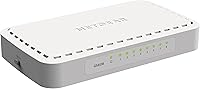
  • Case Material: The outer enclosure is constructed from plastic, finished in white, and designed for indoor desktop or wall-mount use.
  • Interface Standard: Compliant with IEEE 802.3az (Energy Efficient Ethernet), which automatically reduces power draw during low-activity periods.
  • Cooling Method: Entirely fanless design — passive cooling only, resulting in zero operational noise under all normal usage conditions.
  • Mounting Options: Supports both flat desktop placement and wall mounting; mounting slots are integrated into the enclosure design.
  • Setup Requirements: No software installation, driver download, firmware configuration, or account registration is required at any point.
  • Warranty: Covered by a 2-year limited hardware warranty provided directly by Netgear from the original date of purchase.
  • Power Supply: Powered via an external AC adapter included in the box; no PoE (Power over Ethernet) output is supported.
  • Market Position: Ranked #1,368 in Computer Networking Switches on Amazon, reflecting sustained long-term commercial performance.
  • Release Date: First made available on June 25, 2004, giving the product over two decades of continuous market presence.
  • Included Contents: The package contains the GS608NA switch unit and an AC power adapter; mounting hardware is not included.

Related Reviews
NETGEAR GS308E 8-Port Managed Network Switch
81%
93%
Reliability & Uptime
96%
Silent Operation
67%
Ease of Setup
78%
Web Management Interface
88%
Value for Tier
More
NETGEAR GS108PP 8-Port Gigabit Ethernet PoE+ Switch
88%
95%
Ease of Setup
90%
PoE Performance
88%
Reliability
92%
Noise Level
87%
Build Quality
More
NETGEAR GS308PP 8-Port PoE+ Gigabit Ethernet Switch
85%
93%
Setup & Installation
88%
Performance & Reliability
90%
PoE+ Functionality
84%
Build Quality & Design
91%
Noise Level (Fanless Design)
More
NETGEAR GS108Tv3 8-Port Gigabit Smart Switch
79%
83%
Ease of Setup
91%
Network Feature Depth
74%
NETGEAR Insight App
67%
Build Quality
96%
Silent Operation
More
NETGEAR GS108 8-Port Gigabit Ethernet Switch
82%
97%
Ease of Setup
93%
Reliability & Longevity
88%
Build Quality
91%
Value for Money
89%
Port Performance
More
NETGEAR GS308EP
NETGEAR GS308EP
81%
88%
PoE+ Performance
91%
Ease of Setup
74%
Build Quality
82%
Network Management Features
93%
Value for Money
More
NETGEAR GS324 24-Port Gigabit Ethernet Switch
84%
97%
Ease of Setup
94%
Silent Operation
89%
Build Quality
92%
Port Performance & Stability
67%
Thermal Management
More
NETGEAR GS316 16-Port Gigabit Network Switch
85%
97%
Ease of Setup
96%
Noise Level
78%
Build Quality
91%
Port Performance
88%
Reliability & Longevity
More
NETGEAR FS608 8-Port Fast Ethernet Switch
88%
88%
Network Performance
91%
Port Reliability
95%
Ease of Setup
90%
Build Quality
87%
Power Efficiency
More
Tenda TEG1008M 8-Port Gigabit Ethernet Switch
86%
95%
Ease of Setup
89%
Performance/Stability
91%
Noise Level
87%
Build Quality
85%
Mounting Flexibility
More

FAQ

No, nothing at all. You plug the power adapter in, connect your ethernet cables, and the switch starts working immediately. There is no setup wizard, no app to download, and no browser portal to visit. It is as close to zero-effort networking hardware as you will find.

Yes, that is exactly how it is designed to work. You run a single cable from one of the switch ports to your router, and the remaining seven ports become available for your other wired devices — computers, game consoles, NAS drives, smart TVs, whatever you have. All seven active downstream connections share the router uplink, which is standard for any switch.

It is completely silent. There is no fan inside — the switch uses passive cooling only. Buyers who keep it in bedrooms, home theaters, or shared living spaces consistently confirm that it produces no audible noise whatsoever, even after hours of continuous use.

Yes, wall mounting is supported directly out of the box — the enclosure has built-in mounting slots. The one thing to note is that mounting screws and wall anchors are not included in the package, so you will need to source those separately before installation.

Under typical home usage it stays comfortably warm at most. A small number of users report that it runs noticeably warmer when installed in an enclosed cabinet alongside other equipment, so if you are planning to place it in a confined space with limited airflow, leaving some breathing room around it is a sensible precaution.

It works with any router or modem that has a standard ethernet port, regardless of brand. Netgear, Asus, TP-Link, Eero, Ubiquiti — it does not matter. Unmanaged switches are entirely brand-agnostic, so there are no compatibility concerns here.

Unfortunately, no. This is an unmanaged switch, which means it has no traffic management capabilities at all — no VLANs, no Quality of Service settings, no port prioritization. Every connected device is treated equally. If those features matter to you, you would need to step up to a managed switch.

The GS608 has a genuinely strong reliability track record. A significant portion of long-term buyers report using their units for three to five or more years of daily operation without any port failures or hardware issues. There are isolated reports of early failures, but they appear to be outliers rather than a recurring pattern.

The lightweight feel is the most common source of skepticism among buyers, especially those coming from older metal-chassis switches. Functionally, though, the unit holds up well for home and light office use. If you need something that will survive a physically demanding environment, a heavier metal-chassis alternative might be a better fit, but for typical indoor use the plastic body has proven durable enough over many years.

Yes, Netgear covers the switch with a 2-year limited hardware warranty from the purchase date. If a port or the unit itself fails under normal use within that window, you can contact Netgear support to initiate a warranty claim. Keep your proof of purchase handy, as it will be required to verify eligibility.

Where to Buy