Overview

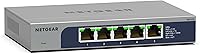
The NETGEAR MS105 5-Port Multi-Gigabit Unmanaged Switch sits in a sweet spot that didn't really exist a few years ago — affordable multi-gig networking for regular people. With Wi-Fi 6 routers now routinely pushing past gigabit speeds, and NAS drives capable of sustained transfers that standard 1G connections choke on, the bottleneck has quietly shifted to the switch itself. This NETGEAR switch addresses that without demanding anything from you in return: no software, no configuration required. You plug it in and it works. The metal chassis is compact enough to tuck behind a monitor or mount to a wall, and being unmanaged means simplicity — not a compromise — for most home users.
Features & Benefits

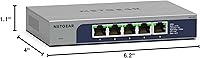
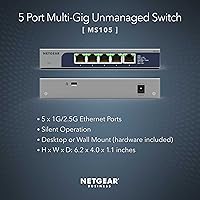
All five ports on the MS105 support both 1G and 2.5G speeds, so you're not stuck with a single fast port and four slow ones — the whole switch runs multi-gig. That matters when you've got a NAS, a desktop, and a Wi-Fi 6 access point all demanding bandwidth at the same time. The unit is completely fanless, which means zero noise — genuinely useful if it lives on your desk or in a bedroom setup. At 6.2 x 4 x 1.1 inches and just under two pounds, the solid metal chassis feels substantial without taking up real estate. NETGEAR backs it with a lifetime limited warranty and next-business-day replacement, plus round-the-clock chat support — unusual for a switch at this level.

Best For

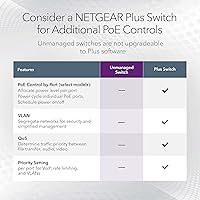
The MS105 makes the most sense for home lab users who've outgrown gigabit and want a straightforward upgrade without a managed switch's complexity. If you're running a NAS and copying large files between machines, local transfer speeds become noticeable very quickly — 2.5G makes a real difference here. Small home offices where the router already handles routing and the switch just needs to connect a handful of devices will find this multi-gig switch perfectly sized. It's also a solid fit for anyone running a Wi-Fi 6 or 6E access point that supports 2.5G uplinks. What it isn't for: anyone who needs PoE to power cameras or access points, or who wants VLAN or traffic management. That's simply not what this switch does.

User Feedback

Among buyers, this NETGEAR switch carries a solid 4.4-star rating across nearly 80 reviews — a smaller pool than some competitors, but one where the feedback is fairly consistent. Easy setup and real-world speed improvements, especially when paired with a NAS or a 2.5G-capable router, come up repeatedly. Build quality draws praise too — the metal enclosure feels like it belongs in a rack, not a junk drawer. The recurring criticism is straightforward: this multi-gig switch costs noticeably more than a basic gigabit alternative, and if you don't actually need the speed bump, that gap is hard to justify. The absence of PoE frustrates some buyers. Long-term reliability reports are generally positive, with no notable heat complaints appearing consistently.

Pros

  • All five ports support 2.5G, so no single device gets stuck on a slower dedicated port.
  • Completely fanless operation makes this multi-gig switch genuinely silent in any environment.
  • Setup takes minutes — no software, no account, no configuration of any kind required.
  • The all-metal chassis feels durable and runs cool even during sustained transfers.
  • A lifetime limited warranty with next-business-day replacement is exceptional at this price tier.
  • Auto-negotiation between 1G and 2.5G means it works cleanly alongside older gigabit hardware.
  • Small enough to mount on a wall or tuck behind a monitor without dominating the space.
  • Real-world NAS transfer speeds show a meaningful improvement over standard gigabit connections.
  • IEEE 802.3az compliance keeps idle power draw low for an always-on network device.
  • 24/7 live chat support from NETGEAR is a genuine differentiator for an unmanaged switch.

Cons

  • No PoE support makes it incompatible with access points or cameras that need switch-powered connections.
  • Five ports is a tight limit — one router plus a NAS plus two PCs already fills it.
  • Achieving full 2.5G requires compatible NICs and at least Cat5e cabling throughout — not always a given.
  • No port status feedback beyond LEDs; there is no way to confirm actual link speeds remotely.
  • Tightly spaced ports can cause physical interference when using bulky or right-angle RJ45 connectors.
  • The price premium over a gigabit switch is hard to justify if your devices cannot actually use 2.5G.
  • Wall mounting hardware included is minimal and may require additional anchors for drywall installs.
  • No management features means zero ability to troubleshoot, segment, or prioritize traffic at the switch level.
  • Review volume is still relatively modest, leaving long-term reliability data less conclusive than older models.
  • Regional restriction to the US and Canada limits availability for international buyers.

Ratings

The scores below reflect an AI-driven analysis of verified buyer reviews for the NETGEAR MS105 5-Port Multi-Gigabit Unmanaged Switch, drawn from global feedback with spam, bot-generated, and incentivized responses actively filtered out. The result is an honest breakdown that weighs both what this multi-gig switch does exceptionally well and where real users have run into friction. Strengths and shortcomings are represented with equal weight.

Plug-and-Play Setup
96%
Users consistently describe the setup experience as genuinely effortless — unbox, connect, done. No driver installation, no web interface to navigate, no configuration headaches. For home users who just want faster local speeds without a networking deep-dive, this is exactly what they need.
The simplicity is also a ceiling. Users who wanted even basic diagnostics — link speed confirmation per port, for instance — found there was no feedback mechanism at all beyond the port LEDs. That is by design, but worth knowing upfront.
Multi-Gig Port Performance
88%
Buyers pairing this NETGEAR switch with a 2.5G-capable NAS reported tangible real-world improvements — large file transfers that previously saturated a gigabit link now completed noticeably faster. All five ports delivering 2.5G, not just one or two, was a frequently cited advantage.
A minority of users noted that achieving full 2.5G throughput required compatible NICs and cables on both ends, which caught some buyers off guard. The switch itself performs fine; the surrounding ecosystem needs to match, and not everyone factored that in before purchasing.
Build Quality & Materials
91%
The all-metal chassis earns consistent praise for feeling solid and purposeful — not like consumer-grade plastic that flexes under pressure. Several users noted it runs cool to the touch even after extended uptime, which builds confidence in long-term durability.
A small number of buyers noted the unit is heavier than expected for its footprint, making wall mounting feel slightly more involved than anticipated. The mounting hardware included is functional but basic, and a few users sourced their own screws for a cleaner install.
Fanless & Noise Level
94%
Complete silence in operation is genuinely appreciated by users who placed this multi-gig switch in living rooms, bedroom offices, or home theater setups. Unlike managed switches with cooling fans, there is simply nothing to hear — even in a quiet room at night.
Fanless designs depend entirely on passive heat dissipation, and a handful of users in warmer climates or poorly ventilated spaces reported the chassis getting warm during sustained heavy transfers. No failures were attributed to this, but it is worth monitoring in tight enclosures.
Value for Money
67%
33%
For users who genuinely need 2.5G across all five ports, the MS105 delivers a compelling feature set relative to its price tier. The lifetime warranty and next-business-day replacement add real long-term value that budget switches simply do not offer.
This is where opinions divide most sharply. Buyers comparing it against standard gigabit switches balk at the price difference, especially if their current setup does not actually bottleneck at 1G. If you are not running a NAS or a Wi-Fi 6 backhaul, the premium is genuinely hard to justify.
Port Count & Layout
73%
27%
Five ports covers the most common home lab and small office scenarios comfortably — a router, a NAS, a desktop, and an access point still leaves one port free. The compact layout keeps cable management tidy without requiring a patch panel.
Power users or anyone with more than four downstream devices will hit the limit quickly. There is no 8-port variant of this exact model, so buyers needing more capacity have to step up to a different product line, often at a significantly higher price point.
Energy Efficiency
83%
IEEE 802.3az compliance means the switch actively reduces power draw on idle or low-activity ports. Users running it continuously reported it drawing very little power, which adds up meaningfully over months of always-on operation in a home setup.
Energy efficiency is not something most buyers track closely after purchase, so real-world impact feedback is limited. A few technically inclined users measured idle draw and found it satisfactory, but this category rarely drives purchasing decisions for the typical buyer.
Mounting Flexibility
79%
21%
The option to go desktop or wall-mounted is practical for home installs where a rack is overkill. Several users mounted it cleanly behind a desk or inside a media cabinet, keeping it out of sight without sacrificing airflow or access to ports.
The included mounting hardware is minimal, and wall mounting requires a bit more effort than the product packaging implies. Users installing it in drywall without a stud found they needed additional anchoring solutions, and the manual guidance on mounting is sparse.
Warranty & Support Coverage
89%
A lifetime limited hardware warranty with next-business-day replacement is a genuinely strong backing for a switch at this price point. Users who contacted NETGEAR support via the included 24/7 chat access generally reported responsive, knowledgeable agents.
Some users noted that warranty service involves a replacement-first process rather than a repair, which is actually convenient — but a few were surprised they needed to register the product to activate full coverage. The warranty terms are solid but require a registration step that not everyone notices initially.
PoE Availability
22%
78%
This is not a PoE switch, and buyers who knew that going in have no issue. For a clean multi-gig data switch where power delivery is handled separately, the absence of PoE keeps the price down and the design simpler.
This is the single most common source of buyer disappointment. Users who wanted to power access points, IP cameras, or VoIP phones directly through the switch discovered too late that this NETGEAR switch does not support PoE in any form. It is a fundamental limitation that is easy to overlook during purchase.
Management & Control Features
31%
69%
For users who want zero management overhead, the fully unmanaged design is a feature, not a gap. There is nothing to misconfigure, no firmware interface to learn, and no ongoing administration required — it simply works.
Anyone needing VLANs, QoS prioritization, port mirroring, or traffic monitoring will find this switch completely unsuitable. There is no web interface, no CLI, and no SNMP support. Users who bought it expecting at least basic visibility into port status were left with only the LEDs.
Compatibility with Existing Gear
82%
18%
The MS105 auto-negotiates between 1G and 2.5G, so it works cleanly with older gigabit devices alongside newer multi-gig hardware. Users integrating it into mixed environments — some 1G, some 2.5G — reported no compatibility issues during the transition.
Realizing the full 2.5G potential requires 2.5G-capable NICs, cables rated at least Cat5e, and compatible routers or NAS units. Several buyers assumed any modern device would auto-upgrade to 2.5G, which is not how it works — the bottleneck shifts to the weakest link in the chain.
Physical Footprint
88%
At just 6.2 x 4 x 1.1 inches, this multi-gig switch is genuinely small. It fits behind a monitor, in a cable box, or on a shallow shelf without issue. The low-profile form factor is a consistent positive among users working with limited desk space.
The compact size means the five ports are fairly tightly spaced, and users with thicker or right-angle RJ45 connectors reported mild interference between adjacent plugs. It is a minor issue but worth noting for anyone using bulky patch cables or keystone jacks.
Long-Term Reliability
85%
Given the product has been on the market since late 2022, early adopters have had meaningful time to report on longevity. The feedback here is encouraging — very few reports of units failing under normal operating conditions, and the metal build appears to hold up well over time.
The review base is still relatively small compared to NETGEAR's older product lines, so long-term reliability data is less statistically robust. A few users flagged occasional port link drops after extended uptime, though rebooting the switch resolved the issue in each reported case.

Suitable for:

The NETGEAR MS105 5-Port Multi-Gigabit Unmanaged Switch is a strong fit for anyone whose home network has quietly outgrown what standard gigabit can deliver. If you have a NAS device and regularly move large files — video projects, backups, media libraries — between it and your workstation, the jump to 2.5G is immediately noticeable in ways that matter day to day. It is equally well-matched to home offices running a Wi-Fi 6 or 6E router, where the access point itself is already capable of pushing past 1Gbps and a gigabit switch becomes the weakest link. Home lab enthusiasts who want a clean, no-fuss multi-gig backbone without the overhead of a managed switch will find the plug-and-play experience genuinely refreshing. The compact, fanless metal build also makes it practical for anyone working in shared or noise-sensitive spaces where a humming fan would be unwelcome.
Not suitable for:

If you need to power devices through your switch — wireless access points, IP cameras, VoIP handsets — the NETGEAR MS105 5-Port Multi-Gigabit Unmanaged Switch will not serve you; it has no PoE capability of any kind, and that is a hard stop for many small business or prosumer setups. Anyone who needs VLANs to segment traffic, QoS rules to prioritize video calls, or any form of port-level visibility will also find this switch entirely inadequate — there is no management interface, no web GUI, and no CLI, by design. Users with more than four downstream wired devices will hit the port limit quickly, and there is no straightforward way to expand this specific unit. If your current network genuinely maxes out at well under 1Gbps and you have no 2.5G-capable devices in your setup, the price premium over a standard gigabit switch is difficult to rationalize. Finally, buyers outside the US and Canada should note this switch is not intended for use in other regions.
Specifications

  • Port Count: The switch includes 5 x RJ45 ports, each supporting auto-negotiation between 1G and 2.5G Multi-Gigabit speeds.
  • Max Transfer Rate: Each port delivers a maximum data transfer rate of 2.5 Gbps when connected to compatible 2.5G-capable devices.
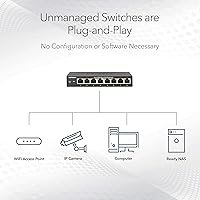
  • Management Type: The switch is fully unmanaged, requiring no configuration, software installation, or ongoing administration.
  • PoE Support: This switch provides no Power over Ethernet capability on any port.
  • SFP Ports: No SFP or fiber uplink ports are included; all five ports are copper RJ45 only.
  • Fanless Design: The switch uses passive cooling with no internal fan, producing zero audible noise during operation.
  • Dimensions: The chassis measures 6.2″ L x 4″ W x 1.1″ H, making it suitable for desktop placement or wall mounting.
  • Weight: The unit weighs 1.72 pounds, reflecting its all-metal construction in a compact form factor.
  • Case Material: The outer enclosure is constructed from metal, contributing to passive heat dissipation and long-term durability.
  • Mounting Options: The switch supports both desktop and wall mount installation, with mounting hardware included in the box.
  • Energy Standard: The switch is compliant with IEEE 802.3az (Energy Efficient Ethernet), reducing power consumption on idle or low-activity ports.
  • Operating Temperature: The switch is rated for operation in ambient temperatures up to 40 degrees Celsius.
  • Interface Type: All ports use the RJ45 interface, compatible with standard Cat5e, Cat6, and Cat6a Ethernet cables.
  • Warranty: NETGEAR covers this switch with a Lifetime Limited Hardware Warranty, including next-business-day replacement upon failure.
  • Support Access: Buyers receive access to 24/7 live chat support directly from NETGEAR networking experts.
  • Regional Use: This switch is designed and approved for use in the United States and Canada only.
  • Model Number: The official item model number is MS105-100NAS, used for warranty registration and support identification.
  • Included Components: The package includes the switch unit, a power adapter, and basic wall mounting hardware.

Related Reviews

NETGEAR XS505M 5-Port 10G Multi-Gigabit Ethernet Unmanaged Switch
87%
91%
Performance
94%
Setup and Installation
88%
Build Quality
85%
Energy Efficiency
93%
Fanless Operation (Noise Level)
More
NETGEAR GS105NA 5-Port Gigabit Unmanaged Switch
85%
97%
Ease of Setup
93%
Network Performance
88%
Build Quality
96%
Noise Level
91%
Value for Money
More
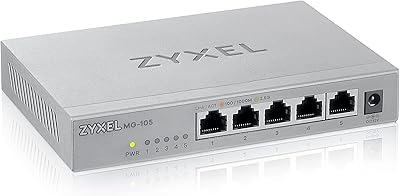
Zyxel MG-105 5-Port 2.5G Unmanaged Switch
80%
93%
Network Performance
97%
Ease of Setup
89%
Value for Money
62%
Build Quality
98%
Noise Level
More
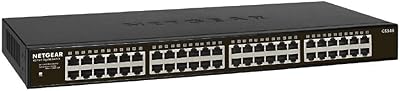
NETGEAR GS348 48-Port Gigabit Unmanaged Switch
74%
97%
Noise Level
94%
Ease of Setup
89%
Build Quality
93%
Long-Term Reliability
86%
Value for Money
More
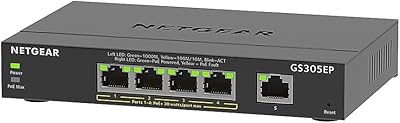
NETGEAR GS305EP 5-Port PoE Gigabit Switch
79%
91%
Ease of Setup
78%
PoE Performance
97%
Noise Level
67%
Management Interface
72%
Build Quality
More
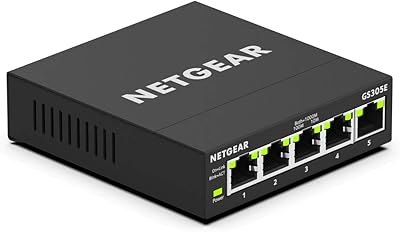
NETGEAR GS305E 5-Port Gigabit Managed Switch
76%
93%
Value for Money
84%
Setup & Ease of Use
81%
Build Quality & Durability
88%
Network Performance & Throughput
97%
Silent Operation
More
NETGEAR GS108 8-Port Gigabit Ethernet Switch
82%
97%
Ease of Setup
93%
Reliability & Longevity
88%
Build Quality
91%
Value for Money
89%
Port Performance
More
NETGEAR GS305P v2 5-Port Gigabit Ethernet PoE Switch
87%
93%
Ease of Setup
89%
PoE Power Delivery
94%
Noise Level (Fanless Design)
85%
Build Quality
91%
Energy Efficiency
More
NETGEAR GS116LP 16-Port Unmanaged PoE+ Switch
86%
97%
Ease of Setup
93%
PoE Port Coverage
62%
PoE Power Budget
96%
Silent Operation
88%
Build Quality
More
NETGEAR XS512EM 12-Port 10G Multi-Gigabit Smart Managed Switch
87%
88%
Performance under Load
93%
Ease of Setup
90%
Energy Efficiency
85%
Connectivity Options
91%
Build Quality
More

FAQ

No, not at all. The NETGEAR MS105 5-Port Multi-Gigabit Unmanaged Switch is purely plug-and-play — you connect your devices, plug in power, and it starts working immediately. There is no app, no web interface, and no configuration required at any point.
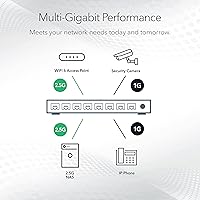
It works with both. Each port auto-negotiates between 1G and 2.5G, so older gigabit devices connect at 1G while newer 2.5G-capable devices automatically link at the faster speed. You can mix them freely without any manual configuration.

Cat5e is technically sufficient for 2.5G at typical home distances, though Cat6 or Cat6a is recommended for longer runs or future-proofing. If your existing cabling is Cat5e in good condition and under about 100 meters, you should be fine.

No. This multi-gig switch has no PoE (Power over Ethernet) support on any port. If you need to power devices through the switch itself, you will need a separate PoE switch or injector.

Only through the port LEDs on the front of the unit — they indicate link activity but do not display the negotiated speed in detail. Since the switch is unmanaged, there is no dashboard, app, or CLI to query for per-port speed information.

The chassis can get noticeably warm during sustained transfers, which is expected for a fanless metal device — the housing itself acts as a heat sink. Most users report it running warm but not hot under normal conditions. Avoid placing it in enclosed spaces with poor airflow for extended periods.

No. As an unmanaged switch, it has absolutely no traffic management features — no VLANs, no QoS, no port mirroring, and no monitoring capabilities. If any of those features matter to your setup, you would need a managed switch instead.

Basic wall mounting hardware is included in the box. The switch has mounting slots on its underside that align with screws in a wall. Most users find the process straightforward, though those mounting into drywall without a stud may want to pick up appropriate wall anchors separately.

Yes, and this is actually one of the most common use cases for the MS105. If your router has a 2.5G LAN port, connecting it to this multi-gig switch lets that faster bandwidth flow through to your wired devices rather than being capped at 1G by the switch.

NETGEAR's Lifetime Limited Warranty includes next-business-day replacement, which means if your unit is confirmed faulty, they will ship a replacement the following business day. You will need to register the product with NETGEAR to activate full warranty coverage, so it is worth doing that shortly after purchase.

Where to Buy