Overview

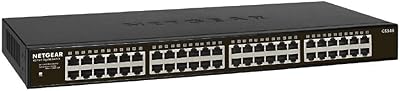
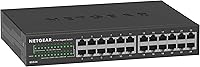
The NETGEAR GS324 24-Port Gigabit Ethernet Switch is a straightforward, no-configuration-needed option for anyone who needs to expand their wired network without wrestling with software or setup menus. Built into a solid metal chassis, it sits comfortably in the mid-range tier — sturdy enough for a small business server room yet compact enough for a home office shelf. What sets it apart from many switches at this price point is its completely fanless design, meaning it runs in total silence. Add in the flexibility to mount it on a desktop, bolt it to a wall, or slide it into a rack, and this unmanaged switch covers a surprisingly wide range of real-world installations.
Features & Benefits

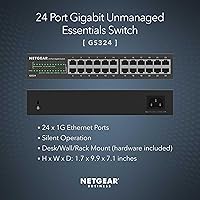
All 24 ports deliver full gigabit throughput simultaneously, so there is no bottleneck whether you are transferring files between a NAS and a workstation or streaming 4K video to multiple devices at once. The fanless build keeps things completely quiet, which matters more than people expect once they have dealt with the persistent hum of a cheap fan-cooled switch. The GS324 also supports Energy Efficient Ethernet, dialing back power consumption automatically when ports are not pushing data — a small but meaningful touch for always-on setups. The metal housing handles heat passively and feels noticeably more robust than plastic alternatives. Best of all, every mounting accessory — rackmount brackets, wall-mount hardware, desktop rubber feet — ships in the box, alongside a three-year limited warranty.

Best For

This 24-port gigabit switch makes the most sense for people whose router built-in ports simply cannot keep up anymore — home labs, small offices, or anyone running multiple wired devices who is tired of relying on Wi-Fi. It is a natural fit for AV and media rooms where a NAS, smart TV, gaming console, and streaming device all need stable, fast connections without a fan adding background noise. IT administrators handling small deployments will appreciate being able to drop it into a rack without needing to configure a single VLAN. It is also a strong pick for noise-sensitive spaces like recording studios or bedrooms, where even the faint whirr of cooling hardware becomes a real nuisance over time.

User Feedback

The general consensus around the GS324 is hard to argue with — buyers repeatedly describe plugging it in and having every device come online without a single step of configuration. Silent operation comes up constantly as the deciding factor for people who compared it against fan-cooled alternatives. On the downside, a notable handful of users mention the unit gets warm during extended use, which is worth keeping in mind if you are planning a tightly enclosed rack install without adequate airflow. A few also flag the power adapter bulk as awkward in cramped spaces. That said, long-term reliability reports are consistently strong, and the build quality earns frequent praise for a switch in this price range.

Pros

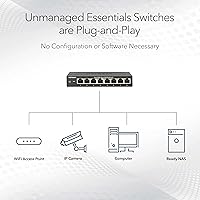
  • Plug-and-play setup takes minutes — no software, login, or configuration of any kind required.
  • All 24 ports deliver full gigabit speeds simultaneously with no throttling under normal load.
  • Completely silent operation makes it practical for living rooms, bedrooms, and recording spaces.
  • Solid metal chassis feels noticeably more durable than plastic-bodied switches in the same price range.
  • Every mounting option — desktop, wall, and rackmount — is supported and all hardware ships in the box.
  • Energy Efficient Ethernet support quietly reduces power draw when ports are idle, saving electricity over time.
  • A three-year limited warranty is stronger coverage than most unmanaged competitors offer at this price tier.
  • Long-term users consistently report stable link speeds and no dropped connections across all ports over months of use.
  • The GS324 is ranked among the top sellers in its category, reflecting a large and generally satisfied buyer base.

Cons

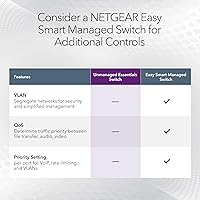
  • No management interface whatsoever — VLANs, QoS, and port monitoring are simply not possible.
  • The unit runs noticeably warm after extended use, which is a real concern in enclosed or poorly ventilated racks.
  • The included power adapter is bulky and can be awkward to position in tight rack or cabinet setups.
  • No PoE support on any port, so powering IP cameras, access points, or VoIP phones requires a separate PoE injector or switch.
  • Not suitable for networks that need to segment or prioritize traffic between departments or device types.
  • No link activity LEDs that are easy to read from a distance, which can make basic troubleshooting slightly less convenient.
  • Limited to 1G speeds per port — no 2.5G or 10G uplink options for high-throughput server or NAS connections.

Ratings

The scores below reflect an AI-driven analysis of verified global buyer reviews for the NETGEAR GS324 24-Port Gigabit Ethernet Switch, with spam, bot-generated, and incentivized feedback actively filtered out before scoring. Each category is evaluated against real-world usage patterns reported by home lab builders, small office IT managers, and AV enthusiasts alike. Both the strengths that make this switch a category leader and the friction points that affect a minority of buyers are transparently represented.

Ease of Setup
97%
Buyers across all technical backgrounds consistently describe a setup experience measured in seconds, not minutes — plug in power, connect devices, done. There is no firmware to update, no app to download, and no login screen standing between the user and a working network. This is the single most praised aspect across the entire review base.
Because there is truly nothing to configure, advanced users occasionally feel limited when they realize there is no fallback interface even for basic diagnostics. It is a minor frustration, but worth knowing if you ever want to check link status programmatically.
Silent Operation
94%
The fanless design earns consistent, enthusiastic praise from buyers who moved away from fan-cooled switches in home offices, media rooms, and recording spaces. Many describe noticing the silence almost immediately — particularly those who had previously tolerated a low-level hum from older hardware running nearby. In noise-sensitive environments, this alone justifies the purchase.
Passive cooling means the chassis absorbs and holds heat, and some users in warm climates or enclosed spaces note the top panel gets uncomfortably warm after hours of sustained traffic. It is not a failure mode, but it does require thoughtful placement in tightly packed rack enclosures.
Build Quality
89%
The metal housing sets the GS324 apart from plastic-bodied competitors in the same price range — buyers frequently describe it as feeling solid and well-finished for the tier. Several reviewers specifically mention that the chassis inspires confidence in long-term deployment, particularly in rack environments where cheaper units tend to flex or creak.
A small number of buyers have noted that the port labeling can be difficult to read under poor lighting conditions, and the finish does show fingerprints and dust more visibly than matte plastic alternatives would. Neither issue affects performance, but they come up often enough to note.
Port Performance & Stability
92%
Long-term users consistently report stable gigabit links across all 24 ports over months and even years of continuous operation, with no random disconnections or speed degradation. Home lab users running NAS transfers, backup jobs, and media streaming simultaneously report no bottleneck behavior, which reflects well on the switching fabric under real mixed-load conditions.
A handful of reviewers report that a specific port on their unit failed within the first year, though these cases appear isolated rather than systemic. There are no widespread reports of packet loss or throughput inconsistency, but isolated hardware defects do surface occasionally in a product at this volume.
Thermal Management
67%
33%
For open-air desktop or standard rack installs with adequate airflow, the passive cooling system handles continuous load without issue, and the metal chassis does a reasonable job dispersing heat across its surface area. Most buyers in typical office or home environments report no thermal concerns over extended periods.
In sealed or low-airflow rack cabinets, the unit runs noticeably hot after extended use, and some buyers express concern about long-term reliability under those conditions. This is a real limitation that distinguishes the GS324 from switches with active cooling in thermally constrained deployments.
Value for Money
88%
For a metal-chassis, fanless, 24-port gigabit switch that ships with all mounting hardware and backs itself with a three-year warranty, buyers broadly agree the price represents fair value. The GS324 consistently outperforms cheaper plastic alternatives in perceived durability, and buyers feel the warranty adds meaningful long-term security to the purchase.
A small segment of buyers feel the price is slightly high compared to off-brand alternatives with similar port counts, and note that you are paying in part for the NETGEAR name and warranty assurance. For pure budget buyers who prioritize port count over build quality or brand reliability, cheaper options technically exist.
Mounting Flexibility
86%
The inclusion of all three mounting kits in the box — desktop feet, wall brackets, and rackmount hardware — is consistently highlighted as a practical, thoughtful touch that competitors frequently leave out or charge extra for. IT administrators setting up small server rooms particularly appreciate not having to source rack brackets separately.
Some users report that the rackmount brackets feel slightly less robust than the main chassis, and a few note that wall-mount installation requires careful stud alignment given the unit's weight. The installation guide is also described as bare-bones, which can frustrate less experienced users attempting a rack install for the first time.
Power Supply & Cable Management
61%
39%
The wide-range power input handles both 110V and 240V environments without any adapter swapping, which is useful for international buyers or those running mixed-voltage lab setups. The included power cord is adequate length for most standard rack or desktop placements.
The external power brick is the most commonly cited physical complaint — multiple reviewers describe it as bulky and awkward in tight rack power strips where space between outlets is limited. There is no internal power supply, so cable routing around the brick requires extra planning in organized rack builds.
Port Density
91%
Twenty-four gigabit ports on a single unit is genuinely useful for home labs, small offices, and AV installations where device counts have crept beyond what a typical router or smaller switch can handle. Buyers upgrading from 8- or 16-port switches specifically call out the headroom as a major quality-of-life improvement.
For larger deployments that need 48 or more ports, a single GS324 is not enough and daisy-chaining multiple unmanaged switches introduces limitations around broadcast domains. There are also no 10G uplink ports for high-throughput connections to a NAS or server, which more demanding home lab users do notice.
Energy Efficiency
82%
18%
IEEE 802.3az compliance means the switch automatically scales back power on low-traffic or idle ports, which adds up in always-on deployments like home servers or 24/7 office networks. Buyers running the unit continuously appreciate that it does not drive up electricity costs noticeably compared to older non-EEE hardware.
There is no power consumption display or monitoring capability since the switch is entirely unmanaged, so users cannot verify actual savings or track idle vs active draw over time. For energy-conscious buyers who want precise figures, the lack of any telemetry is a minor but real gap.
Compatibility
93%
The auto-negotiation on every port means it connects cleanly to gigabit, 100Mbps, and legacy 10Mbps devices without any manual speed configuration, which home users with mixed-age hardware particularly appreciate. Buyers report seamless connectivity across PCs, Macs, NAS boxes, smart TVs, gaming consoles, and projectors without exception.
The switch is certified for the US and Canada only, which occasionally catches international buyers off guard when ordering from US-based listings. While the power supply handles international voltages, warranty and regulatory compliance are technically limited to North American use.
Long-Term Reliability
84%
The majority of long-term reviews spanning one to three years report no degradation in link quality, port function, or chassis integrity, suggesting the hardware is genuinely durable under normal operating conditions. The metal build and three-year warranty both contribute to a strong confidence profile for a set-it-and-forget-it deployment.
A small but recurring thread in reviews involves isolated port failures that appear outside the typical early-failure window, suggesting some units may have durability variance. These cases remain a minority, but they do affect the reliability score enough to prevent a higher rating.
Indicator Lights & Diagnostics
71%
29%
Each port has a dedicated activity and link LED, giving a quick visual confirmation that devices are connected and passing traffic — useful for basic troubleshooting without any tools. Most buyers find the LED layout intuitive enough for day-to-day checks.
The LEDs are relatively dim and can be difficult to read from across a rack in a bright server room environment. Because the switch is entirely unmanaged, there is no way to go deeper than visual LED status — no logging, no SNMP, and no traffic counters of any kind.
Packaging & Unboxing
78%
22%
Buyers generally describe the packaging as well-organized, with each accessory clearly separated and the unit protected adequately for shipping. Receiving all mounting hardware in one box without any surprise omissions earns positive mentions from buyers who have been burned by incomplete kits from other brands.
The printed installation guide is minimal and assumes some baseline networking familiarity, which can leave less experienced buyers uncertain about rack installation specifics. A few reviewers mention that the accessory bags are not labeled, requiring a bit of cross-referencing to identify which hardware belongs to which mounting method.

Suitable for:

The NETGEAR GS324 24-Port Gigabit Ethernet Switch is a strong match for anyone who has simply run out of ports and needs a reliable, zero-fuss way to wire up more devices. Home lab enthusiasts, small office managers, and IT generalists who want a rack-ready switch without the overhead of managed configuration will find it fits right into their workflow. It is especially well-suited to media-heavy environments — think a living room setup with a NAS, gaming console, smart TV, and a couple of streaming sticks all demanding stable, fast wired connections. The fanless build makes it a genuinely practical pick for noise-sensitive spaces like recording studios, libraries, or even a bedroom desk setup where a buzzing fan would be intolerable. Anyone upgrading from a smaller 8- or 16-port switch and wanting meaningful room to grow will appreciate having 24 full-gigabit ports without paying a premium for management features they will never use.
Not suitable for:

The NETGEAR GS324 24-Port Gigabit Ethernet Switch is not the right tool if your network requires any form of traffic control, segmentation, or monitoring. There are no VLAN settings, no QoS controls, no port mirroring, and no web interface — by design. If you are running a mid-size or growing business where you need to isolate guest traffic, prioritize VoIP calls, or manage bandwidth by department, you will quickly hit a wall with an unmanaged switch and should be looking at managed alternatives instead. The passive cooling also means the chassis does run warm under sustained load, so anyone planning to install it in a sealed or poorly ventilated rack enclosure should think twice or ensure adequate airflow around the unit. The power adapter is also on the bulkier side, which can be a minor but real annoyance in tight rack configurations where space around the power strip is already limited.
Specifications

  • Model Number: The unit carries the model designation GS324-200NAS, identifying it as the second-generation Essentials variant in NETGEAR's unmanaged switch lineup.
  • Port Count: Twenty-four RJ45 ports each support full-duplex Gigabit Ethernet, allowing simultaneous 1 Gbps connections across every connected device.
  • Management Type: This is a fully unmanaged switch with no web interface, CLI, or configuration software — devices are recognized and traffic is forwarded automatically upon connection.
  • Switching Capacity: The internal switching fabric provides up to 48 Gbps of total bandwidth, ensuring no congestion even when all 24 ports are active simultaneously.
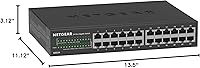
  • Dimensions: The chassis measures 13.5″ in length, 11.12″ in width, and 3.12″ in height, occupying roughly 1U of vertical space in a standard rack.
  • Weight: The unit weighs approximately 2.86 pounds (around 1.3 kg), making it light enough for wall mounting without heavy-duty anchoring.
  • Chassis Material: The outer housing is constructed from metal, which contributes to passive heat dissipation and provides greater long-term durability than plastic-bodied alternatives.
  • Cooling Method: The GS324 uses entirely passive, fanless cooling with no moving parts, resulting in completely silent operation under all normal load conditions.
  • Power Input: The switch accepts a wide-range AC input of 100–240V at 50/60Hz, making it compatible with standard outlets across North America and most international markets.
  • Energy Efficiency: The switch complies with IEEE 802.3az Energy Efficient Ethernet, automatically reducing power consumption on ports that are idle or carrying light traffic.
  • Mounting Options: Three mounting configurations are officially supported: flat desktop placement, wall mounting, and standard 19-inch rackmount installation.
  • Included Hardware: The box ships with a rackmount kit, wall-mount bracket hardware, rubber desktop feet, a power cord, and a printed installation guide.
  • Warranty: NETGEAR provides a 3-year limited hardware warranty, covering manufacturing defects under normal use conditions.
  • Interface Type: All 24 ports use the RJ45 connector standard, compatible with standard Cat5e, Cat6, and Cat6a Ethernet cables.
  • Data Transfer Rate: Each port supports a maximum data transfer rate of 1 Gbps (gigabit per second), consistent with the 1000BASE-T Ethernet standard.
  • Compatibility: The switch works with any Ethernet-enabled device including desktop PCs, laptops, NAS drives, gaming consoles, smart TVs, projectors, and DVD players.
  • Availability Region: This model is designed and certified for use in the United States and Canada only.
  • UPC: The product UPC is 606449151459, which can be used for retail verification or inventory tracking purposes.

Related Reviews
NETGEAR GS316 16-Port Gigabit Network Switch
85%
97%
Ease of Setup
96%
Noise Level
78%
Build Quality
91%
Port Performance
88%
Reliability & Longevity
More
NETGEAR FS728TP 24-Port Fast Ethernet Switch
88%
91%
Value for Money
88%
Performance
93%
Ease of Setup
87%
Build Quality
90%
Power-over-Ethernet (PoE) Support
More
NETGEAR GS608 8-Port Gigabit Ethernet Switch
83%
97%
Ease of Setup
91%
Network Performance
94%
Silent Operation
67%
Build Quality
83%
Value for Money
More
NETGEAR GS308E 8-Port Managed Network Switch
81%
93%
Reliability & Uptime
96%
Silent Operation
67%
Ease of Setup
78%
Web Management Interface
88%
Value for Tier
More
NETGEAR GS108PP 8-Port Gigabit Ethernet PoE+ Switch
88%
95%
Ease of Setup
90%
PoE Performance
88%
Reliability
92%
Noise Level
87%
Build Quality
More
NETGEAR GS316PP 16-Port PoE+ Gigabit Ethernet Switch
85%
92%
Value for Money
89%
Ease of Use
86%
Energy Efficiency
76%
PoE Power Delivery
90%
Quiet Operation
More
NETGEAR GS308EP
NETGEAR GS308EP
81%
88%
PoE+ Performance
91%
Ease of Setup
74%
Build Quality
82%
Network Management Features
93%
Value for Money
More
NETGEAR MS105 5-Port Multi-Gigabit Unmanaged Switch
76%
96%
Plug-and-Play Setup
88%
Multi-Gig Port Performance
91%
Build Quality & Materials
94%
Fanless & Noise Level
67%
Value for Money
More
NETGEAR GS108Tv3 8-Port Gigabit Smart Switch
79%
83%
Ease of Setup
91%
Network Feature Depth
74%
NETGEAR Insight App
67%
Build Quality
96%
Silent Operation
More
NETGEAR GS305E 5-Port Gigabit Managed Switch
76%
93%
Value for Money
84%
Setup & Ease of Use
81%
Build Quality & Durability
88%
Network Performance & Throughput
97%
Silent Operation
More

FAQ

Not at all. Just plug it into your router or existing network and connect your devices — it starts forwarding traffic immediately. There is no app, no browser interface, and no login screen involved. For most people that is the entire appeal.

Yes. The GS324 is brand-agnostic and connects to any router, modem-router combo, or upstream switch that has a standard Ethernet port. It simply extends the number of available wired ports on your existing setup without any compatibility concerns.

Completely silent. There are no fans inside this unit at all, so you will never hear it running. This is one of the most consistent things buyers mention — coming from a fan-cooled switch, the absence of any noise is immediately noticeable.

It does run warm to the touch during extended use, which is normal for passively cooled metal hardware. In an open rack or well-ventilated cabinet that is not an issue, but if your enclosure is sealed or airflow is restricted, it is worth leaving some clearance around the unit or adding a vented panel above it.

No — this is an unmanaged switch, which means there are no traffic management features of any kind. If you need VLANs, QoS, or port-based access controls, you will need to look at a managed switch instead. The GS324 is purely a port expander with no configuration layer.

No, none of the 24 ports supply Power over Ethernet. If you need to power PoE devices like access points, IP cameras, or VoIP handsets, you would need a separate PoE injector or a PoE-capable switch.

It is fully backward compatible. If you plug in an older device that only supports 100Mbps or even 10Mbps, the port will automatically negotiate down to match that speed. Your gigabit devices are unaffected and continue running at full speed.

Any standard Cat5e, Cat6, or Cat6a patch cables will work fine. Cat5e is technically sufficient for gigabit speeds over typical home or office cable runs, though Cat6 is a safe and widely available upgrade if you are running new cables.

Yes, the rackmount brackets are included in the box along with wall-mount hardware and rubber feet for desktop use. You should not need to buy any additional mounting accessories for standard installations.

The switch comes with a 3-year limited hardware warranty, which is notably longer than what many competing unmanaged switches offer. NETGEAR has a dedicated support portal where you can register the product and initiate a replacement claim if needed. Most users report the process is straightforward for genuine hardware failures.

Where to Buy