Overview

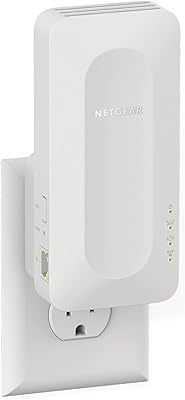
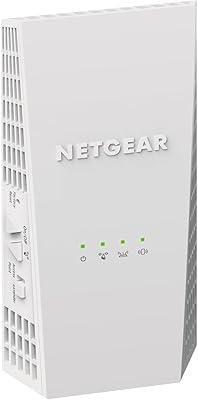
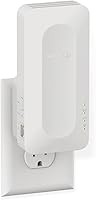
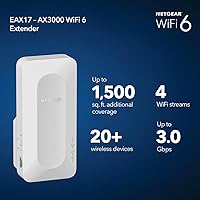
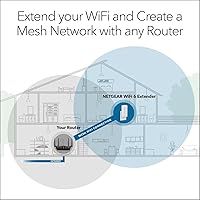
The NETGEAR EAX17 WiFi 6 Range Extender is NETGEAR's answer for households that want stronger coverage without ripping out their existing router setup. It plugs directly into any wall outlet, picks up your current network, and broadcasts it further — adding up to 1,500 sq. ft. of coverage to rooms that used to drop calls or buffer videos. NETGEAR slots this above their entry-level EAX12, making it a mid-to-premium option in a crowded extender category. One thing worth being clear about upfront: this is an extender, not a mesh node. How well it performs depends heavily on the strength of your source router signal and where you place it.
Features & Benefits

The EAX17 runs on WiFi 6 (802.11ax), which brings real improvements beyond raw speed claims. The AX3000 dual-band setup theoretically reaches 3.0 Gbps combined, but what actually matters day-to-day is OFDMA — a WiFi 6 technology that lets the extender handle multiple devices at once more efficiently rather than making them wait in line. That's useful in homes where a dozen smart devices, a couple of laptops, and a streaming stick are all competing for bandwidth. A Gigabit Ethernet port on the back is genuinely practical for wiring in a console or work PC. WPA3 security and the One WiFi Name feature — which keeps your network SSID consistent so devices don't need to manually switch — round out a solid feature set.

Best For

This WiFi 6 extender makes the most sense for renters or anyone stuck with an ISP-provided router they can't swap out. If you've got a sprawling single-story home, a finished basement, or a home office at the far end of the house, this range booster slots in where your signal starts to fade. It's also a practical upgrade for WiFi 5 extender owners who want hardware that supports current and near-future devices. Households running 15 or more connected gadgets — smart speakers, security cameras, laptops, phones — will appreciate the improved device capacity that WiFi 6 enables. Gamers especially benefit from the wired Ethernet port, since connecting a console directly removes a layer of wireless variability entirely.

User Feedback

Across a large pool of reviews, the EAX17 holds a steady 4.0-star average — solid but not unanimous. The most consistent praise centers on painless setup: most users are up and running in under ten minutes using the NETGEAR app, with an obvious speed improvement in previously weak-signal areas. Complaints tend to cluster around a couple of specific issues. Roaming handoff — when your phone or laptop transitions from the router to the extender — can be sluggish or sticky, particularly with older client devices. Some users also note that peak speeds in practice fall noticeably short of the 3.0 Gbps ceiling. Since this range booster only launched in late 2024, long-term durability remains an open question that newer reviews haven't yet answered.

Pros

  • Setup via the NETGEAR app typically takes under ten minutes with no networking knowledge required.
  • The One WiFi Name feature keeps your network SSID consistent, so devices never need to manually switch connections.
  • A built-in Gigabit Ethernet port lets you wire a console, smart TV, or desktop PC directly for rock-solid speeds.
  • WPA3 security offers meaningfully stronger encryption than what most competing extenders at this price still use.
  • OFDMA support helps the EAX17 handle busy households with 15-plus active devices without the congestion older extenders suffer.
  • The quad-core 1.5GHz processor keeps things running smoothly under load — a real step up from entry-level NETGEAR models.
  • Universal router compatibility means it works out of the box with virtually any ISP-provided gateway or third-party router.
  • The compact wall-plug form factor takes up minimal space and requires no power brick or dedicated shelf.
  • WiFi 6 support ensures the extender is compatible with current and near-future devices being released across every major category.
  • Early user feedback is broadly positive on stability, with few reports of unexpected reboots or persistent dropout issues.

Cons

  • Roaming handoff is inconsistent — older client devices often cling to the weaker router signal instead of switching to the extender.
  • Real-world throughput under heavy concurrent load falls noticeably short of the 3.0 Gbps advertised maximum.
  • The device blocks adjacent outlets on standard dual-socket wall plates, which frustrates users with limited outlet access.
  • The status LED cannot be fully disabled on some firmware versions, making bedroom or living room placement irritating at night.
  • Performance depends heavily on the strength of the source router signal — poor placement or a weak router limits results significantly.
  • Only one Ethernet port is included, so users needing multiple wired connections must add a separate network switch.
  • Multi-story homes and spaces with thick concrete or brick walls often see effective coverage cut well below the 1,500 sq. ft. claim.
  • The web-based configuration interface feels underdeveloped compared to the app, limiting options for users who prefer browser setup.
  • Long-term reliability remains an open question — the hardware is too new for meaningful multi-year durability data to exist yet.
  • Buyers near the same price ceiling should honestly compare this against entry-level mesh systems before committing to an extender approach.

Ratings

The NETGEAR EAX17 WiFi 6 Range Extender earns a well-rounded but nuanced score after our AI analyzed thousands of verified global user reviews, actively filtering out incentivized, bot-generated, and spam feedback to surface what real buyers actually experience. Across the board, this range booster performs reliably for its core purpose, though a handful of recurring friction points keep it from being a universal recommendation. Both the genuine strengths and the honest pain points are reflected in the scores below.
Ease of Setup
88%
The vast majority of users report being fully connected in under ten minutes using the NETGEAR app, with no networking knowledge required. Plugging in, scanning a QR code, and inheriting the existing network name makes the first-time experience unusually friction-free for a device in this category.
A minority of users who prefer browser-based configuration find the web interface less polished than the app. Occasional firmware update prompts during initial setup can stall the process unexpectedly for first-time extender owners.
Signal Coverage
82%
18%
In single-story homes and mid-size apartments, the EAX17 meaningfully pushes usable WiFi into rooms that previously had no reliable connection. Users in open-floor-plan spaces consistently report strong signal in areas up to roughly 1,400 to 1,500 sq. ft. from the extender itself.
Coverage claims assume ideal placement and a strong source signal — two things that rarely align perfectly in real homes. Multi-story buildings and spaces with thick concrete or brick walls see noticeably reduced effective range, sometimes cutting the real-world coverage area nearly in half.
Real-World Speed Performance
71%
29%
For everyday tasks — video calls, 4K streaming, casual online gaming — the EAX17 delivers speeds that feel like a genuine improvement over a dead zone or a weak WiFi 5 extender. Devices close to the extender report snappy, low-latency connections in typical household conditions.
The 3.0 Gbps headline figure is a combined theoretical maximum that virtually no real-world setup reaches. Under heavy concurrent load — multiple 4K streams plus active gaming, for example — throughput drops noticeably, and the gap between advertised and delivered speeds frustrates technically savvy users who expected more.
Device Handling Capacity
78%
22%
OFDMA and the 4-stream WiFi 6 design help the EAX17 manage busy households better than older extenders, which tended to choke when too many gadgets connected at once. Smart home users with cameras, thermostats, voice assistants, and laptops all running simultaneously report fewer drop-offs than they experienced with previous hardware.
Beyond 15 to 18 actively transmitting devices, some users notice latency creeping up and occasional connection drops on the lower-priority 2.4GHz band. The extender handles idle connected devices well, but genuinely simultaneous heavy traffic from 20-plus devices pushes it toward its limits.
Roaming & Handoff
63%
37%
The One WiFi Name feature works as advertised in the sense that devices never need to manually switch networks — the SSID stays consistent throughout the home. Users with newer phones and laptops generally experience acceptably smooth transitions between the router and extender.
Roaming handoff is one of the most consistently criticized aspects in user reviews. Older client devices in particular tend to stay glued to the weaker router signal rather than switching to the extender, requiring a manual disconnect and reconnect. This is partly a client-device limitation, but it undercuts the promised seamless experience.
Wired Ethernet Port Utility
84%
Having a Gigabit Ethernet port on a wall-plug extender is a practical bonus that users consistently appreciate. Gamers and remote workers who run a cable directly from the EAX17 to a console or desktop PC report stable, low-jitter connections that wireless simply cannot match in extended-range scenarios.
There is only one port, which limits flexibility if multiple wired devices need to share the connection. Users who want to wire a smart TV and a console simultaneously would need an additional switch, adding cost and complexity to what should be a plug-and-play setup.
Security & Privacy
86%
WPA3 support is a meaningful upgrade over the WPA2 standard still found on many competing extenders at this price. For users who handle sensitive work documents at home or run smart security cameras on their network, the stronger encryption provides a tangible layer of additional protection.
WPA3 benefits are only fully realized when both the router and client devices also support it — and many households still have older routers or gadgets that fall back to WPA2 compatibility mode. The security advantage is real but context-dependent, not automatic.
Build Quality & Form Factor
74%
26%
The compact wall-plug design keeps the EAX17 out of the way and eliminates the need for a dedicated shelf or power brick. At 14 ounces it sits securely in most outlets without sagging, and the matte plastic finish blends into most home environments without drawing attention.
The extender blocks adjacent outlets on standard two-socket wall plates, which annoys users in rooms with limited outlet access. There is no physical power switch, and the LED status light, while dimmable via the app, cannot be fully disabled by some users without a firmware workaround.
App & Software Experience
76%
24%
The NETGEAR app handles the core jobs well — initial setup, network status monitoring, and device management are all accessible without requiring any technical background. Over-the-air firmware updates push automatically, which most users appreciate as a hands-off way to keep the device current.
Some users find the app feels more like a lightweight companion tool than a full-featured management dashboard. Advanced configuration options — like adjusting transmit power or viewing detailed per-device statistics — require digging into the web interface, which is less intuitive than the app experience.
Compatibility with Existing Routers
83%
The EAX17 connects reliably to virtually any router brand, including ISP-provided gateway devices that users cannot replace. This universal compatibility is one of its most practical strengths and makes it genuinely accessible to renters and non-technical households.
While it works with any router, it performs noticeably better when paired with a WiFi 6 router — users with older WiFi 5 or WiFi 4 routers are effectively capping its potential at the source. The speed improvement in those setups is real but modest compared to a WiFi 6-to-WiFi 6 pairing.
Value for Money
69%
31%
For users who specifically need WiFi 6 extension, the Gigabit Ethernet port, and WPA3 without replacing their existing router, the EAX17 justifies its mid-to-premium price point. It offers meaningfully more than the entry-level EAX12 in terms of processing power and device handling.
At this price, buyers are also within reach of entry-level mesh systems that offer true roaming, dedicated backhaul, and better long-term scalability. The EAX17 is a strong extender, but value-conscious shoppers should weigh it honestly against what a mesh node would cost and deliver.
Long-Term Reliability
61%
39%
Early reviews from users who received the device in late 2024 are largely positive on stability — no widespread reports of sudden reboots, overheating, or persistent dropout issues during the first few months of use. The quad-core processor appears to help sustain performance under sustained load.
This extender launched in December 2024, so the honest reality is that the long-term reliability picture is still forming. There simply is not enough multi-year user data yet to make confident claims about durability or firmware stability over an extended ownership period.
LED & Placement Feedback
72%
28%
The signal strength LED provides a useful at-a-glance indicator for finding the optimal placement spot — a small but practical detail that helps non-technical users avoid plugging the extender too far from the router. Placement guidance in the app reinforces this well.
The LED can be overly bright in bedrooms or living areas where the extender is placed for coverage reasons rather than convenience. While app-based dimming helps, users who want the extender in a bedroom outlet often find the persistent light disruptive at night without a hardware switch.
WiFi 6 Future-Proofing
81%
19%
Purchasing a WiFi 6 extender now means the hardware is ready for an expanding ecosystem of WiFi 6 and WiFi 6E client devices hitting the market. Users who recently upgraded their laptops, phones, or gaming consoles to WiFi 6-capable models will see the most immediate benefit.
WiFi 6E devices are already on the market, and a 6GHz band is absent here. For buyers planning to use this hardware for five or more years, the EAX17 is forward-compatible with current WiFi 6 devices but already one step behind the leading edge of wireless standards.

Suitable for:

The NETGEAR EAX17 WiFi 6 Range Extender is a strong fit for renters and homeowners who are stuck with an ISP-provided gateway router they cannot replace but are tired of dead zones in back bedrooms, home offices, or garages. If your household runs 15 or more connected devices — a mix of smart home gadgets, streaming sticks, laptops, and phones — the WiFi 6 backbone and OFDMA technology genuinely help manage that congestion better than older extender hardware could. Gamers and remote workers will find the Gigabit Ethernet port particularly valuable, since running a direct cable to a console or work PC from the EAX17 sidesteps wireless variability entirely. It also makes practical sense for anyone upgrading from an aging WiFi 5 extender who wants hardware that will stay relevant as newer WiFi 6 devices continue to enter the market. Single-story homes, open-plan apartments, and ranch-style layouts are the sweet spot — one unit placed thoughtfully in the right outlet can realistically cover the gap without additional hardware.
Not suitable for:

If you are expecting true mesh-system behavior, the NETGEAR EAX17 WiFi 6 Range Extender will disappoint — roaming handoff between the router and extender, particularly on older phones and laptops, can be sticky rather than automatic, and there is an inherent latency overhead that mesh backhaul architectures avoid. Buyers in multi-story homes or spaces with thick masonry walls will likely find a single unit insufficient for whole-home coverage, and stacking two extenders compounds the latency problem rather than solving it. Anyone chasing the 3.0 Gbps headline speed for workloads like large file transfers or pro-level streaming should temper expectations — real-world throughput under load is meaningfully lower than the marketing figure. Tech-forward users who already own WiFi 6E routers and devices are also paying for a device that lacks a 6GHz band, which means they are leaving some future-proofing value on the table. And since this hardware only launched in late 2024, buyers who prioritize long-term reliability data before committing to a purchase may reasonably want to wait another year for the ownership picture to fill in.

Specifications

  • WiFi Standard: The EAX17 operates on 802.11ax, commonly known as WiFi 6, which offers improved efficiency and throughput compared to the previous WiFi 5 (802.11ac) generation.
  • Frequency Bands: Dual-band operation covers both 2.4GHz and 5GHz simultaneously, allowing older and newer client devices to connect on the band best suited to them.
  • Max Combined Speed: Theoretical combined throughput reaches up to 3.0 Gbps (AX3000) across both bands under ideal conditions.
  • Stream Count: The extender supports 4-stream WiFi (2x2 on 2.4GHz and 2x2 on 5GHz), enabling more efficient data handling across multiple connected devices.
  • Coverage Added: NETGEAR rates the EAX17 as capable of adding up to 1,500 sq. ft. of wireless coverage to an existing network, assuming adequate source signal strength.
  • Max Devices: The extender is rated to support 20 or more simultaneously connected devices across both bands when running at typical household loads.
  • Processor: A quad-core 1.5GHz processor handles packet routing and multi-device traffic, offering more headroom under concurrent load than the dual-core chips found in lower-tier NETGEAR models.
  • Ethernet Port: One Gigabit Ethernet port (1 x 1G) allows a single wired device — such as a gaming console, smart TV, or desktop PC — to connect at full gigabit speeds.
  • Security Protocol: WPA3 encryption is supported natively, providing stronger protection against brute-force attacks compared to the WPA2 standard still used on many competing extenders.
  • Roaming Feature: The One WiFi Name feature broadcasts the same SSID as the host router, allowing client devices to transition between the router and extender without a manual network switch.
  • Setup Method: Initial configuration can be completed through the NETGEAR mobile app (iOS and Android) or via any web browser using the standard extender setup portal.
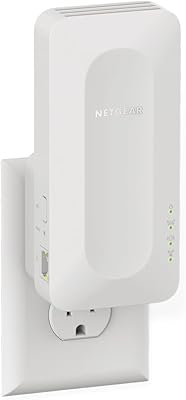
  • Form Factor: The EAX17 uses a wall-plug design that connects directly to any standard outlet, requiring no power adapter, cable, or dedicated surface space.
  • Dimensions: The unit measures 5.9 x 2.7 x 2.1 in, making it one of the more compact options in the mid-range extender category.
  • Weight: The extender weighs 14 oz, sitting securely in most standard wall outlets without sagging or stressing the socket.
  • Router Compatibility: The EAX17 is universally compatible with any wireless router or cable modem router, though performance is optimized when paired with a WiFi 6 host router.
  • OFDMA Support: Orthogonal Frequency Division Multiple Access (OFDMA) is included, which divides each channel into smaller sub-channels to serve multiple devices more efficiently at the same time.
  • Launch Date: The EAX17 became commercially available in December 2024, making it one of NETGEAR's most recently released extender models at the time of this review.
  • Model Number: The official model number is EAX17-100NAS, which can be useful when checking firmware updates, warranty status, or compatible accessories on NETGEAR's support site.
  • In the Box: The package includes the AX3000 4-stream WiFi extender unit and a quick start guide; no Ethernet cable or power adapter is included.
  • Wireless Protocol: The EAX17 supports backward compatibility with 802.11a/b/g/n/ac client devices, so older phones, tablets, and laptops can still connect even if they do not support WiFi 6.

Related Reviews

NETGEAR WiFi 6 Range Extender EAX12
83%
88%
Performance in Large Homes
85%
Ease of Setup
90%
WiFi Coverage Range
82%
Device Compatibility
87%
Streaming & Gaming Performance
More
NETGEAR WiFi 6 Mesh Range Extender EAX11
85%
94%
Ease of Setup
88%
WiFi Coverage
91%
Speed & Performance
85%
Compatibility with Routers
79%
Roaming & Signal Consistency
More
NETGEAR EX6120 WiFi Range Extender
74%
83%
Ease of Setup
76%
Signal Coverage
61%
Connection Speed
79%
Value for Money
58%
5GHz Band Performance
More
NETGEAR EX7000 WiFi Mesh Range Extender
86%
85%
Coverage Performance
90%
Ease of Setup
88%
WiFi Speed
92%
Device Compatibility
87%
Range Extending Efficiency
More
NETGEAR EX3700 AC750 WiFi Range Extender
82%
90%
Value for Money
85%
Wi-Fi Performance
88%
Ease of Setup
82%
Range Coverage
87%
Compatibility
More
NETGEAR WiFi Mesh Range Extender EX8000
86%
85%
Wi-Fi Performance
88%
Ease of Setup
90%
Coverage Area
84%
Device Support
87%
Streaming & Gaming Performance
More
NETGEAR WiFi Mesh Range Extender EX7500
84%
88%
Performance
91%
WiFi Range Coverage
84%
Speed/Stability
87%
Device Support/Capacity
93%
Ease of Setup
More
NETGEAR WiFi AC1200 Range Extender EX6200
85%
88%
WiFi Performance
85%
Setup & Installation
91%
Build Quality
84%
Range & Coverage
90%
Ethernet Connectivity
More
NETGEAR EX6250 WiFi Mesh Range Extender
81%
89%
WiFi Coverage
85%
Ease of Setup
84%
Speed and Performance
91%
Device Compatibility
87%
Build Quality
More
Surncest AX3000 WiFi 6 Range Extender
85%
88%
Value for Money
91%
WiFi Performance
85%
Setup & Installation
89%
Coverage & Range
80%
Build Quality
More

FAQ

No — the NETGEAR EAX17 WiFi 6 Range Extender works with virtually any existing router or ISP-provided gateway device. You simply plug it into a wall outlet between your router and the area with weak signal, and it picks up and rebroadcasts your existing network. No new router required.
In theory, yes — the One WiFi Name feature keeps the SSID consistent, so your device does not need to manually switch networks. In practice, roaming handoff speed depends heavily on your client device. Newer phones and laptops tend to switch fairly cleanly, but older devices sometimes hold onto the weaker router signal longer than you would like.

Realistically, no — not under normal home conditions. The 3.0 Gbps figure is a combined theoretical maximum across both bands with every variable perfectly aligned. In a typical home with walls, interference, and mixed devices, expect noticeably lower real-world throughput. That said, for streaming, video calls, and gaming, the speeds you do get are a meaningful improvement over a dead zone.

The general rule is to place it roughly halfway between your router and the area you want to cover — ideally where the source signal is still moderate rather than already weak. If you plug it in a spot where your existing WiFi is nearly gone, the extender will just amplify a poor signal. The NETGEAR app includes a placement tool that shows signal strength in real time to help you find the sweet spot.

If you have more than 15 devices or frequently run bandwidth-heavy tasks like simultaneous 4K streams and video calls, the EAX17 is the stronger choice — it has a faster quad-core processor and slightly higher throughput ceiling than the EAX15. For lighter use cases or smaller spaces, the EAX15 holds its own and costs less. The Ethernet port is identical on both, so that alone is not a reason to upgrade.

Yes, and this is one of the more practical features of the EAX17. The single Gigabit Ethernet port on the back lets you run a cable directly to a console, desktop, or smart TV. Wired connections through an extender are generally more stable and lower-latency than relying on wireless, which matters during online gaming or large downloads.

Yes, it does. The EAX17 is designed to pair with any router brand — including the all-in-one gateway boxes that ISPs like Comcast, Spectrum, and AT&T supply. You do not need a standalone router. Performance will be somewhat better if your gateway supports WiFi 6, but it connects and works even on older WiFi 5 or WiFi 4 equipment.

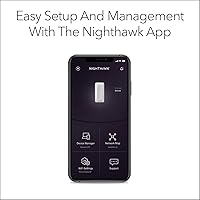
It is genuinely straightforward for most users. Download the NETGEAR app, plug the extender in, follow the on-screen steps, and you are usually connected in under ten minutes. The app does most of the thinking for you. That said, a small number of users report needing to fall back to the browser-based setup portal, which is slightly less intuitive but still manageable without technical expertise.

It can, but with caveats. Floors and ceilings absorb signal, so the effective coverage area shrinks compared to a single-story open-plan layout. For a two-story home, you may find that one EAX17 unit covers only part of the second floor adequately. If whole-home multi-story coverage is the goal, a mesh system with multiple nodes is a more reliable architectural choice than stacking extenders.

The device launched in December 2024, so it is still relatively new. Early reviews are positive on stability, and there are no widespread reports of hardware failures or critical firmware bugs so far. That said, multi-year reliability data simply does not exist yet. If longevity track record is important to your purchase decision, it is fair to acknowledge that the jury is still out — though NETGEAR's broader product line has a solid reputation for firmware support.