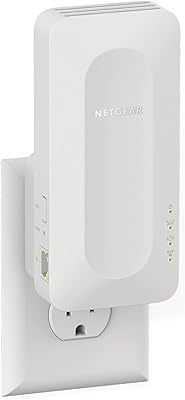
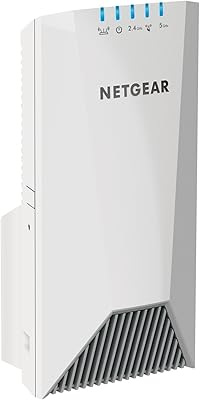
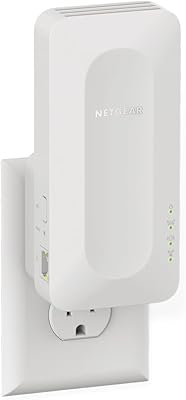
Overview

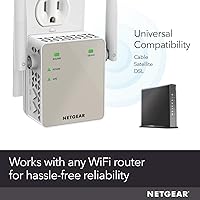
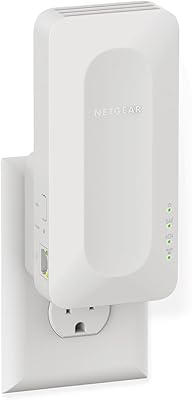
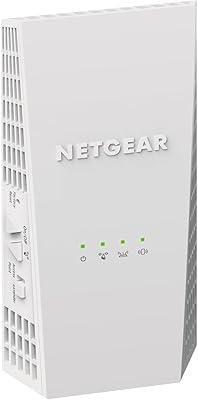
The NETGEAR EX6120 WiFi Range Extender has been around since 2015, and the fact that it still ranks among the top repeaters on Amazon says something real about its staying power. It plugs directly into any wall outlet, so there's no desk space sacrificed and no extra power brick to deal with. It works with any router brand, which removes the headache of compatibility concerns most buyers dread. Positioned squarely in the mid-range tier, this WiFi booster targets apartments and smaller homes where one or two dead zones are the problem — not a whole building's worth of coverage gaps.
Features & Benefits

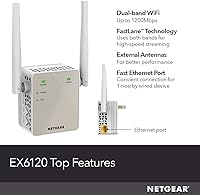
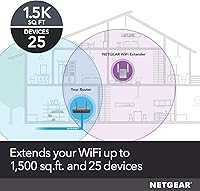
The EX6120 runs on dual-band AC1200 technology, splitting performance across 2.4GHz and 5GHz bands. What sets it apart slightly is NETGEAR's FastLane feature, which can dedicate both bands to a single device for a stronger connection when you need it most. It handles up to 25 devices simultaneously and covers roughly 1,500 sq. ft. — workable for a single-floor apartment or a mid-sized home. There's also a 10/100M Ethernet port for wiring in a smart TV or console directly. Setup runs through a web browser or the Nighthawk app, and WPA2 security keeps your extended network protected.

Best For

This range extender makes the most sense for renters or homeowners dealing with specific dead zones — a back bedroom, a detached garage, or a basement that never seems to get a signal. It's a natural fit for anyone who wants to stream HD video on a secondary screen without running cables through walls. Smart home users pushing WiFi to IP cameras or smart speakers in low-coverage corners will find it practical too. If you want a plug-in fix from a name you can trust without committing to a full mesh system, the EX6120 hits that practical middle ground reasonably well.

User Feedback

Across more than 119,000 ratings, the EX6120 holds a 3.8-star average — which, at that volume, reflects a genuinely mixed but mostly positive experience. Easy setup and quick signal improvement in dead zones are the most consistent praise points. The honest caveat, though, is speed: like all single-unit repeaters, it shares bandwidth between your router and connected devices, so real-world throughput will be noticeably lower than the theoretical maximum. Some users report the 5GHz band weakening over longer distances or through thick walls. A smaller group ran into WPS pairing hiccups. Long-term reliability, however, holds up well for most buyers.

Pros

  • Works with any router brand — no ecosystem lock-in or compatibility headaches.
  • Wall-plug form factor means zero desk clutter and no extra power cables to manage.
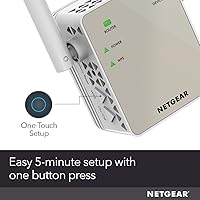
  • Most buyers report setup taking under ten minutes using the browser interface or app.
  • The single Ethernet port lets you hardwire a nearby smart TV or streaming device directly.
  • Dual-band AC1200 handles light browsing, HD streaming, and smart home devices comfortably.
  • Units from years ago are still running reliably, suggesting solid long-term build quality.
  • FastLane technology can channel both bands toward a single high-demand device when needed.
  • Over 119,000 verified ratings give you a deep, trustworthy signal on real-world performance.
  • Compact size means it rarely blocks the second outlet on a standard wall socket.

Cons

  • Bandwidth is split between the router and connected devices, so speeds are noticeably reduced.
  • 5GHz performance degrades quickly through walls or over distances greater than one room.
  • The Ethernet port is capped at 100Mbps, bottlenecking anyone with a fast internet plan.
  • Some users experience WPS pairing failures, especially with newer dual-band router setups.
  • The Nighthawk app has drawn consistent criticism for instability during the setup process.
  • No WPA3 support leaves a security gap compared to current-generation extenders.
  • Periodic reboots are needed on some units to maintain a stable, consistent connection.
  • AC1200 hardware is aging — newer extenders at similar prices now offer Wi-Fi 6 performance.
  • Heavy simultaneous usage across multiple devices can expose the 25-device limit quickly.

Ratings

The NETGEAR EX6120 WiFi Range Extender has been scored by our AI system after processing thousands of verified global buyer reviews, with spam, bot activity, and incentivized feedback actively filtered out. The scores below reflect real ownership experiences — covering everything from first-time setup to months of daily use — and do not shy away from the trade-offs that matter most to buyers. Both the genuine strengths and the recurring frustrations are represented transparently in each category.
Ease of Setup
83%
A large share of buyers report getting up and running in under ten minutes using either the web browser interface or the Nighthawk app. The WPS button option is particularly appreciated by less tech-savvy users who just want to plug in and connect without navigating menus.
A notable subset of reviewers — particularly those with dual-band routers or newer mesh systems — ran into WPS pairing failures and had to resort to manual configuration. Customer support experiences during these hiccups were inconsistent according to several long-form reviews.
Signal Coverage
76%
24%
For single-floor apartments and smaller homes, the real-world coverage improvement is tangible and immediate. Users placing this WiFi booster midway between their router and a dead-zone bedroom or home office consistently reported usable signal where there was almost none before.
The claimed 1,500 sq. ft. coverage is optimistic in practice, especially in homes with thick concrete or brick walls. The 5GHz band in particular drops off noticeably at longer distances, leaving some users in larger spaces underwhelmed with the actual reach.
Connection Speed
61%
39%
For light browsing, smart home device communication, and standard-definition streaming, the speed delivered by this range extender is more than adequate. Users running IP cameras or smart speakers in extended zones rarely complained about speed for those specific use cases.
As a single-unit repeater, the EX6120 must split its bandwidth between receiving the signal from the router and rebroadcasting it — meaning real-world speeds are often half or less of what your main router delivers. Buyers expecting near-router performance for 4K streaming or video calls are frequently disappointed.
Value for Money
79%
21%
For a name-brand extender from NETGEAR, the pricing sits at a point where buyers feel they are getting reliable hardware without paying a premium for features they do not need. Long-term durability — with many units reported still functioning after three or more years — strengthens the value case considerably.
At its price point, buyers can find Wi-Fi 6 extenders or entry-level mesh nodes that outperform this unit meaningfully. Those who did not research alternatives before purchasing sometimes felt they had paid mid-range money for hardware that was already aging at the time of their purchase.
5GHz Band Performance
58%
42%
When placed in close to moderate proximity to the source router, the 5GHz band delivers noticeably faster throughput than the 2.4GHz band, making it a better option for streaming or gaming in adjacent rooms. FastLane technology helps channel both bands toward a single high-demand device when needed.
Distance and physical obstructions hit the 5GHz band hard. Multiple reviewers noted that moving even one room further than expected caused the 5GHz connection to become unstable or drop entirely, forcing their devices back onto the slower 2.4GHz band without much warning.
Build Quality & Design
81%
19%
The compact wall-plug form factor is genuinely practical — it sits flush against the outlet, does not block adjacent sockets in most configurations, and draws no attention to itself in a living space. At just 4.6 ounces, it feels solid and well-constructed for its size category.
The unit can run warm during extended use, which a handful of users flagged as a minor concern in enclosed outlet areas. There is no physical on/off switch, so power cycling requires physically unplugging the device — a small but recurring annoyance mentioned in longer-term reviews.
Router Compatibility
88%
Universal compatibility is one of the EX6120's most consistently praised traits. Buyers with routers from ISP-provided hardware, TP-Link, ASUS, Linksys, and others all reported straightforward pairing without firmware conflicts or proprietary restrictions getting in the way.
While broad compatibility is largely delivered, a small number of users with very new Wi-Fi 6 or tri-band routers noted that the extender struggled to maintain a stable backhaul connection, which is expected given the hardware generation gap but worth flagging for buyers upgrading their home network.
2.4GHz Band Reliability
77%
23%
The 2.4GHz band proves dependable for the use cases it handles best — smart home devices, IoT sensors, and light browsing across a wide area. Its stronger wall penetration compared to 5GHz makes it the more consistent performer in homes with multiple rooms or floors.
Bandwidth on the 2.4GHz band is inherently limited, and in homes with many neighboring networks competing on the same frequencies, users occasionally experienced sluggishness and dropped connections that were difficult to troubleshoot without technical knowledge.
Long-Term Reliability
82%
18%
An impressive number of buyers specifically mention that their unit has been running continuously for two, three, or even four years without failure. For a wall-plug device that stays powered around the clock, this durability track record stands out positively in the review pool.
A portion of users report that the device needs periodic reboots — sometimes weekly — to maintain a stable connection. Over time, a smaller group noted gradual performance degradation that required a factory reset to resolve, suggesting firmware or memory-related issues on some units.
Wired Ethernet Port
74%
26%
The single 10/100M Ethernet port is a practical bonus for users wanting to hardwire a nearby smart TV, streaming stick, or older gaming console into the extended network. It removes the need for a separate switch or powerline adapter in many common setups.
The port is capped at 100Mbps, which becomes a real bottleneck for anyone with an internet plan faster than that tier. Users with gigabit service or high-speed gaming needs will find the wired connection underwhelming compared to what modern extenders and mesh nodes offer.
App & Interface Experience
69%
31%
The Nighthawk app simplifies initial setup considerably, and the web-based dashboard gives intermediate users enough control to assign bands and check connected devices without needing to dig into advanced settings. For the majority of buyers, it is functional and straightforward.
The app experience has drawn criticism for being clunky and occasionally failing to detect the extender during setup, forcing users back to the browser-based interface. Several reviews mention the app has not kept pace with the hardware in terms of stability or feature depth.
FastLane Technology
66%
34%
FastLane is a genuine differentiator from basic extenders — it allows a single connected device to leverage both bands simultaneously for improved throughput, which is particularly useful for a desktop or streaming device positioned near the extender.
The benefit is narrow in practice: it applies to one device at a time and is most noticeable only in specific placement and signal conditions. Most buyers with multiple devices sharing the extender never experienced a meaningful improvement from FastLane versus standard single-band repeating.
Security Features
72%
28%
Support for WPA2 encryption means the extended network operates with the same security standard as most home routers, reassuring buyers who are cautious about adding network devices in a household with sensitive data or connected cameras.
The EX6120 does not support WPA3, which is increasingly standard on newer hardware. For security-conscious buyers or those in high-density housing with many neighboring networks, the absence of the newer protocol is a minor but real gap compared to current-generation alternatives.
Device Capacity
71%
29%
Handling up to 25 simultaneous connections covers the realistic needs of most households, including a mix of phones, tablets, laptops, smart speakers, and basic IoT devices. Buyers with moderate smart home setups rarely reported congestion issues under normal conditions.
In households with heavy simultaneous usage — multiple 4K streams, active video calls, and several background-syncing devices at once — the device count ceiling starts to feel tight. Performance degradation under high concurrency was a recurring observation from power users and larger families.

Suitable for:

The NETGEAR EX6120 WiFi Range Extender is a practical pick for renters and homeowners who have one or two specific dead zones to address — a back bedroom that never gets signal, a basement home gym, or a detached garage where a smart speaker or security camera keeps dropping offline. It works with virtually any router brand, so there is no need to worry about compatibility if you have an older ISP-provided gateway or a mid-range router from a different manufacturer. For households primarily using WiFi for HD streaming on a secondary TV, casual video calls, and smart home devices like cameras, door locks, or voice assistants, the EX6120 delivers reliable enough performance to cover those needs without a complex setup. It is also a strong fit for anyone who simply wants a plug-in solution they can install in minutes without running cables through walls or reconfiguring their whole network. If your internet plan tops out around 25–50Mbps and your pain point is purely about signal reach rather than raw speed, this WiFi booster is well-matched to your situation.

Not suitable for:

The NETGEAR EX6120 WiFi Range Extender is not the right tool for buyers who need to push fast, consistent speeds across a large multi-floor home or a space with thick concrete walls and multiple signal-blocking obstacles. Like all single-unit repeaters, it splits bandwidth between receiving the router signal and rebroadcasting it — meaning real-world throughput to connected devices is typically cut by half or more, which becomes a real problem for 4K streaming, competitive online gaming, or large file transfers. Households with gigabit internet plans will find the 100Mbps wired Ethernet port a hard ceiling that wastes the connection speed they are paying for. Buyers who are already running a Wi-Fi 6 router and want a matching network upgrade will be better served by a Wi-Fi 6 extender or an entry-level mesh system that maintains a dedicated backhaul channel. If your home consistently needs coverage beyond 1,500 sq. ft., or if you have five or more people simultaneously streaming and video-calling, this range extender will likely leave you frustrated rather than satisfied.

Specifications

  • Brand: Manufactured by NETGEAR, a well-established networking hardware company with a long track record in consumer and business WiFi equipment.
  • Model Number: The exact model identifier is EX6120-100NAS, used for warranty registration, firmware downloads, and support inquiries.
  • WiFi Standard: Operates on 802.11ac (Wi-Fi 5), providing broad compatibility with modern routers and client devices released over the past decade.
  • Frequency Bands: Dual-band design transmits simultaneously on both 2.4GHz and 5GHz frequencies to balance range and speed across connected devices.
  • Max Theoretical Speed: Combined theoretical throughput reaches up to 1200Mbps, though real-world speeds will be lower due to repeater bandwidth sharing.
  • Coverage Area: Rated to extend WiFi coverage by up to 1,500 sq. ft. under ideal open-space conditions with minimal physical obstructions.
  • Connected Devices: Supports up to 25 simultaneously connected devices, including smartphones, tablets, laptops, smart home gadgets, and IoT sensors.
  • Ethernet Port: Includes one 10/100M Fast Ethernet port for hardwiring a nearby device such as a smart TV, console, or desktop computer.
  • Security Protocols: Supports WEP, WPA, and WPA2 wireless security standards to encrypt the extended network and protect connected devices.
  • Special Technology: NETGEAR's patented FastLane technology can dedicate both the 2.4GHz and 5GHz bands simultaneously to a single device for improved throughput.
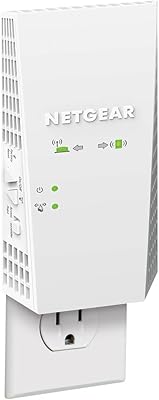
  • Form Factor: Compact wall-plug design plugs directly into a standard electrical outlet without requiring a separate power adapter or dedicated surface space.
  • Dimensions: Physical footprint measures 2.64 x 1.54 x 2.17 inches, keeping the unit discreet and unlikely to obstruct adjacent outlets in most configurations.
  • Weight: The unit weighs 4.6 ounces, making it light enough that it stays firmly seated in standard outlets without sagging or loosening over time.
  • Router Compatibility: Universally compatible with any wireless router, gateway, or cable modem that broadcasts a WiFi signal, regardless of brand or ISP hardware.
  • Setup Method: Initial configuration is supported via the NETGEAR Nighthawk mobile app or through a standard web browser interface at mywifiext.net.
  • Power Source: Draws power directly from a standard AC wall outlet with no external power brick or cable required for operation.
  • First Available: The EX6120 was first made available for purchase in September 2015 and has remained in active production and retail distribution since then.
  • Manufacturer: Designed and distributed by Netgear Inc., headquartered in San Jose, California, with global customer support and firmware update infrastructure.

Related Reviews
NETGEAR EX3700 AC750 WiFi Range Extender
82%
90%
Value for Money
85%
Wi-Fi Performance
88%
Ease of Setup
82%
Range Coverage
87%
Compatibility
More
NETGEAR WiFi Mesh Range Extender EX7500
84%
88%
Performance
91%
WiFi Range Coverage
84%
Speed/Stability
87%
Device Support/Capacity
93%
Ease of Setup
More
NETGEAR EX7000 WiFi Mesh Range Extender
86%
85%
Coverage Performance
90%
Ease of Setup
88%
WiFi Speed
92%
Device Compatibility
87%
Range Extending Efficiency
More
NETGEAR EAX17 WiFi 6 Range Extender
76%
88%
Ease of Setup
82%
Signal Coverage
71%
Real-World Speed Performance
78%
Device Handling Capacity
63%
Roaming & Handoff
More
Netgear EX6400 WiFi Mesh Range Extender
73%
83%
Signal Coverage
61%
Throughput & Speed Performance
88%
Setup & Installation
58%
Smart Roaming Performance
86%
Wired Ethernet Connectivity
More
NETGEAR WiFi AC1200 Range Extender EX6200
85%
88%
WiFi Performance
85%
Setup & Installation
91%
Build Quality
84%
Range & Coverage
90%
Ethernet Connectivity
More
NETGEAR WiFi Mesh Range Extender EX8000
86%
85%
Wi-Fi Performance
88%
Ease of Setup
90%
Coverage Area
84%
Device Support
87%
Streaming & Gaming Performance
More
NETGEAR WiFi 6 Range Extender EAX12
83%
88%
Performance in Large Homes
85%
Ease of Setup
90%
WiFi Coverage Range
82%
Device Compatibility
87%
Streaming & Gaming Performance
More
NETGEAR EX6250 WiFi Mesh Range Extender
81%
89%
WiFi Coverage
85%
Ease of Setup
84%
Speed and Performance
91%
Device Compatibility
87%
Build Quality
More
NETGEAR WiFi 6 Mesh Range Extender EAX11
85%
94%
Ease of Setup
88%
WiFi Coverage
91%
Speed & Performance
85%
Compatibility with Routers
79%
Roaming & Signal Consistency
More

FAQ

Yes, the EX6120 is universally compatible and works with any WiFi router, gateway, or cable modem regardless of brand — including ISP-provided hardware from companies like Xfinity, AT&T, or Spectrum. You do not need a NETGEAR router to use it.

Not automatically, at least not in a smart way. The EX6120 creates a separate extended network with its own name, so your devices will connect to whichever network they were last paired with. To get the best signal in a dead-zone area, you may need to manually select the extender network on your device.

This is worth being upfront about: as a single-unit repeater, the EX6120 has to use part of its bandwidth to communicate with your router while simultaneously serving connected devices. In practice, you can expect real-world speeds to be roughly half of what your router delivers at the same location. It is more than enough for HD streaming and smart home devices, but demanding tasks like large uploads or 4K multi-stream households will feel the difference.

Yes, there is one 10/100M Ethernet port on the unit. You can run a cable directly from the extender into a nearby TV, console, or desktop. Just keep in mind the port maxes out at 100Mbps, so if your internet plan is faster than that, the wired connection will be the limiting factor.

The sweet spot is roughly halfway between your router and the dead zone you are trying to fix — close enough to your router that it picks up a strong signal, but far enough to actually extend coverage into the problem area. Avoid placing it behind large appliances, inside cabinets, or near microwave ovens, as all of these can interfere with the WiFi signal.

Technically it can connect to a mesh node the same way it connects to any router, but pairing a traditional repeater with a mesh system is generally not recommended. Mesh systems are designed to handle roaming and coverage on their own, and adding a separate extender can sometimes cause connectivity conflicts or inconsistent behavior. If you already have a mesh system, you are better off adding another mesh node from the same brand.

Setup is straightforward for most users. You can either press the WPS button on both the extender and your router for an automatic connection, or follow the guided steps at mywifiext.net through any browser. The Nighthawk app also walks you through it. The process typically takes under ten minutes, though users with dual-band routers occasionally need to configure each band separately.

It can help, but with some caveats. The 2.4GHz band handles floors and walls better than 5GHz, so you may get usable coverage on a second floor if placed near a stairwell or central area. However, the 5GHz band loses strength quickly through ceilings and structural walls, so do not count on strong 5GHz performance across multiple floors without ideal placement.

For most users, it runs in the background without much attention. That said, some owners mention needing to reboot the unit every few weeks if performance starts to dip — a quick unplug and replug resolves it. Checking NETGEAR's site occasionally for firmware updates is also a good habit, as updates can improve stability and patch security vulnerabilities over time.

You can, but the results are unpredictable. Each additional repeater in a chain introduces more bandwidth loss, and the two units would need to be on separate networks with different names, requiring manual switching as you move around. For larger homes needing seamless, whole-home coverage, a mesh WiFi system is a much more effective and reliable investment than daisy-chaining multiple extenders.