Overview

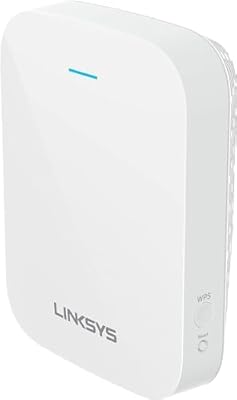
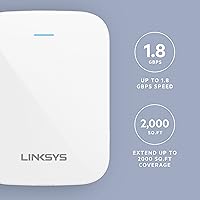
The Linksys RE7310 WiFi 6 Range Extender sits in a practical middle ground for anyone tired of dead zones without wanting to overhaul their entire home network. It promises coverage up to 2,000 square feet, which works reasonably well in a mid-sized single-story home but can fall short in multi-story layouts with thick walls. The AX1800 dual-band spec means it handles more devices at once than older WiFi 5 extenders — a real difference when phones, TVs, and smart home gadgets all compete for bandwidth. One thing worth stating upfront: this is an extender, not a mesh node. Roaming between it and your router is not automatic the way it would be in a dedicated mesh system.
Features & Benefits

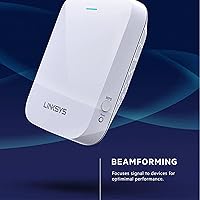
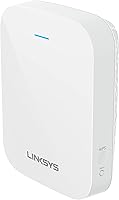
WiFi 6 is the main selling point here, and it earns its keep in busy households. The RE7310 runs both the 2.4 GHz and 5 GHz bands simultaneously, so older smart home gadgets stay on the slower band while laptops and streaming devices grab the faster one. Beamforming technology directs the signal toward specific devices rather than scattering it in every direction, which helps noticeably at distance. MU-MIMO lets several people browse or stream at once without pulling bandwidth from each other. Setup is refreshingly simple — press the WPS buttons on both devices and you are online within a minute. For those with a spare Ethernet cable, access point mode turns this WiFi 6 extender into a proper full access point, delivering a cleaner connection than wireless repeating alone.

Best For

This WiFi 6 extender is a solid match for homeowners dealing with one weak-signal room or floor — the kind of situation where your router almost reaches but not quite. It also suits households where smart home devices keep multiplying; the extra bandwidth headroom means your thermostat, doorbell camera, and voice assistants are not fighting your laptop for airtime. If you already have a WiFi 6 router at the center of your network, extending that standard throughout makes more sense than dropping back to WiFi 5. Renters who cannot run cables through walls will appreciate the plug-in form factor. And if you are coming from an aging WiFi 5 extender, the improvement in handling multiple simultaneous connections will feel tangible day to day.

User Feedback

With a 3.7-star average across roughly 270 ratings, the RE7310 earns its praise and its criticism in about equal measure. Buyers consistently highlight easy WPS pairing and a genuine signal improvement in spots their router could barely reach. The negatives cluster around two recurring issues: the handoff between the extender and the router is not smooth for devices moving room to room, and real-world coverage can fall well short of the stated claim once walls and floors enter the picture. A few users also reported friction pairing it with third-party routers despite the broad compatibility promise. The 18-month warranty earns mentions as a mild reassurance, though several reviewers noted they would prefer consistent long-term reliability over extended coverage on paper.

Pros

  • WiFi 6 support handles a house full of devices more gracefully than older extender hardware
  • Push-button WPS setup takes under a minute and requires no app or technical knowledge
  • Dual-band operation keeps older smart home gadgets from slowing down faster devices
  • Beamforming directs the signal toward your device rather than wasting it in empty directions
  • Access point mode turns the RE7310 into a proper wired access point, not just a wireless repeater
  • Compact, foldable plug-in design takes up no shelf or desk space
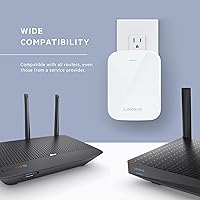
  • Works with routers from any brand or internet service provider without changing router settings
  • The 18-month warranty offers slightly more coverage than the typical one-year standard
  • MU-MIMO lets several household members stream or browse simultaneously without noticeable slowdowns
  • A meaningful upgrade over WiFi 5 extenders for homes already running a modern router

Cons

  • Device handoff between the extender and router is not automatic, causing sticky connection issues when moving rooms
  • Real-world coverage can fall well below the stated 2,000 sq. ft. claim in homes with multiple walls or floors
  • Some users have experienced pairing difficulties with third-party and ISP-provided routers despite broad compatibility claims
  • A 3.7-star average across hundreds of ratings points to a notably inconsistent ownership experience
  • No dedicated mobile app for monitoring or adjusting settings limits control for advanced users
  • Running as a wireless repeater introduces latency and speed loss compared to a wired access point setup
  • Does not support seamless band steering, so devices may not automatically connect to the optimal frequency
  • Longevity concerns have surfaced in user feedback, with some units showing reliability issues after extended use
  • Buyers in large or multi-story homes may find they need a second unit, which quickly changes the value equation
  • Not a substitute for a proper mesh system if smooth whole-home roaming is a priority

Ratings

The scores below for the Linksys RE7310 WiFi 6 Range Extender were generated by our AI system after analyzing verified global user reviews, with spam, bot submissions, and incentivized feedback actively filtered out before any scoring was applied. The result is an honest, weighted picture of how real buyers experience this range booster across setup, daily performance, and long-term reliability. Both what works well and what frustrates owners are transparently reflected in every category.
Ease of Setup
83%
The Push-Button WPS pairing is genuinely fast — most users report being up and running in under two minutes without touching any settings pages. Non-technical buyers in particular praised not needing an app or a browser interface to get started, which removed a barrier that puts many people off networking hardware.
A meaningful portion of users with third-party or ISP-supplied routers ran into WPS handshake failures and had to fall back on manual web configuration, which is less intuitive. The lack of a guided mobile app means troubleshooting when things go wrong is harder than it should be at this price point.
Signal Coverage
61%
39%
In open-plan single-story homes, the RE7310 does a solid job of pushing usable WiFi into rooms that were previously marginal — users in average-sized houses reported consistent improvements in the bedroom or home office farthest from the router. For its intended use case of bridging one clear coverage gap, it delivers a real improvement.
The 2,000 sq. ft. claim has drawn consistent skepticism from buyers in multi-story homes or spaces with brick, concrete, or dense drywall construction. Real-world effective coverage frequently falls 30 to 40 percent below the advertised figure, and buyers hoping to cover an entire large home with a single unit are often disappointed.
Speed Performance
67%
33%
Connecting devices via this range booster in areas where the router signal was previously weak produces a noticeable speed uplift for everyday tasks like video streaming and video calls. The AX1800 dual-band capability means the 5 GHz band can handle bandwidth-hungry devices while smart home gadgets sit on 2.4 GHz without competing for the same resources.
In wireless repeater mode, the unit uses part of its bandwidth to maintain its uplink to the router, which cuts effective throughput noticeably compared to a direct router connection. Buyers expecting near-router speeds at range will find the real-world numbers disappointing, especially in homes where the extender itself is picking up a mediocre signal to begin with.
Device Handoff & Roaming
38%
62%
Users who keep their devices stationary — a smart TV in the back room, a desktop in a far office, or a security camera in the garage — experience stable, uninterrupted connections without any roaming issues. For these fixed-use scenarios, the lack of seamless handoff simply does not matter.
This is the single most complained-about aspect across user reviews. Phones and laptops tend to stick to the weaker router signal rather than switching to the extender, or they latch onto the extender and refuse to switch back when you walk closer to the router. Without mesh-style band steering, roaming behavior is entirely controlled by the client device and is often frustrating in practice.
Multi-Device Handling
74%
26%
MU-MIMO and WiFi 6 together make a genuine difference in households where five or more devices are connected simultaneously. Users with smart home setups — multiple cameras, voice assistants, thermostats, and phones all active at once — noted less congestion and fewer buffering incidents compared to their older extenders.
Under heavier loads with many high-throughput devices competing at once, some users noticed performance degradation that suggests the extender is approaching its practical limits. The improvement over WiFi 5 hardware is real but not dramatic enough to satisfy power users running bandwidth-intensive workloads across many devices.
Build Quality & Design
71%
29%
The compact foldable form factor is genuinely practical — it plugs flush into a wall outlet and does not obstruct the socket below it in most standard outlet configurations. The physical build feels solid for a plug-in device, and the folding prongs make it easy to pack and move without worrying about breakage.
A few users noted the unit runs warm during extended use, which raised some concerns about long-term component reliability. The overall plastic construction does not feel premium relative to the price, and there are no external antennas to adjust for directional signal optimization.
Access Point Mode
79%
21%
Users who ran an Ethernet cable from their router to the RE7310 and switched to access point mode reported noticeably better and more consistent performance compared to wireless repeater mode. For anyone who can manage the cable run, this mode effectively turns the unit into a proper secondary WiFi 6 access point at a reasonable cost.
The mode switch requires manually changing a physical or software setting, and documentation on how to do this properly is sparse in the box. Some users were not aware access point mode existed at all, which means a useful feature is going underused simply because it is not prominently communicated during setup.
Compatibility
69%
31%
The vast majority of users with standard home routers — including popular brands like ASUS, TP-Link, Netgear, and Eero — reported no compatibility issues and connected without any special configuration. The universal router support claim holds up for most common hardware combinations.
A recurring thread in negative reviews involves users with specific ISP-issued combination modem-router units experiencing repeated WPS failures or unstable connections after pairing. The compatibility is broad but not truly universal, and there is no easy diagnostic path when something does not connect as expected.
Value for Money
63%
37%
As an entry point into WiFi 6 extension without buying a full mesh system, the RE7310 offers a reasonable feature set for its price tier. The 18-month warranty adds modest extra reassurance compared to most competitors that ship with a standard one-year coverage window.
Given the real-world coverage limitations and the lack of seamless roaming, buyers who later discover those gaps often feel the money would have been better directed toward a budget mesh system node. The value proposition weakens significantly for anyone with a home larger than a typical apartment or small house.
Long-Term Reliability
57%
43%
Many buyers use the unit for months without issue, and the 18-month warranty gives at least some confidence that Linksys stands behind the hardware. Users who placed the extender in a cool, well-ventilated location generally reported stable operation over extended periods.
A meaningful cluster of reviews mentions units becoming unstable, disconnecting frequently, or failing entirely after six to twelve months of continuous use. Thermal concerns — the device running consistently warm during normal operation — appear repeatedly in feedback from owners who experienced reliability problems.
Wireless Repeater Performance
62%
38%
For the most common use case of wirelessly extending coverage to a single dead zone, the RE7310 does the job adequately. Users who placed it in the right spot — where the router signal is still decent but starting to thin out — saw consistent improvements in the target room.
The inherent bandwidth overhead of wireless repeating means this mode will always deliver less than half the router's available throughput to extended devices. Users who expected near-full speeds at the far end of the extender's range were frequently disappointed by real-world throughput figures.
Indicator Lights & Placement Guidance
55%
45%
The LED signal indicator gives a basic sense of whether the extender is well-positioned relative to the router, which is more helpful than no feedback at all during the placement process. First-time extender users found it useful for rough positioning.
The placement feedback is blunt and imprecise — users cannot tell whether they are at 60 percent signal strength or 80 percent from the indicator alone. More granular placement guidance during setup, ideally through a browser interface or app, would help buyers extract more performance from the hardware.
Documentation & Support
52%
48%
Basic setup documentation is included in the box and covers the standard WPS pairing process clearly enough for most users to get started without going online. Linksys also maintains a support website with firmware update instructions for users who seek them out.
Beyond the simple setup steps, in-box documentation is thin. Troubleshooting guidance for non-standard router pairings, access point mode configuration, and firmware updates is not well-documented for typical buyers, and customer support response times have drawn complaints in user reviews.

Suitable for:

The Linksys RE7310 WiFi 6 Range Extender is a practical choice for homeowners who have a capable modern router but one or two rooms that simply do not get a usable signal. It works especially well in single-story homes or smaller two-story layouts where the coverage gap is real but not enormous. Households with a growing number of connected devices — smart speakers, security cameras, thermostats, and multiple phones all running at once — will appreciate the extra bandwidth capacity that WiFi 6 brings compared to older extender standards. Renters or anyone who cannot run a cable through walls will find the plug-in design genuinely convenient, and the access point mode gives technically inclined users the option to wire it in for a stronger, cleaner connection. If you are already running a WiFi 6 router and want that standard to actually reach your home office or back bedroom, this range booster closes that gap without requiring a full network overhaul.

Not suitable for:

Buyers expecting the frictionless roaming experience of a true mesh system should look elsewhere — the Linksys RE7310 WiFi 6 Range Extender does not handle device handoffs automatically, meaning your phone or laptop may cling to the weaker signal as you move through your home. Anyone dealing with a very large property, a multi-story house with thick concrete or brick walls, or a layout with multiple dead zones will likely find the real-world coverage falls noticeably short of the advertised figure. Power users who need rock-solid, low-latency connections for competitive gaming or video production work should consider a dedicated access point or a mesh node instead, where network management is more robust. If your current router is also aging or underpowered, extending its signal will not fix the underlying bottleneck — the extender can only work with what the router gives it. Finally, anyone who values a plug-and-forget experience with third-party routers should be aware that setup compatibility, while broadly supported on paper, has caused friction for a meaningful portion of real buyers.
Specifications

  • WiFi Standard: This range booster uses the 802.11ax standard, commonly known as WiFi 6, which delivers better throughput and handles more simultaneous device connections than the previous WiFi 5 generation.
  • Max Speed: Combined dual-band throughput is rated at up to 1,800 Mbps (AX1800), split across the 2.4 GHz and 5 GHz bands.
  • Frequency Bands: Operates on both 2.4 GHz and 5 GHz simultaneously, allowing older and newer devices to connect on the band best suited to their capabilities.
  • Coverage Area: Linksys rates the RE7310 for coverage up to 2,000 sq. ft., though real-world results in multi-story homes or spaces with dense walls will typically be lower.
  • Operating Modes: Supports two distinct modes: Range Extender, which wirelessly rebroadcasts an existing network, and Access Point, which creates a new WiFi 6 network via a wired Ethernet connection.
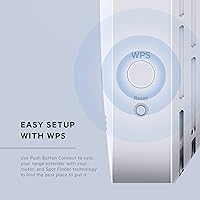
  • Setup Method: Primary setup uses Push-Button WPS, requiring only a button press on both the extender and the router to establish a connection with no app required.
  • Beamforming: Beamforming technology focuses the wireless signal toward connected client devices rather than radiating it evenly in all directions, improving effective range and stability.
  • MU-MIMO: Multi-User, Multiple Input, Multiple Output (MU-MIMO) support allows the extender to communicate with several devices at the same time instead of sequentially.
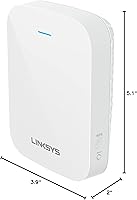
  • Dimensions: The unit measures 5.1 x 3.9 x 2 inches, making it compact enough to plug directly into a standard wall outlet without obstructing adjacent sockets.
  • Weight: The RE7310 weighs 10.7 ounces, which is typical for a plug-in extender of this class.
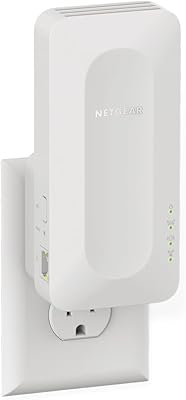
  • Form Factor: Features a foldable plug-in design that allows the unit to be folded flat for transport or angled to optimize signal direction once installed.
  • Compatibility: Compatible with routers from any manufacturer, including devices supplied by internet service providers, with no requirement to modify existing router settings.
  • Ethernet Port: Includes at least one Ethernet port to support wired device connections and to enable Access Point mode when connected directly to a router or switch.
  • Brand: Manufactured and sold by Linksys, a networking hardware brand with a long history in consumer and small-business WiFi equipment.
  • Model Number: The official model designation is RE7310, which identifies this specific variant within the Linksys range extender lineup.
  • Warranty: Comes with an 18-month limited warranty exclusive to Amazon purchases, which is six months longer than the standard one-year coverage on most comparable extenders.
  • First Available: This model was first listed on Amazon on June 8, 2021, placing it in the early wave of consumer-grade WiFi 6 extenders available at the mid-range price tier.
  • BSR Ranking: Holds a Best Sellers Rank of approximately 128 in the Amazon Repeaters category, indicating steady but not dominant sales volume relative to competitors.

Related Reviews

Linksys RE7350 WiFi 6 Wireless Range Extender
84%
88%
WiFi Performance
84%
Coverage Area
93%
Setup Ease
87%
Build Quality
82%
Speed Consistency
More
ingabis M-A25 AX3000 WiFi 6 Range Extender
77%
91%
Ease of Setup
78%
Signal Coverage
82%
WiFi Speed Performance
88%
Gigabit Ethernet Port
79%
Multi-Device Handling
More
Surncest WIFI6 AX3000 WiFi 6 Range Extender
76%
81%
Signal Range & Coverage
84%
Setup & Ease of Use
83%
5 GHz Performance
58%
Bandwidth Trade-off (Repeater Mode)
78%
2.4 GHz Device Coverage
More
NETGEAR EAX17 WiFi 6 Range Extender
76%
88%
Ease of Setup
82%
Signal Coverage
71%
Real-World Speed Performance
78%
Device Handling Capacity
63%
Roaming & Handoff
More
NETGEAR EAX12 WiFi 6 Range Extender
76%
91%
Ease of Setup
73%
WiFi Coverage
67%
Real-World Speed
69%
Router Compatibility
74%
Connection Stability
More
NETGEAR EAX11 WiFi 6 Mesh Range Extender
73%
91%
Ease of Setup
73%
Signal Coverage
78%
Wireless Speed Performance
61%
Roaming & Handoff
76%
Device Capacity
More
TP-Link RE815X AX5400 WiFi 6 Range Extender
85%
88%
Performance
91%
Setup & Installation
82%
Coverage Area
77%
Speed Stability
89%
App & Software Experience
More
TP-Link RE715X
TP-Link RE715X
75%
88%
Signal Coverage
91%
Setup Experience
63%
WiFi Speed in Extended Zones
79%
EasyMesh & Roaming
72%
Build Quality & Design
More
TP-Link RE700X AX3000 WiFi 6 Range Extender
85%
91%
Setup & Installation
88%
WiFi Performance
85%
Coverage Range
80%
Build Quality
90%
App & Software Experience
More
TP-Link RE615X
TP-Link RE615X
77%
91%
Ease of Setup
76%
WiFi Coverage
63%
Throughput Performance
93%
Ethernet Port Utility
71%
Signal Stability
More

FAQ

It does both, but with a trade-off. In wireless repeater mode, the RE7310 rebroadcasts your existing signal, which typically cuts available bandwidth roughly in half compared to a direct router connection. Where it genuinely helps is in areas where your router signal is too weak to be usable at all — turning a dead zone into a functional connection is a real improvement, even if peak speeds are not as high as sitting next to your router.

In most cases, yes. The Linksys RE7310 WiFi 6 Range Extender is designed to be compatible with routers from any manufacturer, including the combination modem-router units that internet providers typically supply. That said, a small portion of users have reported pairing difficulties with certain ISP hardware, so if setup via WPS does not work on the first try, logging into the web interface for manual configuration is worth attempting.
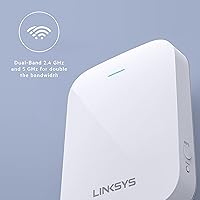
In extender mode, the unit connects wirelessly to your router and rebroadcasts the signal — no cables needed, but you accept some speed overhead. In access point mode, you run an Ethernet cable from your router to this range booster, and it creates a fresh WiFi 6 network from that wired connection. Access point mode generally delivers faster and more reliable speeds, so if you can run a cable, that setup is worth choosing over wireless repeating.

Not reliably, no. This is one of the most common frustrations with traditional extenders. Unlike a mesh system, the RE7310 does not handle roaming handoffs automatically — your device decides when to switch, and it often holds onto the weaker signal longer than you would like. If seamless whole-home roaming is a priority for you, a mesh networking system would be a better fit.

The sweet spot is roughly halfway between your router and the dead zone you are trying to cover. Placing it too close to the router means it is not actually extending coverage meaningfully; placing it too far means it is picking up a weak signal itself, which limits how well it can rebroadcast. A location where your router signal is still decent but starting to weaken tends to produce the best results.

No, this range booster is backward compatible with older WiFi standards including WiFi 5 and WiFi 4. It will work with any router. That said, to actually take advantage of the WiFi 6 improvements — better multi-device handling and higher throughput — both the extender and the device connecting to it need to support WiFi 6. If your router is older, you will still get coverage extension but not the full WiFi 6 experience.

Setup does not require an app; the Push-Button WPS method handles pairing in under a minute. For more advanced configuration you can access the extender through a web browser interface. There is no dedicated standalone app specifically for this unit, which is a limitation if you prefer managing your network from a phone.

It covers manufacturing defects under normal use conditions for 18 months from the date of purchase, and it is only available through the Amazon listing. This is longer than the one-year warranty you typically see on comparable extenders, which is a modest but genuine advantage. It does not cover physical damage or problems caused by incorrect installation.

In wireless extender mode, the unit uses part of the available bandwidth to maintain its connection back to your router, so there is some overhead. MU-MIMO support helps by allowing the extender to handle multiple device connections more efficiently rather than serving them one at a time. In practice, for typical browsing, streaming, and smart home use, most households do not notice significant slowdowns on the broader network.

A second router set up as an access point via Ethernet gives you more control and often better performance, but requires cable routing. A mesh system costs more but handles roaming and network management far more elegantly. This range booster sits between those two options — easier and cheaper than either, but with real limitations around roaming and peak speeds. For a single dead zone in an otherwise well-covered home, it is a reasonable fix; for whole-home coverage problems, a mesh system is worth the extra investment.

Where to Buy