Overview

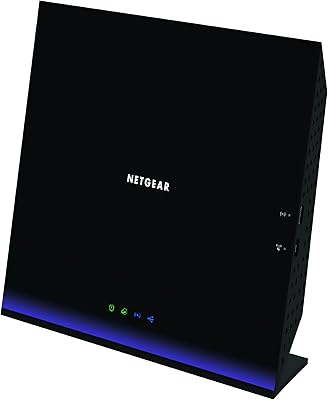
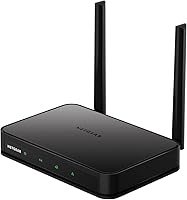
The NETGEAR R6020 AC750 Dual-Band WiFi Router is a straightforward, no-frills option aimed at renters, studio dwellers, and anyone who needs reliable wireless coverage in a compact space. It connects to your existing cable modem — it is not a modem-router combo — and handles everyday tasks like browsing, HD streaming, and a few smart home gadgets without complaint. The AC750 label means you get a combined theoretical maximum of 750Mbps split across two radio bands. Think of it less as raw speed and more as decent headroom for a small household. Physically, it sits flat and low-profile, blending into a shelf or desk without drawing attention.
Features & Benefits

The R6020 runs on two bands simultaneously — 2.4GHz for broader reach and 5GHz for faster, less crowded connections when your devices are nearby. In practice, that means your phone can grab the quicker 5GHz band while an older smart speaker stays on 2.4GHz without competing for bandwidth. Four wired Ethernet ports on the back are genuinely useful for plugging in a desktop, console, or streaming stick that benefits from a stable, physical connection. Setup is handled through the Nighthawk App, which walks you through the process step by step — most people have it running in under ten minutes. A WPS button handles quick wireless pairing, and the router works with virtually any ISP.

Best For

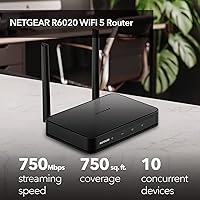
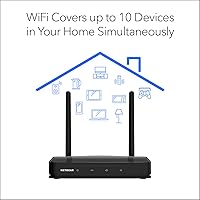
This entry-level router is well-matched for apartments, studios, or small homes where the wireless signal does not need to punch through multiple floors or thick walls. If your household runs ten or fewer devices — laptops, phones, a smart TV, a voice assistant or two — the R6020 keeps up comfortably. It is an especially good fit for first-time router buyers who have never configured networking equipment before, since the guided app removes most of the guesswork. It also makes practical sense as a replacement for the underwhelming router your ISP handed you at signup. Just keep expectations calibrated: heavy 4K streaming across several screens simultaneously or competitive online gaming will push it past its comfort zone.

User Feedback

Across a substantial pool of ratings, this NETGEAR router holds a solid 4.1 out of 5 stars — a respectable score that reflects consistently met expectations at its price tier. Buyers repeatedly praise quick, painless setup and steady performance in smaller spaces. Where the criticism lands is predictable: users in larger homes report weaker signal in distant rooms, and anyone expecting speeds that can handle multiple simultaneous 4K streams will find the throughput ceiling limiting. A handful of reviewers mention occasional firmware quirks, though these appear to be the exception rather than the norm. The honest takeaway is that the R6020 does exactly what it promises — and frustrates mainly those who needed something more powerful to begin with.

Pros

  • Guided setup through the Nighthawk App makes installation straightforward even for complete beginners.
  • Compact, low-profile design sits unobtrusively on a shelf or desk without cluttering the space.
  • Dual-band operation lets devices automatically connect to whichever frequency suits them best.
  • Four wired Ethernet ports offer stable, reliable connections for consoles, desktops, or smart TVs.
  • Works with virtually any ISP — cable, fiber, DSL, or satellite — without compatibility headaches.
  • Holds a solid 4.1-star rating across hundreds of real-world buyers, reflecting consistently met expectations.
  • WPS button allows fast wireless pairing without digging through settings menus.
  • Lightweight and easy to reposition if you need to optimize signal placement in a small space.
  • Provides a meaningful performance upgrade over the generic routers most ISPs hand out at signup.

Cons

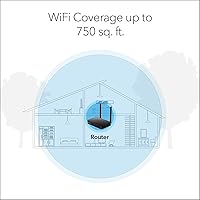
  • Signal range falls short in homes larger than 750 square feet, leaving dead zones in distant rooms.
  • Fast Ethernet ports max out at 100Mbps wired speeds, which bottlenecks anyone with a gigabit internet plan.
  • The AC750 combined speed rating is a theoretical ceiling that real-world conditions rarely hit.
  • Not well-suited to households that regularly stream 4K content on multiple screens at the same time.
  • Some users have reported occasional firmware hiccups that require a reboot to resolve.
  • No USB port, so there is no option to attach a shared storage drive or printer to the network.
  • The Nighthawk App experience has drawn mixed feedback, with a few users preferring a traditional browser-based interface.
  • No parental controls or advanced traffic management features for households that need them.
  • Supporting more than ten devices simultaneously can cause noticeable performance degradation.

Ratings

Our editorial team used AI to analyze hundreds of verified global buyer reviews for the NETGEAR R6020 AC750 Dual-Band WiFi Router, actively filtering out incentivized, bot-generated, and spam submissions to surface what real users actually experienced. The scores below reflect a transparent synthesis of both genuine praise and recurring frustrations — weighted by how often each theme appeared across the review pool. Whether this router fits your needs or falls short depends heavily on your home size and usage habits, and those nuances are captured honestly in each category.

Ease of Setup
91%
The Nighthawk App-guided setup is consistently praised as one of the R6020's strongest traits. Buyers with no prior networking experience report being fully online within ten to fifteen minutes of opening the box, with clear prompts that remove the usual guesswork of router configuration.
A small segment of users encountered hiccups when the app failed to detect the router on the first attempt, requiring a reset and fresh start. Those who prefer a traditional browser-based setup interface found the app-only approach limiting and slightly restrictive.
WiFi Range & Coverage
63%
37%
In compact apartments and studio-style living spaces, the signal holds up well — buyers in open-plan homes under 600 square feet rarely report dead zones. Placing the router centrally in a smaller home consistently delivers solid connectivity throughout the space.
Range becomes a real problem for anyone in a home larger than the rated 750 square feet, especially with walls or floors in the way. Multi-room coverage in a two-bedroom apartment with thick walls draws frequent complaints, and there is no mesh expansion option to compensate.
Wireless Speed Performance
58%
42%
For basic tasks — browsing, video calls, and single-stream HD video — the AC750 throughput is entirely adequate. Users replacing an aging ISP-provided router often notice a meaningful improvement in day-to-day responsiveness, even if peak speeds are modest by modern standards.
The speed ceiling becomes obvious quickly when multiple household members stream simultaneously or when anyone attempts 4K content. The 5GHz band in particular underperforms relative to buyer expectations, and users with faster internet plans feel the bottleneck acutely.
Value for Money
78%
22%
Buyers who approach this router with realistic expectations — a small space, light usage, a modest internet plan — overwhelmingly feel it delivers fair value for its price tier. As a replacement for an ISP-supplied unit or a first router purchase, it punches reasonably well for what it costs.
Those who bought it hoping to stretch it across a larger home or heavier usage load frequently describe it as a poor investment in hindsight. When compared to slightly pricier Wi-Fi 5 or Wi-Fi 6 models with noticeably better range and speed, the value proposition narrows quickly.
Build Quality & Design
74%
26%
The flat, low-profile chassis feels solid for an entry-level device, and the matte black finish does not attract fingerprints or look cheap sitting on a shelf. Several buyers appreciate that it does not require vertical stands or external antennas, keeping the setup tidy.
The plastic housing feels thin under pressure, and a few long-term users report the unit running noticeably warm during extended use. There are no ventilation slots on the top surface, which raises minor concerns about sustained heat management over months of continuous operation.
Firmware & Stability
67%
33%
For the majority of buyers, day-to-day operation is stable and uneventful — the router stays connected without requiring frequent reboots. Firmware updates push silently through the Nighthawk App for users who keep it installed, which helps address bugs without manual intervention.
A recurring minority report random disconnections that only resolve after a full power cycle, particularly after several months of use. Some firmware updates have introduced temporary instability, and the proprietary NETGEAR firmware offers limited customization for users who want finer control over their network.
Wired Port Performance
55%
45%
Having four Ethernet ports is genuinely useful at this price point, and buyers who connect a desktop PC or streaming device via cable report more consistent speeds than over WiFi. Wired connections remain stable and reliable even when the wireless network is under load.
The Fast Ethernet standard caps wired throughput at 100Mbps, which is a hard ceiling that frustrates anyone with a broadband plan exceeding that speed. In an era where Gigabit Ethernet is standard even on budget routers, this limitation feels dated and is a meaningful drawback for future-proofing.
ISP Compatibility
88%
Compatibility across ISP types — cable, DSL, fiber, and satellite — is broad and largely trouble-free. Buyers switching from a previous router or upgrading from an ISP unit report smooth transitions with minimal configuration needed to get their existing internet plan recognized.
A handful of users with less common ISP configurations, particularly some satellite providers, report needing to contact support before achieving a stable connection. The router also does not support PPPoE passthrough natively in some firmware versions, which can affect certain DSL setups.
Device Handling Capacity
61%
39%
Households running six to eight devices simultaneously — a couple of phones, a laptop, a smart TV, and a few smart home gadgets — find the R6020 manages the load without obvious slowdowns during light-to-moderate usage. For a single person or couple with modest device counts, it holds up well.
Buyers with larger households consistently report performance degradation once the connected device count climbs past ten. Smart homes with always-on sensors, cameras, and assistants filling background bandwidth expose this router's limitations faster than casual use alone would.
Nighthawk App Experience
69%
31%
The app earns genuine appreciation for making setup and speed testing accessible to users who would normally avoid logging into a router admin panel. Internet speed testing and basic usage monitoring are practical touches that buyers find useful after initial setup.
Long-term app usability draws more mixed feedback — some users find it slow to load or prone to losing connection to the router intermittently. The absence of a full browser-based management portal as a fallback option is a frustration for users who prefer not to rely on a mobile app for network management.
Signal Consistency
72%
28%
Within a confined and suitable environment, the signal stays steady during typical daily tasks like video calls and music streaming. Buyers who position the router near the center of their living space report fewer drops than those who tuck it behind furniture or in a corner.
Interference from neighboring networks in dense apartment buildings noticeably affects 2.4GHz band performance, and the router lacks band steering or advanced interference mitigation tools to compensate. Signal consistency in mixed-wall environments like older buildings with plaster or brick is a common complaint.
Smart Home Integration
76%
24%
For standard smart home setups — a few voice assistants, smart bulbs, a thermostat, and a security camera — the R6020 manages device coexistence without notable issues. The dual-band setup helps segregate IoT devices onto the 2.4GHz band while keeping primary devices on 5GHz.
Larger smart home ecosystems with fifteen or more connected IoT devices strain the router's bandwidth allocation and internal processing. There are no dedicated IoT network segmentation tools or guest network isolation features sophisticated enough for security-conscious smart home users.
Package & Documentation
82%
18%
The included quick start guide is praised for being genuinely concise and visual, avoiding the wall-of-text manuals that often accompany networking equipment. Buyers appreciate that the box includes an Ethernet cable, removing the need to source one separately just to complete the initial setup.
The quick start guide only covers the most basic setup path, leaving buyers with non-standard configurations — like bridging an ISP combo unit — to seek answers online or through support. A more comprehensive printed guide covering common troubleshooting scenarios would meaningfully reduce post-purchase confusion.

Suitable for:

The NETGEAR R6020 AC750 Dual-Band WiFi Router is a practical choice for anyone living in a studio, one-bedroom apartment, or small home where the total square footage stays under roughly 750 feet. It is particularly well-suited to renters who are not willing to invest heavily in networking gear and just need reliable coverage for day-to-day tasks — browsing, video calls, HD streaming, and a handful of smart home devices. First-time router buyers will appreciate the Nighthawk App, which removes the intimidation of manual network configuration and gets most people online in under fifteen minutes. It also makes a sensible upgrade for anyone still running the basic router their internet provider shipped years ago, since even a modest improvement in hardware can noticeably stabilize a home connection. If your household runs ten or fewer devices and nobody is hammering the network with simultaneous 4K streams or competitive online gaming, this entry-level router will quietly do its job without demanding much attention.
Not suitable for:

The NETGEAR R6020 AC750 Dual-Band WiFi Router is not the right tool for larger homes, multi-story houses, or spaces with thick concrete or brick walls that absorb wireless signals quickly. Power users who rely on fast, uninterrupted throughput for 4K streaming across several TVs simultaneously, cloud gaming, or large file transfers will find the AC750 speed ceiling frustrating in short order. Families with a dense mix of devices — smart speakers, tablets, laptops, gaming consoles, and security cameras all competing at once — will likely push past the ten-device comfort zone and start noticing slowdowns. The wired Ethernet ports cap out at Fast Ethernet speeds, meaning anyone with a multi-gigabit internet plan will see that investment largely wasted here. If your usage patterns are demanding or your living space is expansive, spending more on a Wi-Fi 6 router with broader coverage and higher throughput is the smarter long-term decision.
Specifications

  • WiFi Standard: The router uses the 802.11ac (Wi-Fi 5) wireless standard, which offers improved speeds and efficiency compared to the older 802.11n generation.
  • Combined Speed: Maximum combined theoretical wireless throughput is AC750, split across both bands — 300Mbps on 2.4GHz and 433Mbps on 5GHz.
  • Frequency Bands: Operates simultaneously on both the 2.4GHz band for broader range and the 5GHz band for faster, less congested connections.
  • Coverage Area: Designed to provide reliable wireless coverage for spaces up to approximately 750 square feet under typical home conditions.
  • Device Capacity: Supports stable connections for up to 10 wireless devices simultaneously without significant performance degradation under normal use.
  • LAN Ports: Includes 4 Fast Ethernet LAN ports operating at up to 100Mbps each, suitable for wired connections to computers, consoles, or media players.
  • ISP Compatibility: Compatible with internet service providers delivering connections via cable, DSL, fiber, or satellite, supporting incoming speeds up to 1Gbps.
  • Setup App: Initial configuration and ongoing network management are handled through the NETGEAR Nighthawk App, available for iOS and Android devices.
  • Special Features: A dedicated WPS button on the unit enables quick, one-touch wireless pairing for compatible devices without entering a password manually.
  • Firmware: Runs NETGEAR's proprietary firmware, which supports remote management, internet speed testing, and basic data usage monitoring via the Nighthawk App.
  • Dimensions: The unit measures 6.8 x 5.5 x 1.5 inches, giving it a flat, low-profile footprint that sits discreetly on a shelf or desk.
  • Weight: The router weighs 1.21 pounds, making it easy to reposition or pack for travel to a second residence.
  • Color: Available in matte black, which blends with most home entertainment or office setups without drawing attention.
  • In the Box: Each unit ships with the router, one Ethernet cable, a power adapter, and a printed quick start guide for initial setup.
  • Power Input: Powered by the included AC power adapter; no PoE (Power over Ethernet) support is available on this model.
  • WAN Port: One dedicated WAN (internet) port connects the router to an existing cable or DSL modem to distribute the internet signal wirelessly.
  • User Rating: Holds an average rating of 4.1 out of 5 stars based on 629 customer ratings on Amazon at the time of evaluation.

Related Reviews

NETGEAR WAX202 WiFi 6 Dual-Band Router
84%
88%
WiFi Performance
93%
Setup & Installation
85%
App Usability
89%
Speed & Coverage
90%
Device Connectivity
More
Netgear WNDR4300 N750 Dual Band Gigabit Router
73%
78%
Wi-Fi Range & Coverage
86%
Setup & Ease of Use
74%
Connection Stability
88%
Wired (Ethernet) Performance
57%
USB Sharing (ReadySHARE)
More
ASUS RT-ACRH13 AC1300 Dual Band Gigabit Router
78%
91%
Ease of Setup
72%
Wi-Fi Range
84%
Connection Stability
67%
Multi-Device Performance
83%
Value for Money
More
ASUS RT-AX1800S
ASUS RT-AX1800S
79%
88%
Value for Money
79%
WiFi Speed & Performance
74%
Coverage & Range
83%
Setup & Ease of Use
67%
Router App Experience
More
NETGEAR Nighthawk RS280S WiFi 7 Tri-Band Router
80%
88%
Wireless Speed & Performance
71%
Wi-Fi Coverage & Range
83%
Setup & Ease of Use
62%
Modem Compatibility
86%
Wired Port Performance
More
NETGEAR WNDR3400 N600 Dual Band Wi-Fi Router
82%
85%
Performance
91%
Ease of Setup
87%
Dual-Band Performance
72%
Connection Stability
80%
Parental Controls
More
NETGEAR R6250 AC1600 Dual Band Wi-Fi Router
73%
91%
Ease of Setup
74%
Wi-Fi Performance
61%
Wi-Fi Range & Coverage
82%
Connection Stability
69%
Multi-Device Handling
More
ASUS RT-AX5400 WiFi 6 Dual-Band Router
80%
84%
WiFi Speed & Throughput
71%
Coverage & Range
88%
Setup & Ease of Use
91%
Built-in Security (AiProtection)
83%
Parental Controls
More
NETGEAR Nighthawk X6 AC3000 Tri-Band WiFi Router
84%
88%
Performance
76%
Setup and Installation
91%
Signal Strength and Range
79%
Usability (App & Interface)
85%
Compatibility with Devices
More
Netgear Nighthawk X6S AC4000 Tri-Band Router
70%
83%
Wireless Performance
81%
Signal Range & Coverage
86%
Multi-Device Handling
78%
Gaming & Low Latency
61%
Setup & Installation
More

FAQ

You will need a separate modem. The R6020 is a standalone wireless router, not a modem-router combo, so it plugs into a modem you either own or rent from your ISP. If you are currently using a combined modem-router unit from your provider, you would need to switch it to bridge mode or replace it with a standalone modem before using this router.

It is genuinely straightforward for most people. NETGEAR designed the setup process around the Nighthawk App, which walks you through each step with plain-language prompts — no logging into IP addresses or reading technical manuals required. The majority of buyers report being fully connected within ten to fifteen minutes of opening the box.

Yes, the NETGEAR R6020 AC750 Dual-Band WiFi Router is compatible with virtually all major ISPs in the US, including cable providers like Xfinity and Cox, fiber services like AT&T and Fios, and DSL or satellite connections. The one thing to verify is that your modem is compatible with your ISP — the router itself is not the limiting factor there.
That is right in the sweet spot for this router. An open-layout 600-square-foot apartment should get solid coverage wall to wall, especially if the router is placed centrally rather than tucked in a corner. Thick concrete walls or interference from neighboring networks can reduce effective range, but for a typical apartment layout you should be fine.

The 2.4GHz band covers more distance but is slower and often more congested in apartment buildings where many routers overlap. The 5GHz band is faster and cleaner but does not travel as far. Most modern phones, laptops, and tablets will automatically connect to whichever band gives them the better signal at any given moment, so you typically do not need to manage this manually.

Light gaming and HD streaming are within its comfort zone, but competitive online gaming and 4K streaming across multiple screens at the same time will push this router to its limits. The AC750 speed rating leaves less headroom than mid-range or premium routers, so if your household regularly does both simultaneously, you may notice buffering or lag during peak usage.

The R6020 is rated for up to 10 devices, and while it will technically accept more connections, performance tends to become uneven beyond that threshold. If your household has 12 to 15 active devices — especially smart home gadgets that stay connected around the clock — you may experience intermittent slowdowns. A mid-range router with higher device capacity would be a safer choice for that scenario.

Basic network management is available through the Nighthawk App, but this entry-level router does not include robust parental control features like content filtering or scheduled access blocks. If parental controls are a priority, NETGEAR's higher-tier routers or a third-party DNS filtering service would serve you better.

No, and this is an important point to understand before buying. The wired Ethernet ports on this router max out at 100Mbps (Fast Ethernet), and the wireless speeds are also well below gigabit territory. If you are paying for a gigabit internet plan, this router would bottleneck your connection significantly — you would need a router with Gigabit Ethernet ports and a higher wireless spec to take full advantage of that plan.

A simple restart — unplugging the power for 30 seconds and plugging it back in — resolves most temporary issues. If problems persist, logging into the Nighthawk App to check for a firmware update is a good second step, as updates occasionally fix stability bugs. For recurring disconnections, checking that the router is not placed near microwaves or cordless phones can also help, since those devices can interfere with the 2.4GHz band.

Where to Buy