Overview

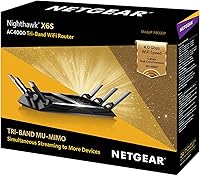
The Netgear Nighthawk X6S AC4000 Tri-Band Router sits firmly in the mid-to-premium segment of home networking, built for households where a single Wi-Fi band simply cannot keep up. Launched in 2017 as part of Netgear's respected Nighthawk lineup, it separates itself from dual-band alternatives by splitting traffic across three distinct bands — one 2.4 GHz channel and two separate 5 GHz channels. That distinction matters when smart TVs, gaming consoles, laptops, and a dozen smart home gadgets are all competing for bandwidth simultaneously. It is worth flagging, though, that the X6S predates Wi-Fi 6, so anyone comparing it against newer hardware should weigh that generational gap carefully before committing.

Features & Benefits

The practical advantage of this Nighthawk router is how intelligently it distributes traffic. Two dedicated 5 GHz bands mean your streaming devices and your gaming rig can occupy separate channels instead of wrestling over the same connection. MU-MIMO technology reinforces this by letting the router communicate with several devices at once rather than cycling through them sequentially, which translates to noticeably smoother performance during peak household usage. The built-in QoS tools prioritize gaming and video traffic automatically, sparing you from manual tinkering. Alexa and Google Assistant can handle basic network commands by voice, and a USB 2.0 port allows you to share a drive or printer across the network, though transfer speeds there are modest at best.

Best For

This tri-band router makes the strongest case in homes running ten or more devices simultaneously — streaming sticks, smart speakers, consoles, laptops, and tablets all pulling bandwidth at once. Gamers benefit directly from the automatic traffic prioritization, keeping latency low without requiring any manual configuration. Families juggling multiple 4K streams across different rooms will notice the load-balancing working in their favor. For smaller homes or lighter usage, though, the advantage shrinks considerably; a solid dual-band router would likely cover those needs for less money. Smart home enthusiasts who want Alexa or Google Assistant managing their network by voice will find this router a natural fit for that kind of setup.

User Feedback

The X6S holds a 4.2-star rating across well over a thousand reviews, and the most consistent praise centers on signal range and stability, especially in larger homes with multiple floors or thick walls. Many owners describe a clear step up from whatever entry-level hardware they replaced. The friction points are equally consistent: setup tends to trip up less technical users, and the Nighthawk app draws mixed opinions on usability. Some long-term owners have encountered firmware reliability issues requiring periodic reboots. The sharpest criticism, though, is about value — with Wi-Fi 6 routers now widely available at competitive prices, a number of buyers question whether this generation of hardware still justifies its asking price. For pure performance satisfaction, most say yes; for future-proofing, the calculus is less clear.

Pros

  • Tri-band design distributes device traffic across three channels, reducing congestion in busy households significantly.
  • MU-MIMO allows multiple devices to receive data simultaneously rather than waiting in a queue.
  • Automatic QoS prioritizes gaming and streaming traffic without requiring the user to manually adjust settings.
  • Signal range and stability are consistently praised by real owners, even in larger multi-floor homes.
  • Works with both Alexa and Google Assistant for hands-free network management.
  • Compatible with a wide range of operating systems, including Windows, Mac, Linux, and UNIX.
  • The USB 2.0 port adds basic network storage or printer sharing without needing additional hardware.
  • Over 1,400 Amazon ratings average to 4.2 stars, reflecting a broad base of satisfied long-term users.

Cons

  • Built on the older WiFi 5 standard, so it cannot match the efficiency or speeds of current WiFi 6 routers.
  • Advertised AC4000 speeds are theoretical maximums — real-world performance will always fall noticeably short of those figures.
  • Setup can frustrate less experienced users, with a learning curve that feels steep compared to simpler modern alternatives.
  • The Nighthawk app receives mixed reviews, with some users finding the interface clunky and inconsistent.
  • Firmware updates have caused intermittent reliability issues for some long-term owners, occasionally requiring router reboots.
  • Only one USB 2.0 port is included, limiting network storage and peripheral sharing options.
  • At its current price, the value proposition weakens considerably against newer WiFi 6 models available in a similar range.
  • The tri-band benefit is minimal for smaller homes or light users — those buyers are likely paying for features they will rarely use.

Ratings

The scores below for the Netgear Nighthawk X6S AC4000 Tri-Band Router were generated by our AI after analyzing verified purchase reviews from buyers worldwide, with spam, bot submissions, and incentivized feedback actively filtered out. Each category reflects the full spectrum of real ownership experiences — not just the highlights — so both the genuine strengths and the recurring frustrations are represented transparently.

Wireless Performance
83%
In homes with a dozen or more active devices, users consistently report that the tri-band setup keeps things running without the slowdowns they experienced on previous dual-band routers. Streaming 4K on two TVs while someone games in another room is the kind of scenario where this router holds up noticeably well.
Real-world speeds fall well short of the theoretical AC4000 ceiling, which catches some buyers off guard. Those with gigabit internet plans often find they cannot fully utilize their ISP speeds over Wi-Fi, especially at longer distances from the router.
Signal Range & Coverage
81%
19%
Owners in larger homes — particularly two-story houses in the 2,500 to 3,500 square foot range — frequently praise the router's ability to maintain a solid signal across floors and through interior walls. It outperforms many single-band and entry-level dual-band units in this respect.
Homes with thick concrete walls or unusual layouts report dead zones in far corners that the X6S cannot reach without a range extender. For very large properties, a mesh system would be a more reliable solution than relying on this single-unit router.
Multi-Device Handling
86%
The combination of tri-band architecture and MU-MIMO means the router does not force devices to queue up for bandwidth the way older single-band units do. Households with smart TVs, consoles, laptops, and smart home hubs all running simultaneously notice a tangible difference in stability.
Beyond roughly 25 to 30 simultaneously active connections, some users report gradual performance degradation. Power users with large smart home ecosystems and multiple heavy-bandwidth devices may eventually push past what the X6S handles comfortably.
Gaming & Low Latency
78%
22%
The built-in QoS system automatically pushes gaming traffic to the front of the line, which casual and mid-level gamers appreciate since it eliminates the need to dig into advanced settings. Many online gaming users report noticeably fewer rubber-banding incidents compared to their previous routers.
Hardcore competitive gamers who want granular, manual control over traffic prioritization may find the QoS options less flexible than dedicated gaming routers offer. The automatic system works well enough for most, but it is not the deepest implementation available at this price tier.
Setup & Installation
61%
39%
For users with any prior networking experience, the Nighthawk app walks through the initial setup in a reasonably logical sequence and most people get connected within 30 to 45 minutes. The WPS button is a convenient shortcut for compatible devices.
Less tech-savvy buyers are a recurring source of negative reviews, with many describing frustration at the number of steps involved and the app's occasional tendency to stall mid-setup. Compared to newer mesh systems designed with simplicity as a priority, the experience feels dated.
App & Interface Usability
59%
41%
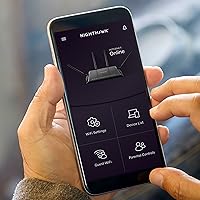
The Nighthawk app does cover the essentials — speed tests, guest network management, device prioritization, and basic parental controls — without requiring users to log into a browser-based interface for everyday tasks.
A meaningful portion of long-term owners find the app inconsistent, with occasional connectivity drops between the app and the router requiring a restart of the app or the router itself. The interface design has not aged particularly well compared to more modern router companion apps.
Firmware & Reliability
64%
36%
Many owners report years of stable day-to-day operation without needing to intervene, which is the baseline expectation for any home router. Netgear has continued to release firmware updates for this model even years after launch.
A recurring thread in long-term owner reviews involves firmware updates introducing new instability — dropped connections, slower speeds, or the need to perform a factory reset after updating. This is not universal, but it is frequent enough to be a legitimate concern for buyers who prefer a set-it-and-forget-it experience.
Voice Assistant Integration
74%
26%
The compatibility with both Alexa and Google Assistant is a genuine differentiator for smart home households. Being able to ask Alexa to run a speed test or reboot the router without touching the app is the kind of convenience that users who are already embedded in those ecosystems genuinely use.
The voice control feature set is fairly limited — it handles basic commands well but cannot replace the app for anything beyond surface-level tasks. Users expecting deep voice-driven network management will be disappointed by how narrow the supported command library actually is.
Value for Money
58%
42%
At its current price point, the X6S delivers tri-band performance that would have been considered premium-tier a few years ago, and buyers who find it discounted significantly below its original retail price get a solid deal for a busy household.
The value calculation has shifted meaningfully since 2017. WiFi 6 routers now occupy a similar price range and offer better efficiency, improved range, and longer-term firmware support. It is difficult to argue this router represents the best use of that budget in the current market.
Build Quality & Design
77%
23%
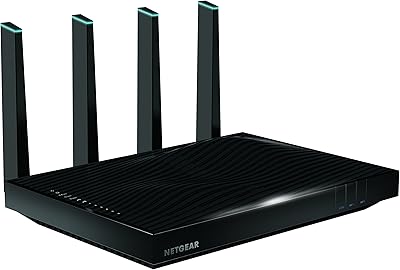
The physical construction feels solid and purposeful — nothing about it feels cheap or fragile. The footprint is large but stable, and the antenna configuration gives it a presence that matches its performance tier.
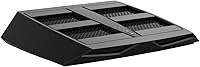
The design is visibly dated by today's standards, and the router occupies a considerable amount of shelf or desk space at nearly 12 inches across. Users who care about aesthetics or have limited space near their modem may find it intrusive.
Heat Management
72%
28%
Under typical household loads, the router stays within normal operating temperatures and does not throttle performance during extended use. Owners who run it continuously for months report it remains reliably cool to the touch in well-ventilated spots.
Placing the router in an enclosed cabinet or cramped entertainment center causes heat to accumulate, which some users link to occasional instability. It needs decent airflow around it, which is easy to overlook when first choosing a location.
USB Storage Sharing
53%
47%
The USB 2.0 port works as advertised for light network storage — plugging in a flash drive and sharing files across the home network is straightforward to configure and functional for occasional use.
USB 2.0 transfer speeds are a real bottleneck for anyone hoping to use this as a proper media server or NAS replacement. Heavy file transfers over the network feel sluggish, and there is only one port, leaving no room for both a drive and a printer simultaneously.
Parental Controls
66%
34%
The router includes basic parental control features — website filtering and scheduled internet access by device — which are enough to satisfy parents looking for simple guardrails for younger children's devices.
Parents who want more sophisticated controls, such as per-app filtering, detailed usage reports, or robust time management tools, will find the built-in options fairly rudimentary. Third-party solutions or a router with Circle integration would serve those needs much better.

Suitable for:

The Netgear Nighthawk X6S AC4000 Tri-Band Router was built for households where network congestion is a daily reality, not an occasional inconvenience. If your home regularly has ten or more devices online at the same time — gaming consoles, smart TVs, laptops, tablets, smart speakers, and security cameras all running simultaneously — the tri-band design gives each category of device its own breathing room instead of forcing everything to share a single overloaded channel. Families who stream 4K content in multiple rooms at once will appreciate how the router distributes that heavy load across two separate 5 GHz bands without requiring manual configuration. Gamers who want lower latency without constantly adjusting settings will find the automatic QoS prioritization does most of that work for them. It also suits smart home enthusiasts who prefer voice-controlled network management through Alexa or Google Assistant, and anyone upgrading from an aging dual-band router who wants noticeably more headroom without the complexity of a full mesh system.
Not suitable for:

The Netgear Nighthawk X6S AC4000 Tri-Band Router is a harder sell for buyers who are shopping in 2025 and comparing it against current-generation hardware. Released in 2017, it is built on the WiFi 5 standard, meaning it cannot take advantage of the efficiency and speed improvements that WiFi 6 and WiFi 6E routers now offer at increasingly competitive prices. For smaller apartments or homes with only a handful of connected devices, the tri-band advantage largely disappears — a well-priced dual-band router would handle that load just as comfortably for less money. Less tech-savvy users may also find the initial setup frustrating, since the Nighthawk app experience is not universally praised and the configuration options can feel overwhelming without some networking background. Anyone prioritizing long-term firmware support and forward compatibility should think carefully before committing to hardware that is already a full generation behind the current standard.

Specifications

  • WiFi Standard: The router operates on the 802.11ac (WiFi 5) standard, which is one generation behind the current WiFi 6 specification.
  • Frequency Bands: It uses a tri-band configuration: one 2.4 GHz band and two separate 5 GHz bands for distributing device traffic.
  • Combined Speed: The theoretical combined wireless throughput is AC4000, made up of 750 Mbps on 2.4 GHz and 1625 Mbps on each 5 GHz band.
  • MU-MIMO: MU-MIMO support allows the router to communicate with multiple devices at the same time rather than sequentially serving each one.
  • Quality of Service: Built-in advanced QoS tools automatically prioritize bandwidth for gaming and video streaming traffic without requiring manual setup.
  • Voice Assistants: The router is compatible with both Amazon Alexa and Google Assistant for basic voice-controlled network management.
  • USB Connectivity: One USB 2.0 port is included, suitable for connecting a shared network storage drive or a networked printer.
  • Dimensions: The unit measures 8.9″ x 11.6″ x 2.1″, making it a moderately large desktop router that requires dedicated shelf or surface space.
  • Weight: The router weighs 4.18 pounds, which is typical for a full-featured tri-band unit with an external antenna configuration.
  • OS Compatibility: It is compatible with Windows (7, 8, 10, Vista, XP, 2000), Mac OS, UNIX, and Linux operating systems.
  • WPS Support: WPS (Wi-Fi Protected Setup) is supported, allowing compatible devices to connect to the network with a single button press.
  • Color: The router is available in black, which is the only listed color option for this model.
  • Model Number: The official model number is R8000P-100NAS, used to identify this specific variant when seeking firmware updates or support.
  • In The Box: The package includes the router itself, one Ethernet cable, a power adapter, and a printed quick install guide.
  • Launch Date: This model was first made available in June 2017 and has not been discontinued by the manufacturer as of the latest available data.
  • Amazon Rating: The router carries a 4.2-out-of-5-star average rating based on over 1,400 customer ratings on Amazon.

Related Reviews

NETGEAR Nighthawk RS280S WiFi 7 Tri-Band Router
80%
88%
Wireless Speed & Performance
71%
Wi-Fi Coverage & Range
83%
Setup & Ease of Use
62%
Modem Compatibility
86%
Wired Port Performance
More
NETGEAR Nighthawk X6 AC3000 Tri-Band WiFi Router
84%
88%
Performance
76%
Setup and Installation
91%
Signal Strength and Range
79%
Usability (App & Interface)
85%
Compatibility with Devices
More
NETGEAR Nighthawk X8 AC5300 Tri-Band WiFi Router R8500
84%
89%
WiFi Performance
87%
Range and Coverage
93%
Ease of Setup
90%
Compatibility with Alexa
80%
Overall Build Quality
More
NETGEAR Nighthawk MK83 Mesh WiFi 6 System
74%
88%
Coverage & Range
83%
WiFi Speed Performance
91%
Setup & Installation
62%
Value for Money
71%
App Experience
More
NETGEAR Nighthawk C6900-100NAS Dual Band AC1900 Cable Modem Router
85%
91%
Wi-Fi Performance
89%
Gaming and Streaming Speed
87%
Setup and Installation
92%
Value for Money
80%
Reliability and Stability
More
Netgear Nighthawk AX5200 Router
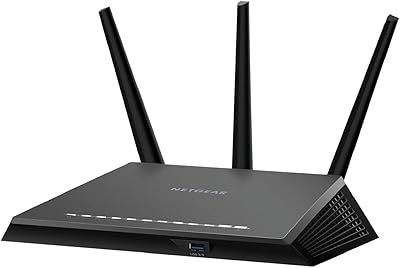
87%
92%
Wi-Fi Performance
89%
Range & Coverage
84%
Setup & Installation
88%
Reliability & Stability
91%
Gaming & Streaming Experience
More
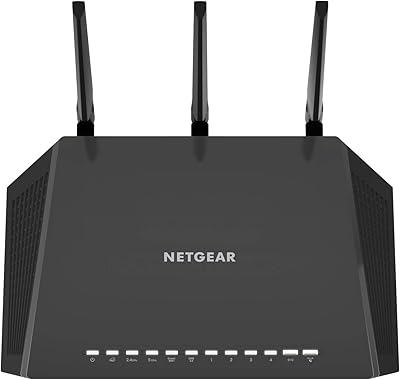
NETGEAR Nighthawk R7350 AC2400 Wi-Fi Router
78%
88%
5GHz Performance
67%
2.4GHz Reliability
91%
Setup Experience
79%
Gaming Performance
73%
Coverage Range
More
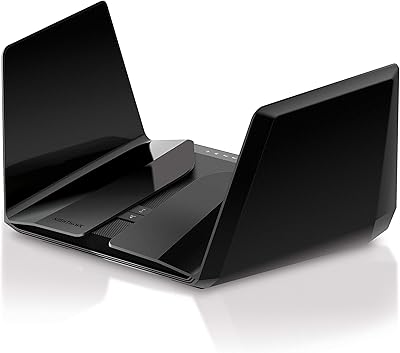
Netgear Nighthawk AX12 AX11000 Router
87%
92%
Wi-Fi Performance
89%
Speed & Latency
85%
Ease of Setup
88%
Build Quality
90%
Security Features
More
NETGEAR Nighthawk RS600 WiFi 7 Tri-Band Router
81%
91%
Wireless Performance
76%
Coverage & Range
88%
Setup & Onboarding
67%
Value for Money
83%
Build Quality & Design
More
NETGEAR Nighthawk RS180 WiFi 7 Router
86%
92%
WiFi Performance
90%
Gaming Performance
88%
Streaming Quality
89%
Coverage Area
85%
Ease of Setup
More

FAQ

It can be a bit tricky for first-timers. The Nighthawk app guides you through the basics, but some users find the interface less intuitive than they expected. If you are comfortable following step-by-step instructions and do not mind a bit of trial and error, most people get it running within 30 to 45 minutes. If you hit a wall, Netgear's support documentation is reasonably thorough.

The AC4000 figure is a combined theoretical maximum across all three bands under ideal lab conditions — you will not hit that number in everyday use. Realistically, on a strong 5 GHz connection close to the router, expect somewhere in the range of 400 to 800 Mbps depending on your internet plan, interference, and device capabilities. Think of the advertised number as a ceiling, not a promise.

It handles busy households well. Most users with 15 to 20 connected devices report stable performance, especially when heavier devices like gaming consoles and streaming TVs get pushed onto the dedicated 5 GHz bands. Beyond 25 to 30 active, simultaneous connections, you may start noticing some degradation, but for a typical home that is unlikely to be an issue.

Yes, the X6S works with any standard cable or DSL modem from your internet service provider. It is not a modem-router combo, so you will need a separate modem — which most ISP subscribers already have. Just plug the modem into the router's WAN port and follow the setup process.

Yes, as long as you already have an Alexa-enabled device like an Echo speaker, you can link it to the Nighthawk skill in the Alexa app and use voice commands to do things like run a speed test, enable guest Wi-Fi, or reboot the router. The feature set is useful but not exhaustive — deep configuration still requires the app or web interface.

That depends on your priorities. If you need strong tri-band performance on a tighter budget and are not concerned about future-proofing, this router still delivers solid real-world results. However, if you own WiFi 6 devices or plan to upgrade your hardware soon, a current-generation WiFi 6 router at a similar price point will serve you better long-term. It is a genuine trade-off worth thinking through.

For many two-story homes in the 2,500 to 3,500 square foot range, this Nighthawk router performs well. Owners with concrete walls or unusually complex floor plans sometimes report weaker coverage in far corners. If your home is on the larger side or has tricky layouts, a mesh system might serve you better than any single-unit router.

Not necessarily. The router handles band steering automatically in most cases, though you can also manually assign devices to specific bands through the app or web interface if you want more control. Most users just let it run automatically and find the results acceptable without any intervention.

Netgear has released firmware updates for the R8000P over the years, though the pace of updates has slowed given the model's age. Some long-term owners have reported occasional issues following updates that required a reboot or factory reset to resolve. It is worth checking Netgear's support page for the latest firmware version before and after setup.

The single USB 2.0 port lets you plug in an external hard drive and share it as basic network-attached storage, or connect a USB printer so multiple devices on the network can use it wirelessly. Transfer speeds are modest — do not expect NAS-level performance — but for occasional file sharing or a shared printer, it gets the job done.

Where to Buy