Overview

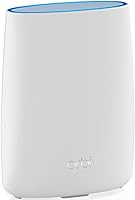
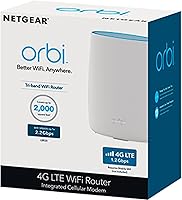
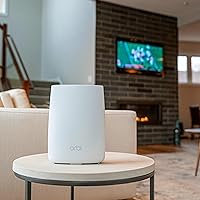
The NETGEAR Orbi LBR20 4G LTE WiFi Router takes a fundamentally different approach to home connectivity — it runs entirely on a cellular signal rather than a cable or DSL line. Pop in a nano SIM, activate a compatible BYOD data plan with AT&T, T-Mobile, or Verizon, and you are online. No ISP technician visit, no coaxial cable hunting. The price sits firmly in the mid-to-premium range, which buys you a built-in LTE modem and entry into NETGEAR's well-regarded Orbi mesh ecosystem. Standalone coverage tops out at 2,000 sq. ft., though that can be extended by adding compatible Orbi satellites sold separately.

Features & Benefits

The Orbi LBR20's headline spec is its integrated modem capable of pulling down up to 1.2 Gbps — though real-world speeds depend heavily on your proximity to a cell tower and your carrier's network conditions. On the WiFi side, dual-band AC2200 hardware handles up to 25 devices across 2.4 GHz and 5 GHz bands, with a combined ceiling of 2.2 Gbps. Pair it with compatible Orbi satellites and a dedicated backhaul band keeps client traffic from competing with the mesh link. Setup runs through the Orbi app, which is genuinely straightforward. Two bundled trials — NETGEAR Armor and Smart Parental Controls — are worth exploring, but both auto-renew as paid subscriptions after 30 days.

Best For

This LTE mesh router makes the most sense where traditional broadband simply is not available or cannot be trusted. Rural households with no cable or fiber access are the obvious primary audience — if a cell signal reaches your property, this router can put you online. Vacation homes and cabins benefit too, since there is no ISP contract to worry about. It also works well as a failover connection for home offices that cannot afford downtime when the primary ISP hiccups. Already own Orbi satellites? The LBR20 slots neatly into an existing mesh without replacing any hardware. Where it is less compelling: urban areas where fiber or cable already delivers faster, cheaper service.

User Feedback

Across nearly 600 reviews, this cellular WiFi router earns a 3.8 out of 5 — respectable, though it reflects a genuine split in buyer experience. Consistent praise centers on easy app-based setup and how reliably it bridges the gap when a primary connection goes down. Critical feedback clusters around a few recurring pain points: real-world LTE speeds can fall well short of the spec sheet depending on tower distance, and the limited ethernet ports frustrate users who rely on wired connections. Ongoing carrier plan costs also catch buyers off guard when calculating total ownership cost. The auto-renewing trials for Armor and Parental Controls are a genuine watch-out worth factoring in before committing.

Pros

  • No separate modem needed — the built-in 4G LTE modem keeps the setup clean and the upfront hardware cost consolidated.
  • Works with AT&T, T-Mobile, and Verizon, so you are not locked into a single carrier to make it functional.
  • The Orbi app makes initial setup genuinely approachable, even for users who have never configured a router before.
  • Pairs with a wide range of existing Orbi satellites, letting you expand coverage without replacing your whole setup.
  • Doubles as a reliable backup connection, giving home offices a safety net when the primary ISP fails.
  • Universal voltage support means it travels well internationally without needing a separate power adapter.
  • Dedicated backhaul band when used with compatible satellites keeps mesh performance from degrading as more devices connect.
  • Compact physical footprint — under two pounds and reasonably sized — makes placement flexible even in smaller spaces.

Cons

  • Real-world LTE speeds vary significantly based on tower distance and carrier congestion — the 1.2 Gbps figure is a ceiling, not a guarantee.
  • Ongoing cellular data plan costs are easy to underestimate; the total monthly expense can climb well above what fixed broadband costs.
  • Only two Gigabit Ethernet ports means wired device flexibility is limited right out of the box.
  • NETGEAR Armor and Smart Parental Controls auto-renew as paid subscriptions after the 30-day trial — easy to forget and harder to notice on a credit card statement.
  • Expanding beyond 2,000 sq. ft. requires purchasing additional Orbi satellites separately, adding meaningful cost.
  • Cellular latency is generally higher than fiber or cable, which matters for online gaming or video calls under load.
  • The LBR20 uses an older WiFi standard (802.11ac) with no WiFi 6 support, which may feel limiting as newer client devices become more common.
  • Users in areas with weak cellular coverage will find this router provides little practical value regardless of other features.

Ratings

The scores below for the NETGEAR Orbi LBR20 4G LTE WiFi Router were generated by our AI review engine after analyzing verified global buyer feedback, actively filtering out incentivized, bot-generated, and duplicate submissions to surface only genuine user experiences. Each category reflects both the strengths that loyal buyers consistently celebrate and the friction points that repeatedly surface in critical reviews — nothing has been softened or omitted to present a fair, complete picture.

Cellular Connectivity
71%
29%
In locations with a strong LTE signal, the Orbi LBR20 delivers reliable, stable connectivity that genuinely replaces a fixed broadband line for everyday tasks like streaming and video calls. Buyers in rural areas with good tower proximity consistently report that it just works — no fussing, no drops during normal use.
The 1.2 Gbps download figure is a ceiling that most users never approach — real-world speeds in weak-signal areas can be frustratingly inconsistent, and there is nothing the router itself can do to compensate for poor carrier coverage at your location.
WiFi Coverage
74%
26%
For a standalone unit covering a 2,000 sq. ft. home, the wireless signal holds up well across single-story layouts and performs respectably in open-plan spaces. Users in smaller vacation cabins and ranch-style homes rarely need to add a satellite to get full-home coverage.
Multi-story homes and properties with thick interior walls push this router to its limits without a satellite extender, and those satellites are sold separately at additional cost. Buyers expecting whole-home coverage in larger properties without extra hardware tend to be disappointed.
Setup Experience
86%
The Orbi app is one of the genuinely strong points here — the guided setup walks even less technically confident users through SIM insertion, network naming, and basic configuration in a matter of minutes. Buyers setting up connectivity at a remote cabin for the first time consistently mention how painless the initial process felt.
A small number of users run into carrier activation hiccups that the app cannot resolve on its own, requiring a call to the carrier — an experience that feels jarring after an otherwise smooth onboarding. Advanced configuration options are also limited compared to competing routers in this price range.
Value for Money
58%
42%
For buyers who genuinely have no fixed broadband alternative, the all-in-one modem-plus-router design does eliminate the need to buy a separate cellular modem, which provides some upfront hardware savings. The broad carrier certification also means you are not locked into a single carrier's ecosystem.
The hardware cost is only the beginning — ongoing monthly cellular data plan fees add up quickly, and when you factor in the auto-renewing Armor and Parental Controls subscriptions, the total annual cost of ownership climbs considerably higher than most buyers initially anticipate.
Mesh Expandability
78%
22%
The compatibility list for Orbi satellites is broad — RBS50, RBS40, RBS20, RBW30, and more — meaning existing Orbi owners can fold this router into a setup they already have without replacing hardware. The dedicated backhaul band keeps client WiFi performance from degrading as the mesh scales up.
Every satellite needed to extend coverage beyond 2,000 sq. ft. is an additional purchase, and the cost of building out a full mesh system using this router as a cellular hub adds up fast. Buyers who assumed the router alone would cover a large property are among the most vocal critics.
App & Management
77%
23%
The Orbi app gives users a clean, accessible view of connected devices, signal strength, and network activity without requiring any interaction with a web-based admin panel. For non-technical users managing a vacation home network remotely, the app's simplicity is a genuine asset.
Power users looking for granular controls — custom DNS, detailed traffic logging, advanced QoS settings — will find the app limiting compared to third-party firmware options or more advanced routers in the same price bracket. Some users also report that the app occasionally requires a relaunch to reflect real-time network changes.
Carrier Compatibility
82%
18%
Official certification across all three of the major US carriers — AT&T, T-Mobile, and Verizon — is a meaningful advantage that reduces SIM activation headaches considerably. Most buyers can simply pop in a SIM from a plan they already manage and be online within minutes.
Certification covers the big three, but users on MVNOs or regional carriers are largely on their own in terms of compatibility. A handful of reviewers also note that plan selection and BYOD eligibility rules vary enough between carriers to require some research before purchasing.
Port Selection
47%
53%
Both Ethernet ports are Gigabit-rated, so wired connections that do exist are fast and reliable — buyers using a single wired desktop or NAS device alongside wireless clients rarely complain about the quality of those connections.
Two Gigabit Ethernet ports is a significant limitation for anyone with more than one wired device — a desktop, a smart TV, a network switch, or a gaming console can exhaust the available ports instantly. This is one of the most frequently cited complaints in critical reviews, particularly from home office users.
Build & Design
73%
27%
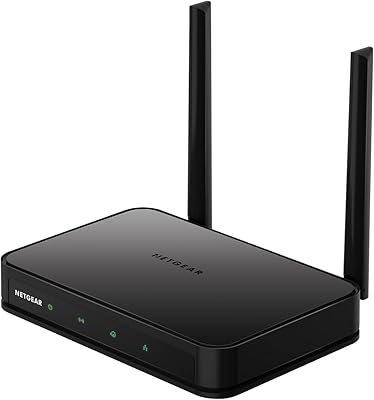
At under two pounds and with a relatively compact footprint, the Orbi LBR20 is easy to position on a shelf or countertop without dominating the space. The clean white design is inoffensive and fits most home environments without looking out of place.
Some buyers note that the plastic casing feels less premium than the price point suggests, and the router runs noticeably warm during extended use. There is no visual signal strength indicator on the unit itself, which makes optimizing placement for best cellular reception a somewhat trial-and-error process.
Security Features
63%
37%
NETGEAR Armor provides real, active threat detection across all connected devices during the trial period — buyers with smart home devices and kids on the network appreciate having an extra layer of protection that works automatically in the background.
The transition from a free trial to a paid subscription catches a meaningful number of buyers off guard, and cancelling requires proactive action rather than inaction. Without Armor active, the baseline security feature set is standard and unremarkable for the price tier.
Failover Reliability
76%
24%
As a backup internet connection for home offices, the Orbi LBR20 performs its core job capably — when the primary ISP line drops, the cellular connection kicks in and keeps work-critical applications like video conferencing and cloud tools running. Buyers who set it up specifically as a failover tend to be among the more satisfied owners.
Automatic failover behavior depends on how the router is configured alongside an existing primary connection, and the setup for this use case is not as clearly documented as the primary-connection setup. A few users also note that cellular latency during failover is noticeably higher than their usual wired connection.
Real-World Speeds
61%
39%
In areas with strong LTE Advanced signal, buyers report download speeds comfortably sufficient for HD streaming on multiple devices simultaneously and smooth video calls without buffering. The performance ceiling, when conditions allow it to be approached, is genuinely impressive for a cellular solution.
Speed variance is the defining frustration for a segment of buyers — the same router in two different rural locations can deliver dramatically different results based purely on tower proximity and carrier load. Users in marginal signal areas frequently describe a gap between advertised and lived performance that they feel the product marketing understates.
Device Capacity
72%
28%
Support for up to 25 simultaneous connections is more than adequate for the typical rural household or vacation property this router targets — smartphones, tablets, a smart TV, and a few smart home devices can all coexist on the network without noticeable congestion.
At the upper end of that 25-device ceiling, particularly when several devices are actively streaming or transferring data, some users observe a dip in responsiveness across the network. The dual-band configuration, without a dedicated 6 GHz band, shows its age as smart home device counts in the average household continue to grow.

Suitable for:

The NETGEAR Orbi LBR20 4G LTE WiFi Router was built for people whose location makes traditional broadband a non-starter — rural households where cable or fiber never reached the property are the clearest fit. If your only realistic option is a cellular signal, this router turns that signal into a full home WiFi network without requiring a separate modem purchase. Vacation cabin owners will appreciate the simplicity: insert a nano SIM, open the Orbi app, and the place is connected without scheduling an ISP installation or committing to a monthly contract tied to a fixed address. It also makes a genuinely strong case as a failover device for home offices that need a reliable backup when the primary ISP goes down — the kind of setup where even a few hours of downtime costs real money. Existing Orbi satellite owners get an added bonus, since the LBR20 integrates directly into that mesh ecosystem without replacing hardware they already own.

Not suitable for:

The NETGEAR Orbi LBR20 4G LTE WiFi Router is a poor fit for anyone in a city or suburb where fiber, cable, or even a solid DSL line is already available — at that point, a standard router at a fraction of the cost will deliver faster and more consistent speeds. The hardware purchase is only part of the financial commitment; you will also carry an ongoing cellular data plan cost, and if your tower is distant or congested, real-world download speeds can fall dramatically below the advertised ceiling. Power users who rely on multiple wired connections will find just two Gigabit Ethernet ports limiting. Households that stream 4K on several screens simultaneously or run bandwidth-heavy applications should temper expectations, since cellular throughput is inherently variable in ways that fixed broadband is not. Anyone put off by subscription upsells should also take note — the bundled NETGEAR Armor and Smart Parental Controls trials convert to recurring charges after 30 days if not cancelled.

Specifications

  • Model Number: The router's official model designation is LBR20-100NAS.
  • Cellular Standard: Connectivity runs over 4G LTE Advanced with a built-in modem, requiring no separate modem hardware.
  • LTE Download Speed: Maximum LTE download speed is rated at up to 1.2 Gbps, subject to carrier network conditions and signal strength.
  • WiFi Standard: Wireless networking uses 802.11ac (Wi-Fi 5) across dual 2.4 GHz and 5 GHz frequency bands.
  • WiFi Throughput: Combined maximum WiFi throughput is rated at 2.2 Gbps (AC2200) under ideal conditions.
  • Coverage Area: The router covers up to 2,000 sq. ft. as a standalone unit, expandable with compatible Orbi satellites sold separately.
  • Device Capacity: Supports simultaneous connections for up to 25 client devices across both wireless bands.
  • Carrier Support: Certified for use with AT&T, T-Mobile, and Verizon BYOD data plans using a nano SIM card.
  • SIM Type: Requires a nano SIM card sourced directly from a compatible cellular carrier.
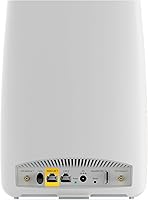
  • Ethernet Ports: Includes one Gigabit WAN/LAN port and one Gigabit LAN port for wired device connections.
  • Mesh Compatibility: Supports tri-band mesh expansion with Orbi satellite models RBS50, RBS50Y, RBS40, RBS40V, RBS20, and RBW30.
  • Dimensions: Physical dimensions measure 3.1 x 8.9 x 6.7 inches (L x W x H).
  • Weight: The unit weighs 1.72 pounds, making it light enough to reposition easily during setup.
  • Power Input: The included 12V/2.5A power adapter accepts universal input voltage ranging from 100 to 240 V.
  • Management App: Network setup and ongoing management are handled through the Orbi mobile app, available for iOS and Android.
  • Security Suite: NETGEAR Armor cybersecurity protection is included as a 30-day free trial and transitions to a paid annual subscription thereafter.
  • Parental Controls: NETGEAR Smart Parental Controls are bundled as a 30-day trial before converting to an optional paid subscription.
  • In-Box Contents: Package includes one LBR20 router, one 2-meter Ethernet cable, one 12V/2.5A power adapter, and a quick start guide.

Related Reviews
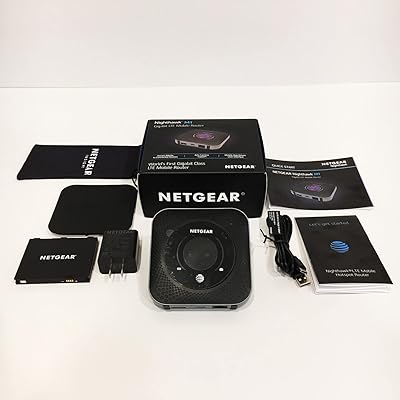
Netgear Nighthawk MR1100 4G LTE Mobile Hotspot Router
85%
87%
Performance
92%
Battery Life
90%
Portability
85%
Connectivity
88%
Ease of Use
More
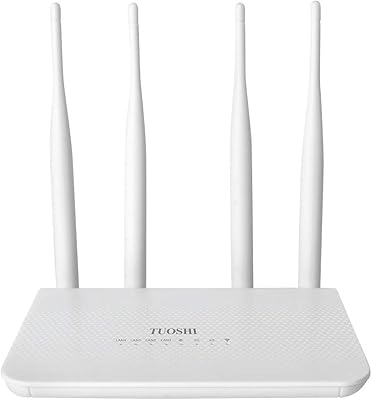
TUOSHI LT15F 4G LTE Modem Router
69%
83%
Setup & Ease of Use
71%
Carrier Compatibility
78%
Signal Reception & Antenna Performance
66%
LTE Speed & Performance
72%
Wi-Fi Coverage & Range
More
Netgear Nighthawk MR1100 4G LTE Mobile Hotspot Router
82%
87%
Performance
78%
Battery Life
91%
Portability
84%
Setup & Installation
65%
Carrier Compatibility
More
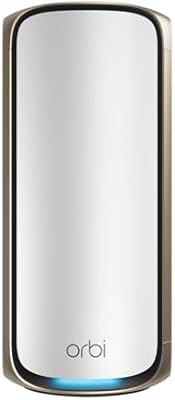
NETGEAR Orbi 970 WiFi 7 Mesh Router
77%
88%
Wireless Performance
83%
Coverage & Range
51%
Value for Money
74%
Setup & Installation
62%
Network Stability
More
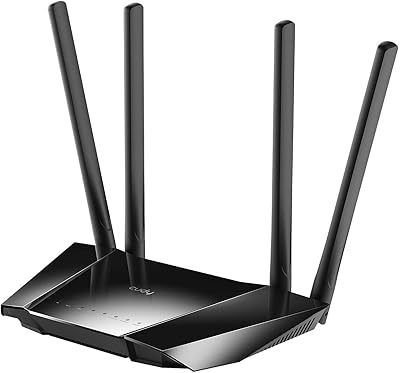
Cudy N300 WiFi Unlocked 4G LTE Modem Router LT400
84%
85%
Performance & Speed
91%
Ease of Setup
88%
VPN Functionality
78%
Range & Coverage
70%
Signal Reliability in Rural Areas
More
KuWFi QC300K-L 300Mbps Outdoor 4G LTE CPE WiFi Router
83%
89%
Ease of Setup
84%
Reliability of Connectivity
86%
Signal Range
91%
Weatherproof Performance
88%
Compatibility with Carriers
More
Netgear Unite Pro AC-781S Mobile Hotspot
68%
81%
Value for Money
74%
Connectivity Performance
67%
Carrier Compatibility
69%
Refurbished Condition
61%
Battery Life
More
NETGEAR R6120 AC1200 Dual Band WiFi Router
74%
92%
Ease of Setup
89%
Value for Money
74%
Wi-Fi Coverage
51%
Wired Ethernet Performance
76%
Wireless Speed
More
Teltonika RUT955 4G/LTE Router
85%
90%
Performance and Reliability
70%
Ease of Setup
88%
Connectivity Options
93%
Dual SIM Failover
85%
Software and Remote Management
More
NETGEAR R6020 AC750 WiFi Router
83%
94%
Ease of Setup
85%
Wi-Fi Performance
72%
Coverage Range
90%
App Experience
91%
Value for Money
More

FAQ

No — the NETGEAR Orbi LBR20 4G LTE WiFi Router is designed to work entirely without a cable, fiber, or DSL provider. You just need a nano SIM card and an active BYOD data plan from AT&T, T-Mobile, or Verizon, and the router connects to the internet over the cellular network.

The Orbi LBR20 is officially certified with AT&T, T-Mobile, and Verizon, so if you are already with one of those three carriers, you should be able to add a compatible BYOD data plan without switching. Other carriers are not officially certified, so compatibility outside these three cannot be guaranteed.

The 1.2 Gbps LTE figure is a theoretical ceiling, not a number you will see under typical conditions. Real-world speeds depend heavily on how close you are to a cell tower, network congestion at a given time, and your carrier's local infrastructure. Users in strong-signal rural areas often report solid, usable speeds, while those farther from towers may see significantly slower results.

Yes, and this is actually one of the more practical use cases for the Orbi LBR20. When configured as a failover connection, it can take over if your primary ISP line drops. Keep in mind that running two internet services — one fixed broadband, one cellular — does mean paying for two separate plans.

Most users find it quite manageable. The Orbi app guides you step by step through inserting the SIM, powering on the router, and naming your network. You do not need to touch any web-based admin interface unless you want to dig into advanced settings. For the average user, it is up and running within 15 to 20 minutes.

Yes, the LBR20 is compatible with several Orbi satellite models including the RBS50, RBS40, RBS20, and RBW30 series. If your existing satellites are on that list, you can integrate them into the mesh and extend coverage beyond the router's standalone 2,000 sq. ft. limit without buying new hardware.

Both NETGEAR Armor and Smart Parental Controls convert to paid annual subscriptions after their respective 30-day trials expire. If you do not want to continue, you will need to cancel before the trial ends to avoid being charged. The router still functions normally for basic internet access without either subscription active.

It fits that scenario well — there is no fixed ISP contract to manage, and setup only requires a SIM card, which means you can activate data when you need it and manage the plan remotely. The app-based management also lets you check in on the network without being physically present.

The router has just two Gigabit Ethernet ports — one configured as a WAN/LAN port and one as a dedicated LAN port. If you need more wired connections, you would need to add a separate network switch. This is one of the more common complaints from buyers who rely on several wired devices.

The Orbi LBR20 uses WiFi 5 (802.11ac), not WiFi 6. For most everyday tasks — streaming, browsing, video calls — this is not a dealbreaker, especially since the bandwidth bottleneck is more likely to be the cellular connection itself than the wireless standard. That said, if future-proofing your wireless hardware matters to you, it is worth factoring in.

Where to Buy