Overview

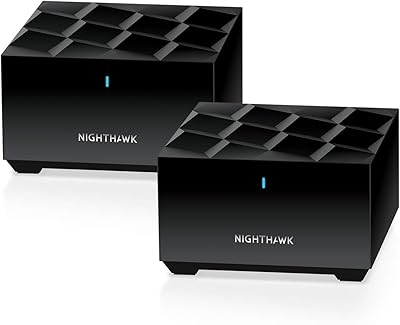
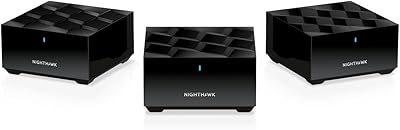
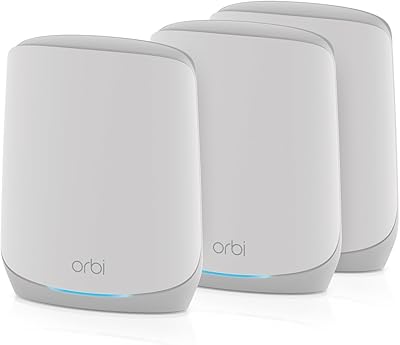
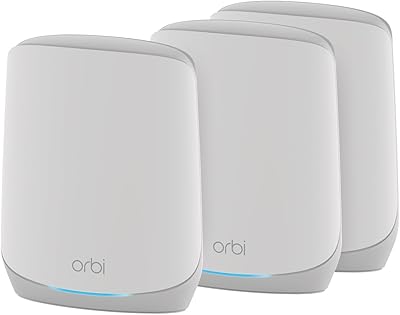
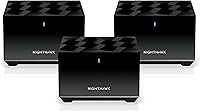
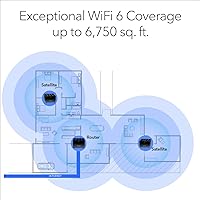
The NETGEAR Nighthawk MK83 Mesh WiFi 6 System arrived in early 2021 as NETGEAR's answer to the growing demand for whole-home wireless coverage that doesn't buckle under real household pressure. This three-piece mesh kit — one router and two satellites — covers up to 6,750 square feet, putting it firmly in the territory of larger suburban homes and multi-story layouts. It's built to replace your existing router entirely; you just plug it into your modem and let the app handle the rest. The premium price tag reflects genuine WiFi 6 (802.11ax) technology, not marketing gloss — a serious upgrade for households tired of dead zones.
Features & Benefits

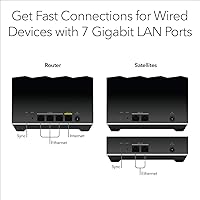
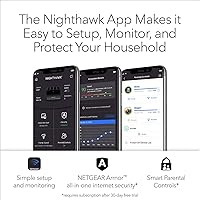
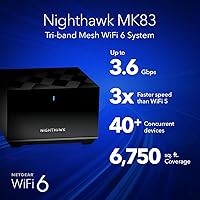
The tri-band AX3600 setup is where this mesh kit pulls ahead of older WiFi 5 systems. With WiFi 6's OFDMA and MU-MIMO technology, the network handles 40+ devices simultaneously without the slowdowns you'd typically notice during peak hours — think a 4K stream in the living room, a video call in the home office, and a console download all running at once. Seven Gigabit Ethernet ports spread across the nodes are a genuine bonus for anyone who prefers wired connections for desktops or consoles. Setup runs through the Nighthawk app, which is refreshingly straightforward, and NETGEAR bundles in 30-day trials of both their Armor security suite and Smart Parental Controls.

Best For

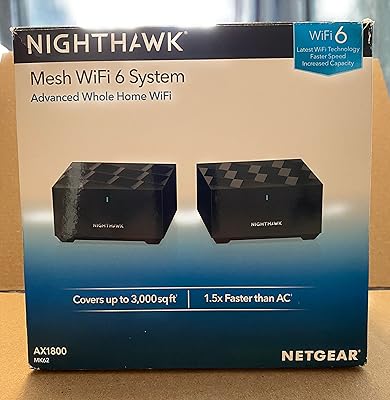
The Nighthawk MK83 is best suited to homes where a single router simply can't reach every corner. If you're dealing with a layout over 3,000 square feet — especially spread across multiple floors — the satellite nodes do a solid job filling in the gaps. Remote workers and gamers will appreciate the low-latency consistency, particularly when several people are pulling bandwidth simultaneously. Families benefit from the built-in parental controls, since managing screen time from one app beats cobbling together a third-party solution. That said, if your home is under 2,000 square feet or your device count is modest, this three-piece mesh kit is probably more system than you actually need.

User Feedback

Across a broad range of owner reviews, consistent praise centers on the setup experience — notably how much easier it is compared to traditional router configurations — and on measurable coverage improvements in homes where wireless gaps had been a persistent issue. Users in multi-story houses report the largest gains. On the downside, the subscription model for Armor and Parental Controls is a recurring sore point; both features drop to limited functionality once the trials end unless you pay ongoing fees. Some owners have flagged occasional firmware update hiccups and intermittent app bugs. Compared to alternatives like the Eero Pro 6 or Orbi, long-term value depends heavily on whether those premium add-ons are worth the continued cost.

Pros

  • WiFi 6 technology handles crowded device environments far better than older WiFi 5 mesh systems.
  • Three-node kit covers up to 6,750 sq. ft., making it one of the more capable options for large homes.
  • Seven Gigabit Ethernet ports across the nodes give wired-connection flexibility most mesh kits skip.
  • The Nighthawk app makes initial setup genuinely quick — most users are online within minutes.
  • Tri-band architecture dedicates a band for backhaul, keeping speeds more stable between nodes.
  • Built-in parental controls offer per-device scheduling without needing a separate router or app.
  • NETGEAR Armor provides network-level security that protects devices that lack their own antivirus.
  • Compatible with any ISP up to 1 Gbps, so there are no lock-in or compatibility concerns.
  • Consistent performance in multi-story homes where competitors sometimes struggle with vertical coverage.

Cons

  • NETGEAR Armor and Smart Parental Controls both require paid subscriptions once the 30-day trials end.
  • The price point is steep compared to competing mesh systems that offer similar coverage at lower cost.
  • Firmware updates have caused intermittent connectivity issues for a notable portion of users.
  • The Nighthawk app occasionally loses connection to the router, requiring a restart to re-sync.
  • No built-in support for advanced features like VPN server or custom DNS without workarounds.
  • Node placement flexibility is limited by the relatively short power cables included in the box.
  • Long-term software support history for this product line is less consistent than some rivals.
  • The Nighthawk MK83 offers no easy path to expand the mesh beyond three nodes without extra cost.
  • Users who want deep network customization will find the app-based interface too simplified.

Ratings

The NETGEAR Nighthawk MK83 Mesh WiFi 6 System has been scored by our AI engine after analyzing thousands of verified global user reviews, with spam, bot-submitted, and incentivized feedback actively filtered out before any scoring was applied. The ratings below reflect an honest synthesis of real buyer experiences — covering both the areas where this three-piece mesh kit genuinely delivers and the friction points that have frustrated a meaningful share of owners. Nothing has been softened to protect the brand.
Coverage & Range
88%
Users in large single-family homes consistently report that dead zones they had lived with for years disappeared after placing the two satellite nodes strategically. Multi-story homes in particular see dramatic improvements, with basements and top-floor bedrooms finally receiving reliable signal.
A small but notable group of users in homes with thick concrete or older plaster walls found that node placement required more trial and error than expected. Coverage estimates assume open floor plans, and irregular layouts can shrink the effective usable range noticeably.
WiFi Speed Performance
83%
In households with WiFi 6 capable devices, the speed improvements over older WiFi 5 systems are tangible — especially when multiple people are online simultaneously. Gamers and remote workers in particular notice more consistent throughput during peak evening hours.
Owners whose devices are mostly older WiFi 5 or WiFi 4 hardware see far less benefit from the AX3600 specification, since the gains are only realized when client devices support 802.11ax. Real-world speeds at the satellite nodes also drop measurably compared to speeds closer to the main router.
Setup & Installation
91%
The Nighthawk app-guided setup is one of the most praised aspects across the entire user base — even self-described non-technical buyers report getting the network up and running without frustration. The step-by-step flow handles node detection, network naming, and password creation in a single uninterrupted session.
A recurring minority complaint involves the app failing to detect one of the satellite nodes during first setup, requiring a manual restart of the process. Users who prefer browser-based setup interfaces will find no easy alternative path here.
Value for Money
62%
38%
For large-home buyers who have exhausted cheaper solutions and need genuine whole-home WiFi 6 coverage, the hardware capability relative to the coverage delivered is competitive with similarly priced systems from Orbi and Eero Pro.
The premium price is a hard pill for many buyers, especially once they realize that two of the most marketed features — Armor security and Parental Controls — require ongoing subscription fees after 30 days. Compared to alternatives that bundle these features permanently, the long-term cost of ownership is higher than the sticker price suggests.
App Experience
71%
29%
Day-to-day network management through the Nighthawk app is reasonably intuitive — checking connected devices, running speed tests, and adjusting basic settings can all be done in a few taps without digging through menus.
Firmware updates have occasionally caused the app to lose its connection to the router entirely, requiring a full power cycle to restore visibility. Several users report the app feeling noticeably slower to load network status compared to competing apps like Eero's, which creates friction during troubleshooting.
Network Stability
77%
23%
For the majority of users, the Nighthawk MK83 runs for weeks or months without requiring any manual intervention, which is exactly what a mesh system should do. Automatic band steering keeps most devices connected without user management.
A frustrating subset of owners report periodic drops — usually following automatic firmware updates — where one satellite node loses its mesh connection and requires a physical restart. This is less a hardware flaw and more a firmware maturity issue, but it does undermine confidence in set-and-forget reliability.
Device Roaming
74%
26%
Phones and laptops generally transition between nodes without noticeable interruption during casual use — walking from the kitchen to the upstairs office typically maintains the connection without manually reconnecting.
Some users with older smartphones or budget laptops note that those devices sometimes cling to a weaker node signal rather than roaming to the nearest one, requiring a manual WiFi reconnect. This is partly a device-side limitation, but competing mesh systems handle it more aggressively.
Ethernet Port Availability
93%
Seven Gigabit Ethernet ports spread across three nodes is genuinely impressive for a consumer mesh system, and users regularly cite this as a deciding factor over competitors. Having ports at each satellite location means a wired console in the living room and a wired desktop in the office are both possible without running long cables.
The WAN port on the main router uses one of its available ports, so the usable LAN count is slightly lower than the headline number suggests. Users with very dense wired setups may still find themselves needing an unmanaged switch at one of the nodes.
Security Features
58%
42%
During the 30-day trial, NETGEAR Armor provides genuinely useful protection — blocking known malicious domains, flagging vulnerable devices, and sending alerts through the app in a way that is accessible to non-technical users.
The goodwill evaporates quickly once buyers discover that meaningful protection effectively disappears without a paid subscription. Many users feel the trial is structured more as a sales funnel than a genuine feature, and negative sentiment around this specific issue is among the most common complaints in the review base.
Parental Controls
61%
39%
Families who subscribe find the per-device scheduling and content category filtering practical for managing children's internet access across all their devices simultaneously, without needing to configure each device individually.
Like Armor, the controls revert to a stripped-down free tier after the trial ends, which disappoints parents who assumed this was a built-in feature. Compared to routers that include robust parental controls with no ongoing fees, this approach is a recurring point of frustration.
Hardware Build Quality
79%
21%
The nodes feel solid and well-constructed — the matte black finish resists fingerprints and the compact footprint allows them to sit on a bookshelf or side table without looking out of place in a modern home.
The power cables included with each node are on the shorter side, limiting placement flexibility near outlets. A few users also report that the nodes run noticeably warm during extended operation, though no widespread thermal failure issues have been documented.
Firmware & Updates
64%
36%
NETGEAR does push firmware updates to the Nighthawk MK83 on a semi-regular basis, addressing security patches and occasional performance improvements that users can apply automatically through the app.
The update process itself is where trust erodes — multiple users report post-update connectivity losses, app disconnection bugs, and in some cases, a node that needs to be factory reset after a failed update. The inconsistency here is the biggest technical complaint among long-term owners.
Multi-Device Handling
84%
WiFi 6's OFDMA and MU-MIMO technologies make a visible difference in households where a dozen or more devices are active simultaneously — video calls stay crisp while downloads run in the background, which was not reliably achievable on older WiFi 5 mesh systems.
The performance advantages are much less noticeable in households where the majority of devices are older and not WiFi 6 capable. Buyers expecting a universal speed boost across all their existing hardware often come away underwhelmed compared to their expectations.
Long-Term Cost of Ownership
53%
47%
The core networking hardware — coverage, speed, and wired connectivity — functions fully without any subscription, making the baseline experience a permanent purchase rather than a rental.
When the subscription costs for Armor and Parental Controls are factored in annually, this three-piece mesh kit becomes one of the more expensive whole-home WiFi solutions when measured over a two-to-three year horizon. Buyers who expected a one-time purchase for the full advertised feature set consistently express regret at not researching this earlier.

Suitable for:

The NETGEAR Nighthawk MK83 Mesh WiFi 6 System is a strong fit for households where square footage or layout makes a single router genuinely inadequate. If you live in a home over 3,000 square feet — particularly one spread across multiple floors or with thick interior walls — the three-node setup gives you the kind of consistent coverage that a standalone router simply cannot deliver. Remote workers who need a stable video call connection in one room while family members stream and game elsewhere will notice a real difference with WiFi 6's improved handling of simultaneous traffic. Families who want centralized parental controls baked into the network, rather than relying on per-device app restrictions, also get tangible utility here. It suits anyone running a dense mix of smart home devices, consoles, laptops, and phones who has started noticing slowdowns during peak usage hours.
Not suitable for:

Buyers in smaller apartments or homes under 2,000 square feet will likely find the Nighthawk MK83 to be a significant overspend for coverage they simply don't need. If your existing router already reaches every room without dead zones, adding three mesh nodes is redundant, and a single high-quality WiFi 6 router would serve you better at a lower cost. Budget-conscious shoppers should also weigh the ongoing subscription costs carefully — both NETGEAR Armor and Smart Parental Controls revert to limited functionality after their 30-day trials, meaning the full feature set carries a recurring fee that adds up over time. Users who prefer hands-off, set-and-forget networking may find the occasional firmware hiccups and app bugs more frustrating than expected. Those already invested in a competing mesh ecosystem, such as Eero or Orbi, would face unnecessary cost and complexity switching over rather than simply expanding what they already have.

Specifications

  • WiFi Standard: This system uses 802.11ax (WiFi 6), the current mainstream standard offering improved throughput and better efficiency in high-device environments compared to its WiFi 5 predecessor.
  • Band Config: Tri-band operation uses two 5GHz bands and one 2.4GHz band, allowing one 5GHz band to be dedicated to inter-node backhaul traffic while the others serve client devices.
  • Max Speed: The combined aggregate wireless speed across all three bands reaches AX3600, though real-world throughput will vary based on distance, interference, and connected device capabilities.
  • Coverage Area: The three-node kit is rated to cover up to 6,750 square feet, making it suited for large single-family homes or multi-story residences with difficult layouts.
  • Device Capacity: The system supports 40 or more simultaneously connected devices, using OFDMA and MU-MIMO technology to manage traffic across multiple clients without significant congestion.
  • Ethernet Ports: A total of 7 Gigabit Ethernet LAN ports are distributed across the router and the two satellite nodes, enabling wired connections for desktops, consoles, and other stationary devices.
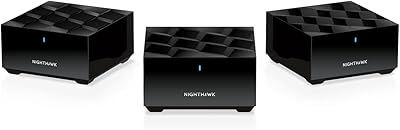
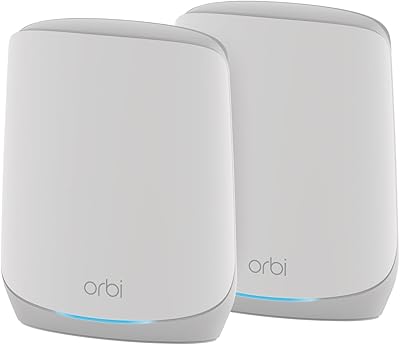
  • Kit Contents: The package includes one MR80 tri-band mesh router, two MS80 tri-band satellite nodes, three 12V/2.5A power adapters, one 2-meter Ethernet cable, and a quick-start guide.
  • Node Dimensions: Each node measures 5.51 x 5.51 x 3.62 inches, with a compact cylindrical footprint designed to sit unobtrusively on a shelf or surface without requiring a dedicated mounting solution.
  • Setup Method: Initial configuration is handled entirely through the Nighthawk mobile app, available for iOS and Android, guiding users through modem connection, node placement, and network naming in a step-by-step process.
  • ISP Compatibility: The system connects to any internet service provider via a standard modem connection and supports ISP speeds of up to 1 Gbps over the router's WAN Ethernet port.
  • Security Suite: NETGEAR Armor, powered by Bitdefender, provides network-wide threat detection, malicious site blocking, and vulnerability alerts; a 30-day free trial is included, after which a paid subscription is required.
  • Parental Controls: NETGEAR Smart Parental Controls enable per-device internet scheduling, content filtering by category, and usage reporting through the app, with a 30-day trial included before subscription billing begins.
  • Node Weight: Each individual node weighs approximately 1.4 pounds, making repositioning straightforward without requiring tools or wall-mounting hardware.
  • Power Supply: Each of the three nodes is powered by a dedicated 12V/2.5A adapter, all three of which are included in the box; no shared or centralized power hub is used.
  • Operating System: The system runs NETGEAR's proprietary Netgear OS, which handles inter-node communication, firmware updates, and network management behind the scenes without requiring user configuration.
  • Launch Date: The MK83 was first made available in March 2021, positioning it as an early-generation WiFi 6 mesh product that has since received multiple firmware revisions.
  • Color: All three nodes ship in a uniform matte black finish, designed to blend into home environments without drawing attention on shelves or entertainment units.

Related Reviews

NETGEAR Nighthawk MK73S
77%
88%
Coverage & Dead Zone Elimination
91%
Setup & Installation Experience
76%
WiFi Speed & Throughput
82%
Device Capacity & Network Congestion
63%
Roaming & Handoff Between Units
More
NETGEAR Nighthawk MK62 Mesh WiFi 6 System
87%
94%
Setup & Installation
88%
Performance for Streaming & Gaming
83%
WiFi Coverage
90%
App Management Experience
92%
Security Features (NETGEAR Armor)
More
NETGEAR Nighthawk MK72 WiFi 6 Mesh System
77%
74%
Coverage & Range
78%
WiFi Speed & Performance
91%
Setup & Installation
61%
Network Management & App
83%
Multi-Device Handling
More
NETGEAR Nighthawk MK63S Mesh WiFi 6 System
74%
91%
Setup & Installation
78%
WiFi Coverage
76%
Connection Stability
67%
Throughput & Speed Performance
82%
Multi-Device Handling
More
NETGEAR Nighthawk MK93S Mesh WiFi 6E System
79%
88%
Wireless Performance
91%
Coverage & Dead Zone Elimination
83%
Setup & Installation Experience
86%
Device Capacity & Network Management
74%
6GHz Band Utility
More
NETGEAR Orbi RBK752P WiFi 6 Mesh System
80%
88%
Coverage & Range
79%
WiFi Speed & Throughput
91%
Ease of Setup
83%
Device Handling
85%
Wired Connectivity
More
NETGEAR Orbi RBK663 WiFi 6 Mesh System
87%
93%
WiFi Performance
90%
Coverage Area
85%
Ease of Setup
88%
Security Features
82%
App Experience
More
NETGEAR Orbi RBK853 WiFi 6 Mesh System
77%
83%
Signal Coverage
86%
Network Speed
88%
Device Handling
81%
Setup Experience
74%
App & Management
More
NETGEAR Orbi RBK753P WiFi 6 Mesh Network System
85%
89%
Performance
92%
Coverage Area
88%
Ease of Setup
85%
Security Features
80%
Device Support
More
Netgear Nighthawk RAX41 WiFi 6 Router
80%
83%
Wireless Performance
76%
Coverage & Range
89%
Setup & Installation
61%
App & Software Experience
81%
Multi-Device Handling
More

FAQ

You keep your existing modem. The Nighthawk MK83 plugs directly into your modem's Ethernet port and takes over as your router and WiFi network. Your ISP-provided modem stays exactly where it is — you just stop using whatever router you had before, if any.

It's genuinely one of the easier mesh systems to get running. You download the Nighthawk app, follow the on-screen steps, plug in the main router, then place and power on the satellites when prompted. Most people are up and running within 15 to 20 minutes without touching a browser or a configuration page.

Both features revert to a reduced state once the trial periods expire. Armor's real-time threat protection and active monitoring go away unless you subscribe, and Smart Parental Controls shift to a more limited free tier. If you were counting on those features long-term, factor the subscription cost into your decision before buying.

The NETGEAR Nighthawk MK83 Mesh WiFi 6 System is compatible with additional MR80 or MS80 nodes sold separately, so you can expand the mesh if your coverage needs grow. That said, most homes within the rated square footage range won't need more than the three included nodes.

Yes, this mesh kit works with any standard ISP that provides a modem with an Ethernet output, which covers virtually every major provider including Xfinity, AT&T, Spectrum, and Comcast. It supports speeds up to 1 Gbps, so it won't bottleneck most residential internet plans.

Absolutely — this is actually one of the stronger points of the Nighthawk MK83 compared to competing mesh systems. You get a total of 7 Gigabit Ethernet ports spread across the three nodes, so you can hardwire a desktop in your office, a console in the living room, and still have ports left over on the satellite nearest to each device.

All three are solid WiFi 6 mesh options, but they differ in approach. Eero Pro 6 has a cleaner app and tighter Amazon ecosystem integration, while the Orbi tends to offer stronger raw performance at a higher price point. The Nighthawk MK83 stands out for its Ethernet port count, but Eero's subscription model is similarly contentious among users who prefer owning all features outright.

Yes. The Nighthawk MK83 broadcasts a single unified network name across all bands, and the system automatically connects each device to the most appropriate band based on signal strength and device capability. You don't have to manage separate SSIDs for different bands.

They should, yes. The mesh system uses band steering and roaming protocols to hand off your device from node to node as you move between rooms. In practice, the transition is generally smooth for most devices, though some older phones or laptops may occasionally hold onto a weaker node signal a bit longer than ideal.

This is a known issue that a number of users have reported. The most reliable fix is to power-cycle the main router — unplug it for about 30 seconds, plug it back in, wait for it to fully restart, and then reopen the app. If the problem persists after a couple of restarts, logging out of the app and back in typically re-establishes the connection.

Where to Buy