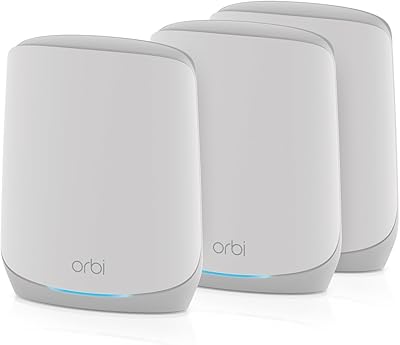
Overview

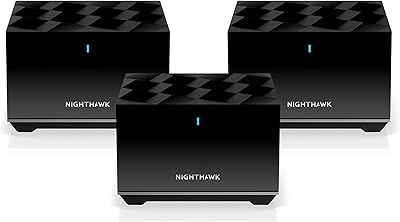
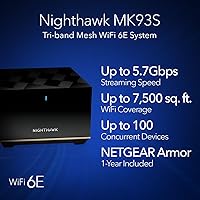
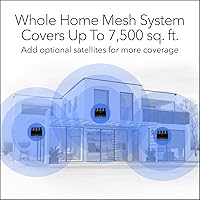
The NETGEAR Nighthawk MK93S Mesh WiFi 6E System is a three-piece setup — one router and two satellites — designed to blanket homes up to 7,500 square feet with fast, consistent wireless coverage. It targets households where a single router simply cannot keep up with dozens of devices competing for bandwidth. The kit plugs into any existing cable modem and works with virtually any ISP delivering up to 2.5Gbps. One year of NETGEAR Armor security is bundled in, though that subscription does renew at a cost afterward. The units are sizable, so placement planning matters before you unbox anything.
Features & Benefits

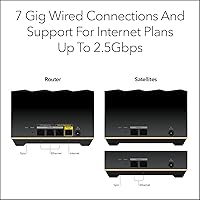
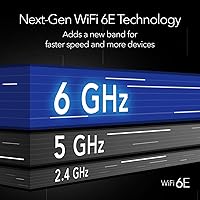
WiFi 6E adds a dedicated 6GHz band on top of the standard 2.4GHz and 5GHz channels — think of it as opening a third lane on a highway that only newer devices can use, which keeps older gadgets from crowding out your fastest hardware. The tri-band architecture handles up to 100 devices without the congestion you might expect at that scale. Seven Gigabit Ethernet ports spread across the router and satellites give you real flexibility for wired connections, and port aggregation is supported for those who need extra throughput. Automatic firmware updates handle security patching quietly in the background, which is a practical benefit most buyers overlook.

Best For

This WiFi 6E kit makes the most sense in larger homes and open layouts where dead zones are a persistent frustration. If your household runs 20 or more active devices across streaming, gaming, and smart-home gadgets simultaneously, the load-balancing architecture here handles that daily pressure well. Early adopters who already own WiFi 6E laptops or phones will actually tap into the 6GHz band and notice the difference. It also suits anyone tired of managing a patchwork of extenders and a separate router — replacing that entire setup with a unified system is where this mesh genuinely pays off. A standalone cybersecurity subscription would be an added expense elsewhere.

User Feedback

Across roughly 139 ratings, this mesh system holds a 4.0-star average, which reflects genuine satisfaction with a few honest reservations mixed in. Buyers consistently praise how straightforward the app-guided setup is, and many report noticeably improved speeds in rooms that were previously unreliable. The most common friction points are the app dependency for configuration and the realization that the Armor subscription is not permanently free. A handful of technically experienced users noted they wanted more granular controls than the app exposes. Satellite placement generates real debate in reviews — most agree that spacing units too far apart or through thick walls hurts performance significantly, so experimenting with positioning early is worth the effort.

Pros

  • Three-node coverage handles homes up to 7,500 sq. ft. without dead zones or signal drop-offs.
  • The 6GHz band delivers noticeably lower latency for WiFi 6E-capable phones and laptops.
  • Seven Gigabit Ethernet ports spread across all nodes give wired devices real flexibility.
  • App-guided setup takes most buyers under 20 minutes, even without networking experience.
  • Tri-band architecture manages 100 connected devices without the slowdowns older routers show under load.
  • Automatic firmware updates keep the network patched without any manual involvement.
  • Port aggregation support offers a practical throughput boost for users running NAS drives or wired workstations.
  • Compatible with virtually any cable modem and works across cable, fiber, satellite, and DSL connections.
  • Built-in Armor security suite actively monitors threats rather than just relying on static firewall rules.

Cons

  • The Armor security subscription renews at an annual cost after the first year — it is not a permanent inclusion.
  • Setup is entirely app-dependent, with no browser-based management interface available for desktop users.
  • All Ethernet ports are capped at 1Gbps, which limits wired performance for multi-gig fiber subscribers.
  • The three units are physically large, making discreet placement a real challenge in smaller living spaces.
  • 6GHz coverage range is shorter than 5GHz, so its benefits fade quickly through walls or at distance.
  • Advanced routing controls like VLAN support and per-device QoS are notably absent from the app.
  • Buyers without WiFi 6E client devices cannot tap into the 6GHz band and pay a premium they cannot use yet.
  • Some users reported node dropouts following automatic firmware updates, requiring manual reboots to resolve.
  • Customer support response quality is inconsistent, with multiple buyers describing slow or unhelpful first contacts.

Ratings

The NETGEAR Nighthawk MK93S Mesh WiFi 6E System earned its scores after our AI engine processed verified buyer reviews from global marketplaces, actively filtering out incentivized, repeated, and bot-generated submissions. What remains reflects the honest experiences of real households — from tech-savvy early adopters to families who just want WiFi that works in every corner of the house. Both the genuine strengths and the recurring frustrations are weighted transparently in every category below.
Wireless Performance
88%
In homes where a single router previously struggled to reach the back bedrooms or garage, buyers report a dramatic improvement in consistent speeds. Streaming 4K content on multiple TVs simultaneously while others game online is the kind of real-world load this system handles without the buffering pauses users were accustomed to.
A portion of reviewers noted that peak speeds advertised require WiFi 6E-capable client devices, which many households do not yet own across the board. Older laptops and phones land on the 2.4GHz or 5GHz bands and do not experience the headline throughput figures.
Coverage & Dead Zone Elimination
91%
The three-unit configuration genuinely covers sprawling single-story homes and multi-floor layouts that previously required four or more extenders. Buyers with open-plan living areas and detached offices consistently praised the reliable signal handoff between nodes as they moved through the house.
Coverage claims assume relatively open architecture. Reviewers in homes with thick concrete or brick interior walls reported needing to reconsider satellite placement carefully, and a few found the 7,500 square foot figure optimistic in older construction with dense wall materials.
Setup & Installation Experience
83%
The Nighthawk app walks users through the entire process step by step, and a notable number of non-technical buyers described completing the full setup in under 20 minutes without calling for help. Having Ethernet cable included in the box is a small but appreciated practical touch that speeds things along.
The setup process is entirely app-dependent, which frustrated a subset of buyers who prefer a browser-based interface or have phones with compatibility quirks. A few users reported the app losing connection mid-setup, requiring a restart of the process from the beginning.
Device Capacity & Network Management
86%
Households running smart home hubs, multiple streaming sticks, tablets, laptops, phones, and game consoles simultaneously found the network held up without the slowdowns they experienced on previous routers. The tri-band architecture does a solid job distributing devices across channels without manual intervention.
Managing which devices connect to which band requires diving into the app, and advanced users wanting detailed QoS controls or per-device bandwidth prioritization found the options more limited than competitors at a similar price tier. Power users flagged this as a real gap.
6GHz Band Utility
74%
26%
For buyers who already own recent-generation WiFi 6E smartphones or the latest ultrabooks, the 6GHz band delivers noticeably lower latency and cleaner speeds during peak household usage hours. It essentially reserves a fast lane for devices that can use it, which is genuinely useful in device-dense homes.
The 6GHz band has shorter range and does not penetrate walls as effectively as 5GHz, so its benefits are most pronounced when devices are in the same room or adjacent to a node. Buyers who expected 6GHz coverage to match the overall system range were sometimes disappointed.
Build Quality & Hardware Design
79%
21%
The units feel solid and well-constructed, not the cheap plastic that some budget mesh systems ship with. Buyers noted the matte black finish holds up well and does not attract fingerprints visibly, which matters when the router sits on a shelf in a living space.
The units are notably large, and finding discreet placement spots for three of them is a genuine logistical challenge in smaller homes or apartments. A few reviewers wished NETGEAR had offered a more compact satellite design given the premium price of the kit.
Security Features
81%
19%
Having automatic firmware updates running silently in the background removes one of the most commonly neglected home network maintenance tasks. The bundled Armor suite provides real-time threat monitoring that caught flagged devices on the network for several reviewers who did not expect to find anything.
The first year of Armor is included, but the annual renewal cost after that catches some buyers off guard, as the product listing language does not emphasize this prominently. Buyers who do not renew lose access to active threat protection and are left with basic firmware-level security only.
Value for Money
67%
33%
For buyers who need the full coverage footprint and have WiFi 6E devices to take advantage of the 6GHz band, the per-square-foot cost compares reasonably against buying a router plus multiple extenders separately. The included Ethernet cable and one-year security subscription add tangible value at purchase.
The asking price is a significant commitment, and buyers who live in average-sized homes or do not own WiFi 6E client devices are essentially paying a premium for capability they cannot yet use. Several reviewers openly questioned whether the upgrade from a WiFi 6 mesh system justified the cost difference.
App & Software Experience
63%
37%
The Nighthawk app is clean and accessible enough for everyday tasks like checking connected devices, running a speed test, or enabling guest networks. Casual users generally reported that the core functionality they needed was easy to find without reading a manual.
Advanced users found the app frustratingly shallow when it came to routing controls, VLAN support, or detailed traffic monitoring. Several technically experienced reviewers specifically called out the lack of a web-based management interface as a regression compared to older NETGEAR products they had used before.
Ethernet Port Availability
87%
Having seven Gigabit Ethernet ports distributed across all three nodes is a practical advantage that mesh systems from some competing brands do not match. Buyers who run wired connections to desktop PCs, NAS drives, or game consoles appreciated not having to compromise on which devices could go wired.
All seven ports are limited to 1Gbps, and buyers with multi-gig fiber plans or NAS setups that benefit from 2.5G or 10G wired connections hit a ceiling. Port aggregation helps partially, but a single 2.5G port on the main router would have meaningfully future-proofed the hardware.
Reliability & Uptime
82%
18%
The majority of long-term users reported months of stable operation without needing to restart the system or troubleshoot dropped connections. For households where network reliability is non-negotiable — remote workers, home businesses, households with smart security systems — this consistency is the core selling point.
A smaller but vocal group of reviewers experienced periodic node dropouts, particularly after firmware updates. Rebooting the system resolved the issue in most reported cases, but having a mesh system require manual intervention after an automatic update undermines the hands-off reliability buyers expect at this price.
Compatibility with ISPs & Modems
89%
Working with virtually any modern cable modem regardless of ISP is a real convenience, and reviewers switching from bundled ISP-provided router-modem combos found the transition straightforward. Support for cable, fiber, satellite, and DSL connections means this kit fits a wide range of home infrastructure setups.
A handful of users on specific ISP configurations — particularly those requiring modem authentication or bridge mode — reported needing to contact support to get the connection configured correctly. The setup app does not always surface these edge cases clearly for users who are not networking-literate.
Mesh Backhaul Performance
77%
23%
When satellites are positioned with reasonable line-of-sight or through a single standard interior wall, the wireless backhaul holds up well enough that most buyers never feel the need to run a wired backhaul. Multi-floor deployments with satellites on different levels reported strong inter-node communication.
In layouts where satellites need to pass signal through multiple walls or over long distances, backhaul performance degrades and the 6GHz backhaul band loses its advantage. Buyers expecting plug-and-play optimization in complex floor plans sometimes needed multiple repositioning attempts to find a stable configuration.
Customer Support Experience
58%
42%
NETGEAR offers phone and chat support channels, and buyers who reached a knowledgeable agent generally reported their issues being resolved. The online knowledge base covers common setup and troubleshooting scenarios adequately for users willing to search before calling.
Wait times and initial response quality drew consistent criticism in reviews, with multiple buyers describing frustrating first-contact experiences before reaching someone who could actually help. For a premium-tier product, several reviewers felt post-purchase support did not match the quality implied by the purchase price.

Suitable for:

The NETGEAR Nighthawk MK93S Mesh WiFi 6E System is built for households where connectivity is genuinely stretched thin — think large two-story homes, sprawling ranch layouts, or open-plan spaces where a single router has never managed to reach every corner reliably. It makes particular sense for families or remote workers who have accumulated 20 or more active devices, from smart TVs and game consoles to security cameras and voice assistants, all competing for bandwidth at once. Early adopters who have already invested in WiFi 6E laptops, recent-generation smartphones, or high-end tablets will actually unlock the 6GHz band's advantages and notice a tangible difference in low-latency responsiveness. Buyers who are tired of managing a patchwork of extenders bolted onto an aging router will appreciate having one unified system that handles coverage, security, and device management in a single app. The bundled Armor security subscription is also a genuine draw for households that want active malware and threat protection without sourcing and paying for a separate service from day one.

Not suitable for:

The NETGEAR Nighthawk MK93S Mesh WiFi 6E System is harder to justify for buyers who live in average-sized apartments or smaller homes where a single high-quality router would cover the space without satellites. If your device inventory is modest — a couple of laptops, a few phones, and a smart TV — the full capacity of this system will sit unused, and the premium you pay for tri-band WiFi 6E hardware will not translate into a meaningful day-to-day improvement. Advanced networking users who want granular controls like per-device traffic prioritization, VLAN configuration, or a proper browser-based management interface will find the app-only approach frustratingly limiting compared to other options at a similar price point. It is also worth noting that the Armor security subscription included at purchase renews annually at an added cost, which changes the long-term value calculation for buyers who assumed security coverage was permanent. Finally, anyone whose home has thick concrete or brick walls throughout should approach the coverage estimates with caution, as dense construction materials can significantly undercut the real-world range of the satellites.
Specifications

  • WiFi Standard: This mesh system uses the 802.11ax (WiFi 6E) standard, the latest generation offering improved throughput, reduced congestion, and access to the 6GHz frequency band.
  • Frequency Bands: Tri-band operation covers 2.4GHz, 5GHz, and 6GHz simultaneously, allowing the system to distribute devices across three separate wireless channels.
  • Max Aggregate Speed: Combined aggregate wireless throughput reaches up to 5.7Gbps across all three bands under ideal conditions.
  • Coverage Area: The three-unit system is rated to cover up to 7,500 square feet of living space under typical residential conditions.
  • Device Capacity: The network supports up to 100 simultaneously connected devices without significant degradation in per-device performance.
  • Included Units: The kit ships with one tri-band mesh router (MR90) and two tri-band mesh satellites (MS90).
  • Ethernet Ports: Seven Gigabit Ethernet ports are distributed across the system — three on the router and two on each satellite — supporting wired device connections and optional wired backhaul.
  • Port Aggregation: Port aggregation is supported on the router, allowing two Ethernet ports to be bonded for increased wired throughput to a compatible switch or NAS device.
  • ISP Compatibility: The system connects to any existing cable modem and is compatible with cable, fiber, satellite, and DSL internet services delivering up to 2.5Gbps.
  • Security Suite: NETGEAR Armor is included for the first year, providing active malware protection, threat monitoring, and identity-theft safeguards with automatic firmware updates; renewal is required after year one.
  • Operating System: The router and satellites run ZyNOS, NETGEAR's proprietary network operating system, managed through the Nighthawk mobile app.
  • Power Supply: Each unit in the kit is powered by a dedicated 12V / 2.5A adapter; three power adapters are included in the box.
  • Included Accessories: The box contains one 2-meter (6-foot) Ethernet cable, three power adapters, a quick start guide, the router, and two satellites.
  • Total Kit Weight: The complete kit, including all three units, weighs approximately 7.19 pounds.
  • Color & Finish: All three units share a matte black finish designed to blend into home environments without drawing attention.
  • Model Number: The full system model number is MK93S-100NAS, intended for use in the United States only.
  • WPS Support: Wi-Fi Protected Setup (WPS) is supported for simplified pairing of compatible wireless devices without manual password entry.
  • ASIN: The Amazon Standard Identification Number for this product listing is B0CFBHF9Z2.

Related Reviews
NETGEAR Nighthawk MK73S
77%
88%
Coverage & Dead Zone Elimination
91%
Setup & Installation Experience
76%
WiFi Speed & Throughput
82%
Device Capacity & Network Congestion
63%
Roaming & Handoff Between Units
More
NETGEAR Nighthawk MK62 Mesh WiFi 6 System
87%
94%
Setup & Installation
88%
Performance for Streaming & Gaming
83%
WiFi Coverage
90%
App Management Experience
92%
Security Features (NETGEAR Armor)
More
NETGEAR Nighthawk MK72 WiFi 6 Mesh System
77%
74%
Coverage & Range
78%
WiFi Speed & Performance
91%
Setup & Installation
61%
Network Management & App
83%
Multi-Device Handling
More
NETGEAR Nighthawk MK83 Mesh WiFi 6 System
74%
88%
Coverage & Range
83%
WiFi Speed Performance
91%
Setup & Installation
62%
Value for Money
71%
App Experience
More
NETGEAR Nighthawk MK63S Mesh WiFi 6 System
74%
91%
Setup & Installation
78%
WiFi Coverage
76%
Connection Stability
67%
Throughput & Speed Performance
82%
Multi-Device Handling
More
NETGEAR Nighthawk RAXE500 WiFi 6E Tri-Band Router
78%
88%
Wireless Speed Performance
71%
6GHz Band Utility
86%
Multi-Device Handling
73%
Setup & App Experience
82%
Coverage & Range
More
NETGEAR Orbi RBK663 WiFi 6 Mesh System
87%
93%
WiFi Performance
90%
Coverage Area
85%
Ease of Setup
88%
Security Features
82%
App Experience
More
NETGEAR Orbi RBK752P WiFi 6 Mesh System
80%
88%
Coverage & Range
79%
WiFi Speed & Throughput
91%
Ease of Setup
83%
Device Handling
85%
Wired Connectivity
More
NETGEAR Orbi RBK853 WiFi 6 Mesh System
77%
83%
Signal Coverage
86%
Network Speed
88%
Device Handling
81%
Setup Experience
74%
App & Management
More
TP-Link Deco XE75 Mesh WiFi System 1-Pack
77%
91%
Setup Experience
78%
WiFi Coverage
83%
Real-World Speed
62%
6 GHz Band Utility
86%
Multi-Device Performance
More

FAQ

You do not need a new modem. The Nighthawk MK93S connects to any standard cable modem you already own, regardless of brand. It works with virtually every major ISP including cable, fiber, DSL, and satellite providers, as long as your plan delivers up to 2.5Gbps. Just plug the router into your existing modem with the included Ethernet cable and follow the app setup.

It is included for the first year at no extra charge, but it is not permanently free. After that initial 12-month period, continuing Armor protection requires a paid annual renewal. If you choose not to renew, the router still functions normally, but the active threat monitoring, malware scanning, and identity protection features will no longer be active.

That depends entirely on what devices you own. The 6GHz band is only accessible to WiFi 6E-certified devices — newer flagship smartphones, recent-generation laptops, and select tablets released in the last couple of years. If most of your devices are older, they will connect on the 2.4GHz or 5GHz bands as usual, and you will not experience the 6GHz advantage directly. For households that are actively upgrading their devices, the difference in low-latency responsiveness is real.

Setup is genuinely straightforward for most people. You download the Nighthawk app, plug the main router into your modem, and the app walks you through the rest step by step — including placing and activating the satellites. Most buyers report finishing the full setup in 15 to 20 minutes. The one thing to know is that everything runs through the app; there is no traditional browser-based setup page.

A good rule of thumb is to position each satellite roughly halfway between the main router and the area you want to extend coverage to. Avoid tucking them behind large appliances, inside cabinets, or in corners. Placing them at a mid-height shelf rather than on the floor helps the signal spread more evenly. If you have a two-story home, putting one satellite on each floor typically works well.

Yes, absolutely. The router and satellites continue working as a fully functional mesh WiFi system whether or not you maintain the Armor subscription. You just lose access to the active security monitoring features. Automatic firmware updates for the hardware itself continue regardless of your Armor subscription status.

It replaces your existing router entirely. You connect the main MR90 router directly to your modem, and it takes over all routing and WiFi duties for your home. There is no need to keep your old router running alongside it — in fact, doing so would likely cause network conflicts.

For most gaming setups, yes. The tri-band architecture keeps gaming traffic from competing with household streaming and browsing, and the 6GHz band offers notably low latency for compatible devices. If you play on a wired connection, the Ethernet ports on the satellites mean you can run a cable directly to a console or PC without routing it back to the main router. Competitive gamers who want highly granular QoS controls may find the app a bit limited, though.

The rest of the network continues operating. Devices that were connected through the offline satellite will either drop their connection temporarily or fall back to a weaker signal from another node, depending on their physical location. Once the satellite comes back online, connected devices should reconnect to it automatically without any manual steps.

NETGEAR does sell compatible add-on satellites separately, so you can extend coverage beyond what the included two-satellite kit provides. This is worth considering if you have a particularly large or irregularly shaped home where three units leave gaps. Check NETGEAR's compatibility list to confirm which satellite models work with the MR90 router before purchasing additional units.

Where to Buy