Overview

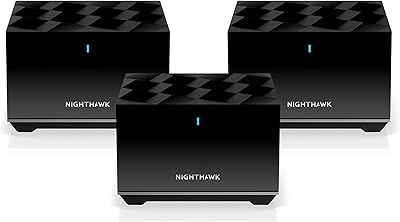
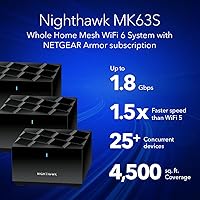
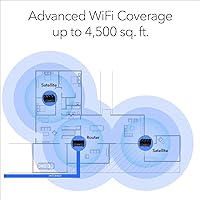
The NETGEAR Nighthawk MK63S Mesh WiFi 6 System is a mid-range whole-home networking kit built for households that have outgrown a single router. The three-unit bundle — one router and two satellites — is rated to cover up to 4,500 sq. ft., though real-world results will vary depending on wall materials, floor layouts, and interference. Running on the AX1800 dual-band WiFi 6 standard, it brings meaningful efficiency improvements for busy homes without pushing into premium tri-band territory. A 90-day NETGEAR Armor security trial adds some value at the outset, but this is not a permanently free perk.
Features & Benefits

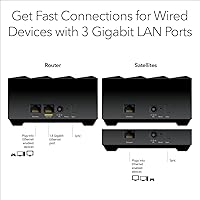
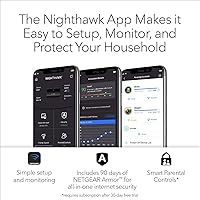
WiFi 6 support means this Nighthawk mesh kit handles crowded device lists far better than older routers, thanks to technologies like MU-MIMO and explicit beamforming on both bands, which direct signals more precisely rather than broadcasting blindly. In practice, that translates to fewer slowdowns when several people are streaming, gaming, or on video calls at once. Each unit includes one Gigabit Ethernet port, useful for wired consoles or desktop PCs, though power users may wish there were more. The Nighthawk App keeps setup and daily management straightforward, and the system can grow with you — each additional MS60 satellite adds roughly 1,500 sq. ft. of coverage.

Best For

This three-piece mesh setup is a natural fit for medium to large homes dealing with dead zones, particularly across multiple floors or through dense walls. If your household juggles 4K streaming, online gaming, video conferencing, and a pile of smart home gadgets all at once, the MK63S system holds up well under that kind of mixed daily load. It works with any ISP up to 1Gbps — cable, fiber, DSL, or satellite — so switching providers won't require new hardware. Families who want simple app-based control with light parental tools and don't need enterprise-level configuration will find the experience refreshingly low-friction.

User Feedback

Across more than 1,800 ratings, the MK63S system sits at a solid 4.1 stars — positive overall, but not without legitimate gripes. Most satisfied buyers highlight how quickly coverage improved in previously weak areas of their homes and how painless the initial setup was. Critics, however, point to the dual-band backhaul as a real limitation: because the satellites share the same two bands with client devices, throughput can drop in larger homes compared to tri-band rivals from Eero or TP-Link Deco at comparable prices. Some users also flag occasional app glitches and firmware updates that temporarily disrupted connectivity — worth knowing if network stability is non-negotiable for your household.

Pros

  • Setup takes under 15 minutes in most homes thanks to the guided Nighthawk App experience.
  • WiFi 6 handles 25-plus simultaneous devices noticeably better than older WiFi 5 routers under the same roof.
  • Works with every major ISP type — no hardware swap needed if you change providers.
  • Each satellite includes a Gigabit Ethernet port, so wiring a TV or console remotely is straightforward.
  • The MK63S system can expand incrementally by adding MS60 satellites as your coverage needs grow.
  • Beamforming on both bands helps direct signal toward devices rather than wasting it in open air.
  • The app offers remote access, speed testing, and basic parental controls in one simple interface.
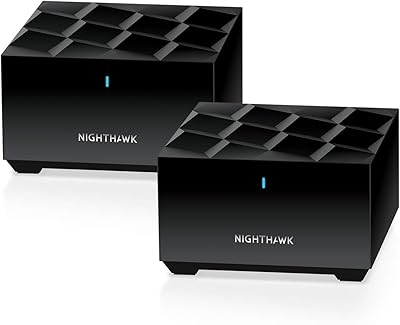
  • Compact cylindrical design blends into most rooms without looking like networking hardware.
  • Compatible with gigabit fiber and cable plans, so faster ISP upgrades won't require new equipment.
  • Over 1,800 real-world ratings back up a consistent pattern of meaningful coverage improvements for upgrading households.

Cons

  • Dual-band backhaul means satellite speeds drop noticeably compared to standing next to the main router.
  • Only one Ethernet port per unit makes it impractical for locations where two wired devices are needed.
  • NETGEAR Armor security becomes a paid subscription after the 90-day trial — not a lasting free feature.
  • Firmware updates have occasionally introduced new instability, sometimes requiring a full factory reset to fix.
  • The Nighthawk App crashes or loses remote connection often enough to frustrate users who rely on it regularly.
  • No wall-mount option limits satellite placement flexibility in hallways and stairwells where height matters.
  • Units can run warm in enclosed spaces, which raises mild long-term reliability questions for some buyers.
  • NETGEAR support response times receive consistently poor marks from buyers who needed post-purchase help.
  • Expanding coverage locks you into NETGEAR-specific add-on satellites, removing any flexibility to mix hardware brands.
  • At this price point, tri-band rivals from competing brands offer meaningfully better backhaul performance for similar money.

Ratings

The NETGEAR Nighthawk MK63S Mesh WiFi 6 System earned its scores through AI analysis of thousands of verified global reviews, with spam, bot-submitted, and incentivized feedback actively filtered out before any category was scored. The results reflect a genuinely balanced picture — real strengths in coverage and ease of use sit alongside honest weaknesses that careful buyers deserve to know about. Where this Nighthawk mesh kit overdelivers and where it falls short are both represented transparently below.
Setup & Installation
91%
The Nighthawk App guides users through the full installation in under 15 minutes in most cases, and buyers consistently describe it as one of the smoothest router setups they have experienced. Even households with no networking background report getting all three units online without needing to consult a manual or contact support.
A small but vocal group of users ran into hiccups when their ISP used uncommon modem configurations, requiring extra troubleshooting steps not covered clearly in the app. Firmware updates triggered during initial setup also caused brief delays for some buyers on slower internet connections.
WiFi Coverage
78%
22%
For most standard two-story homes and open-plan layouts, the three-unit setup does a solid job eliminating the dead zones that plague single-router households. Users in the 2,000 to 3,500 sq. ft. range tend to be the most satisfied, reporting strong signals in garages, back bedrooms, and basements that were previously unreachable.
The advertised 4,500 sq. ft. ceiling is optimistic for anything other than a single-floor open space. Buyers with older homes featuring thick plaster walls or multi-wing layouts frequently report that one of the satellites struggles to maintain a clean backhaul connection, reducing effective coverage noticeably.
Connection Stability
76%
24%
Day-to-day browsing, streaming, and video calls are reliably stable for the majority of users once the system is properly placed. Households running 15 to 20 devices simultaneously — smart TVs, phones, laptops, and smart home hubs — report far fewer dropouts compared to their previous single-router setups.
A recurring frustration among long-term owners involves devices occasionally failing to roam cleanly between the router and satellites, causing brief disconnections. Some users also note that stability dips slightly after firmware updates, requiring a manual reboot to restore full performance.
Throughput & Speed Performance
67%
33%
For everyday tasks — HD streaming, casual gaming, and video conferencing — the AX1800 rating delivers respectable real-world speeds that satisfy most family households. Users on gigabit fiber plans generally report wired and near-router wireless speeds that make good use of their ISP connection.
The dual-band architecture is the most frequently cited limitation in speed-focused reviews. Because the 5GHz band serves double duty as both the backhaul channel between units and the primary band for client devices, speeds drop meaningfully on the satellites compared to what you get standing next to the main router — an issue that tri-band competitors at similar prices largely avoid.
Multi-Device Handling
82%
18%
WiFi 6 technologies like MU-MIMO and OFDMA allow the MK63S system to handle 20-plus active devices without the pronounced slowdowns that older WiFi 5 routers showed under similar loads. Families with a mix of phones, tablets, smart speakers, and laptops generally notice a genuine improvement over their previous setup.
Under peak simultaneous load — think every household member streaming 4K video while others are gaming — users on the satellite units start to feel the bandwidth squeeze from the shared dual-band backhaul. It handles typical family usage well, but it is not built for high-density or power-user environments.
App & Management Experience
69%
31%
The Nighthawk App provides a genuinely useful dashboard for non-technical users, covering speed tests, basic parental controls, device prioritization, and remote access from outside the home. For buyers who want a simple interface without diving into a browser-based admin panel, it covers the essentials well.
The app has a noticeable reliability problem that shows up consistently in long-term user reviews — intermittent failures to connect to the router remotely, and occasional crashes after OS updates on both Android and iOS. Advanced users who want deeper controls like VLAN support or detailed traffic monitoring will find the app frustratingly shallow.
Ethernet Port Availability
54%
46%
Having one Gigabit Ethernet port on each unit — including the satellites — is a practical touch that lets users hardwire a smart TV, game console, or desktop wherever a satellite is placed, without running a long cable back to the main router.
One port per unit is the sharpest hardware criticism this kit receives. Users who want to wire two devices at the same satellite location — a desktop and a NAS drive, for example — immediately hit a wall and need to add an unmanaged switch, which feels like an unnecessary extra expense for a mid-range system.
Security Features
63%
37%
The bundled 90-day NETGEAR Armor trial provides real-time threat detection and basic device vulnerability scanning across the whole network, which is a useful head start for families wanting some protection without configuring anything manually.
Once the trial period ends, Armor requires a paid annual subscription to stay active — and the cost of that subscription is something buyers often discover after purchase rather than before. Without it, the router offers only standard WPA3 encryption and basic firewall functionality, which is adequate but unremarkable compared to competitors that include more lasting built-in protections.
Value for Money
72%
28%
As an entry point into WiFi 6 mesh networking for a family-sized home, the three-unit kit offers a reasonable hardware package at a mid-range price. For buyers upgrading from an aging single router, the coverage and device-handling improvements feel like a tangible step forward.
At this price, the dual-band-only backhaul is a real sticking point when you compare it directly to tri-band options from TP-Link Deco or Amazon Eero that compete in the same bracket. Informed shoppers often conclude they are paying a premium partly for the Nighthawk brand name rather than purely for hardware capability.
Physical Design & Placement
74%
26%
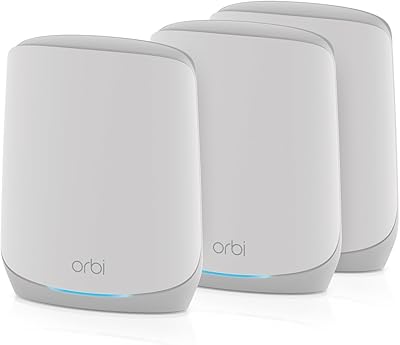
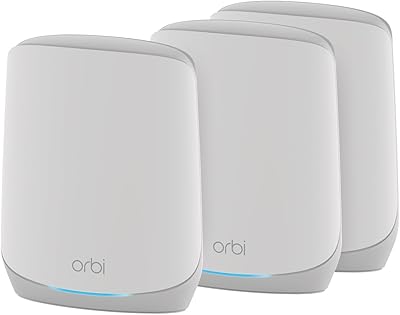
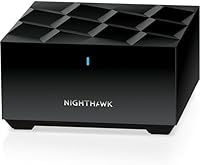
The compact, cylindrical form factor of each unit is unobtrusive enough to sit on a bookshelf or side table without dominating a room, and users appreciate that all three units share a consistent look that does not clash with home decor.
The units lack any wall-mount option, which limits placement flexibility in hallways or stairwells where a mounted satellite would provide better central coverage. A few users also note that the units can run noticeably warm in enclosed spaces, raising mild concerns about long-term hardware longevity.
ISP & Modem Compatibility
83%
The system connects to any standard cable modem or modem-router combo in bridge mode and works across all major ISP types including cable, fiber, DSL, and fixed wireless. Most users report a completely transparent transition from their old router without needing to call their provider.
A minority of users with ISPs that use DS-Lite or certain carrier-grade NAT configurations report compatibility friction that required a support call to resolve. Double-NAT situations with modem-router combos in non-bridge mode also caused confusion for less technical buyers.
Expandability
77%
23%
The ability to add MS60 satellites later to extend coverage by roughly 1,500 sq. ft. per unit gives the system a useful upgrade path for users who move to a larger home or find that the included two satellites do not quite reach every corner.
Expansion only works with NETGEAR-specific MS60 add-ons, which locks buyers into the NETGEAR ecosystem for future upgrades. The add-on satellites are not inexpensive, and the same dual-band backhaul limitation applies to each additional node, meaning performance does not scale as efficiently as it would on a tri-band platform.
Long-Term Reliability
71%
29%
Many buyers report running the MK63S system for over a year without any hardware failures, and NETGEAR has pushed firmware updates that addressed early bugs around device roaming and WPA3 compatibility. For a set-it-and-forget-it household, it generally holds up.
Firmware updates have a somewhat mixed track record — while most improve things, a segment of users report that specific update versions introduced new instability that required a factory reset to fix. NETGEAR support response times also receive consistently lukewarm reviews from buyers who needed help post-purchase.

Suitable for:

The NETGEAR Nighthawk MK63S Mesh WiFi 6 System is a strong match for families in medium to large homes who are fed up with dead zones and sluggish connections in rooms far from their old single router. If your household runs a constant mix of 4K streaming, video calls, casual online gaming, and a growing collection of smart home devices, this three-unit setup handles that kind of everyday load without requiring you to think much about it. It works cleanly with any ISP up to 1Gbps — cable, fiber, DSL, or satellite — so you won't face compatibility headaches if you switch providers down the line. Parents who want light parental controls and basic security monitoring through an easy app interface will find the built-in tools useful, especially during the included 90-day Armor trial. Anyone upgrading from a years-old single router will likely notice an immediate and meaningful improvement in both coverage and how well the network holds up when multiple people are online at once.
Not suitable for:

The NETGEAR Nighthawk MK63S Mesh WiFi 6 System is not the right call for buyers who need maximum throughput at every node in a large home, because the dual-band design means the satellites share bandwidth between client devices and the backhaul connection to the router — a real bottleneck that tri-band competitors at similar prices largely sidestep. Power users who rely on wired connections for NAS drives, multiple desktop PCs, or home lab setups will quickly run out of Ethernet ports, since each unit only offers a single Gigabit LAN port. Anyone expecting NETGEAR Armor to function as a permanent free security layer will be disappointed when the 90-day trial ends and a paid subscription is required to keep those protections active. Heavy gamers or remote workers who depend on rock-solid, low-latency connections throughout a large or architecturally complex home — think thick stone walls, split levels, or sprawling ranch layouts — may find the coverage claims fall short of their real-world needs. Those who want deep network controls like VLAN configuration, detailed traffic analysis, or advanced QoS settings will find the Nighthawk App too limited and should look at more configurable platforms.
Specifications

  • WiFi Standard: The system uses the 802.11ax (WiFi 6) standard, which improves efficiency and throughput compared to the previous WiFi 5 generation, particularly in homes with many active devices.
  • Band Configuration: Dual-band operation covers both 2.4GHz for range and device compatibility and 5GHz for higher-speed connections closer to each node.
  • Maximum Speed: The combined AX1800 rating reflects up to 600Mbps on the 2.4GHz band and up to 1,200Mbps on the 5GHz band under ideal conditions.
  • Coverage Area: NETGEAR rates the three-unit kit at up to 4,500 sq. ft., though real-world coverage varies based on floor plan complexity, wall materials, and interference sources.
  • Device Capacity: The system is designed to support 25 or more simultaneously connected devices across all nodes without significant performance degradation under typical household usage.
  • Kit Contents: The box includes one MR60 mesh router, two MS60 mesh satellite extenders, one 2-meter Ethernet cable, three 12V/1.5A power adapters, and a quick-start guide.
  • Ethernet Ports: Each unit — the router and both satellites — includes one Gigabit Ethernet LAN port, providing three wired connection points across the home in total.
  • Security: A 90-day trial subscription to NETGEAR Armor is included, offering real-time threat detection and device vulnerability scanning; a paid subscription is required after the trial ends.
  • Setup Method: Initial configuration is handled entirely through the Nighthawk mobile app, available for both iOS and Android, with no browser-based admin interface required for basic setup.
  • ISP Compatibility: The system connects to any standard cable modem and is compatible with cable, fiber, DSL, and satellite internet service providers offering speeds up to 1Gbps.
  • Expandability: Coverage can be extended by adding NETGEAR MS60 satellites sold separately, with each additional node contributing approximately 1,500 sq. ft. of additional coverage.
  • Operating System: The system runs on ZyNOS, NETGEAR's proprietary network operating system, which manages routing, mesh coordination, and firmware update delivery.
  • Wireless Features: The kit supports MU-MIMO for simultaneous multi-device data streaming and explicit beamforming on both frequency bands for more directed signal transmission.
  • Item Weight: The complete kit — router plus two satellites — weighs approximately 4.05 pounds in total, making each individual unit compact and easy to position around a home.
  • Power Requirements: Each unit is powered by a dedicated 12V/1.5A adapter; all three adapters are included in the box and the system is rated for 240V input.
  • Model Number: The official model designation is MK63S-100NAS, which identifies this specific three-unit dual-band WiFi 6 bundle within NETGEAR's Nighthawk mesh product line.
  • First Available: This kit was first made available for purchase in February 2021, positioning it as an early consumer-grade WiFi 6 mesh option in the mid-range market segment.
  • App Features: The Nighthawk app provides internet speed testing, connected device monitoring, basic parental controls, device prioritization, and remote network access from outside the home.

Related Reviews
NETGEAR Nighthawk MK73S
77%
88%
Coverage & Dead Zone Elimination
91%
Setup & Installation Experience
76%
WiFi Speed & Throughput
82%
Device Capacity & Network Congestion
63%
Roaming & Handoff Between Units
More
NETGEAR Nighthawk MK72 WiFi 6 Mesh System
77%
74%
Coverage & Range
78%
WiFi Speed & Performance
91%
Setup & Installation
61%
Network Management & App
83%
Multi-Device Handling
More
NETGEAR Nighthawk MK62 Mesh WiFi 6 System
87%
94%
Setup & Installation
88%
Performance for Streaming & Gaming
83%
WiFi Coverage
90%
App Management Experience
92%
Security Features (NETGEAR Armor)
More
NETGEAR Nighthawk MK83 Mesh WiFi 6 System
74%
88%
Coverage & Range
83%
WiFi Speed Performance
91%
Setup & Installation
62%
Value for Money
71%
App Experience
More
NETGEAR Orbi RBK853 WiFi 6 Mesh System
77%
83%
Signal Coverage
86%
Network Speed
88%
Device Handling
81%
Setup Experience
74%
App & Management
More
NETGEAR Nighthawk MK93S Mesh WiFi 6E System
79%
88%
Wireless Performance
91%
Coverage & Dead Zone Elimination
83%
Setup & Installation Experience
86%
Device Capacity & Network Management
74%
6GHz Band Utility
More
NETGEAR Orbi RBK663 WiFi 6 Mesh System
87%
93%
WiFi Performance
90%
Coverage Area
85%
Ease of Setup
88%
Security Features
82%
App Experience
More
NETGEAR Orbi RBK752P WiFi 6 Mesh System
80%
88%
Coverage & Range
79%
WiFi Speed & Throughput
91%
Ease of Setup
83%
Device Handling
85%
Wired Connectivity
More
NETGEAR Orbi RBK753P WiFi 6 Mesh Network System
85%
89%
Performance
92%
Coverage Area
88%
Ease of Setup
85%
Security Features
80%
Device Support
More
NETGEAR Nighthawk RAX54S
77%
83%
Wireless Performance
79%
Coverage & Range
88%
Setup & Ease of Use
76%
Gaming Performance (DumaOS 3.0)
81%
Security Features
More

FAQ

You still need your existing cable or DSL modem — the MK63S system replaces only your WiFi router, not the modem itself. Plug the included Ethernet cable from your modem into the main router unit, then let the Nighthawk app walk you through the rest. If your ISP gave you a modem-router combo, you will need to put it in bridge mode first, which usually takes one call to your provider.

A good rule of thumb is to position each satellite roughly halfway between the main router and the area you want to cover — close enough to maintain a strong backhaul connection, but far enough to actually extend your signal. Avoid placing satellites behind thick concrete walls or inside enclosed cabinets. If a satellite's LED indicates a weak connection, try moving it 10 to 15 feet closer to the router.

Yes, the MK63S system is compatible with fiber, cable, DSL, and fixed wireless ISPs up to 1Gbps. As long as your fiber provider supplies a standard ONT or modem with an Ethernet output, the router connects to it the same way it would with any other ISP.

It is free for the first 90 days, after which you need a paid annual subscription to keep Armor active. Without it, the system still operates normally with standard WPA3 encryption and a basic firewall — you just lose the real-time threat scanning and device vulnerability alerts that Armor provides.

Yes, each unit has one Gigabit Ethernet LAN port, so you can hardwire one device per node — three total across the kit. If you need two wired devices at the same location as a satellite, you will need to add an inexpensive unmanaged switch to that port.

Unlike a traditional range extender, which creates a separate network that your devices often struggle to hand off between, this system uses true mesh technology — all three units share the same network name and automatically manage which node your device connects to as you move through your home. The result is a much more consistent experience, especially on video calls or while gaming.

To some degree, yes — and this is worth understanding before buying. Because this is a dual-band system, the 5GHz band handles both the connection to your devices and the backhaul traffic between nodes. That means satellite speeds can be noticeably lower than what you get next to the main router, especially in a larger home. Tri-band mesh systems dedicate a separate band purely to backhaul, which reduces this effect.

Yes, the Nighthawk app supports remote access, so you can log in from anywhere to pause internet access for specific devices, check what is connected, or run a speed test. The parental controls are fairly basic compared to dedicated filtering services, but they work well for simple time-limit and content-scheduling needs.

You can expand by purchasing additional MS60 satellites separately, with each one adding roughly 1,500 sq. ft. of coverage. Keep in mind these add-ons are specific to the NETGEAR Nighthawk mesh ecosystem and are not compatible with Orbi or other NETGEAR product lines, so you are committed to this platform if you expand.

This is a known issue that a segment of owners have reported, and the most reliable fix is a factory reset followed by a fresh setup through the Nighthawk app. Before doing that, try a simple power cycle of all three units. If the issue persists after a reset, check the NETGEAR support forum — others often post workarounds within days of a problematic update, and NETGEAR has historically pushed corrective firmware relatively quickly.

Where to Buy