

Overview

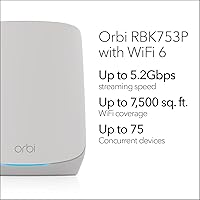
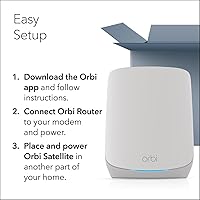
The NETGEAR Orbi RBK753P WiFi 6 Mesh System is a three-piece kit — one router and two satellites — built for homes where a single router simply cannot reach every corner. It targets the mid-to-large home segment, covering up to 7,500 square feet, which puts it squarely in premium mesh territory without pushing into the stratospheric pricing of enterprise-grade options. This is not a system for apartment dwellers. If you are dealing with dead zones across floors or a sprawling ranch-style layout, this Orbi mesh kit was designed with you in mind. Setup requires no networking expertise, and it works with virtually any ISP you are already paying for.

Features & Benefits

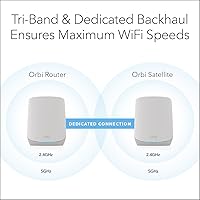
The RBK753P system runs on tri-band WiFi 6 technology, which matters more than it might sound. Instead of all your devices competing on one or two channels, traffic spreads across three bands — and crucially, the backhaul link between router and satellites uses its own dedicated band. That means client devices are not sharing bandwidth with internal mesh communication, a real advantage over cheaper dual-band rivals. You also get seven Gigabit Ethernet ports spread across the hardware, so gaming consoles and NAS drives can stay wired. The Orbi app handles setup, guest networks, and remote management without any need to log into a browser-based admin panel.

Best For

This three-piece mesh setup earns its place in homes between roughly 2,500 and 7,500 square feet — think multi-story houses, open-plan layouts, or properties with stubborn dead zones in garages and back bedrooms. It suits households running multiple simultaneous demands: someone video-conferencing in the office, kids gaming in another room, and a 4K stream running downstairs all at once. Buyers who need wired connections for stationary gear will appreciate the Ethernet ports on each satellite. It is also a natural upgrade path for existing Orbi users, since the ecosystem lets you add satellites later and expand coverage without replacing the whole kit.

User Feedback

Sitting at 4.0 out of 5 across more than 600 ratings, this Orbi mesh kit earns mostly positive marks — buyers frequently praise how quickly it gets running and how noticeably it improves on older single-router setups. That said, there are consistent friction points worth knowing about. The NETGEAR Armor trial lasts just 30 days, and several reviewers found the follow-up subscription prompts frustrating given the kit's price tier. App reliability draws mixed opinions, with some users reporting satellite dropouts after firmware updates. Power users have noted the absence of advanced QoS controls, and buyers in larger homes occasionally feel the two included satellites fall just short of full coverage.

Pros

  • Coverage across 7,500 sq. ft. eliminates dead zones in most medium-to-large homes with just the included hardware.
  • Dedicated tri-band backhaul keeps mesh communication off the same channels your devices use, reducing real-world congestion.
  • Seven Gigabit Ethernet ports across the kit mean wired connections are available where it actually matters.
  • WiFi 6 support future-proofs the network as newer phones, laptops, and smart-home gear become mainstream.
  • App-based setup is fast and approachable — most buyers report getting online within 15 to 20 minutes.
  • Works with virtually any ISP technology including cable, fiber, DSL, and satellite connections up to 1 Gbps.
  • Guest network creation and remote access management are handled entirely through the app without browser logins.
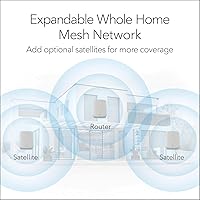
  • The kit is expandable — additional satellites can be added later if coverage needs grow without replacing the router.
  • Noticeable speed improvement over older single-router or extender setups is a common theme in buyer feedback.

Cons

  • NETGEAR Armor security features require a paid subscription after the 30-day trial, which feels steep at this price point.
  • The Orbi app has drawn mixed reliability reviews, with some users experiencing connectivity issues after firmware updates.
  • No meaningful QoS or VLAN controls are exposed to users who want more hands-on network management.
  • Very large homes above 7,500 sq. ft. will likely need a third satellite purchased separately, adding to the total cost.
  • Occasional satellite reboots after firmware updates have been reported, which is disruptive in a always-on home network.
  • Budget alternatives now offer competitive WiFi 6 mesh coverage, making the value proposition harder to defend for average-sized homes.
  • The subscription upsell notifications within the app are frequently cited as an annoyance after the trial period ends.
  • No WiFi 6E support means buyers who want the 6 GHz band will need to look at newer, pricier alternatives.

Ratings

The NETGEAR Orbi RBK753P WiFi 6 Mesh System scores below are generated by AI after analyzing verified purchaser reviews worldwide, with spam, bot activity, and incentivized feedback actively filtered out before scoring. Across more than 600 real buyer accounts, this Orbi mesh kit earned consistent praise for coverage and ease of use — but also drew recurring criticism around subscription costs and app reliability that are honestly reflected in the numbers. The result is a transparent, category-by-category breakdown of where this three-piece mesh setup genuinely earns its place and where it falls short.

Coverage & Range
88%
For homes in the 3,000 to 7,000 square foot range, buyers report a dramatic reduction in dead zones — back bedrooms, garages, and garden offices that previously struggled suddenly hold a strong signal. The two satellites spread coverage evenly, and most users in typical two-story homes find the included kit sufficient without purchasing extras.
Buyers in larger or unusually shaped homes — think L-shaped layouts or properties with thick stone or brick walls — frequently report that two satellites are not quite enough, requiring a third unit purchased separately. That additional cost can sting given the kit is already priced at a premium.
WiFi Speed & Performance
84%
Real-world throughput improvements over older WiFi 5 routers are clearly felt by most buyers, especially households running several simultaneous high-demand tasks like 4K streaming and video calls. The dedicated backhaul band keeps the mesh backbone from eating into client speeds, which is noticeable compared to dual-band rivals.
Speed gains are most apparent on newer WiFi 6 devices; older hardware sees more modest improvements. A handful of users in demanding environments note that peak throughput rarely approaches the theoretical ceiling, which is expected but worth stating plainly.
Setup & Installation
91%
The Orbi app setup process is consistently praised as one of the strongest points of this system — most buyers describe being fully online within 15 to 20 minutes even without any networking background. The step-by-step prompts are clear, satellite placement suggestions are helpful, and the whole process avoids any need to access a browser-based admin interface.
A small number of users encountered hiccups when migrating settings from an older router or when their ISP required specific configuration steps that the app did not clearly anticipate. These edge cases are relatively uncommon but can cause frustration for buyers who expected a truly zero-effort experience.
App Experience
67%
33%
The Orbi app covers the basics well — setting up a guest network, checking connected devices, running a speed test, and accessing the network remotely all work without needing technical knowledge. For straightforward day-to-day management, most non-technical buyers find it more than adequate.
App stability is a recurring friction point in buyer feedback, with reports of the app losing connection to the router, requiring re-login, or behaving inconsistently after firmware updates. Power users trying to go deeper than basic settings quickly discover the app exposes very limited controls compared to competitors at the same price tier.
Value for Money
63%
37%
For buyers who genuinely need whole-home WiFi 6 coverage across a large floor plan, this Orbi mesh kit delivers a meaningful upgrade over piecemeal extender setups, and the hardware quality feels appropriate for the price. The seven Ethernet ports across the kit add real utility that cheaper mesh systems often skip.
The price is harder to justify now that capable WiFi 6 mesh systems from competing brands have become widely available at significantly lower price points. The 30-day Armor trial that rolls into a paid subscription also leaves some buyers feeling the ongoing cost was not made clear enough upfront.
Multi-Device Handling
86%
Households with 30 to 60 connected devices — smart home sensors, phones, tablets, laptops, and consoles all running together — generally report stable performance without the slowdowns that plagued their previous single-router setups. The tri-band design genuinely helps distribute the load across available spectrum.
At the upper edge of the rated 75-device limit, some buyers in large families or smart-home-heavy setups report occasional instability, particularly when several high-bandwidth devices are active simultaneously. These cases are not the norm but are worth noting for buyers with unusually dense device environments.
Wired Connectivity
89%
Seven Gigabit Ethernet ports spread across the router and both satellites is a standout feature at this tier, and buyers consistently appreciate being able to hard-wire a NAS drive in one room, a gaming console in another, and still have ports left over. This eliminates the need for a separate switch in most homes.
All ports are capped at 1 Gbps, which is fine for most users but falls short for anyone with a multi-gigabit ISP plan or who needs high-speed local network transfers between wired devices. Buyers on 2 Gbps or faster fiber plans will not get full wired throughput from this hardware.
Security Features
71%
29%
NETGEAR Armor provides a meaningful layer of protection beyond a basic router firewall — real-time malware scanning and device vulnerability alerts are features most mesh systems at this price do not include at all. Families with kids especially appreciate the parental controls available through the app.
The 30-day trial conversion to a paid subscription is the most consistently mentioned frustration in buyer reviews, and the in-app prompts reminding users to subscribe are described as persistent and annoying. Buyers who do not subscribe end up with a security pitch baked into their router interface, which feels out of place.
Firmware & Updates
68%
32%
NETGEAR releases firmware updates on a reasonably regular cadence, and most updates go through without incident — the system applies them quietly in the background and most users never notice. When updates do address real bugs, the improvement is typically acknowledged by buyers in follow-up reviews.
A notable subset of buyers report that firmware updates have occasionally caused satellites to drop off the network or require a manual reboot to reconnect. This is not a universal experience, but it is frequent enough in the review pool to represent a genuine reliability concern rather than isolated incidents.
Hardware Build Quality
82%
18%
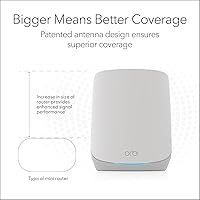
The router and satellite units feel solidly built with no cheap plastic flex, and the clean white finish blends into most living spaces without looking like networking equipment. Buyers who place satellites on shelves or in open areas appreciate that they do not look out of place.
The units are on the larger side compared to some competing mesh nodes, which can make discreet placement tricky in smaller rooms or apartments. A few buyers noted the power bricks are bulkier than expected, which can be awkward in tighter outlet configurations.
Advanced Network Controls
44%
56%
For the vast majority of home users, the controls exposed through the Orbi app are sufficient — basic QoS prioritization, guest network isolation, and device-level management cover most everyday needs without overwhelming non-technical buyers.
Power users who want VLAN support, detailed per-device bandwidth throttling, or deep traffic analysis will find this system frustratingly limited. The RBK753P system is clearly engineered for simplicity over configurability, which is a deliberate trade-off that the wrong buyer will find genuinely limiting.
ISP Compatibility
93%
Compatibility with cable, fiber, DSL, and satellite ISPs is as broad as it gets in this category, and buyers across a wide range of providers report no configuration friction. The kit works out of the box with virtually any modem and does not require ISP-specific firmware.
The WAN port maxes out at 1 Gbps, which is a hard ceiling for anyone already on or planning to upgrade to a multi-gigabit internet plan. This is not an issue for most buyers today, but it is worth knowing if your ISP offers faster tiers that you intend to use.
Expandability
81%
19%
The ability to purchase additional compatible satellites and add them to an existing Orbi network without replacing the router is a genuine long-term advantage — buyers who move to a larger home or add square footage do not need to start over from scratch.
Expansion satellites are sold separately and add meaningful cost to an already premium-priced kit. Compatibility is also limited to the Orbi ecosystem, so mixing in third-party mesh nodes is not supported.

Suitable for:

The NETGEAR Orbi RBK753P WiFi 6 Mesh System is a strong fit for homeowners who have outgrown a single router and need reliable coverage across 2,500 to 7,500 square feet — think multi-story houses, homes with thick walls, or sprawling open-plan layouts where signal has always struggled to reach the far end. Families with heavy network demands will find the most value here: if you have people video-conferencing, gaming online, and streaming 4K content all at the same time, the tri-band design and dedicated backhaul mean those activities are far less likely to step on each other. The seven Gigabit Ethernet ports scattered across the router and satellites are a genuine bonus for anyone who wants game consoles, smart TVs, or a NAS drive connected by cable rather than WiFi. It also suits buyers who want a capable mesh system without learning to configure VLANs or fiddle with admin dashboards — the Orbi app gets most people up and running without drama. Existing Orbi users looking to upgrade will appreciate that the ecosystem allows adding satellites later if coverage needs grow.

Not suitable for:

Apartment dwellers or anyone in a home under 1,500 square feet will simply be paying a premium for coverage they do not need — a single capable router would serve them better and cost considerably less. Budget-conscious buyers should also think carefully: this three-piece mesh setup sits firmly in the premium tier, and less expensive mesh systems from competing brands now offer WiFi 6 coverage that is genuinely good enough for average-sized homes. The NETGEAR Armor security suite, which sounds appealing on paper, reverts to a paid subscription after 30 days, so buyers who want that protection long-term need to factor in an ongoing cost that many reviewers found frustrating. Advanced home network enthusiasts who want granular controls — detailed QoS rules, VLAN segmentation, or deep traffic monitoring — will hit the limits of what the Orbi app exposes fairly quickly. Finally, buyers with homes larger than 7,500 square feet should plan to purchase at least one additional satellite separately, since the two included units may leave gaps in very large or unusually shaped floor plans.

Specifications

  • WiFi Standard: The system uses 802.11ax, commonly known as WiFi 6, which improves efficiency and throughput compared to the previous WiFi 5 generation.
  • Band Configuration: Tri-band operation splits traffic across two 5 GHz bands and one 2.4 GHz band, with one 5 GHz band reserved exclusively for backhaul between the router and satellites.
  • Max Throughput: Combined theoretical throughput reaches up to 5.2 Gbps (AX5200) across all three bands simultaneously.
  • Coverage Area: The included router and two satellites together cover up to 7,500 square feet of indoor space under typical home conditions.
  • Concurrent Devices: The system is rated to handle up to 75 connected devices simultaneously without significant performance degradation.
  • Kit Contents: The package includes one Orbi router (RBR750P), two Orbi satellites (RBS750P), three power adapters, one 2-meter Ethernet cable, and a quick start guide.
  • Router LAN Ports: The router unit provides three 1 Gigabit Ethernet LAN ports for wired device connections.
  • Satellite LAN Ports: Each satellite includes two 1 Gigabit Ethernet LAN ports, giving the full kit seven wired ports in total.
  • WAN Port: The router has one 1 Gigabit Ethernet WAN port for connecting to a cable or fiber modem.
  • ISP Compatibility: The system works with any internet service provider technology — cable, fiber, DSL, or satellite — supporting ISP speeds up to 1 Gbps.
  • Security Suite: NETGEAR Armor is included with a 30-day free trial, providing malware protection and identity-theft monitoring; a paid subscription is required after the trial period.
  • Management App: The Orbi mobile app (iOS and Android) handles initial setup, device management, guest network creation, parental controls, and remote access.
  • Special Features: Notable software features include guest network mode, remote network access, and internet security tools accessible through the Orbi app.
  • Package Dimensions: The retail package measures 12.56 x 12.05 x 7.36 inches and weighs 8.64 pounds.
  • Color: The router and satellite units are finished in white, designed to blend into typical home interiors.
  • Model Number: The full kit carries model number RBK753P-100NAS, intended for use in the United States only.
  • First Available: This kit was first made available for purchase in March 2024.

Related Reviews
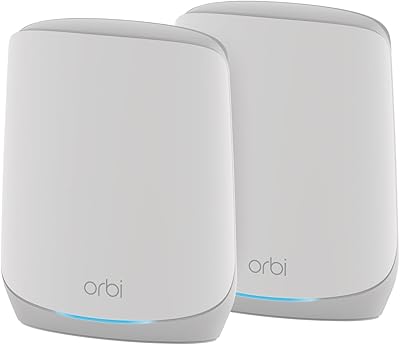
NETGEAR Orbi RBK663 WiFi 6 Mesh System
80%
88%
Coverage & Range
83%
Network Performance
91%
Setup Experience
81%
Device Handling
67%
Satellite Stability
More
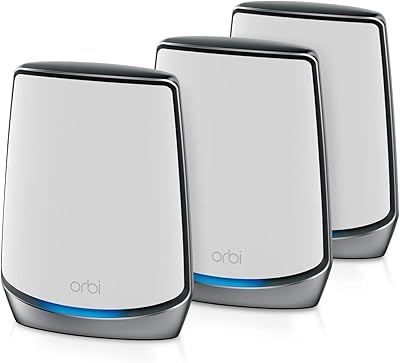
NETGEAR Orbi RBK752P WiFi 6 Mesh System
80%
88%
Coverage & Range
79%
WiFi Speed & Throughput
91%
Ease of Setup
83%
Device Handling
85%
Wired Connectivity
More
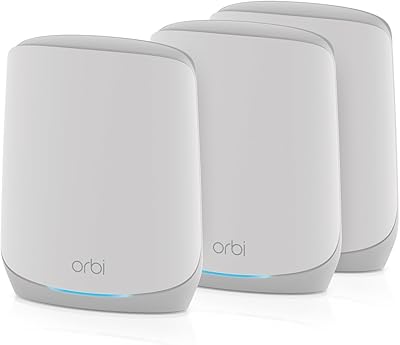
NETGEAR Orbi RBK853 WiFi 6 Mesh System
77%
83%
Signal Coverage
86%
Network Speed
88%
Device Handling
81%
Setup Experience
74%
App & Management
More
NETGEAR Nighthawk MK73S
77%
88%
Coverage & Dead Zone Elimination
91%
Setup & Installation Experience
76%
WiFi Speed & Throughput
82%
Device Capacity & Network Congestion
63%
Roaming & Handoff Between Units
More
NETGEAR Nighthawk MK62 Mesh WiFi 6 System
87%
94%
Setup & Installation
88%
Performance for Streaming & Gaming
83%
WiFi Coverage
90%
App Management Experience
92%
Security Features (NETGEAR Armor)
More
NETGEAR Nighthawk MK72 WiFi 6 Mesh System
77%
74%
Coverage & Range
78%
WiFi Speed & Performance
91%
Setup & Installation
61%
Network Management & App
83%
Multi-Device Handling
More
NETGEAR Orbi RBK13 Mesh WiFi System
77%
88%
Coverage & Dead Zone Elimination
91%
Ease of Setup
67%
WiFi Speed & Throughput
83%
Roaming & Band Switching
74%
Multi-Device Performance
More
NETGEAR Orbi RBK30 Whole Home Mesh WiFi System
82%
88%
WiFi Coverage
91%
Ease of Setup
85%
Performance Stability
89%
App Functionality
87%
Alexa Compatibility
More
Netgear Orbi RBK50 2-Pack Mesh WiFi System
72%
88%
Coverage & Range
83%
Signal Consistency
91%
Setup & Installation
84%
Ease of Daily Use
62%
Value for Money
More
NETGEAR Orbi CBK40 Modem Mesh WiFi System
74%
82%
Coverage & Range
74%
WiFi Speed Performance
88%
Modem Integration
83%
Setup & Onboarding
77%
App Experience
More

FAQ

You still need your modem. The NETGEAR Orbi RBK753P WiFi 6 Mesh System replaces your WiFi router — not the modem itself. Just plug the Orbi router into your existing cable or fiber modem using the included Ethernet cable and you are good to go.

Almost certainly yes. This Orbi mesh kit is compatible with any ISP using cable, fiber, DSL, or satellite technology, as long as your plan speed does not exceed 1 Gbps on the WAN port. It is not locked to any specific provider.

For most 5,000 square foot homes, the two included satellites should cover the space adequately — provided you place them sensibly, roughly halfway between the router and the areas you need to reach. That said, homes with unusual layouts, multiple floors, or thick concrete walls sometimes need a third satellite, which can be purchased separately and added to the system later.

Setup is genuinely straightforward. You download the Orbi app, plug in the router and satellites, and follow the step-by-step prompts. Most buyers report being fully online within 15 to 20 minutes. You do not need to touch any browser-based admin interface unless you want to.

After the free trial, Armor requires a paid annual subscription to stay active. If you do not subscribe, the basic router functionality continues working fine — you just lose the malware scanning, identity protection, and threat monitoring that Armor provides. It is worth factoring that ongoing cost into your decision if network-wide security is important to you.

Yes, and this is one of the practical strengths of this three-piece mesh setup. Each satellite has two Gigabit Ethernet ports, so you can run a wired connection to a gaming console in a bedroom or a NAS drive in a home office without needing a separate switch.

This system supports WiFi 6 (802.11ax) only — it does not include the 6 GHz band introduced with WiFi 6E. If access to the 6 GHz band is a priority for you, you would need to look at newer WiFi 6E or WiFi 7 mesh systems, which typically carry a higher price.

Yes. The Orbi ecosystem is designed to be expandable. You can purchase compatible Orbi satellites separately and add them to the existing system through the app. The router you already own stays in place, so you are not starting from scratch.

It is wireless by default, using a dedicated 5 GHz band reserved exclusively for router-to-satellite communication. This is what separates tri-band mesh systems from cheaper dual-band alternatives — your devices are not competing with the internal mesh link for airtime. If you want, you can also run a wired backhaul using the Ethernet ports for even more stable performance.

Some users of the RBK753P system have reported occasional satellite dropouts or the need to reboot a satellite after firmware updates — so it is not entirely immune to that frustration. It is worth setting firmware updates to apply overnight when the network is less critical, and NETGEAR does release updates fairly regularly to address stability issues.