Overview

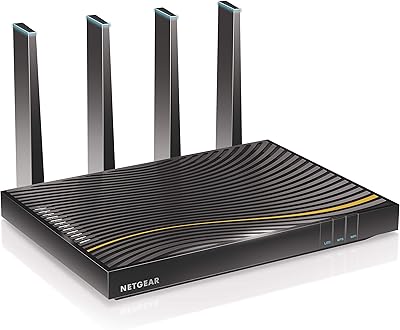
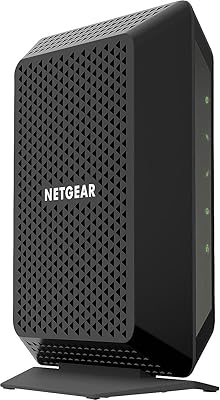
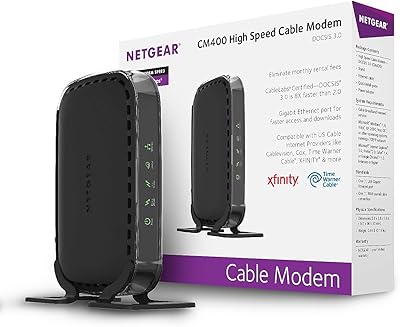
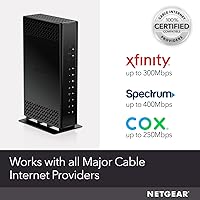
The NETGEAR C6230 AC1200 Cable Modem Router is one of those devices that makes an immediate, practical case for itself: stop paying your cable company a monthly rental fee for hardware you don't own. This modem-router combo sits comfortably in the mid-range tier — capable enough for everyday household use without the price tag of a flagship networking device. It works with Xfinity, Spectrum, and Cox, but if you're on Verizon, AT&T, any DSL service, or a bundled voice plan, it won't work — full stop. WiFi range and raw speed have real ceilings, and DOCSIS 3.0, while not the newest standard, remains solid and widely supported for most residential cable plans today.
Features & Benefits

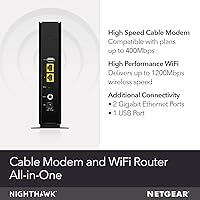
The C6230 runs on dual-band AC1200 WiFi, broadcasting on both 2.4GHz and 5GHz simultaneously. In practical terms, older smart home gadgets and phones default to 2.4GHz while laptops and streaming sticks gravitate toward the faster 5GHz band. The 16x4 channel bonding helps the modem pull more data from your provider at once, which reduces congestion during peak evening hours. Two Gigabit Ethernet ports handle wired connections for a desktop or console, and the USB port can serve a shared printer or storage drive. Managing parental controls, a guest network, or basic diagnostics all runs through the NETGEAR Nighthawk App — reasonably intuitive, even for users who have never configured a router before.

Best For

This modem-router combo fits best in medium-sized homes on Xfinity, Spectrum, or Cox with internet plans up to 400Mbps. If your household runs a handful of devices — phones, a laptop or two, a streaming box — the C6230 handles that load comfortably. It's also a practical choice for anyone eager to cut the monthly equipment rental from their cable bill, since the savings can add up meaningfully over a year or two. Where it starts to feel limited is in larger, multi-story spaces or for households with heavy simultaneous streaming and gaming demands. Those users would be better served by a DOCSIS 3.1 device with a more powerful WiFi radio.

User Feedback

With over 2,000 ratings and a score of 4.1 out of 5, the C6230 lands in solid — if unremarkable — territory. The praise that appears most consistently centers on easy activation on Spectrum and Cox, a stable everyday connection, and the satisfaction of seeing a rental charge disappear from the monthly bill. The complaints worth noting: reviewers in larger homes frequently flag that the WiFi signal fades before reaching back rooms or upper floors, and periodic reboots surface as a minor but recurring annoyance after months of continuous use. Xfinity activations draw more friction than the other carriers. Long-term owners — those past the one-year mark — tend to report solid reliability, while opinions on NETGEAR's customer support land all over the map.

Pros

  • Eliminates the monthly equipment rental fee, which can add up to meaningful savings over one to two years.
  • Activation on Spectrum and Cox is straightforward, with most users reporting the process takes under 20 minutes.
  • Dual-band WiFi lets older devices connect on 2.4GHz while newer hardware enjoys the less congested 5GHz band.
  • Two Gigabit Ethernet ports provide fast, stable wired connections for desktops, consoles, or smart TVs.
  • The NETGEAR Nighthawk App makes setting up a guest network or parental controls accessible without technical know-how.
  • 16x4 channel bonding helps maintain stable speeds during peak usage hours rather than dropping to a crawl.
  • Compact and relatively lightweight, so it does not dominate a shelf or entertainment console.
  • Beamforming support helps direct the WiFi signal toward connected devices rather than broadcasting equally in all directions.
  • Replaces both a separate modem and a separate router, reducing cable clutter and the number of devices to manage.
  • Long-term owners consistently report solid reliability past the one-year mark under normal household conditions.

Cons

  • WiFi range falls short in larger or multi-story homes, leaving back rooms and upper floors with a noticeably weaker signal.
  • Completely incompatible with DSL, fiber, Verizon, AT&T, and any bundled voice service — not a flexible option if you switch providers.
  • Some Xfinity users report friction during initial activation that requires a call to the carrier to resolve.
  • The USB port is limited to USB 2.0, which makes sharing large files through a connected storage drive noticeably slow.
  • DOCSIS 3.0 is aging technology; buyers on gigabit plans or planning to upgrade to one will quickly outgrow this unit.
  • Occasional reboots appear in long-term user reports, which is a minor but recurring inconvenience for always-on households.
  • AC1200 WiFi throughput is a real ceiling — heavy simultaneous streaming and gaming across multiple devices will reveal its limits.
  • Customer support experiences vary widely, with some users reporting helpful service and others finding resolution difficult.
  • No dedicated mobile app controls beyond basic settings; advanced networking features require logging into a web interface.
  • No DOCSIS 3.1 support means this unit cannot take full advantage of plans above 400Mbps even if your provider offers them.

Ratings

The NETGEAR C6230 AC1200 Cable Modem Router has been scored by our AI system after analyzing thousands of verified global buyer reviews, with spam, bot-generated, and incentivized feedback actively filtered out before any scoring was applied. The ratings below reflect the full picture — genuine strengths and recurring frustrations alike — so you can make a confident, eyes-open buying decision.
Connection Stability
83%
For the majority of users running everyday workloads — video calls, HD streaming, general browsing — the C6230 delivers a dependably steady connection over extended periods. Long-term owners on Spectrum and Cox frequently describe months of trouble-free performance without needing to touch the device.
A recurring pattern in reviews involves intermittent drops that require a manual reboot to resolve, particularly after the unit has been running continuously for several weeks. It is not a daily occurrence, but it surfaces consistently enough to be a legitimate concern rather than an isolated complaint.
WiFi Range & Coverage
61%
39%
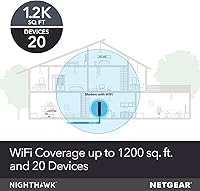
In compact living spaces — apartments, small condos, or single-story homes under roughly 1,200 square feet — the dual-band signal performs reasonably well and covers the space without obvious dead zones. The 5GHz band, in particular, delivers solid throughput at close to mid-range distances.
This is where the C6230 earns its most consistent criticism. In two-story homes or spaces with brick walls, the signal weakens noticeably in far rooms, and upper floors can feel like a different network entirely. AC1200 is simply not a long-range WiFi class, and buyers with larger homes should factor that in before purchasing.
Setup & Activation
78%
22%
Spectrum and Cox users frequently describe activation as one of the smoother hardware setups they have experienced — plug in the coax, follow the provider steps online, and most are browsing within 20 minutes. The inclusion of a quick install guide helps first-time modem buyers feel oriented without needing external support.
Xfinity activations tell a different story, with a meaningful share of reviewers needing to call Xfinity support directly to complete registration rather than finishing online. This inconsistency across carriers is a friction point that NETGEAR has limited control over, but it is worth knowing about upfront.
Value for Money
86%
The financial case for this modem-router combo is genuinely compelling for households currently paying a monthly rental fee to their cable provider. Over twelve to twenty-four months of ownership, the cumulative savings can comfortably exceed the purchase price, making the C6230 one of the more cost-efficient decisions in home networking at this tier.
The value calculation weakens for buyers who are already on, or planning to move to, gigabit internet plans — this unit cannot grow with you past the 400Mbps ceiling. In that scenario, you may end up replacing it sooner than expected, which erodes the long-term savings argument.
WiFi Speed Performance
69%
31%
For moderate household demands — a couple of people streaming HD content while someone else handles email and video calls — the AC1200 rating translates into adequate real-world throughput on the 5GHz band. Most users on plans up to 300Mbps report hitting close to their subscribed speeds under normal conditions.
The AC1200 label is a combined theoretical figure across both bands, and real-world performance lands noticeably lower under simultaneous device load. Households with five or more active devices, multiple 4K streams, or competitive online gaming will hit the ceiling and experience congestion that a more powerful radio would handle without breaking a sweat.
Ease of Management
74%
26%
The NETGEAR Nighthawk App makes day-to-day management accessible to users who have never configured a router before, covering guest network creation, basic parental controls, and quick status checks without requiring a login to a web interface. For non-technical households, this lowers the barrier to actually using the device's features.
Users who want deeper control — custom DNS settings, QoS rules, or advanced firewall configuration — will find the app surface relatively shallow. Accessing the full web-based admin interface is possible but adds a step that casual users may not know exists, and some find the admin portal's design dated.
Carrier Compatibility
71%
29%
Compatibility with Xfinity, Spectrum, and Cox covers a substantial portion of the U.S. cable internet market, and the device works reliably once activated on those networks. Spectrum users in particular tend to report the smoothest end-to-end experience from purchase to first connected device.
The compatibility walls are absolute — this unit offers zero utility to anyone on Verizon, AT&T, DSL, satellite, or a bundled phone plan, and there is no workaround. Buyers who anticipate switching providers in the near future should carefully confirm their new carrier is on the supported list before committing.
Build Quality & Design
72%
28%
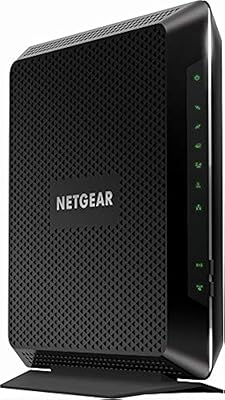
The C6230 has a solid, no-frills construction that feels appropriately durable for a device meant to run continuously for years. Its modest footprint and matte black finish allow it to sit on a shelf or beside a TV without drawing attention.
The enclosure feels functional rather than premium, and the ventilation design has drawn minor criticism from users in warm environments who notice the chassis running warm after extended operation. Nothing alarming, but it is worth ensuring adequate airflow around the unit wherever it is placed.
Parental Controls
66%
34%
The built-in parental controls through the Nighthawk App give parents a basic but usable layer of oversight, including the ability to set up a separate guest network and restrict access for specific connected devices. For households with young children who primarily need simple content limits, it covers the essentials.
The controls are not sophisticated enough to satisfy parents looking for granular scheduling, per-device web filtering, or activity logging. Families with older children who know their way around a network may find the restrictions easy to circumvent through alternative connection methods.
Long-Term Reliability
77%
23%
Users who have owned the C6230 for more than a year tend to report genuinely positive reliability outcomes, with the hardware continuing to perform its core function — delivering internet to the home — without requiring replacement or intervention. That consistency is reassuring for a device that is expected to run around the clock.
The occasional reboot requirement does not disappear over time for some users, and a smaller subset of reviewers report degraded performance after eighteen to twenty-four months that prompts them to consider an upgrade. DOCSIS 3.0 hardware in general is also aging toward obsolescence, which affects long-term investment confidence.
Wired Port Utility
81%
19%
The two Gigabit Ethernet ports are a practical asset for anyone who prefers wired connections for a desktop workstation, a gaming console, or a smart TV. Wired throughput is stable and consistently reaches close to the subscribed plan speed without any of the variability that comes with WiFi.
Two ports is a modest offering if you have more than a couple of devices that benefit from wired connections and no network switch already in place. The USB 2.0 port, while useful for a shared printer, is too slow to serve as a practical shared storage solution with larger files.
Customer Support Experience
54%
46%
When NETGEAR support does resolve an issue — particularly during initial setup or firmware-related troubleshooting — some users describe the interaction as helpful and knowledgeable. Online community resources and the NETGEAR support documentation are also reasonably thorough for common issues.
Support experiences in the reviews are strikingly inconsistent, with a notable proportion of users describing long wait times, unhelpful responses, or being redirected to their cable provider rather than receiving direct assistance. For a device at this price point, the support quality is a meaningful weak point that surfaces repeatedly in lower-rated reviews.
Security Features
73%
27%
WPA2 encryption, beamforming, and the ability to set up an isolated guest network give the C6230 a reasonable security baseline for a typical household. The guest network feature in particular is useful for keeping smart home devices or visitors on a separate segment from primary computers.
The security feature set has not kept pace with more recent hardware — WPA3 support is absent, and the firewall controls accessible through the app are limited. For households managing sensitive home-office traffic or a growing fleet of IoT devices, a more modern security architecture would provide meaningfully better protection.
Installation Experience
79%
21%
The physical installation — connecting the coax cable, plugging in power, and running an Ethernet cable to a device — is genuinely straightforward and requires no technical background. The included quick install guide walks through the process in plain language, and most users are through the hardware side of setup in under ten minutes.
The activation step, which requires logging into your carrier's website or app to register the new device's MAC address, adds a layer that some users find unexpectedly confusing — particularly those who have never switched out their own modem before. Carrier-side activation delays can also stretch what should be a quick process into a longer wait.

Suitable for:

The NETGEAR C6230 AC1200 Cable Modem Router is a genuinely practical buy for households on Xfinity, Spectrum, or Cox who are tired of paying a recurring rental fee for equipment they will never own. It fits comfortably in apartments, condos, or single-story homes where the WiFi signal does not need to travel far or punch through multiple thick walls. Families with a few phones, a laptop, and a streaming device will find that this modem-router combo handles their daily load without complaint. It is also a natural step up for anyone still running an older DOCSIS 2.0 modem, where the channel bonding improvements alone will translate into a noticeably more stable connection. If your internet plan sits at 400Mbps or below and you just want reliable, no-fuss home connectivity without configuring advanced networking settings, the C6230 is a sensible, cost-conscious choice.
Not suitable for:

The NETGEAR C6230 AC1200 Cable Modem Router is a hard pass for anyone on Verizon, AT&T, CenturyLink, any DSL provider, or a cable package that includes bundled home phone service — it simply will not work with those setups, and no amount of configuration will change that. Buyers in larger homes, especially two-story houses or open floor plans that stretch beyond 1,500 square feet, are likely to run into dead zones that AC1200 WiFi cannot reliably cover. Power users who run multiple 4K streams simultaneously, competitive online gamers sensitive to latency, or anyone on a gigabit internet plan will find this NETGEAR unit to be a genuine bottleneck rather than a solution. If your household has grown into a dense cluster of smart home devices, laptops, consoles, and phones all competing for bandwidth at once, a more capable DOCSIS 3.1 combo or a standalone modem paired with a dedicated WiFi 6 router would serve you far better.
Specifications

  • Brand & Model: Manufactured by NETGEAR under the model designation C6230-100NAS.
  • WiFi Standard: Uses 802.11ac (AC1200) wireless technology for dual-band WiFi connectivity.
  • Frequency Bands: Broadcasts simultaneously on both 2.4GHz and 5GHz bands for flexible device compatibility.
  • Modem Technology: Built on DOCSIS 3.0 with 16x4 channel bonding for reliable cable internet performance.
  • Max Plan Speed: Supports cable internet plans up to 400Mbps on Spectrum, 300Mbps on Xfinity, and 250Mbps on Cox.
  • Ethernet Ports: Equipped with 2 Gigabit Ethernet ports for fast, stable wired connections to computers or consoles.
  • USB Port: Includes 1 USB 2.0 port suitable for connecting a shared printer or external storage drive.
  • Security: Supports WPA and WPA2 wireless security protocols to help protect the home network from unauthorized access.
  • Special Features: Includes beamforming, guest network mode, parental controls, WPS, and an LED indicator for status monitoring.
  • Compatible Carriers: Works with Xfinity, Spectrum, and Cox cable internet services only.
  • Incompatible With: Not compatible with Verizon, AT&T, CenturyLink, DSL providers, DirecTV, DISH, or any bundled voice service.
  • Management App: Managed via the NETGEAR Nighthawk App, available for both iOS and Android devices.
  • Dimensions: Measures 9.5 x 6.5 x 4.5 inches, making it a mid-sized unit suitable for placement on a shelf or desk.
  • Weight: Weighs 12.6 oz, light enough to reposition without difficulty.
  • Color: Available in black with a matte finish that blends into most home entertainment setups.
  • In the Box: Package includes the modem router unit, one Ethernet cable, a power adapter, and a quick install guide.
  • Power Input: Operates at 240 volts via the included power adapter.
  • WiFi Speed Rating: Rated at combined AC1200 speeds, with up to 300Mbps on 2.4GHz and up to 867Mbps on the 5GHz band under ideal conditions.

Related Reviews

NETGEAR C6300 Cable Modem Router Combo
69%
83%
Value for Money
88%
Setup & Installation
71%
WiFi Performance
91%
Wired Connectivity
62%
Long-Term Reliability
More
NETGEAR C6250 AC1600 Modem Router Combo
74%
84%
Value for Money
88%
Ease of Setup
71%
Wi-Fi Performance
82%
Modem Speed & Reliability
73%
Provider Compatibility
More
NETGEAR Nighthawk C7800 Cable Modem WiFi Router Combo
84%
88%
Wi-Fi Performance
75%
Ease of Setup
92%
Speed and Reliability
85%
Compatibility with ISPs
90%
Value for Money
More
NETGEAR Orbi CBK752 Mesh Modem Router Combo
74%
88%
WiFi Speed & Throughput
78%
Whole-Home Coverage
71%
Modem Compatibility & ISP Provisioning
66%
Satellite Connection Stability
82%
Setup & Initial Configuration
More
NETGEAR Nighthawk C7100V Cable Modem WiFi Router Combo with Voice
86%
92%
Ease of Setup
85%
WiFi Performance
91%
Value for Money
89%
Stability for Gaming & Streaming
88%
VoIP Feature
More
NETGEAR Nighthawk C6900-100NAS Dual Band AC1900 Cable Modem Router
85%
91%
Wi-Fi Performance
89%
Gaming and Streaming Speed
87%
Setup and Installation
92%
Value for Money
80%
Reliability and Stability
More
NETGEAR C3700 N600 Cable Modem Router
73%
91%
Ease of Setup
88%
Connection Reliability
58%
WiFi Speed & Performance
61%
WiFi Range & Coverage
83%
Modem Speed & Throughput
More
NETGEAR C7500 AC3200 Cable Modem Router Combo
66%
78%
Wi-Fi Performance
71%
Modem Reliability
74%
Setup Experience
55%
ISP Compatibility
63%
Value for Money
More
NETGEAR CM400 DOCSIS 3.0 Cable Modem
78%
91%
Value for Money
84%
Ease of Setup
87%
Connection Stability
78%
ISP Compatibility
73%
Build Quality
More
NETGEAR CM700 Cable Modem
75%
88%
Value for Money
79%
Connection Stability
91%
Ease of Installation
83%
Speed Performance
62%
Build Quality & Thermal Management
More

FAQ

Yes, the C6230 is approved for use with Xfinity cable internet plans up to 300Mbps. One thing to keep in mind: Xfinity activations occasionally require a call to their support line to complete, so keep your account number handy when setting it up.

No, and this is important to confirm before purchasing. The NETGEAR C6230 AC1200 Cable Modem Router is designed exclusively for cable internet services and will not function with fiber-based providers like Verizon Fios or AT&T, nor with any DSL service.

Unfortunately, no. This unit does not support Voice over IP or bundled telephone services. If your cable package includes a home phone line, you will need to keep your provider's equipment for the voice component, which may complicate things depending on your provider.

For most users on Spectrum or Cox, setup is fairly painless — connect the coax cable, plug in power, connect to the network, and follow the activation steps online or through the Nighthawk App. Xfinity activations can sometimes take an extra step or two, but the process is still manageable without any technical background.

In a typical household with a few devices, yes. Streaming HD video and handling video calls simultaneously is well within what the C6230 can handle. Where you may notice limitations is if several people are streaming 4K content or gaming online at the same time — that kind of sustained, parallel demand can push against the unit's ceiling.

That depends heavily on your home's size and layout. This NETGEAR unit performs well in apartments and single-story homes up to roughly 1,500 square feet. In larger homes, or homes with multiple floors and thick walls, you will likely encounter dead zones. If that describes your space, consider adding a WiFi extender or mesh node rather than relying solely on this device.

Most providers let you activate online or through their app without needing to call. You will typically need your account number and the modem's MAC address, which is printed on the label on the bottom of the unit. Spectrum and Cox tend to handle this smoothly online; Xfinity may require a follow-up call in some cases.

Cable providers typically charge somewhere between ten and fifteen dollars per month for equipment rental. Over the course of a year, that is a rough saving of one hundred to nearly two hundred dollars compared to ongoing rental fees. The actual amount depends on your specific provider and plan, so check your bill for the exact rental line item before calculating.

Yes, and it works well. The two Gigabit Ethernet ports are one of the more practical features on this unit, giving you a solid wired connection for a desktop PC, a streaming device, or a gaming console. Wired connections through this router are stable and take full advantage of your plan speed without any WiFi interference.

Long-term owners generally report positive experiences, with the connection remaining stable under normal household use. The most common complaint that surfaces after extended use is the occasional need to reboot the unit when speeds dip or connectivity drops briefly. It is not a daily occurrence for most users, but it is worth knowing that a quick power cycle is sometimes needed to get things back on track.

Where to Buy