Overview

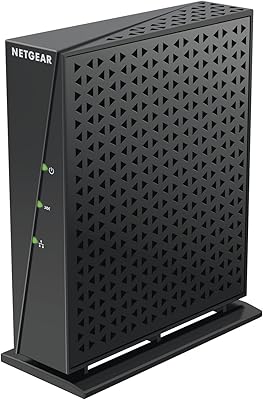
The NETGEAR DM111PSP ADSL2+ Modem is a dedicated, no-frills device built specifically for subscribers on ADSL2+ internet plans — not cable, not fiber, not VDSL. That distinction matters more than anything else about this unit. Released in 2012, it has been around long enough to build a real track record, and NETGEAR has not discontinued it, which says something about its staying power. This DSL modem sits in the mid-range of the market, designed for people who want to own their equipment rather than pay monthly rental fees to their ISP. Compact, lightweight, and cross-platform compatible — Windows, Mac, and Linux are all supported.
Features & Benefits

The ADSL2+ standard gives this unit a real speed advantage over older ADSL connections, though it is worth being clear-eyed: DSL has its own ceiling regardless of the modem involved. That said, the hardware checks the right boxes. There is both a USB 2.0 and a USB 3.0 port onboard — handy for attaching a shared drive or printer without a separate hub. Setup runs through a browser-based interface and plays well with common browsers across all supported platforms. It weighs under half a pound and operates on 100–240V power, which means relocating it or using it internationally is not a hassle. Functional and straightforward.

Best For

This ADSL2+ unit makes the most sense for DSL subscribers who are tired of paying recurring rental fees and want hardware they actually own outright. It is particularly well-suited for people who already run a standalone router and simply need a clean modem to handle the DSL handshake — no combo-unit complications. Linux and Mac users will appreciate the confirmed cross-platform support, which is not always guaranteed on networking hardware in this range. The dual-voltage design also makes it a practical choice for expats or frequent travelers using DSL abroad. What it is not: any kind of fit for cable, fiber, or VDSL. Know your connection type before ordering.

User Feedback

Across 274 Amazon ratings, the NETGEAR standalone modem lands at 3.8 out of 5 — solid, but not without friction. Buyers who matched it to the right connection type tend to be genuinely satisfied; long-term reliability comes up repeatedly, with multiple users reporting years of stable operation. The frustration largely stems from mismatched purchases — people who ordered without confirming their internet type and found it simply would not connect. A smaller group raised concerns about firmware support feeling stale and customer service being difficult to navigate. It is an honest picture: paired with the right DSL plan, it holds up well over time. Paired with anything else, no amount of troubleshooting will fix it.

Pros

  • Owners eliminate monthly ISP modem rental fees, recovering the purchase cost within months.
  • Setup is browser-based and genuinely accessible — most users are online within minutes.
  • Confirmed compatibility with Linux, Mac OS, and Windows makes it rare in this category.
  • The 100–240V power supply works internationally without a separate voltage converter.
  • Long-term reliability is a consistent theme — many users report years of uninterrupted operation.
  • Compact and lightweight, so it tucks cleanly behind a router without dominating your desk.
  • Works seamlessly in bridge mode, avoiding double-NAT headaches when paired with your own router.
  • Both a USB 2.0 and USB 3.0 port are included, adding connectivity options beyond basic modem duties.

Cons

  • Firmware has not received meaningful updates in years, raising legitimate security concerns for a home network device.
  • Technical support for this aging model is thin — users report slow responses and agents unfamiliar with the hardware.
  • No built-in Wi-Fi means an additional router purchase is required for wireless access.
  • USB port functionality is poorly documented, leaving buyers unsure of actual network sharing capabilities.
  • Incompatible with VDSL2, which is increasingly common as DSL providers upgrade their infrastructure.
  • The 3.8-star average reflects a real pattern of buyer confusion — compatibility is easy to misread before purchasing.
  • No wall-mount solution or cable management is included, limiting clean installation options.
  • As a product first released in 2012, it lacks the architecture improvements found in more recently designed DSL modems.

Ratings

The scores below are generated by our AI system after analyzing verified buyer reviews for the NETGEAR DM111PSP ADSL2+ Modem from multiple global sources, with spam, incentivized, and bot-flagged submissions actively filtered out. What you see reflects the real distribution of experiences — from users who have run this unit for years without a hiccup to those who hit frustrating dead ends because of compatibility mismatches. Both sides of that picture are represented honestly here.
DSL Compatibility & Protocol Support
83%
For buyers on a genuine ADSL2+ plan, this unit connects cleanly and holds its link reliably. Users on AT&T DSL and similar providers report stable sync rates and consistent performance over extended periods, which is exactly what you want from a dedicated modem.
The protocol support is narrow by design — ADSL2+ only. Anyone on a VDSL2, cable, or fiber connection will get nothing from this hardware, and a meaningful share of negative reviews trace directly back to that mismatch rather than any actual device defect.
Setup & Installation Experience
79%
21%
Most buyers describe the initial setup as refreshingly straightforward. The browser-based configuration interface works across major browsers on Windows, Mac, and Linux, and the physical connection process is minimal enough that non-technical users rarely needed to call for help.
A subset of reviewers ran into ISP-specific provisioning hurdles that the documentation did not adequately prepare them for. When something went wrong during setup, the troubleshooting guidance felt thin, and reaching useful support was a recurring complaint.
Connection Stability & Reliability
81%
19%
Long-term reliability is one of the strongest themes in positive reviews. Multiple users report running this DSL modem for three or more years without a dropout or hardware failure, which stands out in a category where ISP-supplied equipment often degrades faster.
A few users noted that sync stability could wobble during line quality dips, which is partly a DSL infrastructure issue rather than a modem fault — but the unit does not appear to compensate for noisy lines as aggressively as some competing hardware.
OS & Platform Compatibility
86%
Confirmed support for Windows, Mac OS, Linux, and UNIX is a genuine differentiator. Linux users in particular appreciated having a modem that did not require workarounds or unofficial drivers, which is not a given in this product segment.
While the compatibility list is broad, some users on less common Linux distributions found that documentation was written with Windows users in mind. Edge cases required community forum digging rather than any official guidance from NETGEAR.
Value for Money
72%
28%
For DSL subscribers paying a monthly modem rental fee to their ISP, this ADSL2+ unit can pay for itself within several months of ownership. Buyers who made that calculation deliberately tend to feel the purchase was justified, especially given the multi-year lifespan reported by many.
At its listed price point, some buyers feel the feature set is showing its age — particularly when compared to newer DSL gateways available at similar or lower prices. Without Wi-Fi built in, the value equation depends heavily on whether you already own a capable router.
Firmware & Software Maturity
51%
49%
The firmware is stable in the sense that it does not introduce new problems. For users who configure it once and leave it alone, the software side rarely becomes an issue in day-to-day use over years of operation.
Several reviewers flagged that firmware updates have been sparse to nonexistent for some time, leaving the unit without any modern security patches or feature improvements. For a device handling your home internet connection, that stagnation is a legitimate concern.
Build Quality & Physical Design
74%
26%
The unit feels solid for its weight class. At under half a pound, it is clearly not a heavy-duty piece of rack equipment, but the casing does not creak or flex, and the port connections feel secure rather than loose after repeated cable insertions.
The design is purely utilitarian — white plastic with no ventilation concerns noted, but also nothing particularly modern about the form factor. A few users mentioned the unit runs warm during extended sessions, though no heat-related failures were commonly reported.
USB Port Utility
67%
33%
Having both a USB 2.0 and USB 3.0 port available is a welcome addition for users who want to attach a shared storage drive or printer without adding another hub to their desk. The USB 3.0 port in particular gives some future-facing flexibility.
Documentation on how to actually use the USB ports for network sharing is sparse, and several buyers were unsure whether the ports offered full NAS-style functionality or were simply for direct device connection. Real-world USB utility appears limited without additional configuration knowledge.
Physical Footprint & Portability
88%
At 6.7 ounces and compact dimensions, this ADSL2+ unit is easy to tuck behind a router or mount discreetly. Users who moved residences or rearranged home office setups appreciated not having to work around a bulky device.
The compact size is a genuine plus, but the cord management situation is typical for this class of device — no built-in cable routing or wall-mount option included, so placement flexibility is still somewhat constrained by where your phone line terminates.
International & Voltage Flexibility
82%
18%
The 100–240V auto-switching power supply is a practical feature for expats or travelers who need a personal DSL modem that works abroad without a separate voltage converter. Users in multiple countries confirmed it powered up correctly without any adapter modification.
Voltage flexibility aside, actual DSL standard compatibility varies by region, and ADSL2+ coverage is not uniform globally. A handful of international buyers discovered that their local provider used a variant of the standard that the modem did not handle cleanly.
Technical Support Quality
44%
56%
For straightforward installations, the need for support rarely arises — and buyers who never had to contact NETGEAR directly were generally satisfied with the self-serve documentation available at setup time.
When support was actually needed, the experience drew consistent criticism. Response times, agent knowledge specific to this older model, and the availability of updated guidance all came up as pain points. For a product this age, support infrastructure has clearly thinned.
Indicator Lights & Status Visibility
69%
31%
The status LED layout gives enough feedback to diagnose basic connection states — DSL sync, power, and data activity are all represented, which helps during initial setup and when troubleshooting a dropped connection without logging into the interface.
Some users found the LED indicators insufficiently granular for diagnosing more complex sync issues. There is no detailed status breakdown comparable to what some competing modems display, which made isolating line problems more difficult for technically inclined users.
Router Handoff & Bridge Mode Performance
78%
22%
For users running their own router — which is the most logical pairing for a standalone modem like this — the handoff works cleanly. Bridge mode operation was confirmed by multiple technically experienced reviewers who praised the lack of double-NAT complications.
Getting bridge mode configured correctly is not covered in depth by the included documentation, and less experienced users sometimes struggled to understand why their router was not receiving a public IP. Community forums filled the gap that official materials left open.
Product Longevity & Continued Availability
76%
24%
The fact that this unit remains available and non-discontinued after more than a decade on the market is a meaningful signal. Replacement units are accessible for buyers whose original hardware eventually fails, which matters for those who configured their network around it.
Being a 2012 product means the underlying hardware architecture is aging. While it still functions, it is not being developed further, and buyers looking for a modem that will receive active investment from the manufacturer should look at more recently released alternatives.

Suitable for:

The NETGEAR DM111PSP ADSL2+ Modem is the right call for DSL subscribers who are tired of paying a monthly equipment rental fee to their ISP and want hardware they actually own. It works best when paired with a separate router — if you already have a solid Wi-Fi router and just need a clean, reliable modem to handle the DSL side of the equation, this unit fits that role well. Linux and Mac users will find the confirmed cross-platform compatibility genuinely useful, since many modems in this segment are documented for Windows only. The dual-voltage power supply also makes it a practical pick for expats or frequent international travelers who use DSL connections abroad. If your internet service is ADSL2+ and you know it, this is a focused, no-frills device that gets the job done.
Not suitable for:

The NETGEAR DM111PSP ADSL2+ Modem is flatly incompatible with cable, fiber, and VDSL internet services — and that single fact disqualifies it for a large portion of the broadband market. If your provider is Comcast, Cox, Spectrum, Verizon FIOS, or AT&T U-verse, stop here; this unit will not work, full stop. It is also a poor fit for buyers who want an all-in-one gateway with built-in Wi-Fi, since it has no wireless functionality whatsoever. Anyone hoping for active manufacturer support, recent firmware updates, or long-term software development should look elsewhere — this is a 2012 product, and it shows in how NETGEAR has maintained it. Finally, users who need a modem vetted for VDSL2 plans — increasingly common as ISPs upgrade their DSL infrastructure — will need a different device entirely.
Specifications

  • Brand: Manufactured by NETGEAR Inc., a well-established networking hardware company with a broad consumer and small business product portfolio.
  • Model Number: The exact model identifier is DM111PSP-100NAS, used for warranty registration, ISP compatibility checks, and firmware lookups.
  • Connection Type: Supports the ADSL2+ broadband standard, which operates over standard copper telephone lines provided by DSL internet service providers.
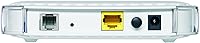
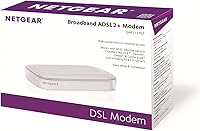
  • Dimensions: The unit measures 10 x 7 x 2.8 inches (L x W x H), keeping a low profile suitable for placement on a desk or shelf.
  • Weight: At 6.7 ounces, this is a lightweight device that can be repositioned or relocated without any meaningful effort.
  • Voltage Input: The power supply accepts 100–240V AC input, making it compatible with both North American and international electrical standards without a converter.
  • USB 2.0 Ports: One USB 2.0 port is included on the device for peripheral or storage connectivity.
  • USB 3.0 Ports: One USB 3.0 port is also present, offering higher-speed data transfer capability compared to the USB 2.0 port.
  • Color: The unit ships in white, consistent with NETGEAR's standard consumer hardware aesthetic for this product generation.
  • OS Compatibility: Officially compatible with Microsoft Windows (XP, 2000, Vista, 7, 8), Mac OS, UNIX, and Linux operating systems.
  • Browser Support: Browser-based configuration is supported on Internet Explorer 5.0+, Firefox 2.0+, Chrome 11.0+, and Safari 1.4 or higher.
  • Incompatible Services: This modem will not function with cable internet providers (such as Comcast, Cox, or Charter) or fiber and VDSL services including Verizon FIOS, AT&T U-verse, and CenturyLink VDSL.
  • Release Date: The product was first made available on May 23, 2012, and as of the time of this review remains active and non-discontinued by the manufacturer.
  • Discontinuation Status: NETGEAR has not discontinued this model, meaning replacement units and basic product information remain accessible through standard retail channels.
  • Amazon Rating: The device holds an aggregate rating of 3.8 out of 5 stars based on 274 verified customer ratings on Amazon.
  • Sales Rank: Ranked #103 in the Computer Networking Modems category on Amazon, placing it within the top tier of actively sold modem hardware on the platform.
  • Department: Classified under wired networking, reflecting its function as a dedicated, non-wireless broadband modem.
  • Setup Method: Initial configuration is performed through a browser-based interface accessed after physical connection to the DSL phone line and a computer or router.

Related Reviews
NETGEAR CM400 DOCSIS 3.0 Cable Modem
78%
91%
Value for Money
84%
Ease of Setup
87%
Connection Stability
78%
ISP Compatibility
73%
Build Quality
More
NETGEAR C7500 AC3200 Cable Modem Router Combo
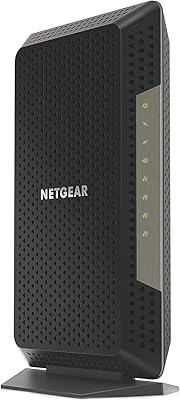
66%
78%
Wi-Fi Performance
71%
Modem Reliability
74%
Setup Experience
55%
ISP Compatibility
63%
Value for Money
More
NETGEAR CM700 Cable Modem
75%
88%
Value for Money
79%
Connection Stability
91%
Ease of Installation
83%
Speed Performance
62%
Build Quality & Thermal Management
More
NETGEAR DM200 DSL Modem
74%
83%
Connection Stability
51%
Setup Experience
58%
ISP Compatibility
81%
Value for Money
74%
Build Quality
More
NETGEAR Nighthawk CM1200
75%
88%
Internet Speed Performance
83%
Setup & Installation
63%
Long-Term Reliability
79%
Value for Money
71%
Compatibility & ISP Support
More
NETGEAR CM600 DOCSIS 3.0 Cable Modem
74%
88%
Ease of Setup
84%
Connection Stability
61%
Long-Term Reliability
86%
Value for Money
79%
Speed Performance
More
NETGEAR CM500V Cable Modem with Voice
85%
93%
Value for Money
88%
Performance & Speed
85%
Voice Call Quality
91%
Ease of Setup
82%
Compatibility with Xfinity
More
TP-Link TD-8817 ADSL2+ Modem
80%
87%
Value for Money
92%
Ease of Setup
85%
Build Quality
80%
Internet Speed
88%
Security Features
More
NETGEAR Nighthawk CAX30
79%
88%
Setup & Installation
83%
WiFi Speed & Performance
71%
WiFi Coverage & Range
91%
Modem Reliability & Uptime
78%
Value for Money
More
NETGEAR Nighthawk C7000 AC1900 Modem Router Combo
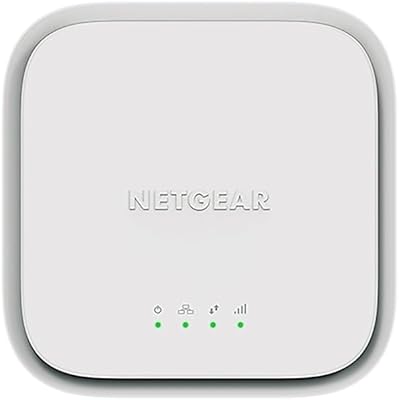
75%
91%
Ease of Setup
78%
Wi-Fi Speed & Performance
71%
Modem Speed & DOCSIS Performance
74%
Wi-Fi Coverage & Range
76%
Build Quality & Design
More

FAQ

No, it will not. This DSL modem is built exclusively for ADSL2+ connections delivered over a copper telephone line. Cable internet services like Comcast, Xfinity, Cox, and Charter use an entirely different technology — DOCSIS — and this unit has no ability to connect to those networks. If you are on cable, you need a DOCSIS modem instead.

It depends on which AT&T service you have. If you are on a legacy AT&T DSL plan that uses the ADSL2+ standard, this unit should be compatible. However, AT&T U-verse runs on VDSL2, not ADSL2+, and this modem will not work with U-verse. Check your current plan type before ordering — your ISP can confirm which standard your connection uses.

No. This is a dedicated standalone modem with no wireless capability whatsoever. You will need a separate Wi-Fi router connected to this unit if you want wireless internet in your home. That is actually a feature for some buyers — it means you can pair it with any router you choose rather than being locked into a combined gateway.

Yes, and this is one of the more useful things about this unit. Linux, Mac OS, and UNIX are all officially supported, and the browser-based configuration interface means you are not dependent on any operating-system-specific software. Most Linux users report no driver issues during setup.

The modem supports ADSL2+ speeds, which have a theoretical downstream ceiling of around 24 Mbps and upstream of around 1.4 Mbps. In practice, real-world speeds depend almost entirely on your DSL line quality, distance from the telephone exchange, and your ISP plan. The modem itself is not a bottleneck for typical ADSL2+ service, but do not expect fiber-like performance — DSL has inherent physical limitations regardless of hardware quality.

No, it does not support VDSL2. If your provider has upgraded their infrastructure to VDSL2 — which is increasingly common with providers like CenturyLink and some AT&T areas — this unit will not establish a connection. VDSL2 requires a modem that explicitly lists VDSL2 support in its specifications.

You can connect it directly to a single computer via its Ethernet port for a simple, single-device setup. If you want multiple devices or wireless coverage, you will need a router between this modem and your network. Many buyers use it in bridge mode feeding a dedicated router, which is the most common and flexible configuration.

Setup is fairly approachable. You connect the modem to your phone line and to your computer or router, power it on, and then open a browser to access the configuration interface. Most major browsers on any supported OS will work. The process requires entering your ISP credentials, which your provider supplies. The majority of buyers describe it as manageable, though some ISP-specific provisioning steps are not well-covered by the included documentation.

This is a known limitation. The modem is a 2012 product and firmware development has been largely inactive for some time. While the existing firmware is stable for day-to-day use, it has not received the kind of security patches or feature improvements you would expect from newer hardware. If firmware currency matters to you — for example, if you have strict home network security requirements — that is worth factoring into your decision.

NETGEAR does offer support channels, but buyer feedback consistently notes that this older model receives limited specialist attention. Response times and agent familiarity with the DM111PSP specifically have drawn criticism in reviews. Community forums and third-party DSL user groups have often proven more useful than official support for troubleshooting edge cases. For straightforward setups, the need for support rarely arises — but going in with realistic expectations about manufacturer assistance is advisable.

Where to Buy