Overview

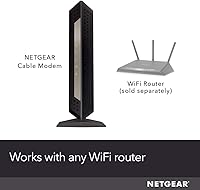
The NETGEAR CM1000 DOCSIS 3.1 Cable Modem is built for cable internet subscribers who are done letting their ISP charge them a monthly equipment fee for hardware they will never own. DOCSIS 3.1 is the current gold standard for cable modems, capable of handling today's fastest residential plans without breaking a sweat. This NETGEAR modem works with Xfinity, Spectrum, and Cox — but it is worth stating plainly that it has no place on DSL, fiber, or any bundled phone service. There is also no built-in Wi-Fi, so a separate router is required. Over a couple of years, ownership typically pays for itself many times over.
Features & Benefits

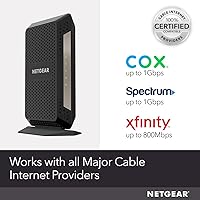
At the core of the CM1000 is a DOCSIS 3.1 engine with 32x8 channel bonding and OFDM(A) 2x2 technology, which allows it to aggregate bandwidth far more efficiently than older DOCSIS 3.0 hardware — meaning more consistent speeds during peak hours rather than the bottlenecks aging modems create. There is a single Gigabit Ethernet port on the back, connecting to your router of choice or directly to a PC. IPv6 is fully supported, which matters as the internet continues shifting away from IPv4 infrastructure. Certification levels also vary by ISP: Spectrum and Cox are approved for full gigabit plans, while Xfinity is certified up to 800 Mbps on this model specifically.

Best For

This standalone cable modem is a natural fit for anyone on Xfinity, Spectrum, or Cox who subscribes to a gigabit or near-gigabit cable plan and wants to squeeze every bit of performance out of it. It also suits networking enthusiasts who already own a preferred router and simply need a dependable modem to pair it with. The long-term ownership value is a genuine consideration — rental fees accumulate fast, and the CM1000 typically recoups its cost within a year or two for most subscribers. That said, if you are on DSL, fiber, or a plan that includes home phone service, this modem simply will not work. Full stop.

User Feedback

With roughly 3,800 ratings averaging 4.2 out of 5 stars, this NETGEAR modem has earned a broadly positive reputation — though the picture is more nuanced than the headline score suggests. Buyers who stick with it past the first few months consistently praise its connection stability and noticeable speed gains over ISP-rented hardware. Setup is where friction surfaces most often: provisioning a new modem with your cable provider can frustrate users less comfortable navigating tech support. A recurring gripe is the occasional need to reboot after extended uptime. Also worth flagging, a fair share of negative reviews come from buyers who expected built-in Wi-Fi — a mismatch in expectations, not a product flaw.

Pros

  • Eliminates recurring ISP modem rental fees, typically paying for itself within one to two years.
  • DOCSIS 3.1 technology handles today's fastest cable plans without becoming a bottleneck.
  • Certified and officially approved by Xfinity, Spectrum, and Cox for reliable activation.
  • Consistent connection stability praised repeatedly by long-term owners across multiple ISPs.
  • Separating modem and router lets you upgrade each independently without replacing both.
  • IPv6 support keeps the CM1000 relevant as ISP networks continue to evolve.
  • Compact vertical form factor fits neatly behind a router without consuming much space.
  • Strong performance on gigabit Spectrum and Cox plans, with users frequently hitting subscribed speeds.
  • Over 3,800 ratings with a 4.2-star average reflects a broadly satisfied and large owner base.
  • Built to last — multi-year owners consistently report the hardware holds up without meaningful performance degradation.

Cons

  • ISP provisioning calls can be lengthy and frustrating, especially for less tech-savvy buyers.
  • Xfinity certification tops out at 800 Mbps — not the full gigabit some subscribers expect.
  • Occasional spontaneous reboots reported after extended uptime, requiring manual power cycling.
  • No LED dimming option, which bothers buyers who place the modem in a bedroom or living room.
  • Runs noticeably warm and needs open airflow — enclosed media cabinets can cause instability.
  • A single Gigabit Ethernet port limits flexibility for users wanting direct multi-device wired connections.
  • No voice port rules it out entirely for anyone with a bundled cable phone line.
  • Hardware failures appearing after the warranty period have generated inconsistent support experiences.
  • Newer competing DOCSIS 3.1 modems have entered the market at lower price points, narrowing the value gap.
  • Out-of-box documentation does not adequately prepare buyers for the ISP activation call-in process.

Ratings

The NETGEAR CM1000 DOCSIS 3.1 Cable Modem scores below were generated by AI after analyzing thousands of verified buyer reviews worldwide, with spam, bot-submitted, and incentivized feedback actively filtered out. The CM1000 has accumulated a substantial review base across multiple years of market availability, giving us a reliable signal on both where it genuinely delivers and where real users have run into friction. Both strengths and pain points are reflected transparently — no score here is padded to flatter the product.
Connection Stability
88%
Long-term owners consistently report that once the CM1000 is provisioned and running, it simply stays running. Users on Spectrum and Cox in particular describe weeks-long stretches without a single dropped connection, which is a meaningful step up from aging ISP-rented hardware that tends to degrade over time.
A recurring pattern in lower-rated reviews points to spontaneous reboot cycles appearing after several months of continuous uptime — not a dealbreaker, but enough to require a manual power cycle every few weeks for some users. This seems more common in warmer environments where the unit may run hot.
Speed Performance
84%
On gigabit cable plans through Spectrum or Cox, buyers frequently report hitting or closely approaching their subscribed speeds — something their previous ISP-issued modems rarely managed consistently. The DOCSIS 3.1 architecture handles peak-hour congestion noticeably better than older DOCSIS 3.0 equipment.
Xfinity subscribers should temper expectations slightly: this standalone cable modem is certified for up to 800 Mbps on Comcast's network, not the full gigabit tier. Users who did not check this detail before purchasing have expressed frustration when their gigabit plan does not fully translate at the modem level.
Compatibility & ISP Support
76%
24%
For cable internet customers on Xfinity, Spectrum, or Cox, compatibility is well-established and officially certified — not a guessing game. The CM1000 appears on each provider's approved modem lists, which reduces the risk of activation headaches that plague some third-party hardware.
The compatibility wall is real and unforgiving. DSL subscribers, fiber customers, and anyone with a bundled voice line cannot use this modem at all, and a meaningful chunk of negative reviews comes from buyers who did not verify this before purchasing. The product is also US-only, which catches some international shoppers off guard.
Setup & Provisioning Experience
61%
39%
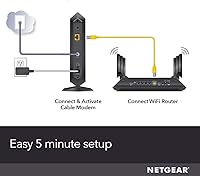
For users who have swapped modems before or are comfortable calling their ISP to provision new hardware, the process is generally straightforward. The physical setup — plugging in coax and Ethernet — takes minutes, and the hardware itself provides clear indicator lights to confirm signal status.
ISP provisioning is where this process earns its lowest marks from buyers. Multiple reviewers describe lengthy hold times with their cable provider, MAC address registration confusion, and in some cases, technicians who pushed back against activating customer-owned equipment. Less technical users found this step genuinely stressful.
Value for Money
82%
18%
The long-term ownership math is convincing for most cable subscribers. Monthly rental fees from ISPs add up fast, and buyers who have owned the CM1000 for two or more years consistently note that it has paid for itself and continues to save money every billing cycle — a point that comes up repeatedly in five-star reviews.
The upfront investment is significant compared to some competing DOCSIS 3.1 modems that have entered the market at lower price points. Buyers on slower cable plans well below gigabit speeds may find that a less expensive DOCSIS 3.0 modem meets their needs without the premium outlay this unit commands.
Build Quality & Design
79%
21%
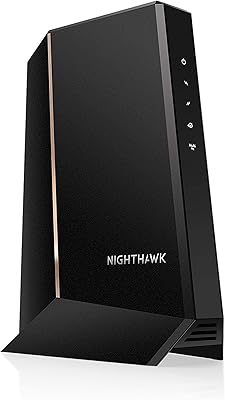
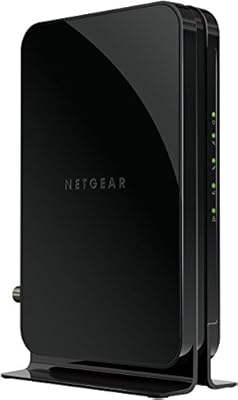
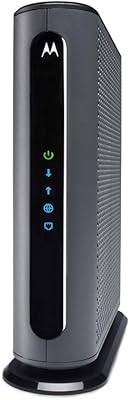
The tower form factor is sturdier than it looks in photos, with a solid matte black casing that does not feel hollow or cheap. At roughly the footprint of a thick paperback novel standing upright, it fits neatly behind a router without dominating the shelf or desk space.
The unit runs noticeably warm after extended operation, and ventilation relies entirely on passive airflow — there is no fan. A few buyers who placed it in enclosed media cabinets reported thermal-related instability, which suggests it needs at least modest breathing room around it.
Modem-Only Design
73%
27%
Networking-savvy buyers actively appreciate that the modem and router functions are separated. It means you can upgrade, replace, or mix and match your router independently without touching the modem — a flexibility that all-in-one gateway devices simply cannot offer.
The absence of built-in Wi-Fi is the single largest source of confused negative reviews. A surprising number of buyers assumed this unit would broadcast a wireless signal out of the box, and discovering it does not after the fact generated genuine frustration — a clarity gap the product page has not fully resolved.
Ethernet Port Configuration
68%
32%
The single Gigabit Ethernet port is clean and purpose-built for connecting one device — almost always a router. For the vast majority of home setups, one port is all that is ever needed, and the Gigabit throughput ceiling keeps it from becoming a bottleneck on fast plans.
Power users who want to run multiple wired devices directly off the modem — or those hoping for a multi-gig port to future-proof against 2.5 Gbps or faster cable plans — will find a single 1G port limiting. NETGEAR's own newer models offer port aggregation for those building ahead of current plan speeds.
Long-Term Reliability
83%
The CM1000 has been on the market since late 2016 and still earns positive long-term reviews — a reasonably strong signal that it does not degrade quickly. Buyers who have used it for three or four years describe it as still performing as expected, which is harder to say about many ISP-rented units.
A small but consistent thread of reviews describes hardware failures appearing after the one-year mark — occasionally outside warranty coverage. NETGEAR's customer support response in these cases appears inconsistent based on buyer accounts, ranging from smooth replacements to frustrating runarounds.
IPv6 & Future-Readiness
77%
23%
Full IPv6 support is genuinely useful for buyers who care about network infrastructure longevity. As ISPs continue transitioning their backbone away from IPv4 address pools, having a modem that handles both protocols without manual configuration is a quiet but meaningful advantage.
IPv6 functionality is largely invisible to average users who will never configure it directly, which means it is a feature that lands harder for IT-minded buyers than for general consumers. It does not compensate for the missing multi-gig port if someone is planning a truly future-oriented network build.
Indicator Lights & Status Feedback
71%
29%
The front panel LEDs give a reasonably clear read on modem status — power, downstream, upstream, and online indicators help buyers quickly confirm whether a connection issue is at the modem level or further down the network chain. This is more useful than it sounds during a troubleshooting session.
Some buyers find the lights too bright for bedroom or living room setups where the modem is placed in a visible spot. There is no option to dim or disable the LEDs, which is a small but genuinely annoying omission that a firmware setting could have addressed.
Documentation & Out-of-Box Experience
64%
36%
The physical setup guide included in the box covers the basic coax-to-Ethernet connection clearly enough for most buyers to get the hardware installed without confusion. NETGEAR's online resources also provide ISP-specific activation steps that complement the printed guide.
The documentation does a poor job of preparing less experienced buyers for the ISP call-in activation step, which is often the hardest part of the process. Several reviewers felt blindsided by needing to contact their provider, having expected the modem to self-activate the way a router typically would after plugging in.
Physical Footprint & Placement
81%
19%
The compact vertical design keeps the CM1000 from taking over limited shelf or desk space. At just over 13 ounces, it is light enough to be cable-managed or tucked behind other equipment without needing dedicated mounting hardware or a dedicated modem shelf.
The tower orientation means it can tip if nudged, and there are no included cable management features to keep the coax and Ethernet from pulling at awkward angles. In tighter equipment closets or media centers, the vertical stance can be mildly inconvenient depending on how cables are routed.

Suitable for:

The NETGEAR CM1000 DOCSIS 3.1 Cable Modem is the right call for cable internet subscribers on Xfinity, Spectrum, or Cox who are serious about owning their equipment and getting the most out of a high-speed plan. If you are paying for a gigabit or near-gigabit cable tier and still using a modem your ISP hands you for a recurring monthly fee, the CM1000 makes a compelling case for cutting that cost permanently — the payback period is typically well under two years for most cable subscribers. It is also an excellent fit for anyone who already owns a preferred router and simply wants a capable, dedicated modem to pair with it, since the separation of modem and router functions gives you full control over each component independently. Networking enthusiasts and home office workers who depend on a stable, consistent connection rather than bleeding-edge wireless performance will find the reliability track record particularly reassuring. Longer-term owners in particular tend to be among the most satisfied buyers, which suggests this is a purchase that rewards patience and correct expectations.
Not suitable for:

The NETGEAR CM1000 DOCSIS 3.1 Cable Modem is a hard pass for anyone not on a traditional cable internet connection — if your service runs over DSL, fiber, or a fixed wireless network, this hardware simply will not work with your infrastructure, full stop. Customers whose internet plan is bundled with home phone service are also out of luck, as this modem has no voice port and is not designed for any VoIP-over-cable configuration. Buyers hoping for an all-in-one solution that handles both the modem and Wi-Fi functions in a single box need to look elsewhere — the CM1000 does not broadcast any wireless signal and requires a separate router to serve connected devices throughout the home. Xfinity subscribers on true gigabit plans should also be aware that this modem is certified for up to 800 Mbps on Comcast's network, not the full 1 Gbps tier, which may matter if you are paying for top-tier speeds. Finally, buyers who are not comfortable calling their ISP to provision new modem hardware — or who want a truly plug-and-play experience — may find the activation process more involved than they anticipated.
Specifications

  • Modem Standard: Built on DOCSIS 3.1, the current generation cable modem specification designed to support multi-gigabit downstream capacity on modern cable infrastructure.
  • Channel Bonding: Supports 32x8 channel bonding, allowing it to aggregate 32 downstream and 8 upstream channels simultaneously for more consistent throughput under load.
  • OFDM Technology: Includes OFDM(A) 2x2 support, the advanced modulation method introduced with DOCSIS 3.1 that significantly improves spectral efficiency over older channel bonding alone.
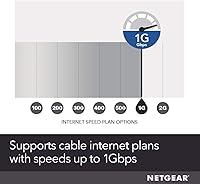
  • Max Speed: Capable of supporting cable internet plans up to 1 Gbps downstream, with certification varying by ISP: up to 1 Gbps on Spectrum and Cox, and up to 800 Mbps on Xfinity.
  • Ethernet Ports: Equipped with one Gigabit Ethernet port (10/100/1000 Mbps) on the rear panel for connecting a router or a single wired computer.
  • Wi-Fi: No wireless radio is included — this is a modem-only device that requires a separate router or access point to provide Wi-Fi coverage.
  • Voice Support: No telephone voice port is included, making this modem incompatible with any bundled cable phone or VoIP service plan.
  • IP Protocol: Supports both IPv4 and IPv6, allowing it to function on current and next-generation ISP network configurations without additional setup.
  • Compatible ISPs: Officially certified for use with Xfinity (Comcast), Spectrum, and Cox cable internet service; not compatible with DSL, fiber, satellite, or fixed wireless providers.
  • Dimensions: Measures 5.9″ long by 5.4″ wide by 8.8″ tall in its upright tower orientation, occupying a footprint roughly equivalent to a thick hardcover book stood on end.
  • Weight: Weighs 13.4 ounces, light enough to be repositioned easily or cable-managed behind other networking equipment.
  • Color & Finish: Finished in matte black with a ridged casing that resists minor scuffs and keeps the unit from appearing visually prominent in most home setups.
  • Model Number: Sold under the model designation CM1000-100NAS, which is the version intended exclusively for the US cable market.
  • Country of Use: Designed and certified for use in the United States only; it is not compatible with cable infrastructure or ISP networks outside the US.
  • Cooling System: Uses passive cooling with no internal fan, relying on the ridged outer casing and natural convection airflow to manage operating temperatures.
  • Indicator Lights: Front panel includes LED status indicators for power, downstream signal, upstream signal, and online connectivity, providing a quick visual reference during setup or troubleshooting.
  • Connectivity Input: Accepts a standard coaxial cable (F-type connector) on the rear for connection to the cable wall outlet provided by your ISP.
  • Power Supply: Powered via an included AC power adapter; there is no Power over Ethernet (PoE) support or battery backup built into the unit.

Related Reviews

NETGEAR Nighthawk 32x8 DOCSIS 3.1 Cable Modem
78%
88%
Internet Speed Performance
83%
Setup & Activation
79%
Build Quality & Durability
91%
Value for Money
74%
ISP Compatibility
More
NETGEAR CM2500 DOCSIS 3.1 Cable Modem
77%
83%
Setup & Provisioning
88%
Upload Speed Performance
81%
Download Speed Consistency
76%
ISP Compatibility
79%
Build Quality & Design
More
NETGEAR Nighthawk CM3000
79%
88%
Upload Speed Performance
91%
Download Speed Delivery
79%
ISP Compatibility
66%
Setup & Activation Experience
74%
Value for Money
More
Hitron CODA DOCSIS 3.1 Cable Modem
76%
83%
Connection Stability
78%
Ease of Setup
74%
ISP Compatibility
86%
Value for Money
81%
Performance at Rated Speeds
More
Humax HGD310 DOCSIS 3.1 Cable Modem
76%
88%
Internet Speed Performance
83%
Setup & Installation
79%
ISP Compatibility
91%
Value for Money
67%
Build Quality & Durability
More
Arris CM8200A DOCSIS 3.1 Cable Modem
74%
88%
Internet Speed Performance
79%
Ease of Setup & Activation
74%
ISP Compatibility
83%
Build Quality & Durability
71%
Thermal Management
More
NETGEAR CM500 DOCSIS 3.0 Cable Modem
77%
91%
Value for Money
88%
Setup & Activation
84%
Connection Stability
63%
Refurbished Condition Consistency
72%
ISP Compatibility
More
Motorola MB8611 DOCSIS 3.1 Multi-Gig Cable Modem
85%
92%
Performance & Speed
85%
ISP Compatibility
88%
Setup & Installation
90%
Latency for Gaming/Streaming
80%
Reliability
More
ARRIS SURFboard SBG8300 DOCSIS 3.1 Cable Modem Router Combo
84%
91%
Performance & Speed
88%
Wi-Fi Coverage & Stability
80%
Ease of Setup
84%
Compatibility with ISPs
92%
Value for Money
More
ARRIS SURFboard G36
ARRIS SURFboard G36
72%
83%
Setup & Activation
76%
Wi-Fi Speed & Throughput
61%
Wi-Fi Range & Coverage
58%
Connection Stability
88%
DOCSIS 3.1 Modem Performance
More

FAQ

No Wi-Fi is included — the NETGEAR CM1000 DOCSIS 3.1 Cable Modem is a modem only. You will need to connect a separate router to its Gigabit Ethernet port to get wireless coverage throughout your home. This is actually a deliberate design choice that many networking enthusiasts prefer, since it lets you pick the best router for your needs independently.

It will work with Xfinity, but with an important caveat: the CM1000 is certified by Comcast for speeds up to 800 Mbps, not the full 1 Gbps tier. If you are on a true gigabit Xfinity plan, you may see slightly lower speeds at the modem level than your subscription technically allows. For full gigabit certification on Xfinity, you would need to look at NETGEAR's newer models like the CM1100 or CM1200.

The physical installation — plugging in the coaxial cable and connecting your router — is genuinely simple. The part that trips people up is the ISP activation call. You will need to contact your cable provider, give them the modem's MAC address (printed on the label), and have them provision it on their network. This process can take anywhere from a few minutes to over an hour depending on your ISP's support wait times. Having your account number ready before calling helps.

Yes, the CM1000 is certified by Spectrum for plans up to 1 Gbps, making it one of the cleaner compatibility matches for Spectrum gigabit subscribers. Many Spectrum users report hitting or closely approaching their subscribed speeds after switching to this standalone cable modem from ISP-rented hardware.

No — this modem has no voice port and cannot support any bundled cable phone or VoIP line. If your current ISP plan includes home phone service over cable, you either need to keep renting the ISP's gateway or switch to a separate modem that includes a telephone port. Dropping the phone bundle first is the cleanest path to using the CM1000.

A subset of owners do report occasional spontaneous reboots or brief connection drops, typically appearing after several months of continuous operation. This tends to happen more frequently in warm or enclosed spaces where airflow around the modem is restricted. Make sure the unit has at least a few inches of open space around it and is not inside a closed media cabinet. If reboots persist, a full power cycle and checking coaxial cable connections often resolves it.

It depends on what your ISP charges for equipment rental, but for most major cable providers, monthly modem rental fees add up quickly. The majority of buyers who track this find the modem pays for itself somewhere between one and two years. After that point, you are simply saving money every month you continue using it — which is why long-term owners tend to be among the most enthusiastic about this purchase.

Yes, and Cox is actually one of the better ISP matches for the CM1000. It is certified for Cox plans up to 1 Gbps, and Cox users in particular report a notably smoother provisioning experience compared to some other providers. If you are on a Cox gigabit plan and looking to ditch your rental modem, this unit is a solid fit.

In most cases, yes — the CM1000 is compatible with both providers, so you would not need to replace the hardware if you switch. You would simply need to call your new ISP and have them provision the modem on their network using the MAC address. Keep in mind that your new provider needs to support DOCSIS 3.1 hardware for the activation to work, which both Spectrum and Cox do.

If you are on a plan faster than roughly 400 Mbps, DOCSIS 3.1 starts making a practical difference — particularly during peak evening hours when older modems can struggle to maintain consistent throughput. The OFDM(A) technology in DOCSIS 3.1 handles congestion more efficiently than channel bonding alone. For slower plans, a good DOCSIS 3.0 modem is still perfectly adequate, but anyone paying for gigabit-class speeds is leaving performance on the table by pairing it with older modem hardware.

Where to Buy