Overview

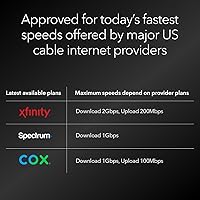
The NETGEAR Nighthawk CM3000 arrived in mid-2024 targeting a very specific kind of buyer — one whose ISP is actively rolling out mid/high-split cable infrastructure. If you haven't heard that term before, here's the short version: traditional cable networks dedicate most of their bandwidth to downloads, leaving uploads relatively slow. Mid/high-split rebalances that allocation, which is why Xfinity can now offer 2Gbps downloads alongside dramatically faster upload tiers. This cable modem exists to unlock those plans — plans your current rental unit almost certainly cannot support. Compatible with Xfinity, Spectrum, Cox, and Optimum, it also makes a strong financial case: owning your modem rather than renting one adds up to real savings over a few years.
Features & Benefits

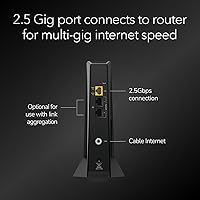
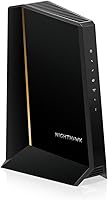
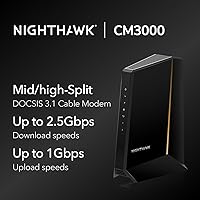
The CM3000 is built around DOCSIS 3.1 mid/high-split technology, which pushes maximum download speeds to 2.5Gbps and upload speeds to a ceiling of 1Gbps — numbers that put it well ahead of most home modems available today. The Ethernet port setup is notably practical: one 2.5G port handles a high-throughput router connection, while two additional 1G ports offer flexibility for wired devices. At 6.8″ x 3.7″ x 8.2″ and just over a pound, the physical footprint is modest enough to tuck away easily. NETGEAR clearly designed this Nighthawk modem to anchor a next-generation home network, recommending pairing it with a Wi-Fi 7 router to avoid bottlenecks at the wireless layer.

Best For

This cable modem makes the most sense for households already subscribed to — or actively planning to move to — a multi-gig internet plan from Xfinity, Spectrum, Cox, or Optimum. If you're uploading large video files, running a NAS accessible from outside your home, managing multiple security cameras, or video conferencing on several devices at once, the upload ceiling here is a genuine differentiator. Remote workers and content creators will notice it most. That said, buyers primarily looking to cut rental fees should also consider this: the long-term cost math typically works out favorably over two to three years for anyone on a high-tier plan.

User Feedback

Across more than 300 ratings on Amazon, the CM3000 holds a 4.4-out-of-5-star average — a solid result for a specialized piece of hardware. Buyers who qualified for it routinely highlight the real-world difference in upload performance, especially on Xfinity's higher-tier plans. The more candid reviews, however, flag something worth knowing: if your ISP hasn't yet upgraded the local node infrastructure to support mid/high-split, you won't see those improvements right away regardless of what modem you own. A handful of users also mention activation delays during initial setup. On the hardware side, pairing experiences with Orbi and Wi-Fi 6E routers tend to be reported positively.

Pros

  • Unlocks upload speeds on eligible Xfinity mid/high-split plans that rental modems simply cannot access.
  • The 2.5G Ethernet port removes the modem as a bottleneck in a multi-gig home network.
  • Paying off this Nighthawk modem typically takes under two years when replacing a monthly ISP rental fee.
  • Three Ethernet ports on a single modem — including two 1G ports — adds useful wired flexibility.
  • Approved by Xfinity, Spectrum, Cox, and Optimum, covering most US cable subscribers.
  • Compact vertical design fits neatly in tight spaces without generating excessive heat.
  • Strong pairing compatibility with Wi-Fi 6E and Wi-Fi 7 routers for a fully capable home network.
  • Supports upload speeds up to 1Gbps — a ceiling most competing modems cannot approach.
  • Buyers in mid/high-split-ready markets report real-world speed gains that match the marketing claims.
  • Released in 2024, it is positioned well for infrastructure upgrades expected to roll out over the next few years.

Cons

  • If your local cable node has not been upgraded, upload speeds will be no better than an older modem.
  • ISP activation can require multiple support calls, with some agents unfamiliar with this specific hardware.
  • No voice port means it cannot replace a modem-router combo for customers using ISP phone service.
  • Buyers on plans under 1Gbps will see no meaningful performance difference over cheaper alternatives.
  • The modem admin interface feels dated and is harder to navigate than modern app-based dashboards.
  • Long-term reliability data is still limited given the relatively recent launch date.
  • The premium upfront cost is difficult to justify if mid/high-split is not yet available in your area.
  • Status indicator LEDs are minimal, making on-the-fly connection diagnostics harder without accessing the admin panel.
  • Some buyers report confusion about which Ethernet port to use for maximum throughput with their router.
  • Documentation included in the box is thin, with detailed setup guidance requiring online research.

Ratings

The NETGEAR Nighthawk CM3000 earns an overall strong showing in our analysis, which was built by processing hundreds of verified buyer reviews through an AI-assisted scoring model designed to filter out incentivized, bot-generated, and outlier feedback. What surfaces is an honest picture: this cable modem genuinely delivers for the right buyer, but it comes with real-world caveats that matter before you commit. Both the standout strengths and the legitimate frustrations are reflected transparently in the category scores below.
Upload Speed Performance
88%
Buyers on mid/high-split-enabled Xfinity nodes consistently report dramatic upload improvements — think jumping from 20–35Mbps on a rental modem to 150Mbps or more on qualifying plans. For households with multiple people video conferencing, uploading footage to cloud storage, or streaming live, this difference is immediately felt in daily use.
The gains are entirely contingent on whether your local ISP infrastructure has been upgraded to support mid/high-split. Users in areas where that rollout hasn't happened yet report upload speeds that are no better than a standard DOCSIS 3.1 modem, which stings at this price point.
Download Speed Delivery
91%
On high-tier multi-gig Xfinity plans, the CM3000 handles download throughput confidently, with users regularly hitting speeds that saturate their subscribed plan. The 2.5G Ethernet port ensures the modem itself is not the bottleneck when paired with a capable router.
Buyers on plans below 1Gbps will see no tangible download benefit over a well-specced older DOCSIS 3.1 modem. The ceiling this hardware offers only becomes relevant on plans most ISPs are still rolling out, making it premature for a notable portion of current buyers.
ISP Compatibility
79%
21%
Officially approved for Xfinity, Spectrum, Cox, and Optimum, this Nighthawk modem covers the majority of US cable subscribers. Users across these providers generally confirm successful activation once they work through the setup process.
Compatibility does not equal full functionality — several reviewers on Spectrum and Cox note that mid/high-split features are inactive on their local nodes, limiting the modem to standard DOCSIS 3.1 performance. Confirming local infrastructure readiness before buying is genuinely necessary.
Setup & Activation Experience
66%
34%
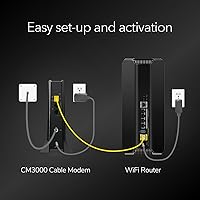
When the activation goes smoothly — which it does for many buyers — the physical setup is straightforward: connect the coax, plug in the Ethernet, call or use the ISP app to register the MAC address. Several reviewers say it was running within 20 minutes.
A recurring theme in lower-star reviews is ISP activation friction: hold times with support, agents unfamiliar with the CM3000, and in some cases multiple calls before the modem is provisioned correctly. This is partly an ISP training issue, but it still lands on the buyer's experience.
Value for Money
74%
26%
For buyers on a qualifying high-speed plan, the rental savings argument is real — at roughly ten to fifteen dollars a month depending on the ISP, the modem pays for itself in roughly two years, after which every month is pure savings. Long-term owners view this as a financially sound purchase.
For anyone not on a mid/high-split-eligible plan right now, paying a premium for hardware that functions like a standard modem feels hard to justify. The value case is compelling in theory but depends heavily on timing and local infrastructure readiness.
Router Pairing & Network Integration
83%
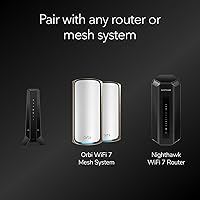
Users who paired the CM3000 with a Wi-Fi 6E or Wi-Fi 7 router — particularly NETGEAR's own Orbi systems — report a clean, high-throughput setup with no handshake issues. The 2.5G LAN port passes full multi-gig throughput without complaint when the router can handle it.
Buyers using older Wi-Fi 5 or Wi-Fi 6 routers sometimes find the 2.5G port wasted on hardware that caps at 1G. A small number of users also report minor compatibility quirks when using third-party mesh systems not designed with 2.5G uplinks in mind.
Build Quality & Hardware Design
84%
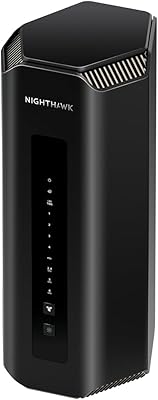
The vertical tower form factor feels solid and purposeful rather than cheap, and ventilation slots along the sides suggest NETGEAR put thought into thermal management. At just over a pound, it is easy to position on a shelf or tuck behind a router without hassle.
There are no status LEDs beyond the basics, which some more technical users find limiting when trying to diagnose a connection issue without logging into the modem admin panel. The matte black finish is practical but shows dust accumulation readily in open-air setups.
Ethernet Port Configuration
81%
19%
Having three Ethernet ports on a modem — one 2.5G and two 1G — is genuinely useful and uncommon in this category. Buyers who run a router on the 2.5G port and a wired device directly on a 1G port appreciate the flexibility without needing a separate switch.
Some buyers expected all three ports to be 2.5G-capable given the product positioning, and the mixed-speed configuration is occasionally misread in product listings before purchase. It is not a functional flaw, but expectation management around port speeds could be clearer.
Future-Proofing
87%
Buying the CM3000 now means being ready when mid/high-split infrastructure reaches your neighborhood — which Xfinity and others are actively expanding. Buyers who think in three-to-five year windows see this as a smart hedge against needing another modem upgrade soon.
The future-proofing argument only holds if the ISP actually follows through on infrastructure investment in your area. In markets where cable providers are losing ground to fiber, the mid/high-split rollout timeline is less certain, weakening this rationale somewhat.
Documentation & Support Resources
62%
38%
NETGEAR's online knowledge base includes setup guides specific to the CM3000, and the product page links out to ISP-specific activation instructions. For technically confident buyers, the available documentation is sufficient to get through the process without calling anyone.
Less experienced users frequently mention that the included documentation is thin, and that finding clear guidance on ISP-specific activation steps requires digging. NETGEAR's own customer support response times draw complaints in a noticeable portion of lower-rated reviews.
Modem Admin Interface
69%
31%
The local admin panel provides the essentials: signal levels, connection stats, and basic diagnostics. Power users who want to monitor channel bonding or downstream signal quality will find enough data to work with during troubleshooting.
The interface looks dated compared to modern router dashboards and lacks the intuitive layout that newer network hardware has normalized. Buyers used to app-driven setups may find navigating to the local IP and interpreting raw signal stats more friction than expected.
Physical Footprint & Placement
86%
The compact vertical profile means it stacks neatly in an AV cabinet or fits on a narrow shelf near the cable entry point. At 6.8″ x 3.7″ x 8.2″, it is noticeably smaller than some competing multi-gig modems, making cable management easier in tight spaces.
The vertical-only design means it cannot be laid flat without blocking ventilation, which limits mounting options in some setups. A few buyers in wall-mounted or enclosed media center configurations mention having to rethink placement to keep airflow adequate.
Long-Term Reliability
77%
23%
Given the product launched in mid-2024, long-term data is still accumulating, but early indicators from buyers with six-plus months of use are largely positive. Spontaneous reboots and dropped connections are not a recurring complaint in the review pool.
The sample size of truly long-term owners is still limited at this stage in the product lifecycle, so reliability scores carry more uncertainty than they would for a modem with two or three years of field data. A few buyers note occasional brief disconnects that correlate with ISP-side events rather than hardware failure.

Suitable for:

The NETGEAR Nighthawk CM3000 is built for a specific kind of buyer, and when it lands in the right hands, it genuinely delivers. If you are subscribed to — or actively planning to move to — an Xfinity 2Gbps or multi-gig plan, this is likely the only consumer modem that can actually unlock the full speed tier your subscription promises. Remote workers who depend on reliable, fast uploads for video calls, cloud backups, or accessing home NAS drives will feel the difference immediately in markets where mid/high-split infrastructure is live. Content creators uploading large video files, households juggling multiple simultaneous users, and anyone running home security cameras that push footage to the cloud will also find the improved upload headroom genuinely useful day to day. Buyers who are tired of paying a monthly modem rental fee and want hardware they own outright — and that will remain capable for several years — will find the long-term cost math works in their favor. It pairs best with a Wi-Fi 6E or Wi-Fi 7 router, so households already investing in next-generation networking gear will get the most cohesive setup.
Not suitable for:

The NETGEAR Nighthawk CM3000 is a poor fit for anyone whose ISP has not yet upgraded the local cable node to support mid/high-split technology — and that currently describes a large portion of the country, even in markets served by Xfinity. If you are on a plan below 1Gbps, or if your provider has not announced a mid/high-split rollout timeline in your area, this cable modem will function no differently than a standard DOCSIS 3.1 modem at a fraction of the price. Light internet users — households that primarily browse, stream video, and check email — have no practical need for the upload or download ceilings this hardware offers. Buyers who are not comfortable calling their ISP to manually provision a third-party modem, or who have had frustrating activation experiences before, should factor in that the setup process can require patience and sometimes multiple support calls. Anyone using voice-over-cable phone service through their ISP should also note that the CM3000 has no voice ports whatsoever, making it incompatible with that setup without additional hardware.

Specifications

  • Modem Standard: Uses DOCSIS 3.1 mid/high-split technology, which enables significantly higher upload bandwidth compared to standard DOCSIS 3.1 cable modems.
  • Max Download: Supports downstream speeds of up to 2.5Gbps, sufficient for the highest-tier residential cable internet plans currently available.
  • Max Upload: Supports upstream speeds of up to 1Gbps when connected to a cable node that has been upgraded to mid/high-split infrastructure.
  • Ethernet Ports: Equipped with three LAN ports: one 2.5G Ethernet port for high-throughput router connections and two additional 1G Ethernet ports for wired devices.
  • Voice Ports: No telephone or voice-over-cable ports are included; this modem does not support ISP-provided landline phone service.
  • Dimensions: Measures 6.8″ in length, 3.7″ in width, and 8.2″ in height in a vertical tower form factor designed for shelf or cabinet placement.
  • Weight: Weighs 1.09 lb, making it one of the lighter options in the multi-gig modem category and easy to reposition during installation.
  • Color & Finish: Available in matte black, which blends into most home networking setups and home office environments without drawing visual attention.
  • Model Number: The official NETGEAR model designation is CM3000-100NAS, which is the identifier to use when confirming ISP compatibility or registering the device.
  • Compatible ISPs: Officially approved for use with Xfinity, Spectrum, Cox, and Optimum; compatibility with smaller regional cable providers should be verified directly with the ISP.
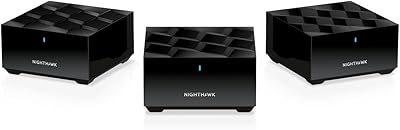
  • Router Pairing: NETGEAR recommends pairing the CM3000 with a Wi-Fi 6E or Wi-Fi 7 router or Orbi mesh system to avoid wireless bandwidth bottlenecks downstream of the modem.
  • Availability Date: First made available in May 2024, positioning it as one of the earliest consumer-grade mid/high-split DOCSIS 3.1 modems to reach the retail market.
  • Connection Type: Connects to the cable wall outlet via a standard coaxial F-connector and to the router or switch via Ethernet; no DSL or fiber compatibility.
  • Power Supply: Powered via an included AC power adapter; no battery backup is built in, so a UPS is recommended for uninterrupted connectivity during brief power fluctuations.
  • Amazon Rating: Holds a 4.4-out-of-5-star rating based on 302 verified ratings on Amazon, ranking at number 14 in the Computer Networking Modems category.

Related Reviews

Netgear Nighthawk AX5200 Router
87%
92%
Wi-Fi Performance
89%
Range & Coverage
84%
Setup & Installation
88%
Reliability & Stability
91%
Gaming & Streaming Experience
More
Netgear Nighthawk AX12 AX11000 Router
87%
92%
Wi-Fi Performance
89%
Speed & Latency
85%
Ease of Setup
88%
Build Quality
90%
Security Features
More
NETGEAR Nighthawk CM1200
75%
88%
Internet Speed Performance
83%
Setup & Installation
63%
Long-Term Reliability
79%
Value for Money
71%
Compatibility & ISP Support
More
NETGEAR Nighthawk R7350 AC2400 Router
82%
88%
Performance for Gaming
85%
Streaming Performance
91%
Ease of Setup
82%
Wi-Fi Range and Coverage
84%
Reliability
More
NETGEAR Nighthawk RAX36 WiFi 6 Router
85%
90%
Performance
92%
Value for Money
75%
Setup Experience
88%
Security Features
85%
Range and Coverage
More
NETGEAR Nighthawk RAX70 WiFi 6 Router
87%
91%
WiFi Performance
88%
Security Features (NETGEAR Armor)
85%
Setup & Installation
89%
Coverage Area
92%
Speed (AX6600 Support)
More
NETGEAR Nighthawk RS600 WiFi 7 Router
85%
92%
WiFi Performance
90%
Coverage Area
85%
Setup Ease
88%
Security Features
89%
Device Handling (Concurrent Connections)
More
NETGEAR Nighthawk AC2600 Smart WiFi Router
83%
88%
Performance for Gaming
86%
Speed Consistency
82%
Wi-Fi Range
72%
Ease of Setup
91%
Traffic Management (QoS)
More
Netgear Nighthawk RAX41 WiFi 6 Router
86%
89%
Performance
84%
WiFi Range & Coverage
81%
Ease of Setup
87%
App Functionality
92%
Security Features
More
NETGEAR Nighthawk RAX54S
77%
83%
Wireless Performance
79%
Coverage & Range
88%
Setup & Ease of Use
76%
Gaming Performance (DumaOS 3.0)
81%
Security Features
More

FAQ

It depends entirely on your ISP plan and local infrastructure. Mid/high-split is a genuine cable technology upgrade that reallocates frequency bandwidth to allow much faster upload speeds. If your ISP — particularly Xfinity — has upgraded your local node to mid/high-split, a standard modem physically cannot deliver those faster upload tiers no matter how new it is. If your node has not been upgraded yet, the CM3000 will work fine but offer no upload advantage over a cheaper modem.

The most reliable way is to call Xfinity directly and ask whether your service address is on a mid/high-split-enabled node. You can also check their website for available plan speeds in your area — if a 2Gbps download plan is being offered at your address, that is a strong indicator the infrastructure upgrade has happened. Some users in online forums also track regional rollout progress, which can give a rough sense of timing in your market.

Use the 2.5G Ethernet port for your router connection — it is the one labeled or designated for WAN output to your router and is capable of passing multi-gig throughput. The two 1G ports are additional outputs that can be used for wired devices or a switch, but running your primary router through a 1G port would bottleneck any plan above 1Gbps.

It will work with any router that has a standard Ethernet WAN port, but to take full advantage of the 2.5G LAN port, your router needs a 2.5G WAN port as well. If your router only has a 1G WAN port, speeds above 1Gbps will be capped at that connection. NETGEAR recommends pairing it with a Wi-Fi 6E or Wi-Fi 7 router for a genuinely future-ready setup.

The physical setup is simple — connect the coax cable from your wall, plug in your router via Ethernet, and power it on. The tricky part for some buyers is the ISP activation step, which requires calling your provider or using their app to register the modem's MAC address. Xfinity's app-based activation tends to go smoothly, but some users report needing to call support when the automated process stalls. Having the MAC address and model number ready before you call saves time.

No. This cable modem has no telephone ports and does not support voice-over-cable service. If you have an active landline through your ISP that runs through your modem, you would need to either switch to a VoIP alternative or keep a separate voice-capable modem for that service.

It is on Spectrum's approved modem list, so it will activate and function on their network. However, Spectrum's mid/high-split infrastructure rollout is at an earlier stage than Xfinity's in most markets, meaning the full upload speed potential may not be accessible yet depending on your location. For standard Spectrum gigabit plans, it works without issues.

Most ISPs charge between ten and fifteen dollars per month for modem rental. At that rate, this cable modem typically pays for itself somewhere between two and two-and-a-half years of ownership, after which you are essentially getting free hardware on an ongoing basis. Buyers who plan to stay on their current ISP for several years and are on a high-tier plan tend to find the math works strongly in their favor.

Beyond activating it with your ISP, no special configuration is required on the modem itself. The ISP provisions the modem remotely to match your subscribed plan. That said, hitting the true ceiling of your plan also depends on your router's capabilities, the quality of your coax cabling, and whether your ISP's node infrastructure supports mid/high-split — those are factors outside the modem's control.

The modem will still work normally as a DOCSIS 3.1 modem on any compatible cable network — you will not lose basic functionality. You just would not see mid/high-split upload benefits until the new location's infrastructure is upgraded. Since this Nighthawk modem supports the technology natively, you are covered whenever that rollout reaches your new area without needing another hardware upgrade.