Overview

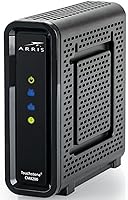
The Arris CM8200A DOCSIS 3.1 Cable Modem is built for people tired of paying their ISP a monthly rental fee just to stay connected. DOCSIS 3.1 is the current gold standard for cable internet — in plain terms, it means the hardware can handle the speeds most providers are rolling out today and will keep pace as plans improve over the next few years. This cable modem works with Xfinity and Cox, two of the biggest providers in the country, making it a practical pick for a wide slice of the market. It competes at a mid-range price point against similar standalone modems from Motorola and Netgear. One honest caveat upfront: it has a single Ethernet port, so you will need a separate router to cover a full home network.
Features & Benefits

The CM8200A uses 32x8 channel bonding, which means it bundles multiple data streams together to push throughput well beyond what older modems can manage. If you are on a gigabit plan or thinking about upgrading to one, this modem will not be the bottleneck. The DOCSIS 3.1 protocol also means you are not buying hardware that will be obsolete in two or three years — a real consideration given how fast ISPs are expanding their speed tiers. There is no built-in Wi-Fi, which is actually a plus for anyone who already owns a capable router or wants full control over their wireless setup. The enclosure is compact and runs passively cool without any fan noise to speak of.

Best For

This DOCSIS 3.1 modem makes the most sense for Xfinity or Cox subscribers who are done with rental fees adding up month after month — at this price point, it typically pays for itself within a year for most households. It is also a strong fit for anyone on a gigabit or near-gigabit plan who wants hardware that can actually keep pace with those speeds. Networking enthusiasts and small home offices will appreciate the clean separation of modem and router functions. It is less ideal for renters who move frequently and cannot guarantee their next ISP will support it, or for anyone seeking an all-in-one gateway without the hassle of managing separate devices.

User Feedback

With a 3.9-star average across over 200 ratings, this cable modem earns generally solid marks, though the picture is a bit nuanced. Buyers frequently highlight how straightforward activation was and appreciate that speeds hold up consistently once the device is provisioned. Build quality gets mentioned positively too — it feels sturdy, not cheap. The complaints worth paying attention to involve ISP provisioning delays, particularly on certain Xfinity tiers, where some users had to call their provider to push the process through. Long-term reliability looks dependable based on extended user reports, but customer support experiences from Arris have been inconsistent, which factors into why the rating sits just shy of a full four stars.

Pros

  • Eliminates the ISP rental fee and typically pays for itself within a year for most subscribers.
  • Handles gigabit and near-gigabit plan speeds without becoming a throughput bottleneck.
  • DOCSIS 3.1 support means the hardware stays relevant as ISPs expand their speed tiers.
  • Compact build fits easily on a shelf or desk without crowding other networking gear.
  • Activation is straightforward for most Xfinity and Cox users via the standard ISP app.
  • Runs without fan noise, making it unobtrusive in quiet home or office environments.
  • Solid construction holds up well with no significant physical wear reported after extended use.
  • Works cleanly with any third-party router, giving you full control over your wireless setup.

Cons

  • Only one Ethernet port means you must budget for and set up a separate router for any multi-device household.
  • ISP provisioning delays require a support call in enough cases to be a recurring buyer complaint.
  • Runs noticeably warm and needs open airflow — enclosed media cabinets can cause connectivity dropouts.
  • Manufacturer support response times are frequently cited as slow and often redirects users back to the ISP.
  • No official compatibility outside Xfinity and Cox, limiting future-proofing if you switch providers.
  • Firmware is entirely ISP-controlled, leaving no option to roll back a problematic update.
  • Some long-term owners report increased reboot frequency after 18 to 24 months of continuous use.
  • The included Ethernet cable is too short for flexible placement right out of the box.

Ratings

The Arris CM8200A DOCSIS 3.1 Cable Modem earned its scores through AI-driven analysis of verified buyer reviews collected globally, with spam, bot-generated, and incentivized submissions actively filtered out before scoring. What remains reflects real households and home offices sharing candid experiences — the wins and the frustrations alike. Strengths in throughput and build are reflected honestly, as are the recurring pain points around ISP provisioning and the single-port limitation.
Internet Speed Performance
88%
Most buyers on gigabit Xfinity and Cox plans report hitting or coming very close to their advertised speeds once the modem is provisioned correctly. The 32x8 channel bonding delivers noticeably more consistent throughput compared to older DOCSIS 3.0 hardware, especially during peak evening hours when network congestion typically bites.
A subset of users on mid-tier plans noted that the speed gains over their previous modem were smaller than expected, suggesting the CM8200A's full potential only unlocks at higher subscription tiers. Those on plans below 400 Mbps may not see a compelling difference in day-to-day use.
Ease of Setup & Activation
79%
21%
For most Xfinity and Cox subscribers, activation is handled through the ISP's app or website and wraps up in under 15 minutes without a technician visit. Buyers consistently appreciate how straightforward the physical installation is — one cable in, one Ethernet out, and you are essentially done.
A meaningful number of reviewers hit provisioning walls where the ISP's system failed to recognize the modem automatically, requiring a support call to push it through manually. This extra friction is not the modem's fault technically, but it does make the out-of-box experience feel less polished than competitors sometimes manage.
ISP Compatibility
74%
26%
Verified compatibility with Xfinity and Cox covers a large portion of the US cable internet market, and users on both providers generally report stable, trouble-free operation once the device is activated. The modem handles both residential and small-business account types without issue on supported plans.
Compatibility outside Xfinity and Cox is inconsistent and not officially guaranteed — buyers on Spectrum, Mediacom, or regional providers have reported outright rejection during provisioning. Even within supported ISPs, certain legacy or grandfathered plan tiers have caused activation headaches that took multiple support contacts to resolve.
Build Quality & Durability
83%
The enclosure feels solid and well-constructed for a device in this price tier — nothing flexes or rattles, and the finish resists fingerprints reasonably well. Users who have run the CM8200A continuously for over a year report no physical deterioration, overheating, or port loosening.
The modem runs noticeably warm during extended operation, and while passive cooling handles it adequately in open spaces, users who place it in enclosed media cabinets have reported occasional thermal-related dropouts. There is no included stand or mounting option, which limits placement flexibility.
Thermal Management
71%
29%
Under normal open-air conditions, the passive heat dissipation design keeps operating temperatures within safe ranges without any fan noise — a genuine quality-of-life advantage in quiet home office environments. Buyers who leave the modem in open shelf setups report no heat-related issues even after months of continuous use.
Place this modem in a crowded entertainment cabinet or stack it with other networking gear and heat becomes a real concern. Several reviewers traced intermittent connectivity drops directly to restricted airflow, which suggests the thermal headroom is tighter than ideal for dense home networking setups.
Value for Money
86%
Eliminating a monthly modem rental fee — often ranging from eight to fifteen dollars depending on the ISP — means the CM8200A typically pays for itself within eight to twelve months for most subscribers. For anyone planning to stay with their provider long-term, the math is hard to argue with.
At its price point, the CM8200A competes with newer models that occasionally offer slightly broader ISP compatibility or additional Ethernet ports. Buyers who later discover their ISP tier does not fully exploit DOCSIS 3.1 may feel they over-invested relative to a less expensive DOCSIS 3.0 option.
Long-Term Reliability
77%
23%
The majority of multi-year owners report consistent uptime with no need to reboot the modem more than once every few weeks at most. For a device that runs around the clock, that kind of stability matters, and it shows up repeatedly in longer-format reviews from buyers past the one-year mark.
A smaller but non-trivial group of reviewers reported the modem developing intermittent disconnection issues after 18 to 24 months of use, particularly the need for more frequent reboots over time. Whether this reflects a hardware aging pattern or ISP-side firmware changes is not entirely clear from user reports alone.
Physical Design & Footprint
81%
19%
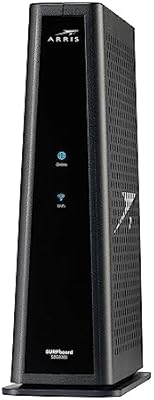
The compact rectangular form factor fits easily on a router shelf, a cable box, or a small surface without demanding much real estate. The all-black enclosure is understated enough to blend into most home setups without looking like networking gear that escaped a data center.
The modem has no rubber feet on some units, which causes minor sliding on smooth surfaces — a small annoyance buyers have flagged in otherwise positive reviews. The single indicator LED layout, while minimal, makes it harder at a glance to diagnose whether a connectivity issue is on the modem or the ISP side.
Port Configuration
62%
38%
Having a single dedicated Gigabit Ethernet port keeps the connection clean and focused — for users running a router off the modem, one port is genuinely all that is needed, and the Gigabit throughput ensures no bottleneck between the modem and router.
The single-port limitation is the most commonly cited frustration in negative reviews, especially from buyers who assumed they could connect multiple wired devices directly without a router. It is a real constraint that affects everyday usability for anyone who has not planned their network setup in advance.
Firmware & Software Stability
73%
27%
Under normal ISP-managed firmware, the CM8200A runs quietly in the background with no user intervention required for months at a time. Most buyers report that ISP firmware updates push through without disrupting connectivity or requiring manual reboots.
Because the modem's firmware is controlled by the ISP rather than the user, there is no ability to roll back problematic updates or adjust low-level settings. A handful of reviewers traced degraded performance directly to ISP firmware pushes, with no recourse other than waiting for the next update or contacting support.
Customer & Manufacturer Support
58%
42%
Arris has a recognized brand presence in the modem space, and for straightforward issues, their documentation and community forums provide enough guidance for technically comfortable users to self-resolve most problems without opening a support ticket.
Direct manufacturer support experiences come up as a recurring weak point in buyer reviews, with slow response times and agents who frequently redirect users back to the ISP even for clearly hardware-adjacent issues. This inconsistency drags on overall satisfaction scores noticeably among buyers who needed post-purchase help.
Packaging & Included Accessories
67%
33%
The box includes the essentials — power adapter and a short Ethernet cable — so buyers can get started without an immediate trip to the store. Packaging is adequate and protective, with no reports of units arriving damaged due to poor cushioning.
The included Ethernet cable is short enough that placement flexibility is limited right out of the box, and no coaxial cable is included despite it being required for installation. The quick-start guide is minimal, which is fine for experienced users but leaves newcomers looking up steps online anyway.
Compatibility with Multi-Gig Plans
69%
31%
As ISPs expand multi-gigabit residential offerings, the CM8200A is technically positioned to handle those tier upgrades without requiring a hardware swap — a forward-looking advantage that DOCSIS 3.0 modems simply cannot claim. Early adopters on pilot gigabit-plus plans have reported it handling the handshake correctly.
Actual multi-gigabit throughput delivery depends heavily on ISP-side infrastructure readiness, and in most markets the CM8200A's ceiling is not yet being tested in real-world conditions. Buyers expecting immediate multi-gig performance today may be investing in theoretical future capability rather than present-day gains.

Suitable for:

The Arris CM8200A DOCSIS 3.1 Cable Modem is the right call for Xfinity or Cox subscribers who are tired of watching a monthly equipment rental charge quietly drain their budget year after year. If you are on a gigabit or near-gigabit internet plan and your current modem is a hand-me-down from your ISP or an aging DOCSIS 3.0 unit, this is a hardware upgrade that will actually let your plan perform as advertised. Networking enthusiasts who already own a solid router and prefer to keep their modem and wireless functions separate will find this setup genuinely satisfying. Small home offices that depend on consistent, high-throughput connectivity — without tolerating the unpredictability of ISP-supplied gear — are a natural fit here. The compact footprint also means it slots into tight desk or shelf setups without becoming an eyesore.

Not suitable for:

The Arris CM8200A DOCSIS 3.1 Cable Modem is a poor match for anyone who needs a single device to handle both modem and Wi-Fi duties — there is no wireless capability built in, and that is not a firmware update away from changing. Subscribers on Spectrum, Mediacom, or smaller regional cable providers should verify compatibility carefully before purchasing, as the modem is not officially certified for those networks and provisioning failures are a real documented risk. If you are a renter who moves frequently and cannot predict your next ISP, locking into a modem with limited provider support is a financial gamble. Less tech-comfortable users who want an activation process that just works without a potential support call should also be cautious — provisioning hiccups, while not universal, are common enough to be a genuine consideration. Finally, anyone on a basic internet plan well below gigabit speeds is unlikely to see a meaningful performance difference over a less expensive DOCSIS 3.0 modem.

Specifications

  • Protocol: Uses DOCSIS 3.1, the current cable internet standard capable of supporting multi-gigabit downstream speeds on compatible ISP plans.
  • Channel Bonding: Supports 32x8 channel bonding, combining 32 downstream and 8 upstream channels to maximize throughput under real-world network conditions.
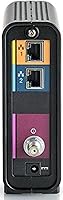
  • Ethernet Port: Equipped with a single Gigabit Ethernet port (Port 1) for connecting directly to a router or a single wired device.
  • Wi-Fi: No built-in wireless functionality — this is a standalone modem only, requiring a separate router for any Wi-Fi coverage.
  • Dimensions: Measures 15.24 x 9.45 x 3.58 inches, making it compact enough to sit on a shelf or desk without occupying significant space.
  • Item Weight: Manufacturer lists the unit weight as 0.01 ounces, which likely reflects a data entry error; the physical unit is a standard desktop modem weight.
  • Enclosure: Features a compact black plastic housing with passive ventilation slots designed to dissipate heat without a cooling fan.
  • Cooling System: Relies entirely on passive heat dissipation with no active fan, keeping operation completely silent during normal use.
  • ISP Compatibility: Officially certified for use with Xfinity (Comcast) and Cox Communications on supported residential and commercial internet plans.
  • Use Case: Designed for both residential households and small commercial environments requiring high-bandwidth, reliable internet connectivity.
  • Model Number: Identified by model number CM8200A, manufactured by ARRIS under the Touchstone product line.
  • Availability: First made available in October 2017 and remains an active, non-discontinued product as of the latest manufacturer records.
  • Connectivity Type: Connects to the cable network via a standard coaxial (F-connector) input and outputs to networking equipment via Ethernet.
  • Amazon Ranking: Ranked #40 in Computer Networking Modems on Amazon, sitting at #34,184 overall in the Electronics category.
  • User Rating: Holds a 3.9 out of 5-star average across 214 verified ratings on Amazon at the time of review.
  • Manufacturer: Produced by ARRIS, a well-established manufacturer in the cable modem and broadband equipment industry.

Related Reviews
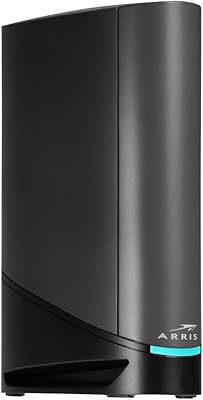
ARRIS SURFboard SBG8300 DOCSIS 3.1 Cable Modem Router Combo
84%
91%
Performance & Speed
88%
Wi-Fi Coverage & Stability
80%
Ease of Setup
84%
Compatibility with ISPs
92%
Value for Money
More
ARRIS SURFboard G36
ARRIS SURFboard G36
72%
83%
Setup & Activation
76%
Wi-Fi Speed & Throughput
61%
Wi-Fi Range & Coverage
58%
Connection Stability
88%
DOCSIS 3.1 Modem Performance
More
ARRIS CM820A DOCSIS 3.0 Cable Modem
74%
83%
Connection Stability
78%
Ease of Setup
74%
ISP Compatibility
81%
Long-Term Reliability
88%
Value for Money
More
Hitron CODA DOCSIS 3.1 Cable Modem
76%
83%
Connection Stability
78%
Ease of Setup
74%
ISP Compatibility
86%
Value for Money
81%
Performance at Rated Speeds
More
Humax HGD310 DOCSIS 3.1 Cable Modem
76%
88%
Internet Speed Performance
83%
Setup & Installation
79%
ISP Compatibility
91%
Value for Money
67%
Build Quality & Durability
More
NETGEAR CM2500 DOCSIS 3.1 Cable Modem
77%
83%
Setup & Provisioning
88%
Upload Speed Performance
81%
Download Speed Consistency
76%
ISP Compatibility
79%
Build Quality & Design
More
NETGEAR Nighthawk CM3000
79%
88%
Upload Speed Performance
91%
Download Speed Delivery
79%
ISP Compatibility
66%
Setup & Activation Experience
74%
Value for Money
More
NETGEAR Nighthawk 32x8 DOCSIS 3.1 Cable Modem
78%
88%
Internet Speed Performance
83%
Setup & Activation
79%
Build Quality & Durability
91%
Value for Money
74%
ISP Compatibility
More
NETGEAR CM1000 DOCSIS 3.1 Cable Modem
76%
88%
Connection Stability
84%
Speed Performance
76%
Compatibility & ISP Support
61%
Setup & Provisioning Experience
82%
Value for Money
More
Motorola MB8611 DOCSIS 3.1 Multi-Gig Cable Modem
85%
92%
Performance & Speed
85%
ISP Compatibility
88%
Setup & Installation
90%
Latency for Gaming/Streaming
80%
Reliability
More

FAQ

No, the CM8200A is not officially certified for Spectrum. It is approved for Xfinity and Cox only. Attempting to activate it on Spectrum will very likely result in a provisioning failure, so if Spectrum is your ISP, you will need to look at a different model from their approved device list.

Yes, you do. This is a modem only — there is no Wi-Fi built in and only one Ethernet port. Most households will want to connect a separate router to it so that multiple devices can get online wirelessly. Think of this modem as the front door and your router as the hallway that gets everyone inside connected.

In most cases, yes. The Arris CM8200A DOCSIS 3.1 Cable Modem is compatible with Xfinity gigabit plans, and many buyers on those tiers report hitting speeds close to their advertised rates. That said, you should double-check Xfinity's approved modem list to confirm it is supported for your specific plan, since compatibility can vary by region or account type.

For most Xfinity and Cox subscribers, setup is reasonably straightforward — you connect the coaxial cable, plug in power, connect your router via Ethernet, and then activate through your ISP's app or website. The majority of buyers complete the process in under 20 minutes. A smaller number of users have needed to call their ISP to manually push the provisioning through, so keep that possibility in mind if the app activation stalls.

Not without a router. The CM8200A has only one active Ethernet port, so it can connect to one device — almost always a router — directly. If you need multiple wired or wireless connections, a router sitting between the modem and your devices is the standard and straightforward solution.

It holds up well for the foreseeable future. DOCSIS 3.1 is the current top-tier cable internet protocol, and the CM8200A can theoretically handle multi-gigabit speeds when ISPs expand their infrastructure to support them. For most home users, this hardware will not need replacing for several years even as internet plan speeds increase.

It does run warm during extended use, which is normal for a passively cooled modem. The main thing to avoid is placing it inside a closed cabinet or stacking it tightly between other devices where airflow is restricted. Give it a few inches of open air on the sides and top, and thermal-related issues are very unlikely to crop up.

Most users report reliable performance well past the two-year mark, and plenty of buyers have run it continuously for three or more years without issues. Some long-term owners mention needing to reboot it more frequently after 18 to 24 months, but that is common across modems generally and does not necessarily signal hardware failure.

For most people, yes — and fairly quickly. ISP rental fees commonly run between eight and fifteen dollars per month depending on the provider. At that rate, this cable modem pays for itself within roughly eight to fourteen months, after which the savings compound every month you stay with your provider. Over two or three years, the math is solidly in favor of owning.

Cox subscribers need to visit Cox's activation portal or call their support line with the modem's MAC address and serial number, both printed on the label on the bottom of the unit. Cox typically provisions it within a few minutes once the device is registered on your account. Having your account number handy speeds the process up, and most users are online within 15 to 30 minutes of starting.

Where to Buy