Overview

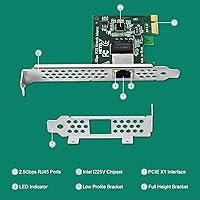
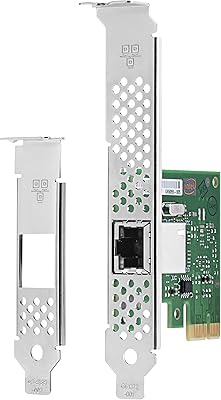
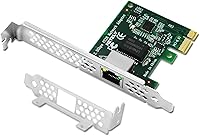
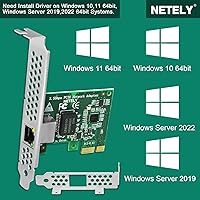
The NETELY I225-T1 2.5GbE PCIe Network Adapter is a no-fuss way to step beyond standard gigabit speeds without replacing your entire desktop setup. Built around the well-regarded Intel I225-V controller, this 2.5GbE PCIe card occupies a single PCIe 3.0 x1 slot and delivers meaningful bandwidth gains to wired home and office networks. At its price point, you are not getting premium packaging or exotic build materials — and that is fine, because the hardware inside does what it promises. It supports Windows 10 and 11 (64-bit), Windows Server 2019 and 2022, and runs on Intel, AMD, and ARM platforms. One port, one job — done simply.
Features & Benefits

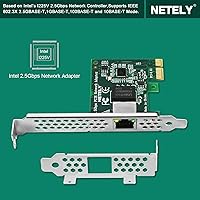
The chipset choice here matters more than it might seem. Intel's I225-V is a proven controller with broad driver support, which means you are less likely to hit compatibility walls compared to lesser-known silicon. This NETELY network adapter auto-negotiates across 10, 100, 1000, and 2500 Mbps, so plugging it into an older gigabit switch won't break anything — it simply runs at whatever speed the network supports. The card uses a PCIe 3.0 x1 slot, which virtually every modern desktop motherboard has free. For those running slim or small-form-factor cases, the included low-profile bracket makes installation straightforward. Wake-on-LAN and Time-Sensitive Networking support round out the feature set for power users.

Best For

This 2.5GbE PCIe card makes the most sense for a specific type of buyer. If your onboard NIC has died or simply can't keep pace with a newer router, this is an affordable, low-effort replacement. Home network enthusiasts who have already upgraded their router or switch to 2.5GbE will finally have the client-side hardware to match. Budget-conscious gamers who want a reliable wired connection over Wi-Fi will also get solid value here. Small office setups running Windows Server 2019 or 2022 are well covered too. And for slim PC or HTPC owners, the low-profile bracket means this card actually fits where you need it.

User Feedback

With a 3.9 out of 5 rating drawn from around 80 reviews, the I225-T1 adapter sits in solid but not exceptional territory — and given the modest review count, a handful of negative experiences carry more weight than they would on a more established listing. On the positive side, buyers consistently mention easy installation and the card running at full speed on Windows 11 right out of the box. The main complaint worth flagging is driver detection: some users found the card wasn't recognized until they manually grabbed Intel's latest NIC driver. It is a solvable issue, but worth knowing before you install. No widespread reports of the I225-V silicon errata surfacing, which is reassuring.

Pros

  • Built on the Intel I225-V chipset, which carries solid industry recognition for driver maturity and long-term support.
  • Auto-negotiates across 10, 100, 1000, and 2500 Mbps, so it works with older networking gear without any manual configuration.
  • Fits into a PCIe 3.0 x1 slot, meaning almost any modern desktop motherboard has an open lane for it.
  • Both full-height and low-profile brackets are included, making it usable in ATX towers and slim SFF cases alike.
  • Wake-on-LAN support is a practical bonus for home lab users who want to remotely power on their machine.
  • Time-Sensitive Networking support adds headroom for latency-sensitive workloads that basic NICs cannot handle.
  • Many buyers report the card working on Windows 11 immediately after installation, with no extra steps needed.
  • At its price point, it is one of the more affordable ways to add 2.5GbE connectivity to a desktop PC.
  • Compact and lightweight at just 1.2 ounces, it installs without obstructing adjacent PCIe slots or airflow components.

Cons

  • A noticeable share of users needed to manually download Intel's NIC driver before the card was detected — not deal-breaking, but worth knowing upfront.
  • With roughly 80 ratings total, the review pool is still thin, making it harder to draw confident conclusions about long-term reliability.
  • No official Linux support is listed, which creates uncertainty for home lab users running non-Windows environments.
  • The Intel I225-V chipset had a documented errata in early silicon revisions, and buyers have no easy way to confirm which revision they are getting.
  • Single-port only — anyone needing multiple network interfaces will need a different card or an additional adapter.
  • Packaging and build presentation are basic, which may concern buyers who use perceived quality as a proxy for component reliability.
  • No macOS support, so this card is a dead end for Hackintosh builders or anyone running Apple silicon in a desktop enclosure.
  • NETELY is a relatively obscure brand with limited community presence, making troubleshooting resources harder to find than with established NIC vendors.

Ratings

Our AI-generated scores for the NETELY I225-T1 2.5GbE PCIe Network Adapter are derived from analyzing verified global buyer reviews, with spam, bot activity, and incentivized feedback actively filtered out before scoring. The ratings below reflect both what this 2.5GbE PCIe card genuinely does well and where real buyers have run into friction — nothing is glossed over. Whether you are upgrading a home network or replacing a failed NIC, these scores are meant to give you an honest, balanced picture before you commit.
Driver Compatibility
67%
33%
A solid majority of buyers on Windows 10 and Windows 11 report the card being detected without any manual intervention, with Windows Update pulling a working driver automatically. For straightforward desktop setups, the out-of-box experience is genuinely hassle-free.
A recurring minority of users — enough to notice — find the card sits undetected until they manually download Intel's latest NIC driver. This is solvable, but it catches unprepared buyers off guard and has contributed meaningfully to lower star ratings.
Installation Ease
83%
Physically installing this NETELY network adapter is about as simple as PCIe cards get — slot it in, screw in the bracket, and boot up. Most buyers with any DIY PC experience complete the hardware side in under five minutes with no tools beyond a screwdriver.
The bracket swap from full-height to low-profile, while straightforward, involves fiddly screws that a few users found frustrating without the right screwdriver size on hand. First-time builders occasionally stumbled on the driver step and mistook it for a hardware fault.
Network Performance
88%
Once connected to a 2.5GbE-capable router or switch, the I225-T1 adapter consistently delivers the speed jump buyers are expecting — NAS transfers, high-bandwidth streaming, and low-latency gaming connections all benefit noticeably compared to a standard gigabit card.
A small number of users report occasional link drops or speed inconsistencies that required a driver update to resolve, which may be tied to the known I225-V silicon errata in earlier hardware revisions. Performance is strong but not quite flawless across every configuration.
OS & Platform Compatibility
79%
21%
Coverage across Windows 10, Windows 11, and Windows Server 2019 and 2022 is broad and well-documented, and the support for Intel, AMD, and ARM platforms means this card fits into a wide range of current desktop builds without compatibility guesswork.
Linux is conspicuously absent from the official compatibility list, which is a real limitation for home lab users running non-Windows environments. macOS is also unsupported, narrowing the audience more than some buyers initially realize before purchasing.
Value for Money
84%
For the price bracket this card occupies, getting an Intel I225-V-based 2.5GbE adapter with both bracket options included is genuinely good value. Buyers who needed a fast replacement NIC or a budget-friendly 2.5GbE upgrade overwhelmingly feel they got a fair deal.
A handful of buyers who encountered driver issues felt the savings were not worth the troubleshooting time, particularly when pricier cards from more established brands tend to have smoother out-of-box experiences and better community support resources.
Build Quality
63%
37%
The card is compact and light, and the PCIe connector feels solid during installation. For an entry-level networking card at this price, the physical construction is functional and does not feel dangerously flimsy.
The packaging is minimal and the green PCB aesthetic is purely utilitarian — buyers used to more polished hardware will notice the no-frills presentation. A few users questioned long-term component durability given the budget positioning, though failures have not been widely reported.
Bracket & Case Compatibility
86%
Including both full-height and low-profile brackets in the box is a genuinely thoughtful touch that slim PC and HTPC owners appreciate — it removes a common point of frustration when buying NIC cards for compact builds.
The low-profile bracket requires manual swapping, and the screws involved are small enough that buyers without a precision screwdriver kit may find the process annoying. The pre-installed full-height bracket itself is functional but not notably sturdy.
Wake-on-LAN Functionality
74%
26%
Home lab users and remote workers who rely on Wake-on-LAN have reported the feature working reliably once properly configured in both the BIOS and Windows Device Manager, adding real utility beyond basic networking.
WoL requires configuration steps that are not documented in the box, and buyers unfamiliar with BIOS settings may not realize it needs to be enabled there as well as in the OS. There is no included setup guide addressing this feature specifically.
Auto-Negotiation Reliability
81%
19%
The card's ability to negotiate down to 1GbE or even 100Mbps when connected to older gear works exactly as expected for the vast majority of buyers, making it a safe upgrade even in mixed-speed network environments.
A small number of users on older switches reported the card defaulting to an unexpected speed tier on first connection, requiring a manual link speed override in the driver settings — uncommon, but worth noting for users with legacy networking hardware.
Chipset Reputation & Longevity
77%
23%
The Intel I225-V is a well-known and widely trusted chipset in networking circles, and buyers with experience selecting NICs appreciate that the card is not built around obscure or unsupported silicon that could become orphaned without driver updates.
The I225-V errata history — even if largely addressed in newer silicon steppings — adds a degree of uncertainty that more cautious buyers cannot fully dismiss. There is no straightforward way for end users to confirm which hardware revision they are receiving.
TSN Support Utility
61%
39%
For the niche audience of home lab users and network engineers who specifically need Time-Sensitive Networking capabilities, having TSN support at this price point is a meaningful differentiator that comparable budget cards often lack.
The overwhelming majority of typical buyers — gamers, home network upgraders, NAS users — will never use or notice TSN functionality. It is a spec that sounds impressive but provides no practical benefit for most real-world use cases at this market tier.
Review Volume & Confidence
54%
46%
The card has been available since late 2022 and has accumulated enough reviews to identify clear patterns in both praise and criticism, giving prospective buyers a reasonable baseline of real-world feedback to draw from.
With roughly 80 ratings total, the sample size remains thin compared to category leaders, meaning a cluster of negative experiences has an outsized effect on the average score. Confidence in trend reliability is moderate at best until more reviews accumulate.
Manufacturer Support
48%
52%
NETELY's product listing is reasonably detailed, and buyers who hit issues can fall back on Intel's own robust driver and support documentation since the underlying chipset is Intel-made — a meaningful safety net.
NETELY itself has a limited community presence and minimal publicly visible customer support infrastructure. Buyers who need brand-specific troubleshooting beyond Intel's generic driver documentation have few resources to turn to, which is a noticeable gap at any price.

Suitable for:

The NETELY I225-T1 2.5GbE PCIe Network Adapter is a strong fit for desktop users who want to close the gap between their wired connection and a faster router or switch without spending heavily. If your onboard NIC has failed or is simply stuck at gigabit speeds, this card slots into a standard PCIe 3.0 x1 lane and gets you back online at a meaningful upgrade. Home network enthusiasts who have already upgraded their router to 2.5GbE will find this the missing piece on the PC side. It also makes practical sense for budget-conscious gamers who prioritize a stable, low-latency wired connection over Wi-Fi. Small office and home office setups running Windows Server 2019 or 2022 are well within scope, and the included low-profile bracket means slim PC and HTPC owners are not left out either.
Not suitable for:

The NETELY I225-T1 2.5GbE PCIe Network Adapter is not the right tool for every situation, and it is worth being clear about where it falls short. If you need more than one network port — say, for routing, virtualization, or running multiple VLANs from a single machine — this single-port card simply will not do the job. Anyone chasing 10GbE speeds for high-throughput NAS transfers or professional video workflows should look elsewhere entirely. Laptop users or those on mini PCs without a PCIe slot have no use for this hardware at all. Buyers who expect plug-and-play reliability under every OS configuration may run into frustration, as a manual Intel driver install is sometimes required. And if you are running a Linux-based home lab, driver compatibility is worth researching before committing, since Linux support is not officially listed.
Specifications

  • Chipset: Powered by the Intel I225-V controller (I225-T1 variant), a well-established chipset known for stable driver support and broad OS compatibility.
  • Max Speed: Supports a maximum wired throughput of 2.5 Gbps over a single RJ45 port.
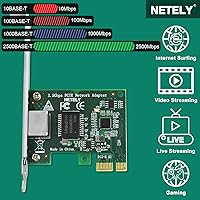
  • Auto-Negotiation: Automatically negotiates connection speeds at 10, 100, 1000, or 2500 Mbps depending on the connected network hardware.
  • Interface: Connects to the motherboard via a PCIe 3.0 x1 slot, which is available on virtually all modern desktop motherboards.
  • Port Configuration: Features one RJ45 Ethernet port; this is a single-port card and does not support multiple simultaneous wired connections.
  • OS Support: Officially compatible with Windows 10 64-bit, Windows 11 64-bit, Windows Server 2019, and Windows Server 2022.
  • Platform Support: Works across Intel, AMD, and ARM hardware platforms, covering the vast majority of current desktop PC configurations.
  • Bracket Options: Ships with a full-height bracket pre-installed and includes a low-profile bracket in the box for slim and small-form-factor PC cases.
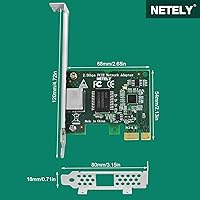
  • Dimensions: The card measures 2.68 x 4.72 x 0.71 inches, making it compact enough to fit in tight PCIe slots without obstructing neighboring components.
  • Weight: Weighs 1.2 ounces, light enough that it places no meaningful mechanical stress on the PCIe slot.
  • PCB Color: Features a green PCB, which is standard for this category of networking hardware and has no bearing on performance.
  • Wake-on-LAN: Supports Wake-on-LAN (WoL), allowing the host PC to be powered on remotely over the local network.
  • TSN Support: Includes Time-Sensitive Networking (TSN) support, which benefits latency-sensitive applications and is a feature of the Intel I225-V chipset.
  • Data Standard: Fully compliant with the IEEE 802.3 Ethernet standard, ensuring interoperability with routers, switches, and other compliant networking equipment.
  • First Available: This product was first listed for sale in December 2022, giving it a reasonable track record in the market.

Related Reviews

QINIYEK RTL8125B Dual-Port 2.5G PCIe NIC
77%
88%
Ease of Installation
91%
Windows Driver Compatibility
63%
Linux Driver Compatibility
78%
Dual-Port Utility
83%
Throughput Performance
More
ULANSeN Dual I226-V 2.5GbE PCIe Network Card
82%
88%
Chipset Reliability
91%
Installation Ease
86%
OS & Platform Compatibility
71%
Thermal Performance
89%
Value for Money
More
NETELY NET-AC8265 Dual Band Wireless-AC 1200Mbps PCIe WiFi Adapter with Bluetooth 4.2
81%
87%
Performance
75%
Ease of Installation
82%
Bluetooth Functionality
80%
Compatibility with Windows
90%
Gaming Performance
More
Intel I210-T1 Gigabit Ethernet Network Adapter
83%
96%
Driver Stability & OS Compatibility
94%
Network Reliability & Stability
93%
Virtualization Performance
61%
Value for Money
89%
Installation Experience
More
GLOTRENDS LE8202 2-Port Gigabit PCIe Network Card
82%
88%
Driver Compatibility
91%
Ease of Installation
94%
Value for Money
86%
OS & Platform Coverage
79%
Build Quality
More
ScreenBeam ECB6200K02 MoCA 2.0 Network Adapter Kit
77%
88%
Ease of Setup
84%
Connection Stability
76%
Real-World Throughput
61%
Compatibility Range
82%
Value for Money
More
TP-Link TX201 2.5G PCIe Network Card
84%
93%
Installation Ease
88%
Transfer Speed Performance
79%
Driver & Software Support
96%
Value for Money
82%
Build & Hardware Quality
More
BrosTrend 2.5G Linux PCIe Network Card
80%
94%
Linux Compatibility
91%
Plug-and-Play Experience
82%
Network Throughput
78%
Build Quality
88%
Value for Money
More
QNAP QSW-2104-2S-A-US 2.5GbE & 10G SFP+ Network Switch
84%
95%
Ease of Setup
91%
Network Performance
89%
Quiet Operation
85%
Build Quality
87%
Compatibility
More
OWC 2TB Accelsior 1M2 M.2 SSD to PCIe 4.0 Adapter Card
86%
91%
Performance
88%
Ease of Installation
89%
Compatibility with Mac/PC
93%
Data Transfer Speed
85%
Build Quality
More

FAQ

Many users find that Windows 11 detects and configures the card automatically through Windows Update. That said, a portion of buyers have needed to manually grab the latest Intel NIC driver from Intel's support site before the card showed up correctly. It is worth checking Intel's driver page if the card is not recognized immediately — it is a quick fix, not a major hurdle.

Yes, PCIe is backward compatible, so this 2.5GbE PCIe card will physically fit and function in a PCIe 2.0 x1 slot. You will not lose 2.5GbE speeds in practice because the bandwidth ceiling of PCIe 2.0 x1 still exceeds what a 2.5Gbps network connection demands.

The I225-V chipset did have a documented errata affecting early silicon revisions, primarily relating to certain 2.5GbE link stability scenarios. Intel addressed this in later stepping revisions, and keeping your driver updated to the latest version from Intel's site is the best mitigation. Buyers of the NETELY I225-T1 2.5GbE PCIe Network Adapter have not widely reported this as a recurring real-world problem, but it is worth being aware of if you plan to run the card in a demanding server environment.
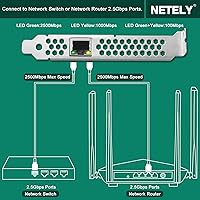
The full-height bracket comes pre-installed on the card. The low-profile bracket is included loose in the box, so you would need to unscrew the full-height one and swap it out yourself before installing into a slim case. It is a straightforward process that takes under a minute with a small screwdriver.

It will work perfectly fine with a gigabit router. The card auto-negotiates its connection speed to match whatever is on the other end, so in a gigabit network it simply connects at 1000 Mbps. You can upgrade your router later and the card will automatically take advantage of the faster speeds without any changes.

Linux is not officially listed in NETELY's compatibility documentation. The Intel I225-V chipset does have open-source driver support in the Linux kernel (via the igc driver), so many users report it working on common distributions, but this is not guaranteed or officially supported by the manufacturer. If you are running a Linux home lab, it is worth researching your specific kernel version and distribution before purchasing.

This is a single-port card, so there is only one physical network interface to work with. You can share it across VMs through a virtual switch, but each VM will not get a dedicated physical port. If you need isolated physical network connections per VM, you would need a multi-port NIC instead.

Wake-on-LAN lets another device on your local network send a magic packet that powers on your PC remotely. To use it, you need to enable WoL in your motherboard's BIOS settings and ensure the feature is enabled in Windows Device Manager under the adapter's power management options. Once set up, the NETELY network adapter handles the rest.

You will need at minimum a Cat 5e cable to reliably reach 2.5Gbps, though Cat 6 or Cat 6a is recommended for longer cable runs or to leave headroom for future upgrades. Standard Cat 5 (not 5e) may struggle at 2.5Gbps, especially over longer distances, so it is worth checking what is already run in your home or office.

Yes, the I225-T1 adapter is actually well-suited for HTPCs. The included low-profile bracket means it fits in slim media center cases, and a wired 2.5GbE connection is more than enough bandwidth for 4K streaming, large local media file transfers, or accessing a NAS on the same network. Just confirm your HTPC case has an available PCIe x1 slot before ordering.