Overview

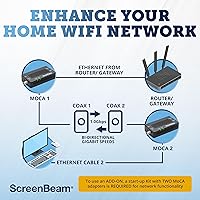
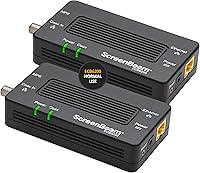
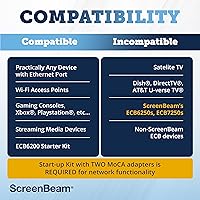
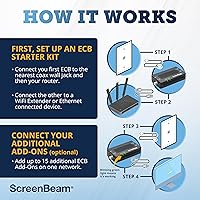
The ScreenBeam ECB6200K02 MoCA 2.0 Network Adapter Kit takes a practical approach to home networking that most people never consider: using the coaxial cable already wired into your walls. Unlike powerline adapters that push data through electrical wiring, MoCA runs over coax — the same type of cable your cable TV used to use. Most homes already have coax outlets in multiple rooms, which means no new cable runs and no drilling. The starter kit ships with two adapters and everything needed to connect both ends. One honest caveat: this MoCA adapter kit is incompatible with DirecTV, Dish, AT&T, and U-verse coax networks, so confirm your setup before ordering.
Features & Benefits

Running on the Bonded MoCA 2.0 standard, this MoCA adapter kit is rated for up to 1 Gbps of throughput — though real-world performance depends on your cable quality, the number of splitters in line, and overall network conditions. What it does deliver consistently is lower latency than Wi-Fi, which matters far more than raw speed for gaming and video calls. The setup scales to support up to 16 devices across a single MoCA network, making it workable for larger homes. Each adapter is compact, and the box includes coax and Ethernet cables for both units, so you are not scrambling for accessories on day one.

Best For

This coax-to-Ethernet kit makes the most sense for homeowners who already have coax outlets in the rooms where they need connectivity. Verizon FiOS users tend to have an especially smooth experience — most FiOS routers are MoCA-compatible, meaning you may only need one adapter rather than two. It is also well suited for 4K streamers and online gamers who find Wi-Fi too inconsistent, and for remote workers who have had enough of frozen video calls mid-meeting. If you have been eyeing a mesh Wi-Fi system just to cover dead zones, this is a wired alternative worth considering — steadier and with far less radio interference.

User Feedback

With a 4.3-star average across more than 2,300 ratings, the ECB6200 coax network adapter has built a dependable track record. Buyers consistently mention how quick the setup is — often under ten minutes — and the noticeable stability improvement over their previous Wi-Fi arrangement. FiOS subscribers in particular report strong out-of-the-box compatibility. On the flip side, users with DOCSIS 3.1 modems have flagged random disconnects caused by frequency overlap, a known issue worth raising with your ISP before committing. A number of buyers also ran into the satellite TV and AT&T incompatibility only after purchasing. Those with heavier bandwidth demands have noted the MoCA 2.5 upgrade as a logical next step.

Pros

  • Uses coax wiring already in your walls — no drilling, no new cable runs required.
  • Starter kit includes two complete adapters with all cables, so setup is genuinely all-in-one.
  • Delivers noticeably lower latency than Wi-Fi, a real difference for online gaming and video calls.
  • Verizon FiOS users often need just one adapter thanks to native MoCA support in FiOS routers.
  • Scales up to 16 devices on a single MoCA network for larger homes with multiple rooms to cover.
  • The ECB6200 coax network adapter has a multi-year reliability track record dating back to 2015.
  • Backward compatible with MoCA 1.0 and 1.1, so it works alongside older MoCA hardware.
  • Compact form factor sits discreetly near a wall outlet without cluttering the space.
  • A strong alternative to mesh Wi-Fi systems at a lower cost with a more stable wired signal.

Cons

  • Incompatible with DirecTV, Dish, AT&T, and U-verse coax networks — a dealbreaker many buyers discover too late.
  • DOCSIS 3.1 modem conflicts can cause random disconnects that require ISP support to fix.
  • The 1 Gbps speed rating is theoretical; real throughput varies with cable age, splitters, and signal quality.
  • No MPS encryption means the MoCA network layer itself is unprotected at the hardware level.
  • Expanding beyond two rooms requires purchasing additional adapters at extra cost.
  • Included coax cables are short and may not reach outlets in awkward room layouts.
  • Indicator lights provide minimal diagnostic help when troubleshooting a problem connection.
  • Customer support experiences reported by buyers are inconsistent in quality and response time.
  • Heavy multi-user households may push MoCA 2.0 close to its practical limits during peak usage.
  • Not viable without accessible, working coax outlets — renters or newer builds may have neither.

Ratings

The ScreenBeam ECB6200K02 MoCA 2.0 Network Adapter Kit has been evaluated by our AI rating system after processing thousands of verified global buyer reviews, with spam, bot-generated, and incentivized feedback actively filtered out. Scores reflect the honest distribution of real-world experiences — from enthusiastic praise by FiOS households to the frustrations of users who discovered compatibility walls after purchase. Both the strengths and the genuine pain points are transparently represented below.
Ease of Setup
88%
The majority of buyers report getting both adapters online in under ten minutes, with no technical background required. Connecting a coax cable to the adapter and plugging an Ethernet cable into a router or device is about as involved as it gets, and most found the quick-start guide sufficient.
Users with older or more complex home wiring occasionally hit snags, particularly when coax splitters or signal amplifiers were already in the line. Those setups sometimes required extra troubleshooting that the included guide does not cover.
Connection Stability
84%
Once properly installed, buyers consistently describe the connection as rock-solid compared to their previous Wi-Fi or powerline setups. Remote workers and streamers in particular note that dropped connections during video calls or buffering mid-stream became rare to nonexistent.
A recurring frustration surfaces among users with DOCSIS 3.1 modems, where frequency overlap causes intermittent random disconnects. Resolving this typically requires contacting the ISP, which is an extra step many buyers did not anticipate.
Real-World Throughput
76%
24%
Most buyers see meaningful, tangible speed improvements over their Wi-Fi setup, especially in rooms that previously sat in dead zones. For 4K streaming and online gaming, the reduction in latency is often more impactful than raw speed numbers.
The 1 Gbps rating is a theoretical ceiling, and actual throughput depends heavily on cable condition, the number of splitters in the line, and how many MoCA devices share the network. Users expecting gigabit speeds at the device often land somewhere below that in practice.
Compatibility Range
61%
39%
Verizon FiOS users enjoy some of the best out-of-the-box compatibility of any MoCA adapter on the market, and most Comcast Xfinity setups with coax infrastructure work reliably as well. Backward compatibility with MoCA 1.0 and 1.1 adds useful flexibility for homes with older gear.
Incompatibility with DirecTV, Dish, AT&T, and AT&T U-verse networks is a hard wall that catches a meaningful number of buyers off guard. Several reviewers only discovered the conflict after installation, leading to returns that could have been avoided with better pre-purchase research.
Value for Money
82%
18%
For households with existing coax wiring, this coax-to-Ethernet kit offers a compelling alternative to mesh Wi-Fi systems that cost significantly more and still deliver a wireless signal. The kit includes both adapters plus all necessary cables, so the out-of-pocket cost to get started is genuinely all-in.
Buyers who need more than two rooms covered will need to purchase additional adapters separately, and the cost adds up. Some users who pushed the kit for demanding workloads ultimately felt they should have invested directly in the MoCA 2.5 tier instead.
Latency Performance
89%
Wired connections over coax produce noticeably lower and more consistent latency than Wi-Fi, which online gamers and video call-heavy remote workers describe as a practical difference they feel immediately. Ping times become predictable in a way that wireless simply cannot match in busy household environments.
While latency is strong under normal conditions, users who share the MoCA network with multiple simultaneous heavy users report some degradation during peak usage. It is not severe, but it is worth noting for households with four or more active connections running at once.
Hardware Build Quality
78%
22%
The adapter feels solid for its size and price tier, with a sturdy plastic casing that does not flex or feel cheap. Its compact footprint means it sits neatly near a coax wall outlet without creating clutter or blocking adjacent ports on a power strip.
The matte black plastic does attract dust and shows fingerprints fairly easily. A small number of buyers noted that the indicator lights, while functional, offer limited diagnostic information when something goes wrong — a minor annoyance during troubleshooting.
Network Scalability
81%
19%
Supporting up to 16 nodes on a single MoCA network gives this kit meaningful room to grow as household needs expand. Larger homes can add more adapters over time without replacing what is already installed, and performance generally holds up across multiple connected devices.
Adding nodes beyond the two included in the starter kit means purchasing individual adapters at additional cost. For renters or those in smaller spaces, the scalability headroom goes largely unused and does not factor into the practical value of the purchase.
Router Compatibility
73%
27%
The adapter works with the vast majority of home routers that have a standard Ethernet port, and FiOS router users often find they only need a single adapter rather than two due to built-in MoCA support. This makes setup even leaner for that subscriber base.
Some ISP-supplied routers, particularly older DOCSIS 3.1 models, create signal interference that leads to unstable performance. Buyers on those modems may need to request a firmware update or hardware swap from their ISP before the adapter behaves as expected.
Package Contents
86%
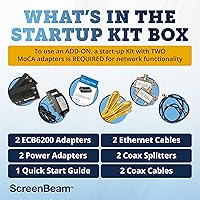
Including two Ethernet cables and two coax cables alongside both adapters means most buyers can complete installation without a single extra trip to the hardware store. That level of completeness is not universal in this product category and is consistently appreciated in buyer feedback.
The coax cables included are functional but short, which can be limiting depending on where wall outlets are positioned relative to routers or devices. Buyers in rooms with awkward cable outlet placements may need longer replacement cables.
Security Features
53%
47%
The network operates over coax wiring rather than radio waves, which means the signal does not broadcast into neighboring apartments or across property lines the way Wi-Fi does. For users in dense living situations, that is a practical privacy advantage without any configuration required.
MPS (MoCA Privacy System) security is absent from this adapter kit, which means the MoCA network layer itself lacks built-in encryption. Security-conscious users who want encrypted MoCA communication will need to look at higher-tier models or rely entirely on router-level security.
Long-Term Reliability
83%
This adapter has been on the market since 2015, and a significant portion of the buyer base reports units that have been running without issue for multiple years. That longevity track record is meaningful in a networking product category where hardware failures are a common complaint elsewhere.
A small but notable share of buyers report units failing or degrading in performance after extended use, particularly when housed in warm or poorly ventilated spaces near cable boxes. There is no active cooling, so placement matters more than the understated form factor might suggest.
Documentation & Support
67%
33%
The quick-start guide covers the standard installation scenario clearly enough that most buyers never need to consult anything else. ScreenBeam also maintains online resources that handle common configuration questions for the most popular ISP setups.
When setups deviate from the standard — particularly with DOCSIS 3.1 conflicts or multi-splitter coax runs — the included documentation offers little actionable guidance. Customer support experiences reported in reviews are inconsistent, with some buyers finding resolution quickly and others describing slow or unhelpful responses.

Suitable for:

The ScreenBeam ECB6200K02 MoCA 2.0 Network Adapter Kit is purpose-built for homeowners who already have coaxial cable outlets in multiple rooms and are tired of fighting Wi-Fi dead zones. Verizon FiOS subscribers will find it particularly straightforward to deploy, since most FiOS routers already support MoCA natively — meaning one adapter can be enough to extend a wired connection to another room. It is also an excellent fit for online gamers and 4K streamers who need consistent, low-latency connections that Wi-Fi simply cannot guarantee, especially in homes with thick walls or multiple competing wireless devices. Remote workers who have experienced frozen video calls or unstable connections during critical meetings will appreciate the predictability that a wired setup over coax provides. If you have been considering a mesh Wi-Fi system purely to solve dead zone problems, this coax-to-Ethernet kit is a cleaner, more reliable alternative worth considering first.
Not suitable for:

The ScreenBeam ECB6200K02 MoCA 2.0 Network Adapter Kit is a hard pass for anyone whose home internet or TV service runs on DirecTV, Dish, AT&T, or AT&T U-verse coaxial infrastructure — these networks are fundamentally incompatible, and no amount of configuration will change that. Buyers with DOCSIS 3.1 modems should also proceed with caution, as frequency overlap between MoCA 2.0 and certain DOCSIS 3.1 equipment can cause random disconnects that require ISP intervention to resolve. Renters who cannot trace or access their building's coax wiring, or who live in apartments where coax outlets are absent entirely, will find this MoCA adapter kit has no practical path to installation. Users who need built-in network-layer encryption should also look elsewhere, as MPS security is not included on this model. Finally, households with extremely heavy bandwidth demands — multiple simultaneous 4K streams plus active gaming and large file transfers — may find MoCA 2.0 starts to feel constrained and would be better served by stepping up to a MoCA 2.5 solution.
Specifications

  • MoCA Standard: The adapters operate on the Bonded MoCA 2.0 standard and are backward compatible with MoCA 1.1 and 1.0 networks.
  • Max Throughput: Bonded MoCA 2.0 delivers theoretical throughput of up to 1 Gbps over existing coaxial cable infrastructure.
  • Ethernet Speed: Each adapter features a 100/1000 Base-T Ethernet port, supporting both Fast Ethernet and Gigabit Ethernet connections.
  • Max Nodes: A single MoCA network built with these adapters supports up to 16 connected nodes simultaneously.
  • Dimensions: Each adapter measures 5.4″ in length, 2.6″ in width, and 1.1″ in height.
  • Weight: Each individual adapter unit weighs 0.65 lbs, making it lightweight and easy to position near a coax outlet.
  • Kit Contents: The starter kit includes 2 ECB6200 adapters, 2 power adapters, 2 Ethernet cables, and 2 coax cables.
  • Color: Both adapters are finished in matte black, designed to sit unobtrusively near cable wall outlets.
  • MPS Security: Hardware-level MoCA Privacy System (MPS) encryption is not included on this model.
  • Incompatible Networks: These adapters are not compatible with DirecTV, Dish Network, AT&T internet, or AT&T U-verse coaxial infrastructures.
  • DOCSIS 3.1 Risk: Some DOCSIS 3.1 modems may experience frequency overlap with MoCA 2.0, potentially causing intermittent disconnects.
  • Comcast Support: Comcast Xfinity supports MoCA 2.0 only through the Xfinity XB8 gateway; other Comcast modems may have limited compatibility.
  • FiOS Compatibility: Most Verizon FiOS routers include native MoCA support, meaning FiOS users may only need one adapter rather than two.
  • Manufacturer: These adapters are designed and manufactured by ScreenBeam, a company specializing in wireless and wired display and networking technology.
  • First Available: This adapter model has been commercially available since August 2015, giving it a long reliability track record in the market.
  • BSR Ranking: At the time of evaluation, this kit ranked #12 in the Amazon Powerline Network Adapters category.
  • Interface Type: Both input and output connections use standard coaxial (F-type) and RJ-45 Ethernet interfaces.
  • Power Supply: Each adapter requires its own dedicated power adapter, both of which are included in the starter kit box.

Related Reviews
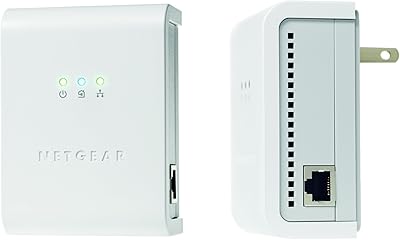
Netgear XAVB5001 Powerline Network Adapter Kit
70%
88%
Ease of Setup
51%
Real-World Speed Performance
73%
Connection Stability
58%
Electrical Outlet Compatibility
67%
Value for Money
More
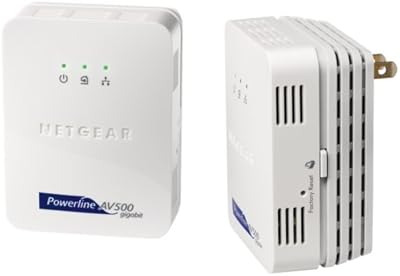
Netgear XETB1001 Powerline Network Adapter Kit
68%
88%
Ease of Setup
51%
Real-World Speed
67%
Connection Stability
58%
Value for Money
74%
Compatibility
More
Monoprice 5342 USB 2.0 Print Server
62%
71%
Ease of Setup
38%
OS Compatibility
52%
Connection Reliability
67%
Value for Money
61%
Build Quality
More
Actiontec PWR511K01 500Mbps Powerline Network Adapter Kit
67%
88%
Ease of Setup
61%
Real-World Speed Performance
74%
Connection Stability
53%
Build Quality & Durability
67%
Value for Money
More
D-Link Powerline AV Network Adapter Kit DHP-307AV
81%
83%
Performance
90%
Ease of Setup
78%
Reliability
70%
Speed Consistency
88%
Security (Encryption)
More
Linksys Powerline AV 1-Port Network Adapter Kit (PLEK400)
84%
93%
Setup & Installation
85%
Performance (Speed/Connectivity)
88%
Build Quality & Design
81%
Reliability & Stability
90%
Compatibility with Devices
More
QINIYEK RTL8125B Dual-Port 2.5G PCIe NIC
77%
88%
Ease of Installation
91%
Windows Driver Compatibility
63%
Linux Driver Compatibility
78%
Dual-Port Utility
83%
Throughput Performance
More
ULANSeN Dual I226-V 2.5GbE PCIe Network Card
82%
88%
Chipset Reliability
91%
Installation Ease
86%
OS & Platform Compatibility
71%
Thermal Performance
89%
Value for Money
More
OWC 2TB Accelsior 1M2 M.2 SSD to PCIe 4.0 Adapter Card
86%
91%
Performance
88%
Ease of Installation
89%
Compatibility with Mac/PC
93%
Data Transfer Speed
85%
Build Quality
More
ELAC Debut 2.0 F5.2 Floorstanding Speaker
82%
91%
Sound Quality
78%
Bass Performance
88%
Treble & High-Frequency Detail
86%
Midrange Clarity
89%
Soundstage & Imaging
More

FAQ

No, active cable TV service is not required. What you need is the physical coaxial cable wiring already installed in your walls. As long as coax outlets are present and the cables are intact, the MoCA adapters can use that infrastructure regardless of whether a TV subscription is active.

It depends on which Xfinity gateway you have. Comcast officially supports MoCA 2.0 only through the Xfinity XB8 modem. If you have an older Comcast-supplied gateway, compatibility is not guaranteed, so it is worth confirming with Xfinity before purchasing.

Powerline adapters send network data through your home's electrical wiring, while this coax-to-Ethernet kit sends it through coaxial cable. Coax is purpose-built for high-frequency signal transmission, which is why MoCA consistently outperforms powerline adapters in both speed and reliability. The two technologies are not interchangeable.

Possibly not. Most FiOS routers have MoCA built in, which means the router itself acts as one end of the MoCA network. In that case, you would only need to place one adapter in the room where you want the wired Ethernet connection. The second adapter in the kit would be available if you need to extend to a third room later.

When installed correctly, MoCA adapters should not degrade your cable TV signal. However, if your coax lines have splitters or the signal strength is already marginal, adding MoCA devices to the network can occasionally amplify existing signal issues. Installing a MoCA point-of-entry filter at your cable entry point is a recommended step that helps isolate the MoCA signal and protect TV quality.

No. AT&T internet — including AT&T U-verse — uses coaxial infrastructure that is incompatible with MoCA 2.0. Attempting to use this kit on an AT&T coax network will not work and could cause signal conflicts. This is one of the most important compatibility checks to make before purchasing.

There is a legitimate concern worth being aware of. Some DOCSIS 3.1 modems operate on frequency ranges that overlap with MoCA 2.0, which can lead to random disconnects. It does not affect every DOCSIS 3.1 modem, but if you experience instability after setup, contacting your ISP to request a firmware update or a frequency adjustment is the recommended fix.

For most setups — particularly with non-MoCA routers — you need at least two adapters: one connects to your router, and the other provides the Ethernet output in the destination room. If your router already has MoCA built in (as many FiOS routers do), a single adapter at the far end is sufficient.

The starter kit covers two connection points out of the box. If you need additional rooms, you can add more compatible MoCA 2.0 adapters to the same coax network, up to a maximum of 16 nodes total. Just make sure each room has a working coax outlet before planning your expansion.

That figure is the theoretical ceiling under ideal conditions, not a guaranteed real-world result. Actual throughput depends on the age and quality of your coax cables, how many splitters are in the line, the number of active MoCA devices on the network, and your ISP plan speed. Most users see meaningful improvements over Wi-Fi, but expecting exactly 1 Gbps at the device level would be optimistic.

Where to Buy