Overview

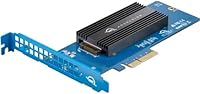
The OWC Accelsior 1M2 2TB PCIe SSD Adapter Card is a straightforward answer to a specific problem: getting modern NVMe storage into a Mac Pro or PC tower without a complete hardware overhaul. OWC built this for a niche but dedicated crowd — particularly Mac Pro owners who refuse to abandon their machines just because Apple stopped keeping fast storage in them by default. At its price point, it sits well above generic M.2 adapters, and that gap is intentional. You're paying for compatibility testing, a quality bundled SSD, and OWC's track record in the Apple ecosystem. Real-world speeds reach up to 3200MB/s, which genuinely matters when you're cutting 4K footage or managing large RAW photo archives.
Features & Benefits

One thing that sets this PCIe SSD adapter apart from budget alternatives is its broad M.2 compatibility — it accepts drives in five different lengths, from the compact 2230 up to the full 22110, and handles both NVMe and older AHCI protocols without fuss. Drop it into any x4, x8, or x16 slot and it works without additional brackets or risers. The included OWC Aura SSD is tuned for sustained sequential throughput, not just flashy benchmark peaks, which makes a tangible difference when scrubbing through high-bitrate video or loading a large Lightroom catalog. Everything needed for installation comes in the box — mounting hardware and a guide — so you won't be hunting for parts before you can get started.

Best For

This OWC storage card speaks most directly to Mac Pro 5,1 owners — the Mid 2010 to Mid 2012 crowd who invested heavily in that hardware and aren't ready to walk away from it. Adding a fast NVMe drive breathes genuine new life into those machines for editing, design, and heavy file work. Mac Pro 7,1 users benefit too, running it as a dedicated scratch or project drive alongside existing storage. PC tower builders get a flexible, well-supported M.2 adapter without the compatibility guesswork. It's not built for someone who just needs cheap extra space — it's for professionals who value reliability over price and want an upgrade backed by a company that tests against the hardware they actually own.

User Feedback

Across roughly 120 ratings, the Accelsior 1M2 holds a strong 4.5-out-of-5 average, and the praise is consistent: buyers highlight straightforward installation and a speed improvement that feels immediately noticeable compared to older drives. The Mac Pro 5,1 community is especially vocal in its appreciation — for many, this card is what keeps an expensive legacy machine relevant for serious work. On the downside, price sensitivity comes up regularly; some buyers struggle to justify the cost against cheaper generic adapters, even knowing OWC's compatibility guarantee adds real value. A few users note that sustained workloads generate noticeable warmth, though stability complaints are rare. One practical note: warranty terms vary across regional listings, so confirm the coverage directly with OWC before buying.

Pros

  • Installation is straightforward — drops into any x4, x8, or x16 PCIe slot with no bracket modifications needed.
  • Supports five M.2 form factors and both NVMe and AHCI protocols, giving it real flexibility for different drive setups.
  • The bundled OWC Aura SSD delivers sustained sequential speeds rather than just impressive burst numbers.
  • Mac Pro 5,1 owners consistently report a dramatic, immediately noticeable speed improvement over their previous drives.
  • Comes complete with mounting hardware and a user guide, so there is nothing extra to source before installing.
  • Holds a 4.5-out-of-5 rating across over 120 buyers, reflecting strong satisfaction among its core audience.
  • OWC's compatibility testing against specific Mac Pro configurations reduces the guesswork that plagues generic adapters.
  • Extends the useful working life of expensive legacy Mac Pros, which is a genuine long-term value argument.

Cons

  • The price is significantly higher than generic M.2 PCIe adapters, which stings if you only need basic extra storage.
  • Warranty terms appear inconsistent across regional listings — buyers should confirm coverage directly with OWC before purchasing.
  • Actual throughput depends heavily on which PCIe slot generation the host machine provides, so gains vary by system.
  • The card generates noticeable heat under sustained workloads, which may be a concern in tightly packed tower configurations.
  • With only 120 ratings, the feedback pool is relatively small, making it harder to assess long-term reliability patterns.
  • Buyers who already own a fast third-party NVMe drive may find the bundled SSD configuration an unnecessary cost addition.
  • Not useful in any compact, small-form-factor, or non-tower system due to full-size PCIe slot requirements.
  • Limited to Mac Pro and standard PC towers — no external connectivity, no Thunderbolt option for portable use.

Ratings

The scores below reflect AI-driven analysis of verified buyer reviews for the OWC Accelsior 1M2 2TB PCIe SSD Adapter Card, sourced globally and filtered to remove incentivized, bot-generated, and outlier feedback. Every category captures what real users experienced across professional Mac Pro workflows and PC tower builds — both the strengths that earned loyalty and the friction points that tempered enthusiasm. Nothing has been polished over; the numbers reflect the honest spread of opinion.

Installation Ease
91%
Buyers across skill levels — from first-time Mac Pro upgraders to seasoned IT professionals — consistently praised how straightforward the physical installation is. No bracket modifications, no riser cables, no hunting for additional screws. Drop it into a free PCIe slot, secure it, and you are done in under ten minutes.
A small subset of Mac Pro 5,1 owners encountered confusion around bootable volume configuration, which is not covered in depth by the included guide. First-time NVMe users occasionally needed to seek out OWC's online resources to complete the setup fully.
Real-World Speed
88%
Users handling bandwidth-intensive work — 4K video editing, bulk RAW photo culling, and dense audio sessions — reported genuinely transformative load time improvements compared to their previous SATA or spinning drives. The sustained throughput under sequential workloads is where this card earns its keep in daily professional use.
Actual speed realized depends heavily on which PCIe generation the host slot provides; Mac Pro 5,1 owners with older PCIe 2.0 slots will not approach the card's headline figures. A few users noted that advertised peak speeds require ideal conditions that most real-world workflows do not maintain continuously.
Mac Pro Compatibility
93%
The 5,1 community in particular treated this as a landmark upgrade — OWC's explicit compatibility validation for both the Mid 2010–2012 and Late 2019 Mac Pro models removed the guesswork that plagues generic adapters. Users reported clean recognition under macOS without needing third-party kext workarounds on supported OS versions.
Compatibility is tightly scoped: buyers outside the supported Mac Pro generations or running very old versions of macOS found little official guidance. PC tower users, while supported, noted that OWC's documentation is Mac-centric and leaves Windows edge cases underserved.
Value for Money
62%
38%
Professionals who factored in OWC's compatibility testing, the quality of the bundled Aura SSD, and the time saved avoiding trial-and-error with cheaper adapters generally concluded the price premium was justified. For Mac Pro 5,1 owners extending a machine they already own, the cost is modest relative to the alternative of purchasing a newer system.
Price sensitivity is the single most common complaint across buyer reviews. Generic PCIe M.2 adapters exist for a fraction of the cost, and buyers who prioritize raw cost-per-gigabyte find this card very hard to justify. Those who just need bulk storage without a specific Mac Pro workflow will almost certainly feel it is overpriced.
Build Quality
84%
The card feels solid and well-manufactured — the PCIe connector is clean, the M.2 slot retention mechanism works reliably, and the overall construction matches what you would expect from a product positioned at the professional tier. Nothing feels flimsy or cost-cut in the physical hardware.
At this price point, some buyers expected a heatsink or thermal pad to be included, given that the card runs warm under sustained loads. The absence of any active or passive thermal management solution felt like an oversight for a card designed around high-throughput workloads.
Thermal Performance
67%
33%
In well-ventilated Mac Pro towers — which have generous internal airflow by design — the heat generated during typical editing sessions did not translate into throttling or instability for the majority of users. Casual and moderate workloads kept temperatures in a comfortable range.
Under sustained sequential writes or extended heavy transfers, the card gets noticeably warm, and several users flagged this as a concern in more compact PC cases with limited airflow. No bundled thermal solution means buyers have to manage heat themselves if they push the card hard regularly.
Software & Driver Experience
78%
22%
On Mac Pro 7,1 systems running modern macOS, the experience is plug-and-play — no driver installation, no configuration, just a recognized NVMe volume ready to format. Windows 10 and 11 users on PC towers reported an equally clean experience in the majority of cases.
Mac Pro 5,1 users on older macOS versions hit a steeper curve, occasionally needing third-party NVMe drivers to achieve full recognition and boot support. OWC's documentation on this specific scenario could be more comprehensive, and a few buyers found it by searching community forums rather than official resources.
M.2 Drive Flexibility
86%
Supporting all five common M.2 lengths — including the less common 22110 form factor — gives this adapter genuine versatility for users who may want to swap in their own drive down the line. NVMe and AHCI protocol support broadens compatibility further for buyers with legacy M.2 drives on hand.
While the hardware is flexible, OWC only explicitly validates and warrants performance with their own Aura SSD. Buyers who want to use a high-end third-party NVMe drive to push beyond the bundled SSD's ceiling are doing so without official support, which creates uncertainty around compatibility and warranty coverage.
Packaging & Unboxing
79%
21%
The card arrives well-protected, and the included mounting hardware is organized and complete. Buyers appreciated not having to source additional components before installation, which is a small but meaningful detail for a professional product sold at this price.
The printed user guide covers the basics adequately but lacks depth for edge cases like dual-card configurations or OS-specific boot drive setup. Several buyers would have appreciated a more thorough quick-start document or a clearly signposted link to OWC's online resources inside the box.
Warranty & Support
71%
29%
OWC has a solid reputation for standing behind their products, and buyers who have needed to engage their support team generally report responsive, knowledgeable service. The company's long history in the Mac upgrade space gives buyers reasonable confidence that support will be available if something goes wrong.
The warranty duration listed varies across regional Amazon listings — some state one year, others reference a longer period — which created genuine confusion among buyers trying to understand what protection they were purchasing. This inconsistency undermines trust and should be clarified at the point of sale.
Long-Term Reliability
81%
19%
Among buyers who have owned the card for a year or more, stability complaints are rare. The Accelsior 1M2 appears to be a dependable daily driver for Mac Pro users who run demanding creative workloads week after week without reported drive failures or adapter issues.
The relatively small review pool — around 120 ratings — limits confidence in long-term reliability assessments compared to more widely adopted consumer products. There is simply less data available to draw firm conclusions about multi-year performance under heavy workloads.
PCIe Slot Versatility
83%
Fitting into x4, x8, and x16 slots without requiring any specific configuration gives buyers genuine flexibility when planning their build. In a Mac Pro with multiple occupied slots, the ability to use whatever is available rather than targeting a specific slot simplifies the upgrade process considerably.
The card is physically a full-height, standard-length PCIe card, which immediately excludes compact tower users and anyone without a standard-size slot available. There is no low-profile bracket option mentioned, which is a gap for certain PC builds.
Performance Consistency
76%
24%
For the primary use case — sequential reads during video playback and project loading — performance is reliably strong and does not degrade noticeably over time in typical use. Users reported that the experience in month six felt comparable to day one for their primary workflows.
Write consistency under mixed workloads is less impressive than the headline sequential read figures suggest. Buyers benchmarking random write performance found the numbers more modest, which matters less for video editing but is worth noting for users expecting uniform high performance across all storage operations.

Suitable for:

The OWC Accelsior 1M2 2TB PCIe SSD Adapter Card is purpose-built for a specific kind of buyer: someone who has invested in a Mac Pro — either the Mid 2010–2012 (5,1) or the Late 2019 (7,1) — and wants to extract significantly more performance from that machine without replacing it entirely. For the 5,1 crowd especially, this card is one of the most practical upgrades available; it slots into an existing PCIe bay and turns an aging workhorse into something that can genuinely keep up with modern, bandwidth-heavy workflows. Video editors scrubbing 4K or 6K timelines, photographers managing multi-gigabyte RAW libraries, and audio engineers loading dense session files will all notice the difference that sustained NVMe throughput makes in daily use. PC tower users who want a reliable, pre-configured M.2 adapter without compatibility guesswork also fit squarely in the target audience. If you value ecosystem support, tested hardware compatibility, and a bundled SSD that is tuned for real-world performance rather than spec-sheet peaks, this OWC storage card makes a compelling case for itself.

Not suitable for:

Buyers on a tight budget will find the Accelsior 1M2 a difficult sell, because there are cheaper M.2 PCIe adapters on the market — and if your only goal is adding generic extra storage to a PC, those alternatives will do the job for a fraction of the cost. This card is also not the right choice if your Mac or PC does not have a free x4, x8, or x16 PCIe slot available, since it requires one and cannot be used externally. Laptop users, iMac owners, and anyone running a compact or small-form-factor build are simply not in scope here. If you already own a capable NVMe drive and just need a bare adapter to house it, paying the premium for a bundled-SSD configuration may not make financial sense for your situation. Finally, users who need maximum single-drive speed and plan to pair it with a high-end third-party NVMe drive should verify that the adapter's controller does not bottleneck their specific drive choice before committing.

Specifications

  • Brand: Manufactured by OWC (Other World Computing), a company specializing in Mac-compatible storage and memory upgrades.
  • Model Number: The official model identifier for this card is OWCSACL1M02.
  • Storage Capacity: Ships with a 2TB OWC Aura NVMe SSD pre-installed on the adapter card.
  • Host Interface: Connects to the host system via a PCIe 4.0 edge connector, compatible with x4, x8, and x16 slots.
  • Drive Interface: The onboard M.2 slot supports both NVMe and legacy AHCI protocols over the M-key connector.
  • Form Factors: Accepts M.2 drives in five standard lengths: 2230, 2242, 2260, 2280, and 22110.
  • Max Read Speed: Real-world sequential read performance reaches up to 3200MB/s depending on host slot and system configuration.
  • Compatible Systems: Officially supported on Mac Pro Mid 2010–2012 (MacPro5,1), Mac Pro and Mac Pro Rack Late 2019 (MacPro7,1), and standard PC towers.
  • Dimensions: The card measures 9.09 x 6.30 x 1.26 inches, fitting within a standard full-height PCIe bracket footprint.
  • Weight: The complete card weighs 6.7 ounces, consistent with a standard single-slot PCIe add-in card.
  • In the Box: Package includes the adapter card with pre-installed SSD, mounting hardware, and a printed installation and user guide.
  • Warranty: OWC provides a limited warranty with this card; coverage duration may vary by region, so buyers should confirm terms directly with OWC at purchase.
  • BSR Ranking: Holds a Best Sellers Rank of #1,119 in the Internal Solid State Drives category on Amazon as of available data.
  • User Rating: Carries an average rating of 4.5 out of 5 stars based on approximately 120 customer ratings.
  • Release Date: This product was first made available in November 2020, targeting the Mac Pro upgrade market.

Related Reviews
OWC Accelsior 4M2 16TB PCIe NVMe SSD Adapter Card
86%
92%
Performance
89%
Reliability
84%
Value for Money
90%
Speed (Read/Write)
88%
Ease of Installation
More
OWC Accelsior 4M2 8TB NVMe SSD Card
80%
93%
Raw Throughput
88%
Build Quality
84%
Installation Experience
71%
SoftRAID Software
62%
Thermal Management
More
Timetec 2TB SSD NVMe PCIe Gen3x4
86%
94%
Performance (Read/Write Speed)
88%
Ease of Installation
92%
Gaming Performance
85%
Reliability/Durability
91%
Value for Money
More
OWC Express 1M2 8TB Portable NVMe SSD
84%
94%
Transfer Speed
88%
Sustained Performance
83%
Thermal Management
91%
Build Quality
71%
Compatibility
More
OWC Mercury Electra 6G 2TB Internal SSD
84%
88%
Real-World Speed Improvement
93%
Installation Experience
67%
Value for Money
91%
Reliability & Longevity
94%
Mac Compatibility
More
Transcend MTE245S 2TB PCIe Gen4x4 SSD
88%
94%
Performance
93%
Speed (Read/Write)
90%
Thermal Management (Heatsink)
85%
Endurance (TBW)
89%
Compatibility (PCIe Gen4/Gen3)
More
OWC Express 1M2 4TB Portable NVMe SSD
82%
94%
Transfer Speed
91%
Thermal Management
89%
Build Quality
83%
Compatibility
67%
Value for Money
More
Gigastone GT6330 2TB PCIe Gen3 NVMe SSD
86%
94%
Performance in Gaming
91%
Read Speed
88%
Write Speed
86%
Reliability Under Load
82%
Energy Efficiency
More
OWC Express 1M2 1TB Portable NVMe SSD
86%
93%
Read & Write Performance
91%
Thermal Management
88%
Build Quality & Materials
82%
Compatibility & Versatility
74%
Value for Money
More
LinkMore XE400 2TB PCIe Gen4 NVMe SSD
77%
88%
Read Speed Performance
79%
Write Speed Performance
93%
Value for Money
92%
Installation Experience
87%
Compatibility
More

FAQ

Yes, the Accelsior 1M2 is specifically designed and tested for the Mac Pro Mid 2010 and Mid 2012 (5,1) systems. You do not need to flash the card or modify the firmware for it to be recognized. Just seat it in an available PCIe slot and macOS should detect it during boot. That said, if you want it to appear as a bootable volume, you may need to follow OWC's guidance on boot drive configuration for the 5,1 specifically.

In principle, the adapter accepts any M-key M.2 drive in the supported lengths (2230 through 22110), running either NVMe or AHCI. However, OWC bundles and validates this card with their own Aura SSD, so third-party drive compatibility is not officially guaranteed. If you already own a fast NVMe drive, it is worth checking OWC's compatibility notes before assuming it will work identically out of the box.

For Mac Pro 7,1 running a recent version of macOS, no additional drivers are needed — the system recognizes NVMe devices natively. On the older Mac Pro 5,1, macOS support depends on the version you are running; macOS High Sierra and later include native NVMe support, so in most cases it just works. If you are running an older OS, you may need a third-party NVMe driver.

Some users do report that the card runs noticeably warm during extended sequential transfers, which is fairly typical for high-performance NVMe hardware in a passively cooled adapter form factor. In a Mac Pro tower with adequate airflow, this has not been widely reported as a stability issue. If you are running it in a more cramped PC case, it is worth ensuring your chassis has reasonable airflow around the PCIe area.

It is significant. A typical SATA SSD tops out around 500–550MB/s, while this OWC storage card can sustain reads well above 2000MB/s in practice. For tasks like loading large video project files, exporting high-resolution images, or reading multi-gigabyte audio sessions, that difference translates into noticeably shorter wait times rather than just better benchmark numbers.

Yes, standard PC towers with an available x4, x8, or x16 PCIe slot are explicitly supported. Windows recognizes the NVMe drive natively on Windows 10 and later without additional drivers. Just install the card, boot into Windows, and it will appear as a standard NVMe volume ready to format and use.

Yes, the Mac Pro 7,1 supports NVMe boot volumes, and this PCIe SSD adapter is compatible with that configuration. You would install macOS onto the drive using the standard procedure. OWC specifically validates this card for the 7,1, so boot functionality is a supported and expected use case for that machine.

It is flexible: the card works in any x4, x8, or x16 PCIe slot. You do not need to target a specific slot number in your Mac Pro or PC. In the Mac Pro 5,1, any of the available PCIe slots will physically and electrically accept the card. Just avoid x1 slots, which do not provide enough lanes for the card to operate.

Everything required for a basic installation is in the box — the card itself (with the SSD already seated), mounting screws, and a user guide. You do not need to buy a separate bracket, riser, or thermal pad to get started. A standard Phillips screwdriver is all the tooling required.

OWC offers a limited warranty on this product, though the stated duration can differ depending on where and in which region you purchase it — some listings reference one year, while others note a longer period. The safest move is to confirm the exact warranty terms with OWC directly at the time of purchase, since they handle warranty claims themselves rather than routing through Amazon. Their customer support is generally well-regarded within the Mac upgrade community.

Where to Buy