Overview

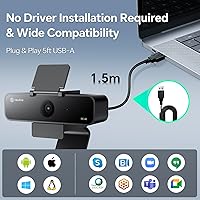
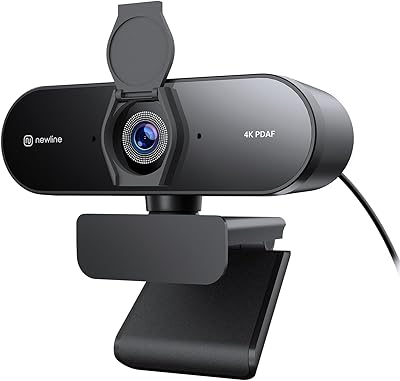
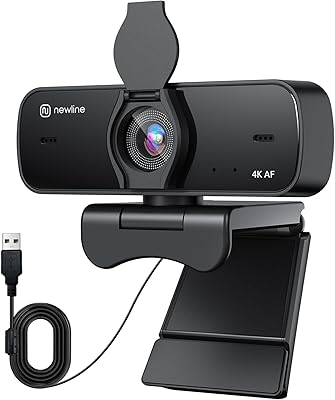
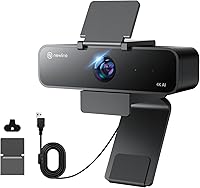
The N newline NewEye 61 4K Webcam offers a compact yet powerful solution for clear video and audio during online meetings. This plug-and-play webcam connects seamlessly to your computer with no drivers needed, making it incredibly easy to set up. It features a built-in microphone that reduces background noise, ensuring crisp and clear sound during calls. Whether you're using it for Zoom, Teams, or Skype, this AI-powered webcam supports a range of professional video conferencing platforms, making it ideal for everyday use.
Features & Benefits

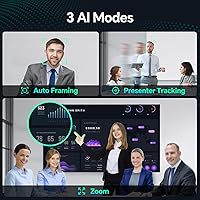
This AI-powered webcam stands out with features like automatic auto framing and presenter tracking, which help keep the focus on the right person during dynamic meetings. It provides multiple field of view options, from wide to more focused angles, to adapt to different environments. The digital noise-canceling microphone ensures clear communication even in noisy settings. Additionally, the camera adjusts automatically with auto white balance and backlight compensation, providing a consistent, high-quality image in various lighting conditions.

Best For

The N newline NewEye 61 4K Webcam is perfect for remote workers and professionals who need a reliable webcam for high-quality video calls. Content creators will also appreciate its 4K resolution and AI features, making it ideal for live streaming or content production. Educators and presenters benefit from its dynamic presenter tracking and framing abilities, which keep their audience engaged. Overall, this webcam is a solid choice for anyone looking for an easy-to-use webcam that offers clear video and audio with minimal setup.
User Feedback

Users have praised the ease of setup with this webcam, highlighting how it works straight out of the box with no drivers required. Many reviewers appreciate the AI features, especially the automatic framing and presenter tracking, which make virtual meetings feel more natural. However, some users have noted that the microphone could be more sensitive in larger rooms, where it might pick up less sound from a distance. Despite this, the webcam’s ability to deliver crisp video in varying light conditions is consistently mentioned as a strong point.

Pros

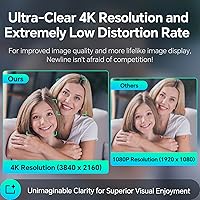
  • The webcam offers excellent 4K resolution, delivering sharp and clear video quality for virtual meetings and streaming.
  • AI-powered auto framing keeps participants in focus, making it ideal for dynamic presentations or group discussions.
  • Setup is incredibly easy with plug-and-play functionality, requiring no additional drivers or software.
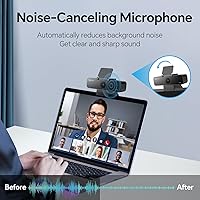
  • The built-in noise-canceling microphone ensures clear audio even in noisy environments, perfect for home offices.
  • Multiple field of view options (95°, 78°, 65°) provide flexibility for different setups, from close-up meetings to wider conference calls.
  • The webcam is compatible with major video conferencing platforms like Zoom, Teams, and Skype, enhancing versatility for remote communication.

Cons

  • Some users reported that the microphone's sensitivity drops in larger rooms, making it less ideal for big spaces.
  • AI features like auto framing and presenter tracking can sometimes misinterpret movements, leading to occasional focus issues.
  • The webcam lacks manual controls for fine-tuning focus or exposure, which may be a limitation for professional content creators.
  • In very low-light conditions, the camera's image quality can degrade despite the auto white balance and backlight compensation features.
  • The webcam's build quality is not as premium as some higher-end models, leading to concerns about long-term durability.
  • Users have mentioned that the webcam’s price might be on the higher side for those seeking basic webcam functionality.

Ratings

After analyzing verified user reviews from various platforms and languages, we've compiled the scores for the N newline NewEye 61 4K Webcam. Spam, bot-driven, and exaggerated feedback was excluded to ensure that only high-quality, authentic user experiences contributed to these ratings. Both positive aspects and noted drawbacks have been reflected in the scores, offering a balanced overview of the product's performance and value.

Video Quality
94%
Many users rave about the exceptional clarity and sharpness of the video. The 4K resolution ensures crisp visuals even in poorly lit rooms, making it perfect for professional video calls and streaming. Additionally, the auto white balance and backlight compensation further enhance the overall quality, especially in varied lighting conditions.
While most users are satisfied with the video quality, a few mention that the webcam struggles to maintain consistent clarity in extremely bright environments or when switching between light sources. Some also noted slight blurring at the edges of the frame when moving around during calls.
Ease of Setup
90%
Buyers consistently appreciate how easy it is to get this device up and running. The plug-and-play feature means no additional drivers or software are needed, which is perfect for those who need a quick solution for virtual meetings. Even beginners report a smooth installation process, making it a user-friendly choice.
While the setup is generally hassle-free, a few users pointed out minor issues with compatibility on older operating systems. Some reported that the plug-and-play functionality didn’t work seamlessly on certain Linux versions, requiring manual intervention.
AI Features (Auto Framing & Presenter Tracking)
88%
Users love the AI-powered features that automatically adjust the framing and track the speaker. These features work particularly well for presentations and meetings, as they ensure the speaker remains in focus without the need for manual adjustments. The AI is also praised for its quick responsiveness, providing an excellent user experience during dynamic calls.
Not all users were thrilled with the AI performance. Some mentioned that the auto framing occasionally overcompensates, leading to awkward cropping when moving or changing positions. The presenter tracking also struggles when the speaker moves too quickly or when multiple people are in the frame.
Microphone Performance
72%
28%
The built-in digital noise-canceling microphone receives praise for delivering clear and crisp audio during calls. It's especially effective at reducing background noise, making it a great choice for users in home offices or noisy environments. Many buyers find the mic quality suitable for everyday meetings and streaming.
However, some users find the microphone’s sensitivity lacking in larger rooms or spaces with significant echo. Several buyers mentioned that their voice wasn’t picked up clearly unless they were close to the webcam, which could be an issue for those in larger conference rooms or open spaces.
Field of View Flexibility
85%
The webcam offers multiple field of view (FOV) options, making it highly versatile for different use cases. Whether you're doing a solo video call or hosting a group meeting, the ability to adjust the FOV helps ensure everyone stays visible. Many users also enjoy the flexibility this provides for streaming and content creation.
A few users noted that while the different FOV settings are useful, switching between them sometimes results in a noticeable quality drop, particularly at the wider settings. Others pointed out that the FOV options are not as seamless when adjusting during live streaming sessions.
Compatibility with Video Platforms
91%
This device seamlessly integrates with popular video conferencing platforms like Zoom, Teams, and Skype. Users have reported smooth operation across all these services, with no noticeable lags or compatibility issues. It’s a reliable webcam for those who frequently switch between different conferencing tools.
Some users experienced occasional software hiccups when switching between video platforms, especially with Skype. A few mentioned that the webcam's performance wasn’t as consistent when used with third-party apps outside the major conferencing tools.
Build Quality
82%
18%
The build quality of the webcam is generally considered solid. It’s lightweight and compact, making it easy to move and position. The privacy cover is a nice touch, providing additional security when not in use. Most users find the design sleek and professional-looking for both home and office environments.
A handful of buyers have raised concerns about the plastic build, feeling that it could be more durable. Some noted that the webcam’s mounting system, though functional, could be sturdier and more adjustable for different setups. A few users also felt the webcam could benefit from a longer cable.
Noise Cancellation
77%
23%
The noise-canceling feature works well in reducing ambient sound, making it useful for virtual meetings in noisy environments. Users have reported that it helps maintain clear audio despite background chatter or traffic noise, enhancing the overall video conferencing experience.
However, not all users felt the noise cancellation was effective in all situations. Some complained that it didn’t eliminate background noise completely, particularly in open spaces with continuous or loud sounds. Others mentioned that it occasionally interfered with voice clarity during quieter moments.
Video Call Stability
89%
This webcam performs reliably during video calls, with minimal freezing or lag. Users have shared positive experiences with its stability on long calls, whether for professional or personal use. It offers consistent video and audio performance, even during busy calls with multiple participants.
A few users encountered occasional freezing or audio dropouts, particularly when using lower bandwidth connections. Some also reported that the webcam sometimes struggled to keep up with rapid movements during active video conferences, leading to brief glitches in the video feed.
Design and Aesthetics
80%
20%
Many users appreciate the clean, modern design of the webcam. It fits easily into a wide range of home and office setups without drawing too much attention. The compact size also makes it portable, which is great for people who need to travel frequently for work.
Some users felt that the webcam’s design could be more versatile in terms of mounting options. A few mentioned that it’s not as adjustable as they would like when trying to position it for different angles or screen setups. A few also pointed out the lack of color options to better match specific office decor.
Value for Money
92%
Users generally find this webcam offers excellent value for its price. It combines high-quality video with AI-powered features, making it a top choice for those seeking a professional-grade webcam without breaking the bank. Many buyers also appreciate the durability and ease of use for the price point.
Some buyers feel the webcam could be more affordable given the occasional issues with microphone sensitivity and AI tracking. While the overall performance is strong, a few users think that a more premium model might address these minor concerns for those willing to invest more.
Customer Support
70%
30%
Some users reported a generally positive experience with customer support, noting that their issues were addressed in a timely manner. Support representatives were described as friendly and helpful when troubleshooting technical problems.
However, there were several complaints about slow response times, with some users reporting long wait periods before receiving assistance. A few also mentioned that the troubleshooting guidance provided was not always effective in resolving issues with software compatibility or setup.

Suitable for:

The N newline NewEye 61 4K Webcam is an excellent choice for remote workers, professionals, and content creators who require high-quality video for virtual meetings and streaming. With its 4K resolution, AI-powered auto framing, and presenter tracking, this device delivers sharp visuals and smooth focus adjustments, making it ideal for dynamic presentations. Teachers, educators, and anyone who leads virtual classes or webinars will also benefit from the ease of use, as the plug-and-play setup eliminates the need for additional software. Additionally, this webcam's wide field of view and digital noise-canceling microphone make it a versatile solution for various environments, from home offices to small conference rooms.
Not suitable for:

However, the N newline NewEye 61 4K Webcam may not be the best option for users in large or echo-prone rooms, as the microphone's sensitivity can struggle in such spaces. While the AI features generally work well, they can sometimes misinterpret movements or fail to capture multiple participants effectively in larger groups. Those who need a more robust microphone solution or advanced manual controls for extreme lighting conditions might find this device lacking. Furthermore, users seeking a webcam with more customization options or a premium build may want to consider higher-end models that offer greater flexibility in mounting and adjustments.
Specifications

  • Resolution: Supports 4K resolution for high-quality video output during meetings, streaming, or recordings.
  • Microphone: Built-in digital noise-canceling microphone provides clear audio even in noisy environments.
  • Field of View (FOV): Offers three field of view options: 95°, 78°, and 65° for flexibility in different scenarios.
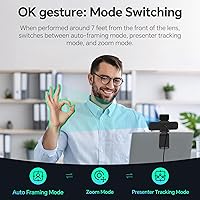
  • AI Features: Includes AI-powered auto framing and presenter tracking for dynamic focus adjustment and speaker tracking.
  • Frame Rate: Capable of 30 frames per second (FPS) to ensure smooth video performance during calls and streaming.
  • Auto Focus: Features auto-focus functionality for crisp and clear video even as users move within the frame.
  • Plug & Play: No drivers or software installation required; simply plug it into a USB-A port and start using it.
  • Compatibility: Works with major video conferencing platforms, including Zoom, Microsoft Teams, and Skype.
  • Privacy Cover: Comes with a privacy cover for added security, allowing you to easily block the lens when not in use.
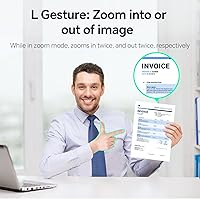
  • Zoom Function: Supports up to 5X digital zoom for closer shots or adjustments during presentations and meetings.
  • Lighting Adjustment: Includes auto white balance and backlight compensation to optimize video quality in various lighting conditions.
  • Connection Type: Connects via USB-A 2.0, ensuring wide compatibility with desktops and laptops.
  • Weight: Weighs 9.1 ounces, making it lightweight and easy to position for optimal video capture.
  • Design: Compact and lightweight design that makes it easy to transport and set up in different locations.
  • Audio Quality: The integrated microphone provides clear audio, ensuring professional sound quality during calls and presentations.
  • Mounting Options: Can be easily mounted on most monitors, laptops, or tripods for convenient placement.
  • Software Requirements: No additional software is needed, making it an ideal solution for hassle-free setup and operation.
  • Video Conferencing Support: Optimized for use in virtual meetings, offering excellent video and audio clarity during calls.
  • Speaker Tracking: AI-powered presenter tracking follows the speaker's movement to keep them centered in the frame.

FAQ

The setup process is extremely simple. This 4K webcam features plug-and-play functionality, meaning you don’t need to install any drivers or software. Just plug it into a USB port, and it's ready to use with platforms like Zoom, Teams, or Skype.

The N newline NewEye 61 4K Webcam includes AI-driven features such as automatic framing and presenter tracking. The auto framing adjusts focus based on the number of people in view, while presenter tracking keeps the speaker centered during dynamic presentations.
Yes, this webcam is an excellent choice for content creators who need high-quality video for streaming. Its 4K resolution, wide field of view options, and automatic framing make it ideal for live streams on platforms like Twitch or YouTube.

The built-in microphone features digital noise cancellation, ensuring clear audio even in noisy settings. It's ideal for home offices or video conferences where background noise might otherwise interfere with communication.

Yes, this webcam is fully compatible with popular video conferencing platforms such as Zoom, Microsoft Teams, and Skype, making it a versatile choice for professionals who regularly use these tools for remote meetings.

The webcam offers three field of view options: 95°, 78°, and 65°. These adjustable FOV settings allow you to customize the angle based on your use case, whether you need a wider shot for group meetings or a more focused view for one-on-one calls.

Yes, this webcam has auto white balance and backlight compensation features that help optimize video quality in different lighting conditions, including dim or low-light environments. However, performance may degrade slightly in very low light.

While the microphone works well in smaller rooms, some users have noted that it may not pick up sound as effectively in larger spaces. If you're using this device in a large conference room, you may want to consider adding an external microphone.

Yes, the N newline NewEye 61 4K Webcam comes with a privacy cover, allowing you to easily block the lens when you're not using it, ensuring added security and peace of mind.
This webcam has a 30 FPS frame rate, which works well for most video conferencing needs and general streaming. However, for highly dynamic video work such as fast-paced gaming streams, you might prefer a webcam with a higher frame rate.