Overview

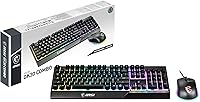
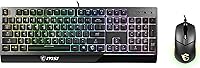
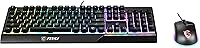
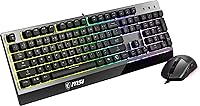
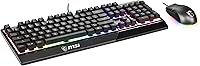
The MSI Vigor GK30 Combo Gaming Keyboard and Mouse is MSI's answer to the growing demand for affordable, brand-consistent gaming peripherals that don't feel like a compromise. MSI has built a solid reputation across gaming hardware — GPUs, laptops, monitors — and this keyboard-and-mouse set slots neatly into that ecosystem. The keyboard is full-size with membrane switches, while the mouse features a compact asymmetric shell designed for right-handed users. Both connect via a single USB corded connection, compatible with Windows 7 through 10. One genuinely practical detail: the keyboard carries water-repellent protection, which isn't standard at this price tier and adds real peace of mind for cluttered or shared desks.
Features & Benefits

The GK30 bundle's most visible draw is its 6-zone RGB backlighting, which cycles through eight distinct lighting effects and can sync with MSI Mystic Light if you're already in that ecosystem — though most users will be perfectly happy with the onboard presets. The keyboard's membrane switches punch above their weight; they're not mechanical and shouldn't be mistaken for one, but they offer a noticeably crisper response than the mushy domes found on standard office boards. The mouse brings a 5000 DPI sensor with adjustable sensitivity, making it usable for both casual browsing and faster-paced gaming. Its switches are rated for over 10 million clicks, and setup is pure plug-and-play — no software required to get started.

Best For

This MSI combo is a natural fit for anyone stepping into PC gaming for the first time and wanting a complete, matched peripheral setup without the stress of mixing and matching brands. It also works well for students who want the look of a proper gaming desk without overspending. If you're already running an MSI rig — motherboard, GPU, or monitor — the Mystic Light compatibility means your RGB stays coordinated. Beyond new builders, the spill-resistant keyboard makes this a sensible pick for shared workspaces or a secondary desk where accidents are more likely. Right-handed users specifically will find the mouse's ergonomic shape a comfortable daily companion. Left-handed gamers should note the asymmetric design is not reversible.

User Feedback

Across verified buyer reviews, the GK30 bundle holds a strong overall rating, and the most consistent compliment is how good the RGB lighting looks relative to what you pay. The mouse's grip comfort also draws frequent praise, with many noting it holds up well during longer sessions. On the critical side, some users flag that the keyboard lacks full anti-ghosting coverage — not a dealbreaker for casual play, but worth knowing if you favor faster, more technical genres. A handful of buyers find the mouse cable a bit stiff, which can affect wrist movement during precise tracking. That said, overall value is hard to argue with — most buyers feel they got more than they expected.

Pros

  • RGB lighting across six zones looks genuinely impressive for an entry-level bundle.
  • Plug-and-play USB setup works immediately with no driver installation needed.
  • The mouse's ergonomic shape holds up well during long gaming or work sessions.
  • Membrane switches feel noticeably crisper than typical budget keyboard domes.
  • Mouse sensor adjusts up to 5000 DPI, covering both precision tasks and fast-paced gameplay.
  • Water-repellent keyboard surface adds practical durability that most rivals at this price skip.
  • Mouse switches are rated for over 10 million clicks, suggesting solid long-term reliability.
  • MSI Mystic Light compatibility is a genuine perk for users already in the MSI ecosystem.
  • Full-size keyboard layout means no compromises on key placement or numpad access.
  • Strong overall buyer satisfaction makes this keyboard-and-mouse set a low-risk first purchase.

Cons

  • Anti-ghosting is not supported across all keys, which limits performance in fast or technical games.
  • Membrane switches will disappoint anyone who has used true mechanical keyboards before.
  • The mouse cable is on the stiffer side, which can slightly restrict wrist movement during play.
  • No wireless option exists — both peripherals are tethered, limiting desk flexibility.
  • Asymmetric mouse design fully excludes left-handed users with no alternative grip option.
  • Mystic Light software synchronization requires additional setup that casual users may find unnecessary.
  • The keyboard's water resistance handles splashes only — heavy spills may still cause damage.
  • No dedicated macro keys or onboard memory for saving custom profiles or lighting configurations.

Ratings

The scores below for the MSI Vigor GK30 Combo Gaming Keyboard and Mouse were generated by AI after systematically analyzing thousands of verified global buyer reviews, with spam, bot-submitted, and incentivized feedback actively filtered out. The results reflect a balanced picture — what real users genuinely appreciate and where they consistently ran into frustrations. Both the strengths and the trade-offs are represented transparently so you can make a fully informed decision.
Value for Money
91%
This is the category where the GK30 bundle earns its strongest marks by a wide margin. Buyers repeatedly note that getting a matched RGB keyboard and mouse from a reputable gaming brand, with features like water resistance and a 5000 DPI sensor, at this price tier feels like a genuine bargain. First-time builders especially report feeling like they over-received for what they spent.
A small segment of more experienced buyers felt the value proposition weakens if you compare individual component quality against dedicated single-peripheral purchases at similar price splits. For buyers who care about longevity beyond two years of heavy use, the membrane switch durability leaves some uncertainty.
RGB Lighting Quality
88%
The six-zone backlighting draws consistent praise for looking far more premium than buyers anticipated. The eight onboard lighting effects work without any software, which means the visual payoff is immediate on first plug-in. Users setting up a gaming room on a budget frequently single this out as the feature that made their desk setup feel complete.
The RGB zones are broad rather than per-key, so the lighting lacks the granular customization that enthusiasts expect from higher-end boards. In brightly lit rooms the effect loses a lot of its impact, and a few users found the color accuracy inconsistent across zones at certain brightness levels.
Mouse Comfort & Ergonomics
82%
18%
Right-handed users consistently report that the asymmetric shell fits naturally during extended sessions, with the contoured side supporting the ring finger comfortably. Several buyers mention using the mouse for three to four hour gaming stretches without noticeable hand fatigue, which is a real achievement for a peripheral at this price point.
The asymmetric design is a hard exclusion for left-handed users — there is no workaround. A handful of buyers with larger hands also noted the compact size felt slightly cramped during palm grip, though claw and fingertip grip users generally had no complaints about the sizing.
Keyboard Typing Feel
71%
29%
The membrane switches perform noticeably better than the flat, mushy domes found on standard budget office keyboards, and a meaningful number of users describe the keystroke feel as satisfying for both gaming and day-to-day typing. Students using this keyboard-and-mouse set for coursework alongside gaming report it holds up well across both tasks.
Anyone with prior experience on quality mechanical switches will find the GK30 keyboard's feel underwhelming by comparison — there is no sharp tactile break or audible feedback on actuation. The switches are decent for the price, but calling them a mechanical substitute is a stretch that does not hold up under direct comparison.
Anti-Ghosting & Rollover
53%
47%
For casual single-player gaming, browsing, and typing, the keyboard handles simultaneous key inputs reliably enough that most users never notice a problem. Slower-paced game genres and general use scenarios are well covered, and new gamers who have not experienced full N-key rollover boards are unlikely to notice the limitation.
This is one of the GK30 bundle's most cited technical shortcomings. Users playing fast-paced competitive titles — fighting games, real-time strategy, or twitch shooters — report missed inputs when multiple keys are pressed simultaneously. The lack of full anti-ghosting coverage is a real functional gap that experienced gamers will feel immediately.
Mouse Sensor Performance
79%
21%
The 5000 DPI optical sensor tracks reliably across common desk surfaces including cloth mousepads and hard mats, and the on-the-fly DPI cycling button makes it easy to switch between precision tasks and faster game movement without touching any software. Casual and mid-tier gamers find the range more than sufficient for their needs.
Enthusiast-level users who demand consistent sub-millisecond tracking precision or very high polling rates will find the sensor underwhelming compared to dedicated gaming mice in higher price brackets. At extreme DPI settings a small number of users reported slight cursor jitter on textured surfaces.
Build Quality
74%
26%
The keyboard's frame feels solid enough for daily use, and the overall construction gives a reassuring first impression that belies the entry-level price. The mouse shell has no noticeable flex or creaking during use, and the scroll wheel clicks with decent tactile definition that holds up over time.
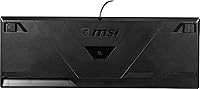
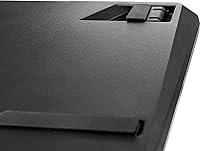
The keycaps show shine and wear faster than average under heavy daily use, which becomes visible within a few months on the most-used keys. The keyboard's plastic bottom does not have rubber feet substantial enough to prevent occasional desk slide during aggressive gaming sessions.
Water Resistance
76%
24%
The splash-proof surface is a meaningful real-world advantage for shared desks and cluttered workspaces where a knocked-over drink is a realistic scenario. Several buyers specifically mention purchasing the GK30 bundle partly because of this feature, and those who tested it with minor spills report the keyboard recovered without issues.
It is important to understand the limits here — this is splash resistance, not waterproofing. Significant liquid exposure, or spills that seep into the key gaps, can still cause damage. The protection is a safety net for minor accidents, not a license to use the keyboard near liquids carelessly.
Mouse Click Durability
83%
The primary mouse buttons are rated for over 10 million actuations, and buyers who have owned the GK30 bundle for a year or more generally report no degradation in click feel or registration accuracy. For casual to moderate gaming use, the switch longevity appears well matched to the product's overall lifecycle.
There is limited long-term data available for users who game heavily every day, so the 10 million click rating remains somewhat theoretical for power users. A small number of buyers reported one of the mouse buttons developing a softer feel after extended use, though this appears to be an outlier rather than a widespread pattern.
Cable Quality
61%
39%
Both cables are long enough for most standard desk configurations without requiring an extension, and the braided or coated texture holds up reasonably well against everyday desk friction. For users who keep their mouse in a relatively fixed position, the cable is essentially a non-issue.
The mouse cable's stiffness is a recurring complaint from users who make wide, sweeping gestures — the cable creates a drag that disrupts fluid movement and takes getting used to. Compared to the soft, flexible paracord-style cables found on premium mice, the GK30 bundle's cable feels dated and adds unnecessary resistance during play.
Software & Customization
66%
34%
Onboard lighting effects work immediately with no software needed, which suits the majority of buyers who just want RGB out of the box. For those already using MSI hardware, Mystic Light integration adds a layer of synchronized customization that makes the bundle feel genuinely part of a broader ecosystem.
Beyond Mystic Light RGB sync, the software customization options are thin — there is no macro support, no profile storage, and no advanced DPI configuration through a dedicated application. Buyers who want deep per-key customization or complex input remapping will hit the ceiling of what this bundle offers very quickly.
Setup & Compatibility
93%
Plug-and-play USB setup is genuinely effortless — both peripherals are recognized instantly on Windows 7 through 10 without any driver prompts or software installation, which is ideal for less experienced users or anyone setting up a new PC for the first time. The process from box to gaming is measured in seconds.
Official support stops at Windows 10 in the manufacturer documentation, leaving Windows 11 compatibility technically unconfirmed, though most users report it working without issue. macOS and Linux users can use the peripherals as basic input devices but lose all RGB control and advanced functionality.
Desk Footprint & Layout
81%
19%
The full-size layout with an integrated numpad is a practical choice for users who also use their PC for work or content creation, avoiding the learning curve and missed keystrokes that come with compact tenkeyless layouts. The keyboard fits comfortably on a standard 120 cm desk alongside a monitor and mouse.
Users with very small desks or those who prefer a minimal setup may find the full-size layout leaves less room for wide mouse movement, particularly in low-DPI gaming styles that require sweeping across a large pad. There is no compact variant available within this specific combo offering.

Suitable for:

The MSI Vigor GK30 Combo Gaming Keyboard and Mouse is a strong choice for first-time PC gamers who want a complete, cohesive peripheral setup without needing to research compatibility or mix brands. Students setting up a gaming or study desk on a tight budget will appreciate getting a keyboard and mouse in one box, with RGB lighting that looks far more expensive than it is. If you're already inside the MSI ecosystem — running an MSI motherboard or GPU — the Mystic Light synchronization is a genuine bonus that keeps your whole setup visually coordinated. The water-repellent keyboard surface is a practical advantage for anyone working or gaming in shared spaces where spills are a realistic risk, not just a remote possibility. It also makes a sensible secondary or backup setup for a home office that occasionally doubles as a gaming station.
Not suitable for:

Serious or competitive PC gamers who depend on precise, consistent keystroke registration will likely find the MSI Vigor GK30 Combo Gaming Keyboard and Mouse falls short of their needs. The membrane switches, while decent for casual use, cannot replicate the actuation consistency or tactile feedback of true mechanical switches — and the keyboard's limited anti-ghosting coverage becomes a real liability in fast-paced games where multiple simultaneous key presses are routine. Left-handed gamers should avoid the GK30 bundle entirely, as the mouse's asymmetric ergonomic shell is designed specifically for right-handed use with no ambidextrous option. Users who prefer a wireless setup will also need to look elsewhere, since both peripherals are corded only. Those expecting a fully waterproof keyboard should note the water resistance here covers splashes and minor spills — it is not designed to withstand heavy liquid exposure.
Specifications

  • Keyboard Layout: Full-size layout with a standard key arrangement including a dedicated numpad and function row.
  • Switch Type: Membrane switches designed to mimic the tactile response of mechanical switches while keeping noise levels low.
  • RGB Lighting: 6-zone RGB backlighting with 8 onboard lighting effects controllable without additional software.
  • Software Support: Compatible with MSI Mystic Light for RGB synchronization across supported MSI hardware components.
  • Water Resistance: The keyboard features a water-repellent and splash-proof surface to protect against minor liquid spills.
  • Mouse Sensor: Optical sensor with adjustable sensitivity up to 5000 DPI for flexible tracking across different surfaces and play styles.
  • Mouse Design: Asymmetric ergonomic shell shaped for right-handed use, with a compact form factor suited to a variety of grip styles.
  • Mouse Durability: Primary mouse buttons are rated for over 10 million clicks, indicating solid long-term reliability under regular gaming use.
  • Connection Type: Both the keyboard and mouse connect via USB corded interface with plug-and-play support requiring no driver installation for basic use.
  • OS Compatibility: Compatible with Windows 7, 8, 8.1, and 10; no official Linux or macOS support is stated by the manufacturer.
  • Keyboard Dimensions: The keyboard measures 18.6 x 8.1 x 1.5 inches (L x W x H), fitting standard full-size desk layouts.
  • Combo Weight: The combined weight of the keyboard and mouse is approximately 3.3 pounds as shipped.
  • Color: Both the keyboard and mouse are finished in black with RGB illumination as the primary visual accent.
  • Power Source: Both peripherals draw power directly from the host PC via USB connection; no batteries or external power supply required.
  • Brand: Manufactured by MSI (Micro-Star International), a company with an established presence in gaming hardware including GPUs and laptops.
  • Model Number: The official model identifier for this combo is VIGOR GK30 COMBO, with ASIN B07WKBMG9Z on Amazon.
  • First Available: This combo was first listed for sale in August 2019, indicating a product with a well-established market track record.

Related Reviews

CHONCHOW G312 Wireless Gaming Keyboard Mouse Combo
79%
88%
Value for Money
82%
Build Quality
84%
Wireless Stability
86%
Keyboard Battery Life
58%
Mouse Battery Life
More
Attoe 75% Wireless Keyboard and Mouse Combo
79%
88%
Value for Money
83%
Connectivity & Wireless Reliability
91%
Multi-Device Pairing
79%
Keyboard Typing Feel
67%
Mouse Performance
More
RedThunder K10 Wireless Keyboard and Mouse Combo
77%
84%
Value for Money
63%
Typing Feel
74%
Build Quality
71%
Wireless Performance
88%
RGB Lighting
More
MageGee K1 Gaming Keyboard and Mouse Combo
73%
88%
Value for Money
94%
Setup & Ease of Use
71%
Keyboard Typing Feel
63%
Mouse Performance
79%
RGB Lighting Quality
More
ZIYOU LANG RK-T8PR0 65% Mechanical Gaming Keyboard and Mouse Combo
86%
87%
Build Quality
90%
Ergonomics
93%
RGB Lighting Customization
68%
Mouse Responsiveness
88%
Compatibility
More
Rii RK707 3-in-1 Wireless Game Controller, Keyboard, and Mouse Combo
83%
86%
Ease of Use
80%
Build Quality
84%
Performance in Gaming
88%
Battery Life
65%
Ergonomics
More
HP 18H24AA Wireless Keyboard and Mouse Combo
79%
91%
Value for Money
93%
Ease of Setup
74%
Keyboard Typing Experience
63%
Mouse Comfort & Ergonomics
86%
Wireless Reliability
More
MPTOG S801AG Wireless Keyboard and Mouse Combo
75%
88%
Aesthetic Design
93%
Ease of Setup
78%
Typing Feel
61%
Mouse Tracking Accuracy
82%
Wireless Reliability
More
QUASIO Wireless Keyboard and Mouse Combo
77%
88%
Value for Money
93%
Setup & Ease of Use
79%
Typing Comfort
84%
Wireless Connectivity & Range
72%
Mouse Performance
More
SABLUTE Wireless Keyboard and Mouse Combo
84%
88%
Typing Comfort
92%
Battery Life
85%
Ergonomics
73%
Connectivity Stability
80%
Backlighting Performance
More

FAQ

It works immediately after plugging in both USB connectors — no software installation is needed for the core functions, including the onboard RGB lighting effects. If you want to sync the lighting with other MSI hardware via Mystic Light, you would need to install that application separately, but it is entirely optional.

Unfortunately, no. The mouse has an asymmetric ergonomic shell that is shaped specifically for right-handed grips. There is no ambidextrous version included in this bundle, so left-handed users would need to look at a different option.

The keyboard is rated as splash-proof and water-repellent, meaning it can handle the occasional drink spill or light moisture without immediate damage. It is not waterproof in any submersible sense, so you should not rinse it under a tap. A lightly dampened cloth for surface cleaning should be fine, but keep excess moisture away from the key gaps.

They are closer to mechanical than most standard membrane boards, but it would be misleading to call them a true replacement. You get a slightly crisper keystroke feel than typical rubber dome keyboards, but there is no distinct audible click or the precise tactile bump that dedicated mechanical switches provide. For casual gaming and everyday typing they perform well, but enthusiasts used to Cherry MX or similar switches will notice the difference immediately.

The MSI Vigor GK30 Combo Gaming Keyboard and Mouse includes a DPI cycling button on the mouse that lets you switch between sensitivity levels without opening any software. This makes it easy to adjust on the fly depending on whether you are browsing, doing precise work, or in a fast-paced game.
This is one area where the GK30 bundle shows its budget-tier limitations. It does not support full N-key rollover, meaning there is a cap on how many simultaneous key presses it can register accurately. For casual gaming this is rarely an issue, but competitive players who press many keys at once in fast-paced titles may occasionally encounter missed inputs.

The keyboard and mouse will function as basic input devices on macOS or Linux since they are standard USB HID peripherals, but the RGB customization software (MSI Mystic Light) is Windows-only. The onboard lighting presets should still cycle on any OS, but advanced control will not be available outside of Windows.

A number of users have noted that the mouse cable is slightly stiffer than what you find on premium braided or paracord-style cables. For most casual gamers it is not a serious problem, but if you make wide sweeping mouse movements regularly, the cable can create a small amount of drag or resistance. It is a minor issue and one that is common at this price range.

Absolutely — the full-size layout with a numpad makes it a practical choice for everyday office tasks like spreadsheets, data entry, and general typing. The RGB lighting can be toned down or set to a static color if you prefer a less flashy look in a professional setting. The water-repellent surface is also a practical bonus for a shared office desk.

The lighting performs best in dim or dark environments, which is typical for most RGB peripherals at any price point. In a brightly lit room it is noticeably less vivid, but the six-zone layout still gives the keyboard a distinct look even under ambient light. If RGB in daylight is a priority, you would need a keyboard with significantly brighter LEDs.

Where to Buy