Overview

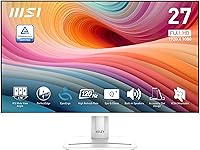
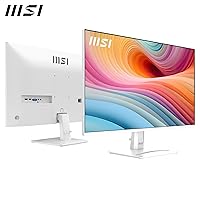
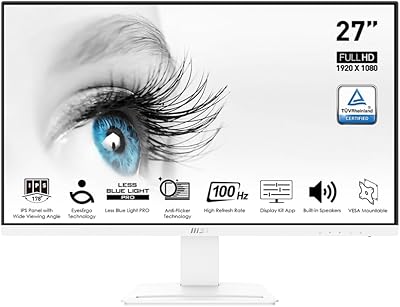
The MSI PRO MP275W E2 27-inch Monitor enters a crowded budget display market with one quiet but effective differentiator: it comes in white. Most monitors at this price point are matte black boxes, so the clean finish genuinely stands out on a desk. Beyond looks, it brings a 120Hz refresh rate and 1ms response time to a tier where 60Hz has long been the norm. Connectivity covers HDMI, DisplayPort, and legacy VGA, which is handy if you are pairing it with older hardware. One honest caveat worth naming early — FHD on 27 inches is a real trade-off, and pixel density will feel soft to anyone accustomed to a smaller or higher-resolution panel.
Features & Benefits

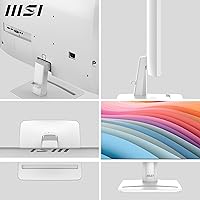
The IPS panel is where this white office monitor earns its keep in practical use. Colors stay consistent whether you are sitting dead-center or viewing from a sharp angle — something TN panels simply cannot match. The 120Hz refresh rate combined with AMD FreeSync means motion in games and fast video looks noticeably cleaner than on a standard 60Hz screen, without requiring a high-end GPU to benefit. Less Blue Light PRO technology, backed by TÜV Rheinland certification, makes extended work sessions easier on the eyes. The four-sided slim bezel keeps things tidy in multi-monitor setups, and VESA compatibility means you can wall-mount it if the included stand does not suit your space.

Best For

This 27-inch IPS display hits a practical sweet spot for a few specific types of buyers. Home office workers who spend most of their day in documents, spreadsheets, and video calls will find the larger screen real estate genuinely useful without the desk clutter. Students building their first setup benefit from having speakers, wide-angle IPS color, and multiple ports in one affordable package. Casual gamers get a meaningful upgrade over 60Hz without paying premium prices. The white colorway is also a natural fit for anyone running a minimalist desk build where matching gear actually matters. Legacy VGA support is a quiet but practical bonus for anyone still using older peripherals.

User Feedback

Buyers consistently praise the white finish and slim bezels, noting the monitor looks more premium in person than the price suggests. Color accuracy and out-of-box brightness also draw positive comments — most users report not needing to adjust settings much after unboxing. On the critical side, a recurring complaint is that pixel density feels loose compared to QHD screens available at similar or slightly higher prices; upgrading from a 24-inch 1080p panel to this one may feel underwhelming rather than sharper. The built-in speakers cover background audio and casual calls adequately, but they are a convenience feature rather than a real audio solution. Stand flexibility beyond basic tilt is also noted as limited.

Pros

  • The white colorway is rare at this price tier and looks noticeably clean and modern on a desk.
  • IPS panel delivers consistent, accurate color even when viewing from wide off-center angles.
  • 120Hz refresh rate is a meaningful upgrade over 60Hz for both gaming and everyday scrolling.
  • AMD FreeSync reduces screen tearing without requiring a specific GPU brand.
  • TUV Rheinland-certified eye care makes long work sessions noticeably less fatiguing.
  • Four-sided slim bezels keep multi-monitor setups looking tidy and professional.
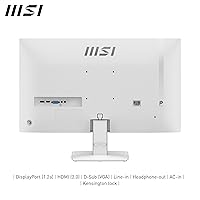
  • HDMI, DisplayPort, and VGA together cover virtually any device a user might connect.
  • VESA mounting support gives users flexibility to wall-mount or use a third-party arm.
  • Built-in speakers handle video calls and background audio without adding desk clutter.
  • Color accuracy and brightness are solid out of the box with minimal calibration needed.

Cons

  • FHD resolution on a 27-inch panel produces soft pixel density that is noticeable in text-heavy work.
  • Users upgrading from a 24-inch 1080p screen may find the larger display looks less sharp, not more.
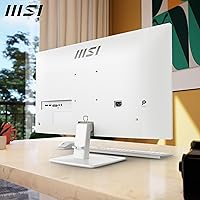
  • Stand offers only basic tilt adjustment with no height, swivel, or pivot options.
  • Built-in speakers lack the output quality needed for anything beyond basic call audio.
  • No USB hub functionality, which is a missed convenience at this desk-use price point.
  • The 1ms response time claim is likely MPRT rather than GtG, which affects how the spec reads in practice.
  • At 13.9 pounds, the monitor is not particularly light for users who reposition their setup frequently.
  • Buyers considering QHD alternatives at a slightly higher budget may find the value proposition less compelling.

Ratings

The scores below for the MSI PRO MP275W E2 27-inch Monitor were generated by our AI system after analyzing thousands of verified buyer reviews from global markets, with spam, bot-submitted, and incentivized feedback actively filtered out. This white office monitor earns genuine praise in several areas but also carries real trade-offs that are honestly reflected in the numbers. Both the highlights and the frustrations are represented here so you can make a confident, informed call.
Value for Money
83%
Most buyers feel they are getting more than expected at this price — a white IPS panel with 120Hz and multiple ports is a combination that genuinely punches above its tier. First-time monitor buyers and students especially report feeling satisfied with what lands on their desk.
Buyers who compare it against QHD options available at a slightly higher budget start to question the value, particularly when pixel density becomes the deciding factor. The trade-off feels less favorable the more you stretch the use case toward content creation or productivity-heavy work.
Image Quality
71%
29%
Colors look accurate and punchy out of the box without needing manual calibration, which most casual users appreciate. The IPS panel handles gradients and skin tones better than TN alternatives at this price, and brightness levels are solid for typical indoor environments.
The 1080p resolution spread across 27 inches is the single biggest image quality complaint — text and fine detail look noticeably soft, especially for users coming from smaller, sharper panels. It is not a dealbreaker for video or gaming, but prolonged reading in small fonts reveals the limitation quickly.
Refresh Rate & Smoothness
88%
The jump from 60Hz to 120Hz is immediately felt during gaming and even general desktop use — scrolling, dragging windows, and fast UI interactions all feel noticeably more fluid. Combined with FreeSync, casual gamers report a genuinely improved experience without any GPU-specific requirements.
At 120Hz the panel is competitive but not exceptional; buyers who later discover 144Hz or 165Hz options at comparable prices occasionally feel they left performance on the table. The benefit is real but the ceiling is modest for anyone who upgrades their GPU and starts wanting more.
Eye Comfort
86%
The Less Blue Light PRO mode combined with TUV Rheinland certification is something users who work eight-plus-hour days genuinely notice — reduced eye fatigue at the end of long sessions is a consistently mentioned benefit. The matte anti-glare coating also helps in bright home office environments with overhead lighting.
Some users find that activating the blue light filter shifts the color temperature toward a warm yellow tone that feels unnatural for color-accurate work. It works well for reading-heavy tasks but graphic designers or photo editors will likely disable it and rely on manual settings instead.
Build Quality & Design
79%
21%
The white finish is consistently praised for looking cleaner and more modern than the reviewer photos suggest — buyers note it feels more premium in person than the price implies. The slim bezels on all four sides also hold up well in person and make multi-monitor setups look intentional rather than cobbled together.
The plastic construction, while acceptable for the price, shows fingerprints and smudges more visibly on white surfaces than equivalent dark-finished monitors. The stand also feels lighter and less stable than users expect, with some wobble reported when bumped during typing on the same desk surface.
Ergonomics & Adjustability
54%
46%
Tilt adjustment works smoothly and covers enough range for most seated desk positions, and the VESA compatibility means buyers who want more flexibility can swap to an arm without much hassle. For users who keep their monitor in one fixed position, the stock stand is generally adequate.
The absence of height adjustment, swivel, or pivot is a real pain point for taller users or anyone with a non-standard sitting position. Several reviewers note that without a monitor arm, getting a comfortable eye-level position requires improvising with books or risers under the stand.
Connectivity
84%
Having HDMI, DisplayPort, and VGA on a single affordable monitor is practically uncommon and genuinely useful — particularly for users setting up in older office environments or connecting both a modern laptop and a legacy desktop simultaneously. Most buyers have no complaints about running out of ports.
The absence of a USB hub is a missed opportunity that reviewers increasingly notice as desks fill up with peripherals. There is no audio output jack listed either, which limits flexibility for users who want to route audio through the monitor to external speakers.
Speaker Quality
46%
54%
The built-in speakers are appreciated purely as a convenience — for video calls, quick YouTube clips, and background audio they remove the need for any additional hardware in tight desk setups or dorm rooms. Buyers with very modest audio expectations are reasonably satisfied.
Almost every user who cares about audio quality flags the speakers as thin, quiet, and bass-free. They are genuinely not suitable for music, films, or anything where audio is part of the experience — and several reviewers explicitly warn others not to factor them into the buying decision.
Color Accuracy
74%
26%
For a monitor not marketed toward creative professionals, out-of-box color representation is solid — everyday content like web browsing, streaming, and casual photo viewing looks natural and well-balanced. The IPS advantage over TN is real and noticeable even to non-technical users.
Factory calibration has some variance between units, with a few buyers reporting a cooler or warmer tint than expected. Serious color work will require manual calibration or a colorimeter, and even then the panel's specs do not target professional-grade color volume.
Setup & Installation
91%
Assembly is quick and tool-free — the stand attaches without frustration, and the on-screen menu is straightforward enough that most buyers configure brightness and input settings within minutes of unboxing. The inclusion of legacy VGA means even non-technical users with older machines face no compatibility headaches.
The monitor does not include a DisplayPort cable in the box, only HDMI, which catches some buyers off guard when they want to use the higher bandwidth connection. Cable management options on the stand are minimal, leaving desk setups looking messier than the monitor's clean aesthetic deserves.
Pixel Density
58%
42%
For casual gaming, video streaming, and general web use at standard desk distances, the pixel density is passable and most non-technical users do not consciously notice the softness during everyday tasks. Movies and games at 1080p look fine when content is matched to the native resolution.
Anyone doing text-heavy work — coding, writing, reading documents — will likely notice the soft rendering within the first few days, especially if they have used a 24-inch 1080p screen before and expected a larger version to look at least as sharp. The pixels-per-inch drop is genuinely noticeable on a 27-inch panel.
Gaming Performance
77%
23%
For casual and mid-level gaming the combination of 120Hz, 1ms MPRT, and FreeSync delivers a smooth and responsive experience that handles fast-paced games confidently. Genres like racing, sports games, and action RPGs benefit noticeably from the higher refresh rate and tear-free output.
The 1ms figure is MPRT-based, which can introduce haloing artifacts during dark fast-moving scenes depending on the overdrive settings. Competitive gamers who take frame timing seriously will find the panel lacking compared to dedicated gaming monitors with true GtG specs and higher refresh ceilings.
Brightness & Contrast
69%
31%
Brightness is adequate for most indoor environments — typical office lighting and home settings present no issues, and the matte screen coating reduces the need for aggressive brightness adjustments. Most users set it and forget it without revisiting the OSD regularly.
In very bright rooms or near windows, the peak brightness can feel limiting compared to higher-nit panels available at this price tier. Contrast ratio is typical IPS — acceptable but noticeably inferior to VA panels for dark scenes in movies and games where deep blacks would make a real difference.
Multi-Monitor Compatibility
81%
19%
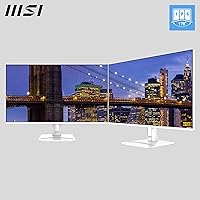
The slim four-sided bezel makes side-by-side dual-monitor configurations look clean and balanced, and the white finish makes it easier to match with other white peripherals or a second identical unit for a cohesive desk setup. Buyers building dual-display home offices mention it works well visually.
Without height adjustment on the stand, achieving a perfectly level alignment with a second monitor of a different brand requires careful stand selection or an arm. Users mixing this display with a darker-finished second monitor may also find the color contrast between the two chassis distracting.

Suitable for:

The MSI PRO MP275W E2 27-inch Monitor is a strong fit for home office workers who spend their days in documents, spreadsheets, and video calls and want a larger screen that does not look industrial sitting on their desk. The white finish makes it a natural choice for anyone building a clean, minimalist workspace where most peripherals are already light-colored. Students and first-time PC builders will appreciate having HDMI, DisplayPort, and VGA all in one affordable package, since it covers nearly any device they might connect now or in the future. Casual gamers who game occasionally after work hours will notice a real difference at 120Hz with FreeSync compared to a standard 60Hz panel, without needing a powerful GPU to take advantage of it. The built-in speakers are a practical bonus for anyone in a small space who just needs audio for calls or background music without adding a separate accessory to the desk.
Not suitable for:

The MSI PRO MP275W E2 27-inch Monitor will likely frustrate buyers who are coming from a smaller screen and expecting a sharper image, because 1080p spread across 27 inches produces noticeably soft pixel density compared to QHD panels available at comparable or slightly higher price points. Serious content creators, photographers, or graphic designers who depend on precise color reproduction and higher pixel density should look elsewhere, as this display was not built for that level of accuracy. Competitive gamers who prioritize maximum refresh rates will also find the 120Hz ceiling limiting when faster options exist. Users who need flexible ergonomics beyond a basic tilt — height adjustment, pivot, or swivel — will find the stand restrictive and may need to budget for a separate monitor arm. Finally, anyone expecting genuinely usable audio from the built-in speakers for music listening or media consumption will almost certainly be disappointed; they are functional for calls but not a substitute for even a basic external speaker.
Specifications

  • Screen Size: The display measures 27 inches diagonally, providing ample workspace for multitasking and side-by-side application layouts.
  • Resolution: Native resolution is 1920 x 1080 (Full HD), which covers standard 1080p content across all connected sources.
  • Panel Type: An IPS (In-Plane Switching) panel is used, delivering accurate colors and wide viewing angles compared to TN alternatives.
  • Refresh Rate: The panel runs at up to 120Hz, allowing smoother motion in games, video, and fast-scrolling content than a standard 60Hz display.
  • Response Time: Rated at 1ms, though this figure reflects MPRT (Moving Picture Response Time) rather than the stricter GtG measurement.
  • Viewing Angles: Horizontal and vertical viewing angles reach 178 degrees, keeping colors consistent across wide off-axis positions.
  • Aspect Ratio: The display uses a standard 16:9 widescreen aspect ratio compatible with the vast majority of modern content and applications.
  • Screen Surface: A matte anti-glare coating reduces reflections from ambient light sources, making it practical for bright room environments.
  • Sync Technology: AMD FreeSync support synchronizes the display refresh rate with compatible GPU output to reduce screen tearing and stutter.
  • Connectivity: Available ports include one HDMI, one DisplayPort, and one VGA, covering modern and legacy device connections.
  • Built-in Audio: Two integrated speakers are included for basic audio output, suitable for calls and low-demand listening scenarios.
  • Eye Care: MSI Less Blue Light PRO technology is implemented alongside TUV Rheinland certification to reduce eye strain during extended use.
  • Bezel Design: A four-sided slim bezel minimizes the border around the active screen area, supporting cleaner multi-monitor configurations.
  • VESA Mounting: The monitor supports standard VESA mounting, allowing compatibility with third-party wall mounts and monitor arms.
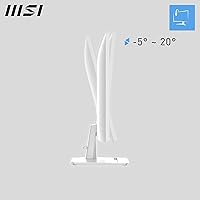
  • Ergonomics: The included stand supports tilt adjustment only; height, swivel, and pivot adjustments are not available on the stock stand.
  • Color: The monitor chassis and stand are finished in white, which is an uncommon option at this price tier in the consumer monitor market.
  • Dimensions: With the stand attached, the monitor measures approximately 24.09 inches wide, 17.63 inches tall, and 8.14 inches deep.
  • Weight: The full unit including stand weighs 13.9 pounds, which is typical for a 27-inch monitor in this category.
  • Release Date: This model was first made available in October 2024, making it a relatively recent addition to the budget monitor market.
  • Manufacturer: The monitor is produced by MSI (Micro-Star International), a hardware brand with an established history in displays and PC components.

Related Reviews
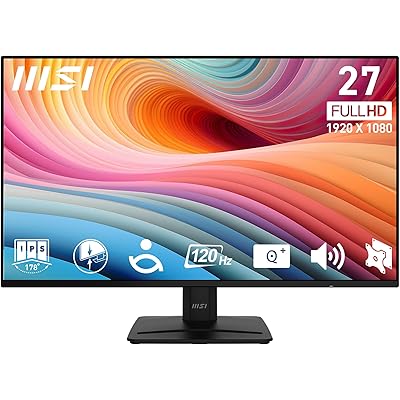
MSI PRO MP271A E2 27-inch Monitor
77%
91%
Value for Money
82%
Image Quality
88%
Eye Comfort
79%
Build Quality
47%
Stand & Ergonomics
More
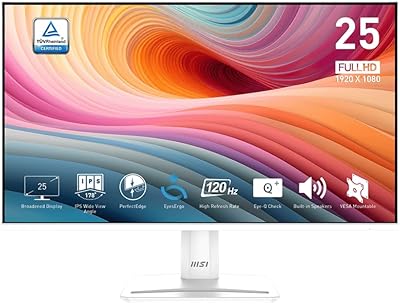
MSI Pro MP273AW 27-inch Monitor
85%
91%
Display Quality
89%
Eye Comfort & Protection
82%
Gaming Performance
88%
Ease of Setup
84%
Design & Aesthetics
More
MSI PRO MP251W E2 24.5-inch Monitor
83%
89%
Display Quality
85%
Performance for Gaming
80%
Build Quality
90%
Ease of Setup
88%
Eye Care Features
More
MSI PRO MP275Q 27-inch WQHD Monitor
75%
91%
Image Clarity & Resolution
84%
Color Accuracy & Gamut
88%
Eye Comfort & Fatigue Reduction
61%
Brightness & HDR Performance
79%
Refresh Rate & Responsiveness
More
MSI MAG 275F 27″ Gaming Monitor
78%
93%
Refresh Rate Performance
86%
Panel Color Quality
88%
Response Time & Ghosting
84%
Console Compatibility
52%
HDR Implementation
More
MSI MAG 275QF 27-inch 2K Gaming Monitor
85%
94%
Performance (Refresh Rate & Response Time)
88%
Display Quality (Color Accuracy & HDR)
74%
Build Quality & Durability
85%
Ergonomics (Tilt Adjustability & Comfort)
90%
Connectivity Options
More
MSI Pro MP161 E2 15.6″ Portable Monitor
73%
84%
Display Quality
91%
Portability
78%
Build Quality
88%
Ease of Setup
52%
Stand & Ergonomics
More
MSI MAG 271QPX 27-inch QD-OLED Gaming Monitor
80%
94%
Image Quality
96%
Motion Clarity
88%
HDR Performance
93%
Refresh Rate & Smoothness
81%
Connectivity & Ports
More
MSI PRO MP243L E14 24-inch Monitor
73%
91%
Value for Money
88%
Refresh Rate Performance
79%
Eye Care Effectiveness
76%
Image Quality
67%
Build Quality
More
MSI Optix MAG274R 27-inch Full HD 144Hz Gaming Monitor
84%
93%
Display Quality
89%
Gaming Performance
91%
Color Accuracy
77%
Build Quality
94%
Response Time
More

FAQ

It depends on how close you sit and what you are using it for. At a typical desk distance of around 24 to 30 inches, most people find 1080p acceptable for general work and casual gaming. That said, text-heavy work like coding or reading documents for long hours may look noticeably softer compared to a QHD panel. If pixel sharpness is a priority for you, it is worth comparing in person before committing.

Yes, both consoles connect via HDMI, and this white office monitor has an HDMI port that handles standard console output. Keep in mind that consoles typically output at 60Hz for most games, so the 120Hz advantage mainly applies when connected to a compatible PC.

Absolutely. The VGA port is there specifically for legacy compatibility, which is increasingly rare on newer monitors at this price. If your older machine only has VGA output, this display will connect without needing an adapter.

They are adequate for video calls, occasional YouTube watching, and background audio at low to moderate volume. Do not expect them to replace even a basic pair of desktop speakers for music or film — the output is thin and lacks bass. Think of them as a convenience feature rather than a real audio solution.

Most users report that color accuracy and brightness are reasonable straight out of the box with minimal adjustments needed. For general office use or casual gaming, factory settings are typically fine. Color-critical work like photo editing would benefit from manual calibration, but that is true of virtually any monitor at this price tier.

The monitor supports VESA mounting, and the standard pattern for monitors in this size class is 100x100mm, which is compatible with the vast majority of third-party arms and wall mounts. Using an arm is also a practical way to get height and swivel adjustability that the included stand does not offer.

Yes, Nvidia GPUs from the GTX 10 series onward support AMD FreeSync displays through Nvidia's Adaptive Sync compatibility. You may need to enable it manually in the Nvidia Control Panel, but it generally works well without needing a certified G-Sync monitor.

White plastic on monitors can show scuffs more visibly than dark surfaces, so placement in a busy area warrants some care. Yellowing from UV exposure is a long-term concern with some white plastics, but keeping the monitor out of direct sunlight largely avoids that issue. Regular light dusting with a microfiber cloth is all the maintenance needed.

Yes, the slim four-sided bezels make it a reasonable candidate for a dual setup. The gap between two panels will be minimal. Just note that if you pair it with a monitor of a different size or resolution, you may need to adjust display scaling settings in your operating system.

MSI typically covers their monitors with a three-year limited warranty covering manufacturing defects, though terms can vary by region. It is worth confirming the warranty terms with the retailer at the time of purchase, particularly if you are buying through a third-party seller rather than directly.