Overview

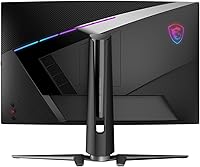
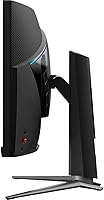
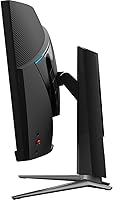
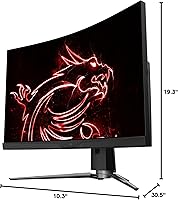
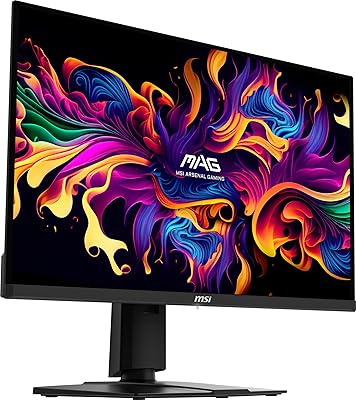
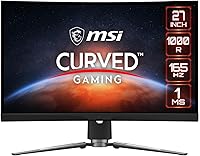
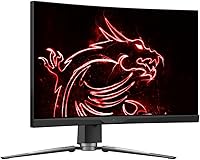
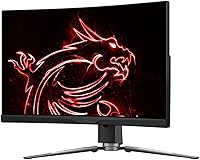
The MSI MPG ARTYMIS 273CQR 27-inch Gaming Monitor sits squarely in the mid-range of MSI's MPG lineup, built for enthusiast gamers who want a meaningful upgrade without spending flagship money. The defining physical feature is its 1000R curved VA panel — a tight curve that pulls your peripheral vision into the action in a way flat screens simply don't. At QHD 1440p, the jump in sharpness over 1080p is immediately noticeable, yet your GPU doesn't have to work nearly as hard as it would pushing 4K. The stand offers tilt, swivel, and height adjustment, which is genuinely useful for long sessions. A strong all-around performer — not a color-critical workstation, but not trying to be.
Features & Benefits

The 1000R curved VA panel delivers deeper blacks and higher contrast than most IPS alternatives, which pays off noticeably in darker game environments — dungeons, night maps, and horror titles all gain atmosphere. The 165Hz refresh rate and 1ms Rapid Boost response time keep motion sharp and fluid; competitive players will feel the benefit immediately, and casual gamers simply get a smoother picture overall. AMD FreeSync Premium handles tearing cleanly and suits AMD GPU owners best, though it performs reasonably well with Nvidia too. HDR 400 is present, but manage your expectations — this is entry-level HDR, not a dramatic transformation. Night Vision is a small perk for FPS players. Connectivity covers HDMI, DisplayPort, USB-C, and two USB 2.0 ports.

Best For

This curved gaming monitor is a strong match for PC gamers who want QHD image quality without the GPU investment 4K demands. It's particularly well-suited to players of story-driven or immersive single-player titles — the tight curve and VA contrast pull you into environments in a way flat displays don't quite match. If you're upgrading from a 1080p flat panel, the visual jump is real and immediately satisfying. The USB-C port makes it practical for users juggling a laptop and desktop at the same desk. And the fully adjustable stand means you won't be wrestling with monitor arms just to find a comfortable viewing angle during long gaming or work sessions.

User Feedback

With a 4.4-star average across roughly 80 ratings, the MSI ARTYMIS 273CQR earns broadly positive marks, though the sample size is modest enough to temper strong conclusions. Buyers consistently praise image quality and build, and the stand's adjustability gets repeated appreciation from people who've dealt with less flexible monitors before. The criticisms worth noting: some users flag mild ghosting during fast transitions — a known VA panel trait rather than a flaw unique to this screen. A handful also express disappointment with the HDR experience, which is fair; HDR 400 is better than nothing but won't impress anyone expecting a premium result. Value for money generally lands well with buyers at this price tier.

Pros

  • QHD 1440p resolution delivers noticeably sharper detail than 1080p without demanding a top-tier GPU.
  • The 1000R curved VA panel produces deep blacks and strong contrast that genuinely enhance dark, atmospheric games.
  • 165Hz refresh rate keeps motion fluid and responsive for both competitive and casual gaming.
  • AMD FreeSync Premium eliminates screen tearing cleanly, making gameplay feel polished rather than choppy.
  • A fully adjustable stand — height, tilt, and swivel — removes the need for a third-party monitor arm.
  • USB-C connectivity adds real versatility for users switching between a laptop and desktop at the same desk.
  • Anti-flicker and low blue light certification make extended sessions easier on the eyes.
  • Build quality draws consistent praise from buyers, feeling solid and well-finished for the price tier.
  • At 27 inches with a 16:9 aspect ratio, the screen size hits a practical sweet spot for most desk setups.
  • Night Vision mode provides a subtle but useful brightness boost in dark in-game environments.

Cons

  • VA panel ghosting during fast lateral movement can be noticeable for motion-sensitive players.
  • HDR 400 support is entry-level at best — do not expect a dramatic or cinematic HDR experience.
  • The rating pool of roughly 80 reviews is still relatively small, making trend conclusions less reliable.
  • Color accuracy is adequate for gaming but falls short for professional creative or color-critical work.
  • Nvidia GPU users get a diminished benefit from FreeSync Premium compared to AMD card owners.
  • At 22 pounds, this curved gaming monitor is on the heavier side and less easy to reposition frequently.
  • No built-in speakers means you will need external audio regardless of your setup.
  • The 27-inch size may feel cramped for users accustomed to ultrawide or larger productivity displays.

Ratings

Our AI rating engine analyzed verified global buyer reviews for the MSI MPG ARTYMIS 273CQR 27-inch Gaming Monitor, actively filtering out incentivized, duplicate, and bot-generated feedback to surface what real owners consistently experience. The scores below reflect a transparent picture of where this curved gaming monitor genuinely earns its praise — and where it falls short of expectations for certain buyers.

Image Quality
83%
The QHD 1440p resolution paired with the VA panel's naturally high contrast ratio makes everyday gaming look noticeably richer than a typical 1080p flat display. Dark environments in particular — underground levels, night scenes, horror titles — benefit from the deep blacks that VA technology handles better than most IPS panels at this price point.
Color accuracy outside of gaming scenarios is adequate but not precise, and some buyers noticed slight color shift toward the edges at extreme viewing angles. Those coming from a high-quality IPS display may find the color vibrancy a step behind what they were used to.
Refresh Rate & Smoothness
88%
At 165Hz, motion in fast-paced games feels genuinely fluid — scrolling through a busy open world or tracking enemies in an FPS has a smoothness that lower-refresh displays simply cannot replicate. Most users report an immediately perceptible difference when switching from a 60Hz or 75Hz screen.
Reaching the full 165Hz requires a capable GPU, and buyers with mid-range cards may find themselves running at lower frame rates that underutilize the panel's ceiling. The benefit is real, but it is hardware-dependent.
Response Time & Motion Clarity
74%
26%
With Rapid Boost overdrive engaged, motion blur is noticeably reduced during fast lateral movement, which helps in competitive shooters and racing games where tracking precision matters. Most casual and mid-level competitive players find it more than adequate for their sessions.
VA panel ghosting is a persistent category issue, and this screen is not exempt — some users spotted faint trailing artifacts during particularly rapid panning sequences. Players who are acutely sensitive to ghosting may find moderate overdrive settings leave some residual blur, while maximum overdrive can introduce inverse ghosting.
Curved Panel Experience
86%
The 1000R curvature consistently earns positive reactions from buyers who play immersive single-player games, with many noting that the wraparound effect makes large environments feel more enveloping than a flat 27-inch screen. At a typical arm's-length desk distance, the curve feels natural rather than exaggerated.
Users who work across multiple windows or frequently reference documents side-by-side report that the tight curve can slightly distort straight horizontal lines near the screen edges. It is a minor issue during gaming but can be distracting during text-heavy productivity work.
HDR Performance
51%
49%
DisplayHDR 400 certification means there is a measurable improvement in highlight rendering versus no HDR at all, and in some titles with good HDR implementation, skies and light sources carry slightly more pop than in SDR mode.
Buyers expecting cinematic HDR — the kind seen on OLED panels or high-brightness HDR 1000 displays — will be disappointed. The brightness ceiling is not high enough to produce the contrast differential that makes HDR truly impactful, and several reviewers specifically called this out as a letdown.
Build Quality
84%
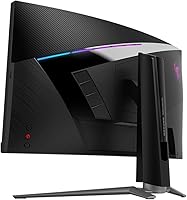
The physical construction of this 27-inch QHD display drew consistent praise from owners — the chassis feels solid, bezels are slim without being fragile, and the rear panel has the purposeful look expected from MSI's MPG line. Nothing rattles or flexes under normal adjustment.
A few buyers noted that the cable management routing on the stand could be better organized, and the matte finish on the back panel attracts dust visibly. These are minor complaints but worth noting for buyers who care about desk aesthetics.
Ergonomics & Stand
87%
Height adjustment, tilt, and swivel in a single included stand is a genuine practical advantage — users who switch between sitting and standing positions, or share the monitor across different users, appreciate not having to buy a separate arm just to get comfortable. The stand holds adjustments firmly without drifting.
The stand's overall footprint is fairly wide, which can eat into desk space on smaller setups. At 22 pounds total, repositioning the monitor is a two-handed job, which some users found mildly inconvenient during initial setup or rearrangements.
Connectivity
81%
19%
Having HDMI, DisplayPort, USB-C, and two USB 2.0 ports on a single monitor covers the needs of most multi-device setups without requiring an external hub. The USB-C input in particular earns strong appreciation from laptop users who can run a single-cable connection for both video and power delivery.
There is only one HDMI port, which limits simultaneous connections for users running two HDMI sources such as a console and a streaming device. Some buyers also noted the USB-C power delivery wattage is modest and may not fully charge all laptops at full performance load.
Eye Comfort
82%
18%
The anti-flicker certification and low blue light mode are not just checkbox features here — users who game for three or four hours at a stretch consistently note less eye fatigue than they experienced on older displays without these protections. The effect is subtle but accumulates meaningfully over long sessions.
The low blue light mode shifts the white balance toward a warmer tone, which some users find slightly yellow-tinted and disable as a result. Without it engaged, prolonged late-night sessions can still cause the eye strain these modes are meant to prevent.
Gaming Performance (FPS & Competitive)
79%
21%
For mid-level competitive play — ranked modes in shooters, fast-paced MOBAs, or battle royale titles — the combination of 165Hz and FreeSync Premium creates a noticeably responsive experience. Most players at this tier will find the performance ceiling more than sufficient.
Hardcore competitive players who prioritize raw pixel response above all else may prefer a TN or fast IPS panel, where ghosting risks are lower and response times are less dependent on overdrive settings. The MSI ARTYMIS 273CQR is a strong all-rounder, not a pure esports specialist.
Value for Money
77%
23%
Buyers generally feel they received solid specification density for the price — QHD resolution, 165Hz, a fully adjustable stand, and USB-C in one package is competitive against alternatives in the same segment. The overall consensus in user reviews leans toward satisfaction with the purchase.
A handful of buyers felt the HDR 400 implementation and VA ghosting traits were compromises that knocked the value proposition slightly, particularly for those who stretched their budget to reach this price tier expecting a more complete feature set. Competing IPS options at similar prices offer better color accuracy, albeit with less contrast.
Setup & Out-of-Box Experience
80%
20%
Most owners report a straightforward unboxing and assembly process, with the stand clicking together without needing tools and the OSD menu being reasonably navigable for initial calibration. Default color settings are usable out of the box without immediately needing adjustment.
The OSD joystick navigation takes some getting used to, and a few users felt the default gamma and brightness settings ran slightly hot until manually tuned. MSI does not include a calibration report, which matters less for gamers but would be a concern for any professional use case.
Night Vision Mode
63%
37%
Night Vision provides a subtle but real benefit in very dark game environments — spotting enemies in shadowed corners or navigating unlit areas in stealth titles becomes slightly easier with the mode active. It is a low-effort quality-of-life addition that some players genuinely use regularly.
Night Vision is a digital brightness adjustment rather than a hardware-level enhancement, and in well-lit game environments or during daytime use, it is irrelevant. It also slightly washes out shadow detail when overused, so it works best as a situational toggle rather than a permanent setting.

Suitable for:

The MSI MPG ARTYMIS 273CQR 27-inch Gaming Monitor is built for PC gamers who want a noticeable quality upgrade without committing to the expense and GPU demands of a 4K setup. If your library leans toward immersive single-player titles — open-world RPGs, atmospheric horror, story-driven adventures — the tight 1000R curve and high-contrast VA panel genuinely add to the experience in a way a flat screen rarely does. Competitive players who prioritize smooth, responsive gameplay will also find the 165Hz refresh rate and FreeSync Premium combination hard to argue with at this price tier. It suits multi-device desks well too, since the USB-C port means you can plug in a laptop without hunting for a separate adapter. Anyone coming from an older 1080p flat monitor will feel the jump in clarity and immersion almost immediately. The fully adjustable stand — with height, tilt, and swivel — makes it a practical fit for hybrid work-and-game setups where comfort over long hours actually matters.
Not suitable for:

Buyers with serious color accuracy requirements should look elsewhere — the MSI MPG ARTYMIS 273CQR 27-inch Gaming Monitor is not designed for photo editing, video grading, or any workflow where precise, wide-gamut color reproduction is essential. The HDR 400 certification sounds appealing on paper, but in practice it delivers only a modest improvement over standard dynamic range; if you have experienced proper HDR on a high-end display, this will feel underwhelming by comparison. VA panels as a category carry a ghosting risk during fast lateral movement, and this screen is not immune to that trait — it is manageable for most players, but it can bother those who are especially sensitive to motion artifacts. Nvidia GPU owners benefit less from FreeSync Premium than AMD users do, so if you are running a high-end green-team card, you may not extract full value from the variable refresh rate feature. Anyone who needs a truly large display — 32 inches or above — for multi-window productivity will also find the 27-inch footprint limiting.
Specifications

  • Screen Size: The display measures 27 inches diagonally, offering a practical size for both gaming and desk-based productivity.
  • Panel Type: Uses a VA (Vertical Alignment) panel, which provides higher contrast ratios and deeper blacks compared to typical IPS alternatives.
  • Resolution: Native resolution is 2560x1440 (QHD), delivering noticeably sharper detail than 1080p without the performance demands of 4K.
  • Refresh Rate: Supports a maximum refresh rate of 165Hz, enabling smooth and fluid motion in fast-paced gaming scenarios.
  • Response Time: Rated at 1ms via MSI Rapid Boost technology, reducing motion blur during high-speed in-game action.
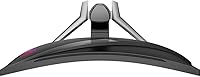
  • Curvature: Features a 1000R screen curvature, which is one of the tightest curves available and is designed to match the natural arc of human vision.
  • Aspect Ratio: Standard 16:9 widescreen aspect ratio, compatible with virtually all gaming and productivity content formats.
  • HDR Support: Certified for DisplayHDR 400, offering a baseline level of HDR enhancement that is noticeable but not comparable to premium HDR implementations.
  • Sync Technology: Equipped with AMD FreeSync Premium, which eliminates screen tearing and stuttering during variable frame rate output.
  • Ports: Connectivity includes one HDMI port, one DisplayPort, one USB-C port, and two USB 2.0 ports for peripherals.
  • Viewing Angle: Rated at 178 degrees both horizontally and vertically, ensuring consistent image quality across wide viewing positions.
  • Ergonomics: The stand supports tilt, swivel, and height adjustment, allowing flexible positioning for different desk setups and user preferences.
  • Eye Care: Includes anti-flicker technology and a low blue light mode, both certified to help reduce eye fatigue during extended use.
  • Night Vision: MSI Night Vision mode digitally brightens dark areas of the screen to improve visibility in low-light game environments.
  • Dimensions: Assembled monitor measures 30.5 x 10.3 x 19.3 inches (length x depth x height), including the stand.
  • Weight: Complete unit with stand weighs approximately 22 pounds, which is on the heavier side for a 27-inch display.
  • Color: Available in black with a finish consistent with MSI MPG series gaming aesthetics.
  • VESA Compatibility: Supports standard VESA wall or arm mounting for users who prefer not to use the included stand.

Related Reviews

MSI MAG 275QF 27-inch Gaming Monitor
76%
93%
Refresh Rate Performance
88%
Response Time & Motion Clarity
91%
Image Sharpness & Resolution
82%
Color Accuracy & Vibrancy
47%
HDR Implementation
More
MSI MAG 271QPX 27-inch QD-OLED Gaming Monitor
80%
94%
Image Quality
96%
Motion Clarity
88%
HDR Performance
93%
Refresh Rate & Smoothness
81%
Connectivity & Ports
More
MSI PRO MP275W E2 27-inch Monitor
74%
83%
Value for Money
71%
Image Quality
88%
Refresh Rate & Smoothness
86%
Eye Comfort
79%
Build Quality & Design
More
MSI MPG 341CQPX 34-inch Curved OLED Gaming Monitor
83%
94%
Display Quality
92%
Gaming Performance (240Hz)
89%
Color Accuracy
85%
Ease of Setup
80%
Software (Gaming Intelligence App)
More
MSI Optix MAG274R 27-inch Full HD 144Hz Gaming Monitor
84%
93%
Display Quality
89%
Gaming Performance
91%
Color Accuracy
77%
Build Quality
94%
Response Time
More
Skytech Gaming Moonshadow 27-inch Curved Gaming Monitor
83%
88%
Image Quality
91%
Refresh Rate Performance
86%
Adaptive-Sync
83%
VA Panel Contrast
84%
Stand & Ergonomics
More
Raywego Z270B13 27-inch Gaming Monitor
70%
88%
Value for Money
83%
Picture Quality
84%
Refresh Rate Performance
62%
Build Quality
81%
Eye Comfort
More
MSI G273QPF 27-inch QHD Gaming Monitor
78%
88%
Image Clarity
91%
Refresh Rate Performance
86%
Response Time
79%
Panel Quality
84%
Ergonomics & Stand
More
Dell G2725D 27-inch Gaming Monitor
78%
91%
Image Sharpness
88%
Refresh Rate Performance
83%
Motion Clarity
79%
Color Accuracy
86%
AMD FreeSync
More
FYHXele 27-inch 380Hz Gaming Monitor
87%
91%
Display Quality
94%
Gaming Performance
88%
Build Quality
85%
Ergonomics & Adjustability
90%
Ease of Setup
More

FAQ

FreeSync Premium is natively optimized for AMD GPUs, but Nvidia has supported FreeSync-compatible displays through its G-Sync Compatible program for several years now. That said, you may not get the full certified experience on an Nvidia card, and it is worth checking whether your specific GPU model is confirmed compatible before assuming full functionality.

The 1ms figure refers to MSI Rapid Boost mode, which is an overdrive setting rather than a native panel measurement. It is effective at reducing motion blur and ghosting in most scenarios, but pushing overdrive too aggressively on any VA panel can introduce inverse ghosting artifacts. Most users find the default or moderate overdrive setting the best balance.

Honest answer: HDR 400 is the lowest tier of HDR certification, and the improvement over standard dynamic range is real but subtle. If you have used a high-end OLED or a monitor with HDR 1000 or higher, this will feel underwhelming. For buyers who have never experienced premium HDR, it is a pleasant addition, but it should not be a primary reason to choose this display.

Some users find tight curves like 1000R more immersive for gaming but slightly distracting for everyday tasks like reading documents or browsing. At 27 inches, most people adapt quickly and report it feels natural after a short adjustment period. If you plan to use the monitor primarily at a normal viewing distance of about 60 to 80 cm, the curve works well.

No, the MSI MPG ARTYMIS 273CQR 27-inch Gaming Monitor does not include built-in speakers. You will need to connect external speakers or use headphones, which is fairly standard for gaming monitors in this category.
Yes, the USB-C port supports video input, so you can connect a compatible laptop directly without needing a separate adapter or dock. However, you should confirm that your laptop supports DisplayPort Alternate Mode over USB-C, as not all USB-C ports carry video signal.

The stand has received consistent praise from buyers for its build quality and stability. The height, tilt, and swivel adjustments work smoothly and hold position without drifting. Unless you have a specific desk setup that requires an arm — for example, to save desk space or achieve a very low mount — the included stand should serve most users well.

VA ghosting is a real category trait, not a defect unique to this screen. During very fast lateral movement — think racing games or twitch shooters with rapid panning — you may notice a subtle trailing effect. For most gaming genres it is not a significant issue, and the Rapid Boost overdrive setting helps. If you are highly sensitive to ghosting and play primarily fast-paced competitive titles, an IPS panel might suit you better.

MSI does not publish a precise height adjustment range in the public specification sheet, but the stand allows enough travel to accommodate seated users of different heights comfortably. For exact measurements, it is best to check MSI's official product page or contact their support team directly.

This 27-inch QHD display works well with consoles that output at 1440p, such as the PlayStation 5 and Xbox Series X, both of which support that resolution. The HDMI port handles console connections without issue. The 165Hz refresh rate will not be fully utilized by consoles, which typically cap at 120Hz, but the image quality and low input lag still make for a solid console gaming experience.

Where to Buy