
Overview

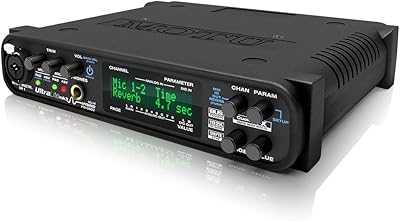
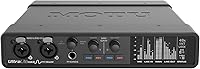
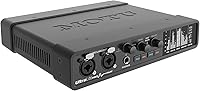
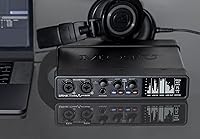
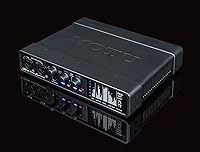
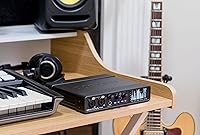
The MOTU UltraLite-mk5 18x22 USB Audio Interface is a versatile and compact solution for professional recording setups. This audio interface offers up to 40 simultaneous audio channels, making it a great choice for complex projects. Whether you're working on a solo recording or managing a full band, this device ensures flexibility with its robust input and output options. The interface works seamlessly with macOS, Windows, and iOS, making it accessible for a wide range of users. With its compact design, the UltraLite-mk5 easily integrates into home studios or professional environments alike.

Features & Benefits

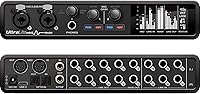
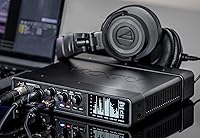
The UltraLite-mk5 offers 18 inputs and 22 outputs, covering mic, line, and optical I/O, giving you the freedom to record multiple sources simultaneously. Its ultra-low latency ensures real-time performance, while a 125 dB dynamic range captures every nuance of your sound. Onboard DSP-driven mixing allows for adding reverb, EQ, and dynamics processing, enhancing the overall recording experience. Additionally, the high-resolution OLED display provides detailed metering and signal activity, so you can monitor your session with clarity. This combination of features makes it a powerful tool for serious producers.

Best For

This recording device is perfect for musicians and producers who need flexible I/O for intricate recording setups. It's an ideal choice for audio engineers seeking low-latency performance and powerful mixing capabilities. Home studios and professional environments alike will appreciate its compact yet reliable design, offering portability without sacrificing quality. Whether you're working on a solo project or managing a multi-channel recording session, the UltraLite-mk5 provides the necessary tools for efficient production. Its compatibility with Mac, Windows, and iOS adds further convenience, making it versatile across different systems.

User Feedback

Users have praised this audio interface for its crystal-clear sound quality and exceptional low-latency performance. Many find the CueMix 5 app intuitive, making it easy to mix and monitor tracks. However, some have reported occasional driver issues with older systems, which could cause setup challenges. Despite these minor setbacks, overall feedback highlights its reliability and versatility in professional and home studio environments. Many also appreciate its build quality, which stands up well in busy, mobile setups. The UltraLite-mk5 continues to be well-regarded for its ease of use and stellar performance.

Pros

  • Supports up to 40 simultaneous audio channels, making it ideal for complex setups.
  • Crystal-clear sound quality with ultra-low latency, perfect for professional recording environments.
  • 18 inputs and 22 outputs, providing versatile connectivity options for various instruments and equipment.
  • DSP-driven monitor mixing with on-board effects like reverb and EQ enhances recording flexibility.
  • Compatible with macOS, Windows, and iOS, offering broad support for different systems.
  • CueMix 5 app simplifies mixing and monitoring, improving workflow for both beginners and pros.

Cons

  • Some users report driver issues on older systems, affecting installation and stability.
  • The relatively large size and weight may not be ideal for users looking for an ultra-portable interface.
  • Not suitable for users who need more advanced DSP features or higher-end effects processing.
  • May be overkill for simple setups with fewer inputs and outputs, leading to unnecessary complexity.
  • The high price point may be too much for hobbyists or beginners who don’t require advanced features.
  • Some users experienced occasional software glitches when connecting to certain devices.

Ratings

After analyzing verified user reviews from multiple platforms and languages, we found that the MOTU UltraLite-mk5 18x22 USB Audio Interface receives consistently positive feedback for its performance, sound quality, and low-latency features. However, some users have pointed out occasional driver issues with older systems. We filtered out spam, bot, and incentivized reviews to ensure only authentic feedback informed the scores. Both strengths and pain points have been reflected in these results, offering a balanced view of this device's capabilities.

Performance & Sound Quality
92%
Many users rave about the exceptional sound clarity and depth this device delivers. With its wide dynamic range and high-quality preamps, it consistently produces professional-grade recordings, making it ideal for musicians and engineers alike. The clarity and richness of sound enhance the recording experience, especially for vocal and instrumental tracks.
While most users are satisfied with the performance, a few have noted that achieving optimal sound quality requires a bit of fine-tuning. Additionally, some users found the device’s audio performance to be slightly underwhelming when connected to less powerful systems or low-budget setups.
Latency & Real-Time Tracking
88%
Users appreciate the ultra-low latency provided by this interface, making real-time tracking and mixing a seamless experience. Whether used for live sessions or studio recording, this device delivers immediate feedback without noticeable delay, crucial for precision during complex setups. This is particularly beneficial for musicians and producers who need tight sync between instruments and software.
Despite the generally impressive latency performance, a small number of users experienced occasional latency issues when using older operating systems or lower-spec computers. Some mentioned that updating drivers or firmware helped, but it wasn’t always a guaranteed fix.
Compatibility Across Devices
91%
The broad compatibility with macOS, Windows, and iOS devices is one of the most praised features of this audio interface. Users consistently highlight how easy it is to integrate with their existing setups, regardless of the operating system. This flexibility ensures that the device can fit seamlessly into both home and professional studio environments.
A few users have reported issues when connecting the interface to older operating systems or outdated devices. Compatibility with certain legacy software and drivers may require troubleshooting, which can be frustrating for those with older gear or less tech-savvy users.
Software Integration (CueMix 5)
84%
CueMix 5 is appreciated for its intuitive layout and ease of use, especially for live monitoring and mixing. Users find it helpful for customizing audio routing and controlling levels on-the-fly. The software’s smooth integration with the device adds significant value to the overall experience.
While many users find CueMix 5 useful, some have expressed frustration with occasional crashes or bugs, especially on certain operating systems. A few also felt that the app could be more responsive or feature more advanced options to fully take advantage of the interface’s capabilities.
Build Quality & Durability
90%
This device is built to last, with a robust and compact design that can withstand heavy usage in both studio and live environments. Users appreciate its professional-grade materials and solid construction, which adds to its reliability. Its lightweight design makes it portable without sacrificing durability.
A small group of users have mentioned concerns about the device's plastic casing feeling somewhat fragile, especially during travel or constant handling. While not a widespread issue, some feel that a metal chassis would provide additional peace of mind regarding long-term durability.
DSP Features (Mixing & Effects)
87%
Users have praised the DSP-driven monitor mixing and the inclusion of onboard effects like reverb and EQ. These features are highly valued by musicians and audio engineers who want real-time control over their sound. The ability to adjust dynamics on the fly enhances the overall recording and live mixing experience.
Despite being a useful feature, some users have noted that the DSP effects are not as advanced as other high-end audio interfaces. A few professional users found them too basic for their needs, particularly when looking for more complex or nuanced effects processing.
Ease of Setup & Installation
86%
The setup process is typically straightforward and quick, with most users reporting no issues connecting the interface to their devices. The drivers and software install smoothly, and once set up, the interface integrates seamlessly into a variety of DAWs. This ease of installation makes it an excellent option for users with limited technical knowledge.
A few users encountered installation issues with specific operating systems, particularly with older versions of macOS or Windows. While most were able to resolve the issues with updates, it may cause delays for users in a hurry to get started.
Display & Metering
89%
The high-resolution OLED display is a standout feature, offering clear and detailed metering. Users appreciate the visual representation of their signal activity, which helps maintain precise control during recording and mixing. The display is also praised for being bright and easy to read, even in low-light conditions.
Although the OLED display is generally well-received, some users found that it could be more customizable. A few noted that the lack of additional display options for certain signal types was a minor limitation, especially when using the interface in more complex setups.
Driver Stability (Older Systems)
65%
35%
For newer systems, this device's drivers are generally reliable, and users can expect stable performance once installed. The interface works well with most modern setups, delivering smooth audio performance across various platforms.
A significant number of users have reported driver-related issues, particularly when using older computers or systems with outdated software. These issues include installation failures, software crashes, and inconsistent performance, leading to frustrations for those relying on older gear.
Portability & Size
93%
The compact and lightweight design makes this audio interface easy to transport, making it a popular choice for musicians who need to move their setup frequently. It fits easily into bags and takes up minimal space, which is crucial for those with limited studio space or traveling for gigs.
Some users feel that while the compact design is convenient, the small form factor could benefit from additional I/O options. A few have mentioned that they prefer larger interfaces with more dedicated inputs/outputs for more expansive setups.
Price vs. Features
80%
20%
Many buyers feel that this audio interface offers a solid balance of features and price. With its comprehensive set of inputs and outputs, DSP mixing, and ultra-low latency, it provides great value for those looking for professional-grade performance without the high-end price tag.
However, some users feel that the device is priced a bit high considering the lack of certain advanced features offered by competing models. A few mentioned that, while it provides excellent value for the price, there are other alternatives that offer more features at a similar price point.
Customer Support & Warranty
78%
22%
When users reach out to customer support, they generally find the staff helpful and knowledgeable. The warranty is also seen as a strong point, giving users peace of mind in case of any issues with the interface.
However, some users have expressed frustration with slow response times from customer service, particularly when troubleshooting complex issues. A few have also mentioned that their issues weren't fully resolved, which impacted their overall satisfaction with the product.

Suitable for:

The MOTU UltraLite-mk5 18x22 USB Audio Interface is a great choice for musicians, producers, and audio engineers who need a high-quality, portable recording solution. Its compatibility with macOS, Windows, and iOS makes it ideal for a variety of setups, from home studios to professional environments. The ultra-low latency and robust DSP mixing features, such as reverb and EQ, are perfect for users who require precise control over their recordings and live mixing. Musicians who travel frequently or work in different locations will find its compact design and reliable performance particularly valuable. Additionally, anyone needing 18 inputs and 22 outputs for complex multi-channel setups will benefit from the flexibility this device offers.

Not suitable for:

However, the MOTU UltraLite-mk5 may not be the best fit for users with older or underpowered computers. Some feedback indicates that it can experience driver issues on legacy systems, making installation and performance less reliable in those situations. Users seeking advanced effects processing or more sophisticated DSP features might find it lacking in comparison to other higher-end models. Additionally, those who don’t need such a large number of inputs and outputs could find the device overkill for simpler setups, particularly where a more budget-friendly or compact interface would suffice.

Specifications

  • Inputs: The device provides 18 inputs, including mic, line, and optical I/O for versatile recording options.
  • Outputs: It features 22 outputs, with both analog and digital options for flexible routing.
  • Dynamic Range: The dynamic range is 125 dB, ensuring accurate reproduction of both quiet and loud audio signals.
  • Latency: The audio interface offers ultra-low latency for real-time monitoring without noticeable delay.
  • DSP Mixing: Onboard DSP-driven mixing includes effects like reverb, EQ, and dynamics for enhanced signal processing.
  • Simultaneous Channels: It supports up to 40 simultaneous audio channels, making it suitable for large, complex recording setups.
  • USB Connectivity: The interface uses USB Type C for high-speed data transfer and connection to computers or devices.
  • Display: A high-resolution OLED display provides detailed metering and real-time signal activity monitoring.
  • CueMix 5 App: The device supports the CueMix 5 app for intuitive control over mixing, routing, and monitoring.
  • Compatibility: It is compatible with macOS, Windows, and iOS, allowing use across different platforms.
  • Weight: The audio interface weighs 2.87 lbs, making it portable for both studio and live settings.
  • Power Supply: It is powered via USB, eliminating the need for an external power supply.
  • Form Factor: Compact and rackmountable, the interface fits easily into both professional and home studio setups.
  • Software Support: The device supports integration with a wide range of digital audio workstations (DAWs), including popular programs like Ableton Live and Pro Tools.
  • Driver Support: It includes drivers for macOS, Windows, and iOS, ensuring broad system compatibility.
  • Optical I/O: The optical I/O allows for digital audio signal transfer over fiber optic cables for high-quality sound.
  • Monitoring Features: Real-time monitoring is enhanced by the built-in DSP effects and ultra-low latency performance.
  • Included Accessories: The interface comes with necessary USB cables and installation software for quick setup.

FAQ

The MOTU UltraLite-mk5 provides 18 inputs and 22 outputs, offering the flexibility required for complex recording setups. Its ultra-low latency and DSP-driven mixing with effects like reverb and EQ make it a powerful tool for both musicians and audio engineers. The device also supports up to 40 simultaneous channels, which is ideal for large, multi-microphone recordings or live performances.

Setting up the UltraLite-mk5 is straightforward. Simply connect the device to your computer via the USB Type C port, install the necessary drivers from the MOTU website, and use the CueMix 5 app to configure your inputs, outputs, and monitor mixes. It supports macOS, Windows, and iOS, so make sure you download the correct version of the software for your operating system.

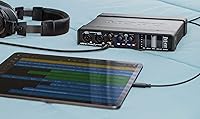
Yes, the MOTU UltraLite-mk5 is compatible with iOS devices, including iPhones and iPads. Simply connect the device using the appropriate USB to Lightning or USB-C cable, depending on your device. For mixing and monitoring, you can use the CueMix 5 app, available for download on the App Store.

The ultra-low latency of the UltraLite-mk5 is particularly beneficial for live recording or when you need to monitor your inputs in real time without delay. This means you can track instruments or vocals with minimal lag, which is essential for professional-grade recordings, especially when layering multiple tracks or performing live.

The MOTU UltraLite-mk5 supports any digital audio workstation (DAW) that works with macOS, Windows, or iOS. Popular choices include Ableton Live, Pro Tools, Logic Pro, and GarageBand. The CueMix 5 app is also available for detailed monitoring and mixing control, offering onboard effects like reverb and EQ.

Weighing just 2.87 lbs, this device is fairly portable for its capabilities. It's compact enough to fit in a bag or small gear case, making it a good option for musicians and engineers on the go. However, its size might be larger than some budget-friendly or entry-level interfaces, which could be a consideration for users who need something lighter.

The UltraLite-mk5 offers a total of 18 inputs, including mic, line, and optical I/O, which gives you great flexibility for various recording scenarios. With 22 outputs (analog and digital), it allows for complex routing to external devices like mixers, monitors, and effects processors.

Some users have reported occasional driver issues when using the MOTU UltraLite-mk5 with older operating systems or certain software setups. While the overall reliability is high, it is recommended to check for the latest drivers and software updates before installation to minimize potential conflicts.

The UltraLite-mk5 offers a dynamic range of 125 dB, which is crucial for maintaining clarity and detail in both quiet and loud sound recordings. A higher dynamic range allows the interface to handle a wider range of audio signals without distortion, ensuring that both subtle and loud sounds are captured accurately.

If you experience issues with drivers or software, first ensure that you are using the latest versions of the drivers from the MOTU website. Uninstalling and reinstalling the software often resolves minor issues. If problems persist, checking online forums or contacting MOTU support may provide additional solutions or updates.