Overview

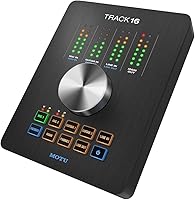
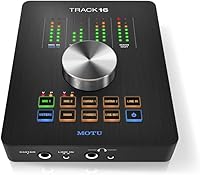
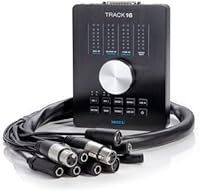
The MOTU Track16 Desktop Studio Audio Interface is a hybrid FireWire/USB unit from a brand that has been building serious studio gear since the early days of digital audio. Unlike portable two-channel interfaces or bulky rack-mounted units, the Track16 sits on your desk and offers a substantial 16-in/14-out channel count — enough headroom for real tracking sessions without the physical footprint of a full rack. The included AudioDesk DAW software adds genuine value out of the box. A one-touch control knob and color-coded LED buttons round out a physical design that prioritizes quick, intuitive operation during busy sessions.

Features & Benefits

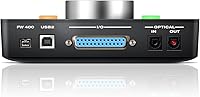
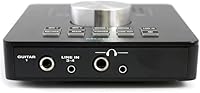
What makes the Track16 practical for day-to-day use is the combination of hybrid FireWire/USB connectivity — supporting FireWire 400, FireWire 800, and USB 2.0 — which means it can slot into older setups that still have FireWire ports or more recent ones relying on USB. Recording at 24-bit/192kHz means the audio headroom is there when you need it. The mic preamps are clean and quiet, and the balanced line-level connections keep the signal path honest from source to DAW. CueMix FX handles zero-latency monitoring and routing without taxing your CPU, which matters when tracking multiple musicians simultaneously.

Best For

This MOTU interface suits home studio owners who have outgrown a basic stereo interface but are not ready to commit to a full rack setup. If you are recording a band — drums, guitars, bass, and vocals simultaneously — the channel count gives you room to work. It is a particularly good fit for Mac and Windows users with existing FireWire ports, or anyone willing to pick up a FireWire adapter. Those who want a bundled DAW included without extra cost will appreciate AudioDesk, though it is worth noting this software is MOTU-specific and not a substitute for industry-standard tools like Pro Tools or Logic.

User Feedback

The Track16 carries a 3.6-star average across a small pool of ten reviews, so treat that figure with some caution — a handful of strong opinions in either direction can shift it noticeably. On the positive side, users consistently point to clean preamp performance and solid build quality as genuine strengths. The criticisms are worth taking seriously, though. Driver stability concerns and FireWire compatibility on modern computers are recurring complaints, and initial setup can feel involved if you are new to MOTU's ecosystem. Buyers whose computers no longer have native FireWire ports should factor in the added cost and complexity of an adapter before committing.

Pros

  • Clean, low-noise mic preamps deliver honest recordings without unwanted coloration
  • 16-in/14-out channel count handles full band tracking sessions with ease
  • Hybrid FireWire and USB 2.0 connectivity works across a wide range of setups
  • 24-bit/192kHz audio resolution provides ample headroom for professional-grade work
  • CueMix FX enables zero-latency DSP monitoring, keeping your CPU free during tracking
  • The one-touch main knob makes switching inputs and outputs fast during live sessions
  • Color-coded LED buttons with six schemes help you stay oriented in low-light studio environments
  • Bundled AudioDesk DAW adds real out-of-the-box value for users without existing software
  • Desktop form factor keeps it accessible without requiring rack hardware or extra mounting costs
  • MOTU's long-standing reputation in studio gear lends confidence in build quality and engineering

Cons

  • FireWire dependency is a real obstacle on modern computers that no longer ship with FireWire ports
  • Driver stability issues have been reported, particularly after OS updates on Mac and Windows
  • Initial setup can be complex and time-consuming for users new to multi-channel audio interfaces
  • AudioDesk software is MOTU-proprietary and not a substitute for industry-standard DAWs
  • The unit requires an external power supply, ruling it out for portable or travel-friendly recording
  • At 5.5 pounds and 15 x 12 x 6 inches, it takes up meaningful desk space in smaller studios
  • A 3.6-star average across only ten reviews makes it difficult to gauge long-term reliability with confidence
  • No USB bus-powering means you always need access to an outlet, limiting placement flexibility
  • Users needing a Thunderbolt-to-FireWire adapter face added cost and an extra potential failure point
  • Occasional setup friction and ecosystem lock-in may frustrate producers expecting a more universal workflow

Ratings

Our AI-generated scores for the MOTU Track16 Desktop Studio Audio Interface are built by analyzing verified buyer reviews from around the world, with spam, bot activity, and incentivized feedback actively filtered out before any scoring takes place. The result is an honest, balanced picture of where this desktop audio interface genuinely performs well and where real users have run into frustration. Both the strengths and the recurring pain points are reflected transparently in the categories below.

Audio Quality
88%
Users consistently point to the preamps as a genuine highlight — clean, quiet, and honest enough to satisfy engineers who have worked in professional environments. At 24-bit/192kHz, the Track16 captures enough detail that recordings hold up well in mixing and mastering stages without introducing obvious coloration.
A small number of users noted that the preamp quality, while strong, does not quite reach the level of standalone high-end mic preamps in the same price bracket. For critical vocal recording, some felt additional preamp investment was still worthwhile.
Build Quality
83%
The chassis feels solid for a desktop unit — not flimsy or plasticky — and most long-term users report that it holds up well through years of regular studio use. The physical controls, including the main knob and LED buttons, feel purposefully built rather than tacked on.
A few buyers noted that the unit runs warm during extended sessions, which raised occasional concerns about long-term component durability. The breakout cable connection also received some criticism for feeling less robust than the main unit itself.
Driver Stability
54%
46%
When drivers are properly installed on a matched system — particularly older Mac setups or Windows machines where the OS has not changed dramatically — the Track16 runs reliably session after session without dropout or unexpected behavior during tracking.
Driver stability is one of the most frequently cited pain points in user feedback, especially after macOS or Windows updates. Several users reported having to wait for updated drivers or roll back their OS, which is a genuine disruption in a working studio environment.
Connectivity & Compatibility
61%
39%
The hybrid FireWire/USB design was forward-thinking at launch and does give users flexibility to connect via whichever port type their system supports. USB 2.0 fallback is useful for machines that have lost native FireWire support over time.
On modern computers — especially newer Macs and recent Windows laptops — native FireWire ports are essentially gone, meaning buyers need a Thunderbolt-to-FireWire adapter that adds cost and a potential failure point. This limitation has become increasingly relevant as the hardware ages.
Ease of Setup
57%
43%
Users with prior experience setting up multi-channel audio interfaces generally found the Track16 manageable to configure, and MOTU's CueMix FX software provides a reasonably clear routing interface once you understand the signal flow.
First-time users and those new to MOTU's ecosystem frequently described the initial setup as time-consuming and confusing. Between installing drivers, configuring CueMix FX, and routing the breakout cable correctly, the learning curve is steeper than competing interfaces at this tier.
Software Bundle
71%
29%
AudioDesk 3 is a capable, sample-accurate DAW that gets new users recording immediately without spending extra on software. For someone building a studio from scratch, it removes one meaningful upfront cost and integrates tightly with the hardware for low-latency monitoring.
AudioDesk is MOTU-specific and not widely used outside of MOTU setups, which limits its usefulness for anyone collaborating with other studios or planning to switch hardware later. Experienced producers already using Logic, Pro Tools, or Ableton will find the bundled software largely redundant.
Workflow & Controls
78%
22%
The one-touch main knob system is genuinely practical during live sessions — tapping a channel and adjusting its level with a single knob is faster than navigating software menus mid-take. The color-coded LEDs make channel identification quick, especially in dimly lit rooms.
Some users found that the LED color scheme customization, while a nice touch, added a layer of setup complexity that was not always intuitive from the manual. A handful of reviewers also noted that the button labels can be difficult to read under certain studio lighting conditions.
Value for Money
66%
34%
Considering the channel count, included software, and MOTU's engineering pedigree, the Track16 offers a reasonable amount of hardware capability relative to what you pay. For users who need 8-plus simultaneous inputs in a desktop form factor, alternatives at this price point are limited.
Given the driver friction, FireWire dependency, and the niche nature of the AudioDesk software, buyers on modern systems may find themselves spending additional money on adapters or alternative DAW software, which erodes the initial value proposition meaningfully.
Zero-Latency Monitoring
81%
19%
CueMix FX handles monitoring through the interface hardware rather than the computer, which means performers hear themselves in real time without any noticeable delay. This is particularly useful when tracking vocalists or instrumentalists who are sensitive to even minor latency.
Configuring multiple independent headphone mixes through CueMix FX requires some upfront learning, and users who are not familiar with DSP routing concepts may find it frustrating to dial in during a session. The payoff is real, but it takes time to get there.
Channel Count & I/O
84%
Sixteen inputs and fourteen outputs in a desktop unit is a legitimately useful spec for anyone recording bands or multi-instrument sessions. Users tracking drums alone noted that having enough inputs to cover a full kit without bouncing channels was a meaningful workflow advantage.
Accessing the full I/O requires the breakout cable, and the physical layout of connections can feel crowded when the cable is fully deployed on a smaller desk. A few users also noted that the listed 8-channel count in some specifications caused initial confusion about the unit's actual capacity.
Long-Term Reliability
63%
37%
Users who purchased the Track16 at launch and kept their systems stable report that the hardware itself has held up well mechanically, with no common reports of physical failure in the knobs, buttons, or chassis over years of use.
OS-level reliability is a different story — users who regularly update their operating systems have encountered recurring driver compatibility issues that interrupt workflow. This makes the Track16 better suited to a dedicated, stable studio machine than a general-use computer that receives frequent updates.
Portability
31%
69%
The desktop form factor does exactly what it promises for fixed studio installations, and the unit's weight and build give it a stable, professional feel when planted on a desk alongside other gear.
At 5.5 pounds with external power supply required, the Track16 is not a portable interface by any practical measure. Users who need to record on location, move between studios, or work from a laptop on the go will find this unit entirely unsuitable for mobile use.
OS & Platform Support
62%
38%
Support for both macOS and Windows is a genuine plus, and MOTU has historically released driver updates across both platforms. Windows users in particular noted that the interface works well on stable, matched configurations without major issues.
The gap between OS update releases and corresponding MOTU driver updates has frustrated users on both platforms. Apple Silicon compatibility and recent Windows updates have been cited as specific friction points, with some users experiencing dropouts or non-recognition until new drivers arrived.

Suitable for:

The MOTU Track16 Desktop Studio Audio Interface is a strong fit for home studio owners who have hit the ceiling of a basic two-channel interface and need room to grow without committing to a full rack system. If you are regularly tracking bands, recording multiple musicians at once, or running sessions where eight or more simultaneous inputs are the norm, the Track16 gives you that headroom in a desktop form factor that does not eat up equipment space. It works well on both Mac and Windows, making it accessible regardless of your platform preference. Users who already have a FireWire-equipped machine — or are happy to grab an adapter — will get the most out of the hybrid connectivity. The bundled AudioDesk DAW is a real bonus for anyone who does not already own recording software, offering a capable starting point right out of the box.

Not suitable for:

The MOTU Track16 Desktop Studio Audio Interface is a harder sell for anyone working on a modern laptop or desktop that lacks native FireWire ports, since relying on a Thunderbolt-to-FireWire adapter adds both cost and a potential point of failure. If you need something truly portable or bus-powered for mobile recording, this desktop unit with its external power supply is simply not designed for that use case. Producers who are already invested in a full DAW ecosystem like Pro Tools, Logic, or Ableton will not get much extra value from the bundled AudioDesk software, since it is MOTU-specific and not a widely adopted industry tool. Those who want plug-and-play simplicity should know that the setup process and driver management can require some patience, particularly on updated operating systems. Finally, if you only need stereo tracking or a simple two-input home setup, the Track16 is more interface than you realistically need.

Specifications

  • I/O Count: The Track16 provides 16 inputs and 14 outputs, giving home and project studio users substantial routing flexibility without requiring a rack chassis.
  • Connectivity: Supports FireWire 400, FireWire 800, and USB 2.0, allowing connection to a broad range of Mac and Windows computers across different generations.
  • Audio Resolution: Records and plays back at up to 24-bit/192kHz, delivering professional-grade dynamic range and frequency response suitable for critical recording work.
  • Mic Preamps: Equipped with high-quality, low-noise mic preamps designed to capture clean signals with minimal coloration across the audible frequency range.
  • Line Connections: Balanced line-level audio connections throughout the signal path help reject interference and maintain signal integrity from source to DAW.
  • Included Software: Ships with AudioDesk 3, a full-featured sample-accurate DAW developed by MOTU, and CueMix FX for DSP-based monitoring and routing control.
  • Control Interface: A single main knob provides one-touch selection of any input or output, with color-coded LED buttons offering six customizable schemes in combinations of green, red, and amber.
  • Operating Systems: Fully compatible with both macOS and Windows, making it accessible to studio users regardless of their preferred computing platform.
  • Form Factor: Designed as a desktop unit rather than a rack-mount device, it sits flat on a work surface and does not require rack hardware for installation.
  • Dimensions: Measures 15 x 12 x 6 inches, occupying a moderate footprint on a studio desk while housing a full complement of I/O connections.
  • Weight: Weighs 5.5 pounds, making it a sturdy desktop fixture rather than a portable or travel-friendly option.
  • Power Supply: Operates via an included external power supply, meaning it requires a nearby outlet and is not bus-powered over USB or FireWire.
  • Included Accessories: Comes packaged with a breakout cable and power supply in addition to the AudioDesk and CueMix FX software licenses.
  • Channel Count: Lists 8 channels in its core specification, with the full 16-in/14-out I/O accessible via the breakout cable and combined connection options.
  • LED Color Schemes: Offers six selectable LED color combinations using green, red, and amber, allowing users to personalize the interface appearance or aid quick visual identification.

Related Reviews
MOTU 8pre Firewire Audio Interface
76%
91%
Preamp Quality
88%
Build Quality
89%
I/O Flexibility
47%
Connectivity & Setup
39%
Modern Compatibility
More
MOTU 896mk3 Hybrid USB/FireWire Audio Interface
74%
84%
Build Quality
79%
Preamp Quality
47%
Driver Stability
58%
Software & DSP Routing
91%
I/O Flexibility
More
PreSonus Studio 1824c
86%
91%
Preamplifier Clarity
88%
Chassis & Build Quality
84%
Low-Latency Performance
93%
Software Bundle Value
87%
Monitoring Flexibility
More
MOTU 8pre USB Audio Interface
80%
86%
Preamp Quality
91%
Build Quality
88%
Channel Count & I/O
79%
Value for Money
61%
CueMix DSP Software
More
PreSonus Studio 68c USB Audio Interface
80%
88%
Preamp Quality
86%
Audio Clarity
91%
Input/Output Flexibility
67%
Driver Stability
83%
Software Bundle Value
More
PreSonus Studio 26c USB Audio Interface
86%
92%
Sound Quality
89%
Ease of Use
94%
Value for Money
85%
Software Bundle
88%
Build Quality
More
MOTU 112D Thunderbolt USB Audio Interface
81%
91%
Driver Stability
94%
Channel Count & I/O
87%
AVB Networking
89%
Thunderbolt Performance
88%
Connector Ecosystem
More
MOTU UltraLite-MK3 Hybrid USB/FireWire Audio Interface
69%
83%
Build Quality
79%
macOS Driver Stability
44%
Windows Driver Reliability
81%
Onboard DSP Performance
72%
Connectivity Flexibility
More
MOTU M2
MOTU M2
92%
96%
Audio Conversion Quality
98%
Visual Monitoring
93%
Build Construction
91%
Driver Stability
94%
Loopback Functionality
More
MOTU Traveler-mk3 FireWire Audio Interface
74%
93%
Audio Performance
91%
Channel Count
71%
Portability
58%
Connectivity
84%
Power Flexibility
More

FAQ

Not necessarily, since the Track16 also connects via USB 2.0. That said, if you want to use the FireWire connection — which some users prefer for lower latency on older systems — and your computer lacks a native FireWire port, you will need a Thunderbolt-to-FireWire adapter. Those adapters work in most cases but add cost and an extra link in the chain to think about.

For most home studio work, yes. AudioDesk 3 is a legitimate DAW developed by MOTU with sample-accurate editing and solid core recording features. The catch is that it is MOTU-specific, so if you later switch interfaces or collaborate with engineers using Pro Tools, Logic, or Ableton, you will need to migrate your projects. Think of it as a capable starter platform, not a long-term industry-standard solution.

Compatibility depends on your specific macOS version and whether MOTU has released updated drivers for it. MOTU has generally supported their interfaces across macOS updates, but it is worth checking MOTU's official driver page before purchasing, especially if you are on Apple Silicon or a very recent macOS release. Driver-related frustrations have come up in user feedback, so confirming compatibility upfront is a smart step.

Yes, that is genuinely one of its stronger use cases. With 16 inputs available, you have enough channels to cover drums, bass, guitars, keyboards, and vocals simultaneously without running out of headroom. You will want to make sure your breakout cable is connected properly to access the full I/O, but the channel count is well suited to live band tracking sessions.

The main knob acts as a unified level control for whatever input or output you tap to select. So instead of hunting through software menus to adjust a specific channel, you tap its corresponding LED button and then turn the knob. It is a practical workflow feature that matters most when you are in the middle of a take and need to make quick adjustments without breaking focus.

It requires the included external power supply, so it needs to be plugged into a wall outlet. This rules it out as a portable or mobile recording option, but for a fixed desktop studio setup it is a non-issue.

CueMix FX is MOTU's mixing and monitoring software that runs DSP processing directly on the interface hardware, not on your computer. This means you can set up zero-latency headphone mixes and complex routing without adding load to your CPU. It is not required for basic recording, but if you are tracking multiple musicians who each need their own headphone mix, it becomes very useful.

It works on both macOS and Windows. MOTU has supported Windows alongside Mac for their interfaces for many years, so you are not locked into one platform. As with any audio interface, keeping your drivers current on Windows is important for stable operation.

The rating comes from a very small pool of ten reviews, which means a couple of negative experiences can pull the average down noticeably. That makes it hard to treat the number as a definitive verdict. The complaints that appear most frequently relate to driver stability and FireWire compatibility on newer systems, which are real concerns worth factoring in — but they are also specific scenarios that may not affect every user equally.

Yes, the breakout cable is included in the box. It expands the physical connectivity of the unit, giving you access to the full range of balanced inputs and outputs that would not fit on the interface chassis itself. You will need it connected to take advantage of the complete 16-in/14-out I/O, so it is an important part of the setup rather than an optional accessory.