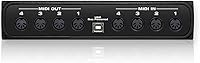
Overview

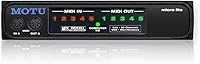
The MOTU Micro Lite 5-Port USB MIDI Interface has been around long enough that its continued presence on the market says something meaningful on its own. MOTU has built a solid reputation in professional audio, and this five-port hub reflects that heritage — practical, unpretentious, and built to do one job well. Before anything else, it's worth being clear: this is a MIDI routing device, not an audio interface. It carries MIDI data — notes, clock signals, control changes — not audio. If you're running a hardware-heavy setup and need to connect multiple devices to your computer without a rat's nest of adapters, the Micro Lite was designed for exactly that scenario.

Features & Benefits

Running five independent MIDI ports in and out, the Micro Lite lets you connect a synth, a drum machine, a controller, and more — all simultaneously, without any dedicated power supply. The USB bus power is genuinely convenient; you plug it in and it just works. Latency is kept tight, which matters when you're recording live MIDI performances where even minor timing drift becomes audible. The device plays nicely with virtually every DAW on both Mac and Windows, so there's no forced compatibility workaround. For producers who move between machines or take gear on the road, the compact form factor is a real practical advantage. Driver stability after OS updates has also held up well for most long-term users, which is increasingly rare.

Best For

This five-port hub is a natural fit for producers with hardware-heavy setups — think multiple synthesizers, a standalone drum machine, and a keyboard controller all needing to talk to a DAW at once. It's also worth considering if you already own an audio interface with limited MIDI I/O and simply need more ports without replacing your whole signal chain. Live performers who prioritize portability and hate dealing with wall adapters backstage will appreciate the clean, bus-powered approach. That said, if you only have one or two MIDI devices and your current interface already covers them, the Micro Lite might be more than you need. This is a tool for people who've genuinely outgrown their existing MIDI connectivity.

User Feedback

Across roughly 112 ratings, the Micro Lite holds a 4.1-star average — respectable, if not exceptional. The praise that comes up most consistently centers on plug-and-play reliability and build quality that holds up after years of regular use. Several owners noted they've been running the same unit through multiple computer upgrades without issues. The most common frustration involves driver behavior after major OS updates, where a small number of users have hit compatibility snags that required waiting on MOTU for patches. A handful of buyers also noted the hardware design feels dated compared to newer competitors. Still, the proportion of long-term owners who express continued satisfaction — and say they'd buy it again — is notably high for a product in this category.

Pros

  • Five independent MIDI ports let you connect an entire hardware rig simultaneously without any compromise.
  • USB bus power keeps the setup clean — no wall adapter, no extra cable, no dedicated outlet required.
  • Works out of the box with all major DAWs on both Mac and Windows, so there is no compatibility guesswork.
  • Low-latency MIDI throughput holds up well in live performance and tight recording scenarios.
  • Compact enough to slip into a gig bag alongside other gear without adding meaningful bulk.
  • Build quality has proven durable over years of regular use, according to long-term owners.
  • MOTU's track record in professional audio lends credibility and reassurance to the purchase.
  • Plug-and-play setup is fast — most users report it working within minutes of first connection.
  • A practical, cost-effective way to expand MIDI I/O without replacing an existing audio interface.

Cons

  • Driver updates after major OS releases have occasionally left some users without a working connection until a patch arrives.
  • The industrial design feels dated and lacks the polished finish of newer competing interfaces.
  • No front-panel LEDs or activity indicators make it harder to visually confirm MIDI signal flow at a glance.
  • Overkill for anyone with only one or two MIDI devices who could be covered by a simpler, cheaper solution.
  • No companion software or editor means all MIDI routing configuration happens entirely within your DAW.
  • The product listing dimensions appear inaccurate, making it difficult to confirm exact physical size before purchasing.
  • No standalone or USB-host mode, so it requires a connected computer to function at all.
  • Long market tenure means some buyers may find better-specced alternatives at a comparable price point today.

Ratings

The scores below reflect an AI-powered analysis of verified buyer feedback for the MOTU Micro Lite 5-Port USB MIDI Interface, drawn from real-world reviews worldwide with spam, bot, and incentivized submissions actively filtered out. Each category is scored independently to give a transparent, granular picture of where this five-port hub genuinely excels and where it falls short. Both the praise from long-term loyalists and the frustrations from critical buyers are factored in equally.

Ease of Setup
88%
Most users report having the Micro Lite recognized and operational within minutes of first plugging it in, with no manual configuration needed in many DAW environments. For producers who dread driver installs, the largely plug-and-play experience on both Mac and Windows is a genuine relief during busy sessions.
A portion of users — particularly on Windows — found that achieving the most stable behavior required downloading and installing MOTU's dedicated drivers rather than relying on generic OS recognition. First-time MIDI interface buyers occasionally needed some DAW-side configuration before signal flow worked as expected.
Driver Stability
74%
26%
Under normal operating conditions — meaning a stable OS version and a current MOTU driver — the Micro Lite runs reliably for extended periods without dropouts or MIDI glitches. Long-term owners who keep their system environments consistent describe it as essentially a set-and-forget device.
The most consistent complaint across reviewers involves the window of disruption that follows major Mac or Windows OS updates, where the existing driver can break and users are left waiting for MOTU to issue a fix. This is not a dealbreaker for most, but it has caused real workflow interruptions for users who update promptly.
MIDI Routing Capability
91%
Five fully independent MIDI in and out ports give producers the headroom to run a complete hardware rig — synths, drum machines, a controller, and a sequencer — all connected and addressable simultaneously. For studio engineers who have maxed out their audio interface's single MIDI port, this five-port hub resolves the bottleneck cleanly.
There is no onboard MIDI processing, filtering, or routing logic built into the hardware itself — all routing decisions must be handled at the DAW or software level. Users expecting any standalone intelligence in the box will find it a purely passive conduit.
MIDI Timing & Latency
86%
MIDI throughput is consistently tight under normal load, which matters significantly for live performance situations where even subtle timing drift becomes audible across multiple synchronized devices. Producers who run dense hardware setups with synchronized sequencers and arpeggiators report dependable clock behavior.
Under heavy multi-port load with dense MIDI data streams — such as running dense polyphonic sequences across multiple ports simultaneously — a small number of users have noticed occasional timing wobble. This is an edge case for most workflows, but it is worth noting for users running extremely data-dense setups.
Build Quality
77%
23%
The physical construction holds up well over years of regular use, with multiple long-term owners reporting their unit still functioning reliably after a decade or more of studio and occasional live deployment. The connectors feel solid and do not develop the wobble or intermittent signal issues common in cheaper interfaces.
The industrial design is noticeably dated by current standards, lacking the clean finishes or tactile quality of newer competitors in the same market tier. There are no front-panel LED activity indicators, which makes it harder to visually confirm at a glance whether MIDI signal is actually flowing through a given port.
Portability
83%
The compact footprint and USB bus power combine to make the Micro Lite a practical travel companion for gigging musicians, taking up minimal bag space and requiring no separate power brick. For producers who run a hybrid live-studio setup, being able to drop this into a laptop bag without rethinking cable management is a tangible benefit.
At nearly two pounds, the unit is not ultralight for something in this form factor category, and users with truly weight-sensitive touring rigs may find newer alternatives offer a smaller physical profile. The lack of a protective carry case or included cable management solution is also a minor friction point for regular travelers.
DAW Compatibility
92%
Cross-platform support across all major DAWs — Logic Pro, Ableton Live, Pro Tools, Cubase, Studio One, and others — means buyers do not need to research compatibility before purchasing. The Micro Lite simply appears as a standard MIDI device, which is exactly the behavior producers and engineers want from a utility-class interface.
Compatibility is broad but reactive rather than proactive — MOTU does not appear to publish advance compatibility notes for upcoming OS releases, which leaves users uncertain about how quickly drivers will be updated when new system versions drop. There is also no companion app for advanced MIDI routing configuration beyond what the DAW itself offers.
Value for Money
69%
31%
For users who genuinely need five ports of MIDI connectivity, the Micro Lite delivers a reliable, proven solution from a credible manufacturer without requiring a full system overhaul. Long-term owners who have used the same unit for many years often cite total cost of ownership as a strong point.
The market has evolved considerably since this product launched, and several newer competitors now offer comparable or superior port counts with better build finishes, improved software support, and more current designs at a similar price. Buyers who are not specifically brand-loyal to MOTU may find better-equipped alternatives at the same spend.
Power Convenience
93%
Drawing power entirely from USB is one of the Micro Lite's most consistently praised practical traits, eliminating a wall adapter from the equation entirely for both studio desks and live setups. This is especially appreciated in venues or studio environments where free power outlets are at a premium.
On older computers or USB hubs with limited power output, a small number of users have reported inconsistent behavior that was traced back to insufficient USB bus power delivery. Using the device directly on a powered USB port — rather than through a passive hub — is the recommended workaround.
Long-Term Reliability
84%
The product has been commercially available since 2001, and a notable share of reviewers are reporting on units they have owned for five, ten, or even fifteen or more years without hardware failure. That kind of durability data is genuinely rare and speaks to the fundamental build integrity of the device.
Long-term reliability of the hardware is not the same as long-term reliability of the software ecosystem around it, and driver support for a product this old is inherently more precarious than for a current-generation device. Users who plan to keep systems on the leading edge of OS updates carry more risk than those on stable, established configurations.
Design & Aesthetics
47%
53%
The design is understated and unobtrusive — it does not clash with other gear on a desk and takes up no visual real estate. For users who prioritize function over form, its anonymity is a non-issue.
By contemporary standards, the Micro Lite looks noticeably old-fashioned, lacking the clean lines, modern branding, or thoughtful port labeling that newer devices in this category provide. The absence of any status LEDs means there is no visual feedback to confirm active MIDI signal, which is a usability shortcoming that most newer competitors have addressed.
Manufacturer Support
63%
37%
MOTU is an established company with a genuine presence in the professional audio industry, and the fact that they have continued to support this product with driver updates for over two decades is notable compared to lesser-known brands that abandon products after a few years.
Response times for driver updates following major OS releases have drawn criticism from users who feel the turnaround is slower than expected for a product that is still actively sold. Customer support responsiveness for individual technical issues appears to be inconsistent based on user accounts.
Channel Flexibility
88%
With five independent MIDI ports each carrying 16 MIDI channels, the Micro Lite effectively gives access to up to 80 addressable MIDI channels across a connected hardware rig, which is more than sufficient for even complex multi-device studio configurations. This depth of addressability is rarely a limitation in practice.
The port count is fixed at five — there is no daisy-chaining, expansion capability, or modular add-on path if a producer's rig eventually grows beyond what five ports can cover. Users planning significant future expansion may eventually need a higher-port-count solution.

Suitable for:

The MOTU Micro Lite 5-Port USB MIDI Interface was built for musicians and producers who have outgrown the one or two MIDI ports bundled with a typical audio interface. If your studio desk hosts a synthesizer, a drum machine, a hardware sequencer, and a keyboard controller all at once, this five-port hub gives you the routing headroom to connect them simultaneously without juggling cables or swapping devices. Live performers who travel with a compact hardware rig will appreciate that it draws power directly from USB, cutting out one more wall adapter from the gig bag. Studio engineers who simply want to expand their existing MIDI capacity — without replacing a perfectly good audio interface — will find the Micro Lite fits neatly into that gap. It also makes a solid choice for Mac and Windows users who switch between machines, since broad DAW compatibility means there is no re-configuring software every time the setup changes.

Not suitable for:

The MOTU Micro Lite 5-Port USB MIDI Interface is not the right tool if what you actually need is an audio interface — it carries MIDI data only, and will not record or play back any sound on its own. Buyers with just one or two MIDI devices who are already covered by their current interface will be paying for ports they simply do not need. Anyone on the cutting edge of operating system adoption should be aware that occasional driver lag after major Mac or Windows updates has been a recurring frustration for a portion of users, so if you cannot tolerate any disruption while waiting for a patch, that is worth factoring in. The hardware design is also notably dated compared to newer competitors, which may matter to users who care about aesthetics or want front-panel indicators and modern build materials. Finally, anyone expecting onboard audio routing, standalone MIDI processing, or a companion app for device management will find this a spartan, purely functional box.

Specifications

  • Brand: Manufactured by MOTU (Mark of the Unicorn), a company with a long-standing reputation in professional audio hardware and software.
  • Model Number: The official model designation is MICROLITE, also marketed under the Micro Lite product name.
  • MIDI Ports: Provides five independent MIDI input ports and five independent MIDI output ports for simultaneous multi-device connectivity.
  • Connectivity: Connects to a host computer via USB, using the USB bus for both data transfer and device power.
  • Power Source: Fully USB bus-powered, requiring no external power adapter or dedicated wall outlet to operate.
  • Compatible OS: Supports both Mac and Windows operating systems, covering the full range of modern desktop computing environments.
  • DAW Support: Compatible with all major Mac and Windows DAW software, including Logic Pro, Ableton Live, Pro Tools, Cubase, and others.
  • Signal Type: Handles MIDI data exclusively — note messages, clock signals, program changes, and control change data — and does not process or transmit audio signals.
  • Device Weight: Weighs approximately 1.98 pounds, keeping the unit light enough for portable and travel-based studio setups.
  • Market Position: Ranked #102 in the Computer Recording MIDI Interfaces category on Amazon, reflecting consistent long-term demand.
  • User Rating: Holds an average rating of 4.1 out of 5 stars based on 112 customer ratings on Amazon.
  • Market Debut: First made available in October 2001, giving the product over two decades of real-world deployment and field-testing.
  • Discontinuation: As of the most recent available data, the Micro Lite has not been discontinued by the manufacturer.
  • Compatible Devices: Designed for use with personal computers; not a standalone or USB-host device and requires an active computer connection to function.
  • Form Factor: Built in a compact enclosure suited for desktop studio use or transport in a gig bag alongside other hardware.

Related Reviews
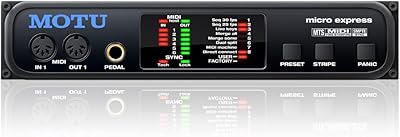
MOTU Micro Express USB MIDI Interface

78%
91%
MIDI Routing Reliability
61%
Driver & OS Compatibility
84%
SMPTE Sync Performance
83%
Build Quality
89%
Port Count & Capacity
More
MOTU MIDI Express XT 8x8 MIDI Interface

71%
83%
Build Quality
88%
MIDI Routing
47%
Driver Stability
61%
Value for Money
86%
Port Density
More
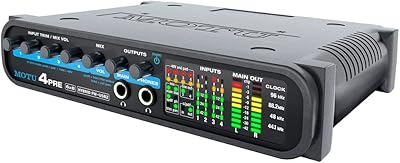
MOTU 8pre USB Audio Interface
80%
86%
Preamp Quality
91%
Build Quality
88%
Channel Count & I/O
79%
Value for Money
61%
CueMix DSP Software
More
MOTU 112D Thunderbolt USB Audio Interface
81%
91%
Driver Stability
94%
Channel Count & I/O
87%
AVB Networking
89%
Thunderbolt Performance
88%
Connector Ecosystem
More
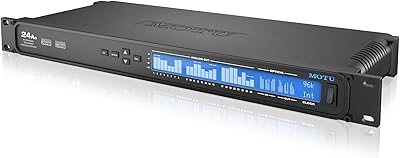
MOTU 4pre USB Audio Interface
68%
81%
Preamp Quality
63%
Driver Stability
58%
Connectivity Options
66%
Value for Money
77%
Build Quality
More
MOTU M2
MOTU M2
92%
96%
Audio Conversion Quality
98%
Visual Monitoring
93%
Build Construction
91%
Driver Stability
94%
Loopback Functionality
More
MOTU 24Ao USB AVB Audio Interface
80%
93%
Channel Density
87%
AVB Network Performance
79%
Driver Stability
58%
Setup & Configuration
74%
Value for Money
More
MOTU MicroBook IIc USB Audio Interface
70%
78%
Build Quality
83%
Sound Quality
58%
Mic Preamp Quality
54%
Ease of Setup
67%
Driver Stability
More
MOTU 16A 32x32 Audio Interface
79%
91%
Driver Stability
93%
Channel Count & I/O Depth
88%
Onboard DSP Mixer
86%
Connectivity Flexibility
74%
AVB Networking
More
MOTU M4
MOTU M4
89%
96%
Audio Conversion Quality
94%
Visual Monitoring
92%
Latency Performance
89%
Build Quality
93%
Loopback Functionality
More

FAQ

It is strictly a MIDI interface — it carries MIDI data like note on/off messages, clock signals, and control changes, but it does not record or play back any audio whatsoever. If you need to record sound from a synthesizer, you will still need a separate audio interface for that. The Micro Lite and an audio interface are complementary tools, not substitutes for each other.

For most setups, the MOTU Micro Lite 5-Port USB MIDI Interface works with minimal configuration — you connect it via USB and your DAW recognizes it fairly quickly. That said, MOTU does provide dedicated drivers, and installing them is recommended for the most stable experience, especially on Windows. Most users report having it fully operational within a few minutes of first plugging it in.

Generally yes, but this is the one area where some users have run into short-term friction. After major OS releases, a small number of owners have reported compatibility hiccups while waiting for MOTU to push an updated driver. If you are on a time-sensitive project, it is worth checking MOTU's support site for driver update notes before upgrading your operating system.

Yes, that is exactly what this five-port hub is designed for. Each of the five MIDI output ports is independent, so you can route different MIDI channels or tracks from your DAW to five separate hardware devices simultaneously. The same applies to inputs — you can receive MIDI from up to five devices at once, which is useful if you want to play multiple controllers or record from several sources.

No external power is required at all. The device draws everything it needs directly from the USB connection to your computer. This is a genuine convenience, especially for live rigs or travel setups where power outlets are at a premium.

Yes, the Micro Lite is broadly compatible with all major DAWs on both Mac and Windows. Whether you are running Ableton Live, Logic Pro, Pro Tools, Cubase, Studio One, or others, the interface shows up as a standard MIDI device and can be assigned to tracks and inputs without any unusual workarounds.

That depends entirely on how many MIDI devices you are running. If you only ever use one or two MIDI devices, your existing interface is probably enough. But if you have multiple synths, a drum machine, a hardware sequencer, and a controller all needing simultaneous connections, a single MIDI port on an audio interface becomes a bottleneck fast. The Micro Lite fills that gap without requiring you to replace your audio interface.

It has not been discontinued by MOTU as of the latest available information. The product has been on the market since 2001, which is a remarkably long run — a reasonable indicator that it continues to meet enough real-world demand to stay in production.

The Micro Lite is designed for use with Mac and Windows personal computers and is not officially supported for direct connection to iOS or Android devices. While some users have experimented with USB adapters and hubs, reliable mobile compatibility is not a documented feature, and results in those scenarios are inconsistent. If mobile MIDI connectivity is a priority, there are purpose-built interfaces better suited for that use case.

Quite well, based on feedback from long-term owners. A number of users report running the same unit through multiple computer hardware upgrades and OS cycles without hardware failure. Build quality is described as solid rather than premium, but it appears durable enough for regular studio and occasional live use. The design looks dated by modern standards, but that has not seemed to affect functional longevity.